Somewhere on your Wix site is a blog post from years ago that still brings in a lead most weeks. Launch day decides whether it keeps doing that job or starts returning a 404.
Yes, you can move from Wix to Webflow and keep your rankings. Google ranks pages, content, and links, not platforms, so Wix to Webflow SEO is about continuity. Traffic loss comes from URLs that 404, content or metadata that quietly changes, and tracking that goes dark.
There’s no one-click export, so a Wix to Webflow migration is a manual rebuild. Six phases take you through it, each producing something you can check: a baseline, a content inventory, a redirect map, a QA’d staging site, a launch-day runbook, and a 30/90-day audit plan. The payoff: more control over your SEO, room to build a faster site, and data showing your rankings made the trip.
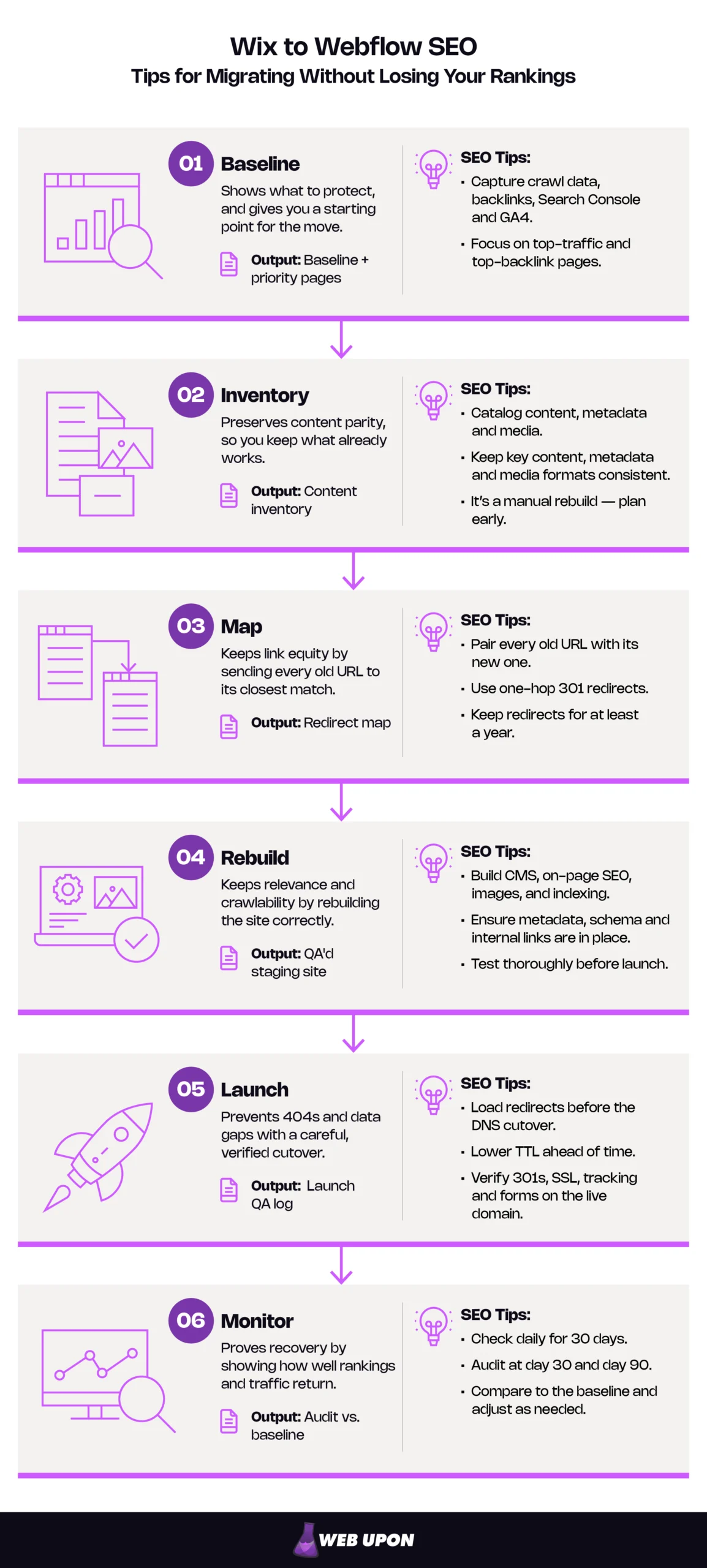
The six phases of a Wix to Webflow SEO migration:
| Phase | What you do | Why it protects rankings | Output |
| 1. Baseline | Crawl, export backlinks, Search Console, GA4 | Shows what to protect | Baseline + priority pages |
| 2. Inventory | Catalog content, metadata, media | Preserves content parity | Content inventory |
| 3. Map | Pair every old URL with its new one | Keeps link equity | Redirect map |
| 4. Rebuild | Build CMS, on-page SEO, images, indexing | Keeps relevance and crawlability | QA’d staging site |
| 5. Launch | Load redirects, cut over DNS, reconnect tracking | Prevents 404s and data gaps | Launch QA log |
| 6. Monitor | Check daily for 30 days, audit at day 30 & 90 | Proves recovery | Audit vs. baseline |
Key Takeaways
- Parity first, polish second. Keep top-traffic and top-backlink pages identical at launch, and hold rewrites, restructures, and disavows until the 30-to-90-day window closes.
- It’s a manual rebuild. There’s no automated Wix-to-Webflow conversion, so the baseline, content inventory, and redirect map come before any design work.
- Redirects carry the equity. Permanent redirects don’t cost PageRank, so send every old URL to its closest match in one hop and keep redirects for at least a year.
- Launch is a checklist, not a leap. Load redirects before the DNS cutover, lower the TTL ahead of time, and verify 301s, SSL, tracking, and forms on the live domain.
- Expect a wobble, then prove recovery. A small to medium-sized site can take a few weeks for most pages to move; 30- and 90-day audits against the baseline show whether each priority page made the trip.
The Migration at a Glance: Planning Your Move Around Parity
Start with the mental model: what to change now, what to leave alone, and what happens to each asset when it leaves Wix.
Parity First, Polish Second
Google has already ranked your URLs, content, and metadata. Anything you change at launch, Google has to re-evaluate.
Google’s own site-move guidance says to change one thing at a time. The platform is your one big change. Everything else waits its turn.
Do this:
- Sort every planned change into one of the two columns below.
- Keep top-traffic and top-backlink pages identical at launch: same URL, same copy, same title tag.
- Schedule rewrites and restructures for after the 30-to-90-day stabilization window.
| Launch-safe (do now) | Wait until stable (30 to 90 days) |
| Image compression and modern formats | URL restructuring beyond what Webflow forces |
| Adding missing alt text | Rewriting or consolidating ranking content |
| Adding or enriching schema | Rewriting titles on top-traffic pages |
| Setting up canonical tags | Navigation and internal-linking overhauls |
| Core Web Vitals improvements | Backlink disavow activity |
| Metadata fixes on low-traffic pages | Major template, layout, or information-architecture changes |
When only one variable changes, a post-launch drop is far easier to trace to its cause.
Verify it: Nothing in the right-hand column is scheduled before your 30-day audit.
Knowing What Carries Over, What Changes, and What Needs a Redirect
Every asset leaves Wix by a different door, and the ones nobody tracks go missing. Accounting for each is the core of website migration SEO.
There’s no one-click Wix to Webflow migration, because Wix has no full-site export. CMS collections and store products export to CSV. Blog posts, page designs, and static copy don’t.
| Asset | How it leaves Wix | What happens in Webflow | SEO risk if missed |
| Static pages and copy | Manual copy, crawl | Rebuilt in the Designer | Changed ranking content |
| CMS collection items | CSV export | CSV import to a Collection | Missing items, changed slugs |
| Blog posts | No native export, crawl plus manual pass | Rebuilt as a Collection | Lost posts, reset dates |
| Store products | CSV export (5,000 rows per file) | Webflow Ecommerce, /product/ URLs | Product 404s |
| Images and alt text | Download individually (no bulk export), alt text via crawl | Renamed and re-uploaded | Image URLs change |
| Meta titles and descriptions | Crawl | Page settings or CMS fields | Title changes on ranking pages |
| Structured data | Copy from Wix SEO settings | JSON-LD in custom code | Lost rich results |
| URLs | Crawl, Search Console, backlinks, sitemap | Kept or redirected | 404s, lost link equity |
| Existing Wix redirects | URL Redirect Manager export | Rebuilt as direct 301s | Old links break at cutover |
| Forms | Rebuilt | Native forms or integration | Lead flow stops |
| Analytics and Search Console | Stay in your Google accounts | Reconnected at launch | Data gaps |
Verify it: Every row has an owner and a matching column in your content inventory (see Extracting and Cataloging Every Wix Content Asset).
With the ground rules set, the real protection work happens before anyone opens the Webflow Designer.
Before You Touch Anything: Building Your Pre-Migration SEO Safety Net
Before you migrate from Wix to Webflow, build the three documents every later step depends on: the baseline, the inventory, and the redirect map. Nothing in Webflow gets touched until all three exist.
Auditing Your Wix Site’s Existing SEO Equity Before Migration
When someone asks three weeks after launch whether the move worked, the baseline is your answer. It also shows which pages need the most care.
Do this:
- Crawl the Wix site with a tool such as Screaming Frog, capturing every indexable URL, title, description, canonical, and heading.
- Export backlinks from a tool such as Ahrefs, plus Search Console’s Links report.
- Download Search Console performance data for the last 3 months, the last 12 months, and year over year if you’re seasonal. Store it outside Search Console, which keeps only 16 months.
- Pull organic landing pages and conversions from GA4.
- Flag priority pages: those driving most organic clicks, any page with referring domains, and any page that converts.
| Data point | Where to get it | Why it matters |
| URLs and metadata | Site crawl | Parity reference |
| Backlinks by page | Backlink tool, Links report | Shows where equity lives |
| Clicks and queries by page | Search Console | Recovery benchmark |
| Landing pages and conversions | GA4 | Ties rankings to revenue |
| Current XML sitemap | /sitemap.xml | Catches URLs a crawl misses |
| Core Web Vitals | PageSpeed Insights | Post-launch comparison |
Verify it: Every export is saved with its date, and every priority page is tagged in the crawl file.
Teams that want a complete, documented baseline before anything moves can start with a professional SEO audit.
Extracting and Cataloging Every Wix Content Asset
The inventory is one spreadsheet with a row for every URL. The designer builds against it, and the marketer signs off on it.
Wix CMS collections export to CSV, and so do Wix Stores products, up to 5,000 rows per file. Blog posts are the exception: Wix says they can’t currently be exported to other platforms. Plan a crawler-plus-manual pass for blog content, static copy, and app content.
Do this:
- Export each CMS collection to CSV from its menu in the Wix CMS.
- Map every Wix URL to its content, metadata, media, and Webflow destination.
- Pull titles, descriptions, canonicals, H1s, and alt text in bulk from the crawler export, and copy by hand only what a crawler can’t read.
- Record custom structured data and each blog post’s original publish date.
- Rename images descriptively and log alt text in its own column.
- List internal links in body copy so each can point straight to its new URL.
Columns:
- Wix URL
- Page type
- Webflow URL
- Meta title
- Meta description
- H1
- Canonical
- Schema
- Publish date
- Images + alt
- Internal links
- Priority
- Status
You’ll spot thin or outdated pages along the way. Content audits turn those findings into decisions. Leave ranking pages alone until after launch.
Verify it: The inventory’s row count matches the indexable URLs in your crawl.
Planning for Wix Features Without a Direct Webflow Equivalent
A booking widget or member area that vanishes on launch day takes its URLs, and sometimes its revenue, with it.
Do this:
- List every Wix app the site relies on: Stores, Bookings, members, forums, events, Multilingual, and forms.
- Decide whether each goes native, moves to an integration, or retires, and record the SEO impact.
- Map multilingual URLs to Webflow Localization, which automatically generates hreflang tags (signals telling Google which language version to show).
- Rebuild forms and confirm every submission reaches the right inbox or CRM.
- Redirect retired features’ URLs to the closest relevant page. Google warns that funneling many URLs to the homepage can be treated as a soft 404.
| Site type or feature | Webflow approach | SEO watch-out |
| Blog or content | Collections for posts, plus categories and tags that earn traffic | Match slugs; plan category, tag, and pagination pages. |
| Ecommerce (Wix Stores) | Webflow Ecommerce | Fixed /product/ prefix means every product needs a redirect. |
| Service or lead-gen | Native forms, bookings via integration | Conversion tracking; LocalBusiness schema. |
| Multilingual | Localization with locale subdirectories | Hreflang, translated metadata, per-locale redirects. |
Verify it: Every feature has a decision, an owner, and a redirect-map row if its URLs change.
Mapping Your Wix URL Structure to Webflow’s URL Architecture
URLs are where link equity lives. Every URL you keep needs nothing. Every URL you change needs a 301 redirect: a permanent forwarding address to the new page.
In Webflow, static pages can live anywhere, so most page URLs survive. CMS items always follow /collection-url/item-slug. The Collection can sit inside a folder, but items can’t sit at the root, and every item in a Collection shares the same path pattern. Products always use /product/, and every slug is lowercase and hyphenated.
Wix defaults to /post/ for blog posts and /product-page/ for products, but owners can rename those prefixes, so read real patterns from your crawl. Our guide to the SEO impact of changing URLs explains what’s at stake.
Do this:
- Group crawled URLs by pattern: pages, posts, categories, tags, pagination, and products.
- Keep URLs wherever Webflow allows; for example, set the blog Collection URL to “post.”
- Gather old URLs from the crawl, Search Console, backlinks, GA4, and the old sitemap.
- Export existing redirects from Wix’s URL Redirect Manager. Wix can add one automatically when some page slugs change (not blog posts), and all of them stop working at cutover.
- Give every old URL, including those from rebuilt Wix redirects, one final destination so your 301 redirects never chain.
| Wix pattern (confirm in your crawl) | Example | Webflow equivalent | Keep or redirect? |
| Static page | /about | /about | Keep |
| Blog post (/post/) | /post/spring-guide | /post/spring-guide | Keep if slug is valid |
| Blog category and tag pages | /blog/categories/news | Collection page | Often redirect |
| Blog pagination | /blog/page/2 | Paginated Collection list (check the live URL format) | Redirect to blog home |
| Store product (/product-page/) | /product-page/red-sweater | /product/red-sweater | Redirect |
| Dynamic CMS page | /projects/lake-house | /projects/lake-house | Keep if pattern matches |
Sample redirect map:
| Old Wix URL | New Webflow URL | Priority | Reason for change | Tested on live domain? |
| /product-page/red-sweater | /product/red-sweater | High | Fixed product prefix | ☐ |
| /post/Spring_Guide | /post/spring-guide | Medium | Slug normalized | ☐ |
| /book-online | /contact | High | Bookings retired | ☐ |
Verify it: No destination in the map is itself an old URL.
Advanced tip: Very old Wix “#!” URLs can’t be redirected server-side, because nothing after the # ever reaches the server. Ask linking sites to update them.
With the baseline, inventory, and map in hand, the rebuild becomes a matter of reproducing what already ranks.
Rebuilding for Search: Reconstructing SEO Architecture Inside Webflow
This phase belongs mostly to the designer and ends with a staging site that matches the inventory page for page. Every decision you make in Webflow SEO settings should trace back to that inventory.
Configuring Webflow CMS Collections to Mirror Your Wix Content Structure
Collections decide your URLs, templates, and how metadata scales. Set them up once, and hundreds of pages inherit the work.
Do this:
- Map each Wix content type to a CMS Collection, or to Webflow Ecommerce for products.
- Create SEO fields (meta title, description, Open Graph image, alt text) and bind them to the template’s SEO settings.
- Add a custom field for original publish dates. Webflow sets its created and published dates automatically, so a template showing them would make every migrated post look new.
- Import the Wix CSVs, then check slugs against the inventory. Any imported slug that no longer matches its Wix URL needs a redirect.
- Confirm your plan’s current CMS item limit covers the migration.
| Wix field | Webflow field type | SEO role |
| Title | Name | H1, default title |
| Slug | Slug | URL |
| SEO title / description | Plain text | Title tag / meta description |
| Cover image | Image | OG image, likely LCP |
| Published date | Date (custom) | Visible date, datePublished |
| Post body | Rich text | Content parity |
Verify it: Spot-check five items per Collection, and confirm no template is excluded from search. Templates are indexable by default; the risk is a stray toggle or custom noindex code.
Implementing On-Page SEO Metadata Across Every Webflow Page
Titles and descriptions are what searchers read before they reach your site. Change them on a priority page, and Google has something new to judge.
Do this:
- Give every page a unique title and description, copying Wix values exactly on priority pages.
- Set the Global canonical tag URL in Webflow SEO settings (Site settings > SEO). A canonical tag names a page’s official URL. Once this field is set, Webflow adds a self-referencing canonical to every page.
- Match the domain version Wix served: https, www or non-www, and no trailing slash.
- Carry over Wix structured data, then add JSON-LD in custom code using CMS field values.
- Keep one H1 per page, with logically nested subheadings.
- Point navigation and body links straight at new URLs.
Metadata parity checklist (per page):
- Title tag
- Meta description
- One H1
- One self-referencing canonical
- Valid schema
- Internal links to final URLs
- Open Graph image
| Page type | Suggested schema |
| Homepage | Organization or LocalBusiness |
| Blog post | BlogPosting or Article |
| Product | Product |
| All pages | BreadcrumbList |
| Genuine Q&A | FAQPage |
Verify it: View the source of three page types and confirm each has exactly one canonical, then run two through Google’s Rich Results Test.
Advanced tip (example): Braces stand in for CMS field references.
<script type=”application/ld+json”>
{
“@context”: “https://schema.org”,
“@type”: “BlogPosting”,
“headline”: “{Name}”,
“datePublished”: “{Original publish date}”,
“image”: “{Cover image}”
}
</script>
Confirm the published date renders in ISO 8601 format (2026-03-14).
Preserving Image SEO and Core Web Vitals During the Rebuild
Images are usually the heaviest thing on a page and one of the easiest SEO details to lose in a rebuild.
Image prep checklist:
- Rename each file descriptively, in lowercase with hyphens.
- Resize it to the largest size it will display.
- Compress it and export as WebP or AVIF.
- Write alt text that describes it.
- Load the hero image eagerly and lazy-load everything below the fold.
The hero is usually your Largest Contentful Paint (LCP) element, the biggest thing visible on first load, so lazy loading it can delay that metric. Core Web Vitals are Google’s measures of loading, responsiveness, and visual stability. They count as “good” at LCP within 2.5 seconds, Interaction to Next Paint (INP) under 200 milliseconds, and Cumulative Layout Shift (CLS) under 0.1. Treat them as a page-experience signal; relevance still matters more.
PageSpeed Insights on staging shows lab data, a simulation. Google’s field data comes from real Chrome users over a rolling 28 days, so it builds only after launch. If templates miss the thresholds on staging, speed audits can pinpoint why.
Image URLs change regardless, because Webflow serves assets from its own CDN. Image-search traffic may take time to return.
Verify it: PageSpeed Insights names the hero as the LCP element, and it isn’t lazy-loaded.
Validating Your Webflow XML Sitemap and Indexing Settings
A page Google can’t find, or finds at two addresses, does you no good.
Do this:
- Confirm the auto-generated sitemap is on and lists every intended page and CMS item.
- Exclude thank-you, password, 404, and style-guide pages with each page’s Sitemap indexing toggle. Blocking a page in robots.txt won’t remove it from Webflow’s sitemap.
- Review robots.txt in Webflow’s SEO settings.
- Disable indexing on the webflow.io staging subdomain (paid plan required).
Pre-launch indexing checklist:
- Sitemap complete
- Utility pages excluded
- robots.txt reviewed
- Staging subdomain noindexed
- No stray noindex code
- Global canonical set
Verify it: Every box above is checked, and the published sitemap lists no utility pages.
Sitemap submission happens at launch; see Reconnecting Google Search Console and Analytics After Migration.
Even a perfect rebuild can fail if launch day goes wrong, so the next phase moves the domain without dropping a URL.
Going Live Without Going Dark: Executing the Migration and Protecting Search Visibility
Launch day is usually the riskiest hour of the project and, with preparation, the most predictable. It starts with a go/no-go SEO migration checklist and ends with your domain on Webflow, every old URL redirecting, and tracking intact.
Implementing a Well-Tested 301 Redirect Strategy from Wix to Webflow
A 301 redirect is a permanent forwarding address for a URL. Google says 301 and other permanent redirects don’t cause a loss in PageRank. Chains, loops, and mismatched destinations are the real risks.
Do this:
- Load the map into Site settings > Publishing > 301 redirects before cutover, following Webflow’s redirect guide. Use CSV import for large maps. Redirects require a paid site plan.
- Prioritize high-traffic and high-backlink pages.
- Send every old URL to its final destination in one hop.
- Use wildcard rules for patterns. Webflow recommends 1,000 rules at most as a best practice.
- Confirm every destination returns a 200 on staging, then test the old URLs on the live domain after cutover.
- Keep redirects for at least a year, per Google, and ideally for good.
Verify it: Every old URL returns a single 301 to a live page.
Warning: Common gotchas with Wix to Webflow redirects
- CSV imports overwrite all existing redirects. Export, merge, then import. One invalid row fails the whole file.
- Redirects run oldest first, so add specific rules before wildcards.
- Escape special characters in every old path by placing % before them, including ?, =, &, hyphens, and underscores (so /product-page/ becomes /product%-page/). Check Webflow’s current list.
- A live page or Collection item blocks its own redirect until you delete, draft, or re-slug it.
- /es/old-page needs its own rule; /old-page’s redirect won’t cover it.
Advanced tip: If product slugs stay the same, one rule moves the whole catalog: old path /product%-page/(.*), redirect to /product/%1. Test several products after cutover.
When a redirect map runs to hundreds of URLs, an experienced SEO team can help a lot.
Managing the DNS Cutover and Webflow Hosting Without Disrupting Crawling
DNS is the internet’s address book; the cutover points your domain’s entry at Webflow instead of Wix. It’s a record change, not a domain transfer, so you can schedule it, check it, and reverse it if needed.
Do this:
- Pass the go/no-go checklist before touching DNS.
- Schedule the cutover for a low-traffic window.
- Connect the domain in Webflow’s hosting settings and enter DNS records exactly as Webflow shows them.
- Watch propagation with a tool such as WhatsMyDNS.
- Confirm SSL is active as soon as the records resolve.
- Keep Wix active until everything is verified. If Wix is your registrar, update records there and leave any registrar transfer for later.
Verify it: WhatsMyDNS shows the new records worldwide, and the site loads over https with no browser warning.
Go/no-go checklist:
- Staging QA’d
- Redirects loaded, including rebuilt Wix redirects
- Global canonical set
- Staging subdomain noindexed
- GA4 and conversions firing
- Forms tested end to end
- Baseline saved
Launch-day runbook:
- Lower the DNS TTL to its lowest value (often 30 seconds) at least one full TTL period ahead; a 24-hour TTL means a day’s notice (advanced). TTL is how long servers cache your records; lower means a faster switch.
- Publish the Webflow site and connect the domain.
- Update DNS records.
- Confirm propagation and SSL.
- Crawl the old-URL list on the live domain and confirm the 301s.
- Submit the sitemap in Search Console.
- Request indexing for priority pages.
- Check GA4 real-time data and a test form.
- Announce the launch.
Reconnecting Google Search Console and Analytics After Migration
Most moves keep the same domain, so your Search Console history comes with you. The risk is losing verification or GA4 tracking in the handoff.
Do this:
- Keep your existing property. If it was verified with an HTML tag Wix added, re-add the tag in Webflow or verify through DNS, since Search Console periodically rechecks the tag.
- Use the Change of Address tool only if the domain itself changed.
- Connect GA4 through Webflow’s Google Analytics integration (Site settings > Integrations) or Google Tag Manager. Install the tag in only one place; tagging twice double-counts pageviews.
- Confirm conversions fire, and annotate the launch date.
- Submit the sitemap once DNS propagates.
- Request indexing for priority pages in URL Inspection. A daily quota applies, so let the sitemap cover the rest.
Verify it: The property shows as verified the day after launch, and GA4 Realtime records a test conversion.
Advanced tip: A DNS-verified Domain property doesn’t depend on your site’s code, so it survives platform changes. Add one before launch.
The site is live, but the migration isn’t finished until the data proves it worked.
After the Launch: Monitoring, Diagnosing, and Recovering Search Rankings
Some movement after launch is normal. The job now is to preserve search rankings by separating ordinary volatility from real problems, then proving recovery with a scorecard.
Telling Normal Volatility Apart from Genuine SEO Damage
In the first weeks, the Search Console graph will wobble. Knowing what normal looks like stops you from fixing things that aren’t broken. A small to medium-sized site can take a few weeks for most pages to move, and larger sites take longer. Rankings fluctuate in the meantime.
Do this:
- Monitor organic traffic daily in GA4 and Search Console for 30 days.
- Set up GA4 custom insights with email alerts for organic drops. Search Console has no custom traffic alerts, but it emails owners about detected issues, so route those emails to the right person.
- Check the Pages report and crawl stats for spikes in 404s, redirect errors, or noindex exclusions.
- Cross-reference page-level drops against the redirect map.
| Signal | Usually normal | Investigate now |
| Gradual dip across many pages early on | Yes | If still sliding past a few weeks |
| Old URLs still in results | Yes | If they don’t redirect |
| A priority page near zero clicks | No | Check redirect, canonical, indexing |
| A spike in 404s or redirect errors | No | Fix missing redirects |
| Conversions fall while traffic holds | No | Test forms and GA4 events |
Verify it: Every priority page returns a 200 and shows as indexed in URL Inspection.
It’s safe to cancel your Wix plan only after redirects, indexing, tracking, and forms are verified on the live domain, ideally after your 30-day audit. Keep account access for reference until then. If your domain is registered through Wix, treat it as a separate decision and renew or transfer it deliberately so it never lapses.
Running 30-Day and 90-Day Post-Migration Audits
The 30- and 90-day audits prove the move worked, and they’re the gate that releases everything you deferred at launch.
Do this:
- Audit at 30 and 90 days against the baseline and a full website audit checklist.
- Release deferred polish in small batches, and only after rankings stabilize.
- Review the Phase 1 backlink profile. Disavow only for a manual action or known unnatural links, never mid-migration; Google says most sites never need the disavow tool.
- Recrawl the old-URL list, since later edits can break or shadow redirects.
| Metric | Baseline | Day 30 | Day 90 | Status |
| Organic clicks (priority pages) | ||||
| Indexed pages | ||||
| Organic conversions | ||||
| 404s and redirect errors | ||||
| Core Web Vitals (field) |
Verify it: Each scorecard metric is back near its baseline, or has a named cause and a fix in progress.
If a priority page hasn’t recovered within the expected window, a professional SEO audit at the 30- or 90-day mark can pinpoint why.
One Rule, Six Phases: Launching Your Webflow Site with Your Rankings Intact
Webflow gives you more direct control over markup, CMS SEO fields, structured data, and redirects. That control helps, but it doesn’t create rankings on its own. Content, links, and a careful migration decide whether your search equity survives the move and grows afterward.
Wix to Webflow SEO comes down to six phases: baseline, inventory, map, rebuild, launch, and monitor. One rule runs through all of them: parity first, polish second. Every step exists so you can move platforms without losing rankings you’ve already earned.
Start this week:
- Export Search Console and GA4 data, and save it outside both tools.
- Crawl your Wix site and start the content inventory.
- Export your existing Wix redirects.
- Draft the redirect map, beginning with priority pages.
- Pick a low-traffic launch window and name an owner for each item on your SEO migration checklist.
Rankings are often lost during migrations, and most in-house teams run one only every few years. If you’d rather hand off the SEO side of moving from Wix to Webflow, contact Web Upon. We can own the baseline audit, redirect map, launch-day QA, and 30/90-day monitoring so your designers can focus on the build.
You have the plan. Work through it in order, verify each step, and launch day can be the least dramatic day of the project. That years-old blog post can keep bringing in its weekly lead, now from Webflow.


