When URLs change, rankings move. The SEO impact of changing URL decisions is almost always a measurable short-term dip, typically a few weeks while Google re-crawls and re-indexes the new structure. What matters is whether the decline stays within a normal range or becomes prolonged enough to indicate a technical problem. Knowing the difference helps teams respond appropriately instead of overreacting too early.
Key Takeaways
- Not all URL changes carry the same SEO risk; slug edits are usually manageable, while domain migrations can be highly disruptive. This framework separates low-risk cosmetic changes from structural moves that can affect rankings, indexing, and authority transfer. The bigger the change, the more disciplined the migration plan needs to be. Treating every URL change the same is one of the most common mistakes in enterprise SEO.
- Redirect behavior, chain length, and crawl budget directly determine how efficiently search equity moves from old URLs to new ones. A clean redirect path makes it easier for search engines to understand the move and reprocess the page correctly. Chains and loops slow crawling, waste budget, and delay reindexing. At scale, even small inefficiencies can compound into measurable ranking loss.
- Protecting link equity during a URL change requires a precise risk control system, not just redirects alone. A 1:1 redirect map ensures each important old URL points to the most relevant new destination. Canonical tags must align with redirects so search engines receive consistent signals about which URL should rank. High-value backlinks should also be managed strategically so authority is preserved as fully as possible.
Why URL Changes Are a High-Stakes SEO Event for Enterprise Sites
Migration decisions are board-level decisions when organic revenue is on the line. The technical mechanics matter, but they only matter once the stakes are clear — so the conversation starts here.
The Hidden Revenue Risk Behind Every URL Modification
URL changes are rarely cosmetic. Every modification ripples through the technical SEO stack and lands directly on the pages that generate revenue. On enterprise sites — those with thousands or hundreds of thousands of indexed URLs — the risk compounds: a single misconfigured redirect can orphan entire content clusters from years of accumulated search authority.
The operational reality is straightforward. Ranking losses from URL changes can take weeks or months to recover, and recovery is never guaranteed for every page. Pre-migration planning is a business-critical function, not a technical afterthought. The first decision gate in any URL structure change is distinguishing a low-risk slug edit from a high-risk structural overhaul, because the playbook scales with the risk tier.
The table below translates change types into risk levels and recovery windows:
| Change Type | Example | Risk Level | Typical Recovery Window |
| Slug edit | /about → /about-us |
Low | Days to 2 weeks |
| Subfolder restructure | /products/x → /shop/x |
Medium | 2–6 weeks |
| Domain migration | example.com → newexample.com |
High | Several months for larger sites |
A slug edit on a single low-traffic page is housekeeping. A domain migration involving a million indexed URLs is a relaunch. The mistake most teams make is treating these as the same operation with the same playbook. They are not, and the consequences scale accordingly.
How Search Engines Interpret URL Identity and Signal Continuity
Search engines treat URLs as unique identifiers. Every backlink, every cached engagement signal, every association the indexing pipeline has built over time is keyed to the specific URL string. Change the URL without proper signaling, and the crawler treats the new destination as an entirely new page with no history.
The simplest way to picture it: a URL is a search engine’s address card for a page. Backlinks and ranking authority are the mail. Change the address without filing a forwarding order — a properly implemented 301 redirect — and the mail does not arrive. The new address sits empty. The old address bounces. Google has no way to know the two addresses belong to the same recipient.
Even when redirects are implemented correctly, the indexing pipeline has work to do. Google must re-crawl the old URL, follow the redirect, evaluate the new URL, and re-associate the historical signals. Indexing delays of days to weeks are standard during this process, and they show up as an organic traffic dip in the dashboard. That dip is usually temporary, but only if the underlying signaling is clean. Google’s own documentation on site moves with URL changes walks through the formal protocol for the same reason.
With the stakes established, the next section breaks down the specific mechanisms that decide whether a URL change preserves or destroys ranking authority.
The Technical Anatomy of URL Changes and Their SEO Consequences
Every decision in the migration playbook flows from three technical realities: how redirects pass equity, how chains and loops break it, and how crawl budget gets consumed. Get any one of these wrong and a recoverable migration becomes an unrecoverable one.
Redirect Types and Their Direct Impact on Link Equity Transfer
Choosing the right redirect type is the single most consequential 301 redirect SEO call in a migration. The 301 (permanent) redirect is the gold standard for URL changes that are not coming back: it tells search engines the move is permanent and instructs them to pass link equity to the new destination. Google has publicly clarified that permanent redirects do not cause PageRank loss.
Temporary redirects cause search results to keep showing the source page. The 302 (temporary) redirect tells crawlers the original URL is still authoritative and will return. Used incorrectly during a permanent change, a 302 instructs Google to keep the old URL in the index, meaning the new URL never inherits the ranking authority. This is one of the most persistent and costly migration errors, and it is almost always invisible in the moment. The redirect “works” from a user’s perspective. Pages load. Nothing breaks. The damage shows up weeks later, in ranking reports for URLs that should have inherited authority and didn’t.
| Redirect Type | Signal to Crawler | Link Equity Behavior | Correct Use Case | Common Misuse |
| 301 (Permanent) | URL has moved permanently | Full PageRank passed to new URL | Permanent URL changes, migrations | Should be the default for any permanent change |
| 302 (Temporary) | Original URL will return | Source URL stays in search results; new URL does not inherit | A/B tests, temporary maintenance | Used for permanent moves, blocking equity transfer |
| 307 (Temporary, HTTP/1.1) | Same as 302 with stricter method preservation | Same as 302 | Specific protocol-level temporary redirects | Rarely the right choice for content changes |
| Meta refresh | Client-side redirect via HTML | Inconsistent equity transfer; treated unpredictably | Legacy systems with no server access | Used in place of server-side 301s |
The choice is not abstract. A 302 used in place of a 301 is, in functional SEO terms, a decision to leave your ranking authority on the old URL while serving traffic to the new one. The reverse — a 301 used for a temporary change — is also wrong, because it tells Google to consolidate signals to a destination you intend to abandon.
Redirect Chains and Redirect Loops: The Silent Ranking Killers
Redirect chains happen when one URL redirects to another, which redirects to another, and so on. A real-world chain inherited from years of redesigns might look like this:
example.com/old-product → example.com/products/old-product → example.com/shop/products/old-product → example.com/shop/old-product
Four URLs. Three redirects. The page loads from a user’s perspective. From Google’s perspective, the crawler must follow each hop in sequence. Google’s documentation states that Googlebot can follow up to ten hops in a redirect chain, but advises keeping chains “no more than 3 and fewer than 5.” Ten is the technical ceiling; five is the recommended ceiling. Modern Google handles short chains without dramatic algorithmic penalty, but longer chains degrade crawl efficiency — the destination URL gets crawled less frequently, re-indexing slows, and the volatility window stretches.
Redirect loops are worse. A loop is a chain that never terminates: URL A redirects to URL B, which redirects back to URL A. Crawlers detect the cycle and abandon the URL entirely, removing it from the index until someone resolves the loop. Enterprise sites migrating legacy URL structures frequently inherit chains and loops from previous redesigns that nobody documented, which is why a pre-migration SEO audit is non-negotiable.
Crawl Budget Depletion During Large-Scale URL Transitions
Crawl budget is the number of pages Googlebot will crawl on a domain in a given timeframe. For most sites it is a non-issue: sites with fewer than a few thousand URLs are typically crawled efficiently without budget concerns. For enterprise sites with hundreds of thousands or millions of indexed URLs, however, it becomes a real constraint — and a major URL change is exactly the kind of event that exhausts it.
When thousands of URLs are redirected at once, Googlebot spends its allocated budget resolving old paths instead of discovering and re-indexing new content. Redirect errors and broken redirect rules drain budget further. So do soft 404s, which Google defines as pages that return a 200 OK status code despite the page not actually existing, where a 404 Not Found would have been the correct response. Google treats those pages as missing despite the surface-level success. The warning signs surface in Search Console’s Crawl Stats report: a sudden spike in time spent on redirects, a drop in pages crawled per day, or a rising count of “Page with redirect” entries above the prior baseline.
For sites where crawl budget genuinely matters, the playbook is to prioritize. Keep the sitemap pointed exclusively at canonical destination URLs. Eliminate redirect chains before launch. Use robots.txt to deprioritize crawl paths that no longer matter. Understanding these mechanisms is only useful when paired with a framework for protecting ranking authority through the transition. That framework starts with the redirect map.
Link Equity Preservation: The Core Technical Framework for URL Transitions
This is where the conversation moves from understanding risk to controlling it. The link equity preservation framework rests on three pillars: the 1:1 redirect map, canonical signal alignment, and backlink authority management.
Building a 1:1 Redirect Map to Protect High-Authority Pages
A 1:1 redirect map matches every existing URL with measurable SEO value to a precise destination URL. No unmapped pages. No group-mapped fallbacks. No “redirect everything to the homepage” shortcuts. Funneling many old URLs to one irrelevant destination such as the new homepage can confuse users and may be treated as a soft 404 error. The result is link equity loss across every consolidated URL.
The mapping process begins with the audit. Pages ranking in top positions, pages with significant backlink profiles, pages driving measurable organic traffic — those are the priority assets. They get mapped first, manually verified, and re-verified before launch. Lower-priority pages can be batched, but every URL with SEO value gets a one-to-one destination.
The redirect mapping workflow:
- Crawl the existing site to capture every indexed URL.
- Layer in ranking data, backlink data, and organic traffic data from analytics and Search Console.
- Tag each URL with a priority level: P1 for high-revenue or high-authority pages, P2 for supporting content, P3 for low-value or thin pages.
- Map each priority URL to its new destination, with content relevance as the matching criterion.
- Validate the entire map in staging before any code reaches production.
For enterprise teams managing this at scale across thousands of URLs, manual verification is the step where most internal teams run out of bandwidth. That is one of the practical reasons teams bring in enterprise domain migration support at this stage.
Canonical Signal Alignment Before, During, and After URL Changes
Canonical tags and 301 redirects get confused, and the confusion is expensive. The distinction matters: a redirect physically moves users and crawlers from one URL to another. A canonical tag tells search engines which URL is the preferred indexing version when multiple URLs resolve to similar or duplicate content. They solve different problems and operate in different layers of the indexing pipeline.
During a URL change, both must be updated in lockstep. A canonical tag pointing to an old URL after the redirect is in place sends Google a contradictory signal: the redirect says “the canonical version is here,” and the canonical tag says “no, it’s back there.” Crawlers do not gracefully resolve that conflict. They delay indexing, dilute signals, or pick the wrong destination outright.
During phased migrations, when both old and new URLs are temporarily accessible, self-referencing canonicals on the new URLs confirm to search engines that the new destination is the authoritative version. Each new URL should carry a self-referencing rel=”canonical” link tag. A canonical audit within 48 to 72 hours of launch is the catch-it-early checkpoint that prevents misalignments from compounding into ranking drops.
Backlink Authority and the External Link Equity Challenge
Backlinks pointing to old URLs continue to pass equity through properly implemented 301 redirects. The transition period itself, though, creates a window of vulnerability — the crawler has to discover the redirect, follow it, and re-attribute the equity. That process takes time, and during it, ranking authority is in transit rather than fully arrived.
Where possible, the highest-impact backlinks should be updated at the source. For an enterprise site with tens of thousands of referring domains, attempting to update every backlink is a fool’s errand. The realistic prioritization rule: focus outreach on the top 50–100 highest-authority referring domains. The remaining backlinks flow through redirects, which is acceptable.
The most overlooked source of equity dilution is backlinks pointing to URLs that now sit inside redirect chains rather than resolving directly to final destinations. Monitoring backlink profiles with tools like Ahrefs or Majestic post-migration surfaces these and flags the highest-impact leakage points first.
For enterprise teams without internal capacity for redirect mapping at scale or backlink remediation outreach, this is the natural point in a migration to bring in specialist support.
Inside the Ranking Dip: The SEO Impact of Changing URL Decisions
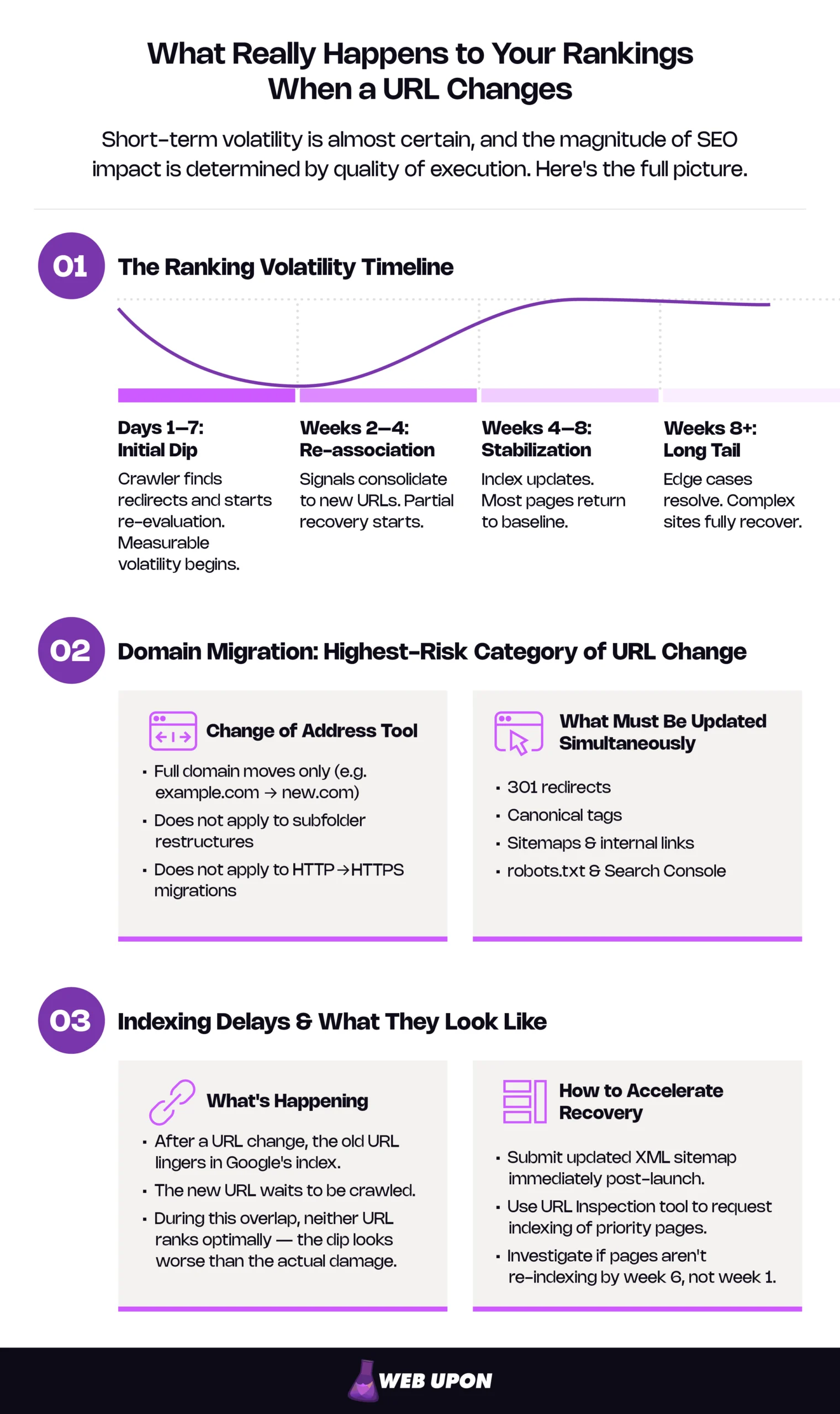
Most well-executed migrations show initial volatility in the first week, partial recovery within a few weeks, and stabilization over one to two months. What separates a controlled transition from a disaster is whether the ranking drop after a URL change stays inside the expected envelope or breaks out of it.
The Ranking Volatility Timeline: What the Data Reveals
Documented migrations consistently show a ranking dip in the days immediately following URL changes, even when redirects are correctly implemented. A medium-sized site typically takes a few weeks for most pages to settle in the index, while larger sites take longer. The exact magnitude varies. Pages with strong pre-existing authority, clean redirect implementations, and high crawl frequency tend to recover faster. Pages with thin link profiles or redirect errors may experience permanent ranking losses.
Tracking ranking changes at the page level — not just the domain level — is essential for early detection. Domain-level ranking averages can mask catastrophic individual-page losses if a few pages happen to gain. The page-level view is the only one that catches a high-revenue ranking page sliding from position 3 to position 18 before the traffic damage is irreversible.
| Phase | Timeframe | What’s Happening | Typical Ranking Behavior |
| Initial dip | Days 1–7 | Crawler discovers redirects, begins re-evaluation | Measurable ranking volatility expected; magnitude varies by site size and execution quality |
| Re-association | Weeks 2–4 | Signals consolidating to new URLs | Partial recovery begins |
| Stabilization | Weeks 4–8 | Index fully updated; signals settled | Most pages return to baseline |
| Long tail | Weeks 8+ | Edge cases and lower-priority pages catch up | Final recovery for complex sites |
These ranges are typical, not guaranteed. A small site with strong technical execution can stabilize in two weeks. A large site with redirect chain inheritance from prior migrations can take months. The numbers are a starting reference, not a forecast.
Domain Migrations: When URL Changes Involve a Full Domain Change
Domain migrations are the highest-risk category of URL change. Every SEO signal — redirects, canonicals, sitemaps, internal links, robots.txt, and Search Console property configuration — must be updated simultaneously and verified against a baseline captured before migration started.
Google’s domain migration protocol includes submitting a Change of Address request through Search Console, which according to Google’s own documentation signals the move and helps migrate the site’s Google Search results from the old domain to the new one. One clarification that trips up many teams: the Change of Address tool only applies to full domain moves. The tool can be used “only on properties at the domain level,” cannot be used on path-level properties such as example.com/petstore/, and explicitly does not apply to HTTP-to-HTTPS moves. For subfolder restructures, path changes, or HTTPS migrations within the same domain, there is no equivalent signal — the migration relies entirely on properly implemented redirects and updated sitemaps. See what Google actually recommends for site migrations.
Site migration outcomes vary widely, and the magnitude of any traffic dip is almost entirely attributable to execution quality. A migration with a clean 1:1 redirect map, aligned canonicals, an updated sitemap, and a Change of Address submission can stabilize quickly. A migration missing any one of those — or carrying redirect chain inheritance into the new structure — can drag for months or never fully recover. Specialist enterprise domain migration services exist specifically because the gap between those two outcomes is execution discipline, not luck.
Indexing Delays and Their Compounding Effect on Organic Traffic
After a URL change, the old URL may remain in Google’s index for days or weeks while the new URL waits to be crawled and indexed. During this overlap window, neither URL ranks optimally. The old URL is being phased out. The new URL has not yet inherited the historical signals. The result is an organic traffic dip that looks worse than the actual ranking damage.
Indexing delays are exacerbated by low crawl frequency, large site size, redirect chain complexity, and sitemap errors. Google’s documentation on requesting recrawls is direct on the available levers: use the URL Inspection tool for individual pages and submit a sitemap for large numbers of URLs, particularly after “you just launched your site or recently performed a site move.” Submitting updated XML sitemaps immediately after launch and using the URL Inspection tool to request indexing of priority pages accelerates the timeline. For high-priority pages, manual indexing requests are worth the effort.
The most expensive mistake during the indexing delay window is panic. Teams misread the temporary traffic dip as permanent ranking loss and reach for interventions that compound the problem: adding more redirects on top of redirects, changing canonicals again, rolling back the migration entirely, or layering noindex tags onto pages that are simply waiting to be re-crawled. Each of those resets the indexing clock and prolongs the window. The disciplined response is to monitor, measure, and wait. If priority pages have not begun re-indexing by week six, that is the point to investigate — not week one.
Knowing what happens after a URL change is only half the equation. The other half — and the one within the team’s control — is what happens before the change goes live.
The Pre-Migration SEO Audit and Migration Playbook
Most migration disasters are diagnosed in the wreckage. The team can see what failed but cannot prove what should have been there in the first place because nobody captured the baseline. The pre-migration audit is the artifact that prevents that scenario.
Conducting a Full SEO Audit Before Any URL Structure Change
A pre-migration SEO audit establishes the performance baseline against which post-migration recovery is measured. Without it, diagnosing a ranking drop becomes guesswork — the team has no way to know which pages were ranking where before launch, which means no way to know what recovery looks like.
The audit must catalog every indexed URL, current ranking positions, organic traffic volumes per page, backlink counts and referring domains, canonical configurations, internal link structures, and any existing redirect chains or soft 404s already on the domain. The last item is critical. Legacy redirect chains inherited from prior migrations are one of the most common causes of compounding equity loss when a new migration layers on top of them.
The audit output is not just a snapshot. It directly informs the redirect map (which URLs need 1:1 destinations), the sitemap update schedule (which URLs to prioritize), and the post-migration monitoring framework (which pages to watch closely). Enterprise teams without dedicated technical SEO capacity often engage external partners specifically for this stage — a comprehensive SEO audit at enterprise scale is a multi-week engagement when done thoroughly.
Implementing the Migration Playbook: Sequencing for Minimum SEO Disruption
The migration playbook sequences URL changes in a specific order. Skipping a step or running steps in parallel out of sequence is how recoverable migrations turn into emergencies.
The sequence:
- Redirect map finalization. All P1 and P2 URLs mapped 1:1 to destinations, manually verified.
- Internal link updates. Every internal link in content, navigation, and templates updated to point directly to new URLs — not to redirects. Internal links that rely on redirects inflate crawl budget consumption and dilute equity across the entire domain.
- Canonical tag updates. New URLs receive self-referencing canonicals; old URLs are updated to canonical to their new destinations only if the redirect implementation requires it.
- Sitemap submission. Updated XML sitemap referencing only new URLs is published and submitted via Search Console.
- Search Console configuration. New property verified for domain migrations; Change of Address submitted where applicable.
- Staging environment testing. Every redirect rule tested in staging before production launch. Loops, chains, and broken rules surface here, where they can be fixed silently — not in post-launch ranking reports.
- Live launch. Rollout to production, with monitoring active from minute one.
A rollback protocol is non-negotiable. The team must be able to revert URL changes within hours if critical errors are detected, which means the old URL structure stays preserved in a recoverable state until post-launch monitoring confirms stability. “We can fix it next sprint” is not a rollback protocol. The window for clean rollback is measured in hours, not days — after that, Google has begun crawling the new structure and a rollback creates a second migration on top of the first.
Post-Migration Monitoring: Search Console, Rankings, and Traffic Signals
Search Console is the primary diagnostic tool post-migration. The Coverage report reveals indexing errors, redirect errors, and crawl anomalies that signal transfer failures before they show up in ranking reports. The URL Inspection tool — documented in Google Search Console’s official help center — confirms whether priority pages are indexed, which redirects Google sees, and which canonicals are being honored.
Ranking monitoring should run at the individual URL level for all P1 pages, with daily tracking in the first two weeks post-migration. Organic traffic in analytics platforms should be segmented by page and traffic source to isolate URL-change-related drops from broader algorithm fluctuations or seasonal effects. Without that segmentation, the team cannot distinguish a migration problem from a Google core update problem — and the responses to those two are very different.
A structured 30/60/90-day review framework provides the data to confirm full recovery or escalate remediation:
| Review Milestone | Primary Metrics | Action Triggers |
| Day 30 | Index coverage, redirect errors, top-10 ranking pages | Investigate any P1 page outside baseline ±10% |
| Day 60 | Page-level ranking trajectories, crawl stats | Escalate pages still outside baseline ±5% |
| Day 90 | Full traffic recovery vs. baseline | Confirm completion or initiate remediation plan |
Best Practices and Common Mistakes That Determine SEO Outcomes
The Non-Negotiable Best Practices for SEO-Safe URL Changes
Every permanent URL change requires a 301 redirect. No exceptions. Pages with no current rankings can still hold backlinks, bookmarks, and inbound traffic from sources the analytics dashboard does not capture cleanly — and those signals only carry if the redirect carries them.
URL slugs should be updated to reflect target keywords where the SEO upside is meaningful, but keyword-driven slug changes must be weighed against the ranking risk of disrupting established URL equity. A page ranking in position 2 for a high-value query rarely benefits from a slug “improvement” — the existing URL has already proven its keyword association to Google.
Sitemaps must reference new URLs exclusively. Sitemaps that contain old URLs alongside new ones send conflicting signals to crawlers and slow re-indexing. The sitemap is a directive about what the site considers canonical; mixed signals delay the consolidation.
Redirect rules should be maintained indefinitely. Removing them after a set period — even a year or more — breaks every external backlink and bookmarked URL that has not yet been updated, and those continue to drive both equity and direct referral traffic for years.
The Most Costly URL Change Mistakes and How to Avoid Them
Implementing URL changes without redirects, even briefly, allows crawlers to index 404 errors. Google’s guidance is direct: 404 pages “are useless from a search engine’s perspective,” and where a page has moved or has a clear replacement, the server should return a 301 (permanent redirect) instead. Once a page returns a 404, its ranking authority drops out of the equation, and recovery requires significantly more effort than the original migration would have. The “we’ll add redirects after launch” approach is the single most expensive mistake in this category.
Using 302 redirects in place of 301s for permanent URL changes prevents link equity transfer and leaves old URLs in search results indefinitely. The redirect “works” from a user perspective, which is why this mistake often goes undetected for weeks until rankings on the new URLs fail to materialize.
Failing to update internal links after URL changes creates a site-wide dependency on redirects. Every internal link that hits a redirect inflates crawl budget consumption, dilutes equity across the entire domain, and adds to the indexing delay. Internal links should always point directly to the final destination URL.
Neglecting to monitor Search Console for crawl errors in the weeks following URL changes lets redirect failures persist undetected. A redirect rule that breaks for 10% of URLs is invisible from a user’s perspective but catastrophic from a search engine’s perspective — and the longer it persists, the more compounded the ranking loss becomes.
| Best Practice | Common Mistake | Why It Matters |
| 301 redirects for every permanent URL change | Skipping redirects or using 302s | 404s strip ranking authority; 302s leave the old URL in search results |
| Update internal links to new URLs directly | Letting internal links resolve through redirects | Inflates crawl budget, dilutes equity, slows indexing |
| Update sitemaps to reference new URLs only | Mixed sitemaps with old and new URLs | Conflicting signals delay re-indexing |
| Maintain redirect rules indefinitely | Removing redirects after a set period | Breaks external backlinks and bookmarked URLs |
| Monitor Search Console weekly post-migration | Assuming “no news is good news” | Redirect failures compound silently over weeks |
Frequently Asked Questions
Will changing my URLs always hurt my SEO rankings?
Short-term volatility is almost certain. Significant site changes typically produce ranking fluctuations during recrawling and reindexing, and most pages on medium-sized sites take a few weeks to settle. Permanent damage, however, is preventable. With proper 1:1 redirect mapping, 301 redirects, canonical alignment, and crawl budget management, the vast majority of pages recover to their pre-migration ranking positions. Outcomes are determined by execution quality, not by the URL change itself.
How long does it take for rankings to recover after a URL change?
Most pages on well-executed migrations stabilize within a few weeks. Domain migrations and large-scale restructures can extend to several months for full recovery, with edge-case pages occasionally taking longer. Sites with redirect chain inheritance from prior migrations or thin link profiles tend to extend toward the longer end of those windows.
What is the difference between a 301 and a 302 redirect for SEO?
A 301 redirect signals a permanent move; permanent redirects cause search results to display the new destination, and that server-side redirects do not cause PageRank loss. A 302 redirect signals a temporary move and instructs search engines to keep the source page in search results. Using a 302 in place of a 301 for a permanent URL change is one of the most costly migration errors because the old URL never cedes its position in search results.
Do I need to update internal links after a URL change, or are redirects enough?
Internal links should be updated to point directly to the new URLs, not left to resolve through redirects. Internal links that rely on redirects inflate crawl budget consumption, dilute link equity across the domain, and slow re-indexing. Redirects are a safety net for external traffic and links that cannot be controlled — internal links are entirely within the team’s control and should always point to the final destination.
How do I know if my redirect map is working correctly?
Test the map in staging before launch using a crawler tool to verify that every redirect resolves with a 301 status code, points to the correct destination, and does not create chains or loops. Post-launch, monitor Google Search Console’s Coverage report and Crawl Stats report for redirect errors, and use the URL Inspection tool to confirm priority pages are indexed at the new URLs.
When should I use Google Search Console’s Change of Address tool?
The Change of Address tool applies only to full domain migrations — moving from one domain to another, like example.com to newexample.com. It cannot be used on path-level properties such as example.com/petstore/, and it explicitly does not apply to HTTP-to-HTTPS moves. For subfolder restructures, path changes, or HTTPS migrations within the same domain, properly implemented 301 redirects, updated sitemaps, and Search Console monitoring carry the migration without a formal Change of Address submission.
Execution Decides the Outcome
The SEO impact of changing URL decisions comes down to one variable: whether the team executed a defensible playbook before any code went live.
For enterprise teams unwilling to risk organic revenue on internal-only execution — particularly on domain migrations or restructures involving thousands of URLs — Web Upon supports migration planning, redirect mapping, and post-migration recovery. Reach out for a consultation.