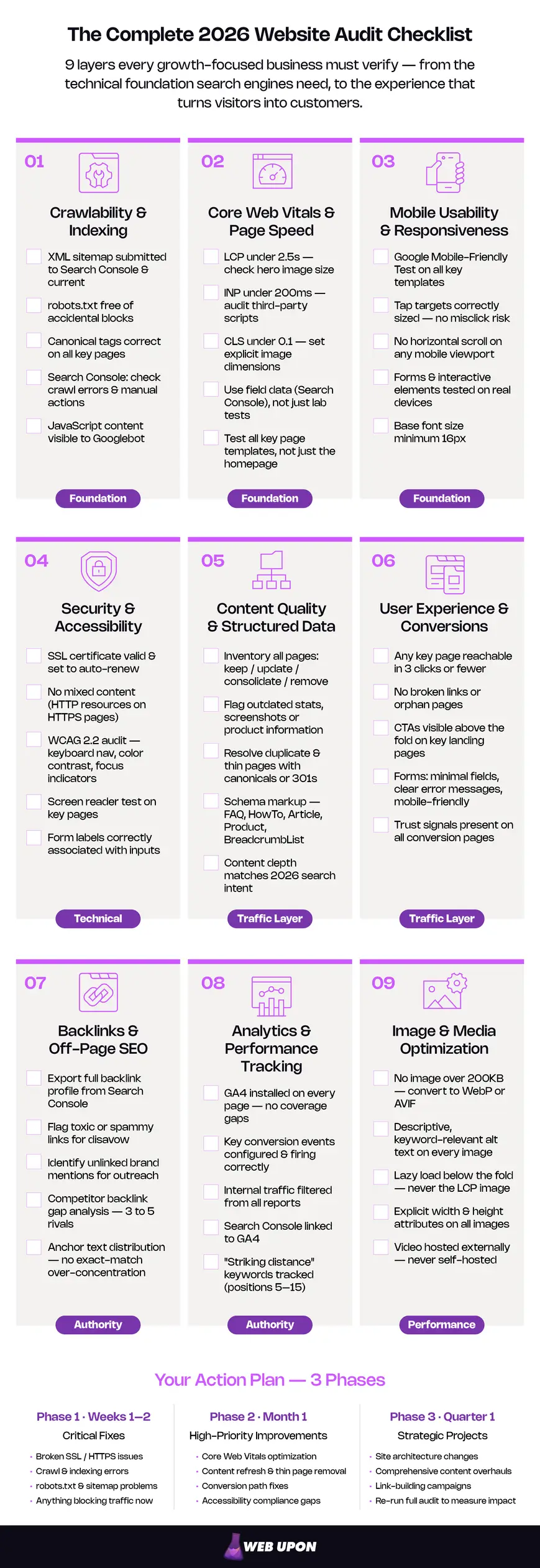
This is a complete, 9-category website audit checklist built for 2026 standards. Whether you’re a business owner running a self-audit or a marketing leader preparing for a professional engagement, this guide gives you a structured, repeatable system for evaluating and improving your website’s performance.
Why Every Business Needs a Website Audit Checklist
Somewhere on your website right now, something is broken. Maybe it’s a page that takes four seconds to load on a phone. Maybe it’s a robots.txt file quietly telling Google to ignore your entire blog. Maybe it’s a form that works perfectly on desktop but won’t submit on an iPhone. You don’t know — and that’s the problem a website audit checklist is built to solve.
The gap between assumption and reality tends to be wider than anyone expects. According to the HTTP Archive’s 2025 Web Almanac, only 48% of websites pass Google’s Core Web Vitals assessment on mobile — close to a coin flip. Your site could be delivering an experience that hurts both rankings and conversions, and nothing in your day-to-day would tell you so.
This guide walks you through nine audit categories covering every layer of your website’s health:
- Crawlability and Indexing
- Core Web Vitals and Page Speed
- Mobile Usability and Responsiveness
- Security and Accessibility
- Content Quality and Structured Data
- User Experience and Conversions
- Backlinks and Off-Page SEO
- Analytics and Performance Tracking
- Image and Media Optimization
Each section includes specific checklist items you can hand to your team, your developer, or your agency.
📋 Download the Free Website Audit Checklist Template — Track your progress across all 9 categories with columns for status, priority, ownership, findings, and completion dates. Use it as a site audit checklist you return to every quarter.
Want to skip the DIY route? Web Upon’s expert team can run this entire audit for you. Contact us for a professional website audit.
Key Takeaways
- Start with the foundation. Crawlability, page speed, and mobile usability must be sound before anything else matters — if Google can’t crawl your site, no amount of content or UX work will compensate.
- Core Web Vitals are a confirmed ranking signal — and over half of websites still fail on mobile. The 2026 metrics: LCP (loading), INP (responsiveness), CLS (visual stability).
- Accessibility is an active enforcement environment. Audit against WCAG 2.2.
- Content depreciates. A content audit identifies which pages are assets and which are liabilities — then gives you a framework to act.
- UX bridges “technically functional” and “actually effective” — navigation, internal linking, and conversion path optimization.
- Measure everything. Backlinks, analytics, and media optimization build competitive advantage once your foundation is solid.
- Prioritize by impact and effort. Sort findings into quick wins, strategic projects, and maintenance tasks — then assign owners and deadlines.
Let’s start where every audit should — with the technical foundation that determines whether search engines can even find your site.
1. Crawlability and Indexing
You could have the best storefront in town. If the front door is locked and the sign is off, nobody’s walking in. That’s what a technical SEO failure looks like: invisible to you, obvious to Google, and expensive in ways that never show up on a dashboard until you go looking. It’s why any serious SEO audit checklist starts here.
If Google can’t crawl your site, it can’t rank your pages. Full stop. This is the most fundamental check in any audit.
- Verify your XML sitemap exists, is submitted to Google Search Console, and is current. Look for broken URLs and pages that are excluded but shouldn’t be. A sitemap that hasn’t been updated in months signals to Google that your site isn’t actively maintained.
- Review your robots.txt file for unintentional blocks. The most common version of this mistake: staging environment directives left in production. A single misconfigured line can silently block your entire /blog/ directory from indexing — meaning none of your content marketing shows up in search results. You’d never know unless you checked.
- Check Google Search Console for crawl errors, indexing issues, and manual actions. The “Pages” report is where to focus — it breaks down which URLs are indexed, which are excluded, and why.
- Verify canonical tags and meta tags on all key pages. Incorrect canonicals can point Google to the wrong version of a page, or tell it to ignore your preferred page entirely. Missing or duplicate meta descriptions reduce click-through rates from search results.
- Test JavaScript rendering. If your site relies on JavaScript frameworks to display content, make sure Googlebot can actually see what your visitors see. Content that only appears after JavaScript executes may be invisible to search engines.
Tools: Google Search Console, URL Inspection tool.
2. Core Web Vitals and Page Speed
Core Web Vitals shape how visitors behave on your site — and poor scores compound: lower rankings and higher bounce rates, feeding each other.
The three metrics that matter in 2026:
- LCP (Largest Contentful Paint) measures loading speed — how quickly your main content becomes visible. Target: under 2.5 seconds. Ideal: under 1.5.
- INP (Interaction to Next Paint) measures responsiveness. When someone clicks a button, taps a link, or types in a field, how long before they see the page react? Target: under 200 milliseconds. INP officially replaced the older FID metric on March 12, 2024, and it’s a fundamentally harder test — FID only measured the delay on your first click, while INP tracks the near-worst-case latency across every interaction during a visit. It’s the metric most sites are failing, and the one most business owners haven’t heard of yet.
- CLS (Cumulative Layout Shift) measures visual stability. Target: under 0.1. You know the feeling — you’re about to tap a button and the page shifts, so you click an ad instead.
Here’s what to check:
- Test all key pages in Google PageSpeed Insights (lab data) AND review Chrome User Experience Report data in Search Console (field data). Field data is what Google actually uses for ranking decisions. Lab tests diagnose problems; field data reflects what your visitors actually experience.
- Identify the largest LCP element on each page template — usually a hero image or heading block. Oversized, uncompressed hero images are among the most common causes of slow LCP.
- Audit JavaScript execution for INP bottlenecks. Long tasks, heavy event handlers, and third-party scripts are the usual suspects. Every analytics tracker, chat widget, and ad script competes for processing time on the visitor’s device.
- Check for layout shifts caused by ads, images without explicit dimensions, or dynamically injected content.
Strategies for faster loading: Server-side rendering, CDN implementation, critical CSS inlining, image optimization (covered in Section 9), code splitting, lazy loading below-the-fold content.
Tools: Google PageSpeed Insights, Chrome DevTools (Performance panel), Google Search Console Core Web Vitals report, WebPageTest.
For a deeper technical diagnosis tailored to your site, contact Web Upon’s speed optimization audit services.
3. Mobile Usability and Responsiveness
Google completed its migration to mobile-first indexing in October 2023. The mobile version of your site is what gets crawled and ranked. If mobile is broken, desktop rankings suffer too — there’s no insulation between them.
- Run the Google Mobile-Friendly Test on all key page templates.
- Check tap target sizing. Buttons and links that are too small or too close together cause misclicks and frustration on smaller screens.
- Verify no horizontal scrolling on any mobile viewport.
- Test forms and interactive elements on actual phones — not just browser emulators. Emulators miss real-world problems like touch response lag and on-screen keyboard interference.
- Confirm text is readable without zooming. Minimum 16px base font size is a widely recommended accessibility and usability baseline.
A common failure that’s easy to miss: desktop mega menus that don’t collapse properly on mobile. They resize fine in a browser window but break on actual devices.
Tools: Google Mobile-Friendly Test, Chrome DevTools device emulator (for initial screening), real device testing (for validation).
Need help diagnosing technical SEO issues across crawlability, speed, and mobile? Contact Web Upon’s SEO audit services.
4. Security and Accessibility
A browser’s “Not Secure” warning is one of the fastest ways to lose a visitor. An inaccessible checkout flow is one of the fastest ways to lose a lawsuit. In 2026, security and accessibility aren’t nice-to-haves — they’re table stakes.
SSL Certificates and HTTPS
Chrome and other browsers flag every HTTP page with a visible “Not Secure” label. That label sits right next to your URL, and it puts a wall between your visitor and their willingness to trust you with anything — a form submission, a purchase, even their attention.
- Confirm your SSL certificate is valid, current, and set to auto-renew. An expired certificate doesn’t just hurt SEO — it puts a full-screen browser warning between your visitor and your content.
- Check for mixed content issues. When HTTPS pages load resources (images, scripts, stylesheets) over HTTP, browsers trigger partial security warnings. Even one HTTP resource can do it.
- Verify all internal links use HTTPS. Hardcoded HTTP URLs left over from a site migration are a common culprit.
- Test certificate chain completeness. If intermediate certificates aren’t properly installed, some browsers and devices won’t recognize your certificate at all.
- Confirm HSTS (HTTP Strict Transport Security) header is implemented. This tells browsers to always use HTTPS for your domain, closing the door on downgrade attacks.
Tools: SSL Labs Server Test (free), browser DevTools Security panel.
Accessibility Compliance (WCAG 2.2)
Accessibility is a legal requirement, a business opportunity, and — in practical terms — an SEO advantage. The same practices that help screen readers (clean HTML, descriptive alt text, proper heading hierarchy) also help search engines understand your content. Investing in one pays dividends in the other.
The current benchmark is WCAG 2.2, published as a W3C Recommendation on October 5, 2023. WCAG 2.1 remains a valid baseline, but 2.2 is the standard to audit against in 2026.
On the regulatory side, the European Accessibility Act took effect on June 28, 2025, and the U.S. Department of Justice’s Title II rule — requiring WCAG 2.1 Level AA conformance for state and local government websites — takes effect April 24, 2026 for entities with populations of 50,000 or more. This is not theoretical exposure — it’s an active, expanding enforcement environment.
Key items to audit:
- Test screen reader compatibility on key pages using NVDA (Windows) or VoiceOver (Mac).
- Verify full keyboard navigation. Every interactive element must be reachable and operable without a mouse.
- Check color contrast ratios against AA standards: minimum 4.5:1 for normal text, 3:1 for large text.
- Ensure all images have descriptive alt text (covered in detail in Section 9).
- Verify form labels are properly associated with input fields.
- Test focus indicators. Keyboard users need to see where they are on the page at all times.
- New in WCAG 2.2: Minimum target size (24×24 CSS pixels for interactive elements), accessible authentication (no cognitive function tests for login), and consistent help mechanisms.
Tools: WAVE Web Accessibility Evaluator, Axe DevTools (browser extension), Lighthouse Accessibility audit.
For the full specification, see the official WCAG 2.2 guidelines on w3.org.
5. Content Quality and Structured Data
A blog post you published two years ago is still representing your business today. It’s still showing up in search results, still shaping first impressions, still telling Google something about your expertise. The question is whether it’s telling the right story — or an outdated one.
Content is a business asset that depreciates. Statistics go stale, advice becomes outdated, and what once ranked on page one quietly slips as competitors publish better answers. A content audit tells you which pages are assets and which are liabilities.
Evaluating Content Quality and Relevance
Outdated or thin content doesn’t just fail to attract traffic — it actively drags down your site’s overall search authority by diluting quality signals across your domain.
- Inventory all indexed pages and categorize each as: keep, update, consolidate, or remove.
- Evaluate each page against current user intent. Does the content match what someone searching that keyword actually wants to find in 2026? Intent shifts — a query that warranted a definition three years ago might now demand a comparison or a how-to.
- Check for outdated statistics, references, screenshots, or product information. A blog post citing “2023 data” in 2026 signals neglect to both readers and search engines.
- Assess content depth. Are your pages more comprehensive and useful than the top 3–5 pages ranking for the same queries? If a competitor answers the question better, Google has no reason to send traffic your way.
- Review freshness signals. When were key pages last updated? Anything untouched for over a year deserves a second look.
Tools: Google Search Console, GA4, content inventory spreadsheet.
For a professional content audit with strategic recommendations, contact Web Upon’s content audit services.
Resolving Duplicate Content and Thin Pages
Duplicate content confuses search engines about which page to rank. Thin pages dilute your site’s quality signals. Both problems are more common than they appear — most sites accumulate duplicates passively through URL variations, CMS quirks, and parameter strings.
- Scan for duplicate or near-duplicate content across the site: same content on multiple URLs, www vs. non-www, HTTP vs. HTTPS, trailing slash variations.
- Identify thin pages — pages with minimal unique content that add little value.
- Implement canonical tags correctly to consolidate signals to the preferred URL.
- Set up proper 301 redirects for pages being removed or consolidated.
- Check for parameter-based duplicates — ?sort=price or ?ref=email generating separate indexed URLs.
Use this framework to decide what to do with each page:
| Content Status | Action |
| High-quality, current, driving traffic | Keep — no action needed |
| Good foundation, outdated details | Update — refresh stats, examples, publish date |
| Multiple pages covering same topic | Consolidate — merge into one authoritative page, 301 redirect the rest |
| Low-quality, no traffic, no backlinks | Remove — 301 redirect to nearest relevant page or return 410 |
Implementing Schema Markup and Structured Data
Schema markup helps search engines understand what your content means, not just what it says. It can earn rich results — FAQ dropdowns, star ratings, how-to steps — that meaningfully increase click-through rates. Google’s own documentation cites case studies including Rotten Tomatoes measuring a 25% higher CTR on pages with structured data and Nestlé reporting 82% higher CTR on pages appearing as rich results. It’s one of the highest-ROI items in any audit: relatively straightforward to implement, with visible SERP improvements possible within weeks.
- Audit existing schema for errors using Google’s Rich Results Test.
- Identify pages where schema is missing but would add value.
- Schema types to prioritize:
- Organization schema on the homepage
- LocalBusiness schema (if applicable)
- FAQ schema on pages with common questions
- HowTo schema on instructional content
- Product and Review schema on product/service pages
- BreadcrumbList schema for site navigation
- Article schema on blog posts
- Validate all schema after implementation using the Rich Results Test and Schema.org validator.
6. User Experience and Conversions
A site can pass every technical check and still fail to convert. Pages load fast, SSL is green, content is fresh — and yet visitors leave without doing anything. The gap between “technically functional” and “actually effective” is user experience.
Navigation and Internal Linking
When visitors can’t find what they need, they leave. When search engines can’t discover your most important pages through internal links, those pages underperform. Navigation and linking problems are invisible to the site owner but obvious to everyone else.
- Test navigation from a first-time visitor’s perspective. Can they reach any key page in 3 clicks or fewer?
- Identify and fix broken links — internal and external — using a crawling tool.
- Find and fix orphan pages — pages with no internal links pointing to them. Orphans are invisible to both visitors and search engines.
- Review internal linking structure. Are your most important pages (service pages, conversion pages) receiving the most internal links? Your linking patterns tell Google what you think matters.
- Check breadcrumb navigation is implemented and functional.
- Verify site search works correctly, if applicable.
Conversion Rate Optimization
Traffic without conversions is a vanity metric. This is where the audit shifts from “is the site healthy?” to “is the site effective?”
- Audit all CTAs. Are they clear, compelling, and visible without scrolling on key landing pages?
- Test all forms for usability. Minimize required fields, ensure clear error messages, confirm mobile-friendly input types. Every unnecessary field is a point where leads drop off.
- Review landing page alignment. Does each page deliver on the promise made in the search result or ad that sent the visitor there? The gap between expectation and reality is where conversions die.
- Map the user journey for your top 3–5 conversion paths and identify friction: unnecessary steps, confusing choices, slow pages in the sequence.
- Check for trust signals on conversion pages: testimonials, security badges, clear privacy policies, visible contact information.
Tools: GA4 (conversion funnels, exit pages), heatmap and session recording tools, A/B testing platforms.
7. Backlinks and Off-Page SEO
Every link from another website to yours is a signal. The right links — from authoritative, relevant sources — tell Google your content is worth recommending. The wrong links — from spam sites and link farms — can trigger penalties. Quality matters more than quantity, and it’s not close.
Assessing and Cleaning Up Your Backlink Profile
A clean backlink profile protects your rankings. A neglected one is a liability you can’t see until the damage is done.
- Export your full backlink profile from Google Search Console (Links report).
- Identify toxic or spammy backlinks. Look for links from irrelevant foreign-language sites, link farms, private blog networks (PBNs), or sites with extremely low authority.
- Disavow genuinely harmful links using Google’s Disavow Tool — but use it sparingly. Google is generally good at ignoring low-quality links on its own, and over-disavowing can hurt more than it helps.
- Check your highest-value backlinks. Are those linking pages still live? Still linking correctly? A high-authority site that linked to you two years ago may have since updated or removed the page.
- Review anchor text distribution. An unnatural concentration of exact-match anchor text can look like manipulation to Google’s algorithms.
Link-Building Opportunities Through Competitive Benchmarking
Your competitors’ backlink profiles are a map of opportunities you may be missing.
- Analyze 3–5 direct competitors for patterns. What content earns them links? Which sites link to them but not to you?
- Look for unlinked brand mentions — instances where your company is referenced on other sites without a link. These are straightforward outreach wins.
- Identify broken link opportunities. Find broken outbound links on relevant industry sites and offer your content as a replacement.
- Build a shortlist of realistic link-building targets from the analysis.
Tools: Google Search Console (Links report), backlink analysis tools.
8. Analytics and Performance Tracking
Without proper analytics, you’re making decisions about your website the way you’d drive at night with the headlights off — relying on memory and hope. This part of the website performance audit makes sure you can measure the impact of every fix from the earlier sections.
Verifying Your Analytics Setup (GA4)
Misconfigured analytics means decisions based on bad data. This is more common than most business owners realize, and it’s one of the quietest ways to waste marketing budget.
- Confirm GA4 is installed on every page. Check for missing tracking code on key templates — new page types and recently redesigned sections are easy to miss.
- Verify key conversion events are properly configured: form submissions, phone clicks, purchases, downloads.
- Filter internal traffic. Your own team’s visits should not inflate your numbers. This is one of the first things to set up and one of the most commonly overlooked.
- Link Google Search Console to GA4 for integrated search performance data.
- Review referral exclusion lists to ensure payment processors and third-party tools aren’t inflating session counts.
- Set up or verify custom dashboards for the metrics that actually matter to your business.
Key metrics to track:
| Metric | What It Tells You |
| Organic traffic (by page) | Which pages are earning search visibility |
| Engagement rate | Whether visitors interact with your content (replaces bounce rate in GA4) |
| Conversion rate (by source) | Which traffic sources produce actual business results |
| Average engagement time | How long visitors spend with your content |
| Top exit pages | Where visitors leave — potential friction points |
Monitoring Search Rankings and Keyword Performance
Rankings shift constantly. Without monitoring, you won’t know whether your audit fixes are working — or whether a new problem has quietly appeared.
- Establish a baseline keyword ranking report before making changes, so you can measure impact.
- Track your top 20–30 target keywords weekly.
- Monitor impressions and click-through rates in Google Search Console. A drop in impressions often signals a ranking or indexing issue before it appears in traffic data — it’s your early warning system.
- Identify keyword cannibalization — multiple pages on your site competing for the same query. When two of your own pages compete, both tend to underperform.
- Find “striking distance” keywords — queries where you rank positions 5–15 and could reach page 1 with targeted improvements. These are often the highest-ROI optimization targets in any audit.
Tools: Google Search Console (Performance report), GA4, rank tracking tools.
For detailed Search Console guidance, see Google’s official documentation.
9. Image and Media Optimization
Open any slow website in a performance tool and the culprit is almost always the same: images. Unoptimized media is the most common performance problem in the audits we run, and often the easiest to fix. The effort-to-impact ratio here is better than almost anything else on this checklist.
Images: Speed and Search Visibility
Every unoptimized image slows your pages and wastes a chance to reinforce your search relevance. Image search drives meaningful traffic in many industries — and alt text does double duty for accessibility and SEO.
- Audit image file sizes. Anything over 200KB should be investigated. Hero images weighing 2–5MB are more common than you’d expect — and the site owner almost never knows.
- Convert to modern formats. WebP is the standard for 2026 with universal browser support. AVIF offers even better compression where supported. Reserve PNG for transparency, SVG for icons and logos.
- Implement responsive images using srcset attributes so phones don’t download desktop-sized files.
- Add descriptive, keyword-relevant alt text to every image. The difference between alt=”image1.jpg” and alt=”website audit checklist spreadsheet showing 9 audit categories” is the difference between invisible and indexed.
- Lazy load all images below the fold — but not the LCP image. Your largest contentful element must load immediately.
- Set explicit width and height attributes on every image to prevent layout shifts.
Video and Multimedia
Poorly implemented video can undo your Core Web Vitals progress in a single page load.
- Never auto-play video. It devastates LCP and INP scores and burns visitor bandwidth without asking.
- Host on a dedicated platform (YouTube, Vimeo, or a CDN) rather than self-hosting. Video files shouldn’t compete with your pages for server resources.
- Lazy load all embedded video players.
- Use poster/thumbnail images so the player doesn’t initialize until the visitor clicks.
- Add VideoObject schema markup where appropriate.
- Provide captions and transcripts. This is a WCAG requirement for prerecorded media — and it gives search engines additional text to index.
Turning Your Audit Into an Action Plan
The audit tells you what’s wrong. This section tells you what to do about it — in what order, with whose name next to each item.
Prioritizing Findings by Impact and Effort
Not every finding needs to be fixed tomorrow. Use this framework to sort them:
| Priority Level | Low Effort | High Effort |
| High Impact | Do these FIRST (quick wins) | Schedule these next (strategic projects) |
| Low Impact | Batch these (maintenance tasks) | Deprioritize or defer (nice-to-haves) |
Then build a phased timeline:
- Week 1–2: Critical fixes — broken SSL, crawl errors, indexing problems, anything actively blocking traffic.
- Month 1: High-priority improvements — Core Web Vitals optimization, content updates, conversion path fixes.
- Quarter 1: Strategic projects — architecture changes, comprehensive content overhauls, link-building campaigns.
Assign clear ownership to every item. Estimate resource needs — budget, developer hours, content creation time. An audit without owners is a report that collects dust.
Customizing the Template for Your Business
The free template is a starting point, not a rigid prescription. Tailor it to your situation:
- Add industry-specific checks. Healthcare sites need HIPAA compliance items. E-commerce needs PCI-DSS. Financial services has its own regulatory layer.
- Add custom KPIs tied to your business goals — lead form submissions, demo requests, phone calls, whatever counts as a conversion for you.
- Adjust priority levels for your situation. A site that’s never been audited has different priorities than one on a quarterly cycle.
- Set a recurring calendar reminder to re-run the audit. Quarterly for fast-moving businesses; biannually at minimum.
Building a System for Continuous Monitoring
Your website isn’t a building — it’s a garden. Left alone, it degrades. New content introduces new issues. Plugins update and break things. Third-party scripts change behavior. Google’s algorithms evolve. Regular audits catch regressions before they become emergencies.
- Set up Google Search Console alerts for critical issues: indexing errors, security problems, manual actions.
- Configure GA4 custom alerts for significant traffic drops — a 20%+ decline in organic traffic week-over-week deserves immediate attention.
- Schedule recurring audits using the template. Quarterly is the recommended cadence.
- Monitor Core Web Vitals continuously via Search Console’s Core Web Vitals report.
- Stay current with algorithm updates and industry shifts.
Don’t have the bandwidth for ongoing monitoring and maintenance? Web Upon’s team provides continuous audit and optimization services so you can focus on running your business.
Take Control of Your Website’s Performance
You came here because something felt off. Now you have a system that replaces that feeling with facts — a 9-category framework covering every layer of your site’s health, from the technical foundation search engines need to the experience that turns visitors into customers. You don’t have to fix everything at once — you just have to start.
Here’s your next move:
- Download the free audit template.
- Start with Section 1 (Crawlability and Indexing) and work through systematically.
- Prioritize findings using the impact/effort matrix above.
- Set a calendar reminder for 90 days out to run the audit again.
If you’d prefer an expert-led audit with strategic recommendations tailored to your business, contact Web Upon to get started.