What Is a Website Migration (and What’s Actually at Stake)?
The website migration process is a structured, multi-phase operation: every URL, redirect, database record, and server configuration transitions methodically from one environment to another — all while preserving the organic search authority your site built over years. Not a single event. A sequence of controlled handoffs, each carrying its own category of risk. The migration type dictates both the technical scope and the risk profile.
| Migration Type | What Changes | Primary Risk |
| Domain change | URL root (rebranding, acquisition, TLD swap) | Loss of all domain-level authority signals if redirects fail |
| CMS / platform change | Backend system, templates, URL generation logic | Content parity gaps, broken structured data, metadata loss |
| Protocol change | HTTP → HTTPS | Mixed content errors, certificate misconfigurations |
| Structural overhaul | URL architecture, site consolidation or split | Internal link graph disruption, orphaned high-value pages |
| Server / hosting change | Infrastructure, IP address, CDN layer | Downtime, DNS propagation lag, performance regression |
Most real-world migrations combine two or more of these. A CMS replatforming almost always involves structural URL changes. A domain change after an acquisition typically means server migration and content consolidation happening in parallel. That compound nature is what makes the process unforgiving; risks don’t just coexist, they stack. The website migration process has three distinct phases: planning, execution, and monitoring — each carrying fundamentally different risks that require different countermeasures.
Key Takeaways
- Planning is where migrations are won or lost. Incomplete redirect maps, unclear scope, and absent rollback plans are the most common root causes of post-migration traffic loss.
- Expect ranking volatility for 2–6 weeks after a well-executed migration. Google confirms temporary fluctuations are normal as it recrawls and reindexes.
- Monitor aggressively for the first 48 hours and the first 90 days. Crawl errors, indexing delays, and traffic patterns reveal problems that only surface after launch.
Phase 1: Pre-Migration Planning and Preparation
Planning is where migrations are won or lost. The risks at this stage are strategic: scope creep, incomplete audits, misaligned stakeholders, rollback plans that exist only as vague intentions. Every shortcut taken during website migration planning compounds during execution.
Defining Scope, Stakeholders, and Success Criteria
Before any technical work begins, define exactly what is changing and what is not. A CMS migration that also restructures the URL hierarchy is a fundamentally different project than one that preserves existing paths. Ambiguous scope poisons every downstream decision — redirect mapping, content migration, QA — because the foundation they’re built on keeps shifting.
Identify every stakeholder with a say or a dependency: SEO, development, content, legal, IT operations, executive sponsor. Migrations fail organizationally when ownership is never defined. The SEO team discovers dev launched without implementing redirects. Legal flags a compliance issue after DNS cutover. These aren’t edge cases — they’re the predictable result of skipping role assignment.
A simple RACI framework prevents this:
| Workstream | Responsible | Accountable | Consulted | Informed |
| Redirect mapping | SEO Lead | Project Manager | Dev Lead | Executive Sponsor |
| Content migration | Content Lead | Project Manager | SEO Lead, Legal | Executive Sponsor |
| QA / pre-launch testing | QA Lead | Project Manager | SEO Lead, Dev Lead | Content Lead |
| DNS cutover & monitoring | Dev Lead / IT Ops | Project Manager | SEO Lead | All stakeholders |
| Rollback execution | Dev Lead | Project Manager | SEO Lead, IT Ops | Executive Sponsor |
Establish measurable success criteria before launch, not after. What does “successful” look like in quantifiable terms? Typical benchmarks: less than 10% organic traffic variance at 30 days, zero sustained 5xx errors on launch day, all priority pages indexing within 48 hours, redirect coverage verified at 100% of mapped URLs.
Build a realistic timeline with milestones. Teams that compress a 6-week planning phase into 2 weeks almost always ship incomplete redirect maps. And incomplete redirect maps are among the largest sources of post-migration traffic loss — a pattern consistent across hundreds of migrations.
Incomplete Discovery and the Redirect Gaps It Creates
The leading cause of migration-related traffic loss: URLs that existed on the old site but were never mapped to a destination on the new one. Each unmapped URL becomes a 404. If that URL carried backlinks, rankings, or consistent traffic, the loss is immediate.
The CMS page list alone won’t save you. Most established sites have hundreds of indexed URLs invisible to the CMS — dynamically generated pages, legacy paths from previous redesigns, parameter URLs, indexed PDFs, images, and print-style pages. If Google indexed it and it carries traffic or equity, it needs a redirect destination.
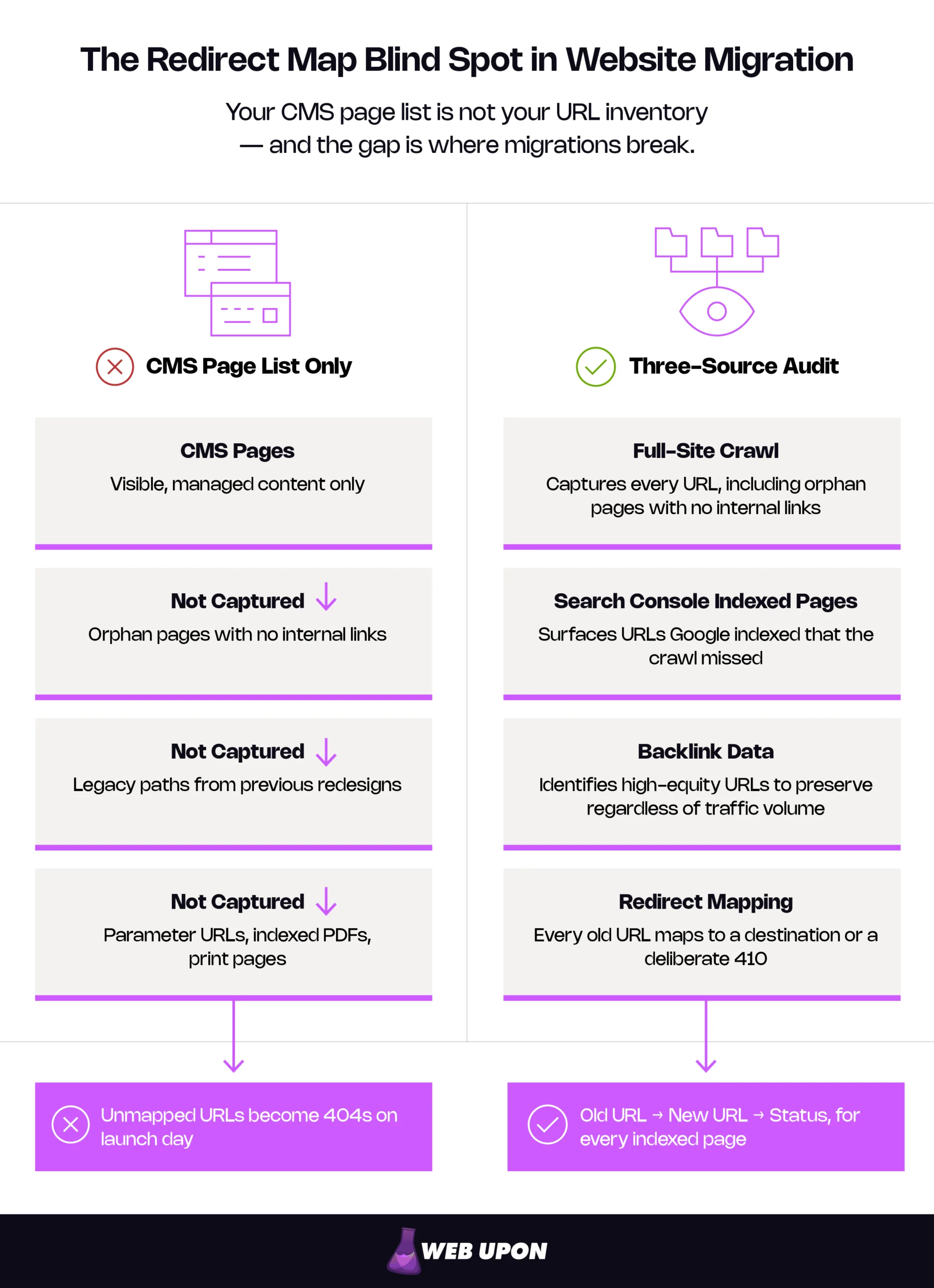
The audit requires three inputs layered together:
- Full-site crawl using an industry-standard crawler to capture every URL, including orphan pages with no internal links pointing to them.
- Google Search Console indexed pages report — export all URLs Google considers indexed, including those the crawl missed.
- Backlink data from a link analysis tool to identify high-equity URLs that must be preserved regardless of traffic volume.
From these three sources, build a master redirect map: Old URL → New URL → Status (mapped, intentional 410, no equivalent). This is not a one-hour task. For a site with 5,000+ pages, redirect mapping alone can take days of careful, URL-by-URL work. Budget accordingly — this map is arguably the most important artifact of the entire migration.
Validate the map against the new site’s live URL inventory before launch. Every old URL must resolve to either a valid new destination or a deliberate 410 response. Anything left unmapped will surface as a 404 in your first post-launch crawl report — by then, the damage is already accumulating.
Inadequate Rollback and Contingency Planning
A rollback plan is not “we’ll figure it out if something goes wrong.” It’s a documented, tested procedure: revert DNS, restore the old site from backup, re-point the domain — typically within a 1–4 hour window.
Define rollback triggers in advance. Specific, measurable thresholds remove ambiguity when you’re under pressure at 2 a.m.: 5xx error rate exceeds 5% of requests, critical landing pages returning 404, database corruption detected, total site outage lasting more than 15 minutes. Assign a single decision-maker who can authorize rollback without convening a committee.
Full backup requirements before launch:
- Complete database export (timestamped)
- File system snapshot (all assets, templates, configurations)
- Server configuration files (web server, PHP/runtime config, caching layers)
- DNS records (screenshot or export — MX records, TXT records, subdomains included)
- The redirect map and all redirect rules (redeployable if needed)
Test the rollback process itself. A backup you’ve never restored is not a backup — it’s an assumption. Run a restoration to a test environment at least once before launch day. If it doesn’t work end to end in a dry run, it won’t work under pressure.
A staging environment that mirrors production is essential for pre-launch validation. Test redirects, content rendering, structured data, page speed, and form functionality before anything touches the live site. For teams working through every pre-launch item systematically, Web Upon’s migration planning checklist covers each validation point in sequence.
Phase 2: Migration Execution
Migration day. Or more accurately, the migration window — because “day” implies a clean boundary that rarely exists. The risks shift from strategic to operational. Things break in real time, under production pressure, with real users hitting the site. How thoroughly you executed the earlier website migration steps determines whether this phase is controlled or chaotic.
Redirect Implementation and URL Transition
Deploy the redirect map from Phase 1 as server-level 301 redirects — configured in .htaccess (Apache), Nginx server blocks, or the platform’s built-in redirect management. 301s signal a permanent move to search engines whereas a 302 signals a temporary move, which functions as a weaker canonical signal and can affect which URL Google selects as canonical. Use 301s for migrations. Always.
Redirect chain prevention matters more than most teams realize. Every old URL should resolve to its final destination in a single hop. Chains — URL A → URL B → URL C — slow crawling, and while Google can follow up to 10 hops in a redirect chain, they advise keeping chains to fewer than five and ideally redirecting to the final destination directly. Audit for chains before launch by testing the full map end to end.
Handle edge cases explicitly:
- Vanity URLs used in print or advertising campaigns
- UTM-tagged URLs that were indexed (strip parameters, redirect the base)
- Internationalized paths (hreflang mappings must be updated in parallel)
- Case-sensitivity mismatches between old and new servers (Linux is case-sensitive by default — a redirect for /About-Us won’t catch /about-us)
Deploy redirects to the new server before switching DNS so they’re active the moment traffic arrives. Validate with automated testing — a scripted crawl of the full old URL inventory, checking for a 200 response at each new destination. Not a sample. Every redirect.
Database and Content Integrity Failures
CMS migrations move content databases, and content that renders perfectly in the old system may break in the new one. Formatting loss, broken internal links, missing media assets, stripped metadata — these are standard failure modes when content crosses between platform data models.
Character encoding mismatches are a frequent silent killer. A database exported in Latin-1 and imported into a UTF-8 system corrupts special characters — accented letters, em dashes, curly quotes, symbols. The result is garbled content that looks unprofessional and, when corruption reaches title tags or headings, disrupts keyword targeting.
Custom fields, taxonomies, and relational data rarely map 1:1 between platforms. A WordPress site built on Advanced Custom Fields won’t carry those structures into a headless CMS automatically. Rebuild the content models on the new platform, and ensure the migration script accounts for every custom field explicitly — or that data disappears.
Structured data and schema markup hard-coded into old templates must be rebuilt for the new system. If the old site had HowTo, FAQ, or Product schema generating rich results in search, those rich results vanish unless the markup is reimplemented on the new platform.
Pre-launch content integrity checks:
- Run a content parity audit on staging: compare 30–50 pages across old and new for content completeness, formatting, internal links, images, and metadata (title tags, meta descriptions, canonical tags).
- Validate database encoding settings match between source and destination before migration — not after.
- Verify all structured data renders correctly using Google’s Rich Results Test on staging URLs.
Downtime and Server-Level Failures
DNS propagation — the period where some users reach the old server and others reach the new one — is normal. It typically resolves within 24–72 hours but creates a window of inconsistent user experiences and dual-server log monitoring.
Reduce this window by lowering the DNS TTL (Time to Live) to 300 seconds (5 minutes) at least 24–48 hours before migration — though Google’s own guidance recommends lowering to a conservative low value at least a week in advance. Once you update DNS records, resolvers worldwide pick up the change within minutes instead of hours. Skip this step, and the old high TTL value — often 3600 seconds or more — stays cached. Propagation crawls regardless of when you flip the switch.
SSL/TLS certificate configuration must be verified before DNS cutover. The new server needs a valid, correctly installed certificate — intermediate chain certificates included — before traffic arrives. A certificate mismatch triggers browser security warnings that immediately destroy user trust. There’s no recovering a first impression shaped by a browser screaming “This site is not secure.”
Load-test the new hosting environment at 1.5–2× current peak traffic before launch. Migration day is the wrong time to discover the new server buckles under load. Performance regressions from a different hosting stack — slower TTFB, degraded Time to Interactive — can trigger Core Web Vitals failures (LCP, CLS, INP) that affect rankings independently of the migration itself.
Execution-day sequence (recommended order):
- Take a final timestamped backup (database + files).
- Deploy all redirects to the new server.
- Execute content/database migration to production.
- Validate SSL certificates on the new server.
- Cut over DNS.
- Begin real-time monitoring (server logs, uptime alerts, Search Console).
Have an on-call point person with direct server access for the entire migration window. Communicate the timeline to internal stakeholders and, where appropriate, external users.
Migration execution is where planning meets reality — and where most teams wish they had an experienced partner in the room. If you’d rather have specialists handle this phase, Web Upon’s migration team can manage it end to end. Talk to us →
Phase 3: Post-Migration Monitoring and Recovery
The migration is live. Now the work shifts to detection — the core of post-migration SEO — finding problems that aren’t visible until crawlers process the new site and analytics accumulate enough data to surface patterns. The first 30–90 days determine whether the migration holds or quietly unravels.
Immediate Post-Launch Validation (First 48 Hours)
The first 48 hours are a verification sprint. Priorities, in order:
- Crawl the old URL inventory against the live site. Every old URL should return a 301 to its new destination or a deliberate 410. Anything returning 404 or 5xx needs immediate action.
- Check Google Search Console for crawl errors, coverage issues, and manual actions. The “Pages” report is your primary dashboard — watch for drops in indexed page count.
- Submit the updated XML sitemap to Google Search Console and Bing Webmaster Tools within the first hour.
- Verify robots.txt isn’t blocking critical sections of the new site. A staging robots.txt pushed to production — with Disallow: / still active — ranks among the most common and most catastrophic post-launch mistakes. Google’s hosting change documentation explicitly warns against leaving crawl-blocking directives in place.
- Confirm canonical tags point to the correct new URLs. Google’s canonicalization documentation warns against conflicting canonical signals, and canonicals still referencing old URLs confuse indexing signals and delay consolidation.
- Spot-check Core Web Vitals (LCP, CLS, INP) on the new site. INP replaced FID as a Core Web Vital on March 12, 2024, so ensure your monitoring reflects current metrics. New templates or a different hosting stack can introduce regressions invisible in staging. Run PageSpeed Insights on 10–15 key landing pages as a production baseline.
Set up real-time alerting for 5xx error spikes via server logs or uptime monitoring. Use the URL Inspection tool in Search Console to confirm Google can fetch and render your highest-priority pages.
Indexing Delays and Visibility Loss
Search engines need time to recrawl and reindex the new site. For smaller sites (under 1,000 pages), this typically finishes within days. For large sites (10,000+ pages), full reindexing can stretch weeks — and rankings will fluctuate throughout. Google confirms that reindexing speed depends on site size and server speed, with medium-sized sites taking a few weeks and larger sites taking longer.
This volatility is expected. Google’s site move documentation confirms that temporary ranking fluctuations are normal while the site is recrawled and reindexed. Communicate it to stakeholders before launch — not after the first traffic dip triggers an escalation. A clear framing helps: expect 2–6 weeks of ranking volatility, with industry data suggesting a temporary dip of 10–20% in organic sessions falls within normal range for a well-executed migration. Panic-driven decisions during this window — reverting URLs, adding hasty redirects — almost always make things worse.
Factors that accelerate reindexing:
- Submitting an updated XML sitemap immediately after launch
- Using Search Console’s URL Inspection tool to request indexing for the 20–50 highest-priority pages
- Maintaining strong internal linking so crawlers discover pages efficiently
Factors that delay reindexing:
- Redirect chains forcing crawlers through multiple hops
- Accidental noindex directives left from the staging environment
- Orphaned pages with no internal links pointing to them
- A sitemap still referencing old URLs instead of new canonical destinations
Monitor the “Pages” report in Search Console daily for the first two weeks. A declining indexed page count — beyond what’s expected from intentional consolidation — signals a systemic issue that needs diagnosis, not patience.
Organic Traffic Decline Beyond Expected Variance
Not every traffic dip is a migration problem. The skill is distinguishing normal fluctuation from genuine structural failure.
Start with the diagnostic framework: compare week-over-week and month-over-month organic sessions, segmenting brand vs. non-brand traffic. Brand traffic typically holds steady through a migration — users search for your name regardless of URL changes. Non-brand traffic, the queries where you rank on merit, is where migration damage surfaces.
Common causes of sustained traffic loss after migration:
- Unmapped URLs generating mass 404s for previously indexed pages
- Redirect chains degrading crawl efficiency across the site
- Lost internal links to high-priority pages — the new site’s link graph doesn’t match the old one
- Missing metadata — title tags and meta descriptions defaulting to CMS placeholders instead of migrating properly
- Content parity failures — pages that lost sections, images, or structured data during transfer
Recovery actions: fix broken redirects immediately. Restore missing metadata. Rebuild internal links to affected pages using the old site’s link graph as a reference. Give Google time to reprocess — and resist the temptation to make sweeping additional changes during recovery. Stability helps search engines consolidate signals faster than constant iteration does.
When to bring in specialist help: if organic traffic is down more than 30% after 60 days with no recovery trend in the weekly data, the migration likely has structural issues requiring expert diagnosis.
Set up a pre/post comparison dashboard: organic sessions, top landing pages, conversion rate, and bounce rate — segmented by brand vs. non-brand. Monitor keyword rankings weekly for the top 50–100 target terms during the first 90 days. Audit internal linking on the new site to confirm high-priority pages retained the same (or better) link equity they carried before the migration.
For a structured approach to post-launch optimization beyond migration recovery, Web Upon’s new website SEO checklist covers the full spectrum of post-launch SEO tasks.
If your organic traffic hasn’t recovered 60 days after migration, it’s time to call in a specialist. Web Upon’s migration recovery team can diagnose what went wrong and build a recovery plan. Get in touch →
Tools That Make Migration Safer
The tools a migration team actually reaches for — not a buying guide, a reference card organized by phase.
| Tool | What It Does in a Migration | Phase(s) |
| Google Search Console | Crawl monitoring, sitemap submission, URL Inspection, indexed pages tracking | 1, 2, 3 |
| Google Analytics / GA4 | Pre/post traffic comparison, conversion tracking, brand vs. non-brand segmentation | 1, 3 |
| Industry-standard site crawler | Full-site crawl, orphan page detection, redirect validation, content parity auditing | 1, 2, 3 |
| Server log analyzer | Real-time 404/5xx monitoring, bot crawl tracking during and after launch | 2, 3 |
| Uptime monitoring service | Immediate downtime and response-time alerts | 2, 3 |
| Google Rich Results Test | Structured data validation on staging and production | 2, 3 |
| PageSpeed Insights / Lighthouse | Core Web Vitals baseline and regression checks (LCP, CLS, INP) | 1, 3 |
| Browser-based redirect checker | Manual spot-checks of individual redirects during QA | 1, 2 |
What Separates a Clean Migration from a Catastrophe
The difference between teams that migrate cleanly and those that spend months recovering almost always traces back to one thing: the completeness and rigor of Phase 1.
Planning prevents gaps — a thorough redirect map that accounts for every indexed URL, not just the pages visible in the CMS. Execution prevents breaks — testing every redirect, validating SSL, load-testing the server before DNS cutover. Monitoring catches what slipped through — crawl data, indexing trends, and traffic patterns watched daily for the first two weeks and weekly for the first 90 days.
Catastrophic migrations share a pattern: compressed timelines, incomplete discovery, and an assumption that problems can be fixed after launch. They can — but at significantly higher cost in traffic, revenue, and the months it takes to claw back what was lost. With average recovery stretching well over a year and 17% of migrations never recovering at all, the website migration best practices in this guide exist specifically to prevent that outcome.
The three-phase framework — planning, execution, monitoring — isn’t just organizational convenience. It’s a risk management structure, mapping each category of threat to the stage where it can be neutralized before it compounds. Teams that internalize this structure don’t just survive migrations. They execute them so cleanly that stakeholders barely notice the transition happened.
Start with a structured plan. Download Web Upon’s free migration planning checklist template to build your phase-by-phase planning document, or walk through the full migration checklist for a more detailed and extensive step-by-step coverage. If you’d rather have experienced hands-on support through the process, our migration specialists at Web Upon can help you get started with a customized plan.