Why Most Site Migrations Fail Before They Start
In most post-migration audits, the root cause isn’t a botched DNS cutover or a misconfigured server. It’s a redirect that was never mapped, a canonical tag that was never documented, or a stakeholder who was never consulted. The failure happened weeks before go-live — during planning, or more accurately, during the absence of it.
This migration checklist template closes that gap. Below is a complete website migration strategy broken into five planning phases — everything you need to document, audit, map, and validate before you touch a single DNS record.
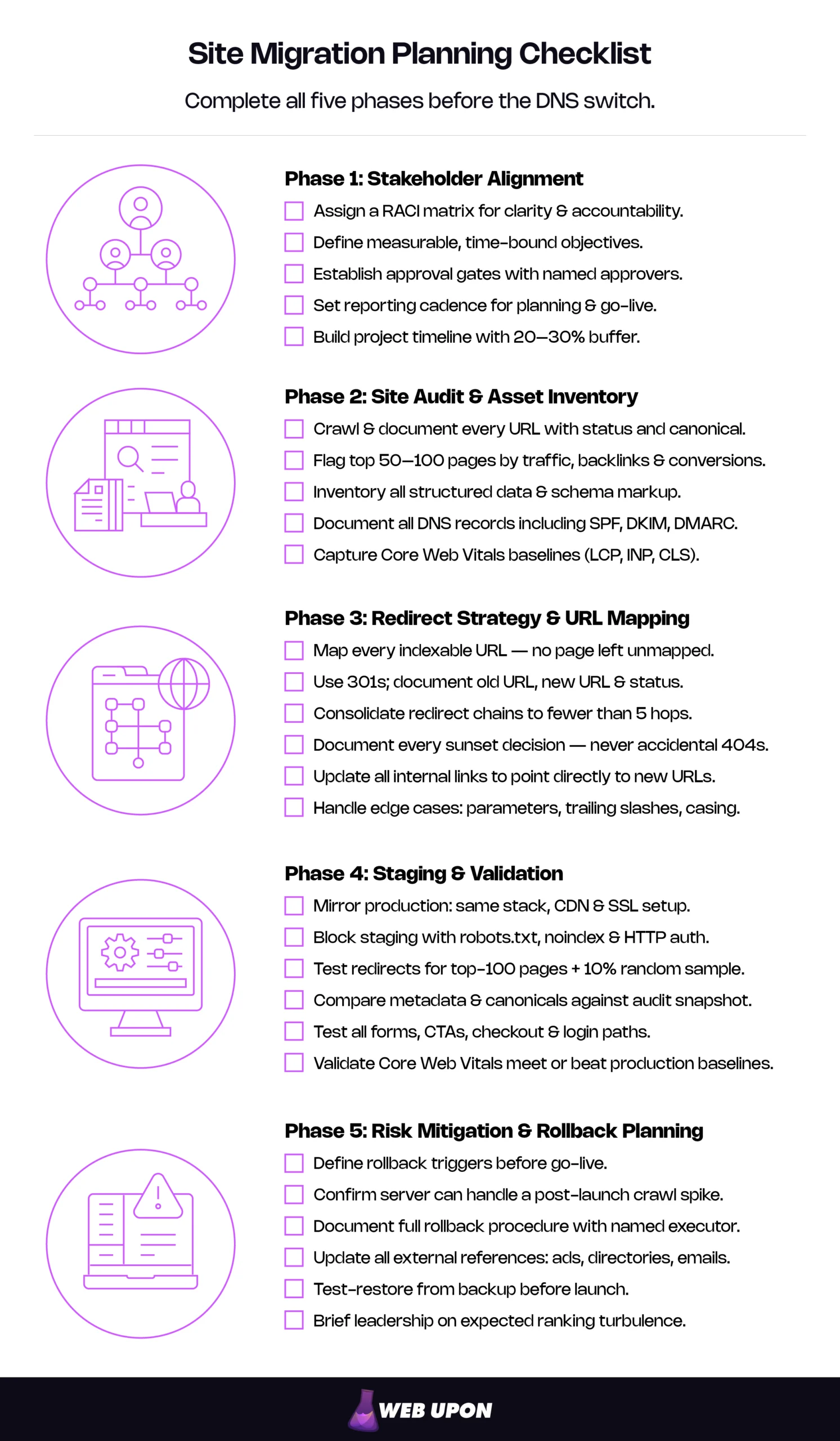
Key Takeaways
- Every indexed URL, backlink, canonical tag, and structured data element is at risk simultaneously during any migration type — domain change, CMS swap, redesign, or hosting transfer.
- The redirect map is the single most consequential planning deliverable — every indexable URL must have a mapped destination or a documented sunset decision.
- A rollback plan you haven’t tested isn’t a plan. Define triggers, document procedures, and verify backups before go-live.
What a Migration Actually Puts at Risk
A domain change rewires every external signal pointing to your site. A CMS overhaul can silently alter URL structures, metadata templates, and rendering behavior. A hosting transfer shifts server response times, IP geolocation, and CDN behavior. Even an HTTPS upgrade — the simplest migration type — requires every indexed URL to resolve through a new protocol.
“Website migration” is an umbrella term for fundamentally different operations, but they all share one thing: every migration puts your indexed URLs, backlink equity, internal link architecture, structured data, local business listings, and cached metadata at risk simultaneously. The planning phase exists to inventory these assets and build protections around each one.
| Migration Type | Primary SEO Risk |
| Domain change | Loss of backlink equity and brand search signals across all indexed URLs |
| CMS platform swap | Altered URL structures, broken metadata templates, changed rendering behavior |
| Hosting/server transfer | Performance degradation, IP geolocation shifts, CDN misconfiguration |
| Site redesign with URL changes | Broken internal link architecture, orphaned pages, redirect gaps |
| HTTP → HTTPS | Mixed content errors, duplicate indexing if canonicals aren’t updated |
| Subdomain consolidation | Conflicting canonical signals, duplicate content across subdomains |
The Cost of a Planning Gap
A well-planned migration with comprehensive redirect mapping typically sees ranking stabilization within a few months. A poorly planned one — incomplete redirect maps, undocumented canonicals, untested staging environments — can take far longer. A 2025 Search Engine Journal study of 892 domain migrations found an average recovery time of 523 days, with the fastest recoveries completing in under 30 days and 17% of migrations never recovering even after 1,000 days.
Run the math against your own numbers: monthly organic traffic × average conversion rate × average deal value × months of depressed performance. For a mid-market company generating even moderate pipeline from organic search, the difference between a three-month recovery and a twelve-month one isn’t abstract. It’s pipeline that didn’t close and revenue that didn’t materialize.
Google’s own documentation acknowledges that ranking fluctuations are expected even for well-executed migrations. The difference between a planned fluctuation and an unplanned collapse comes down to site migration planning — specifically, the rigor of the work done before go-live.
What This Migration Planning Checklist Covers (and What It Doesn’t)
This is a pre-migration planning framework covering the five phases of work that happen before the migration begins: stakeholder alignment, site auditing, redirect strategy, staging validation, and risk mitigation. The planning sequence applies whether you’re working from a CMS migration checklist or scoping a domain change from scratch.
It does not walk through execution or post-launch monitoring in operational detail. For that, see The Complete Website Migration Checklist, which picks up where this planning guide leaves off.
Phase 1: Stakeholder Alignment and Migration Scope
The first redirect that fails in production is rarely a technical problem. It’s a communication problem — a decision that was made verbally, never documented, and lost somewhere between the SEO lead’s Slack message and the developer’s sprint board.
Before any technical audit begins, your SEO migration plan must answer three questions explicitly and on paper: who is accountable for what, what are we actually trying to achieve, and how will decisions get made when complications arise?
Identify Decision-Makers, Executors, and Approvers
Every migration involves more roles than most teams initially account for. Map the full stakeholder landscape: project owner, SEO lead, development lead, content owner, QA lead, and executive sponsor. In mid-market organizations, several of these roles overlap — that’s fine, but the responsibilities still need explicit assignment.
A RACI matrix forces that clarity:
| Task | Project Owner | SEO Lead | Dev Lead | Content Owner | Exec Sponsor |
| Define migration scope | A | C | C | C | I |
| Pre-migration site audit | I | A | R | C | I |
| Redirect map creation | C | A | R | C | I |
| Staging QA sign-off | A | R | R | R | I |
| Go-live authorization | R | C | C | I | A |
| Post-launch monitoring | I | A | R | I | I |
R = Responsible, A = Accountable, C = Consulted, I = Informed
The critical cell in this matrix is redirect map sign-off. A redirect map that hasn’t been reviewed and approved by the SEO lead should never reach implementation.
Define Migration Objectives and Success Criteria
“Migrate to a new CMS” is not an objective. It’s a description of activity. An objective is measurable and time-bound: “Migrate 2,400 indexed pages from Drupal to WordPress with zero loss of top-100 keyword rankings within 90 days, maintaining 95% organic traffic levels by month three.”
Objectives vary by migration type:
- Domain change: “Preserve 100% of backlink equity through redirect mapping. Achieve full index coverage of the new domain within 60 days. Maintain organic traffic within 10% of baseline by month three.”
- CMS swap: “Replicate all existing URL structures, metadata, and structured data on the new platform. Achieve parity on Core Web Vitals scores. Zero increase in crawl errors within the first 30 days.”
- Redesign with URL changes: “Map every existing indexed URL to its new equivalent. Reduce 404 error rate to below 0.5% within one week post-launch. Preserve all featured snippet positions.”
Define measurable success criteria against each objective: organic traffic retention benchmarks, crawl error thresholds, uptime requirements, and page speed targets.
For WordPress-specific migrations, see our guide: How to Migrate Your Site to WordPress Without Losing SEO Rankings.
Establish Communication Protocols and Approval Gates
Define the reporting cadence and channels before the project begins. Weekly status reports work for the planning phase; daily check-ins become necessary approaching go-live.
Approval gates are non-negotiable — specific checkpoints requiring documented sign-off before the migration can proceed. At minimum: redirect map approval, staging environment QA sign-off, pre-launch validation completion, and DNS change authorization. Each gate needs a named approver and a documented escalation path if that approver is unavailable.
Build the Project Timeline with Buffer
Map realistic milestones: audit phase, redirect mapping, staging build, QA cycles, go-live window, post-launch monitoring. Then add buffer.
Migrations always surface unexpected complexity — legacy redirects nobody documented, third-party integrations referencing hardcoded URLs, content published outside the CMS that nobody remembered existed. Build in 20–30% timeline contingency, and identify external dependencies early: registrar transfer windows, SSL certificate provisioning lead times, and third-party integration timelines outside your team’s control.
Phase 2: Comprehensive Site Audit and Asset Inventory
A pre-migration audit isn’t a crawl report. It’s a complete inventory of every SEO asset the migration must preserve — the foundation every subsequent planning decision depends on. Do it superficially, and the redirect mapping phase becomes guesswork.
Crawl and Document the Existing URL Architecture
Run a full-site crawl and capture every URL along with its status code, canonical tag, meta robots directive, and indexation status. The result is your URL inventory spreadsheet — the single source of truth for the redirect mapping phase.
At minimum, your URL inventory needs these columns: URL, HTTP status code, canonical URL, meta robots value, indexation status in Google Search Console, word count, number of internal links pointing to the page, and any hreflang annotations.
Don’t stop at clean URLs. Map parameterized URLs, pagination sequences, trailing-slash variants, and case-sensitivity inconsistencies. If the site has been live for several years, you’re inheriting existing redirects — document those chains now. The redirect architecture you’re starting with matters just as much as the one you’re building.
Identify High-Value Pages and Critical SEO Assets
Not every page carries equal weight. Pull performance data and rank pages by organic traffic, keyword rankings, backlink count, and conversion contribution. Flag the top 50–100 pages that represent the majority of the site’s organic equity — these get the most rigorous redirect mapping and the most thorough QA validation.
A simple prioritization matrix works: score each page 1–3 for traffic volume, backlink authority, and conversion value, then total the scores. Anything scoring 7 or above gets flagged for manual redirect verification and individual QA testing.
Document pages holding featured snippets, rich results, or knowledge panel presence — these positions are fragile and disproportionately valuable. Inventory all structured data and schema markup currently deployed. Product, LocalBusiness, and other active schema types all need to survive the migration intact. (Note: FAQ and HowTo rich results have been significantly restricted since August 2023, but preserving the underlying markup causes no harm and may benefit other search engines.)
Audit On-Page SEO Elements for Migration
Document every page’s title tag, meta description, H1, canonical URL, and Open Graph tags. This is your “before” snapshot. Without it, there’s no way to validate that the new site preserved what it was supposed to.
Catalog internal links, paying special attention to cross-links between high-authority pages. Linking structures that took years to build can silently break during a migration if link targets change and aren’t updated.
Inventory image assets: filenames, alt text, and CDN paths. Image URLs are among the most frequently broken elements in a migration — and among the most commonly overlooked in planning. If images are served from a CDN, confirm whether that configuration persists post-migration or whether image paths will change.
Record the current robots.txt directives and XML sitemap structure. These are foundational crawl controls that need to be deliberately reconstructed, not assumed to carry over.
Audit Technical Infrastructure
Document the current hosting environment: server type, CDN configuration, caching layers, SSL/TLS setup. Record the full DNS configuration — A records, CNAME records, MX records, and TXT records including SPF, DKIM, and DMARC entries. Missing DNS TXT records after a migration are how email deliverability quietly breaks — as of February 2024, Gmail and Yahoo require SPF and DKIM authentication for all senders, with DMARC required for high-volume senders. Proper planning eliminates this common post-migration surprise entirely.
Inventory every third-party integration: analytics tags, marketing pixels, chatbots, CRM connections, payment gateways, CDN providers. Each one references your current domain or URL structure and needs its own migration plan.
Capture performance baselines: current Core Web Vitals scores — Largest Contentful Paint (LCP), Interaction to Next Paint (INP), and Cumulative Layout Shift (CLS) — along with Time to First Byte (TTFB) and overall page load times. These baselines become your post-migration performance targets. Without them, “the site feels slower” is the only diagnostic you’ll have.
| Infrastructure Item | What to Document | Why It Matters |
| DNS records | A, CNAME, MX, TXT (SPF/DKIM/DMARC) | Missing records break email delivery and domain verification |
| SSL/TLS | Certificate type, expiration, issuer | Expired or misconfigured certs cause site-wide HTTPS errors |
| CDN configuration | Provider, caching rules, image serving paths | CDN changes alter asset URLs and caching behavior |
| Third-party integrations | All tags, pixels, scripts with domain references | Hardcoded domain references break silently |
| Core Web Vitals | LCP, INP, CLS baseline scores | Post-migration regression has direct ranking impact |
| Server environment | Stack, caching layers, server-side rendering config | Environment mismatches cause performance and rendering differences |
Phase 3: Redirect Strategy and URL Mapping
An incomplete redirect map is among the most common causes of post-migration ranking loss. Not because URL redirect mapping is technically complex, but because the work is painstaking and most teams underestimate the scope. This is the most consequential planning deliverable of any migration — treat it like one.
Build the Complete Redirect Map
The rule is simple: every indexable URL on the current site must have a corresponding destination on the new site, or an explicit, documented decision to sunset it. No URL left unmapped.
Your migration redirect map should follow this structure:
| Old URL | New URL | Redirect Type | Validation Status | Notes |
| /blog/old-post-title/ | /blog/new-post-title/ | 301 | Pending | Title changed in redesign |
| /services/old-service/ | /solutions/equivalent-service/ | 301 | Pending | Section renamed |
| /category/page/2/ | /category/?page=2 | 301 | Pending | Pagination structure changed |
| /products/discontinued-item/ | /products/ | 301 | Pending | Product sunsetted, redirect to parent |
| /landing-page?utm_source=x | /landing-page/ | 301 | Pending | Strip parameters, map to clean URL |
| /about-us/ | /about/ | 301 | Pending | URL shortened in new IA |
Use 301 redirects in virtually all cases. Google has confirmed that 301 and 302 redirects pass PageRank without dilution, but 301s signal permanence and remain the standard recommendation for migrations. Web Upon’s domain migration SEO service page covers how redirect strategy fits into the broader migration approach.
Handle edge cases deliberately: parameterized URLs, session IDs, trailing-slash inconsistencies, case sensitivity, and encoded characters all need explicit mapping rules, not assumptions.
Plan for Redirect Chains and Legacy Redirects
Before adding new redirects, audit the chains you’re inheriting. A migration that stacks a new redirect on top of two existing ones creates a three-hop chain. Googlebot can follow up to ten redirect hops, but Google recommends keeping chains to fewer than five. Longer chains add latency for users, and not all browsers support extended redirect chains — which can mean lower-priority pages never reach their intended destination.
Consolidate: map legacy redirects directly to the final destination, not to an intermediate URL that’s also being redirected. If /old-page/ currently redirects to /current-page/, and /current-page/ is moving to /new-page/, then /old-page/ should point directly to /new-page/.
Document every chain cleanup decision. Your QA team needs this reference when validating redirect behavior against the plan.
Handle Non-Migratable and Sunset Content
Not every page deserves a one-to-one redirect. Pages with zero organic traffic, zero backlinks, and no ongoing business value can be intentionally sunsetted — but the decision must be documented and deliberate, never accidental.
The decision framework: if a page has backlinks but no traffic value, redirect to the nearest topically relevant page to preserve link equity. If a page has traffic but is being consolidated, redirect to the consolidated destination. If it has neither backlinks nor traffic, a 410 (Gone) response signals intentional removal under HTTP conventions, distinguishing the decision from an accidental 404.
Document every sunset decision and its rationale. This is what prevents the “why is this page missing?” conversations that surface two weeks after launch.
Map Internal Link Updates
Redirects preserve external link equity, but internal links should point directly to new URLs — not route through redirect chains. Every redirect adds latency, and internal links depending on redirects are technical debt: they work, but they’re not clean.
Plan a systematic update across body content, navigation menus, footer links, sidebar widgets, XML sitemaps, and any hardcoded links in CMS templates or configuration files. This is methodical work, easier to plan for now than to discover through crawl error reports after launch.
Redirect mapping at scale is one of the most technically demanding parts of migration planning. If your site has thousands of indexed pages or complex URL patterns, Web Upon’s migration specialists can build and validate your redirect map.
Phase 4: Staging Environment and Validation Planning
“It worked in staging” is the most expensive sentence in web development. The gap between staging and production is where migrations break, and the validation plan you build now determines whether your team catches discrepancies before go-live or after.
This section covers how to plan the QA process — the complete checklist your team needs before the staging site is even built.
Define Staging Environment Requirements
The staging site must replicate production as closely as possible: same server stack, same CDN configuration, same SSL setup. Every discrepancy between the two environments is a variable that can produce different behavior on launch day.
Block staging from search engine indexing using three overlapping controls: a robots.txt disallow directive, meta noindex tags on every page, and HTTP authentication. Any single control can fail or be accidentally removed — the triple layer prevents a partially indexed staging site from competing with your production URLs in search results.
Define access controls: password protection, VPN access, or IP allowlisting. The staging URL should be shared only with the project team and documented in a single, central location.
Build the Pre-Launch Validation Checklist
A structured validation checklist turns QA from informal review into a systematic process. Every item gets a pass/fail status, an assigned owner, and a documented result.
- Redirect validation: Test every redirect for the top-100 priority pages identified in Phase 2, plus a random sample of at least 10% of remaining redirects. Verify correct destination URLs, correct status codes, and absence of redirect chains.
- On-page element validation: Compare title tags, meta descriptions, H1s, canonical URLs, and structured data on the new site against the pre-migration audit snapshot from Phase 2. Every discrepancy is either an intentional change or an error — document it as such.
- Functional testing: Verify forms, CTAs, checkout flows, site search, and login/authentication. These are the conversion paths that directly impact revenue.
- Cross-browser and device testing: Desktop, mobile, and tablet across Chrome, Safari, Firefox, and Edge. Rendering differences between environments are common post-migration, especially when the front-end codebase has changed.
- Performance validation: Run Core Web Vitals assessments on staging. LCP, INP, and CLS scores should meet or exceed current production baselines. If staging performance is worse, identify the cause before go-live — not after.
Plan Crawl and Indexation Controls
Prepare the updated XML sitemap reflecting the new URL structure, ready to submit to Google Search Console immediately after the DNS switch completes.
Plan robots.txt updates for the new site. If the migration involves a domain change, prepare Google Search Console verification for the new domain and draft the Change of Address submission.
Document the exact post-launch indexation sequence: remove staging noindex directives → update robots.txt to allow crawling → submit new XML sitemap → submit Change of Address if applicable. The order matters. Documenting it now prevents the scramble of figuring out the sequence under go-live pressure.
For the complete post-launch indexation and monitoring process, see the New Website SEO Checklist.
Phase 5: Risk Mitigation and Contingency Planning
A migration plan without a documented rollback plan is optimism, not strategy. This phase ensures your plan accounts for documented failure scenarios, defined triggers, and — critically — tested recovery paths.
Document Your Rollback Plan
Define the rollback trigger in concrete terms: what specific metrics or failures would initiate a rollback? Set thresholds in advance — a 50%+ increase in crawl errors within 24 hours, a critical conversion path returning errors, or the homepage serving a 500 status code.
Document the exact rollback procedure: DNS revert steps, redirect removal process, database restoration from backup, and estimated time to restore full production functionality. Assign rollback authority — who makes the call, and who executes.
A migration rollback plan you haven’t tested isn’t a plan at all. Before go-live, perform a test restoration from your most recent backup. Confirm the backup is complete, the restoration process works, and the team knows the steps. Discovering a corrupted or incomplete backup during an actual emergency is a failure mode that ten minutes of pre-launch testing eliminates entirely.
Plan for Known Post-Migration Risks
The difference between normal ranking fluctuation and a problem requiring escalation needs to be defined in advance, not debated while everyone is watching traffic graphs with rising anxiety.
Crawl budget impact is predictable: a large-scale URL change triggers aggressive recrawling as Googlebot discovers new URLs and validates redirects. If the migration involves thousands of URL changes, confirm server infrastructure can handle a significant spike in crawl volume without performance degradation.
Plan for third-party breakages. Every integration that references current URLs needs an update plan: email templates, social media profiles, directory listings, ad campaigns, affiliate links, partner sites. These won’t break SEO directly, but they create a cascade of user experience issues and referral traffic loss that compounds the migration’s impact.
| Risk | Likelihood | Impact | Mitigation | Owner |
| Incomplete redirect map | Medium | High | Phased QA with priority-page validation | SEO Lead |
| Staging environment mismatch | Medium | Medium | Production-mirror requirements documented | Dev Lead |
| Post-migration crawl budget spike | High | Medium | Server capacity planning, CDN caching strategy | Dev Lead |
| Third-party integration breakages | High | Medium | Integration inventory and update schedule | Project Owner |
| Rollback plan untested | Low | Critical | Pre-launch restoration test | Dev Lead |
| Stakeholder misalignment on timeline | Medium | High | Weekly status reports, defined approval gates | Project Owner |
Prepare Stakeholder Communication
Draft a pre-migration briefing for leadership: project timeline, anticipated ranking turbulence, monitoring cadence, and escalation path. Executives who haven’t been briefed on expected turbulence treat normal post-migration fluctuations as emergencies — and emergency-mode decision-making during recovery is how small problems compound into large ones.
Plan internal team communication for the critical post-launch window: who monitors what, how often, through which channels. Define monitoring assignments for the first 48 hours (near-continuous), the first week (daily), and the first month (weekly).
If the migration involves customer-facing changes, prepare external communications — new URLs for bookmarked pages, updated login paths, revised portal links that clients and partners depend on.
What Your Plan Must Account For During and After Go-Live
The planning phase doesn’t stop at go-live — it extends to documenting what happens next. This section is intentionally brief — its purpose is to ensure your pre-migration plan includes provisions for migration execution and monitoring.
Execution-Phase Checkpoints to Build Into Your Plan
Your migration plan should include documented procedures for three critical go-live tasks: DNS propagation monitoring with an expected timeline, real-time redirect validation during the cutover window, and an immediate post-launch smoke test covering homepage rendering, key conversion paths, and analytics tag firing.
These don’t need full operational detail yet, but they need to exist as assigned, scheduled tasks with named owners. For the complete execution walkthrough, see the Website Migration Checklist.
Post-Launch Monitoring Plan
Define monitoring cadence before go-live: hourly checks for the first 24 hours, daily reviews for the first week, weekly assessments for the first month.
Specify what to track at each interval: Google Search Console crawl stats and index coverage, organic traffic trends in analytics, ranking movement for your top keyword set, and server logs for 404 and 500 error spikes. Set formal review milestones at one week, 30 days, and 90 days post-migration — each producing a documented findings report that closes the loop on the planning framework you started with.
| Monitoring Phase | Cadence | Focus Areas |
| First 24 hours | Hourly | Crawl errors, redirect validation, uptime, conversion paths |
| First week | Daily | Index coverage, organic traffic trends, ranking movement |
| First month | Weekly | Full traffic recovery tracking, crawl budget normalization |
| 90-day review | One-time | Comprehensive performance comparison against pre-migration baseline |
Download the Free Migration Planning Checklist Template
Every planning task from this article — stakeholder RACI assignments through post-launch monitoring schedules — organized into a downloadable checklist template with built-in progress tracking and owner assignment fields.
Bring it to your next migration planning meeting, assign owners to every line item, and use this site migration template as the single source of truth throughout the project. It works for domain changes, CMS swaps, redesigns, and hosting transfers — any migration type, any team size.
The five phases above represent hundreds of individual decisions. The companies that execute migrations cleanly aren’t the ones with the biggest teams or the most expensive tools — they’re the ones who made every decision in advance, documented it, and held each other accountable to the plan. That’s what this template gives you: a structure for making those decisions before the pressure of go-live turns planning gaps into production failures.
📋Download the free migration planning checklist template
If your migration involves complex redirect mapping, domain changes, or CMS overhauls that exceed your internal team’s capacity, Web Upon’s migration specialists can audit your plan or manage the entire process end-to-end. Get in touch.


