The migration is approved and the build is scheduled, yet nobody can promise that organic revenue survives the move from Shopify Plus to BigCommerce. Every changed URL is a bet on how search engines will treat the new address, and the SEO impact of changing URLs compounds across thousands of pages. But rankings don’t live on Shopify. They live on your URLs, your content, and your links.
Key Takeaways
- Protect what rankings live on. Rankings live on your URLs, content, and links, not on Shopify. Keep those three intact and the platform can change while your authority stays put.
- Expect a dip, not a loss. Some fluctuation over the first few weeks is normal. A lasting decline almost always traces to a redirect, canonical, or content error that was catchable on staging.
- Capture everything before the build. Crawl every URL, export Search Console history, and export Shopify’s redirects before launch day erases them.
- Keep as many URLs as possible. Mirror Shopify’s product and page paths, and send everything else in one hop to a relevant page, never the homepage.
- Migrate every signal deliberately. Verify metadata, product copy, alt text, structured data, canonicals, and Core Web Vitals against your baseline.
- Launch with a checklist, then watch closely. Remove noindex in the first hour, monitor priority pages daily for four weeks, and re-audit at 30 and 90 days.
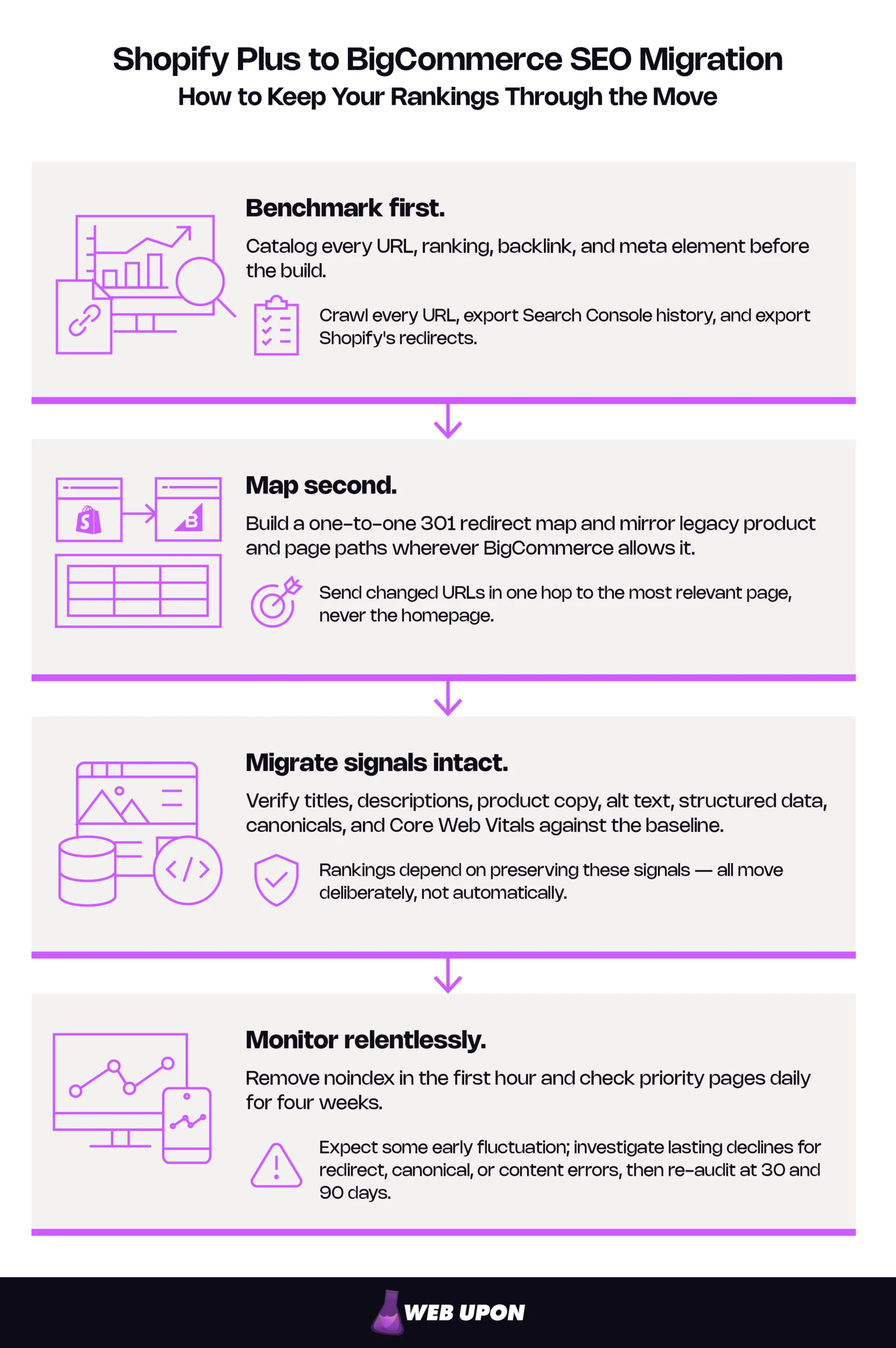
Shopify Plus to BigCommerce SEO Migration Overview
How to Keep Your Rankings Through the Move
- Benchmark first. Catalog every URL, ranking, backlink, and meta element before anyone touches the build.
- Map second. Build a one-to-one 301 redirect map and mirror legacy URL slugs wherever BigCommerce allows it.
- Migrate signals intact. Titles, descriptions, product copy, schema, alt text, and canonicals all move deliberately, not automatically.
- Monitor relentlessly. Daily checks for four weeks, then formal re-audits at 30 and 90 days.
A brief, shallow dip over the first few weeks is normal while search engines recrawl. A permanent loss is not. It almost always traces to a redirect or canonical error that was catchable before launch, and a Shopify Plus to BigCommerce migration built on those four disciplines is designed to catch it. Here is a summary of the whole project:
| Phase | What Happens | Typical Duration | Owner | What Goes Wrong Here |
| Audit | Crawl, export, and benchmark every URL, ranking, backlink, and meta element | 2–4 weeks | SEO lead | Orphaned pages missed, Search Console history lost |
| Map | Build the redirect map, decide which URLs to mirror | 2–4 weeks, overlapping the build | SEO lead, developer sign-off | Hard cases deferred to launch week |
| Build | Configure URLs, import the catalog, rebuild templates and schema on staging | 6–12 weeks | Developers | Slug rules changed after import |
| Launch | Run the launch checklist, switch DNS, validate | 1 day, then a week of close watch | Developers and SEO | Staging noindex ships to production |
| Monitor | Daily checks on priority pages, rankings, and 404s | Weeks 1–4 | SEO lead | Page faults dismissed as turbulence |
| Stabilize | Re-audits at 30 and 90 days, fixes, documentation | Through day 90 | SEO lead, reporting to the ecommerce director | No migration log kept |
One of the most common sequencing mistakes is building before the audit is finished, which leaves redirect mapping chasing slugs that keep changing. Run the table as an ecommerce site migration checklist with gates: no phase starts until the previous one signs off. Once the map is drafted, freeze URL-affecting catalog changes or schedule a final delta pass.
Brands that migrate from Shopify to BigCommerce with a mid-market catalog typically plan three to six months from audit to launch (longer with ERP, B2B, or multiple storefronts), plus 90 days of monitoring. A much shorter plan usually means the audit and map got squeezed.
Every row depends on the audit being right, so that is where the work begins.
Pre-Migration SEO Audit: Protecting What You’ve Already Earned
Your store holds years of evidence about what earns traffic, and most of it vanishes on launch day unless you capture it first. The audit is the least glamorous part of BigCommerce migration SEO, and the most decisive.
Cataloging Your Existing SEO Equity Before Touching Anything
Crawl every product, collection, blog post, and page with a tool such as Screaming Frog or Sitebulb. A complete export records these fields for each URL: status code, title, meta description, H1, canonical, indexability, word count, inlinks, 90-day organic sessions, and referring domains. That file is the baseline every BigCommerce page will be checked against.
Add backlink data from a tool such as Ahrefs or Semrush to flag your highest-authority URLs, and snapshot rankings and traffic so you can later tell variance from damage.
Link-following crawls can miss orphaned pages that still rank. Build the true URL universe from four sources: the crawl, the XML sitemap, Search Console page data, and analytics landing pages.
Two exports can’t wait:
- Search Console data. Search Console keeps only 16 months of history, and old URLs stop accumulating data after launch. Export query-level and page-level performance to a spreadsheet you own.
- Shopify’s redirects. Shopify serves these itself, so they stop working the moment your domain points to BigCommerce. Export them as a CSV from the Shopify admin.
Mapping Your Shopify Plus URL Architecture Against BigCommerce’s Default Schema
Shopify Plus locks URLs under fixed prefixes such as /products/ and /collections/; BigCommerce lets you customize nearly all of them. Map every difference before migration so nothing is orphaned.
| Page Type | Shopify Plus Path | BigCommerce Default | Mirroring Option |
| Product | /products/{handle} | /{product-name}/ | “SEO Optimized (Long)”: /products/{name}, or a custom URL |
| Collection / category | /collections/{handle} | /{category-name}/ | Custom URL (confirm pattern on staging) |
| Blog post | /blogs/{blog}/{post} | /blog/{post}/ | Redirect |
| Blog index | /blogs/{blog} | /blog/ | Redirect |
| Page | /pages/{handle} | /{page-name}/ | “SEO Optimized (Long)”: /pages/{name} |
| Filtered view | /collections/{handle}?filter… | /{category}/?_bc_fsnf=1&… | Redirect valuable ones to real pages |
| Search results | /search?q=… | /search.php?search_query=… | Keep unindexed, no redirect |
Mind the trailing slash. BigCommerce’s default product and category paths end in one and Shopify’s don’t, so test that each legacy form resolves in a single hop.
One of the most troublesome patterns is one Shopify product at two addresses, /products/item and /collections/category/products/item, with a canonical tag pointing to the first. On BigCommerce, give each product one URL with a self-referencing canonical, and redirect both Shopify forms straight to it.
Because slugs are customizable, many migrations can mirror legacy paths closely enough to cut redirect volume substantially. Make the mirroring decision before the build. Compare old and new navigation too, since menu changes shift crawl depth and authority flow.
Assessing Product Catalog and Content Data Integrity Risks
Data failures are often silent. Import 50 of your hardest products into a staging environment: the longest descriptions, most variants, special characters, embedded HTML, tables, and video. Compare every field against the source, looking for four failures:
- Mojibake: smart quotes and accents garbled into symbols.
- Stripped HTML: formatting flattened to plain text.
- Truncation: descriptions cut off at a character limit.
- Unmapped variant images: photos detached from their variants.
The blog needs its own plan. Shopify’s /blogs/{handle}/{post} structure has no BigCommerce equivalent, and multiple Shopify blogs typically collapse into one /blog/ path (confirm on staging), so nearly every post needs a redirect. Prioritize them, because blog posts often hold a disproportionate share of referring domains.
Then check for duplicate paths, such as faceting that exposes one product at several URLs. A canonical tag tells search engines which URL is the primary version of a page (see Google’s canonicalization documentation). Google doesn’t penalize duplicate paths; it calls some duplication normal. The cost is signal dilution: links split across URLs, and Google picks a canonical for you, which may not be the one you would choose. Confirm canonicals before launch.
If your team is quietly calculating hours, a pre-migration SEO audit is usually the highest-leverage step to hand off, and it can be run for you before the build begins.
The audit tells you what you have. The redirect map decides whether you keep it.
Building a Bulletproof Redirect and URL Strategy for BigCommerce
Somewhere in your backlink profile, a years-old gift guide still links to a product URL that is about to disappear. Redirects decide what shoppers and search engines find there, and they are where migrations most often fail and least often recover. Google’s guidance on site moves with URL changes sets the standard for what follows.
Creating a Comprehensive 301 Redirect Map That Covers Every Page Type
A 301 redirect tells browsers and search engines that a page has moved permanently and that its signals should follow. Google confirms that 301s cause no loss of PageRank. The 301 redirect map gives every old URL exactly one new home, across products, categories, blog posts, pages, and filtered URLs that earned traffic.
| Old URL | New URL | Page Type | Sessions (90d) | Referring Domains | Priority | Status | Verified By |
| Full legacy path, including linked query strings | Final destination, never an intermediate | Product, category, blog, page, filtered | Analytics export | Backlink export | P1–P3 | Draft → Live → Verified | Name and date of staging check |
Prioritize by sessions and referring domains. The easy rows map themselves; these are the ones that get missed:
- Many-to-one consolidation. Redirect each old URL directly to the merged page. Google accepts this when that page genuinely covers the old content.
- Discontinued products with backlinks. Send them to the closest category or replacement product, never the homepage.
- Paginated URLs. Map /collections/shirts?page=2 and its siblings to the matching category.
- Parameterized URLs. Strip tracking parameters. Shopify’s ?variant= links canonicalize to the base product URL, but shares and product feeds may still carry them, so decide where they land and test them on staging.
- Existing Shopify redirects. Flatten these rather than stacking them. Point each old source at the new final URL.
A redirect chain is a series of hops, such as A → B → C. Googlebot can follow up to 10, but chains add latency, and Google advises redirecting straight to the final destination, so every old URL gets one hop. Skip the homepage shortcut too. Google warns that irrelevant homepage redirects may be treated as soft 404s, meaning they are handled as missing pages. That discards the equity you meant to keep.
Use BigCommerce’s native 301 redirect manager rather than an app, and know three of its behaviors:
- Bulk import only creates. CSV imports add new manual redirects but can’t update existing ones. Revisions mean export, delete, and re-import.
- URL edits create redirects. Any control-panel change to a product, category, or page URL adds a 301 by default, so slug edits during the build can quietly form chains.
- Dynamic redirects follow their target. They point at the item rather than a fixed path, so they survive later slug changes. Use them for your top URLs.
Validate before launch. Request every legacy path against the staging hostname and confirm each returns one 301 to a 200. Export the redirect table to catch stray automatic entries, and require sign-off from both the SEO lead and the developer. Once live, keep redirects in place for at least a year, and ideally indefinitely.
Configuring BigCommerce URL Architecture to Maximize SEO Continuity
The fewer URLs that change, the less risk you carry. Every URL you keep is a redirect you never have to write, test, or monitor.
BigCommerce’s “Long” formats mirror Shopify’s /products/ and /pages/ prefixes, placeholder patterns cover other cases, and individual items accept custom URLs. Set these before the catalog import. Changing conventions later means re-mapping and a fresh wave of automatic redirects.
Avoid defaults that insert category paths your old store never used, and keep slugs matching the handles that earned rankings. Confirm that product pages carry self-referencing canonicals and that filtered views canonicalize to their parent category.
If someone wants to “fix” URL structure mid-migration, split the projects; Google’s site-move guidance says to change one thing at a time. Migrate on mirrored URLs, stabilize, then restructure if the case still holds. Change both at once and you’ll never know which change caused which result.
Handling Faceted Navigation and Parameter-Based URLs Without Triggering Duplicate Content
Combine five filters of four options each on one category page, and you have thousands of possible URLs for the same products. That is faceted navigation. Left unmanaged, it burns crawl budget, the limited attention search engines give your site, and splits signals across near-duplicates.
Three controls apply, and they are not interchangeable:
- robots.txt blocks crawling.
- Meta robots noindex blocks indexing.
- Canonical tags consolidate signals.
A page blocked in robots.txt can’t have its canonical or noindex tag read at all, and blocked URLs can still be indexed without their content.
By default, BigCommerce adds platform-managed robots.txt rules that block filtered listing URLs (those using the _bc_fsnf parameter) for known high-volume and AI crawlers, and those entries can’t be viewed or edited in store settings. The catch is that some facets genuinely rank and convert, usually brand-plus-category combinations. Rebuild those as real category or brand pages with their own URLs and metadata, and redirect the Shopify filtered or tag URLs that earned traffic to them. Everything else stays out of the index through the default rules, canonicals, meta robots, and faceted search controls. Defaults have shifted across platform versions, so ask developers to confirm current behavior in your live /robots.txt and BigCommerce’s documentation.
Consolidations, discontinued products, flattened chains, and facets worth promoting all grow with the catalog. If the list is outgrowing your team, an experienced SEO team has solved each of them before.
A perfect redirect map delivers visitors to the right page. It doesn’t guarantee the page still says what it used to.
Preserving On-Page SEO Signals During the BigCommerce Data Migration
Picture a product page that redirects perfectly and loads fast, but whose title now reads “Products – Store Name.” Nothing broke, yet its rankings slide, because the page arrived stripped of the signals that earned them.
Migrating Metadata Without Losing Page-Level Relevance Signals
Verify that every title and meta description transfers intact, and rebuild failures from the pre-migration export. Watch for fallbacks. When a meta description fails to import, BigCommerce falls back to the homepage’s description, producing hundreds of identical snippets that are invisible in the storefront and obvious in a crawl. Populate every field so each page renders unique metadata. Then crawl staging and diff the results against the export, since spot-checks stop working past a few dozen pages.
Among the costliest launch errors in any migration: a staging noindex tag or robots.txt block shipped to production. Google’s site-move guidance says to update noindex rules once redirects go live, and its troubleshooting table lists leftover noindex and robots.txt blocks first among common mistakes. Audit meta robots at the page and theme levels, before and after launch.
Protecting Product Description and Structured Content Quality
Confirm that descriptions keep their full HTML and that alt text migrates for every image. Alt text supports image search, relevance, and accessibility.
Rebuild Product, BreadcrumbList, and Review structured data natively or through a vetted app, following the Schema.org Product specification. Product markup powers the price, availability, and review stars in search results. Losing it may not move rankings, but it strips the price, stock, and rating details that make a listing stand out. Validate templates in Google’s Rich Results Test before launch, and watch Search Console’s Enhancements reports afterward.
Reviews often live in a third-party app, which makes them one of the hardest assets to move, so settle portability during vendor selection. Check the theme as well: many themes wrap the store logo in an H1, duplicating it on every page. Structural issues like this are what content audits catch at scale.
Ensuring Mobile Performance and Core Web Vitals Are Not Degraded Post-Migration
Set a performance floor the BigCommerce build must meet or beat, using these thresholds:
| Metric | Google’s “Good” Threshold | Shopify Plus Baseline | BigCommerce Launch Requirement |
| Largest Contentful Paint (LCP) | ≤ 2.5 seconds | Your 75th-percentile field value | At or better than baseline, within “good” |
| Cumulative Layout Shift (CLS) | ≤ 0.1 | Your 75th-percentile field value | At or better than baseline, within “good” |
| Interaction to Next Paint (INP) | ≤ 200 milliseconds | Your 75th-percentile field value | At or better than baseline, within “good” |
Thresholds apply at the 75th percentile, with mobile and desktop measured separately. Benchmark with field data from the Chrome UX Report or Search Console’s Core Web Vitals report. Lab tools diagnose; field data decides. Because field data covers a rolling 28 days, real-user numbers won’t reflect BigCommerce until about four weeks after launch. Until the day-30 read, lean on Lighthouse, PageSpeed Insights, and real-device testing.
Choose a theme that can hit all three thresholds, with image compression, lazy loading, and script deferral built in. A common regression is a third-party script stack reinstalled wholesale. Migration is a rare chance to drop what nobody uses. If performance is your weak spot, you can optimize your Shopify-to-BigCommerce migration with specialists who benchmark before and after launch.
Everything so far happens before launch. What follows decides whether you catch what slipped through.
Post-Migration SEO Monitoring and Recovery Protocol
Launch day is where the real BigCommerce migration SEO work starts. The first four weeks decide whether a dip becomes a decline.
Executing a Structured Launch Checklist to Catch SEO Errors Before They Compound
Run this ecommerce site migration checklist in order. The first five items belong in the first hour.
- Remove noindex. Pass: the homepage, top category, and top product show no noindex tag in the source.
- Confirm production robots.txt. Pass: it matches the approved version, and no critical sections are disallowed.
- Verify HTTPS and the canonical host. Pass: http, the alternate host, and trailing-slash variants each resolve in one 301.
- Crawl the top 500 old URLs. Pass: each returns one 301 to a 200, with no chains.
- Check canonicals. Pass: sampled pages self-reference their production URLs, not staging.
- Submit the XML sitemap (/xmlsitemap.php on Stencil storefronts, /sitemap.xml on Catalyst) to Google Search Console and Bing Webmaster Tools. Pass: the sitemap is accepted and lists only final URLs that return 200.
- Verify Search Console. Pass: the property is verified. On the same domain, history continues. A new domain requires the Change of Address tool, which is a materially different scenario.
- Confirm analytics and conversions. Pass: a test order is recorded and organic sessions appear in reporting.
- Crawl the full old-URL list. Pass: every legacy URL resolves within day one.
Monitoring Search Rankings and Organic Traffic in the Weeks Following Migration
A watch list is only useful with a rule for when to act.
| Timeframe | What to Check | Tool | Escalation Trigger |
| Day 1 | Redirects, template indexability, tracking | Crawler, URL Inspection, analytics | A priority URL not resolving in one hop to a 200 |
| Days 2–7 | Top 50 keyword rankings daily, new 404s, sitemap processing | Rank tracker, server logs, Search Console | A high-value page drops while comparable pages hold |
| Weeks 2–4 | Landing pages against baseline, errors, soft 404s, stray noindex | Analytics, Page Indexing report | Declines that persist or cluster in one template |
| Day 30 | Full re-audit, first field Core Web Vitals read | Crawler, Search Console, Chrome UX Report | Any regression against the export or baseline |
| Day 90 | Second re-audit, traffic against baseline, residual 404s | Crawler, analytics, Search Console | Pages lagging the rest of the site |
A site-wide dip that stabilizes over the first few weeks is expected recrawl behavior, and larger sites take longer. One high-value page losing visibility while comparable pages hold is a page-level fault, and it needs immediate investigation. Segmenting organic traffic by landing page shows which one you’re facing. For a dropped page, confirm these in order: the redirect resolves, the destination returns 200, the page is indexable, its content and metadata match the export, and its canonical points to itself.
Treat 404 monitoring as its own practice. Server logs and Search Console’s 404 data surface URLs the audit missed, which is how redirect gaps are normally found. Redirect each one that carries backlinks, or ask the referring site to update its link.
Building a Long-Term SEO Stability Plan on BigCommerce After the Migration Settles
Re-audit at 30 and 90 days. A structured post-migration ecommerce website SEO audit keeps both checkpoints consistent. Give leadership the typical shape of recovery rather than a date: a dip, partial recovery as recrawling completes, then stabilization. Crawl frequency, catalog size, and launch quality set how deep the dip goes and how long it lasts.
Then build forward. BigCommerce’s customizable URLs, automatic sitemaps, and dynamic redirects make future changes safer. Plan a content refresh for migrated posts and categories that lost relevance, as part of a wider ecommerce SEO strategy. Keep a living migration log of every decision, map version, and configuration change. That log is what makes the next replatform cheaper and safer.
Migrating With Your Organic Authority Intact
A Shopify Plus to BigCommerce migration rests on four disciplines. Benchmark everything before the build. Map every old URL to its final destination with a single 301. Migrate every on-page signal deliberately. Monitor daily until the data shows the site has stabilized.
Rankings live on URLs, content, and links, never on the platform. Protect those three, and the only thing that changes on launch day is the software beneath them. That is how you preserve SEO during a platform migration instead of rebuilding it afterward.
Your next three steps, in order:
- Run the pre-migration audit.
- Build the 301 redirect map and validate it against staging.
- Set the monitoring cadence before launch day.
For a second set of eyes on your plan, or a team to run it with you, contact Web Upon.


