Want an audit that grows sales instead of one that just fills a spreadsheet with red flags? Fix things in this order: (1) protect crawl budget on your most profitable pages, (2) clean up faceted-navigation and canonical sprawl, and (3) strengthen your category-page architecture and content. Everything else gets scored against two questions: how much revenue will this move, and how hard is it to ship? By the end you’ll hold a prioritized, impact-versus-effort ecommerce website SEO audit.
Key Takeaways
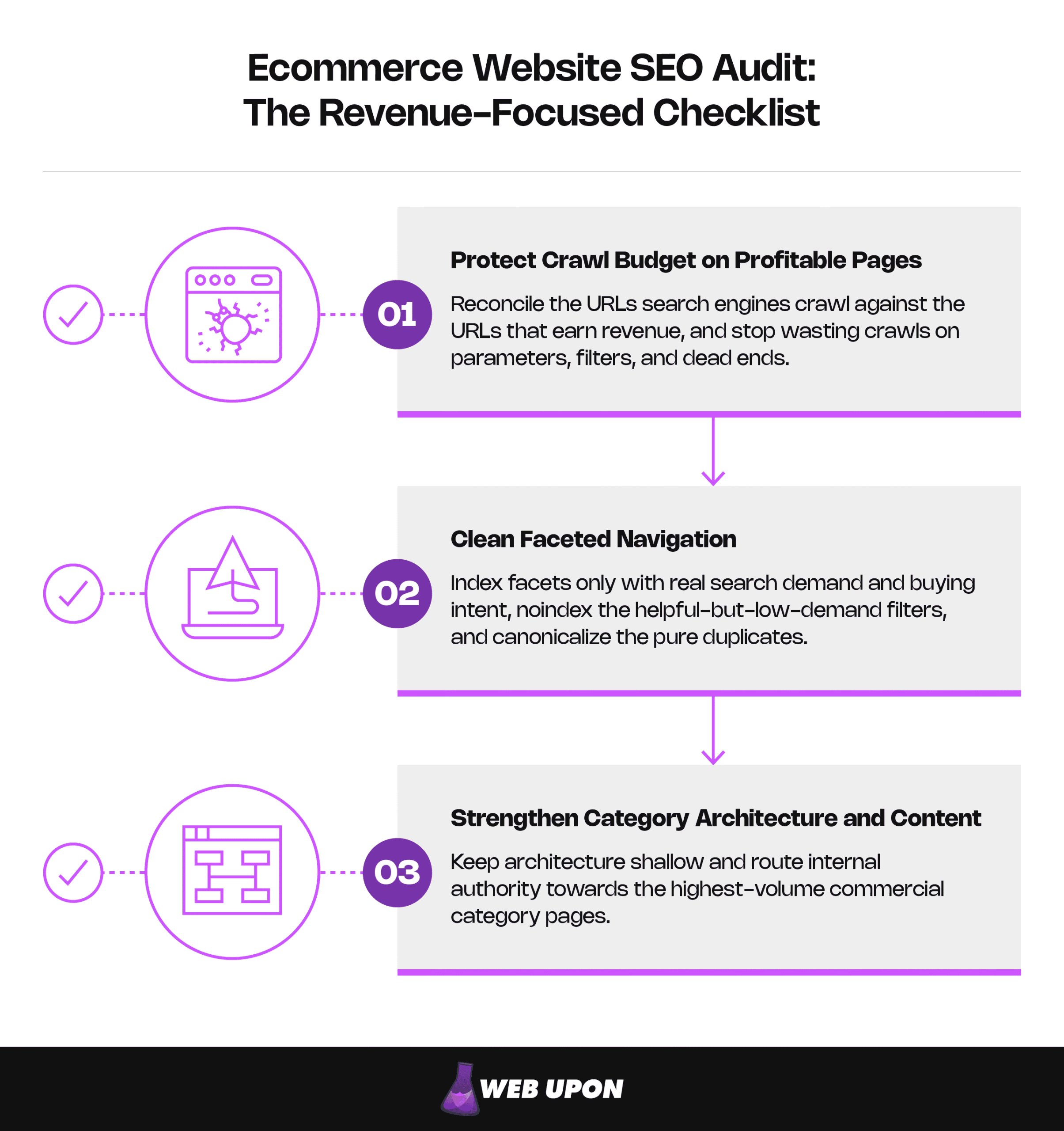
- Crawl budget is finite on large catalogs, and exposing many low-value URLs can hurt crawling and indexing. Reconcile the URLs search engines crawl against the URLs that earn revenue, and stop wasting crawls on parameters, filters, and dead ends.
- Faceted navigation silently mints crawlable near-duplicate URLs. Index facets only with real search demand and buying intent, noindex the helpful-but-low-demand filters, and canonicalize the pure duplicates.
- Category pages are the revenue engine; they capture the highest-volume commercial searches, so they earn the most audit attention. Keep architecture shallow and route internal authority toward them.
Introducing the Revenue-Focused Audit Framework
The Gap Between Technical Fixes and Actual Sales Growth
A crawl tool finishes scanning the store and hands back a report where almost everything glows red. Hundreds of “issues”: missing alt text, redirect notices, meta-length warnings, duplicate-title flags. A developer dutifully turns the list into a backlog. Months pass. The tickets close, the dashboard greens up, and organic revenue hasn’t moved an inch.
Nothing was technically wrong with the work. The wrong work got prioritized.
That’s the trap. A flawless title tag on a page nobody can find lifts nothing. Jargon-heavy reports flag every problem at the same pitch, which kicks off whack-a-mole: close a ticket, find three more, watch the budget drain without anything compounding. Treating all issues as equally urgent is the same as having no priorities at all, and the few fixes that would actually move money sit buried in the pile.
Open your analytics and sort pages by organic revenue. The handful at the top — a few category pages, your bestsellers — are the pages whose rankings actually pay the bills. That list is your filter for everything that follows.
Whether you’re the owner or founder who needs a bottom-line answer on what to fix first, the marketing manager who has to justify spend and hand prioritized work to developers and content teams, or the technical specialist who needs the actual diagnostic steps and decision rules, this is the one move that separates a revenue-focused ecommerce website SEO audit from a generic technical SEO audit: every finding gets anchored to a sales outcome. Not so much “is this technically correct?” but “does this protect or grow revenue, and by how much?” Put that financial lens on the site with Search Console and your analytics platform before you touch a single setting.
| Generic audit | Revenue-focused audit |
| Flags every issue at equal urgency | Ranks issues by revenue impact |
| Output is a list of errors | Output is a prioritized roadmap |
| Measures technical correctness | Measures sales and conversion outcomes |
| Treats all pages the same | Concentrates effort on money pages first |
| Ends in a backlog of tickets | Ends in a sequenced “do this, then this” plan |
What a Revenue-Focused Audit Gets You
- A “fix this first” sequence stated in revenue terms, not technical severity.
- The three problems that quietly cost most stores the most — crawl waste, faceted sprawl, weak category pages — surfaced before anything cosmetic.
- A scoring method (impact × effort) you can present internally and use to say no to busywork.
- Diagnostic steps a specialist can run today, each paired with the business reason an owner can approve.
- Revenue-tied KPIs and a quarterly rhythm that keeps rivals from quietly retaking your best category rankings.
- A way to tell which findings to ignore so the audit ends in action, not 200 open tickets.
Running this hands-on is exactly what our ecommerce SEO team does; worth knowing if you’d rather hand it off than run it yourself.
Crawlability, Indexing, and Crawl Budget: Protecting Your Most Profitable Pages
Diagnosing Crawl Budget Leakage Across Large Catalogs
The biggest leak is the one you can’t see from the front end: how search engines spend their limited time crawling your store. Search engines don’t recrawl your whole store every day. They spend a fixed budget, and on a catalog with thousands of SKUs, filters, and parameters; most of it can disappear into URLs nobody ever buys from. Every crawl spent on a junk URL is a crawl not spent refreshing a page that sells.
So run a reconciliation. Pull the URLs search engines actually crawl (Search Console’s Crawl Stats report, plus server log files if you can get them) and lay them against the URLs that earn organic landings and revenue (your analytics platform). The gap between “heavily crawled” and “actually makes money” is your leak. When most crawl activity lands on parameters, filtered views, and dead ends, you’ve found waste an owner understands and a developer can fix.
| Crawl budget killer | Why it leaks budget |
| Infinite scroll / pagination parameters | Spawn endless variants with little unique value |
| Session IDs in URLs | Multiply one page into thousands of identical copies |
| Sort and filter variants | Create near-duplicate views of the same product set |
| Faceted combinations | Produce a combinatorial explosion of thin URLs |
| Tracking parameters | Fragment crawl signals across duplicate URLs |
| Redundant variants (trailing slash, case, params) | Split crawling across the same content |
Google’s guidance on managing crawl budget is the authority here, and it’s explicit that exposing many low-value URLs can negatively affect a site’s crawling and indexing. Crawl budget optimization isn’t about more crawling. It’s about pointing it at the pages that earn.
Faceted Navigation: The Silent Revenue Killer
A shopper filters by color, then size, then price. Each click can mint a brand-new URL, and just like that, your store created another near-duplicate page for Google to crawl. Multiply that across five facets with a handful of options each, and one tidy category quietly becomes thousands of thin, crawlable pages. They dilute crawl budget, and worse, they compete with the clean category page that should be winning.
Fix it facet by facet, with a rule tied to demand and intent:
- Index a facet only when the filtered view targets real standalone search demand and carries buying intent — “women’s running shoes size 9,” if people actually search it.
- Noindex (follow) facets that help shoppers filter but have no search demand of their own: most sort orders, in-stock toggles, and niche combinations.
- Canonical the pure duplicates — sort orders, pagination, redundant parameters — back to the parent so authority consolidates instead of scattering.
| Facet type | Standalone search demand? | Treatment | Rationale |
| Category-defining attribute | Yes | Index | Captures commercial searches; deserves to rank |
| Brand within category | Often | Index if demand + intent exist | “Brand + category” is frequently searched |
| Size / inventory toggles | Rarely | Noindex, follow | Useful to shoppers, no search value |
| Sort order / view variants | No | Canonical to parent | Pure duplicates of the same set |
| Price range | Sometimes | Index only with proven demand | Usually thin; index sparingly |
| Multi-facet combinations | Almost never | Noindex or block | Combinatorial bloat; near-zero unique value |
Google’s documentation on faceted navigation backs the approach, warning that crawling these URLs tends to cost large amounts of computing resources because of their sheer number. Most stores get this wrong, and getting it right is one of the fastest-paying fixes in the whole audit.
Indexing Health and Canonical Strategy
With crawling under control, audit what’s actually indexed and where authority points.
- Canonical tags: Make sure variants, filtered pages, and paginated sets point authority to the right revenue URL. A rel=”canonical” annotation is a strong signal for which URL should become canonical, so a misplaced one hands your ranking signals to the wrong page.
- Orphaned pages: Hunt for product and category pages that are indexed but get zero internal link equity. Surface them by reconciling two lists: the URLs a crawler reaches by following internal links versus the URLs Search Console and analytics know exist. Anything earning impressions but unreachable through internal links is an orphan, starving.
- Redirect chains and errors: Multi-hop redirects and 404s on dead products bleed authority and waste crawl budget.
For discontinued products, follow these rules:
- 301 to the closest live equivalent or parent when a natural replacement exists — a 301 (or 308) tells Google the page has permanently moved, so equity is preserved and the shopper is kept moving.
- Keep and update if the page still pulls traffic or links and the product may return; mark it unavailable rather than deleting it.
- 410 (Gone) when it’s truly retired with no replacement and no equity — a clean, deliberate “this is removed.”
Indexing health checklist:
- Canonicals resolve to live, self-referencing, revenue-correct URLs.
- No revenue pages are accidentally noindexed or blocked.
- No high-value pages are orphaned.
- Redirect chains collapsed to a single hop.
- Discontinued products handled by rule — not deleted blindly.
You now know which pages get crawled and indexed. Next: how the store is built, because in online store SEO, architecture decides where authority flows in the first place.
Site Architecture and URL Structure: Building the Foundation for Scalable Organic Growth
Category Page Architecture as a Revenue Multiplier
Nobody searches for a SKU. They search “men’s waterproof hiking boots” — and land on a category page. On most stores, category pages capture the highest-volume commercial keywords, so they earn the most audit attention. The category page is the revenue engine; the product page closes the sale.
Audit architecture against two standards. Depth first: more than about three clicks from the homepage signals leakage to crawlers and shoppers alike — authority thins with every hop, and deep pages get crawled less. Structure second: check breadcrumbs, internal-linking hierarchy, and clean silos across your taxonomy so related pages reinforce each other.
Ideal depth stays shallow:
- Home
- Category (≤1 click)
- Subcategory (≤2 clicks)
- Product (≤3 clicks)
- Subcategory (≤2 clicks)
- Category (≤1 click)
If your bestsellers sit five clicks deep, that’s an architecture problem wearing a ranking problem’s clothes.
Internal Linking Audit for Equity Distribution
Some of your best-converting pages are nearly invisible inside your own site. Internal links are how authority travels. Google notes that the vast majority of new pages it finds each day are discovered through links.
- Map the flow from high-authority pages — usually the homepage and top categories — to revenue-critical category and product pages.
- Hunt for quick wins: a quick win is a page that converts well but is under-linked. Surface it by crossing conversion data against internal inbound-link counts from a crawl. A page that turns browsers into buyers on a trickle of internal links is money left on the table, and a few links from the right pages is a cheap, same-day fix.
- Audit anchor text: balance keyword-rich anchors with natural navigation language so the profile reads as earned, not engineered.
URL Structure, Redirects, and Site Security
A shopper reaches checkout and the browser stamps the page “Not Secure.” The cart is already abandoned. That’s the real stakes of the security audit, so be precise about the rest.
- URL consistency: Resolve parameters, trailing slashes, and HTTP-versus-HTTPS so you stop generating duplicate-content signals. Pick one canonical host and protocol; enforce it everywhere.
- Redirect chains: Find multi-hop redirects bleeding equity from top landing pages and collapse them to single hops.
- HTTPS: Serve the whole site over it, but frame it honestly. Google has described HTTPS as only a very lightweight ranking signal, one that carries less weight than high-quality content; it’s baseline trust and security and won’t climb the rankings for you. Its payoff is trust and conversion, and the “Not Secure” warning above is exactly why.
URL consistency checklist:
- Single canonical host (www vs. non-www resolved).
- HTTPS enforced site-wide; no mixed content.
- Consistent trailing-slash rule.
- No duplicate content from parameters.
- One clean, lowercase, readable URL per page.
Foundation sound, the next layer is speed and usability — the experience signals that touch both rankings and the moment of purchase.
Technical Performance Audit: Core Web Vitals, Mobile, and Page Speed
Core Web Vitals as a Conversion and Ranking Signal
A shopper waits for a sluggish product page, reaches to tap “add to cart,” and the button jumps as a banner loads in above it. They mis-tap. They leave. Core Web Vitals put numbers on those small frustrations across three axes: loading (Largest Contentful Paint), responsiveness (Interaction to Next Paint, which replaced First Input Delay in 2024), and visual stability (Cumulative Layout Shift).
Keep the weighting honest: these are a real but modest ranking signal. Google is clear that there is no single page-experience ranking signal, and their bigger payoff is conversion. A fast, stable store sells better; don’t expect the metrics alone to move rankings dramatically.
| Metric | What it measures | “Good” threshold | Why it affects revenue |
| LCP (Largest Contentful Paint) | How quickly the main content appears | ≤ 2.5 seconds | Slow loads lose impatient shoppers before the page renders. |
| INP (Interaction to Next Paint) | Responsiveness to taps, clicks, keypresses | ≤ 200 milliseconds | Laggy filters and add-to-cart kill purchase momentum. |
| CLS (Cumulative Layout Shift) | Visual stability as the page loads | ≤ 0.1 | Shifting layouts cause mis-taps and erode checkout trust. |
Two things in practice. Google grades these on field data at the 75th percentile — at least three in four real visits to a URL must hit “good” — so trust field data over lab scores when you decide where to spend. Lab tools diagnose; field data delivers the verdict. And fix by template — homepage, category, product — ranked by revenue, so the pages that earn most get fixed first.
Mobile Optimization Audit for Ecommerce
Google reads your mobile site, not your desktop one. Under mobile-first indexing, Google uses the mobile version of your content, crawled with the smartphone agent, for indexing and ranking. A weak mobile experience suppresses organic visibility for your entire catalog, phones and desktops both.
Mobile audit checklist:
- Tap targets are large and well-spaced (no fat-finger mis-taps).
- Navigation is usable — categories and search reachable without pinch-zoom.
- Checkout is low-friction: few fields, supported wallets, no surprise steps.
- Mobile speed meets Core Web Vitals on real devices, not just desktop.
One tell worth chasing: when mobile conversion trails desktop or paid by a wide margin, that gap usually hides a mobile SEO or UX issue.
Image Optimization and Site Performance
A single oversized product photo can be the heaviest thing on the page, and on a store, photos are everywhere. Audit file sizes, next-gen formats, and lazy loading across category and product templates; for most pages, the LCP element is an image, so sizing it appropriately, compressing it, and using a modern format directly serves the metric.
Take it seriously because the leverage is rare: unoptimized images hurt three things at once: they drag down Core Web Vitals (LCP especially), waste crawl budget on heavy files, and slow the exact pages where shoppers decide to buy. Add accurate, accessible alt text — descriptive first, keyword-aware second — and a fourth payoff appears. Image work isn’t cosmetic; it’s one of the highest-leverage chores on the list.
Fast and usable, the store still has to say the right things. Next: the on-page content that earns the commercial rankings.
On-Page Ecommerce Website SEO Audit: Category Pages, Product Pages, and Content Quality
Category Page Content and Keyword Optimization
Because category pages are the engine, on-page effort concentrates here.
- Audit category title tags, meta descriptions, and H1s against commercial keyword research tied to search volume and revenue, not vanity terms.
- Treat thin or missing category copy as a real liability: it signals low quality and suppresses rankings for your highest-margin lines.
- Give each priority category unique descriptive copy, supportive internal-linking text, and — where it helps the decision — FAQ content that serves rankings and the sale at once.
Product Page SEO and Duplicate Content
- Audit product titles and meta tags for specificity, and watch for manufacturer-description duplication.
- Name the systemic risk: syndicated descriptions copied from the manufacturer create site-wide duplicate content that suppresses individual rankings, and every competitor selling the same item carries the identical text. (Google is clear there’s no “duplicate content penalty” as such; duplicates are filtered, with one version shown, but that filtering is exactly what keeps your page from surfacing.)
- You can’t rewrite every product page, so don’t try. Invest unique content where it pays back: high margin × high search volume first. Plot products on that 2×2, earn the top-right quadrant real copy, and leave the low-margin, low-demand SKUs on the template.
Structured Data and Schema Markup for Ecommerce
Star ratings, prices, and “in stock” right there in the search listing — that’s what schema buys you. Audit Product, Offer, Review, and BreadcrumbList markup across product and category templates, and be precise about the mechanism: structured data lets product information appear in richer ways in search results, lifting click-through and revenue without changing rankings directly. A structured-data manual action even removes rich-result eligibility without affecting how the page ranks — proof that it’s a CTR lever, not a ranking lever.
| Schema type | What it enables | Where to apply it | Common error to check |
| Product | Product rich results | Product page templates | Missing or invalid required fields |
| Offer | Price and availability in listings | Product / variant templates | Missing price or availability |
| Review / AggregateRating | Star ratings in listings | Product pages with real reviews | Invalid or self-serving ratings |
| BreadcrumbList | Breadcrumb trail in results | Category and product templates | Inconsistent markup across paginated sets |
Validate against Schema.org and Google’s structured-data docs. (This markup lives on your store’s pages. It’s something you audit, separate from any blog-level schema.)
On-site signals handled, one input remains: the off-site authority that decides whether strong pages can actually rank.
Backlink Profile, Authority, and Off-Page Signals
Backlink Profile Audit for Ecommerce Revenue Pages
Most stores pool all their authority on the homepage while the category pages that need to rank get none.
- Compare the quality and relevance of links pointing to category pages versus the homepage, and fix that distribution imbalance.
- Flag toxic or spammy links that put your highest-revenue landing pages at algorithmic risk.
- Run a competitive backlink gap analysis against your own market rivals — the other stores chasing your profitable category terms — to find link opportunities you’re missing.
Internal Authority Amplification Before External Link Building
Here’s the throughline that saves budgets: redistributing the authority you already have usually beats chasing new links; it’s faster, cheaper, and entirely in your control.
- Use crawl and analytics data to find high-authority pages that aren’t passing equity to conversion-critical products and categories.
- Build the internal-linking plan around revenue potential, not page count. Link to the pages that convert, from the pages that have authority.
Internal authority first, external links second. That order sets up the plan.
Now turn every finding above into one defensible roadmap.
Turning Audit Findings Into a Revenue-Prioritized Action Plan
The Prioritization Framework: Impact Versus Effort Scoring
Score every finding on revenue impact and implementation effort, then talk to your dev and content teams in revenue language: “this protects $X of category traffic”.
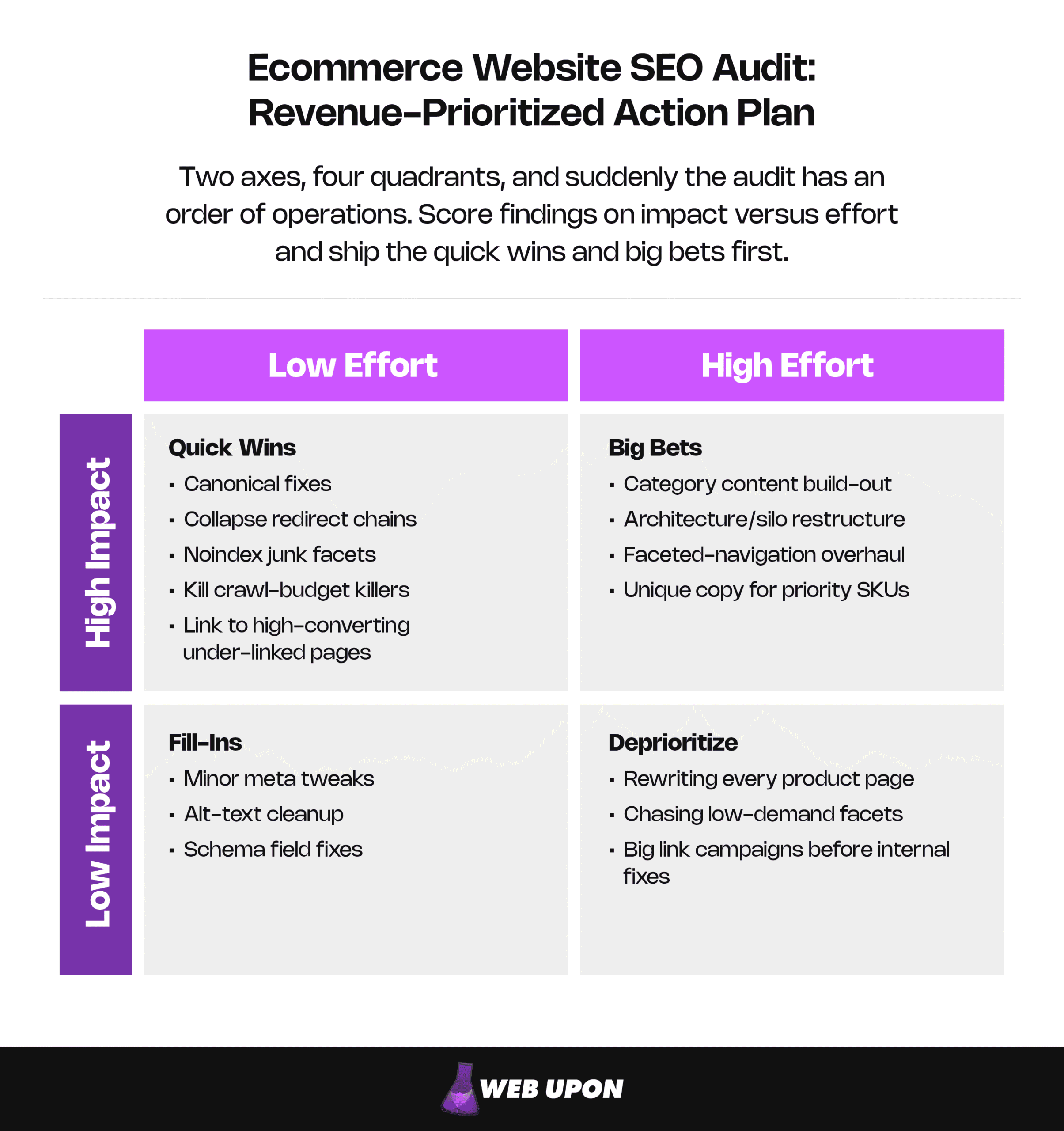
High Impact, Low Effort: Quick Wins — canonical fixes, collapse redirect chains, noindex junk facets, kill crawl-budget killers, link to high-converting under-linked pages.
High Impact, High Effort: Big Bets — category content build-out, architecture/silo restructure, faceted-navigation overhaul, unique copy for priority SKUs.
Low Impact, Low Effort: Fill-Ins — minor meta tweaks, alt-text cleanup, schema field fixes.
Low Impact, High Effort: Deprioritize — rewriting every product page, chasing low-demand facets, big link campaigns before internal fixes.
Crawl-budget fixes, canonical corrections, and category-content gaps land in the high-impact, fast-payback corner over and over — which is why the framework keeps pointing back to them.
Building Your Ecommerce Website SEO Audit Checklist Into an Ongoing Process
A one-time audit decays. Turn it into a quarterly rhythm — Search Console, analytics, and crawl-tool alerts — with a revenue-tied KPI for each category. Steady monitoring of indexing health, Core Web Vitals, and your backlink profile is what stops a competitor from permanently taking the rankings behind your most profitable terms.
| Audit category | KPI to track | Where to measure it | Cadence |
| Crawl & indexing | Share of revenue URLs indexed; crawl hitting money pages | Search Console (Index, Crawl Stats); logs | Quarterly |
| Faceted nav / canonical | Indexed facet/parameter URLs (trending down) | Search Console; crawl | Quarterly |
| Category architecture | Organic sessions and revenue to category pages | Analytics | Monthly |
| Core Web Vitals | % of URLs “Good” by template (field data) | Search Console CWV report | Monthly |
| On-page (category/product) | Organic CTR and conversion on priority pages | Search Console + analytics | Monthly |
| Backlinks / authority | Referring domains to revenue pages; toxic-link count | Backlink data + analytics | Quarterly |
Putting the Audit to Work
A revenue-focused ecommerce website SEO audit protects crawl budget on your most profitable pages, clears the faceted-navigation and canonical sprawl, then strengthens category-page architecture and content, and scores the rest by impact versus effort. That’s the line between an audit that closes tickets and one that turns organic search into a sales engine. Auditing by revenue impact is the whole game. Your next move is simple: run this checklist against your store, drop each finding into a quadrant, and start with the quick wins. If mapping and sequencing it feels like a lot, Web Upon can run the diagnostic and build the revenue-prioritized roadmap for you.