The category page renders. The product page renders. Lighthouse is green. And three thousand URLs your store has ranked for since 2019 are about to answer Google with a 200 and nothing on it. Moving a Magento storefront to a headless React/Next.js frontend silently removes the SEO logic the monolith performed for you, which is why a Magento to headless commerce migration is a full replatform in Google’s eyes even when the team calls it a frontend rebuild. Organic losses of 20–40% are commonly reported when migrations fail to carry those signals across, and because Google can take weeks to swap old URLs for new ones, the drop usually lands after the launch retro.
A Magento storefront can go headless on React/Next.js without losing organic search, and often gain it, if every SEO job the monolith did silently is inventoried, owned, and rebuilt before cutover. Headless does not inherit Magento’s SEO; it deletes it.
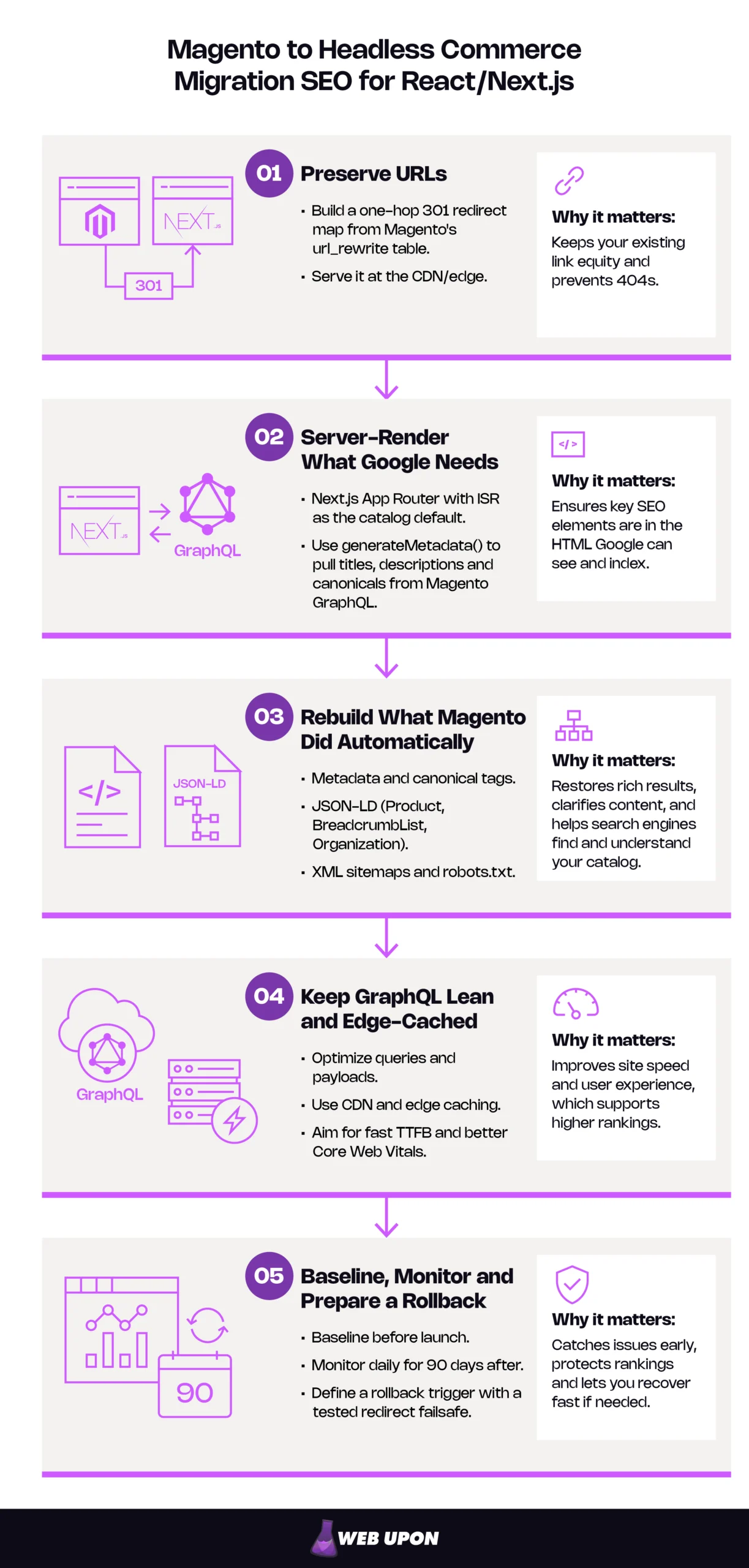
Five moves that protect rankings:
- Preserve URLs, or build a one-hop 301 redirect map from Magento’s url_rewrite table and serve it at the CDN/edge.
- Server-render everything Google needs: Next.js App Router with ISR as the catalog default, and generateMetadata() pulling titles, descriptions, and canonicals from Magento GraphQL.
- Explicitly rebuild what Magento did automatically: metadata, canonical tags, JSON-LD (Product, BreadcrumbList, Organization), XML sitemaps, and robots.txt.
- Keep GraphQL lean and edge-cached so TTFB and Core Web Vitals improve rather than regress.
- Baseline before launch, monitor daily for 90 days after, and define a rollback trigger backed by a tested redirect failsafe.
Key Takeaways
- The risk is missing signals, not headless itself. Lost URLs, canonicals, server-rendered metadata, and sitemaps drive the losses, and each passes visual QA.
- Rendering decides what Google sees. ISR by default, SSR where freshness beats caching, SSG for a small evergreen set, and every SEO-critical element in Server Components.
- Equity lives in url_rewrite. Flatten it to one-hop 301s at the edge and keep them live for at least a year.
- Speed is the upside, measured rather than assumed. Lean, edge-cached GraphQL improves Core Web Vitals, which Google’s ranking systems use but which guarantee nothing alone.
- The first 90 days are a reversible experiment. Baseline first, pair Search Console with logs and RUM, and test the rollback failsafe before launch.
The four sections below cover why the migration is high-stakes, how to choose a rendering strategy, how to preserve equity, and how to measure and recover. All of it starts before cutover, with a professional SEO audit that inventories what Magento is quietly doing on your behalf.
Why Your Magento-to-Headless Migration Is a High-Stakes SEO Event
Magento has been doing a lot for your rankings without being asked, which is why headless Magento SEO starts with treating the Magento headless migration as an audit event.
Understanding the SEO Risk Profile of Replatforming from Magento
Open the url_rewrite table on a store that has been live five years. Tens of thousands of rows: product paths, category paths, 301s from a rebrand nobody remembers. That table powers one of a dozen SEO jobs Magento performs at render time. Move rendering to Next.js and the catalog crosses over via GraphQL. The behavior stays behind.
The 20–40% figure is a symptom of missing signals, not of headless. Losses that size usually trace to a short list: changed URLs without redirects, lost canonicals, metadata that never reached server-rendered HTML, sitemaps pointing at dead paths. Each is preventable. None is prevented by default.
Headless cuts the wire between commerce logic and rendering. In the monolith, the code that knows a filtered category should canonicalize to its parent is the code that renders the page. With a decoupled frontend, that knowledge must be rewritten, and the gaps pass QA because the page looks right to a human. Three that regularly ship:
- A category page loses its canonical. Nobody re-implements alternates.canonical, so every sort order and filter combination becomes a competing indexable URL.
- A layered-navigation URL becomes crawlable. In Magento, ?color=blue&size=m was held in check by canonicals and noindex. In Next.js it is an ordinary route, and Googlebot crawls it by the thousand.
- A CMS page returns a soft 404. GraphQL returns nothing, the app renders “Page not found” with an HTTP 200, and Google classifies the empty page as a soft 404 and excludes it from Search. Real 404s need notFound(), called before any Suspense boundary streams, or the status is locked at 200.
What a failed cutover looks like in Google Search Console: Indexed pages fall week over week. “Not found (404)” spikes as legacy URLs go unanswered. “Crawled – currently not indexed” and “Duplicate without user-selected canonical” climb as filter URLs dilute the catalog. Core Web Vitals turn amber a month later, because that report reads a 28-day field window and describes the past.
Treat the migration as an SEO audit event. The deliverable is not “the new frontend works.” It is “every SEO job Magento performed has a named owner in the new stack.”
SEO tasks handled by Magento versus a headless Next.js storefront:
| SEO job | What Magento did automatically | What the Next.js frontend must now do |
| URL rewrites | url_rewrite resolved every product, category, and CMS path, including historical 301s | Mirror routes in Next.js, export the rewrite table into an edge redirect map |
| Canonical tags | Self-referencing canonicals, filtered pages canonicalized to base category (config-dependent) | Emit alternates.canonical from generateMetadata() with explicit faceted and pagination rules |
| Metadata | meta_title, meta_description rendered from the database | Fetch the same fields over GraphQL, return them from generateMetadata() on the server |
| Layered navigation | Filter URLs canonicalized and/or noindexed by platform or extension | Decide per filter: canonical to parent, noindex,follow, or robots disallow for never-indexed parameters |
| XML sitemaps | Native sitemap module on cron | Programmatic sitemap route handlers pulling live catalog URLs, segmented by type |
| robots.txt | Static file, often extension-managed | Served from the app or edge, never block /_next/static/ or rendering assets |
| Structured data | Product, BreadcrumbList, Organization JSON-LD from theme or extension | Re-implemented explicitly in Server Components from GraphQL fields |
| Pagination | With the category canonical setting on, page 2 onward canonicalized to page one | Self-referencing canonicals per page, never canonical-to-page-one |
| Localization (hreflang) | Store-view URLs, hreflang from theme or extension | Emit alternates.languages from generateMetadata(), each version lists itself and every alternate |
That table is the first deliverable of a proper pre-migration audit and the backbone of any SEO site migration plan. It is almost always longer than the team expected.
The Headless Commerce Architecture Shift and Its Direct SEO Implications
Magento becomes a commerce API. Next.js owns every rendering decision. Magento 2 / Adobe Commerce serves catalog, cart, and CMS data over GraphQL; Next.js decides what HTML exists at which URL, with what metadata. The same principles apply to any React frontend; Next.js is the focus here because of its server-rendering toolkit.
SEO-critical elements must be re-engineered on purpose. Metadata, structured data, canonicals, and pagination stop being side effects of a template. Each is a deliberate implementation, and each can be forgotten. Native SEO modules and extensions stop applying — but their configuration is still in the database, a written record of decisions the business made years ago that now need reproducing.
Googlebot treats JavaScript-rendered pages differently. Google reads the raw HTML first and queues JavaScript rendering for a later pass that can take a few seconds or longer. Content, metadata, and links that exist only after client-side rendering are indexed only after that pass. Many non-Google crawlers do not execute JavaScript at all. Server-rendered HTML is the only version every crawler sees.
Where SEO decisions are made:
- Monolithic Magento: request → web server → Magento router → url_rewrite lookup → template rendering, where metadata, canonical, and JSON-LD are emitted → HTML.
- Headless Next.js: request → CDN/edge, where the redirect map applies → Next.js server, where Server Components fetch GraphQL, generateMetadata() builds the head, JSON-LD renders → HTML, optionally cached by ISR.
In the monolith, SEO happens inside the platform. In headless, it happens in code your team writes, and the first decision that code makes — how each page type is rendered — determines whether Google sees anything at all.
Choosing the Right Next.js Rendering Strategy to Protect and Elevate Search Rankings
SSR, SSG, and ISR each have a best-fit Magento page type, and the App Router primitives around them make server rendering the default for Next.js ecommerce SEO.
Matching SSR, SSG, and ISR to Product Catalog SEO Needs
Server-side rendering (SSR) runs on every request. Use it where freshness beats caching: live inventory views, personalized category listings, flash-sale PDPs. The cost is a TTFB that scales with your slowest GraphQL query.
Static site generation (SSG) renders at build time. Use it for high-traffic, low-change pages — evergreen categories, brand pages, core CMS — where it delivers the fastest first byte to Googlebot. Not for tens of thousands of SKUs; full static builds become slow, fragile, and stale between deploys.
Incremental static regeneration (ISR) is the default for a large Magento catalog. Pages serve statically and regenerate in the background when their revalidation window expires or Magento reports a change. Crawlers get static-speed HTML; price, stock, and metadata stay current enough to trust.
Match revalidation windows to update frequency. Long intervals feed crawlers stale prices and metadata, eroding rich-result eligibility. Rules of thumb: PDPs with frequent price or stock changes, minutes; evergreen categories, hours; CMS pages, daily. Treat the window as a backstop. Wire Magento’s product-save, price-index, and stock-index events to a webhook that triggers on-demand revalidation for the affected paths; each page re-renders on its next request. On Magento Open Source, which Adobe I/O Events does not support, a custom observer module fires the webhook. Two cautions: stale-while-revalidate means the first request after expiry gets the old page, and fallback rendering under dynamicParams must return a real 404 for unknown paths, not a 200 shell, as Google asks for empty filter combinations.
SSR vs SSG vs ISR comparison for Magento headless migration SEO:
| Rendering mode | Best-fit Magento page types | SEO benefit | Risk if misapplied | Suggested revalidation |
| SSR | Live inventory pages, personalized categories, flash-sale PDPs | Always-current metadata and price | High TTFB under load, every crawl hits GraphQL | n/a (per request) |
| SSG | Evergreen categories, brand pages, core CMS | Fastest TTFB for Googlebot | Stale between builds, impractical for large catalogs | Rebuild on deploy |
| ISR | Standard PDPs, most categories, most CMS | Static speed with controlled freshness | Stale content if windows are long or webhooks missing | Minutes / hours / daily, plus on-demand |
Leveraging Next.js App Router and Server Components for SEO-First Rendering
The App Router, introduced in v13 and still the default in Next.js 16.3, makes server rendering the baseline. React Server Components (RSC) render to HTML on the server, so the metadata, Open Graph tags, and structured data they emit are in the first byte Googlebot reads.
Keep SEO-critical content out of Client Components. Everything under “use client” hydrates in the browser. Titles, canonicals, JSON-LD, primary product copy, and internal links that live there reach Google only after the rendering wave, if then.
Use generateMetadata() for per-page metadata from Magento GraphQL:
export async function generateMetadata({ params }) {
const { products } = await magentoQuery(PRODUCT_SEO_FRAGMENT, { urlKey: (await params).slug });
const p = products.items[0];
if (!p) return {};
return {
title: p.meta_title ?? p.name,
description: p.meta_description,
alternates: { canonical: `${SITE_URL}/${p.url_key}${URL_SUFFIX}` },
};
}
Pages Router note. The Head component gets the same result, but its values must come from getServerSideProps or getStaticProps. Populate it from a client-side fetch and every risk above returns.
Belongs in a Server Component:
- generateMetadata() output
- JSON-LD scripts
- Product name, description, price, availability, primary image
- Category listings and internal links
- Breadcrumb trail
Safe in a Client Component:
- Mini-cart and add-to-cart state
- Swatch and variant selectors, provided the default variant’s price and availability are server-rendered
- Filter interactions, with the initial result set server-rendered
- Reviews, wishlists, personalization
Optimizing GraphQL Fetching Strategies to Prevent Crawl Delays
Every millisecond Magento spends resolving a query is a millisecond Google waits for the first byte. A classic failure is the “everything” PDP query: one request pulls the full configurable-product tree, every attribute, the whole media gallery, and related products. First render needs only a name, metadata, price, availability, and one hero image. Define an SEO fragment per page type that fetches only name, meta_title, meta_description, url_key, price, stock status, and the primary image. Load the rest after first paint.
Use persisted queries and GET where you can. Magento’s full-page cache, and any Varnish tier in front of it, caches GraphQL responses only for GET requests; POST goes straight through. Persisted queries send a hash instead of the query body, keeping GET URLs short enough to cache; on Magento that takes an add-on module or a Next.js proxy that maps hashes to GET queries. Batch what remains so a render is one or two requests, not a dozen, but never with cart or customer queries: one uncached query bypasses the cache for the whole call.
Cache rendered HTML at the edge for static and ISR pages so crawlers get a response without Magento being involved. Keep Magento’s GraphQL endpoint behind the Next.js server: reads are proxied and cached, and no mutation is exposed unauthenticated. That is a security posture, but also an SEO one: an exposed, uncached endpoint is one of the fastest ways to let a crawl take Magento down.
Four GraphQL changes that reduce TTFB, in typical order of impact:
- Serve HTML from ISR and edge cache so most crawls never reach GraphQL.
- Replace monolithic page queries with per-page-type SEO fragments.
- Switch cacheable reads to persisted GET queries so Magento’s cache layers apply.
- Batch remaining round trips and defer non-critical data until after first render.
Rendering correctly only matters if Google can find the pages at the URLs it already trusts. That is the next section’s job.
Preserving and Rebuilding SEO Equity During a Magento to Headless Commerce Migration
The operational Magento migration SEO checklist covers URLs, redirects, metadata, schema, sitemaps, and robots.txt: the work that most directly prevents a launch-week loss.
Preserving URL Structure and Designing the Redirect Architecture
Audit and map Magento’s URL structures before cutover. Category and product slugs, the .html suffix, category-path product URLs, and layered-navigation parameters need enumerating, not assuming.
Keep existing URL patterns in Next.js routing wherever you can. A URL that does not change needs no redirect and loses nothing. Change URLs without 301s and the link equity goes with them.
Use url_rewrite as the source of truth. It holds request_path → target_path for every entity in every store view, plus redirect_type rows recording historical 301s from old slugs and earlier migrations. Those rows are the ones teams forget; the old URLs still have backlinks and still sit in the index. Include them, flatten every chain to one hop, and check the “use categories path for product URLs” setting. If it was on, a product may have several indexed paths, and one must be the canonical target.
Implement 301s at the CDN/edge, not in the application. Edge redirects resolve before a request reaches Next.js; application redirects add a server round trip to every legacy URL. Never exceed one hop. Each hop adds latency, spends crawl budget, and raises the odds a crawler stops following. Google interprets server-side redirects most reliably and advises redirecting straight to the final destination: Googlebot follows up to 10 hops, but each adds latency. Chains that keep growing end up in Search Console as a “Redirect error“.
Decide the .html suffix question deliberately. Keeping it in Next.js routing is the lowest-risk path: no redirects, no equity movement. Dropping it demands a complete redirect layer over every product and category URL, and a team willing to watch the results for 90 days.
Six-step 301 redirect map process for a Magento headless migration:
- Export the url_rewrite table for every store view, including redirect_type rows and historical rewrites.
- Deduplicate and resolve existing chains to their final destination.
- Map every request path to a Next.js route or a single redirect target.
- Crawl the map against staging; verify status codes and destinations.
- Deploy the map at the CDN/edge.
- Re-crawl after launch and reconcile against Search Console’s Pages report.
Redirect rules:
- One hop maximum
- Edge layer, not application
- 301, not 302
- Preserve query strings only where they carried ranking value
- Campaign parameters can go, indexed pagination and filter parameters cannot
- Keep redirects live for at least a year
Re-Implementing Metadata, Canonical Tags, and Structured Data
Magento already stores the metadata. Extract it via GraphQL. Every product and category carries meta_title, meta_description, url_key, and canonical_url, though category canonical_url returns only when the category canonical setting is on. The values do not need rewriting. They need fetching and rendering on the server, through generateMetadata() (App Router) or Head (Pages Router).
Rebuild Product, BreadcrumbList, and Organization schema explicitly. None of it is inherited. Product schema should carry the properties Google’s merchant listing guidance documents — name, image, description, sku, brand, and offers with price, priceCurrency, and availability — and each maps cleanly to a GraphQL field. Google wants that markup in the initial HTML; JavaScript-generated markup can make Shopping crawls less frequent and less reliable.
Server-render canonicals. A canonical injected by client-side JavaScript is seen only after rendering, and Google calls HTML the best place to set it. The rules for the page types that do the most damage:
- Faceted category URLs canonicalize to the unfiltered category. Where a filter combination has real search demand — a “blue running shoes” page — promote it to a genuine route with its own metadata.
- Paginated category pages carry self-referencing canonicals: /shoes?p=2 canonicalizes to itself, not to page one. Canonical-to-page-one hides deep products from crawl.
- Filter URLs already indexed are retired with noindex,follow, not a robots.txt block. Google cannot see a directive it is forbidden to fetch.
Adobe Commerce as a Cloud Service replaces the core products and categories queries with service-based equivalents, so these paths apply to Open Source and PaaS.
| Schema type | Page type it belongs on | Magento GraphQL fields that populate it |
| Product | Product detail pages | name, description.html, sku, image.url, price_range.minimum_price.final_price, stock_status, brand (custom attribute) |
| BreadcrumbList | Products and categories | categories.breadcrumbs.category_name, category_url_path, url_key |
| Organization | Site-wide (root layout) | store_config, logo asset, social profile URLs |
Configuring Crawlability, Sitemaps, and Robots.txt
Generate sitemaps programmatically. Magento’s native sitemap module no longer describes the live site. Build them from a route handler or sitemap library that pulls current product, category, and CMS URLs from GraphQL, and segment by content type, submitting each segment separately in Search Console. That is how you learn products are fine and categories are not.
Exclude what should not be indexed, and keep lastmod honest. Omit permanently out-of-stock or disabled products, non-canonical URLs, and filter variants. Drive product lastmod from Magento’s updated_at and omit it on categories, which Google allows for aggregate pages; Google reads it as the last significant change and stops trusting values that don’t match reality, so stamping every URL with the generation time throws the signal away.
Configure robots.txt deliberately, and protect staging with authentication or noindex headers, not robots.txt alone. A robots-blocked URL can still be indexed if something links to it, and an indexed staging domain is a duplicate of your entire catalog.
Block in robots.txt:
- Never-indexed filter parameters (sort, order, limit, mode)
- Internal search result paths
- Cart, checkout, and account routes
- Preview and draft endpoints
Never block in robots.txt:
- /_next/static/ and other rendering assets
- Image optimization routes
- API routes the render depends on
- Any URL you want de-indexed (use noindex, a blocked URL cannot be de-indexed)
This is the point where most teams find gaps they cannot close alone before cutover. An ecommerce website SEO audit surfaces them before launch instead of after.
With equity preserved, the migration’s upside — a storefront that is actually faster — becomes a ranking lever. Speed has to be measured, not assumed.
Core Web Vitals Optimization and Post-Migration SEO Monitoring
Measurable Core Web Vitals improvement is the migration’s ranking upside, a signal rather than a guarantee, and a monitoring and rollback framework is what makes headless commerce SEO defensible.
Improving Core Web Vitals Scores in a Next.js Headless Storefront
Google’s current “good” thresholds at the 75th percentile of real users: Largest Contentful Paint (LCP) ≤ 2.5 s, Interaction to Next Paint (INP) ≤ 200 ms, Cumulative Layout Shift (CLS) ≤ 0.1. Time to First Byte (TTFB) is not a Core Web Vital, but it is the input most directly under your control.
LCP. Load the hero product image through the Next.js Image component with fetchPriority=”high” or loading=”eager” so it is never lazy-loaded; priority is deprecated as of Next.js 16. Serve AVIF or WebP from the CDN at the rendered size.
CLS. Reserve explicit dimensions for every product image and every dynamically loaded region — mini-cart drawer, promo banners, reviews — so hydration and late data cannot shift the layout.
INP. Ship less JavaScript: dynamic imports, code splitting, and as much as possible in Server Components, which ship none. Hydration and script evaluation are common INP causes, and RSC attacks both directly. Defer non-critical third-party scripts. The usual ecommerce culprits are the mini-cart, layered-nav filter handlers, and tag-manager scripts firing on interaction. Instrument those three first.
TTFB. ISR and edge caching are the levers. For the URLs Googlebot crawls most, edge-cached pages should return the first byte well under Google’s 800 ms “good” guidance, often a small fraction of it.
Core Web Vitals targets and Next.js fixes for a headless commerce storefront:
| Metric | What Google measures | Common headless failure | Next.js fix | Target |
| LCP | Time until the largest visible element renders | Hero image lazy-loaded or oversized | <Image fetchPriority=”high”>; CDN AVIF/WebP at rendered size | ≤ 2.5 s |
| CLS | Unexpected layout shift during load | Images and drawers without reserved space | Explicit width/height, reserved containers | ≤ 0.1 |
| INP | Delay from interaction to next paint | Heavy hydration, filter and cart handlers on the main thread | Server Components, dynamic imports, deferred third-party scripts | ≤ 200 ms |
| TTFB | Time to first byte of HTML | Uncached SSR hitting slow GraphQL | ISR + edge cache, SEO fragments | Well under 800 ms at p75 |
Building a Post-Migration SEO Monitoring and Recovery Framework
Establish the baseline before cutover: crawl coverage, indexed URL count, organic traffic by page type, and Core Web Vitals scores from Search Console and analytics. Without it there is no way to prove a regression or a gain.
Verify Search Console ownership before launch. A new property is only needed if the domain changes, or the protocol changes on a URL-prefix property. Otherwise, confirm the existing property still validates against the Next.js deployment; verification files and DNS records are easy casualties of a replatform. Then watch crawl errors, indexing status, and coverage daily for 90 days.
Run log file analysis. Confirm Googlebot is getting 200s on catalog pages and 301s on legacy URLs, not 5xx responses from GraphQL timeouts. Logs show what Google received; Search Console shows what it concluded, days later.
Deploy real-user monitoring (RUM). Search Console’s Core Web Vitals report reads a 28-day rolling field dataset, so a regression from a component release surfaces there a month late. RUM shows it within hours — the only cadence fast enough to catch a bad React release before it becomes a ranking signal.
Define a rollback trigger. For example, a week-over-week drop in organic sessions of more than 15%, adjusted for seasonality against the baseline, activates the redirect failsafe and escalates to a full audit. If you want a team that has done it before to run the baseline, the failsafe test, and the 90-day monitoring, contact Web Upon.
Build and test the redirect failsafe before launch. It is the ability to route traffic back to the Magento frontend, or a frozen static snapshot of it, behind the same URLs within hours. A failsafe designed on the day it is needed is not a failsafe.
Monitoring cadence: daily for weeks 1–2, three times weekly through week 6, weekly through day 90.
Post-migration SEO monitoring cadence and rollback thresholds:
| Timeframe | What to check | Source | Example threshold that triggers action |
| Daily, weeks 1–2 | Googlebot status codes in logs, Search Console Pages report, organic sessions vs. baseline | Log analysis, Search Console, analytics | Any 5xx spike, 404s above 1% of crawled URLs, sessions −15% WoW |
| 3×/week, weeks 3–6 | Indexed URLs by sitemap segment, redirect map coverage, RUM Core Web Vitals | Search Console, crawler, RUM | Indexed count falling, any metric crossing “needs improvement” at p75 |
| Weekly, through day 90 | Rankings for top category and product terms, field CWV, crawl stats | Search Console, rank tracking | Sustained ranking loss on top-20 URLs, field CWV degrading |
| Breach | Activate the redirect failsafe, open a full audit | Escalate to a strategic SEO team | — |
The framework only works if the baseline and the audit were done before cutover, which is where this whole effort begins.
Turning a Risky Magento-to-Headless Migration into a Ranking Advantage
A Magento to headless commerce migration protects rankings when the team does five things: preserves URLs or maps them in one hop at the edge; server-renders every signal Google reads through the App Router and generateMetadata(); deliberately rebuilds the metadata, canonicals, structured data, sitemaps, and robots rules Magento used to emit for free; keeps GraphQL lean enough that the new storefront is measurably faster; and treats the 90 days after launch as a monitored, reversible experiment rather than a finished project.
The highest-leverage moment is before cutover. The audit, the redirect map, and the baseline are cheap in advance and expensive to reconstruct afterward. Do that work and the opening scenario never happens: Lighthouse is still green, and those three thousand URLs still answer Google with the pages it ranked.
Two ways forward: run the pre-migration audit internally with this article as the checklist, or bring in Web Upon ecommerce SEO services team to run it alongside your engineers (if you are weighing outside help, how to hire an ecommerce SEO consultant and what to expect describes what that engagement should look like). Either way, do it before the cutover date is set. When you are ready, contact our team.


