Google’s own documentation distills site migration into a handful of non-negotiables: map every indexed URL to its new destination with a 301 redirect. Submit an updated XML sitemap through Search Console. Use the Change of Address tool for domain moves. Keep redirects active for a minimum of 180 days. Monitor indexing and crawl health daily for the first two weeks, then weekly for months. Expect ranking fluctuations — they’re normal, and Google says so.
That’s the Google site migration protocol. What follows is the operational detail behind each step — sourced directly from Google’s Search Central documentation, their developer guides, and their publicly stated positions on how migrations affect search visibility. This article covers what Google considers a migration, how to plan one using their framework, what to execute on launch day, how to monitor recovery, the mistakes they explicitly warn against, and the tools they’ve built for this process.
Key Takeaways
- Map every URL, redirect with 301s. Google’s migration protocol starts with a 1:1 redirect map covering every indexed URL. Both 301 and 302 redirects pass PageRank, but 301s signal permanence and drive canonical transfer.
- Use the Change of Address tool for domain moves. It tells Google to prioritize crawling and indexing your new site and forwards signals for 180 days.
- Keep redirects active for at least 180 days. Longer is better, and there’s no penalty for leaving 301s in place permanently.
- Expect ranking fluctuations. Temporary fluctuations are normal during reprocessing. A medium-sized site can take a few weeks; larger sites take longer.
- Monitor daily in Search Console for two weeks, then weekly for months. The Pages report, URL Inspection tool, and Crawl Stats are your primary diagnostic instruments.
- Isolate the migration. Don’t combine a domain move with a redesign, content overhaul, or navigation restructure — stacking changes makes diagnosis nearly impossible.
What Google Considers a “Site Migration” (And Why Their Framework Matters)
Google doesn’t treat all migrations the same. Search Central defines specific migration types, each carrying different ranking implications — which means the steps you need depend on which type you’re executing. Getting the classification wrong is where migration plans start to unravel.
The Four Migration Types Google Recognizes
| Migration Type | What Changes | Google-Specific Considerations | Risk Level |
| Domain change | The hostname (e.g., example.com → example.org) | Requires Change of Address tool in Search Console | High |
| URL structure change | Path and directory architecture | 1:1 redirect mapping critical; no Change of Address needed | Medium-High |
| Protocol change | HTTP → HTTPS | Google treats this as a URL change; submit both properties in Search Console | Medium |
| CMS migration | Backend platform swap | Risk depends entirely on whether URLs change; often combines with URL structure change | Variable |
The distinction matters more than it appears. A CMS migration that preserves every URL is a fundamentally different operation from one that restructures them — even though both involve swapping the platform underneath. The first carries minimal ranking risk. The second is effectively a URL structure migration wearing a CMS migration’s label, and it demands the full redirect protocol.
Most real-world migrations combine types. A company rebranding to a new domain while moving to a new CMS is executing a domain change and a CMS migration, and likely a URL restructure as well. Each layer compounds risk and the number of steps that apply. Before building a plan, classify your migration honestly — and plan for the highest-risk type in the combination. For a deeper tactical walkthrough of each migration type, see Web Upon’s website migration checklist.
Why Google’s Recommendations Deserve More Weight Than Industry Folklore
Google controls the index. Their documentation is the closest thing to a primary source for how migrations affect rankings — and it has evolved significantly. Advice that was reasonable in 2018 may be outdated or actively wrong in 2026.
Consider the 301-vs.-302 debate. For years, the SEO industry treated 302 redirects as a ranking liability, insisting they “leaked” link equity. The reason to prefer 301s is that they signal permanence, which affects canonical URL selection — not because 302s lose link value. That single misconception has caused migration teams to waste troubleshooting hours chasing a problem that doesn’t exist, while missing the actual canonicalization issue underneath.
This article uses Google’s current documentation as the baseline. Where industry practice diverges from what Google has stated, we flag it. Understanding site migration best practices starts with getting the source right.
Pre-Migration: Google’s Planning Requirements
Everything in this section happens before anyone touches the production server. The planning you do here determines whether the migration is a controlled operation or an emergency.
Audit Your Current Site Through Google’s Lens
Start in Google Search Console — not a third-party crawler. Search Console shows what Google has actually indexed, which is the only dataset that matters for redirect planning. Third-party tools show what’s crawlable; they can’t tell you what Google has chosen to include in its index.
Export your full list of indexed URLs from the Pages report (formerly Index Coverage). Then pull your top-performing pages from the Performance report — sorted by clicks, impressions, and average position. These are the pages where redirect accuracy is non-negotiable. A missed redirect on a page driving 50 organic visits a day costs you 50 visits a day, compounding, until it’s fixed.
Beyond Search Console, crawl the existing site to capture every URL — including those Google may not have indexed: orphaned pages, parameter variations, paginated sequences. Document current canonical tags, hreflang attributes (if applicable), and structured data implementations. All of these need to either carry over correctly or be deliberately retired.
Finally, clean up pre-existing problems: redirect chains, crawl errors, orphaned pages. Resolving these before the migration prevents them from compounding with new issues during the transition.
| Audit Element | Where to Find It | Why It Matters for Migration |
| Indexed URLs | GSC → Pages report | Your redirect map must cover every indexed URL |
| Top pages by traffic | GSC → Performance report | These pages need priority QA on redirects |
| Existing redirects | Server config / crawl tool | Avoid stacking new redirects on old chains |
| Canonical tags | Source code / crawl tool | Must be updated to point to new URLs |
| Structured data | GSC → Enhancements | Schema must reference new URLs post-migration |
If you’re launching a new site with SEO considerations beyond migration, Web Upon’s new website SEO checklist covers the broader launch requirements.
Build Your Redirect Map Before Anything Else
The redirect map is the most consequential deliverable in a migration. It’s a spreadsheet — your URL redirect mapping document — matching every old URL to its new destination, one-to-one wherever possible.
Google’s documentation is explicit on what not to do: redirecting all old URLs to the new homepage collapses topical signals into a single page. Google’s Search Central blog has called this out directly as a mistake that denies users a consistent experience. If a page about “industrial widgets” redirects to your homepage, Google loses the signal that your site had authoritative content about industrial widgets. That topical equity doesn’t transfer — it evaporates.
Here’s what a redirect map typically looks like in practice:
| Old URL | New URL | HTTP Status | Notes |
| /blog/old-post-title/ | /blog/new-post-title/ | 301 | Direct content match |
| /services/legacy-page/ | /solutions/updated-page/ | 301 | Content consolidated |
| /temp-landing-page/ | — | 410 | No equivalent; intentional removal |
Use 301 redirects for permanent changes. Although both 301 and 302 redirects pass PageRank, 301s are preferred because they signal permanence. That permanence signal drives canonicalization, telling Google to treat the new URL as the definitive version. A 302 tells Google the redirect is temporary, which may cause the old URL to persist in the index longer than you want.
For URLs with no logical new destination, use a 404 or 410 rather than forcing a redirect. Google has stated they treat 404 and 410 similarly for indexing purposes, so either is appropriate for intentional removal.
One operational trap: regex-based redirects. They’re powerful for handling large URL sets, but greedy patterns and order-of-operations issues in server configs can produce unintended matches — redirecting URLs you never meant to touch. Always validate regex rules against a full crawl of your existing URLs before deployment.
For a redirect map template you can work from directly, see Web Upon’s migration checklist template.
Set Up Your Staging Environment and Testing Protocol
Deploy the new site in a staging environment that mirrors production — same server configuration, same CDN setup, same redirect rules.
Block staging from Google’s index using a combination of authentication (HTTP basic auth or IP restriction), robots.txt disallow directives, and noindex meta tags. Belt and suspenders. A staging site that accidentally gets indexed creates duplicate content and redirect confusion before the migration even starts.
In staging, test everything that affects how Google sees the site:
- Redirects: Crawl the full set of old URLs and confirm each returns a 301 to the correct new destination. Check for chains and loops.
- Canonical tags: Verify every page’s canonical points to the correct new URL — not the staging URL, not the old URL.
- XML sitemap: Confirm it contains only new production URLs, not staging URLs.
- Structured data: Validate that schema markup references new URLs. Use Google’s Rich Results Test against staging pages.
- Internal links: Every internal link should resolve to the new URL directly — no redirects needed.
This is the last checkpoint before the migration becomes real. Issues caught in staging are cheap to fix. The same issues discovered post-launch cost traffic.
Align Your Team and Set a Migration Timeline
Everyone needs to know who owns redirect implementation, who monitors Search Console post-launch, who handles rollback if something breaks, and who communicates status to leadership. Misalignment on any of these during a live migration creates delays that compound with every hour.
Avoid migrating during peak traffic periods. If December is your highest-traffic month, don’t launch a migration on November 28th. Google’s documentation doesn’t prescribe a specific timeline, but operational experience suggests two to four weeks for planning and testing on a mid-size site — longer for complex URL structures or international properties.
Establish a rollback plan before launch. Know exactly what “undo” looks like, who authorizes it, and how fast it can execute.
Need help building your redirect map or auditing your current site? Web Upon’s migration specialists can help — get a migration risk assessment.
Technical Execution: What Google Says to Get Right on Launch Day
Every step here happens on or immediately after go-live. This is the sequential protocol for the migration itself.
Implement and Validate Your Redirects
Deploy 301 redirects from every old URL to its mapped new destination. Then validate — don’t assume.
Crawl the full set of old URLs and confirm each returns a single-hop 301 to the correct new URL. Check for redirect chains (old URL → intermediate URL → final URL) and collapse them to single hops. Googlebot can follow up to 10 hops in a redirect chain, but Google recommends keeping chains to fewer than five, ideally no more than three. Each additional hop slows crawling and dilutes signal clarity. Also check for redirect loops — these prevent both users and Googlebot from reaching the page entirely.
Server-level redirects — .htaccess (Apache), Nginx config, or edge rules through a CDN — are preferred over application-level redirects. Google recommends server-side permanent redirects such as 301 and 308 when technically possible. They execute faster, run before the application stack loads, and survive CMS updates and plugin changes.
Google’s documentation states: keep redirects in place for at least 180 days. In practice, keeping them active indefinitely costs almost nothing and protects against long-tail backlinks that may take months to be recrawled. There’s no penalty for leaving a working 301 in place permanently.
Submit Updated Sitemaps in Google Search Console
- Verify the new domain or property in Search Console (if domain change).
- Submit an XML sitemap containing only the new URLs.
- Keep the old sitemap temporarily accessible — Google uses it to discover old URLs and follow redirects, which accelerates processing.
- For domain changes: use the Change of Address tool. This is Google’s explicit recommendation for domain moves, signaling the move is intentional.
- Monitor indexing status of new URLs in the Pages report.
The Change of Address tool applies only to domain-level changes. It won’t work for URL restructures within the same domain, protocol changes, or CMS swaps that preserve the hostname. Search Console will reject the submission if it doesn’t apply. When filed, the tool tells Google to prioritize crawling and indexing the new site and forwards signals from the old site for 180 days.
Verify Robots.txt and Crawl Access
Confirm the new site’s robots.txt doesn’t block Googlebot from critical pages, CSS, JavaScript, or images. Google renders pages using a recent version of Chrome to evaluate content that relies on JavaScript — blocking render-critical resources prevents proper indexing.
The most common catastrophic mistake here: deploying a staging robots.txt to production. A staging file typically contains Disallow: /, which blocks all crawling. If this ships live, Google can’t index a single page. Rankings don’t dip — they vanish.
Use Search Console’s robots.txt Tester to validate the production file. Also check for noindex meta tags or X-Robots-Tag headers left from staging. Either prevents indexing just as effectively as a robots.txt block.
Manage Crawl Budget During the Transition
Crawl budget — defined by Google as the set of URLs that Googlebot can and wants to crawl — becomes more relevant during a migration. Google needs to process both old URLs (to discover redirects) and new URLs (to index fresh content), temporarily increasing crawl demand.
For most mid-market sites, crawl budget is rarely a practical constraint under normal conditions. Google handles a few thousand pages efficiently. But during a migration with tens of thousands of URLs changing simultaneously, the queue can back up, slowing how quickly Google processes the transition.
Monitor crawl activity through Search Console (Settings → Crawl Stats). If crawl rate drops or stalls, the migration is processing slower than expected. Google’s documentation notes that site-wide events like migrations may automatically trigger increased crawl demand to reindex content under new URLs. However, you cannot manually request a crawl rate increase, only a reduction if crawling is overwhelming your servers.
One rule above all: avoid other major changes simultaneously. A redesign, a large content publish, or a navigation restructure launched alongside a migration makes it nearly impossible to diagnose what caused any subsequent traffic change. Isolate the migration. Let Google finish processing it before introducing new variables.
Post-Migration Monitoring: Google’s Recommended Checks
The migration doesn’t end at launch. What you do in the following weeks determines whether the migration holds or issues silently compound. This is where post-migration SEO monitoring converts anxiety into structured diagnosis.
Monitor Indexing and Crawl Health in Search Console
Check the Pages report daily for the first two weeks. You’re watching for two simultaneous movements: new URLs appearing in the “Indexed” count, and old URLs declining. Both should be happening at the same time.
Spot-check critical pages with the URL Inspection tool — your top traffic drivers, your highest-converting landing pages. Confirm each is indexed under the new URL and that Google has selected the new URL as the canonical.
Watch for spikes in the “Excluded” category. A sudden increase often signals redirect issues (old URLs not properly redirecting) or canonicalization conflicts (Google choosing the old URL over the new one despite the redirect).
Monitor Crawl Stats to confirm Googlebot is actively discovering new URLs. A drop in crawl activity after launch may indicate access problems — check robots.txt, server response times, and DNS configuration.
| Timeframe | What to Monitor | Where | Red Flags |
| Day 1–3 | Redirect accuracy, server errors | GSC + server logs | 5xx errors, redirect loops |
| Week 1–2 | Indexing of new URLs, exclusion spikes | GSC → Pages report | Large “Excluded” increases |
| Week 2–4 | Ranking stabilization, crawl rate | GSC → Performance + Crawl Stats | Sustained traffic drop > 20% |
| Month 2–6 | Full index transition, old URL deindexing | GSC → URL Inspection | Old URLs still appearing in SERPs |
The Post-Migration Traffic Dip — And When to Worry
Google’s documentation acknowledges that ranking fluctuations are normal after a migration — and notes that a medium-sized site can take a few weeks for most pages to move in the index, with larger sites taking longer. Set this expectation with stakeholders before launch — not after the traffic graph dips and the CMO starts asking questions.
In our experience, a temporary dip of 10–20% in organic traffic during the first two to four weeks falls within normal range for a properly executed migration. Google is reprocessing signals: recrawling URLs, revalidating redirects, reassigning canonical status, re-evaluating page quality against the new URL structure. Rankings will fluctuate while that work completes.
If the dip exceeds 30% or persists beyond four to six weeks, something is likely wrong. The most common culprits: broken redirects Google can’t follow, canonicalization conflicts where Google prefers the old URL, or pages that were indexed under the old structure but have no equivalent in the new one. Start diagnostics with the URL Inspection tool on the pages showing the largest traffic losses.
During the stabilization period: don’t panic-publish new content or make structural changes. Let Google finish processing the migration before introducing additional variables. Changes made during this window create noise that makes diagnosis harder.
Protect and Reclaim Your Backlink Equity
Redirects preserve backlink equity — the primary job is ensuring those redirects are in place and functional for every URL that has earned external links.
But redirects are passive. For your highest-authority backlinks — links from major publications, industry associations, government sites — direct outreach to update the linking URL is worth the effort. A direct link is always cleaner than a redirect, and some linking sites won’t update their crawl caches for months.
Check for backlinks pointing to old URLs that return 404 errors. These are gaps in your redirect map — equity being actively lost. Monitor referring domain counts in the weeks following migration; a significant drop usually indicates redirect coverage gaps, not that sites have removed their links.
Web Upon’s domain migration SEO services cover enterprise-scale backlink equity management.
The Most Common Migration Mistakes (And What Google Says About Each)
Every mistake below follows the same pattern: it looks like a shortcut during implementation and costs far more to fix after launch than it would have cost to prevent.
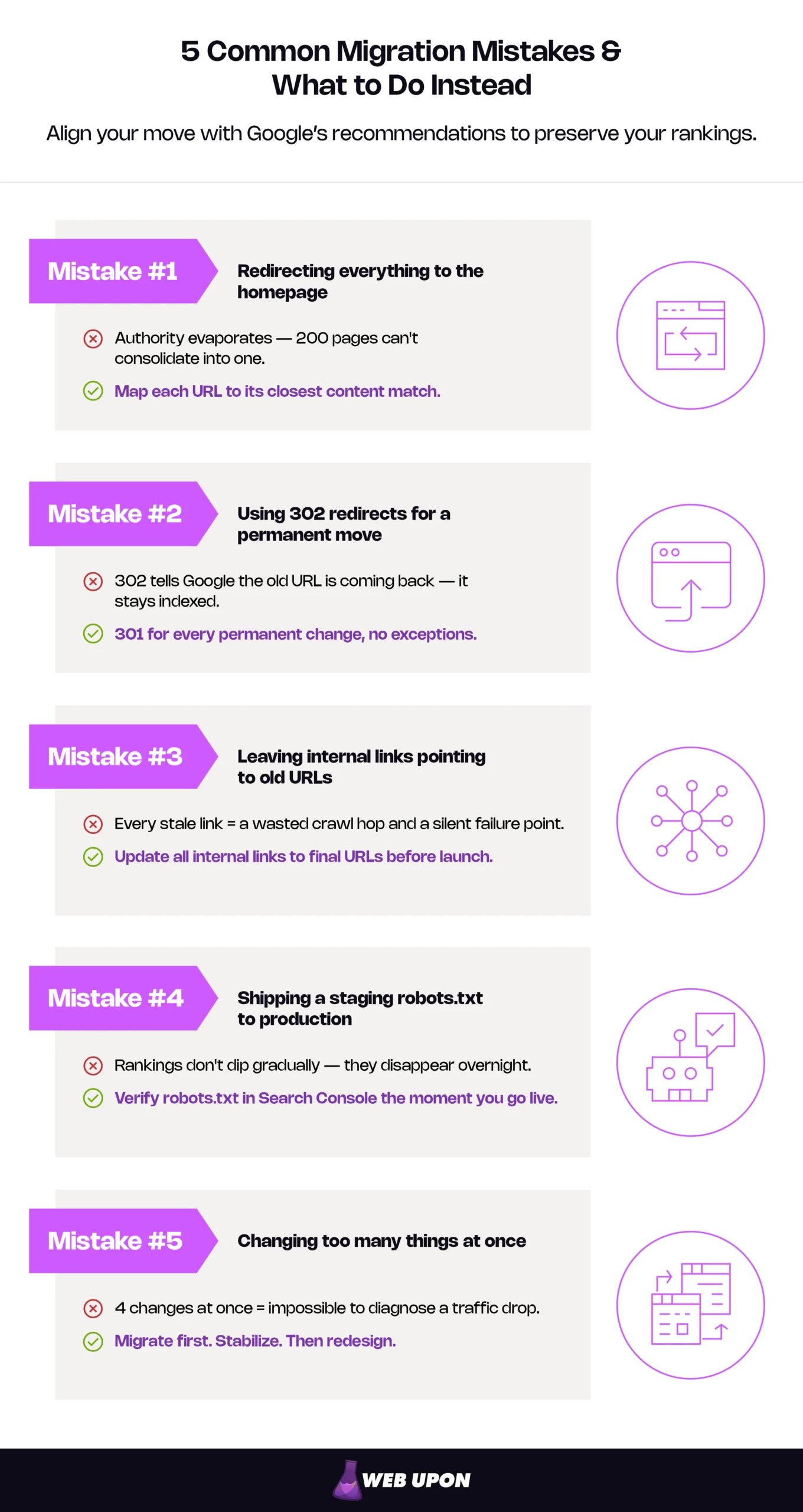
Redirecting Everything to the Homepage
The mistake: Sending all old URLs to the new homepage instead of mapping each to its closest equivalent.
What Google says: Their documentation explicitly flags this. When every old URL resolves to a single page, topical signals collapse rather than transfer. The homepage doesn’t inherit the authority of 200 individual pages — the topical relevance those pages carried simply disappears.
Do this instead: Map every old URL to its closest content match. Where no equivalent exists, a 404 or 410 is more appropriate than a homepage redirect.
Using the Wrong Redirect Type (The 301 vs. 302 Nuance)
The mistake: Using 302 (temporary) redirects for permanent moves, or agonizing over 301 vs. 302 for link equity reasons.
What Google says: Both pass PageRank. The difference is the permanence signal. A 301 triggers canonical transfer to the new URL. A 302 tells Google the redirect is temporary, which may cause the old URL to persist in the index — Google expects the original to come back.
Do this instead: 301 for every permanent change. Reserve 302 exclusively for genuinely temporary redirects — a maintenance page, a seasonal promotion, a move you plan to reverse. Migration is permanent. Use 301.
Forgetting to Update Internal Links
The mistake: Launching the new site with internal links still pointing to old URLs, relying on redirects to resolve them.
What Google says: Every internal link to an old URL creates an unnecessary redirect hop — slowing page load, wasting crawl budget, and introducing a failure point. If the redirect breaks, the internal link becomes a dead end.
Do this instead: Crawl the new site before launch. Update every internal link to the final destination URL. No redirect should be needed for internal navigation.
Blocking the New Site from Crawling After Launch
The mistake: Shipping a staging robots.txt or noindex directive to production.
What Google says: Google cannot index what it cannot crawl. A Disallow: / or blanket noindex tag will cause rankings to disappear — not gradually, but as soon as Google processes the directive.
Do this instead: Add robots.txt and noindex validation to the pre-launch checklist. Verify with Search Console’s robots.txt Tester immediately after go-live. Spot-check critical pages with the URL Inspection tool.
Making Too Many Changes at Once
The mistake: Combining a domain move, URL restructure, redesign, and content overhaul into a single launch.
What Google says: Isolate the migration. When multiple major changes happen simultaneously, diagnosing a traffic drop is nearly impossible — was it the redirects, the new URLs, the design, or the content?
Do this instead: Migrate first. Stabilize. Then iterate on design and content once rankings have recovered. Each variable needs its own observation window.
Avoiding these mistakes is easier with an experienced migration partner. Talk to Web Upon’s migration team.
The Google Tools Behind Every Migration
Google has built specific tools into Search Console and their broader ecosystem that serve defined roles during a migration. Understanding how to use Google Search Console for migration management turns reactive troubleshooting into structured oversight. Here’s which tool to use, when, and why.
Google Search Console: Your Migration Command Center
Search Console is the primary interface for managing how Google sees your migration. The features that matter most:
- Change of Address tool — required for domain changes. Signals to Google the move is intentional and accelerates canonical transfer. Domain-level moves only; won’t accept same-domain URL restructures.
- Sitemaps — submit the new sitemap, keep the old one temporarily accessible, monitor processing status to confirm Google is ingesting new URLs.
- Pages report — your daily monitoring dashboard for the first two weeks. Watch new URLs entering the index and old URLs declining.
- URL Inspection tool — spot-check specific URLs for indexing status, canonical selection, and crawl details. Essential for diagnosing issues with high-priority pages.
- Crawl Stats — monitor crawl aggressiveness on the new site (Settings → Crawl Stats). A post-launch drop may indicate access issues.
- Removals tool — use only if old URLs with sensitive or outdated content need urgent removal from search results. A scalpel, not a default migration tool.
Google Analytics (GA4): Tracking the Before and After
Set up GA4 on the new site before migration so data collection begins the moment you go live. Any gap in tracking is a gap in your ability to diagnose post-launch issues.
Mark the exact migration date with an annotation or shared reference document — you’ll compare every metric against this line for months. Compare organic traffic week-over-week and month-over-month against pre-migration baselines. The comparison is only meaningful if data is clean on both sides.
Watch for migration-specific anomalies: sudden drops in specific landing pages (possible redirect failures), unexpected referral traffic shifts (old domain traffic not flowing through), or self-referral issues where the old domain appears as a referral source in GA4 (redirects not firing for some traffic).
For GA4 setup guidance, see Web Upon’s GA4 analytics services.
Lighthouse and PageSpeed Insights: Performance Validation
Run Lighthouse audits on critical pages before and after migration to catch performance regressions. Migration introduces common performance risks — new hosting, unoptimized assets, changed server configs, additional redirect hops — all of which affect load times.
Confirm Core Web Vitals haven’t degraded: LCP (Largest Contentful Paint), INP (Interaction to Next Paint, which replaced FID as a Core Web Vital on March 12, 2024), and CLS (Cumulative Layout Shift). A migration that fixes URL structure but introduces performance problems trades one ranking risk for another.
Use PageSpeed Insights for field data (real-user metrics from the Chrome User Experience Report) once enough post-migration traffic has accumulated. CrUX uses a 28-day rolling collection window, so meaningful post-migration field data typically requires several weeks of traffic on the new site.
When a Migration Needs More Than a Checklist
This article covers what Google recommends — and for many migrations, following this protocol step by step is genuinely sufficient. A straightforward domain change with a few hundred URLs, a clean redirect map, and a competent developer can execute this without outside help.
But complexity scales non-linearly. Migrations involving hundreds of thousands of URLs, multiple domains, international properties with hreflang matrices, or heavy URL restructuring across a large CMS introduce failure modes that checklists can’t anticipate. The redirect map alone becomes a project. Regex rules interact. Edge cases in canonical logic cascade. Post-launch monitoring becomes a full-time diagnostic operation for weeks.
The protocol doesn’t change at scale — but the margin for error disappears. Every principle in this guide still applies; the difference is that execution across tens of thousands of URLs demands systems, automation, and experience that a checklist alone can’t provide.
Web Upon has operationalized Google’s migration framework across sites of every size — from mid-market CMS swaps to enterprise multi-domain consolidations. If your migration carries complexity a checklist can’t cover, a team that’s executed this before is worth the call. Contact Web Upon for a migration risk assessment.