An enterprise ecommerce migration rarely starts with a strategy. It starts with a security bulletin that has no patch for your version, or a roadmap stalled behind yet another upgrade. Choosing where to go is only half the problem. The other half is getting there without losing the revenue, customer data, and rankings you spent years building. This guide covers both: which destination, BigCommerce or Magento (Adobe Commerce), fits which kind of enterprise, and how to run the move as a phased program that protects what you’ve built.
Key Takeaways
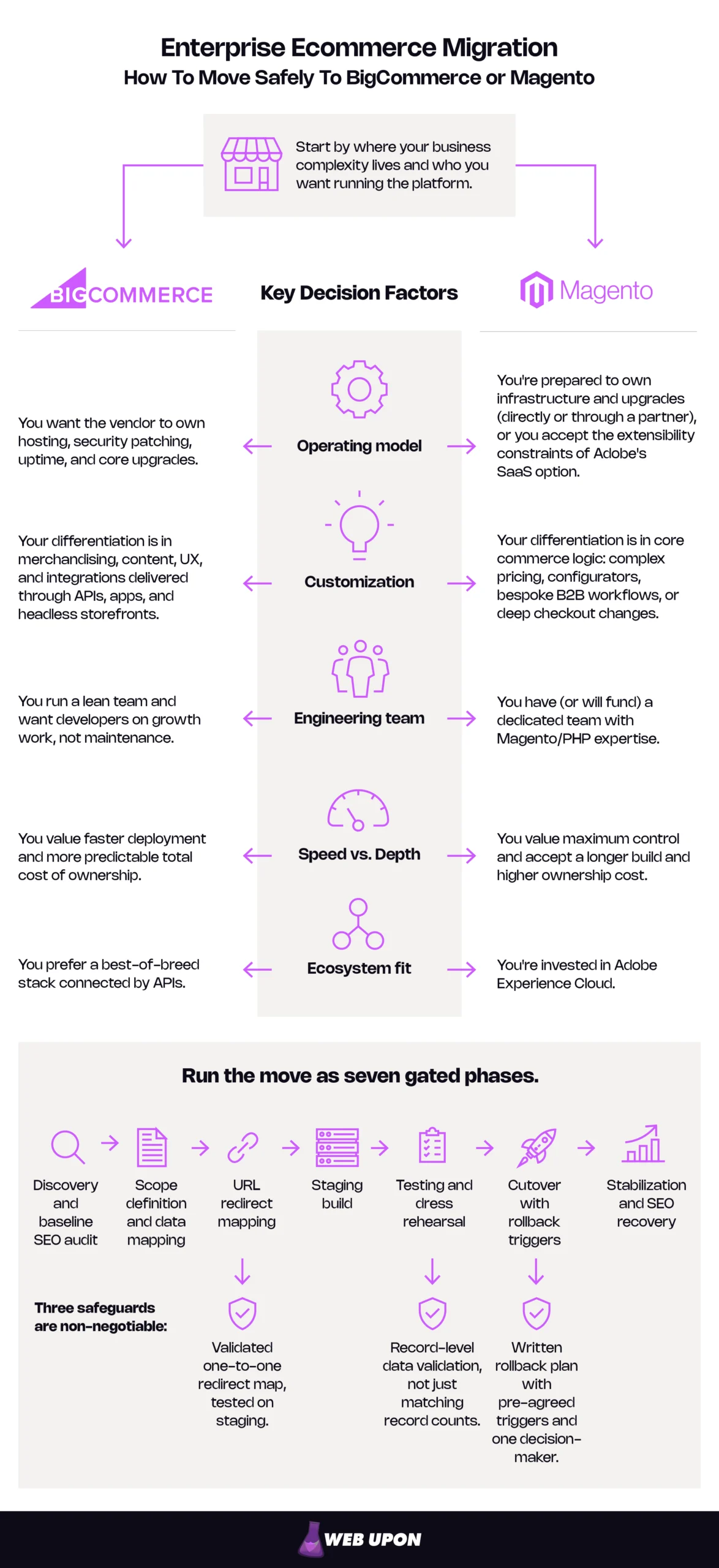
- Choose BigCommerce if your differentiation lives in merchandising, content, and integrations; choose Magento (Adobe Commerce) if it lives in core commerce logic such as complex pricing or bespoke B2B workflows.
- Compare operating models, not “self-hosted vs. SaaS”: Adobe runs Commerce self-hosted, as a managed PaaS, and as a SaaS edition launched in June 2025.
- Decide now: standard support for Adobe Commerce 2.4.6 ended on August 11, 2026, and from June 1, 2027, Adobe may suspend traffic to Cloud environments on unsupported versions.
- Sequence the work: run seven gated phases from baseline to recovery, with SEO starting in phase one.
- Treat three safeguards as non-negotiable: a validated one-to-one redirect map, record-level data validation, and a written rollback plan.
- Protect rankings with permanent redirects: Google says they don’t lose PageRank and advises keeping them for at least a year.
- Plan customer continuity early: passwords and saved cards may not transfer, so prepare a reset flow and processor coordination before launch.
- Measure the result with a 30/60/90-day scorecard against the baseline and the original business case.
In this guide:
- Choosing your destination
- Understanding the stakes
- Building the migration blueprint
- Preserving SEO equity
- Executing the technical migration
- Stabilizing after go-live
- Making your move
Choosing Your Destination: BigCommerce vs. Magento (Adobe Commerce) for Enterprise
The right destination depends less on feature lists than on what’s broken today and where your advantage lives. Diagnose why you’re leaving, compare operating models and total cost, then match requirements to a platform.
Diagnosing the Breaking Point: Signs Your Current Platform Has Stopped Serving You
Platform fatigue rarely announces itself. It shows up on the sprint board, where tickets that say “upgrade” and “fix” crowd out tickets that say “launch.” The first step in any ecommerce replatforming decision is to name the symptoms precisely, because the symptoms determine the cure.
Watch for signs that the platform has become a bottleneck, not a growth engine:
- A growing share of engineering time spent on maintenance instead of the roadmap.
- Launches and campaigns queued behind developer availability.
- Upgrades that routinely break extensions or integrations.
- Performance that degrades at peak traffic, when revenue is highest.
- Integration workarounds piling up, each a liability at the next upgrade.
On Magento, technical debt compounds through the upgrade cycle. Magento 1’s end of life in June 2020 is history; today’s pressure is the 2.4.x support lifecycle, and 2026 made it acute.
Why 2026 is forcing the decision:
- Standard support for the 2.4.6 release line ended on August 11, 2026. Extended support is only for Adobe Commerce customers, so Magento Open Source stores on 2.4.6 stopped receiving official patches.
- Adobe Commerce license holders on 2.4.6 have no-cost extended support through August 31, 2027, followed by a one-time, security-only period through May 31, 2028. Adobe describes that final window as migration time, not a support tier.
- From June 1, 2027, Adobe may suspend traffic to Adobe Commerce on Cloud environments running unsupported versions, taking the storefront offline. Dates for each release line are in the Adobe Commerce lifecycle policy.
- PHP 8.2, one of two PHP versions supported on 2.4.6, reaches end of security support on December 31, 2026 (see PHP’s supported versions page), and Adobe flags end-of-life PHP as a PCI compliance risk.
Every merchant facing a forced upgrade is also facing a replatforming decision, even if the answer is an upgrade.
BigCommerce merchants hit a different wall. On multi-tenant SaaS, you extend checkout, pricing, and promotions through APIs, SDKs, and apps, but never rewrite the core. High-volume merchants feel it in four places: logic that doesn’t fit the platform’s model, app dependence, API throughput limits during heavy syncs, and catalog constraints such as the limit of 600 variants (SKUs) per product in BigCommerce’s API documentation. Catalyst, the GraphQL Storefront API, and B2B Edition have raised that ceiling considerably.
Staying put has costs too, even when they never appear as line items: delayed features, engineer retention risk, security and PCI exposure on unsupported versions, and patching effort that grows as dependencies age.
| Signals you’ve outgrown Magento | Signals you’ve outgrown BigCommerce |
| Most sprints go to upgrades and extension conflicts | Checkout or pricing logic can’t change as the business needs |
| Hosting and patching effort rises every year | Critical functions depend on a growing stack of apps |
| Magento/PHP hiring can’t keep pace with the backlog | API limits constrain integration syncs at peak |
| Your version is out of support, or nearly | Product configurations exceed variant limits |
Comparing Architecture and Operating Models: Self-Hosted, PaaS, and SaaS
The most important architectural question isn’t which platform is more powerful. It’s who owns what when something breaks at 2 a.m. on Black Friday.
Magento Open Source is the free, self-hosted edition; Adobe Commerce is the licensed product on the same codebase, and Adobe now runs it three ways. With BigCommerce, that makes four options:
- Magento Open Source or Adobe Commerce on-premises: You, or your hosting partner, run everything: servers, security, patching, and upgrades.
- Adobe Commerce on Cloud infrastructure: Adobe manages the platform-as-a-service (PaaS) infrastructure, while you own the code, application patches, and upgrades.
- Adobe Commerce as a Cloud Service: Adobe’s SaaS edition, launched in June 2025, with a versionless core that Adobe updates. Customizations run out-of-process: they live in separate services that talk to the platform through APIs and events (App Builder and API Mesh), not as code inside the application.
- BigCommerce: Multi-tenant SaaS. You customize through APIs, apps, and a storefront built on Stencil (BigCommerce’s Handlebars-based theme framework), Catalyst (its Next.js-based composable storefront), or a custom headless build on the GraphQL Storefront API.
Moving onto Adobe’s SaaS edition is closer to a replatform than an upgrade. Adobe’s guide to migrating to Adobe Commerce as a Cloud Service makes a formal assessment the first step of every migration and treats the storefront and integrations as separate workstreams.
| Responsibility | Magento Open Source (self-hosted) | Adobe Commerce on Cloud (PaaS) | Adobe Commerce as a Cloud Service (SaaS) | BigCommerce (SaaS) |
| Hosting and infrastructure | You or your host | Adobe | Adobe | BigCommerce |
| Security patching | You apply all patches | Adobe patches infrastructure, you apply application patches | Adobe | BigCommerce |
| Core upgrades | You plan and run them | You plan and run them, with enforced deadlines | Automatic, versionless core | Automatic, versionless core |
| Customization model | In-process PHP modules | In-process PHP modules | Out-of-process: App Builder, API Mesh, events, webhooks | APIs, apps, webhooks, and storefront code |
| Frontend options | Custom theme or headless | Custom theme, headless, or Adobe’s Edge Delivery storefront (with an added Adobe Commerce Optimizer license) | Adobe Commerce Storefront powered by Edge Delivery Services, or headless | Stencil, Catalyst, or custom headless |
| PCI scope | Widest; you own the full environment | Shared: you own the application and code | Narrower: you own integrations, scripts, and processes | Narrower: you own integrations, scripts, and processes |
Test scalability rather than trusting it. Load-test against your own peak, and confirm catalog limits, API throughput, and multi-storefront support from official documentation, treating each limit as a test case.
PCI scope narrows on SaaS, but it never disappears. The vendor’s attestation covers the platform; you still own your integrations, the third-party scripts on your payment pages, and your processes.
Weighing Total Cost of Ownership Against Enterprise Agility
The license line is the number everyone negotiates, and rarely the one that decides total cost of ownership. Enterprise pricing on both platforms is quote-based, so compare who carries each cost and what drives it.
| Cost component | Self-managed Magento or Adobe PaaS | Adobe SaaS | BigCommerce |
| License or subscription | Adobe license (none for Open Source) | Adobe subscription | BigCommerce subscription |
| Hosting and infrastructure | You, or Adobe on PaaS, scales with traffic | Included | Included |
| Upgrades and patching | You, grows with customization | Adobe | BigCommerce |
| Extensions and apps | Licenses plus rework at each upgrade | Out-of-process apps you maintain | App subscriptions |
| Integration maintenance | You, tied to core code | You, tied to APIs and events | You, tied to APIs |
| Security and compliance | Mostly you | Shared | Shared |
| Engineering headcount or retainers | Highest | Moderate | Lowest platform load |
| The migration project | One-time, scope and data drive it | One-time, includes extension rebuilds | One-time, includes catalog remodeling |
Customization depth trades against deployment speed, depending on where customization lives:
- In-process code (self-hosted or PaaS Magento): maximum depth, highest upgrade burden.
- Out-of-process services (Adobe’s SaaS edition): no upgrade burden, but every customization becomes an integration you maintain.
- Apps and APIs (BigCommerce): fastest to deploy, bounded by what the APIs expose.
- Headless frontends (both platforms): full control of the experience, plus a frontend application you now own.
Judge the trade-off over three to five years, not at launch. On self-managed Magento, every major upgrade is a project, and each customization makes the next one larger. SaaS converts those projects into a predictable subscription and frees engineering time for features. Some cost shifts to apps, integration upkeep, and custom work for capabilities the platform lacks.
Include the migration project itself in the total, and model it as a one-time cost separate from run-rate. Blending the two can make a sound business case look wrong at the 90-day review.
Matching Enterprise Requirements to Each Platform
In practice, a handful of requirements tip the decision.
| Requirement | Leans BigCommerce when… | Leans Adobe Commerce when… |
| B2B complexity | Accounts, quotes, and price lists fit configurable features. | Workflows need custom logic or bespoke pricing engines. |
| Multi-brand, multi-region, multi-currency | Storefronts share one catalog model. | Each region needs distinct logic, tax handling, or catalogs. |
| Headless or composable ambitions | You want a supported composable storefront on a managed backend. | You want headless on a backend you can modify, or Adobe’s Edge Delivery storefront. |
| Catalog and configurator complexity | Products fit variant limits, with modifiers for non-SKU choices. | Configurators need custom data models. |
| Existing Adobe ecosystem investment | Your stack is best-of-breed and API-connected. | You run Adobe Experience Cloud. |
| Engineering team size | A lean team focused on growth work | A dedicated Magento/PHP team or long-term partner |
| Tolerance for upgrade work | You want upgrade projects gone. | You accept upgrades for control, or choose Adobe’s SaaS edition. |
For B2B merchants: Both platforms have serious B2B capabilities. BigCommerce B2B Edition adds company accounts with buyer roles, quotes, shared shopping lists, and a buyer portal. Licensed Adobe Commerce (not Magento Open Source) includes native B2B features such as company accounts, shared catalogs, negotiable quotes, requisition lists, and purchase order approvals. The tiebreaker is whether your workflows fit configurable features or need custom logic.
Staying with Adobe is also a destination decision. Adobe recommends its SaaS edition as the long-term path for Adobe Commerce on Cloud customers, but in-process extensions must be rebuilt out-of-process and the storefront is rebuilt, typically on Edge Delivery Services. Plan an Adobe Commerce as a Cloud Service migration with the same phases, safeguards, and SEO workstream as any other platform move.
Arriving from a legacy or custom platform? The same rules apply, but expect more data mapping effort.
Finally, watch for the requirement nobody wrote down. Interview customer service, finance, and warehouse teams during discovery. The business rules that live in their workarounds are often the ones a migration loses.
Once the destination is chosen, the risk moves from the platform to the move itself.
Understanding the Stakes: Why a Botched Enterprise Ecommerce Migration Can Be Catastrophic
A failed migration isn’t a bad week. It’s lost revenue, lost rankings, and lost trust, compounding for months. Four risks do most of the damage, and each is controlled by decisions made long before launch.
Revenue exposure during cutover. Skip industry averages and estimate your own:
Revenue at risk = (revenue per hour at cutover × hours of disruption) + recovery costs + demand lost in the weeks after
The last term is the one teams forget, because customers who hit an error on launch night don’t all come back. The math makes the case for a low-traffic window outside peak season, and for rehearsing until the disruption window shrinks.
SEO equity as a business asset. Organic rankings are often the most fragile casualty of a botched migration. Size the asset: annual revenue times organic’s share. Rankings rest on URLs, content, internal links, and technical signals, and a replatform can disrupt all four at once. Unlike paid campaigns, rankings can’t be switched back on. That’s why many teams bring in enterprise SEO services before the URL structure is set, not after traffic drops.
Customer trust. Customers notice three things first: logins that fail, order histories that vanish, and saved cards that disappear. Whether passwords and payment tokens can move depends on factors covered in Migrating data. Plan as if they won’t.
Internal confidence. A failed ecommerce replatforming project can damage stakeholder confidence for years. It brings budget freezes, delayed modernization, and a credibility hit for the leaders who sponsored it. The next platform proposal gets harder to approve, even when it’s the right call.
| What’s at risk | What failure looks like | Where this guide protects it |
| Revenue | Checkout errors, downtime, and lost orders during cutover | Executing the cutover and staying ready to roll back |
| Organic search | Ranking and traffic drops, 404 errors at scale | Preserving SEO equity |
| Customer trust | Failed logins, missing orders, lost saved cards | Migrating data |
| Stakeholder confidence | Overruns, missed KPIs, and a board that stops funding change | Measuring migration success against the business case |
Every one of these risks is decided before a single record moves.
Building the Migration Blueprint Before a Single Record Moves
Enterprise migrations are won in planning, months before anyone touches DNS. A sound ecommerce platform migration blueprint has three deliverables: a scope that says exactly what moves, a phased timeline with gates, and a team with clear decision authority.
Defining Migration Scope: What Must Move and What Gets Left Behind
Scope is where budget overruns usually begin, because “migrate everything” feels safer than making decisions. Every data domain needs an explicit call: migrate, transform, archive, or retire.
- Inventory the product catalog: SKU structures, attribute sets, configurable and bundled products, custom options, media, and relationships. Check destination limits against your largest products; a BigCommerce product, for example, supports up to 600 variants (SKUs).
- Define order history requirements. Decide what migrates into the platform and what gets archived in a data warehouse or ERP, and confirm retention obligations for tax, accounting, and privacy with your legal and finance teams.
- Map customer records and their dependencies: customer groups, B2B company accounts, addresses, marketing consent flags (in the EU and UK, a business relying on consent must be able to demonstrate it), and loyalty balances, which often live in third-party systems.
- Identify legacy customizations, pricing rules, and promotions that need architectural rethinking. Give each one a rebuild, replace, or retire decision instead of porting it by default.
- Hand off the full URL inventory to the SEO workstream on day one (see Auditing the pre-migration SEO baseline).
| Data domain | Decision (Migrate / Transform / Archive / Retire) | Owner | Notes |
| Products and variants | Transform | Merchandising lead | Remodel options to fit destination limits |
| Categories and navigation | Migrate | Merchandising lead | Preserve paths where possible for SEO |
| Customers and accounts | Migrate | CRM owner | Confirm password strategy and consent flags |
| Order history | Migrate recent, archive older | Finance and operations | Retention rules set by legal and finance |
| Promotions and pricing rules | Transform or retire | Ecommerce lead | Don’t port expired or redundant rules |
| Content and media | Migrate | Content lead | Keep URLs, headings, and alt text intact |
| Legacy customizations | Transform or retire | Engineering lead | Decide item by item |
The most expensive scope decision is the unmade one. Anything left undecided at the end of phase two will be decided later, under deadline pressure, by whoever happens to be in the room.
Mapping the Migration Timeline: The Core Phases of an Enterprise Project
An ecommerce platform migration timeline should be a sequence of gates, not a sequence of dates. Each phase ends with exit criteria, and the next phase doesn’t start until they’re met.
- Run the discovery and audit phase: platform gap analysis, integration mapping, and the SEO baseline.
- Plan data migration: field mapping, transformation logic, and data integrity validation rules.
- Build the staging environment and a parallel running strategy (both platforms operating at once, with data synchronized, while the new one is tested). Require at least one full dress-rehearsal migration using production-scale data.
- Design the cutover plan, go-live sequencing, and rollback readiness protocols.
- Gate each phase with explicit exit criteria so no phase starts on unfinished work.
How long will it take? The honest answer depends on four drivers: catalog size and complexity, the number of integrations, customization depth, and how quickly your organization makes decisions. The last one surprises people. Slow sign-offs can stretch timelines as much as technical problems do.
| Phase | Key activities | SEO workstream | Exit criteria |
| 1. Discovery and baseline | Gap analysis, integration map, scope | Full crawl, benchmark rankings, traffic, and Core Web Vitals | Signed-off scope and platform decision |
| 2. Data mapping | Field mapping, transformation logic | Complete URL inventory | Approved mapping specification |
| 3. URL redirect mapping | Define destination URL structure | One-to-one map with priority tiers | Map approved by SEO and engineering |
| 4. Staging build | Frontend, extensions/apps, integrations | Metadata, structured data, and internal-link parity on staging | Feature-complete staging |
| 5. Testing and dress rehearsal | Integration, regression, load, and security testing, full trial migration | Redirect QA crawl, rendering checks | Defect thresholds met, rehearsal passes validation |
| 6. Cutover | Freezes, final sync, DNS switch | Live redirect checks, robots and noindex checks, sitemap submission | Go/no-go signed off |
| 7. Stabilization | Hypercare, business validation | Monitoring at 72 hours, 30 days, and 90 days | KPIs within agreed thresholds |
Resist the urge to compress phases five and six when the date slips. Testing and the dress rehearsal are where you find the problems that would otherwise surface in front of customers.
Assembling the Migration Team: Internal Stakeholders and Agency Support
Migrations tend to break at the handoffs between teams rather than inside any single team. The goal is every essential role at the table from day one, and one clear line of decision authority.
- Decide when to engage a migration agency certified on your destination platform and when to build in-house, based on your team’s destination experience, capacity, and familiarity with your migration direction. Treat certification as a signal, not proof.
- Represent every essential role: engineering, SEO, operations, finance, customer experience, data and QA, and a program manager. Fill the SEO seat from day one; our guide on how to hire an ecommerce SEO consultant and what to expect covers the options.
- Evaluate migration service providers on enterprise criteria: references at similar scale and direction, a documented data validation method, a rollback plan in the statement of work, post-launch hypercare (a period of intensive support after go-live), team continuity, and SEO coverage. For the SEO side, see our guide to finding the right ecommerce SEO company.
- Establish a governance structure with clear decision authority: an executive sponsor, a steering committee, a program manager, workstream leads, a change-control process, and a single named go/no-go owner.
| Decision | Responsible | Accountable | Consulted |
| Platform choice | Program manager and engineering lead | Executive sponsor | Finance, SEO, operations |
| URL structure | SEO lead | Program manager | Engineering, merchandising |
| Data mapping sign-off | Data and QA lead | Engineering lead | Finance, operations, customer experience |
| Go/no-go | Program manager | Named go/no-go owner | All workstream leads |
| Rollback call | Workstream leads (report triggers) | Named go/no-go owner | Engineering, payments, SEO |
Name the go/no-go owner in writing before phase five. When the call comes in the middle of the night, a committee can’t make it.
With scope, timeline, and team in place, the first workstream to start is the one most teams start last: SEO.
Preserving SEO Equity: Protecting Organic Authority Through the Entire Migration
Search engines don’t see a replatform. They see thousands of URLs, templates, and links changing overnight. That’s why SEO runs from phase one through phase seven. It also comes before the technical build in this guide, because its first two deliverables, the baseline and the URL map, must be finished before build decisions lock in the new URL structure. Effective ecommerce migration SEO starts with an owner, whether an in-house lead or a strategic SEO team, with a seat on the steering committee.
Auditing the Pre-Migration SEO Baseline: What You Cannot Afford to Lose
The baseline is your insurance policy. Without it, you can’t tell normal post-launch volatility from real damage, or prove the migration worked.
- Crawl and catalog every indexed URL, canonical tag, and piece of metadata, including images and PDFs, faceted and parameter URLs, and hreflang tags on multi-region stores.
- Identify high-equity pages by combining crawl data, Search Console, revenue by landing page from analytics, and backlink data. Top-converting organic landing pages and structured data implementations come first.
- Benchmark keyword rankings, crawl health, and Core Web Vitals before migration begins. Capture field data for LCP, INP, and CLS against Google’s “good” thresholds of 2.5 seconds, 200 milliseconds, and 0.1 at the 75th percentile.
- Document the internal linking architecture and pagination structures so the new templates can reproduce them.
- Export historical performance data now. Search Console keeps 16 months of performance history, and page-level exports are more complete through its API than through the interface, which caps exports at 1,000 rows.
| Asset | Source | Why it matters |
| Indexed URL list | Enterprise site crawler, XML sitemaps, Search Console | Becomes the source list for the redirect map |
| Revenue by landing page | Analytics | Sets redirect priority tiers |
| Backlinked URLs | Backlink data | Protects external authority |
| Rankings, clicks, and impressions by page | Search Console | The post-launch comparison point |
| Core Web Vitals field data | Search Console, PageSpeed Insights | Sets the performance parity target |
| Structured data and hreflang | Crawl data | Preserves rich results and regional targeting |
| Internal link graph | Crawl data | Tells the new templates what to reproduce |
For a full walkthrough of the audit itself, see our ecommerce website SEO audit guide.
Pay special attention to URLs with little traffic but real backlinks. They’re easy to miss in a traffic-sorted spreadsheet and slow to recover once lost.
Designing the URL Redirect Strategy: One of the Most Consequential Technical Decisions in the Migration
Your URL map decides whether search engines and customers find your pages on day one. Get it right, and most rankings transfer. Get it wrong, and no post-launch sprint fully buys them back.
- Build a complete URL mapping document from source to destination. The best redirect is the one you don’t need, so replicate existing URL structures wherever the destination allows, and check early whether paths such as Magento’s .html suffix and category-based URLs can be preserved.
- Prioritize every URL by tier, using revenue, traffic, and backlinks. Tier-one URLs get a manual, one-to-one review.
- Redirect discontinued products to the closest relevant product or category. Use a 404 or 410 only when no equivalent exists, and never mass-redirect to the homepage, because Google may treat irrelevant redirects as soft 404s.
- Implement 301 redirect mapping at scale without chains or loops. Flatten chains left over from earlier migrations so every old URL points straight to its final destination, reserve pattern rules for predictable URL families, and update internal links to final URLs instead of relying on redirects.
- Validate coverage before go-live with crawl-based QA. Crawl the full source URL list against staging and confirm every URL resolves in a single hop to a relevant page returning a 200 status.
Moving to BigCommerce: Redirects are managed in the control panel and API, with bulk CSV import for new redirects (the import can’t update existing ones). Dynamic redirects point to a product, category, brand, or page and update automatically if that item’s URL changes. There’s no server configuration access, so plan pattern-level needs carefully. Custom URL formats and per-item custom URLs often let a Magento to BigCommerce migration keep existing paths intact.
Moving to Adobe Commerce: Redirects can live in the admin’s URL rewrite system, in server-level rules, or at the CDN or edge layer, where very large sets often perform best. Adobe’s cloud offerings have their own configuration and limits (partial-route redirects in routes.yaml default to 302 unless you set 301), and the Edge Delivery storefront handles redirects differently from the classic admin, so confirm mechanics early in any BigCommerce to Adobe Commerce migration.
Redirect mapping example:
| Source URL | Destination URL | Page type | Priority tier | Redirect type | QA status |
| /blue-trail-jacket.html | /blue-trail-jacket.html | Product | Tier 1 | None needed (URL preserved) | Passed |
| /mens/outerwear.html | /mens/outerwear/ | Category | Tier 1 | 301, one-to-one | Passed |
| /discontinued-rain-shell.html | /mens/outerwear/rain-jackets/ | Discontinued product | Tier 2 | 301 to closest category | Pending |
Google’s documentation on redirects and Google Search recommends permanent server-side redirects for moved content. Google has stated that permanent redirects don’t lose PageRank; the real risks are chains, loops, irrelevant targets, and URLs nobody mapped.
Before you freeze your URL map: have an independent SEO team review it against your baseline. Web Upon’s SEO site migration services include this kind of review, from priority tiering through crawl-based QA.
Recovering and Monitoring Organic Performance After Launch
At launch, SEO shifts from prevention to detection. Some volatility is normal while search engines recrawl the site; Google notes that medium-sized sites can take a few weeks or more to show the new URLs. Your job is to separate that noise from real problems, fast.
- Submit updated XML sitemaps in Google Search Console and request recrawls of priority pages. The Change of Address tool applies only when the domain itself changes, so skip it for a same-domain replatform.
- Monitor crawl errors, index coverage, and ranking movement daily for the first 30 days, using thresholds against the baseline that trigger investigation.
- Address duplicate content introduced by the new URL structure: multiple category paths to the same product, faceted and parameter URLs, trailing-slash and letter-case variants, and leftover HTTP URLs. Canonical tags, crawl rules for parameter URLs, and internal-link cleanup fix most of them.
- Keep redirects live for as long as possible. Google’s guidance on site moves with URL changes suggests at least a year; for high-equity URLs, treat them as permanent.
- Set a long-term cadence once the project closes: a 90-day post-launch review, then quarterly checks. A professional SEO audit at day 90 is the cleanest way to confirm recovery and catch slow-burn issues.
| Window | What to check | Escalate if |
| Launch day | Redirect spot checks, robots.txt, noindex tags, sitemap submission, analytics firing | Any tier-one URL fails, or robots rules block crawling |
| Days 1–3 | Crawl errors, 404s, server errors, index coverage | 404s or 5xx errors appear on mapped URLs |
| Weeks 1–4 | Rankings, clicks, and impressions against the baseline, duplicate URLs | Tier-one pages fall past your agreed threshold and don’t rebound |
| Days 30–90 | Organic sessions and revenue against the baseline, Core Web Vitals field data | Recovery stalls, or field data falls below the baseline |
| Ongoing | Quarterly SEO health reviews | New duplication, crawl waste, or template regressions appear |
Two checks catch problems early. On a Magento destination, review the catalog SEO settings that add category paths to product URLs, which can create several URLs per product. On any destination, crawl the live site at day seven with your baseline crawl settings and compare the two.
With the SEO safeguards defined, the technical build can proceed without locking in costly URL mistakes.
Executing the Technical Migration: Data, Frontend, Integrations, and Cutover
This is where the blueprint becomes a working platform. Four workstreams run in parallel, and several steps change with your migration direction.
Migrating Data: Mapping, Transferring, and Validating Every Critical Record
Ecommerce data migration fails quietly. Record counts match, the import log is clean, and then a customer can’t see last year’s orders because a relationship didn’t survive the move.
- Migrate the product catalog: attributes, categories, images, and custom fields.
Moving to BigCommerce: In a Magento to BigCommerce migration, EAV attributes (entity-attribute-value, a flexible model that stores each product attribute as its own record), attribute sets, and configurable products map to BigCommerce options, variants, and custom fields. Options that create distinct SKUs become variants, capped at 600 variants (SKUs) per product. Choices that don’t need their own SKU, such as engraving text, usually map to modifiers. Plan this remodeling early, because it affects URLs, product feeds, and inventory.
Moving to Adobe Commerce: In a BigCommerce to Adobe Commerce migration, BigCommerce options and modifiers map to attribute sets, configurable products, and custom options. Decide early which attributes should be filterable and searchable, because that choice shapes layered navigation and performance on the destination. - Transfer order history and customer accounts without breaking the links between customers, orders, addresses, and company accounts.
- Confirm whether password hashes can carry over: BigCommerce’s customer API only sets a new password or forces a reset, and Adobe Commerce verifies only supported hash algorithms. If the destination can’t verify your current hash format, plan a secure password-reset flow and customer communication before launch, not after.
- Check how imported historical orders behave. They shouldn’t decrement inventory, trigger customer emails, or distort reporting.
- Plan payment token migration with your payment processor. Tokens live with the gateway or vault, so portability depends on the provider and must be coordinated under PCI DSS v4.0.1, the current standard from the PCI Security Standards Council; raw card data never passes through your platform or your team.
- Synchronize inventory from a single source of truth, usually the ERP or OMS. Run a final delta sync (a transfer of only the records changed since the last full load) in the cutover window and switch on oversell protection.
- Validate every critical record before sign-off, using the methods below.
| Method | What it catches | Example |
| Record counts | Missing or duplicated records | Customer, order, and SKU totals match the source |
| Field-level sampling | Truncation, encoding, and mapping errors | A random sample of products compared field by field |
| Relational checks | Broken links between records | Every order links to a customer, an address, and its line items |
| Financial reconciliation | Wrong totals, tax, or discounts | Order totals and tax by month match the source |
| Customer login tests | Password and account access problems | Test accounts in each customer group log in and see order history |
Run full validation on the dress-rehearsal migration, not just the final one. The rehearsal is your best chance to fix a mapping error without customers watching.
Rebuilding the Frontend: Theme Architecture, Extensions, and Performance
Themes don’t migrate; they get rebuilt. Templating, data models, and rendering differ too much for a direct port, and forcing one usually costs more than starting clean.
- Map Magento’s layout XML (the configuration files that arrange content blocks on each page) and block system to BigCommerce’s Stencil framework or the Catalyst storefront. Stencil suits teams that want a managed theme; Catalyst suits teams ready to own a Next.js application in exchange for a composable frontend.
- Choose a frontend for the reverse direction: a custom Adobe Commerce theme, a headless build, or Adobe Commerce Storefront powered by Edge Delivery Services, which assembles pages from prebuilt drop-in components that call Adobe Commerce APIs. On Commerce on Cloud or on-premises, drop-ins need version 2.4.8 or later plus an Adobe Commerce Optimizer license.
- Audit every Magento module or BigCommerce app and give each a decision: keep, replace, rebuild, or retire. On Adobe’s SaaS edition, in-process extensions must be rebuilt out-of-process, so this audit doubles as a scoping exercise.
- Check Catalyst coverage during scoping. Catalyst runs on the GraphQL Storefront API, and BigCommerce’s Catalyst feature support page lists which platform features work out of the box and which need custom implementation.
- Benchmark frontend performance before cutover. Compare staging against the baseline on LCP, INP, and CLS for every key template (home, category, product, cart, and checkout), testing mobile first.
- Confirm SEO parity on every template: metadata, structured data, canonical tags, and internal links.
| Current module/app | Business function | Decision | Destination equivalent | Owner |
| Custom pricing module | Customer-group pricing | Replace | Native price lists | Ecommerce lead |
| Search and filtering extension | Faceted navigation | Replace | Native search or an evaluated app | Merchandising lead |
| ERP connector | Order and inventory sync | Rebuild | Middleware or API integration | Engineering lead |
| Promotional banner module | Sitewide banners | Retire | Native content tools | Marketing lead |
| Custom checkout field | B2B purchase order number | Rebuild | Checkout extension via API or SDK | Engineering lead |
Don’t let the rebuild become a redesign by accident. Changing templates, navigation, and content in the same launch makes it impossible to tell which change moved your metrics.
Testing Integrations and Protecting Third-Party System Continuity
Integrations are where enterprise migrations hide their complexity. The storefront can look perfect in staging while orders quietly fail to reach the warehouse.
- Re-map ERP, PIM, OMS, and CRM integrations for the destination. Document the data flows, direction, frequency, error handling, and any middleware changes for each.
- Define staging test protocols that follow the full order lifecycle end to end: browse, checkout, payment, ERP, fulfillment, and returns and refunds.
- Regression-test custom pricing rules, tax logic, and promotions with an edge-case matrix covering stacked promotions, tiered and customer-group pricing, multi-jurisdiction tax, and B2B quotes.
- Complete the security audit before any production data enters the new environment: access controls, admin accounts with MFA, penetration testing, a data-handling review, and PCI scope confirmation. Include the scripts on your payment pages, which PCI DSS v4.0.1 requires most merchants to inventory and control (merchants validating with SAQ A must instead confirm their site isn’t susceptible to script attacks).
| System | Data exchanged | Direction | Frequency | Owner | Critical test cases |
| ERP | Orders, inventory, pricing | Two-way | Near real time | Engineering | Order reaches ERP with correct tax |
| PIM | Product data and media | PIM to platform | Scheduled | Merchandising | New SKU publishes with all attributes |
| OMS | Orders, shipments, returns | Two-way | Real time | Operations | Split shipment updates the customer |
| CRM | Customers, consent, segments | Two-way | Scheduled | Marketing | Consent flags survive the sync |
| Payment gateway | Authorizations, captures, refunds | Two-way | Real time | Finance | Partial refund posts correctly |
| Tax service | Rates and calculations | Two-way | Real time | Finance | Multi-jurisdiction order is taxed correctly |
Test failure paths, not just happy paths. Ask what happens when the ERP goes down for an hour on launch day, and make sure the answer is a queue, not lost orders.
Executing the Cutover and Staying Ready to Roll Back
On cutover night, nobody should be doing anything for the first time. Every step has been rehearsed, and every step has a named owner.
- Sequence the DNS cutover to keep the live downtime window short. Lower DNS TTL values days in advance and schedule a low-traffic window outside peak season. Any temporary maintenance page must return a 503 status, ideally with a Retry-After header, so crawlers don’t index it.
- Keep data in sync during the final window with code, content, and catalog freezes and a delta sync of orders, customers, and inventory. Be explicit about which system takes orders at every moment.
- Define rollback trigger conditions and the reversion playbook in advance: checkout failure rate, payment errors, order sync failures, or a critical integration going down. Name a single decision owner and define the point of no return. Once new orders land on the destination, rolling back means reverse-syncing those orders to the old platform.
- Run a technical war room for the first 72 hours: error logs, checkout success, payment authorization rates, integration queues, site speed, redirect spot checks, robots.txt and noindex settings, and analytics tracking. This is separate from the 30-day business validation in Stabilizing after go-live.
A cutover runbook and go-live checklist, in T-minus sequence:
- T-30 days: Confirm go/no-go criteria, rollback triggers, and the named decision owner.
- T-14 days: Complete the final dress rehearsal and sign off its validation results.
- T-7 days: Lower DNS TTL values, freeze code, and brief customer service on known changes.
- T-3 days: Freeze catalog and content changes, and confirm all redirects are loaded on the destination.
- T-1 day: Confirm war room staffing, contact lists, and escalation paths.
- T-0: Enable the 503 maintenance page (keep robots.txt returning 200), run the final delta sync, validate, switch DNS, and test checkout end to end.
- T+1 hour: Spot-check redirects, confirm robots.txt and noindex settings, submit XML sitemaps, and verify analytics.
- T+72 hours: Close the war room and hand off to business validation.
| Trigger | Threshold (set by the team) | Decision owner | Action |
| Checkout failure rate | Agreed rate sustained over an agreed window | Named go/no-go owner | Fix forward if the cause is known; otherwise roll back. |
| Payment authorization errors | Agreed rate above the baseline | Named go/no-go owner | Engage the processor; roll back if unresolved. |
| Order sync failures | Orders not reaching the ERP within the agreed time | Named go/no-go owner | Pause order intake or roll back. |
| Critical integration down | Outage beyond the agreed duration | Named go/no-go owner | Fail over or roll back. |
Launch is a milestone, not the finish line.
Stabilizing After Go-Live: Validation, Optimization, and The Business Case
The first 30 days prove the business still runs. The next 90 prove the business case.
Validating Business Continuity in the First 30 Days
Problems are cheapest to fix in the first month, while the team is still assembled and your implementation partner’s hypercare is active. Treat these 30 days as structured validation, not a victory lap.
- Confirm order flow integrity, payment processing, and fulfillment handoffs every day, reconciling platform orders against ERP and payment records.
- Run customer-facing QA on account login, order history visibility, and saved payment methods, using test accounts across customer groups and regions.
- Compare performance under real traffic load against staging benchmarks and the pre-migration baseline.
- Define escalation protocols for critical issues found in the first production week, with severity tiers, owners, and response expectations.
| Severity | Example | Owner | Response expectation |
| Sev 1 | Checkout down, or orders not reaching fulfillment | Go/no-go owner and engineering lead | Immediate, all hands |
| Sev 2 | A payment method failing in one region | Engineering lead | Same day |
| Sev 3 | Tier-two pages returning 404 errors | SEO lead | Within two business days |
| Sev 4 | A cosmetic template issue | Frontend owner | Next scheduled release |
These tiers and response times are illustrative, not benchmarks; set your own before launch. And watch customer service tickets as closely as dashboards. Customers often spot problems before monitoring does.
Measuring Migration Success Against The Business Case
Measure the migration the way you sold it. The scorecard you bring to the board should answer the questions the business case asked, in the same terms.
- Define KPIs tied to the original business case: site speed, cost, conversion rate, and uptime. Add organic sessions and revenue against the baseline, the share of engineering time spent on the roadmap versus maintenance, and release frequency.
- Report migration ROI to executives and the board with a 30/60/90-day scorecard measured against both the baseline and the business case. Separate one-time migration costs from run-rate savings.
- Identify quick wins the new architecture opens up: faster templates, native features replacing extensions, improved faceted navigation, and richer structured data. This is also where ongoing ecommerce SEO work starts compounding the gains.
| KPI | Baseline source | Target | Review cadence | Owner |
| Organic sessions and revenue | Pre-migration SEO baseline | Back to baseline, then growth | Weekly, then monthly | SEO lead |
| Conversion rate | Analytics, same period last year | At or above baseline | Weekly | Ecommerce lead |
| Core Web Vitals (field data) | Baseline field data | “Good” on key templates | Monthly | Engineering lead |
| Uptime and checkout success | Monitoring data | Agreed service level | Daily, then weekly | Engineering lead |
| Engineering time on roadmap | Sprint data | Rising share versus baseline | Quarterly | CTO |
| Release frequency | Deployment history | Higher than baseline | Quarterly | CTO |
| Total cost of ownership | Business case | Run-rate at or below plan | Quarterly | Finance lead |
Compare like with like. Seasonality can make a launch month look better or worse than it really is, so measure against the same period last year as well as the pre-launch baseline.
Preventing the Next Cycle of Platform Fatigue
The real test of a migration is that you never need another emergency one.
- Build a post-migration roadmap that keeps the platform clean, not just busy.
- Set rules for adding extensions, apps, and customizations, such as “one in, one out.”
- Reserve a standing share of engineering capacity for technical debt.
- Schedule quarterly platform and SEO health reviews.
Do those four things, and a year from now the sprint board looks different. The tickets say “launch” again.
Making Your Move: Next Steps for a Safe Enterprise Ecommerce Migration
The platform decision is the easy part. BigCommerce and Adobe Commerce are both capable enterprise destinations, and the right one follows from where your complexity lives. The hard part is protecting what you’ve already built, and that comes down to sequence: a baseline before the build, a URL map before the templates, and a rollback plan before cutover night. Run in that order, an enterprise ecommerce migration that began with a stalled roadmap or an unpatched version becomes a controlled program instead of a gamble, and the roadmap starts moving again.
| Where you are | Your next step |
| Still deciding | Run the breaking-point diagnosis and the requirement-matching table with your leadership team. |
| Decided but not started | Stand up the SEO workstream and capture the baseline before any build decisions. |
| Mid-migration | Hold the URL map open until it has been reviewed against your baseline and tested on staging. |
If organic search is a meaningful share of your revenue, protect it before you freeze your URL map, while every fix is still a spreadsheet edit rather than a recovery project. To have your baseline and redirect plan checked before anything locks, contact Web Upon about a pre-migration SEO review.


