Your traffic dropped 20% over two quarters and nobody can explain why. Your checkout page takes five seconds to load on mobile and customers abandon before it renders. Your last redesign was three years ago, and you’re not sure what’s quietly decaying underneath.
These are different problems. They all start with the same question: what exactly should you be auditing?
The website audit meaning shifts depending on which problem you’re solving. It’s not one thing but a structured diagnostic process that takes six distinct forms, each designed to isolate a specific category of failure: SEO, Technical, Content, UX, Accessibility, and Performance. The right audit type transforms vague anxiety into a prioritized fix list. The wrong one wastes your time and budget on problems that aren’t causing the damage.
Key Takeaways
- Start with the symptom, not the audit type. Declining traffic, slow load times, poor conversions, and compliance gaps each point to different audit types.
- The audit before a major change is generally cheaper than the recovery after a botched one, especially for redesigns, migrations, and high-traffic campaign launches.
- Automated tools detect that something changed; professional audits explain why it matters and what to do about it.
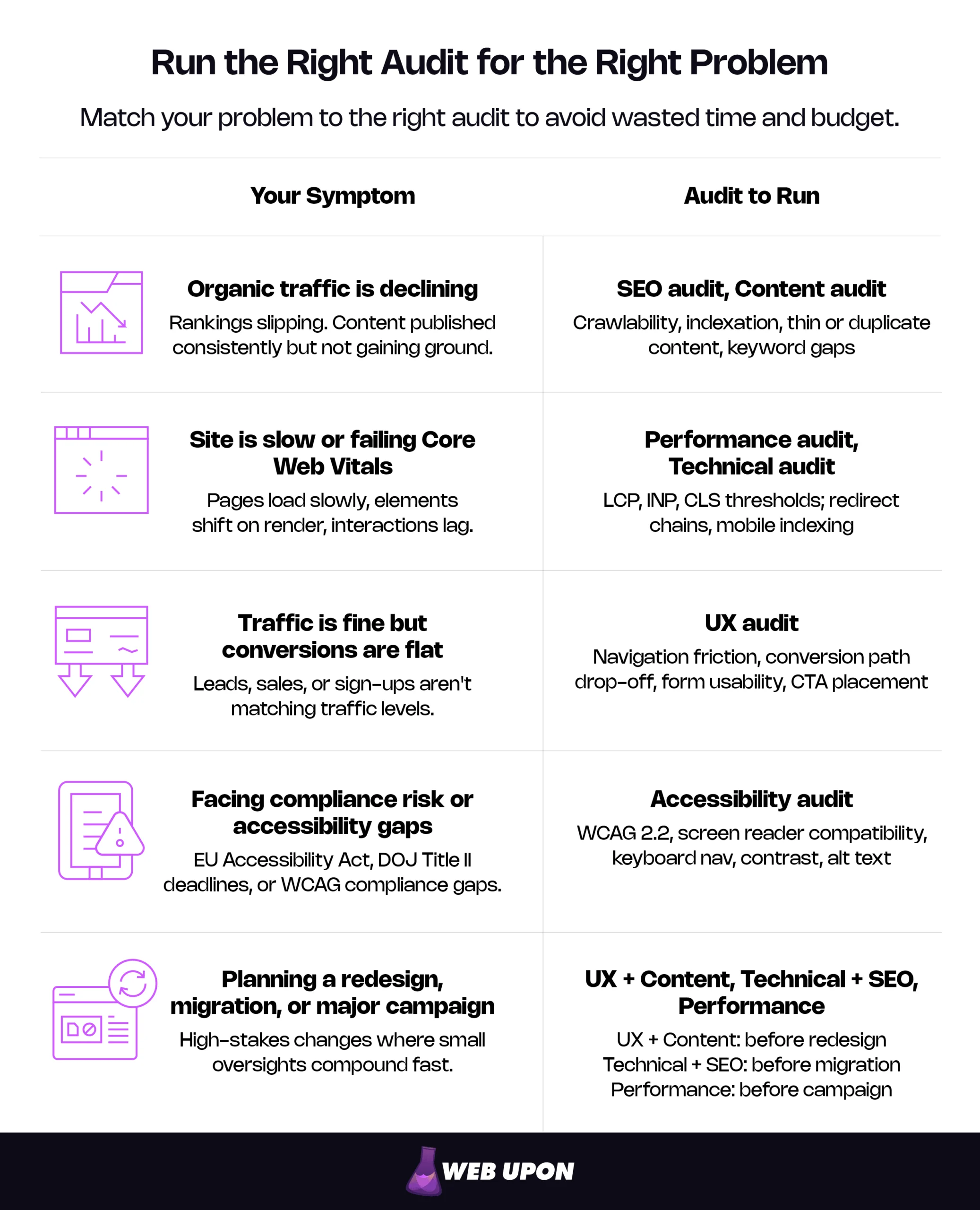
This article is organized around the real-world symptoms that trigger an audit. Find the scenario that matches your situation, and you’ll learn which audit type solves it and what a professional diagnosis actually reveals.
Your Organic Traffic Is Declining (or Failing to Grow)
The trend line in your analytics is flattening or sliding downward. Content that used to rank is losing ground. You’re publishing consistently and seeing no upward movement.
When organic traffic stagnates, the problem usually lives in one of two places: your site’s relationship with search engines, or the quality and relevance of your content. Often it’s both. The two audit types below isolate which is the bottleneck.
SEO Audit
An SEO audit is the diagnostic most people reach for first when traffic drops, and for good reason. The root cause is almost always invisible without a systematic look at how search engines discover, crawl, index, and rank your pages.
It starts with crawlability and indexation: are important pages being discovered, or are they accidentally blocked by robots.txt rules or noindex directives? Next, keyword alignment — whether you’re targeting terms your audience actually searches for, or whether there’s an intent mismatch between your content and the queries driving impressions. Beyond that, on-page optimization (title tags, meta descriptions, header hierarchy, internal linking), backlink profile health (quality, relevance, and toxic link identification), and keyword cannibalization — multiple pages competing for the same term, diluting each other’s ranking potential.
Consider a mid-market ecommerce site that discovers that a significant percentage of its product pages are returning soft 404 errors. The pages display “no results” content to users but return a 200 status code to search engines, signaling that the pages have no value and effectively deindexing thousands of dollars of inventory from search results. No amount of content creation fixes that. Only a systematic crawl reveals it.
If these symptoms sound familiar, a professional SEO audit can pinpoint exactly where your rankings are leaking and prioritize fixes by potential traffic impact.
Content Audit
Where an SEO audit examines how search engines see your site, a content audit examines whether what you’ve published actually deserves to rank. It evaluates the quality, relevance, accuracy, and performance of everything on your site — blog posts, landing pages, product descriptions, resource pages.
The diagnostic areas:
- Content freshness (outdated statistics, deprecated references, expired offers)
- Content gaps (high-value topics your competitors rank for that you haven’t addressed)
- Thin or duplicate content (pages with insufficient depth or near-duplicates diluting authority)
- Engagement signals (which pages show high bounce rates, low time-on-page, or poor scroll depth — and what that reveals)
- Content-keyword alignment (whether each page has a clear primary target and is actually ranking for it)
One of the most underappreciated outputs is the consolidation map. Sites accumulate dozens of posts covering similar subtopics over years, each too thin to rank individually. A content audit identifies which pieces to merge, update, or retire — turning ten mediocre pages into two authoritative ones that actually compete. The sharpest traffic recoveries don’t come from publishing more. They come from pruning intelligently.
A professional content audit separates the assets earning traffic from the deadweight dragging your authority down.
Your Site Is Slow, Broken, or Failing Core Web Vitals
Speed problems are uniquely frustrating because they’re invisible to the site owner. Your device loads fine on your office Wi-Fi. Real users on mobile connections in other regions experience something very different.
When pages load slowly, elements shift during rendering, or interactions feel sluggish, users leave and search engines notice. Google’s Core Web Vitals (LCP, INP, and CLS) factor into ranking performance. If your site is failing these thresholds, two audit types isolate the causes.
Performance Audit
A performance audit measures how fast your site loads and how responsive it feels under actual field conditions where your real users operate.
The core of the assessment is Google’s three Web Vitals metrics:
| Metric | What It Measures | “Good” Threshold |
| LCP (Largest Contentful Paint) | Loading speed of the largest visible element | ≤ 2.5 seconds |
| INP (Interaction to Next Paint) | Responsiveness to user interactions | ≤ 200 milliseconds |
| CLS (Cumulative Layout Shift) | Visual stability during page load | ≤ 0.1 |
Beyond these three, a performance audit evaluates server response time (TTFB), where 800ms separates acceptable from problematic. It examines asset optimization — image compression (WebP format typically delivers 25–34% smaller files than equivalent JPEG quality), code minification, and render-blocking resources. It also evaluates caching strategy (browser caching, CDN configuration, cache invalidation) and mobile performance under real-world network conditions, not just synthetic tests on fast connections.
One critical distinction: a site can score a perfect 100 in a synthetic lab test and still fail Core Web Vitals in the field. Lab tools test on a single device configuration. Field data reflects the full range of devices, connections, and geographic locations your actual visitors use. A performance audit that only looks at lab data is solving the wrong problem.
A site performance audit translates abstract speed metrics into specific, fixable bottlenecks, each with measurable impact on user experience and ranking eligibility.
Technical Audit
If a performance audit is about speed, a technical audit is about structural integrity: the underlying infrastructure, code quality, and server configuration that quietly support or undermine everything else your site does.
Mobile responsiveness comes first: does the site render correctly and function fully across devices? Since Google completed its mobile-first indexing rollout on July 5, 2024, every site is crawled and indexed based on its mobile version regardless of where traffic originates. The audit then covers HTTPS and security configuration (SSL certificates, mixed content warnings, security headers), crawl error resolution (broken links, server errors, redirect chains and loops), structured data validation (schema markup errors that prevent rich results), and site architecture (URL structure, XML sitemap accuracy, robots.txt configuration). For WordPress sites (roughly 42% of the web), this extends to PHP version currency, plugin conflicts, and database optimization.
Redirect chains deserve a specific callout. Each hop adds latency, and chains of three or more waste crawl budget, slowing the user experience. A technical audit maps every redirect path and collapses chains to single hops, recovering both speed and crawl efficiency.
Users Are Visiting but Not Converting
Traffic looks healthy and maybe even growing. But leads, sales, or signups aren’t materializing. The surface numbers suggest everything is working. The revenue says otherwise.
When traffic is stable but conversions are flat, the problem usually lives in the user experience layer — how people navigate, interact with, and respond to your site once they arrive.
UX Audit
A UX audit bridges the gap between “getting found” and “getting results.” It investigates what analytics dashboards can’t fully explain: the friction, confusion, dead ends, and missed opportunities that real users encounter.
- Navigation clarity — can users find what they’re looking for within two to three clicks, or is the menu structure bloated?
- Conversion path analysis — walking the primary user journeys (landing page to product page to cart to checkout) and identifying exactly where users drop off.
- Form usability — are forms too long, confusing, or broken on mobile? Do error messages help users recover or just frustrate them?
- Visual hierarchy and CTAs — are calls-to-action visible and placed at decision points, or buried below the fold? Mobile UX — not just responsiveness, but whether the mobile experience is designed for mobile or just a shrunken desktop.
- Trust signals — reviews, testimonials, security badges, and clear policies positioned where hesitant users need them most.
A B2B software company discovered that their “Request Demo” button was prominently visible on desktop but hidden behind a hamburger menu on mobile — where over 60% of their traffic originated. The fix took less than an hour. Demo requests climbed double digits within a month. That’s the pattern UX audits surface repeatedly: high-leverage, low-effort fixes that no analytics dashboard can detect, because the dashboard shows that users leave but not why.
For a deeper look at how design decisions affect conversion, our web design audit guide walks through the process. When the gap between traffic and revenue won’t close, conversion rate optimization services can identify the specific friction points costing you sales.
You’re Facing Compliance Risk or Accessibility Gaps
Accessibility isn’t just optional, and the regulatory window is closing. Legal frameworks are tightening globally, and the business case extends well beyond avoiding lawsuits: accessible sites serve a larger audience, perform better on mobile, and frequently score higher in search rankings because accessibility best practices overlap significantly with Core Web Vitals optimization.
Accessibility Audit
An accessibility audit evaluates whether your site can be used by people with disabilities — visual, auditory, motor, and cognitive impairments — in compliance with established standards.
The benchmark is WCAG 2.2, the current Web Content Accessibility Guidelines. An audit tests screen reader compatibility (can assistive technology parse your content, navigate menus, and interact with forms?), keyboard navigation (can every interactive element be reached without a mouse?), color contrast (do text and background combinations meet minimum ratios?), and media accessibility (are videos captioned, images given meaningful alt text, audio elements transcribed?).
The legal landscape is concrete and accelerating. The European Accessibility Act began enforcement on June 28, 2025, covering digital products and services across the EU. In the U.S., DOJ Title II web accessibility requirements carry an April 24, 2026 deadline for state and local government entities, and ADA-related digital accessibility lawsuits have continued at significant volume, with over 4,000 filed in 2024 alone. These are active compliance deadlines with financial consequences.
The business case beyond compliance is equally concrete. Roughly one in four U.S. adults lives with some form of disability and the practical overlap with broader site quality is considerable: proper alt text improves SEO, keyboard navigation improves mobile usability, clean heading hierarchy benefits both screen readers and search crawlers. An accessibility audit often produces a fix list that improves the experience for every user, not just those on assistive technology.
You’re Preparing for a Redesign, Migration, or Major Campaign
Redesigns, platform migrations, and major campaign launches are high-stakes moments where small oversights compound fast. From a cost-efficiency standpoint, the audit before a major change is usually cheaper than the recovery after a botched one. A preventive audit mitigates downstream losses by identifying structural, performance, and SEO issues early, while recovery efforts require reactive fixes under pressure that often lead to lost revenue and user trust.
Before a redesign: Run a UX audit and content audit to establish what’s working before you change it. Redesigns frequently discard high-performing content, break established user flows, or introduce new friction in pursuit of aesthetics. An audit gives you a data-backed “do not break” list — which pages drive conversions, which navigation patterns users rely on, which content assets have earned their rankings. Without that baseline, you’re redesigning blind.
Before a migration: Run a technical audit and SEO audit to create a comprehensive inventory of URLs, redirects, metadata, and current ranking positions. Migration without this baseline is a frequent cause of severe post-launch traffic loss. 301 and 302 redirects don’t dilute PageRank — a persistent industry myth — but improperly mapped redirects can still orphan high-value pages, break internal linking structures, and erase years of ranking momentum. A pre-migration audit creates the map that prevents this.
Before a major campaign: Run a performance audit to verify the site handles traffic spikes without degrading. Driving paid traffic to a slow or broken site wastes budget and damages brand perception — and the wasted ad spend alone often exceeds the cost of the audit that would have caught the problem.
Before you sign off on any of these, a professional site audit protects your existing rankings, traffic, and the revenue they generate.
How Often Should You Run a Website Audit?
No universal cadence exists. The right frequency depends on your business model, how often your site changes, and how much you have at risk. What matters is building a diagnostic rhythm rather than waiting for symptoms to become emergencies.
| Business Context | Recommended Audit Frequency | Priority Audit Types |
| Ecommerce (100+ products, frequent inventory changes) | Quarterly technical + performance; semi-annual SEO + content | Technical, Performance, SEO |
| Lead-gen / service business (stable content, moderate traffic) | Semi-annual comprehensive; annual deep-dive | SEO, UX, Content |
| Content-heavy publisher (frequent publishing, high page count) | Quarterly content + SEO; annual technical | Content, SEO, Technical |
| Post-redesign or post-migration (first 12 months) | Monthly technical spot-checks; quarterly comprehensive | Technical, SEO, Performance |
| Compliance-sensitive industries (healthcare, finance, government) | Annual accessibility + security review at minimum | Accessibility, Technical |
Automated monitoring tools can supplement periodic audits with continuous alerts for broken links, downtime, and performance regressions. They’re valuable as an early warning system. But automated scans detect that something changed. They don’t explain why it matters or what to do about it. The interpretive layer — prioritizing findings by business impact, identifying root causes, building a sequenced fix plan — is what separates a professional audit from a dashboard alert.
From Diagnosis to Action: Your Next Steps
The meaning of a website audit depends entirely on the problem you’re solving. The right audit type turns vague suspicion into a prioritized fix list. The wrong one wastes time on symptoms while the real problem compounds.
Two paths from here. For a self-directed start, a step-by-step website audit checklist provides a structured framework, and a set of free website audit tools can surface critical findings without a budget commitment.
For a comprehensive, expert-led diagnosis that exceeds surface-level findings, Web Upon’s audit team can identify exactly what’s costing you traffic, conversions, and revenue, and build a prioritized roadmap to fix it.


