The Shopify vs. BigCommerce decision in 2026 turns on four things: how complex your catalog is, how deep your B2B needs run, which payment provider you use, and how many storefronts or regions you will need in three years.
That answer used to be simpler. For years, two shortcuts settled most debates. BigCommerce charged no transaction fees, and Shopify B2B required Plus. Both stopped being true this year:
- April 2026: Shopify opened core B2B features to its standard plans.
- June 2026: BigCommerce renamed its plans, lowered its revenue thresholds, and added a fee on orders processed outside its approved payment providers.
The two platforms now charge the same monthly price on their three standard tiers, and the same percentage penalty for using an outside processor. When the price tags match, the bill that matters is the one you get after you succeed. Both platforms charge a success tax. This guide shows where each one hides, so you can see it before you sign.
Key Takeaways
- The answer: Shopify wins for DTC brands that prioritize speed to launch, conversion tooling, and ecosystem breadth. BigCommerce wins for complex catalogs, multi-storefront operations, and teams that want open checkout, APIs, and URL control, provided payments run through one of its approved providers.
- The 2026 reset: Shopify’s Basic, Grow, and Advanced plans now include core B2B with up to 3 catalogs. BigCommerce now charges a fee of 2.0%, 1.0%, or 0.6% on orders through non-approved processors, the same tiers as Shopify’s third-party gateway fee.
- Matching price tags: Both platforms list $39, $105, and $399 a month for their three standard tiers, so list price no longer separates them.
- Two different success taxes: BigCommerce’s is mandatory and revenue-triggered (auto-upgrades at $30K, $100K, and $2M in trailing 12-month GMV, plus a 0.9% monthly overage on Scale). Shopify’s is optional and behavior-driven (app subscriptions and gateway fees if you skip Shopify Payments).
- Your payment provider sets your fees: Use Shopify Payments on Shopify or an Embedded Payment Provider on BigCommerce, and the platform fee disappears. Note that BigCommerce’s fee also applies to purchase-order and offline payments on self-serve plans, while Shopify exempts manual payments.
- B2B depth decides wholesale: Count price sheets, not buyers. A few price tiers work on either standard plan; dozens of negotiated price lists push you to Shopify Plus or BigCommerce Performance.
- Catalog shape matters: Shopify allows 2,048 variants but only 3 options per product. BigCommerce allows 600 variants with unlimited modifiers and 200 custom fields.
- Migration is the hidden cost: Redirect mapping, re-integration, and the ranking recovery window cost more than the platform switch itself. Model year three before you sign.
Where to start:
- If you are DTC-first: read the at-a-glance verdict, Pricing, and Choose Shopify When.
- If you sell wholesale: go to B2B and Complex Catalogs, then Choose BigCommerce When.
- If you run a technical team: see Customization, SEO and Marketing, Scalability, and the migration costs in How to Avoid Choosing Wrong.
All prices are in USD for U.S. merchants as of October 2026. Prices, fees, and payment options vary by region.
In This Guide
-
- Shopify vs. BigCommerce at a Glance: Which Platform Fits Which Business
- The Real Stakes: Why This Platform Decision Can Make or Break Your Scaling Strategy
- Pricing Structures and the True Cost of Ownership
- Features, Functionality, and Out-of-the-Box Capability
- Customization, Design Flexibility, and User Experience
- App Ecosystems, Integrations, and Marketing Infrastructure
- Payment Processing, Checkout, and Conversion Infrastructure
- Which Platform Wins for Your Business Model
- Your Next Step Before You Commit
Shopify vs. BigCommerce at a Glance: Which Platform Fits Which Business
The Short Answer for Each Business Type
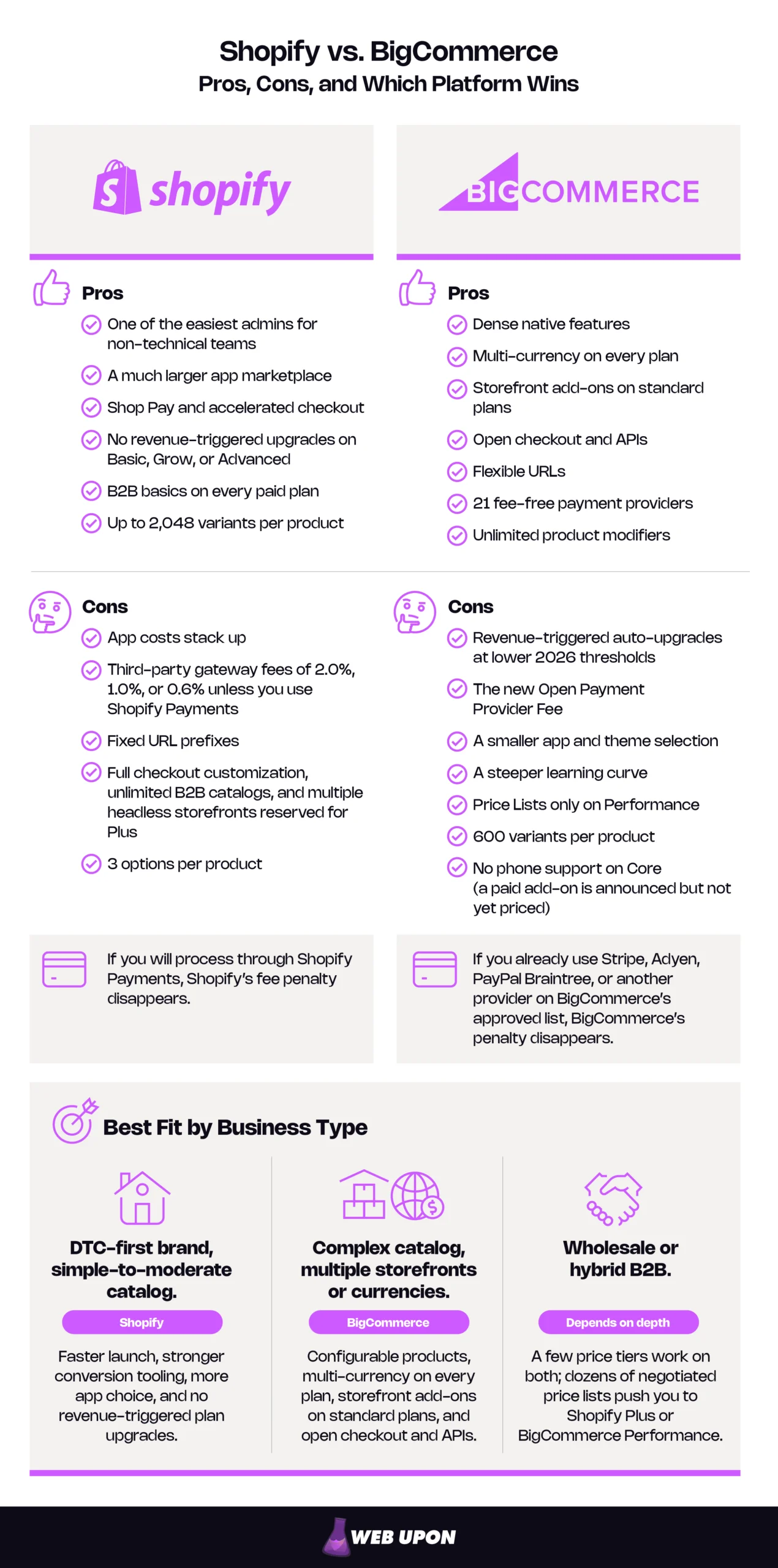
The fastest way to choose is to start from your business model, not the feature list. Most stores fall into one of the profiles below.
Best-fit platform by business type (as of October 2026):
| Business Type | Best Fit | Why |
| DTC-first brand, simple-to-moderate catalog | Shopify | Faster launch, stronger conversion tooling, more app choice, and no revenue-triggered plan upgrades. |
| Complex catalog, multiple storefronts or currencies | BigCommerce | Configurable products, multi-currency on every plan, storefront add-ons on standard plans, and open checkout and APIs. |
| Wholesale or hybrid B2B | Depends on depth | A few price tiers work on both; dozens of negotiated price lists push you to Shopify Plus or BigCommerce Performance. |
One more variable cuts across all three rows: your payment provider.
- If you will process through Shopify Payments, Shopify’s fee penalty disappears.
- If you already use Stripe, Adyen, PayPal Braintree, or another provider on BigCommerce’s approved list, BigCommerce’s penalty disappears.
Pick the platform that matches your model, then confirm it matches your payment setup.
The Real Stakes: Why This Platform Decision Can Make or Break Your Scaling Strategy
The Hidden Cost of a Wrong Platform Choice
Picture a store doing $90,000 a year that crosses $120,000 during a strong holiday season. On one platform, nothing changes. On the other, the plan upgrades automatically, and the monthly bill rises with it. Neither outcome is wrong, but only one of them was in the original budget.
That is the success tax: costs that stay invisible at launch and appear once growth arrives. Both platforms charge one, through different mechanisms.
BigCommerce’s tax is mandatory and tied to revenue.
- Stores auto-upgrade from Growth to Scale above $100,000 in trailing 12-month (TTM) GMV.
- Stores auto-upgrade from Scale to Performance at $2 million.
- On Scale, every month above $33,333 in GMV adds a 0.9% overage.
GMV here means gross order value minus 10%, including taxes, shipping, and marketplace and social orders. BigCommerce raised that reduction from 3% to 10% for self-serve plans in June, but the inclusions still mean stores often cross thresholds earlier than their own revenue reports suggest. In gross-sales terms, the $100,000 and $2 million triggers land near $111,000 and $2.2 million, and Scale’s monthly cap equals an annual run rate of about $444,000.
Shopify’s tax is optional and tied to behavior. No standard plan forces an upgrade based on revenue. Instead, costs grow through app subscriptions and, if you skip Shopify Payments, the third-party transaction fee. You can control it, but only if you watch it.
On BigCommerce, growth changes your plan; on Shopify, growth changes your app bill.
| Profile | Biggest Risk | What to Check First |
| Scaling DTC founder | App subscriptions quietly doubling the plan price | Your required app stack, priced monthly |
| B2B or hybrid retailer | Price-list needs that force an enterprise contract | How many distinct price sheets you maintain |
| Technical e-commerce manager | Integration limits and SEO loss during a future migration | API limits, URL structure, and redirect scope |
The real cost of a wrong choice shows up later, when you migrate: a redirect gap that drops category pages from search, an ERP sync rebuilt from scratch, wholesale pricing that doesn’t survive the move. These costs are predictable at signing. They just rarely get modeled.
The cheapest migration is the one you avoid by modeling year three before you commit.
What Changed in 2026 and Why Older Comparisons Mislead
Two announcements rewrote this comparison.
Shopify, April 2, 2026: Shopify extended native B2B to its Basic, Grow, and Advanced plans at no extra cost. The features include company profiles, up to 3 B2B catalogs, payment terms, volume pricing, ACH payments (U.S. only), and vaulted cards.
BigCommerce, June 1, 2026: BigCommerce restructured its plans.
- New plan names and lower GMV thresholds.
- A continuous overage on Scale.
- An Open Payment Provider Fee on self-serve plans.
| Aspect | Before 2026 | After 2026 |
| Shopify B2B | Plus only | Core B2B on all paid plans (3 catalogs), unlimited catalogs on Plus |
| BigCommerce plan names | Standard, Plus, Pro, Enterprise (former names) | Core, Growth, Scale, Performance |
| BigCommerce payment fees | No platform fee on any gateway | 2.0%, 1.0%, or 0.6% on orders through non-approved providers |
| BigCommerce upgrade triggers | Higher thresholds, block charges on the former Pro plan | $30K, $100K, and $2M TTM GMV, 0.9% continuous overage on Scale |
“No transaction fees” and “B2B requires Plus” are now half-truths, so any comparison built on them is out of date.
How to Read This Comparison as a Scaling Business
In a typical ecommerce platform comparison, feature checklists fail complex operators because almost every box gets a checkmark. What separates the platforms is architecture.
- Shopify keeps a lean core and lets apps fill the gaps.
- BigCommerce builds more into the core and gates depth by plan.
The right approach depends on which gaps your business actually has.
“Future-proof” is only useful if you can test it. Use the criteria below.
| Criterion | Shopify (standard / Plus) | BigCommerce (standard / Performance) |
| Variants per product | 2,048 with 3 options / same | 600 with unlimited modifiers / same |
| B2B pricing structures | Up to 3 catalogs / unlimited | Customer groups from Growth / Price Lists |
| Headless storefronts | 1 / 25 | API access on all plans, storefront add-ons up to 3, 5, or 8 / via sales |
| Inventory locations | 10 / 200 | 4, 5, or 8 / custom |
| Checkout customization | Limited / full | Open on all plans |
| Revenue-triggered upgrade | None / not applicable | $100K and $2M TTM GMV |
Future-proof means your three-year plan fits inside these numbers without a forced upgrade or a workaround.
The success tax shows up in the bill first, so pricing comes next.
Pricing Structures and the True Cost of Ownership
On paper, the 2026 Shopify vs. BigCommerce pricing comparison is almost a tie. Same monthly prices, same fee percentages. The differences appear in what triggers each cost, and in which payment providers let you avoid the fees.
Shopify Pricing: Transparent Plans With Hidden Multipliers
Shopify’s 2026 plans are easy to read. The multipliers sit just outside the plan price.
| Plan | Monthly Price | Annual Billing | Third-Party Gateway Fee | Online Card Rate | Key Unlocks |
| Basic | $39 | $29/mo | 2.0% | 2.9% + 30¢ | B2B (3 catalogs), 10 inventory locations |
| Grow | $105 | $79/mo | 1.0% | 2.7% + 30¢ | 5 staff accounts, full API data access |
| Advanced | $399 | $299/mo | 0.6% | 2.5% + 30¢ | 15 staff accounts, third-party shipping rates, higher API limits |
| Plus | From $2,300 | Term-based | 0.2% | 2.25% + 30¢ | Full checkout customization, unlimited B2B catalogs, up to 9 expansion stores |
How the fees work: Orders through Shopify Payments, Shop Pay, and Shop Pay Installments carry no third-party fee, and PayPal is exempt when Shopify Payments is your primary provider. Neither do manual methods such as bank transfers and draft orders marked paid. Route payments through any other gateway, and the fee applies on top of what that gateway charges you. One newer wrinkle: on stores created on or after May 12, 2025, the portion of an order paid with store credit or gift cards also carries the fee. International cards add 1% to the Shopify Payments rate.
Apps are the second multiplier. Shopify includes strong marketing basics, such as email campaigns, segments, and abandoned checkout recovery. Many stores still add paid apps for reviews, subscriptions, search and merchandising, and loyalty. No reliable neutral source reports an average app bill, so price your own stack before you compare.
Plan upgrades follow the same math.
- Grow to Advanced. The upgrade costs $2,640 more a year on annual billing and saves 0.2 points on card rates. It pays for itself on card fees only above about $1.32 million in annual card sales.
- Advanced to Plus. Plus starts near $27,600 a year and saves 0.25 points over Advanced. It breaks even on card fees only near $9.6 million.
These are illustrative figures based on published starting rates. Plus terms are negotiated.
On Shopify, the true cost depends on your app stack and your payment provider.
BigCommerce Pricing: Native Features Under New Fee Rules
BigCommerce’s 2026 plans match Shopify’s prices tier for tier, then add rules Shopify doesn’t have.
| Plan | Monthly Price | Annual Billing | GMV Cap | Open Payment Provider Fee | Notable Unlocks |
| Core | $39 | $29/mo | $30K TTM, then auto-upgrades | 2.0% | All-plan features, phone support not included (paid add-on announced, not yet priced) |
| Growth | $105 | $79/mo | $100K TTM, then auto-upgrades | 1.0% | Customer groups, abandoned cart saver, stored cards |
| Scale | $399 | $299/mo | $33,333/mo, with 0.9% overage, auto-upgrades at $2M TTM | 0.6% | Product filtering, custom filtering |
| Performance | Custom, from $1,499/mo (annual) | Contract | Contract-defined (BigCommerce lists $250K/mo with 0.6% overage) | 0.0% under contract | Price Lists, advanced promotions, success manager |
Embedded vs. Open Payment Providers: An Embedded Payment Provider is one of the 21 processors on BigCommerce’s approved list as of October 2026, such as BigCommerce Payments, Stripe, Adyen, and PayPal Braintree. Orders processed through them carry no BigCommerce fee. Every other processor is an Open Payment Provider. Orders through those processors carry the fee, which is billed to you as a separate monthly invoice line, never to shoppers.
Two details make or break the math:
- The fee follows the order, not the checkout page. Showing an approved option at checkout doesn’t help if the shopper pays through an open one.
- The fee also applies to offline and manual payments on self-serve plans, including purchase orders. On Shopify, manual payments carry no fee. If you invoice wholesale buyers on net terms, this single rule can outweigh everything else in the comparison.
Overage is calculated monthly. Scale’s 0.9% overage applies month by month, so seasonal spikes cost more than an even annual average suggests.
Native features are BigCommerce’s offset. Every plan includes product reviews, a blog, multi-currency, staff accounts, and more than 70 discount types. Fewer paid apps can recover much of what the fee rules cost.
Performance pricing is negotiable, and these are the levers:
- Contract length and annual prepayment
- Committing volume to an Embedded Payment Provider
- A documented GMV forecast, used to negotiate both the monthly cap and the overage rate
- Storefront count
- Proof of which Performance-only features you actually need
BigCommerce transaction fees are no longer zero by default, but they can still be zero by design.
On BigCommerce, your payment provider and your growth curve set the price as much as your plan does.
Cost Scenarios: $500K vs. $5M Stores on Each Platform
The numbers below are illustrative, not quotes. Substitute your own figures.
Assumptions:
- A U.S. merchant on annual billing
- Sales spread evenly across the year
- All orders paid online by card
- One storefront, and no B2B Price Lists
- An illustrative app stack covering reviews, subscriptions, search, and loyalty:
- Shopify: $350 a month at $500K and $1,000 a month at $5M
- BigCommerce: $150 and $400 a month, since reviews are included and filtering is included on Scale
- Card processing is excluded, because rates are comparable and negotiable on both platforms
- Plan prices, fees, and caps come from each vendor’s published pricing as of October 2026
| Line Item | Shopify Grow + Shopify Payments | Shopify Grow + Third-Party Gateway | BigCommerce Scale + Embedded Provider | BigCommerce Scale + Open Provider |
| Plan | $948 | $948 | $3,588 | $3,588 |
| Scale overage: ($37,500 − $33,333) × 0.9% × 12 | — | — | $450 | $450 |
| Platform payment fee | $0 | 1.0% × $500,000 = $5,000 | $0 | 0.6% × $450,000 = $2,700 |
| Apps (illustrative) | $4,200 | $4,200 | $1,800 | $1,800 |
| Annual total | $5,148 | $10,148 | $5,838 | $8,538 |
At $500,000, the platforms land within $700 of each other when each uses its own fee-free payment path. Choosing the wrong payment provider costs $2,700 to $5,000 a year.
Seasonality also matters on BigCommerce. A December with $90,000 in GMV alone produces roughly $510 in overage that month, more than the even-spread estimate for the whole year.
| Line Item | Shopify Advanced + Shopify Payments | Shopify Plus + Shopify Payments | BigCommerce Performance (published floor) |
| Plan | $3,588 | From $27,600 | From $17,988 |
| Overage | — | Variable at high volume; get terms in writing | ($375,000 − $250,000) × 0.6% × 12 = $9,000, if the listed cap applies |
| Platform payment fee | $0 | $0 | $0 under contract |
| Apps (illustrative) | $12,000 | $12,000 | $4,800 |
| Annual total | About $15,600 | From about $39,600 | From about $31,800, contract-dependent |
At $5 million, BigCommerce’s forced move to Performance is the success tax in action. A DTC store that doesn’t need Plus-only features can stay on Shopify Advanced for about half the cost.
BigCommerce wins this scenario in two cases:
- The store would need Plus anyway, for example for many negotiated price lists.
- Shopify app spend would run about $23,400 a year higher than the BigCommerce equivalent, roughly $16,200 more than this scenario assumes.
The break-even point isn’t a revenue number; it’s the moment your required features or apps cost more on one side than the other.
If you’d like these numbers run with your own sales, payment mix, and app stack, contact us for an independent model.
Price only matters relative to what each platform does natively, which is the next question.
Features, Functionality, and Out-of-the-Box Capability
Shopify Features: A Streamlined Core With an App-First Philosophy
Shopify’s core covers the essentials of a DTC store well: unlimited products, built-in marketing automation, and inventory across 10 locations on standard plans (200 on Plus). Anything specialized usually comes from the App Store.
Catalog limits. In October 2025, Shopify raised its limit to 2,048 variants per product, up from 100. The limit of 3 options per product did not change. A product that needs four selectable attributes, such as size, color, material, and finish, still needs a workaround.
Checkout. Shopify’s plan comparison rates checkout customization “limited” on standard plans and “full” only on Plus.
Native vs. app-required on Shopify standard plans:
| Native | Usually an App |
| Email campaigns and automations | Advanced product reviews |
| Abandoned checkout recovery | Subscriptions |
| Discounts and gift cards | Loyalty programs |
| Multi-location inventory (10) | Advanced search and filtering |
| B2B basics (3 catalogs) | Product configurators beyond 3 options |
Shopify does the common jobs natively and expects apps to handle the specialized ones.
BigCommerce Features: Native Density With Plan-Gated Depth
BigCommerce puts more into the core, then releases depth by plan.
- Growth adds customer groups for segment pricing, abandoned cart emails, persistent carts, and stored cards.
- Scale adds product filtering, including filters built from custom fields.
- Performance adds Price Lists (SKU-level pricing by customer group) and advanced promotions.
- Quotes and purchase-order workflows come through BigCommerce’s B2B Edition, priced through sales.
The catalog model differs from Shopify’s in a way most comparisons skip. BigCommerce caps a product at 600 variants, meaning stock-tracked SKUs. It allows unlimited modifiers, which change a product’s price or weight without being stocked separately (engraving text, gift wrap, or a finish choice). It also supports up to 200 custom fields per product.
The practical rule:
- Many stocked combinations across 3 or fewer attributes favor Shopify.
- Many configurable attributes that aren’t stocked separately, or more than 3 selectable axes, favor BigCommerce.
BigCommerce features by plan:
| Feature | Core | Growth | Scale | Performance |
| Multi-currency, blog, reviews, 70+ discount types | Yes | Yes | Yes | Yes |
| Customer groups, abandoned cart saver, stored cards | — | Yes | Yes | Yes |
| Product filtering and custom filtering | — | — | Yes | Yes |
| Price Lists and advanced promotions | — | — | — | Yes |
| Inventory locations | 4 | 5 | 8 | Custom |
| Phone support | Not included (add-on announced) | Yes | Yes | Yes |
“Enterprise features without the enterprise price” is only partly true in 2026. Standard plans deliver real depth, but the strongest B2B pricing tools still require Performance.
BigCommerce gives you more before you install anything, but check which plan unlocks the feature you need.
B2B and Complex Catalogs: Where the Platforms Diverge Most
The Shopify vs. BigCommerce for B2B question is now about depth, not access. Both platforms support wholesale B2B ecommerce on standard plans. What differs is how far each goes before you need an enterprise contract.
Shopify B2B on Basic, Grow, and Advanced now covers company profiles, payment terms, volume pricing, and up to 3 catalogs assigned through Markets. Plus keeps unlimited catalogs, direct catalog assignment to companies and locations, partial payments, and deposits.
Here is the detail that decides many wholesale cases: the 3-catalog limit counts price sheets, not buyers. Many accounts can share one catalog. The ceiling arrives when pricing fragments. If every key account negotiates its own price sheet, account number four forces Plus.
Your profile tells you where you land:
- If you sell wholesale with a few price tiers, both platforms work on standard plans. Shopify’s 3 catalogs and BigCommerce’s customer groups (from Growth) cover retail, wholesale, and distributor pricing.
- If you manage dozens of negotiated price lists, you need Shopify Plus or BigCommerce Performance. Compare those two directly.
- If you rely on quotes, purchase orders, and sales-rep ordering, look at Shopify Plus or BigCommerce B2B Edition. Remember the fee rule: on BigCommerce self-serve plans, PO and offline payments carry the Open Payment Provider Fee. On Shopify, manual payments carry no fee.
International selling is closer than it looks. Shopify Markets handles local currencies, translations, local domains, and duties on every plan, though several features require Shopify Payments. BigCommerce includes multi-currency on every plan through the processor of your choice, and adds separate storefronts by region as paid add-ons.
B2B capabilities by platform and tier:
| Feature | Shopify Standard | Shopify Plus | BigCommerce Standard | BigCommerce Performance / B2B Edition |
| Company accounts | Yes | Yes | Customer groups (Growth+) | Yes |
| Customer-specific pricing | Up to 3 catalogs | Unlimited catalogs | Group-level pricing | Price Lists (SKU level) |
| Payment terms | Yes | Yes | Via apps or B2B Edition | Yes |
| Quotes and purchase orders | Limited | Yes | Via B2B Edition | Yes |
| Platform fee on PO or offline orders | None | None | 2.0%, 1.0%, or 0.6% | None under contract |
Count your distinct price sheets and your offline payment volume before you count features.
Features decide what you can sell. Design flexibility decides how it looks, and how fast your team can change it.
Customization, Design Flexibility, and User Experience
Shopify Design: Themes, Online Store 2.0, and Liquid
Shopify’s Theme Store offers free and premium themes built on Online Store 2.0, its section-based framework. Merchants can drag, drop, and reorder sections on most pages without code. That editor is a major reason non-technical teams pick Shopify and stay.
Developers work in Liquid, Shopify’s templating language, which controls how store data appears in a theme. Liquid is approachable and well documented. Its ceiling is the platform itself: you shape what Shopify exposes, not the engine underneath.
For technical teams: Liquid’s traditional product loop returns at most 250 variants. Stores using Shopify’s higher variant limit need themes that load variant data on demand.
Shopify’s design tools are one of the easiest paths to a polished store, with a ceiling you reach through code, not settings.
BigCommerce Design: Stencil, Page Builder, and Headless
BigCommerce’s theme marketplace is smaller. Its Stencil framework, the theme engine developers build on, gives technical teams more structural control over templates and front-end behavior. Page Builder covers drag-and-drop editing for non-technical users, though in practice it feels less fluid than Shopify’s editor.
BigCommerce’s bigger design story is headless commerce: running a custom front end, such as a React or Next.js site, on top of BigCommerce’s back end through its APIs. Shopify supports headless too, but limits standard plans to 1 headless storefront (25 on Plus). For design-led teams chasing front-end performance, BigCommerce’s openness on standard plans is a genuine advantage.
BigCommerce rewards teams with developers; Shopify rewards teams without them.
Operator Experience: Learning Curve and Daily Use
Shopify’s onboarding is among the quickest routes to launch. Most merchants can list products, set up payments, and go live without help. BigCommerce asks for more setup up front. Its settings run deeper, and that depth pays off for operators who manage complex catalogs, pricing rules, or multiple storefronts.
Day-to-day effort on common tasks (qualitative):
| Task | Shopify | BigCommerce |
| Add a product | Low | Low |
| Create a discount | Low (apps for advanced logic) | Low (70+ native types) |
| Set up a new currency | Low (Markets) | Low (multi-currency on all plans) |
| Edit checkout | Limited unless Plus | Moderate, open to developers |
For small retailers, Shopify usually wins on daily use; for complex operations, BigCommerce’s extra depth earns its learning curve.
No platform does everything natively, so the ecosystem around it matters next.
App Ecosystems, Integrations, and Marketing Infrastructure
Shopify App Store: Breadth at a Recurring Cost
Shopify advertises thousands of apps and calls its App Store the largest commerce ecosystem. In practice, that breadth means almost any need has several options. The major categories are reviews, subscriptions, loyalty, search, analytics, and SEO tools.
Breadth brings real costs. Apps can conflict with each other or with your theme, overlap in function, and vary in support quality. Every app is also a dependency: if a developer raises prices or shuts down, you inherit the problem.
Shopify’s ecosystem solves nearly any problem, but every app you add is a recurring cost and a dependency.
BigCommerce Integrations: A Smaller Marketplace With More Built In
BigCommerce lists over 1,200 apps, a smaller marketplace that needs to cover less ground. Several things are already built in:
- Product reviews, the blog, and multi-currency on every plan
- Abandoned cart emails from Growth
- Marketplace connections to Amazon, eBay, and Walmart
- Feedonomics Surface for Google, Meta, TikTok, Microsoft, and Pinterest ad feeds, with a free basic plan up to 100,000 SKUs
Pre-built connectors cover major ERP and CRM systems.
For technical teams: check how each platform rations API calls, not just whether an integration exists.
- Shopify publishes higher API limits by tier: up to 2x on select APIs on Advanced, and up to 10x on Plus.
- BigCommerce meters calls per store by plan: 20,000 an hour on Core and Growth and 60,000 on Scale, shared by every app on the store. Your ERP, PIM, and search integrations all draw from that one quota.
When several systems sync during a flash sale, quota design decides whether inventory stays accurate.
BigCommerce needs fewer apps, but you should test API headroom with your real integration load on either platform.
SEO and Marketing: A Head-to-Head Comparison
Shopify’s structural constraints. Shopify uses fixed URL prefixes (/products/, /collections/, /pages/, and /blogs/) that can’t be removed. Products can also be reached through collection-scoped paths, and Shopify’s own developer docs warn that these duplicate the main product page, so themes that link them can waste crawl budget on large catalogs. Our Shopify SEO work focuses on managing exactly these limits.
What Shopify does well. Shopify generates sitemaps and provides SSL automatically. Its robots.txt is editable through a theme template, though Shopify labels those edits an unsupported customization, so the older criticism that you can’t edit it is out of date. Markets supports local domains for international SEO on every plan.
BigCommerce’s defaults. BigCommerce lets you configure URL templates for products, categories, and content pages, and build custom URL formats from placeholders such as product name, category, or SKU. That matches Google’s guidance on simple, descriptive URL structures. It also includes a blog on every plan. We use that control well with our BigCommerce SEO approach.
Content and channels. Both platforms include blogging, and either can support a serious ecommerce content strategy. Both connect to major social and marketplace channels. In our experience, page speed depends more on theme and app bloat than on the platform, since both are fully hosted.
| Capability | Shopify | BigCommerce |
| URL structure control | Fixed prefixes | Configurable templates for products, categories, and content pages |
| Duplicate product paths | Theme-dependent, Shopify flags the SEO risk | Fewer by default |
| robots.txt | Editable via theme template (unsupported customization) | Editable |
| Built-in blog | Yes | Yes |
| International SEO | Markets with local domains | Multi-storefront and multi-currency |
BigCommerce gives you more URL control; Shopify gives you safer defaults with less room to customize.
For platform-specific help with either setup, an ecommerce SEO partner can audit your structure before it becomes a migration problem.
Traffic only pays off if checkout converts and the platform holds up under load.
Payment Processing, Checkout, and Conversion Infrastructure
The fee rates are identical; what differs is how many ways you have to avoid them.
| Plan Level | Shopify Third-Party Gateway Fee | BigCommerce Open Payment Provider Fee |
| Entry (Basic / Core) | 2.0% | 2.0% |
| Mid (Grow / Growth) | 1.0% | 1.0% |
| Upper standard (Advanced / Scale) | 0.6% | 0.6% |
| Enterprise (Plus / Performance) | 0.2% | 0.0% under contract |
| How to avoid it | Use Shopify Payments | Use any of 21 Embedded Payment Providers |
| Manual, offline, or PO orders | No fee | Fee applies on self-serve plans |
Shopify Payments: Fees, Shop Pay, and Checkout Limits
Shopify Payments is Shopify’s built-in processor. Using it removes the third-party fee and unlocks Shop Pay, local currencies, and built-in fraud analysis.
The catch is availability. Shopify Payments operates only in certain countries. Where it isn’t available, every order on Basic, Grow, or Advanced carries the third-party fee on top of your processor’s own rate.
Checkout is one of Shopify’s heaviest areas of investment. Shopify reports that its checkout converts 15% better on average than other platforms, a vendor claim rather than an independent benchmark. Shop Pay and accelerated checkout are real conversion tools. Deeper checkout changes, however, require Plus.
Shopify’s checkout is arguably its strongest conversion asset, as long as Shopify Payments works in your market.
BigCommerce Payments: Embedded Providers and an Open Checkout
BigCommerce no longer has zero transaction fees on every gateway. It has zero fees on 21 Embedded Payment Providers, and the Open Payment Provider Fee on everything else.
That approved list is broad. It covers BigCommerce Payments, Stripe, Adyen, PayPal Braintree, Checkout.com, Worldpay, Global Payments, Klarna, Afterpay, Affirm, and others. Many merchants already use one of them.
BigCommerce’s checkout is open to developers on every plan, so technical teams can change flows without an enterprise contract. Every plan includes single-page checkout, Apple Pay, Google Pay, and Amazon Pay. Any conversion benchmarks BigCommerce publishes are vendor claims.
Scalability: Performance Under Growth Pressure
Both platforms are fully hosted SaaS, and no independent, current uptime comparison exists. Judge them instead on the architectural limits in Table 5: variants per product, API headroom by plan, and storefront caps. For flash sales, note that Shopify reserves bot protection and its high-volume checkout for Plus.
On security, Shopify is certified Level 1 PCI DSS compliant, and BigCommerce maintains Level 1 PCI DSS attestations as both a merchant and a service provider. Level 1 is the highest tier in the framework set by the PCI Security Standards Council. On both, the platform itself carries most of the PCI compliance burden for checkout.
Both platforms scale for most merchants; your limit will be a catalog, API, or storefront cap, not server capacity.
With the evidence laid out, the verdict maps that evidence to specific business models.
Which Platform Wins for Your Business Model
Choose Shopify When: The Ideal Shopify Merchant Profile
Shopify fits best when:
- You run a DTC brand whose growth depends on conversion, marketing tools, and speed rather than catalog complexity.
- You plan to process through Shopify Payments. That removes the fee penalty, and you’ll never face a revenue-triggered upgrade on Basic, Grow, or Advanced.
- Your B2B needs fit within 3 catalogs. Wholesale works on standard plans at no extra cost.
- Your team is lean. Ease of use and the app ecosystem matter more than native depth or URL control.
Shopify Plus earns its price for features: full checkout control, unlimited B2B catalogs, expansion stores, and API headroom. On card-rate savings alone, it doesn’t pay for itself below roughly $9.6 million a year.
Choose Shopify if you want a fast path to a high-converting store and can keep your app stack in check.
Choose BigCommerce When: The Ideal BigCommerce Merchant Profile
BigCommerce fits best when:
- Your catalog is complex. Products have many configurable attributes, more than 3 options, or rely on custom fields and filtering.
- Your processor is already on the Embedded list, or Shopify Payments isn’t available in your country.
- You need multiple storefronts or currencies without an enterprise contract.
- Your team has developers who will use open checkout, APIs, and headless architecture.
- You want control over URL structure for a large or SEO-sensitive catalog.
Price Lists and advanced promotions require the BigCommerce Performance plan, and crossing $2 million in TTM GMV moves you there automatically. If you invoice wholesale buyers offline, plan for the fee on self-serve plans.
Choose BigCommerce if native depth and technical control matter more than ecosystem breadth, and you can predict your path to Performance.
How to Avoid Choosing Wrong the First Time
The BigCommerce vs. Shopify decision gets much easier once you answer five questions honestly:
- How complex is your catalog, and does any product need more than 3 options or more than 600 stocked variants?
- How many customer-specific price lists do you need?
- Which payment provider will you use, and will wholesale buyers pay offline or by purchase order?
- How many storefronts, currencies, or regions will you need in 3 years?
- How much in-house technical capacity do you have?
If you can’t answer all five yet, get an independent review before you sign a contract.
Red flags that you are already on the wrong platform:
- You pay for apps that replicate the other platform’s native features.
- You have hit the 3-catalog limit or the 600-variant limit.
- Your platform payment fees exceed your plan price.
- Your plan changed because of revenue you didn’t forecast.
- Your developers spend more time on workarounds than on features.
What an ecommerce migration actually costs: The platform switch itself is rarely the expensive part. Cost concentrates in three places:
- Redirect mapping. Every product, category, blog, and page URL needs a permanent (301) redirect to its new address. Moving to Shopify usually changes almost every URL because of its fixed prefixes. Moving to BigCommerce can often preserve URLs.
- Re-integration. The ERP, PIM, reviews, subscriptions, and B2B pricing data each have to be rebuilt and tested.
- The recovery window. Rankings and revenue can dip after any move that changes URLs, even a well-run one. Protecting organic traffic through that window takes dedicated SEO expertise, not a last-minute checklist.
Your Next Step Before You Commit
One Recommendation per Business Profile
Recommended platform and plan by business profile (illustrative):
| Business Model | Growth Stage | Recommended Platform and Plan | Key Reason |
| DTC brand | Under about $1.3M | Shopify Grow | Lowest total cost with Shopify Payments; no revenue-triggered upgrades. |
| DTC brand | About $1.3M to $10M | Shopify Advanced, or Plus for its features | Card-rate savings justify Advanced; Plus is a features decision. |
| Wholesale, a few price tiers | Any | Either platform, standard plan | 3 catalogs on Shopify or customer groups on BigCommerce Growth |
| Wholesale, many negotiated price lists | Scaling | Shopify Plus or BigCommerce Performance | Unlimited catalogs vs. SKU-level Price Lists |
| Complex, configurable catalog | Any | BigCommerce Scale or Performance | Unlimited modifiers, custom fields, and filtering |
| Multi-brand or multi-region | Scaling | BigCommerce storefront add-ons or Shopify Plus expansion stores | Add-on storefronts on standard BigCommerce plans; expansion stores require a Shopify Plus contract. |
Neither platform wins on price anymore. Shopify wins for DTC brands that want speed, conversion tools, and freedom from revenue-triggered upgrades. BigCommerce wins for complex catalogs, multi-storefront operations, and teams that value technical control, provided their payments run through an approved provider.
The fear behind this decision is reasonable: picking a platform whose costs and limits only show up once you’re successful. The way past that fear is simple, if not easy. Every success tax in this guide was visible on a published pricing page before anyone signed. Choose the platform whose costs and limits you can see in advance, at the size you plan to be, not the size you are today.
Your next three steps:
- Run your own numbers through the cost scenarios above, using your real payment mix and app stack.
- Answer the five questions in How to Avoid Choosing Wrong.
- Get an independent review before you sign a contract or start a migration.
Web Upon works on both platforms and has no stake in which one you choose. As your ecommerce SEO partner, we can assess your platform fit and the SEO risk of any move before you commit. Contact Web Upon for a neutral platform and SEO assessment.


