How can you migrate from WordPress (WooCommerce) to Shopify without losing your SEO?
A migration that holds its rankings and one that collapses them are usually separated by a single discipline: the completeness of your redirect map. Every URL on your WooCommerce store carries accumulated value — years of crawling, backlinks, and search history pointing at a specific address. When that address changes and nothing tells Google where the page moved, the equity doesn’t transfer. Get the redirects right and you keep what you’ve built. Miss them, and you find out which pages mattered the hard way.
What follows is the rankings-safe WooCommerce to Shopify migration checklist, in the order you should actually run it.
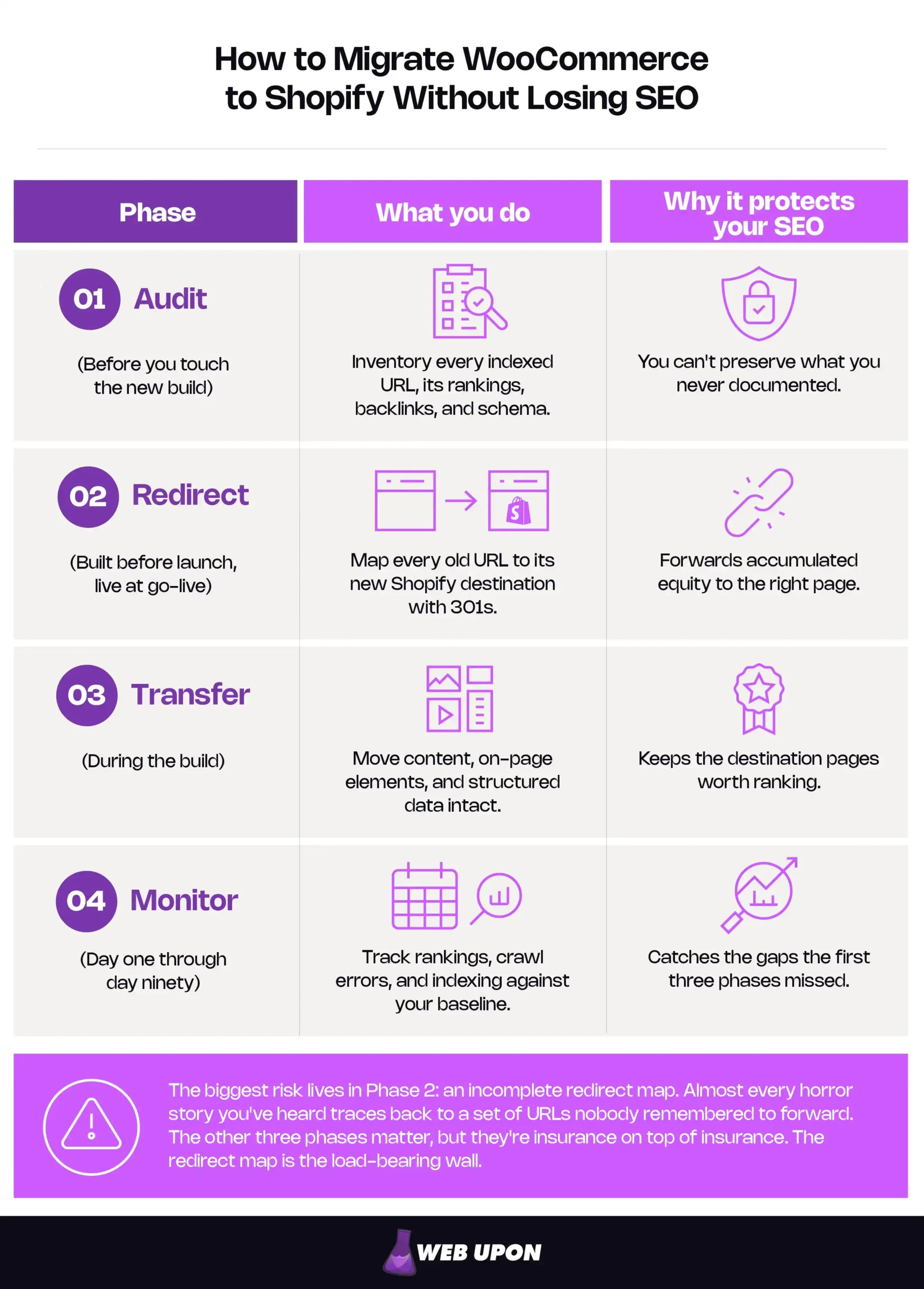
Key Takeaways
- Run four phases in order: Audit (document every indexed URL, ranking, backlink, and schema) → Redirect (map every old URL 1:1 with a 301) → Transfer (move content and structured data intact) → Monitor (track against your baseline for ninety days).
- Audit beyond the crawl. Crawlers miss orphaned URLs that still rank, so cross-reference your crawl with the Google Search Console Pages report and analytics to build a genuinely complete inventory.
- Shopify locks the prefix, not the slug. /products/, /collections/, and /blogs/ are fixed, but the editable handle lets you preserve nearly every keyword-rich URL.
- The redirect map is the safety net. Shopify has no wildcard or regex redirects, so every URL must be mapped one-to-one. Send each old URL to its closest match — never the homepage, which Google can treat as a soft 404.
- Rebuild schema deliberately. Default Shopify themes often drop the review and aggregateRating fields behind star ratings; Product, Review, and BreadcrumbList all remain rich-result-eligible and are worth rebuilding by hand.
- FAQ rich results are gone. Google retired them on May 7, 2026. Keep FAQ content for readers and AI answer engines, not for a SERP dropdown.
- Budget for the dip. Expect normal re-indexing fluctuation for a few weeks after launch; investigate only if a drop persists beyond six weeks.
Pre-Migration SEO Audit: Knowing What You’re Protecting Before You Move
This is the most under-appreciated phase of the entire move, and the one teams are most tempted to rush. The audit is the insurance policy. You cannot redirect a URL you never recorded, rebuild a schema block you never documented, or notice a ranking drop you never baselined. Before you change a single URL, you need a complete picture of what you’re protecting. The rule is simple: do not begin the Shopify build until your baseline export is saved, backed up, and somewhere you won’t lose it.
Start by crawling your entire WooCommerce site to establish a baseline. A tool like Screaming Frog or Sitebulb will capture every internally linked URL — products, category pages, blog posts, tag archives — along with their meta titles, descriptions, and status codes. Export the lot.
But a crawler has a blind spot you need to close, and it’s the one that quietly sinks migrations. A crawler only finds pages that are still linked from somewhere on your site. It cannot see orphaned URLs — pages that have no internal links pointing to them but still rank and still pull traffic. An old landing page, a seasonal product nobody links to anymore, a blog post that earns its visits entirely from search. Those pages never appear in a crawl, which is exactly why they’re the ones that get missed in the redirect map. To catch them — a core part of any thorough pre-migration SEO audit — cross-reference the crawl with two other sources: your Google Search Console Pages report (which surfaces URLs Google has discovered and indexed even when nothing on your site links to them) and your analytics landing-page report. Merge all three, remove duplicates, and you have a genuinely complete inventory rather than a partial one.
With the URL list in hand, audit your current URL structure against Shopify’s. WooCommerce lets you shape permalinks however you like; Shopify does not. Map your existing patterns — /product/, /product-category/, your blog paths — against where they’ll land on Shopify. Flag the URLs with the strongest rankings so they get priority attention later, and note any custom permalink quirks that won’t have a clean Shopify equivalent.
Next, benchmark your rankings and visibility. Snapshot current keyword positions in Google Search Console and your rank tracker. Record organic traffic per URL in Google Analytics. Identify the collection pages and product URLs that drive the most revenue-relevant search visibility. This snapshot becomes the yardstick you’ll measure against for the next ninety days. Without it, you can’t tell a normal re-indexing wobble from a genuine problem.
Finally, inventory your backlinks, schema, and rich snippets. Export your backlink profile with Ahrefs or SEMrush, noting which URLs attract the most authority. Document every schema implementation you currently run — product, review, breadcrumb — and record which pages actually display rich snippets in the search results today. Those are the visible wins you’ll need to consciously rebuild on Shopify, not assume will carry over. Capture your canonical configurations too, so you can spot any indexing confusion later.
| Asset to capture | Tool | Why it matters | Where it’s saved |
| Full URL inventory | Crawler + GSC + Analytics | The basis of your redirect map | Master spreadsheet |
| Keyword rankings | GSC + rank tracker | Post-migration baseline | Benchmark tab |
| Organic traffic per URL | Google Analytics | Detects drops by page type | Benchmark tab |
| Backlink profile | Ahrefs / SEMrush | Prioritizes high-equity URLs | Backlink export |
| Schema & rich snippets | Manual + Rich Results Test | The rebuild checklist | Schema inventory |
With a complete inventory in hand, the next job is deciding where every one of those URLs will live on Shopify.
URL Structure Strategy and Redirect Mapping: Preserving Search Identity Across Platforms
This is the highest-stakes section of the move. If you give one phase your full attention, give it this one. Every instruction here ties back to the same idea: a missed redirect is leaked equity.
The structural reality of Shopify URLs
WooCommerce hands you a blank canvas for URLs. Shopify hands you a template. On Shopify, every product lives under /products/, every collection under /collections/, every blog post under /blogs/{blog-handle}/, and every static page under /pages/. You cannot remove or rename those prefixes; they’re fixed at the platform level.
What you can control is the part that matters most for SEO: the handle, the final segment of the URL. So while the path around it changes, a keyword-rich WooCommerce slug like merino-wool-socks can be preserved exactly on Shopify. The prefix is locked; the slug is yours. One small but worthwhile detail: that /blogs/news/ you’ll see by default is just Shopify’s default blog handle — news is editable, so name it deliberately during setup rather than inheriting an awkward default like /blogs/blog/.
Accept these constraints early. Once you stop fighting Shopify’s URL structure and start planning around it, the redirect strategy writes itself.
Building a comprehensive redirect map before launch
Your redirect map is a single document that pairs every old WooCommerce URL with its new Shopify home, one to one. Build it before launch, not after. Prioritize the high-traffic products, categories, and blog posts that carry real link equity, and use 301 redirects exclusively. A 301 signals a permanent move and forwards nearly all of a page’s accumulated authority. Google is explicit that permanent redirects don’t cause a loss in PageRank. And don’t forget the URLs that hide in the corners: paginated pages, filtered category views, and tag archives are the ones teams overlook most often.
There’s a structural reason completeness isn’t optional here, and it’s specific to Shopify. On a traditional server, one wildcard rule — /blog/* → /blogs/news/* — can quietly catch thousands of URLs at once. Shopify has no wildcard or regex redirects. Every redirect is an exact, one-to-one path mapping, with no pattern-matching safety net underneath. That means any old URL you forget doesn’t get caught by a broader rule — it simply returns a 404. The absence of wildcards is precisely why the audit had to be exhaustive: on Shopify, the map is the safety net.
When you assign destinations, map each URL to its closest content match, never to the homepage. Pointing retired URLs at the homepage is one of the most common ways migrations bleed equity. It tells Google the old content is simply gone and discards most of what that page earned. Google’s own site-move guidance warns that redirecting many old URLs to one irrelevant destination, such as the new homepage, can be treated as a soft 404. An old product should forward to its equivalent product, an old category to its equivalent collection. Only when no thematic match exists at all should you fall back to a parent collection.
Implementing redirects without losing link equity
Shopify’s native URL Redirects tool handles this directly. From the admin, you can enter redirects one at a time or upload them in bulk via CSV, which is how you’ll do a real migration. A few practical guardrails save real pain here. Use relative paths in your CSV (/old-url, not the full https://…) to avoid domain-formatting errors. Batch large imports into manageable groups so that if something breaks, you can find it. And know the ceiling: a store can hold up to 100,000 redirects — more than enough for nearly any catalog, but a genuine limit for stores with millions of URLs, which is why Shopify Plus raises the cap to 20 million.
One feature works quietly in your favor. Shopify actively prevents redirect chains: it will reject any redirect whose destination is already listed as another rule’s starting point. That built-in guard stops the slow accumulation of A → B → C hops that dilute equity and slow crawlers. (It won’t let you redirect from a handful of reserved paths like /cart, /orders, or /apps — but those aren’t pages you’d want to forward anyway.) After launch, test a representative sample of redirects to confirm they return a clean 301 with no loops, and watch Google Search Console for 404s so you can patch any gap immediately. Shopify’s own URL redirect documentation is worth keeping open while you work.
Handling category pages and collection pages
WooCommerce category pages (/product-category/) map to Shopify collection pages (/collections/) with 301 redirects — straightforward in principle, easy to under-serve in practice. Category pages often rank for valuable head terms, so replicate their meta titles, descriptions, and on-page content on the corresponding Shopify collection rather than launching a thin version. Reuse the same keyword-rich slug wherever Shopify allows, and resist the urge to create overlapping collections that compete with each other for the same query.
| Page type | WooCommerce path | Shopify path | Slug preserved? |
| Product | /product/blue-jacket | /products/blue-jacket | Yes — slug editable |
| Category → Collection | /product-category/jackets | /collections/jackets | Yes — slug editable |
| Blog post | /blog/shopify-tips | /blogs/news/shopify-tips | Yes — slug editable |
| Old WooCommerce URL | New Shopify URL | Redirect type | Priority |
| /product/blue-jacket-xl | /products/blue-jacket | 301 | High |
| /product-category/summer | /collections/summer | 301 | High |
| /blog/migration-guide | /blogs/news/migration-guide | 301 | Medium |
Redirect mapping is where migrations most often fail. If you’d rather not stake years of rankings on a spreadsheet, Web Upon can map and QA the entire migration for you — every URL accounted for, every 301 verified before launch.
Redirects point the way, but the destination pages still need every on-page SEO signal carried across intact.
Data Migration and On-Page SEO Preservation: Transferring Every Signal Intact
A redirect sends Google to the right address. What it finds when it arrives is up to you. This phase is about making sure the destination page is every bit as strong as the one it replaced.
Migrating product data without losing on-page elements
Transfer every product’s meta title and meta description — manually or through a migration tool — and verify each field actually populated in Shopify rather than assuming the import caught everything. Match product slugs to the final segment of your old WooCommerce URLs wherever you can; the closer the match, the less you lean on redirects in the first place. Bring across product descriptions, image alt text, and structured-data fields as part of the core transfer, then load a sample of products and confirm the Shopify template renders all of it correctly before launch. Spot-checking ten products by hand will teach you more than trusting a green “import complete” message.
Preserving blog content and its SEO value
Migrate blog posts with their full content, meta data, and internal links intact, and keep the original publish dates so you preserve the content-age signals search engines associate with your posts — bearing in mind that a date helps mainly on time-sensitive queries, and that changing it without genuinely updating the content is not itself a ranking lever. Then handle the internal links deliberately, because this is where avoidable problems creep back in. A 301 forwards equity reliably, but an internal link that still points at an old WooCommerce URL forces every internal click through a redirect hop, and enough of those rebuild the very chains you worked to avoid. Redirects are the safety net for external links and bookmarks you don’t control. Internal links should be rewritten to point straight at the live Shopify URL. It’s among the most common post-migration cleanup tasks, and one of the easiest to do well if you plan for it. Resubmit migrated blog URLs in Search Console to nudge re-indexing along.
Rebuilding schema markup and structured data
Here’s the trap worth naming plainly: Shopify themes do emit basic Product schema, but “basic” is doing a lot of work in that sentence. Default theme markup frequently omits the review and aggregateRating properties — the exact fields responsible for the star ratings a mature WooCommerce store likely displayed in search. So if you assume schema carries over automatically, you can lose your most visible rich snippets without realizing it.
Treat Product, Review, and BreadcrumbList as a deliberate rebuild, not an automatic carry-over. All three remain rich-result-eligible types in Google’s structured-data gallery, which is exactly why they’re worth restoring. Implement product schema with price, availability, and review properties to restore rich-result eligibility, and add breadcrumb schema to replicate the structured navigation WooCommerce provided. Getting the full set in place usually means editing your theme’s JSON-LD or adding a dedicated schema tool rather than trusting defaults. Validate every type in Google’s Rich Results Test — once before launch to capture your starting point, and again after, to confirm what you rebuilt is eligible. (Schema.org remains the reference for the markup itself.)
A note on one schema type you may ask about: an on-page FAQ block is still worth including for clarity and for AI answer engines that parse your content, but treat it as a usability and discoverability asset, not a search-results decoration. Google stopped showing FAQ rich results in May 2026, so FAQ markup no longer produces the expandable dropdown it once did, even though it remains valid and carries no penalty. Build FAQ content for readers and AI, not for the SERP.
Optimizing images to protect post-migration SEO
Re-upload product and blog images with descriptive, keyword-relevant file names rather than letting generic auto-generated names ride along, and rewrite alt text so every image carries a descriptive, keyword-aligned attribute. Shopify’s CDN automatically serves modern formats like WebP on delivery, averaging over 30% smaller files than PNG or JPEG, which generally helps your performance scores. Note the nuance, though: that optimization happens at delivery, not on your source files, so compress oversized originals before uploading rather than assuming the platform shrinks them for you. Last, verify that image URLs resolve correctly inside migrated content so you don’t ship a wave of broken-image crawl errors on day one.
| Element | WooCommerce source | Shopify destination | Verified? |
| Meta title | Yoast / Rank Math field | Shopify SEO listing | ☐ |
| Meta description | Yoast / Rank Math field | Shopify SEO listing | ☐ |
| Slug | Permalink | Editable handle | ☐ |
| Image alt text | Media library | Product/blog image | ☐ |
| Schema | Plugin output | Theme JSON-LD / app | ☐ |
Once the content is in place, Shopify’s technical settings determine whether Google can find and trust it.
Technical SEO Configuration in Shopify Post-Migration: Locking In Your Search Foundation
This is the part of the move that can actively improve your SEO. Managed infrastructure, an automatic sitemap, and built-in performance are advantages WooCommerce asked you to assemble yourself. The work here is mostly confirmation that making sure the platform’s defaults are pointed the right way.
Sitemap and Google Search Console
Shopify automatically generates a sitemap at yourdomain.com/sitemap.xml covering products, collections, blog posts, and pages. Submit it to Google Search Console immediately after launch to prompt a re-crawl of your migrated URLs. Remove the old WooCommerce sitemap from Search Console and let the superseded URLs resolve through their 301s — don’t try to “disavow” the old sitemap references. (Disavowal is a backlink tool; it has nothing to do with sitemaps, and reaching for it here is a common, harmless-but-pointless misstep.) Watch the coverage report for any URLs excluded from indexing.
Canonical tags
Shopify already handles more of this than people expect. Out of the box, a product reachable at both /products/handle and /collections/x/products/handle canonicalizes to the clean /products/handle version automatically. The duplicate-content problem teams worry about is largely solved by default. So your job here is verification, not construction: confirm Shopify’s automatic canonicals weren’t overridden by custom menus or internal links pointing at collection-path variants, and audit collection pages with filtered or sorted parameters that can spin up duplicate signals. Use Search Console’s URL Inspection tool to confirm Google sees the canonical you intend on your highest-priority pages.
Crawl errors and indexing
Watch the Search Console coverage report closely in the first four weeks — daily is not excessive at this stage. Build a simple habit: when a new 404 surfaces, add the matching 301 within a day. Keep an eye out for soft 404s on thin or empty collection pages, and manually resubmit critical URLs through URL Inspection if re-indexing lags. A permanent loss is almost always traceable to missed redirects or thin destination pages.
Site speed and mobile usability
Shopify’s managed hosting typically responds faster than self-hosted WooCommerce, which often translates into a Core Web Vitals advantage out of the gate. A bloated theme or a stack of script-injecting apps can erase the benefit entirely. Choose a theme built for speed and mobile usability, audit your apps after launch and remove any that inject render-blocking scripts, and benchmark with Google PageSpeed Insights and the Core Web Vitals report in Search Console.
Configuration sets the foundation, but the weeks after go-live are when you find out whether it held.
Post-Migration Monitoring and Recovery: Protecting Rankings After Go-Live
A migration isn’t finished at launch. It’s finished ninety days later, when the data confirms you held your ground. This phase is the discipline most stores can’t sustain on their own, and it’s the difference between catching a problem in week two and discovering it in month three.
Establishing a monitoring protocol
Compare your keyword rankings against the pre-migration baseline weekly for the first three months. Set up Search Console alerts for meaningful drops in impressions or clicks on pages that used to perform. Track organic traffic by URL segment — products, collections, blog — in Google Analytics, so that if something slips you can isolate it to a page type rather than staring at a single aggregate line. And document every SEO change you make with a date attached; when rankings wobble, that change log is the fastest route to a diagnosis.
Identifying and recovering from a decline
Expect some fluctuation. As Google re-crawls and re-indexes a migrated site, the move completes on a per-URL basis, and rankings commonly move around while it does — typically a few weeks for most pages, and longer for very large catalogs. That is normal, not a failure, and reacting to it as if it were an emergency leads to panicked changes that cause more harm than the dip itself. The line to watch is persistence: as a practical rule of thumb, a drop that’s still there beyond about six weeks is a signal to investigate, not wait. When that happens, audit the affected URLs for redirect accuracy, canonical correctness, and on-page completeness — the cause is almost always one of those three. Strengthen internal linking to redistribute equity across your migrated pages, and run a focused outreach campaign to your highest-authority referring domains, asking them to update links to the new URLs where they can. A backlink that points straight at the live URL is stronger than one riding a redirect.
The 90-day audit
At the ninety-day mark, run a full crawl of the Shopify store and a complete pass through your monitoring data. Confirm there are no lingering crawl errors, broken links, or missing meta data. Check that every product and collection page carries its full set of on-page elements and structured data. Review your Search Console query data to confirm your target keywords have re-associated with the correct Shopify URLs. Use what you find to prioritize any remaining cleanup — and, ideally, to confirm what you set out to achieve: zero net loss in search visibility. (A structured ecommerce website SEO audit is a good template for this final pass.)
| Timeframe | What to check | Tool | Action threshold |
| Weeks 1–4 | Crawl errors, 404s, indexing | Search Console | Fix new 404s within 24h |
| Weeks 5–12 | Rankings vs. baseline | Rank tracker + GSC | Investigate drops past week 6 |
| Day 90 | Full crawl + on-page completeness | Crawler + GSC | Prioritize remaining cleanup |
If you want a deeper, customized Shopify-specific playbook, our ROI-focused approach to Shopify SEO success goes further.
Migrate With Confidence: Your Next Step
The whole move comes down to four phases: audit what you have, redirect every URL to its rightful home, transfer your content and signals intact, and monitor relentlessly until the data confirms you held. Run them in order, with discipline, and you escape the maintenance debt of a self-hosted store and keep the rankings you spent years building.
The method, as you’ve seen, is clear. Where migrations actually succeed or fail is in the execution depth: the redirect QA that catches the one orphaned URL, the schema rebuild that restores your star ratings, the ninety days of monitoring most teams can’t staff. That’s the part that’s hard to do alone, and it’s exactly the part worth getting right.
Planning a move from WooCommerce to Shopify? Web Upon manages rankings-safe migrations end to end. Talk to our team →