You spent years earning your Wix store’s rankings. The product page that finally cracked page one. The blog post that quietly pulls in traffic every month without you touching it. Now you’re moving to Shopify, and the question keeping you up at night isn’t about themes or checkout flows. It’s simpler, and scarier: will the rankings survive the move?
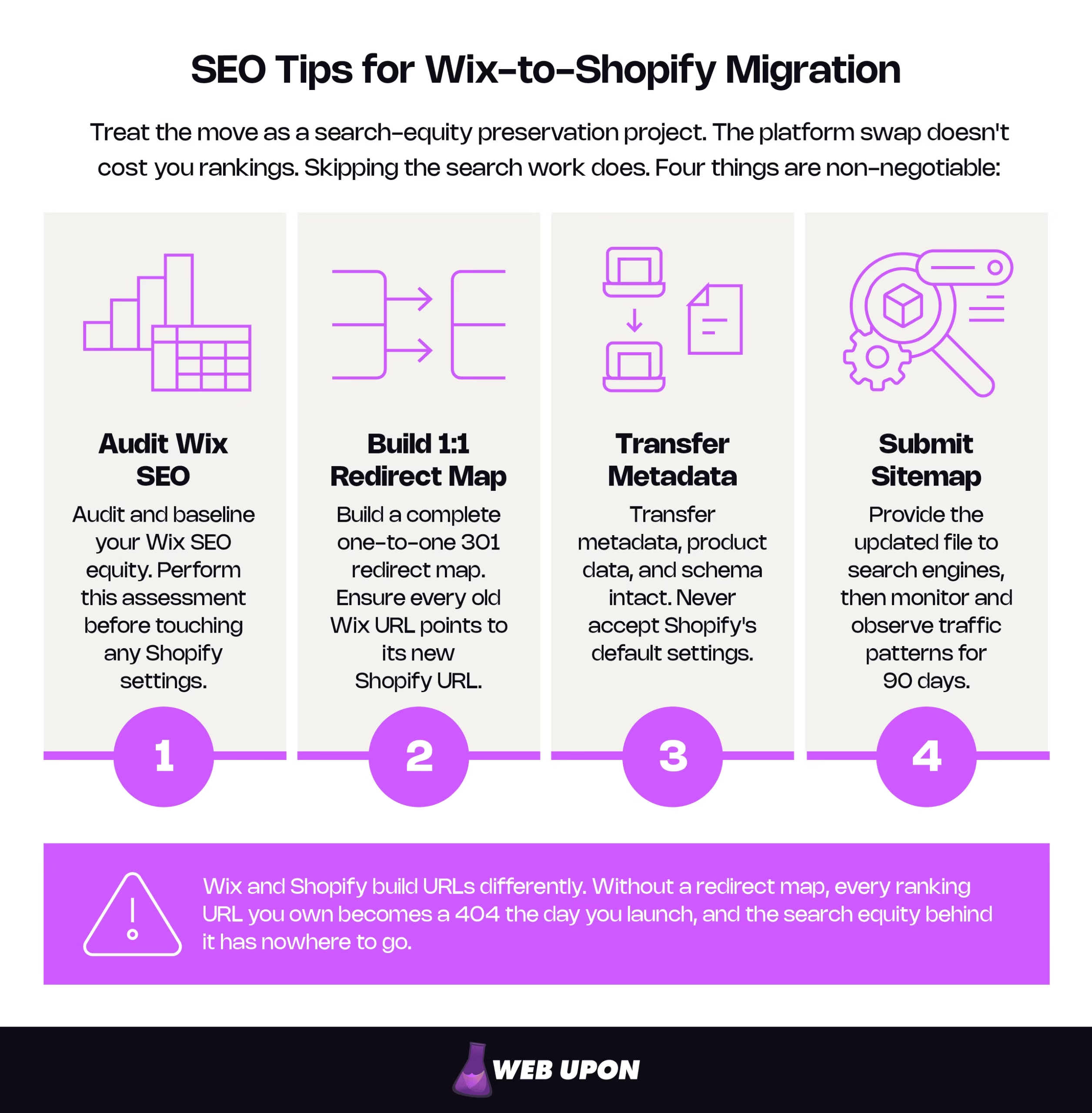
You can migrate Wix to Shopify SEO intact, but only if you treat the move as a search-equity preservation project. Four things are non-negotiable:
- Audit and baseline your Wix SEO equity before you touch any Shopify setting.
- Build a complete one-to-one 301 redirect map — ensure that every old Wix URL is pointed to its new Shopify address.
- Transfer metadata, product data, and schema intact. Never accept Shopify’s metadata or schema defaults.
- Submit your new sitemap then monitor for 90 days.
The platform swap doesn’t cost you rankings. Skipping the search work does, and unmapped URLs are the biggest risk. Shopify forces fixed /products/, /collections/, and /blogs/ prefixes, so without a complete one-to-one 301 map, every ranking URL 404s and drops from Google’s index at launch.
Why Your Wix-to-Shopify Migration Puts Your SEO at Risk
The Hidden Risks That Turn Platform Migrations Into Traffic Disasters
A migration doesn’t erode rankings gradually. When a URL starts returning a 404, Google drops it from the index, and the authority attached to that address — the links, the relevance signals, the years of trust — has nowhere to flow. The damage is fast. The recovery is slow. That asymmetry is the whole reason preparation is worth the effort.
A few failure points cause most of it, and they compound:
| Risk | What causes it | SEO impact |
| Mass 404s | Launching without redirects | Ranking URLs drop from the index; equity lost. |
| Broken backlinks | Old URLs no longer resolve | External link authority stops passing through. |
| Lost metadata | Shopify defaults overwrite optimized titles/descriptions | Relevance signals weaken; click-through falls. |
| Missing sitemap | New URLs not submitted for crawling | Slow, incomplete re-indexing. |
Notice the phrase “domain authority” gets thrown around here — treat it as industry shorthand for a site’s accumulated ranking strength, not a number Google actually keeps. The real currency is SEO equity: the ranking strength Google has attached to a specific URL over time. Because it’s attached to the address, changing the address without a redirect throws it away. That’s why the map matters more than anything else you’ll do.
There’s one distinction that reframes the entire project: are you keeping your domain or changing it? A move from yourstore.com on Wix to yourstore.com on Shopify relies on redirects and canonicals only. A move to a brand-new domain adds a separate step in Google Search Console (covered later). Decide this first — it changes your checklist.
Understanding What SEO Equity You Actually Have Before You Move
You can’t protect what you haven’t measured. Before touching Shopify, take a full inventory of your Wix store’s search footprint.
Start in Google Search Console. Export your indexed URLs, impressions, clicks, and average position — and pull the trailing 12 to 16 months, not just the last quarter. A short window hides seasonality, which means a perfectly normal post-launch dip can later look like a disaster when it isn’t. This export is your baseline, the “before” photo you’ll measure recovery against.
Then rank your pages by value. Columns: URL, organic traffic, backlinks, conversions, priority tier.
The pages in your top tier — high traffic, strong links, real revenue — are the ones you’ll redirect first, test hardest, and watch most closely. Skipping this audit is the most expensive mistake because without it, you’re migrating blind with no way to tell whether the move went well.
If mapping your own equity feels like guesswork, a pre-migration SEO audit takes the uncertainty out before you move a single page. For a deeper look at the full picture, our ecommerce website SEO audit checklist covers the same ground at store scale.
Knowing the stakes is step one. Step two is building the framework that protects every ranking signal before the switch.
Building Your Migration-Proof SEO Framework Before You Switch Platforms
Creating a URL Map That Protects Every Ranking Signal
Wix and Shopify generate fundamentally different URLs. Shopify forces fixed path prefixes — products live under /products/, collections under /collections/, blog posts under /blogs/. Your Wix paths won’t match, so even a page with an identical name needs an explicit redirect. That’s the trap: near-identical content, completely different address.
The fix is a 301 redirect — a permanent instruction that tells search engines a URL has moved for good and forwards its ranking signals to the new one. Build a one-to-one map covering every URL: product, collection, page, and blog post.
| Field | Example |
| Old URL (Wix) | /product-page/blue-widget |
| New URL (Shopify) | /products/blue-widget |
| Page type | Product |
| Redirect type | 301 |
| Priority tier | Tier 1 |
| Status | Tested ✓ |
A quick word on redirect type, because it comes up constantly:
| Type | 301 (permanent) | 302 (temporary) |
| Signals to Google | Page moved for good | Page will return |
| Forwards ranking signals | Yes | No (not reliably) |
| Right choice for migration | ✓ | ✗ |
Here’s the practical relief: Shopify’s built-in redirect manager only creates 301s. You can’t accidentally pick a 302. So the real risk isn’t choosing the wrong type — it’s missing a URL. Every URL you forget stays a 404.
Effort scales with your catalog. A content-heavy store with a few hundred blog posts is a manageable afternoon. A product-heavy store with thousands of SKUs and filtered collection pages is a serious mapping project, so plan accordingly. Keep tool choices simple: a site crawler to inventory your live URLs, a spreadsheet to hold the map.
Auditing and Exporting Your Wix Metadata Before It Disappears
Your carefully written titles and descriptions are ranking assets. Shopify won’t recreate them — it auto-generates a title from the product or collection name and can leave the meta description blank, at which point search engines improvise from your page text. Neither preserves what earned you rankings. Treat every blank field as a regression.
Extract it all first: page titles, meta descriptions, and image alt text, mapped into a transfer spreadsheet. Columns: Page, Current Title, Current Meta, Alt Text, Shopify Field, New Value.
While you’re reformatting, respect the display limits. Google typically shows roughly the first 50–60 characters of a title and around 150–160 characters of a meta description on desktop before truncating — working guidelines, not hard cutoffs, since Google measures display space in pixels and rewrites descriptions freely. A quick before-and-after:
- Before (Wix, too long): “Handmade Blue Ceramic Coffee Mugs — Artisan Stoneware Drinkware for Coffee and Tea Lovers | Our Store”
- After (Shopify, tightened): “Handmade Blue Ceramic Coffee Mugs | Artisan Stoneware”
The keyword stays front-loaded; the tail that never showed anyway is gone.
Structuring Your Shopify Architecture to Match or Improve Your Wix Hierarchy
Map your old world to the new one before you import anything:
| Wix element | Shopify equivalent | Path prefix |
| Store product | Product | /products/ |
| Category | Collection | /collections/ |
| Blog post | Blog article | /blogs/<blog>/ |
| Static page | Page | /pages/ |
Flattening a deep Wix hierarchy during the move can actually help — simpler, shallower paths are easier for Google to crawl efficiently, whereas overly complex URLs can burn crawl budget and leave content unindexed. But flattening only pays off if your internal links follow. Every internal link still pointing at an old Wix path forces an unnecessary hop through your redirects; update them to the new addresses directly.
One Shopify quirk to plan for now: products are reachable at both /products/handle and /collections/x/products/handle. Point your canonical — the single “official” URL you tell search engines to index when the same content lives at more than one address — at the clean /products/ version, so the duplicate path doesn’t split your signals.
Next comes the high-stakes part: executing the technical move without triggering a Search Console crisis.
Executing the Technical Migration Without Triggering a Search Console Crisis
Implementing 301 Redirects the Right Way From Day One
With your map built, loading it is straightforward if you know the mechanics.
- Upload in bulk. Shopify’s redirect manager accepts a two-column CSV (old URL → new URL). For hundreds of URLs, this is the only sane path; manual entry invites typos.
- Mind the restricted paths. Shopify won’t let you redirect URLs beginning with /apps, /application, /cart, /carts, /orders, /shop, or /services, nor the fixed /products, /collections, and /collections/all roots. A redirect also only fires once the old URL returns a 404. Most “why won’t this save?” moments trace back to one of these rules.
- Test everything before launch. Crawl your full redirect list and confirm each one lands on a live page — no loops, no dead ends.
- Go live, then re-test a sample from the browser.
Watch for redirect chains — when one URL redirects to a second, which redirects to a third, instead of pointing straight to the destination. Say page A moved to B last year, and now B moves to C at launch. Don’t leave A → B → C. Point A straight to C. Chains still pass signal, but they add latency, waste crawl budget, and invite edge-case losses. One clean hop is always better.
If a full map across hundreds of URLs feels daunting, Web Upon can build and QA it for you — mapping, testing, and launch verification handled end to end.
Migrating Product Page SEO Data Without Losing Conversion-Critical Content
Product pages carry both rankings and revenue, so this is the heaviest lift for product-heavy stores. Export your Wix product data and reformat it into Shopify’s CSV structure carefully — a misaligned column can quietly corrupt titles or descriptions across your whole catalog.
Two things need deliberate attention beyond the obvious fields:
- Schema markup. Product rich results — the price, availability, and star ratings that show up in search — depend on valid structured data. Wix injects this automatically; on Shopify it comes from your theme or an SEO app, so verify it after import rather than assuming it carried over. Run Google’s Rich Results Test before and after.
- Reviews and user-generated content. Those star ratings are a click-through advantage, and they rely on review markup. If your reviews live in a Wix-native app, they may not export cleanly, and you can lose both the content and the ratings that earned the stars. Plan the review migration on purpose.
Submitting Your New Sitemap and Reclaiming Search Console Authority
Shopify auto-generates your /sitemap.xml at the domain root and keeps it current. You don’t build it — you locate it and submit it.
Your launch-day Search Console checklist:
- Submit the new Shopify sitemap in Google Search Console.
- Confirm tracking fires — Analytics and Search Console tags live on every Shopify page.
- Force-crawl your priority pages with the URL Inspection tool’s “Request Indexing.” It’s rate-limited and not a bulk tool, so use it for your top handful; the sitemap handles the long tail.
Now the step most migration plans forget, and it depends entirely on that domain question from earlier:
- Same domain? There’s no separate property to clean up. Submit the new sitemap to your existing property and let the redirects do their work.
- New domain? Keep both properties verified, and use Settings → Change of Address in the old property to point at the new one. It tells Google the move is permanent and forwards signals alongside your redirects. Two caveats. First, Change of Address is for host or domain moves only — never use it for a same-domain page move or an http-to-https switch, though a single request does cover both the http and https versions of the property it’s filed on. Second, one request works at the host level and won’t carry your subdomains — including www — so Google advises filing a separate Change of Address for the www, non-www, and any subdomain variants of the old domain, even unused ones, with each verified as its own Search Console property.
Expect Search Console to flag “redirecting” warnings on old URLs during the transition. That’s normal. You are, after all, moving.
Going live isn’t the finish line. The post-migration window is what decides whether your rankings actually hold.
Protecting and Recovering Your Search Rankings in the Post-Migration Window
Monitoring for Crawl Errors, Indexing Failures, and Traffic Drops
For the first 90 days, watch closely. But separate two clocks that are easy to confuse: monitoring runs ~90 days; your redirects stay live far longer — a minimum of 180 days per Google, and ideally a full year or more, because backlinks you don’t control keep routing through them long after launch. Turning them off at 90 days is how a clean migration quietly unravels months later.
Here’s the recovery-window heuristic that separates panic from patience: a brief dip and reshuffle in the first two to four weeks is normal as Google recrawls and reconsolidates signals. Escalate only when you see sustained decline past week four to six, a climbing 404 count in the Pages report, or priority URLs falling out of the index entirely. Judge it all against that 12-to-16-month baseline you captured before the move.
| Error you’ll see | Likely cause | Fix |
| 404 (Not Found) | Missing redirect | Add the 301 for that URL. |
| Redirect error | Chain or loop | Collapse to a single hop. |
| Duplicate, no canonical | Both product paths indexed | Set canonical to /products/. |
| Crawled, not indexed | Thin or slow page | Improve content / speed, request indexing. |
Set a simple alert in Google Analytics for a meaningful drop in organic sessions on your priority pages, so you catch trouble before it compounds.
Rebuilding and Redirecting Your Backlink Profile
301 redirects forward the authority from your backlinks reliably. Permanent redirects don’t cause a loss in PageRank so this is optimization, not rescue. That means you don’t need to chase every referring domain — the redirects have most of them covered.
Reserve manual effort for the few links that matter most. Pull your backlink data, identify your highest-authority referring domains, and reach out to update those links directly to the new Shopify URLs. A direct link is marginally stronger than a redirected one, but only worth the outreach on your top sources. Then keep an eye on your link data post-migration to confirm equity is flowing where it should.
Leveraging Shopify’s Native SEO Advantages to Accelerate Recovery
The pain has an upside. Once you’re through the move, Shopify hands you more control over the levers that drive technical SEO, and that’s where recovery accelerates.
Take Core Web Vitals, Google’s three real-user experience metrics: Largest Contentful Paint (loading, good under 2.5 seconds), Interaction to Next Paint (responsiveness, good under 200 milliseconds), and Cumulative Layout Shift (visual stability, good under 0.1). Shopify’s themes and image handling give you cleaner ways to hit these thresholds than you may have had before. The honest caveat: a bloated theme can fail them just as easily, so the platform is opportunity, not a guarantee. (Google’s Core Web Vitals documentation has the current thresholds.)
The same “meet the baseline cleanly” logic applies to mobile. Under mobile-first indexing, Google indexes the mobile version of your site by default, so a responsive Shopify theme isn’t a switch you flip — it’s you satisfying a standard that’s been in place for years, without the friction. Pair that with the canonical settings from earlier to keep duplicate paths from splitting signals, and your structured-data setup to keep rich results eligible, and the platform starts working for your rankings.
If you’d rather press that advantage with a plan built around returns, Web Upon’s ROI-focused Shopify SEO service does exactly that. (Speed is often the fastest win — our speed optimization audits start there.)
The Wix-to-Shopify Migration Checklist
Every SEO task mapped to your timeline:
| Phase | Task | Tool |
| Pre-Migration | Full SEO audit: URL inventory, metadata export, backlink download. | Crawler + GSC |
| Pre-Migration | Baseline traffic & ranking snapshot (12–16 months). | GSC + GA4 |
| Pre-Migration | Complete URL redirect map, reviewed. | Spreadsheet |
| Pre-Migration | Metadata transfer doc prepared (titles, descriptions, alt text). | Spreadsheet |
| Launch Day | Verify all 301s live and resolving correctly. | Crawler |
| Launch Day | Submit new Shopify XML sitemap. | GSC |
| Launch Day | Confirm Analytics + Search Console tags firing on all pages. | GA4 + GSC |
| Launch Day | (Domain move only) Verify all properties + file Change of Address for each variant. | GSC |
| Post-Migration | Weekly ranking & traffic checks, first 90 days. | GSC + GA4 |
| Post-Migration | Keep 301s live 12+ months. | Shopify |
If your move keeps the same domain, ignore the Change of Address row. If it doesn’t, that row is the difference between a smooth transition and weeks of avoidable volatility.
Even a good checklist can be undone by an avoidable mistake. Here are the ones that do the most damage.
Common Wix-to-Shopify Migration Mistakes That Destroy Search Rankings
The Technical Oversights That Silently Erase Years of Progress
These are the quiet killers — the ones that don’t announce themselves until traffic is already gone.
| Mistake | Consequence | How to avoid it |
| Launching without redirects | Every Wix URL 404s; equity lost. | Finish and test the 301 map first. |
| Letting Shopify auto-fill metadata | Optimized titles/descriptions overwritten. | Import your metadata explicitly. |
| Ignoring duplicate URL paths | Signals split across two product URLs. | Set canonicals to /products/. |
| Skipping mobile & speed setup | Weak Core Web Vitals drag on recovery. | Configure the theme before launch. |
The Strategic Mistakes That Compound Into Long-Term Losses
The technical errors cost you overnight. These cost you over months.
- Rushing the timeline and skipping the pre-migration audit to save a few days — the one shortcut you can’t recover from, because you never captured the baseline.
- Treating it as a pure IT project rather than a search-equity transfer, so SEO becomes an afterthought and no one owns the rankings.
- Turning redirects off too early. Rankings stabilize around 90 days, the team calls it “done,” the 301s come down, and equity from backlinks that hadn’t updated yet is severed. This is the mistake that undoes an otherwise flawless migration.
- Running a domain-change move as if the domain stayed the same — skipping Change of Address, under-verifying properties, and leaving Google to guess.
- Failing to monitor and missing the narrow window to correct an early drop before it compounds.
Your Rankings Can Survive the Move
A Wix-to-Shopify migration doesn’t have to cost you rankings. Sequenced correctly, it comes down to four moves: baseline your SEO equity before you start, build and test a complete one-to-one 301 redirect map, transfer your metadata and product data intact rather than accepting defaults, and submit your new sitemap before settling into a 90-day watch. Drop-free migrations are the well-planned ones.
If you’d rather not carry that risk alone, contact Web Upon for a pre-migration SEO audit or a fully managed migration, and we’ll handle the mapping, testing, and monitoring end to end.


