Done in the right order, a Webflow-to-Shopify migration carries your rankings across intact instead of resetting them to zero. Handle the move as a technical relocation with a complete redirect map and a rebuilt metadata and schema layer, and Shopify can hold or even improve your rankings, thanks to its stronger commerce structure.
Work in this sequence: First, audit and benchmark everything before you touch a single page. Second, implement your 301 redirect map and rebuild your metadata, heading hierarchy, and schema inside Shopify’s structure. Third, reconfigure your domain, SSL, and Search Console at launch. Fourth, monitor and stabilize for at least thirty days. In that order, the migration transfers your authority rather than discarding it.
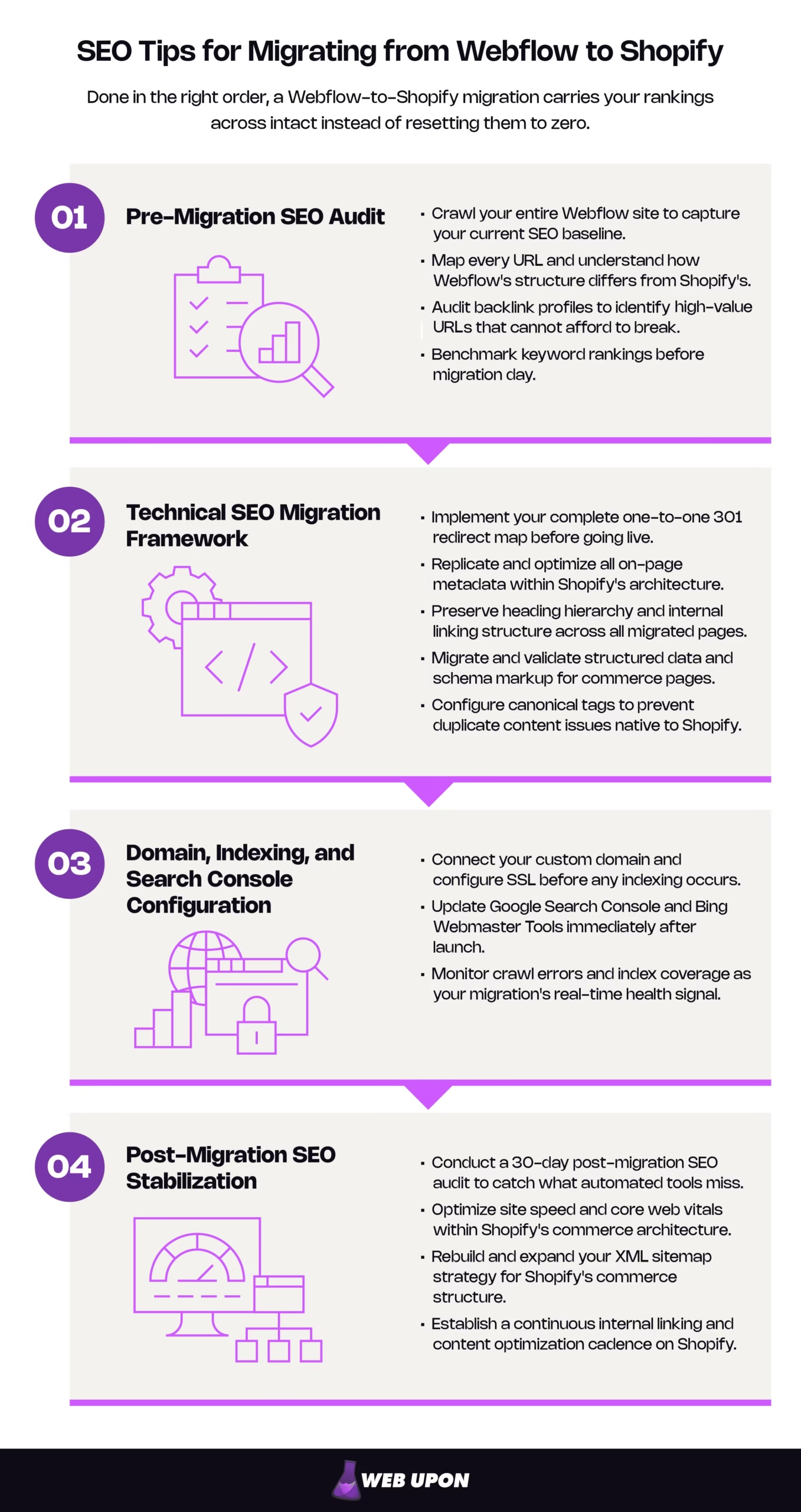
Everything begins with knowing exactly what you have today, which is why the first phase is a full pre-migration SEO audit.
Pre-Migration SEO Audit: Knowing Exactly What You’re Moving Before You Touch Anything
You cannot protect what you haven’t measured. Before anything moves, crawl and archive your current site, map every URL to its Shopify home, audit your backlinks, and freeze a ranking benchmark. Each one exists so that, later, you can prove what changed instead of guessing.
Crawl Your Entire Webflow Site to Capture Your Current SEO Baseline
Start by crawling every indexed URL with a site-auditing crawler such as Screaming Frog or Sitebulb. Capture and document all existing page titles, meta descriptions, H1 tags, and canonical tags into a single master spreadsheet — the canonical tag tells search engines which version of a page is the “official” one. Use Google Search Console and Google Analytics to identify your highest-traffic and highest-authority pages so nothing critical is left behind, and flag any existing crawl errors, redirect chains, or orphaned pages now, so you resolve them before the move rather than dragging them into Shopify.
Treat this crawl as a frozen, timestamped artifact, not a living document. Export it to a dated, read-only file and leave it alone. The most common reason a team can’t diagnose a post-migration drop is that they never saved a clean “before” state, so weeks later they’re arguing about whether a page used to rank instead of proving it. One clean export at a known date is worth more than any live dashboard after the fact.
Map Every URL and Understand How Webflow’s Structure Differs from Shopify’s
This is where the two platforms genuinely collide. Webflow lets you write fully custom URL slugs with no enforced folder hierarchy. Shopify does the opposite: it forces every URL into fixed folders like /products/, /collections/, and /pages/. Export a complete URL inventory from Webflow and map each URL to its future Shopify equivalent before a single file is moved, prioritizing the product pages, blog posts, and landing pages that carry the most backlink equity — the ranking value passed to a page through inbound links — and organic traffic.
| Webflow URL (flexible) | Shopify URL (enforced) |
| /blue-running-shoes | /products/blue-running-shoes |
| /shop/mens | /collections/mens |
| /about | /pages/about |
| /guide/sizing | /blogs/news/sizing-guide |
Shopify’s rules are documented in the Shopify Help Center’s URL and sitemap guidance, and it’s worth reading before you map, because the conflicts are where founders get stuck. A few common ones and how to resolve them:
- A flat editorial path with no native home. A Webflow guide at /guide/sizing has no product or collection equivalent. Shopify forces blog content under /blogs/{blog-handle}/{post}, so it becomes something like /blogs/news/sizing-guide. Decide the blog handle deliberately up front and redirect the old path to the new one — don’t let Shopify invent a handle for you.
- Nested paths that Shopify flattens. A Webflow structure like /shop/mens/shoes can’t nest in Shopify; it collapses to a single handle such as /collections/mens-shoes. Choose that handle on purpose and redirect the old path to it.
- A page whose type changes. Something that was a product page in Webflow may be informational in Shopify. Map it to whichever type matches intent — transactional to /products/, informational to /pages/ — then redirect accordingly.
One thing you’ll see but should not try to “fix” here: Shopify can surface the same product at both /products/item and /collections/x/products/item. That’s a canonical question the platform handles automatically, covered further down — not a redirect you need to build.
Audit Backlink Profiles to Identify High-Value URLs That Cannot Afford to Break
Pull a full backlink report with a backlink tool such as Ahrefs or SEMrush to see which Webflow URLs are receiving the most external link equity. Cross-reference those backlink targets against your URL mapping document so every linked page has a confirmed 301 destination, and flag any backlinks already pointing to broken or redirected URLs so they’re prioritized for outreach or correction. Document referring-domain authority scores as you go.
The point of this step is triage. On most sites, a small minority of URLs hold the large majority of external link equity, so sort your backlink report by referring-domain strength and treat the top of that list as your “cannot break under any circumstances” tier. You’re mapping redirects by SEO impact, not raw page volume. The backlink audit is precisely what tells you which redirects matter most when you build the map later.
Benchmark Keyword Rankings Before Migration Day
Finally, freeze a ranking benchmark. Export a full keyword ranking snapshot from Google Search Console and your rank-tracking tool, recording position, search volume, and URL for every keyword your Webflow site currently ranks for. This benchmark is your early-warning system: it’s the only way to detect a post-migration loss before it compounds. Pay special attention to featured-snippet positions and rich results that depend on structured data you may not have replicated in Shopify yet, because those are the first to disappear if schema doesn’t carry over.
If your audit feels thorough but you’re not certain it’s complete, that uncertainty is worth resolving before launch, not after. A structured ecommerce website SEO audit is designed to catch exactly the gaps that turn into ranking losses later.
With a frozen baseline, a URL map, a backlink triage, and a ranking snapshot in hand, you’re ready to build ranking stability into Shopify from day one.
The Technical SEO Migration Framework: Building Ranking Stability Into Your Shopify Store From Day One
This is the engine of the migration. Work it in order — redirects, then metadata, then headings, then schema, then canonicals — because each layer depends on the one before it.
Build a Complete 301 Redirect Map Before Going Live
A 301 redirect is the instruction that tells a search engine a page has moved permanently. When it’s set up correctly, it passes the old page’s link equity through to the new URL — and contrary to the old SEO folklore, a properly implemented one-to-one 301 passes that equity in full, not “most of it.”
That precision matters, because it reframes what actually goes wrong. Migrations don’t lose rankings to some fixed percentage skimmed off each redirect. They lose rankings in two specific ways. The first is redirecting a page to something that isn’t a true equivalent, or worse, bulk-redirecting everything to the homepage. Google can read that as a “soft 404,” meaning it treats the destination as effectively a dead end and passes zero equity. The second is redirect chains, where an old URL bounces through one or more intermediate URLs before landing. Chains don’t dilute equity so much as slow discovery, waste crawl budget — the finite attention search engines spend crawling your site — and, past a certain length, get abandoned. Both failures are avoidable with the same discipline: map every old URL directly to its closest live equivalent, in a single hop.
Redirect every URL that was indexed or has backlinks. They carry the equity you’re protecting, and each one needs a one-to-one 301 to its closest Shopify equivalent. Orphaned URLs with no traffic and no inbound links can be allowed to return a 404 rather than bulk-redirected somewhere irrelevant, because redirecting to a non-equivalent page risks soft-404 treatment that passes no value anyway. The practical approach is triage: use your backlink audit to rank URLs by equity, guarantee redirects for the critical set first, then work down the list. “Redirect the ones that matter, correctly” beats “redirect everything, sloppily.”
Build the map in a CSV formatted for Shopify’s URL redirect import tool, or use a dedicated redirect app (category-standard options like Redirectify or Easy Redirects are interchangeable — pick what fits your stack). Every Webflow URL that was indexed or received backlinks needs a corresponding 301; there are no exceptions to that rule. Before launch, test every redirect with a status-code checker to confirm a clean 301 is firing.
| Do | Don’t |
| Map each old URL 1:1 to its closest equivalent. | Chain redirects through intermediate URLs. |
| Use a permanent 301, not a temporary 302. | Bulk-redirect everything to the homepage. |
| Redirect to a topically equivalent page. | Send an expired product to a loosely related one. |
| Keep every 301 in place permanently. | Remove redirects after launch. |
That last row is easy to overlook: external links keep arriving at old URLs for years, so a redirect you delete turns those links into 404s that bleed equity long after go-live.
Redirect mapping is also where migrations most often fail — it’s detailed, unglamorous, and unforgiving of shortcuts. If this is the step that keeps you up at night, it’s a reasonable hand-off point to a specialist. Web Upon’s Shopify SEO services exist for exactly this: getting the redirect map right the first time, when the stakes are highest.
Replicate and Optimize All On-Page Metadata Within Shopify’s Architecture
Shopify handles meta titles and descriptions through its theme system and per-page settings, so understand that structure before you migrate content. Transfer and review every page title and meta description manually rather than trusting automated migration tools, which routinely truncate or corrupt metadata. Keep your title-tag keyword strategy consistent with Webflow, stay within the roughly 50–60 character display limit, and rewrite meta descriptions for commerce context where it helps. Product and collection pages now carry transactional intent that a blog-era description won’t serve.
Watch for one Shopify-specific trap that catches nearly every migration: many themes automatically append your store name to the title tag, so a clean Blue Running Shoes quietly becomes Blue Running Shoes – Your Store Name. That auto-suffix eats into your character budget and can push a carefully written title past the point where Google truncates it. Account for the suffix when you write titles, or edit the theme’s title logic so it isn’t duplicating your brand on every page. Once you’re live, a metadata-audit app can confirm completeness across the store.
Preserve Heading Hierarchy and Internal Linking Structure Across All Migrated Pages
Webflow’s visual canvas makes it easy to style text to look like a heading without using a real H1–H6 tag, so audit your pages for genuine heading hierarchy before you migrate. In Shopify, each page should have exactly one H1 that aligns with that page’s primary keyword. Rebuild internal links against Shopify’s real URLs — links copied from Webflow that still point at old paths create broken signals that hurt crawlability — and prioritize linking down from high-authority collection pages to individual products so equity flows through Shopify’s commerce hierarchy.
One refinement worth stating plainly: even though your 301s will catch old internal links, update those internal links to point directly at the new Shopify URLs anyway. Routing internal traffic through a redirect adds a hop, slows crawling, and quietly wastes internal link equity. External links are outside your control; internal ones aren’t, so fix them at the source.
Migrate and Validate Structured Data and Schema Markup for Commerce Pages
Schema markup is the structured data that helps search engines understand what a page is, and it’s often where rich results live. Webflow supports schema through custom code embeds; Shopify themes usually include basic Product schema but may lack Review, BreadcrumbList, or Organization markup. Audit which schema types were active on your Webflow site and confirm each is replicated or improved in Shopify. Your Product schema should carry price and availability — the properties Google requires for merchant-listing rich results — plus recommended enhancements like SKU and review-aggregate (AggregateRating) data, which powers the star ratings shown in organic search and Google Shopping. Validate everything on key pages with Google’s Rich Results Test immediately after migration, and resolve errors before you submit your new sitemap. Schema.org remains the reference for the markup itself.
| Schema type | What it powers |
| Product | Price and rich-result eligibility |
| Review / AggregateRating | Star ratings in search |
| BreadcrumbList | Breadcrumb display in the SERP |
| Organization | Brand knowledge signals |
One current caveat that will save you effort: don’t reach for FAQ or HowTo schema expecting rich results. HowTo rich results were retired back in 2023, and FAQ rich results stopped appearing in Google Search on May 7, 2026, with Google’s reporting and testing support for them being withdrawn through the middle of that year. FAQPage is still a valid type and is still read by AI-search systems, so it’s fine to keep for that value — just don’t expect a SERP dropdown from it anymore.
Configure Canonical Tags to Prevent Duplicate Content Issues Native to Shopify
Shopify creates duplicate product URLs by design: when a product appears in multiple collections, it generates paths like /collections/category/products/item alongside the clean /products/item. Here’s the reassuring part: Shopify handles this natively, defaulting the canonical to the /products/ version, so you should not try to 301 or manually rewrite these. That’s the platform working as intended, not a bug to fix.
What does deserve your attention are duplicates that Shopify doesn’t resolve automatically: patterns introduced by custom theme templates, pagination, filter and sort parameters, or tag-based collection URLs. Confirm your sitemap contains only canonical URLs, and use Google Search Console’s URL Inspection tool to verify which URL Google actually selected as canonical for a given page, rather than assuming your theme is behaving.
A perfectly built store still can’t rank until the plumbing is connected — domain, SSL, and Search Console — so that’s the next phase.
Domain, Indexing, and Search Console Configuration: Closing the Loop on Search Visibility
This is launch day, and it’s the most time-sensitive stretch of the whole project. The work here is operational and unforgiving of delay.
Connect Your Custom Domain and Configure SSL Before Any Indexing Occurs
Shopify issues a free SSL certificate automatically when you connect your domain, but verify it’s active and serving HTTPS across every URL before you go live. Mixed-content warnings — caused by HTTP assets loading on otherwise-secure HTTPS pages — strip a page of its secure status and trigger browser security prompts that push bounce rates up, even though Google treats active mixed content as an indexing and security issue rather than a direct ranking penalty. Set your preferred domain version (www or non-www) in Shopify’s settings and confirm it matches the version verified in Google Search Console, then update every internal link, canonical tag, and sitemap reference to that exact format so you don’t split link equity across protocol or subdomain variants.
Update Google Search Console and Bing Webmaster Tools Immediately After Launch
If the domain itself is changing, add and verify your Shopify store as a new property in Google Search Console; if it’s staying the same, update the existing property. Submit your new Shopify-generated XML sitemap — found at yourdomain.com/sitemap.xml — on launch day to accelerate re-crawling, and use the URL Inspection tool to manually request indexing for your highest-priority pages: homepage, top collections, best-selling products. Then watch the Coverage report daily through the first two weeks to catch noindex tags, crawl errors, or redirect issues before they turn into sustained losses. Do the same in Bing Webmaster Tools; it’s a few minutes of work for a second search channel.
Monitor Crawl Errors and Index Coverage as Your Migration’s Real-Time Health Signal
Crawl errors surfacing in Search Console after launch are your earliest warning of broken redirects, missing pages, or a misconfigured robots.txt — the file that tells crawlers where they may and may not go. Shopify’s default robots.txt sensibly blocks cart, checkout, and admin paths. It’s now editable through robots.txt.liquid, which is useful but easy to misuse: the classic self-inflicted wound is editing it during a migration and accidentally disallowing a live commerce path. Before you assume rankings are the problem, confirm your product and collection URLs return a 200 status and are fully crawlable. Set up Search Console email alerts and connect a rank tracker so a drop notifies you the same day rather than weeks later. Run a post-launch crawl with Screaming Frog within 48 hours to compare against your frozen pre-migration crawl — that side-by-side is what exposes any page that failed to migrate or redirect.
| Window | What to do |
| Launch day | Submit sitemap, request indexing for priority pages, verify SSL/HTTPS. |
| First 48 hours | Post-launch crawl vs. baseline; check redirects and robots.txt. |
| First 2 weeks | Monitor Coverage report daily; resolve crawl errors as they appear. |
Going live is the midpoint, not the finish line. The first thirty days decide whether your rankings stabilize and grow.
Post-Migration SEO Stabilization: Recovering Fast and Building Forward on Shopify
The move is done; now you protect and compound the result. Work from diagnosis to performance to structure to an ongoing cadence.
Conduct a 30-Day Post-Migration SEO Audit to Catch What Automated Tools Miss
Compare your post-migration rankings against the frozen benchmark and categorize every loss by page type, URL pattern, and severity. Look specifically for pages that slipped because of changed metadata, content truncated during migration, or heading-hierarchy errors introduced by Shopify theme templates. Check image alt text across migrated product and blog images, too — automated tools frequently strip or corrupt alt attributes, which quietly harms both image-search visibility and accessibility. Audit page speed with Google PageSpeed Insights and the Core Web Vitals data in Search Console, since Shopify’s theme and app ecosystem can introduce regressions that Webflow’s leaner output didn’t have.
A word on nerves, because this is the moment founders panic: some ranking flux in the first days and weeks is normal, not proof of failure. Google needs time to re-crawl, follow your redirects, and re-consolidate signals onto the new URLs. The disciplined response is to measure against your baseline and categorize. Act immediately on structural problems like missing redirects, stripped metadata, or soft-404s, but let ordinary re-indexing wobble settle. Recovery is realistically measured in weeks, and no honest practitioner will promise zero loss. What a clean, sequenced migration buys you is minimized, recoverable risk. When the losses you’re triaging look like business-critical patterns rather than noise, ROI-focused content audits help you prioritize fixes by revenue impact instead of chasing every minor dip.
Optimize Site Speed and Core Web Vitals Within Shopify’s Commerce Architecture
Shopify’s Liquid templating and app ecosystem can add render-blocking scripts and extra HTTP requests that inflate load times. Compress and convert migrated images to WebP, implement lazy loading to lighten initial page weight on collection and product pages, and audit installed apps — remove any that inject JavaScript or CSS without earning their keep in revenue or SEO. Lean on Shopify’s built-in CDN for asset delivery, and consider a performance-focused theme as a clean baseline so you’re not inheriting speed debt on day one.
Make sure you’re optimizing for the current Core Web Vitals: Largest Contentful Paint, Interaction to Next Paint, and Cumulative Layout Shift. Interaction to Next Paint replaced First Input Delay as a Core Web Vital in March 2024, so any theme or checklist still referencing FID is out of date. This matters here specifically because INP measures responsiveness to every interaction, and app-injected JavaScript is one of the most common reasons a Shopify store’s INP suffers.
Rebuild and Expand Your XML Sitemap Strategy for Shopify’s Commerce Structure
Shopify auto-generates a sitemap index at /sitemap.xml with separate sitemaps for products, collections, pages, and blog posts — verify each section is populating. Exclude low-value or thin pages such as tag-filtered collection URLs, policy pages, and account pages so crawl budget concentrates on commerce content that can actually rank. Confirm the sitemap reflects only canonical URLs and updates dynamically as you add products and collections, and resubmit it to Search Console after any major structural change, including theme updates or new collection architecture.
Establish a Continuous Internal Linking and Content Optimization Cadence on Shopify
Migration ends; maintenance doesn’t. Use Shopify’s blog to rebuild the content assets that lived in Webflow and re-establish the topical authority that supported your product and collection rankings. Implement a systematic internal-linking strategy that connects that blog content to relevant collections and products — replicating, and ideally improving, the architecture that drove organic traffic before. Keep resolving new crawl errors, broken links, and orphaned pages as the store grows, and protect the gains you fought for by scheduling quarterly technical audits that check redirect health, metadata quality, Core Web Vitals, and index coverage together. If keeping that cadence in-house isn’t realistic, ongoing Shopify SEO services turn it into a managed routine.
Get the Redirect Map Right, and the Rest Is Recoverable
A migration doesn’t have to cost you rankings. Handled as a disciplined, ordered SEO project, it transfers your search authority to Shopify instead of resetting it.
If you get only one thing perfect, make it the complete one-to-one 301 redirect map. Every other phase is, in some form, protecting the equity those redirects carry. Get them right and the rest is recoverable; get them wrong and no amount of post-launch effort fully undoes it.
Migrations are high-stakes and time-sensitive, and the window to do them cleanly is narrow. If you’d rather have this framework executed for you by a team that runs it regularly, contact Web Upon.


