You know your best-performing pages by heart. The collection that quietly earns half your revenue. The three blog posts that rank on page one and never stop sending buyers. Now imagine flipping a switch, and by Monday the traffic to all of them has gone dark.
That fear is the reason most founders put off leaving Squarespace long after they’ve outgrown it. A move from Squarespace to Shopify is not a redesign with SEO bolted on afterward. It is an SEO project that happens to produce a new-looking store, and when you treat it that way, the outcome becomes controllable.
You protect your rankings by making a one-to-one 301 redirect map the governing document of your entire migration. Shopify enforces fixed URL prefixes (/products/, /collections/, /blogs/, /pages/) that you cannot remove, and mishandling them is the number-one cause of ranking loss when teams migrate Squarespace to Shopify.
The safe sequence is always the same: audit everything first, map every URL, preserve your meta data and schema by hand, then monitor for 60 to 90 days. One thing to hold onto through the nervous first weeks: a two-to-six-week wobble in rankings while Google re-indexes is normal. A drop that keeps going, or that hits specific pages hard, is a signal — almost always a redirect that missed. That distinction is the difference between panic and a quick fix.
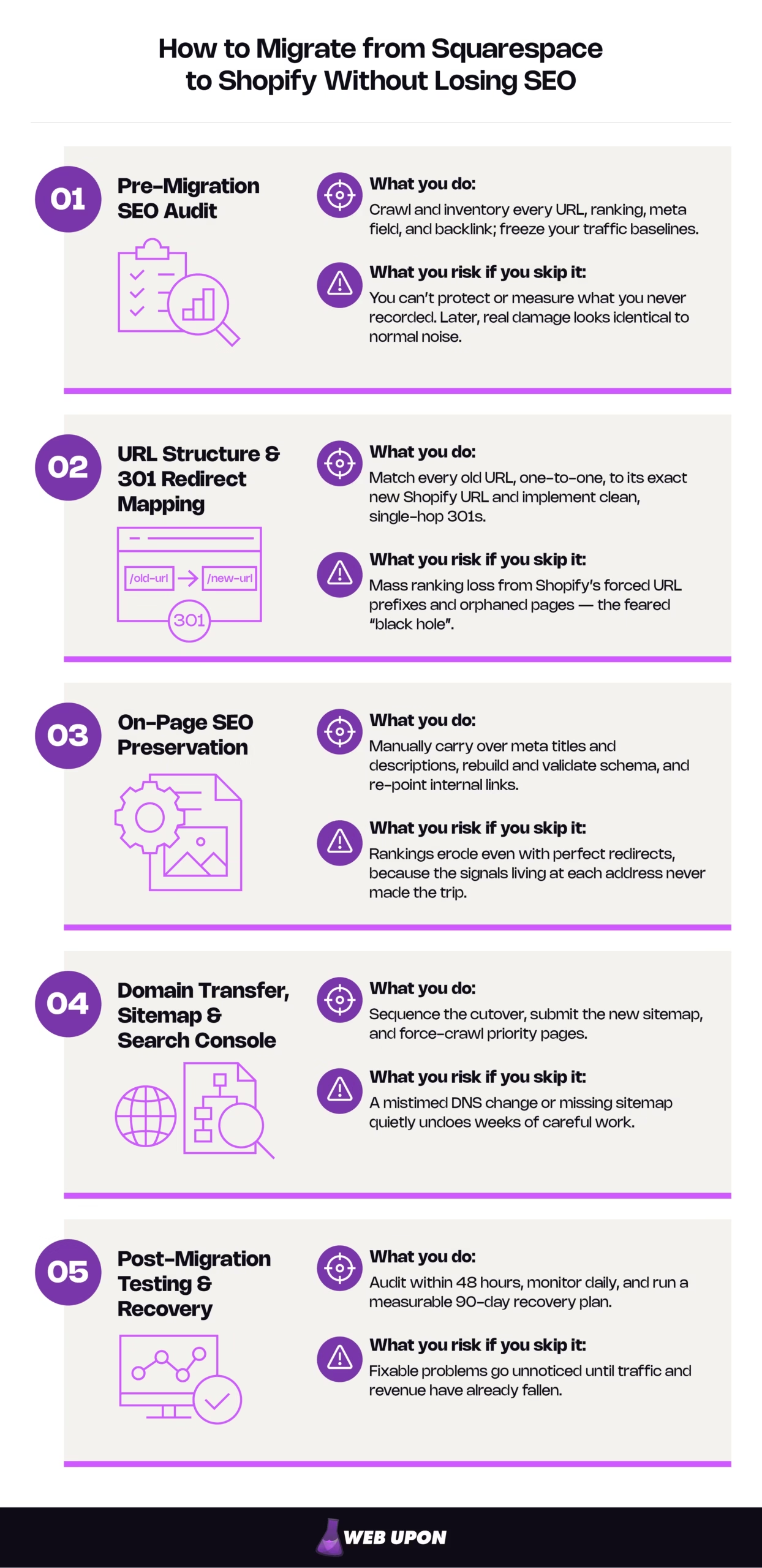
The rest of this guide walks you through the five phases of migrating from Squarespace to Shopify without losing SEO.
1. Pre-Migration SEO Audit: Know Exactly What You’re Moving Before You Touch Anything
You cannot protect what you have not measured. Before a single page is rebuilt on Shopify, this phase produces the master inventory that every later decision depends on. Skip it, and you lose the only reference that lets you tell recovery apart from damage after launch.
Crawl your entire Squarespace site to capture the full SEO footprint
Start with a complete crawl using a tool such as Screaming Frog or Sitebulb. The goal is a list of every indexable URL — every product, collection, blog post, and content page — with its current ranking position beside it. Nothing gets left off, because anything missing from this list is a page that risks being missing from your redirect map later.
Build the inventory as a master spreadsheet you’ll use for the rest of the project. At minimum, capture:
| Column | What it records |
| Old URL | The exact Squarespace address, including trailing slashes and case |
| Page type | Product, collection, blog post, or page |
| Target keyword | The primary term the page ranks for |
| GSC clicks | Organic clicks over the trailing 90 days |
| Ranking position | Current average position |
| Backlinks | Whether external links point here |
| Priority | High / medium / low, based on traffic and revenue |
One important detail: pull your meta titles and descriptions from the live-site crawl, not from Squarespace’s built-in export. That export uses a WordPress-style XML format that does not reliably include everything on your site, so relying on it will silently drop the optimized titles you worked hard to write.
Pull keyword rankings and organic traffic baselines from Search Console
Export ranking and traffic data for every URL to set a benchmark you can measure against later. Flag your highest-traffic and highest-revenue pages plainly — these are non-negotiable assets — and note any page carrying meaningful backlink equity.
Then freeze it. Save this as a fixed snapshot and set it aside. Once the domain moves, Search Console starts reporting on your new URLs, and this “before” picture can’t be recreated. It is the only thing that later lets you prove, page by page, that a page recovered rather than quietly slipped.
While you’re here, document the problems Squarespace already has: existing 404s, redirect chains, and crawl errors. Fix or note them now, before they compound into the new build.
Audit your backlink profile to identify the equity most at risk
Backlinks are the hardest ranking signal to rebuild, which makes them the most important to protect. Export your inbound links with a tool like Ahrefs or SEMrush, then sort them by the authority of the linking domain and the relevance of the linking page. The pages sitting at the top of that list — usually a handful of product pages and standout posts — deserve individual attention.
Map each of those high-value destinations to its planned Shopify URL and plan to hand-verify every one after launch. A single broken redirect on a page that holds your best editorial links can cost more equity than a hundred low-value 404s combined.
This inventory is the raw material for the single most important deliverable of the whole migration: the redirect map. If judging that risk alone feels like guesswork, this is exactly where a structured pre-migration SEO audit earns its place — it turns a vague fear into a priced, documented list of what’s at stake. Our broader ecommerce website SEO audit covers the same ground for stores not yet mid-move.
2. URL Structure and 301 Redirect Mapping: The Make-or-Break Technical Foundation
This is the heart of the migration. If the audit tells you what you have, the redirect map decides whether you keep it. Everything hinges on one structural reality that catches most first-time migrators off guard.
Understand how Squarespace and Shopify URL structures fundamentally differ
Squarespace lets you set almost any URL slug you like, with no forced subfolders. Shopify does the opposite: it enforces fixed prefixes — /products/, /collections/, /blogs/, and /pages/ — and you cannot strip them out. Every URL on your site is about to change shape, whether you plan for it or not.
| Content type | Squarespace path | Shopify equivalent |
| Product | /shop/leather-tote | /products/leather-tote |
| Collection | /bags | /collections/bags |
| Blog post | /blog/how-to-clean-leather | /blogs/news/how-to-clean-leather |
| Page | /about | /pages/about |
Two Shopify quirks change your map. First, the same product is reachable at both /products/handle and /collections/collection/products/handle so set the canonical tag to the clean /products/ version, or the two paths will split the equity that should be pooling on one. Second, Shopify’s default blog handle is usually news, which is why posts land at /blogs/news/… and you can rename that handle, but the /blogs/ prefix itself is permanent. Squarespace’s singular /blog/ versus Shopify’s plural /blogs/ is a mismatch that quietly breaks redirects when nobody’s watching for it.
Build a comprehensive URL redirect map before launch day
Now the central deliverable. Create a document that matches every old Squarespace URL to its exact new Shopify URL, one to one. No approximations, no “we’ll catch the rest later.”
Work down from your priority column — products, collections, and posts with live rankings first — and include the variations that are easy to forget: trailing slashes, uppercase and lowercase versions, and paginated URLs. Treat this map as the plan the whole migration answers to, not a task you slot in the week before launch.
Implement 301 redirects correctly inside Shopify
Enter your redirects through Shopify’s built-in URL Redirects tool, under Content > Menus > URL redirects in your admin. For a real catalog, do it as a bulk CSV import — it’s the only practical way to load a large map, and Shopify’s redirects are 301 by default, which is exactly what you want. Very large catalogs that exceed the tool’s practical limits may need an app or theme-level approach, so confirm your volume before launch.
The failure mode to hunt for is the redirect chain: an old URL that hops through one address to reach another. Each hop bleeds a little equity and slows crawling. Before you submit your new sitemap, walk this short checklist:
- Every old URL resolves in a single hop, with no intermediate stop.
- Every redirect returns a 301, never a 302 — a temporary redirect passes far less link equity.
- Trailing-slash, letter-case, and paginated variants are all covered.
- Your highest-traffic and highest-backlink URLs are verified by hand, not just spot-checked.
- No redirect points back into a loop.
A correctly implemented 301 preserves essentially all of a page’s ranking equity, whereas losses that create the dreaded “black hole” come from missing redirects, multi-hop chains, or accidentally left 302s.
Handle blog content URL changes with surgical precision
Blog posts are pure long-tail ranking assets, and they’re the first casualty in a careless migration. Map every post individually, preserve the keyword-carrying part of each slug wherever Shopify’s structure allows, and audit the internal links inside your posts afterward.
Catalog size sets your risk here. A store with a deep blog carries most of its migration danger in this section; a store with little or no blog moves through it quickly. Either way, this is the phase where outside expertise tends to pay for itself — getting a second set of eyes on the redirect map before launch day costs far less than reconstructing rankings after one.
3. On-Page SEO Preservation: Migrating Meta Data, Schema, and Content Architecture
Perfect redirects protect the address of each page. They do nothing for what lives at that address. Rankings still erode if the meta data, schema, and internal links that earned those rankings don’t make the move deliberately — and on Shopify, “deliberately” means by hand.
| Element | Moves automatically? | Your job |
| Meta titles | No | Re-enter the optimized title per page. |
| Meta descriptions | No | Carry over verbatim for top pages; review the rest. |
| Schema markup | Only basic Product | Rebuild and validate. |
| Internal links | No | Re-point every link to the new URL. |
| Image alt text | No | Re-enter descriptive, accurate alt text. |
Migrate meta titles and descriptions without losing keyword optimization
Do not let Shopify auto-generate your titles. Take the optimized meta titles you captured in the crawl and enter them, one page at a time, into Shopify’s SEO fields — and set the title field explicitly, because Shopify appends your store name through a theme template. Leave it to the default and your carefully written titles get quietly rewritten and truncated in search results.
Move descriptions verbatim for your high performers; review the rest for keyword alignment as you go. Then crawl the finished site and confirm no field came through blank or auto-populated.
Rebuild and validate schema markup for product and content pages
The two platforms handle structured data differently, so nothing here transfers on its own. Shopify’s themes usually output basic Product and Offer schema, but they typically leave out AggregateRating and Review unless a reviews app injects them, which means the star ratings that used to show under your listings can simply vanish. The types that matter most for e-commerce are Product, Offer, AggregateRating, and BreadcrumbList; prioritize product pages that carry review data, pricing, and availability, since those signals shape how a listing looks and how often it gets clicked.
Validate every product template with Google’s Rich Results Test right after launch. Treat schema as a way to make your pages clearer and eligible for enhanced listings, not as a guarantee of them. Google has now retired FAQ rich results entirely — as of May 2026 they no longer appear in Search for any site — and removed HowTo rich results as well, so the value here is structure and clarity, not a promised feature in the results page.
Preserve internal linking architecture across the new site structure
Internal links are how equity flows through your site, and a broken one dilutes the pages it should be feeding. Audit the links inside blog posts, content pages, and product descriptions, and update each to its new Shopify URL. Rebuild your navigation to mirror the logical hierarchy Google already understood from your Squarespace site, and interlink collections with their relevant products to reinforce topical authority. Our comprehensive content audit and optimization of migrated ecommerce content go deeper on both.
4. Domain Transfer, Sitemap Submission, and Search Console Configuration: The Cutover Sequence That Holds
Everything so far is preparation. The cutover is the moment it either holds or unravels, and it comes down to sequence. Run it in this order:
- Verify every redirect resolves correctly.
- Confirm SSL is active on Shopify.
- Switch DNS to the new store.
- Submit the new Shopify sitemap.
- Remove the old Squarespace sitemap.
- Force-crawl your priority pages.
Execute the domain transfer without creating indexation gaps
Keep your Squarespace domain live and pointing at the old site until Shopify is fully built, tested, and redirect-ready. Only then move DNS or transfer the domain. The danger to avoid is any window where your domain resolves to a blank, password-protected, or uncrawlable storefront. That gap is where indexation problems start.
Two small moves shrink the risk. Lower your DNS TTL 24 to 48 hours before the switch, so the change propagates in minutes rather than days. And confirm HTTPS resolves the instant the domain moves — even a brief spell of certificate warnings suppresses crawling and scares off buyers at the same time.
Submit your new Shopify sitemap to Search Console immediately
Shopify generates a sitemap automatically at yourdomain.com/sitemap.xml. Submit it to Google Search Console on launch day, then delete the old Squarespace sitemap submission so Google stops crawling addresses that no longer exist. (That’s a straightforward sitemap removal in Search Console — not a “disavow,” which is a separate backlink tool that has nothing to do with sitemaps.) Watch the Index Coverage report daily for the first two weeks, and use the URL Inspection tool to force-crawl your most important product and collection pages so Google finds the new versions fast.
One tool to skip for same-domain moves: Search Console’s Change of Address applies only when your domain itself changes. A same-domain move from Squarespace to Shopify doesn’t use it — your redirects and resubmitted sitemap do that work, and reaching for Change of Address here is a common wasted step.
Monitor Search Console for post-migration crawl errors and ranking changes
Turn on email alerts for crawl-error spikes and manual actions. Track your keyword rankings weekly through the first 60 days, and when something moves, cross-reference it against your redirect map — a ranking drop paired with a missing redirect is your answer.
Be clear with yourself about what you’re seeing. A two-to-six-week fluctuation across the site is Google re-indexing, and it settles on its own. A sharp, sustained drop on specific pages is different: that’s a broken or missing redirect, and it’s fixable the moment you find it. Normal settling needs patience. Real damage needs the redirect map. Knowing which is which is the whole game.
5. Post-Migration SEO Testing, Monitoring, and Long-Term Ranking Recovery
Launch is not the finish line — it’s the start of the window where rankings actually recover. A concrete, measurable plan is what turns a nervous first month into a controlled one.
Conduct a full post-migration site audit within 48 hours
Re-crawl the entire Shopify site with a tool such as Screaming Frog or Sitebulb the moment it goes live. You’re hunting for broken links, blank meta fields, and redirect errors while they’re cheap to fix. Confirm nothing important is blocked in robots.txt or accidentally set to noindex, and check that every redirect is returning a 301 rather than a 302.
Look specifically for redirect chains introduced at launch — old URL to interim URL to final URL. Chains are the most common silent equity leak on Shopify, because a well-meaning edit stacks a second hop on top of the first without anyone noticing. While you’re in there, check page speed and Core Web Vitals; performance quietly supports everything else you’re trying to protect.
Protect organic traffic during the migration window
Some of your most valuable links don’t need to depend on a redirect at all. Reach out to the partners behind your highest-authority backlinks and ask them to update the URL directly — that removes the single point of failure for the links that matter most. Update your Google Business Profile, social profiles, and directory listings to the new URLs on launch day.
Then watch traffic daily for the first 30 days, segmented by page so you can see problems at the URL level rather than as a vague sitewide dip.
Incident threshold: Treat any page that loses more than 30% of its pre-migration organic traffic within 30 days as a critical incident. Stop, pull up the redirect map, and audit that page’s redirect and content immediately.
Build a 90-day recovery and optimization roadmap
Recovery has a rhythm. Give each 30-day block a clear job and a signal that tells you it worked.
| Window | Focus | Key actions | Success signal |
| Days 1–30 | Stabilize | Resolve 404s, redirect chains, and missing schema first. | Crawl errors trending toward zero |
| Days 31–60 | Optimize | Strengthen product and collection content; rebuild internal linking. | Priority keywords climbing back toward baseline |
| Days 61–90 | Grow | Earn new backlinks pointing at your Shopify URLs. | Rankings meeting or beating the pre-migration baseline |
Close the loop with a monthly review that compares current rankings and organic traffic against the baseline you froze back in phase one. That comparison is how you prove full recovery instead of hoping for it, and how you know when your migration is genuinely behind you. For the ongoing optimization work that follows, our approach to ROI-focused Shopify SEO picks up where the migration leaves off.
Your Migration Is a Managed Risk, Not a Gamble
Strip away the anxiety and the pattern is simple. Rankings survive a Squarespace-to-Shopify migration when two things lead the project and everything else follows them: a complete pre-migration audit, and a one-to-one 301 redirect map that governs the build from day one. Preserve your meta data and schema by hand, sequence the cutover carefully, and monitor with a baseline you can point to.
Expect a short re-indexation dip. Recover it with disciplined monitoring. Those who lose rankings in a migration are almost never the ones who planned for the redirect map; they’re the ones who discovered it existed on launch day.
Reach out to Web Upon if you’d rather have specialists de-risk the move. We can map every redirect, preserve every signal, and watch the recovery window for you.


