Migrating from BigCommerce to WooCommerce does not have to cost you your search rankings. Ranking loss is not an inevitable side effect of switching platforms. It is a preventable outcome caused by three specific failures: an incomplete URL map, missing or chained 301 redirects, and metadata or schema that did not transfer.
Stores that map every URL before building, implement single-hop 301 redirects for every changed URL, and preserve titles, descriptions, canonicals, and product schema typically see a temporary fluctuation in the first two to four weeks and a return to baseline or better within 90 days. Stores that skip the mapping phase are the ones that lose traffic permanently.
Timing is the whole story. The majority of your SEO outcome is decided before a single product is imported. What follows runs in project order: before the build, during execution, and after launch.
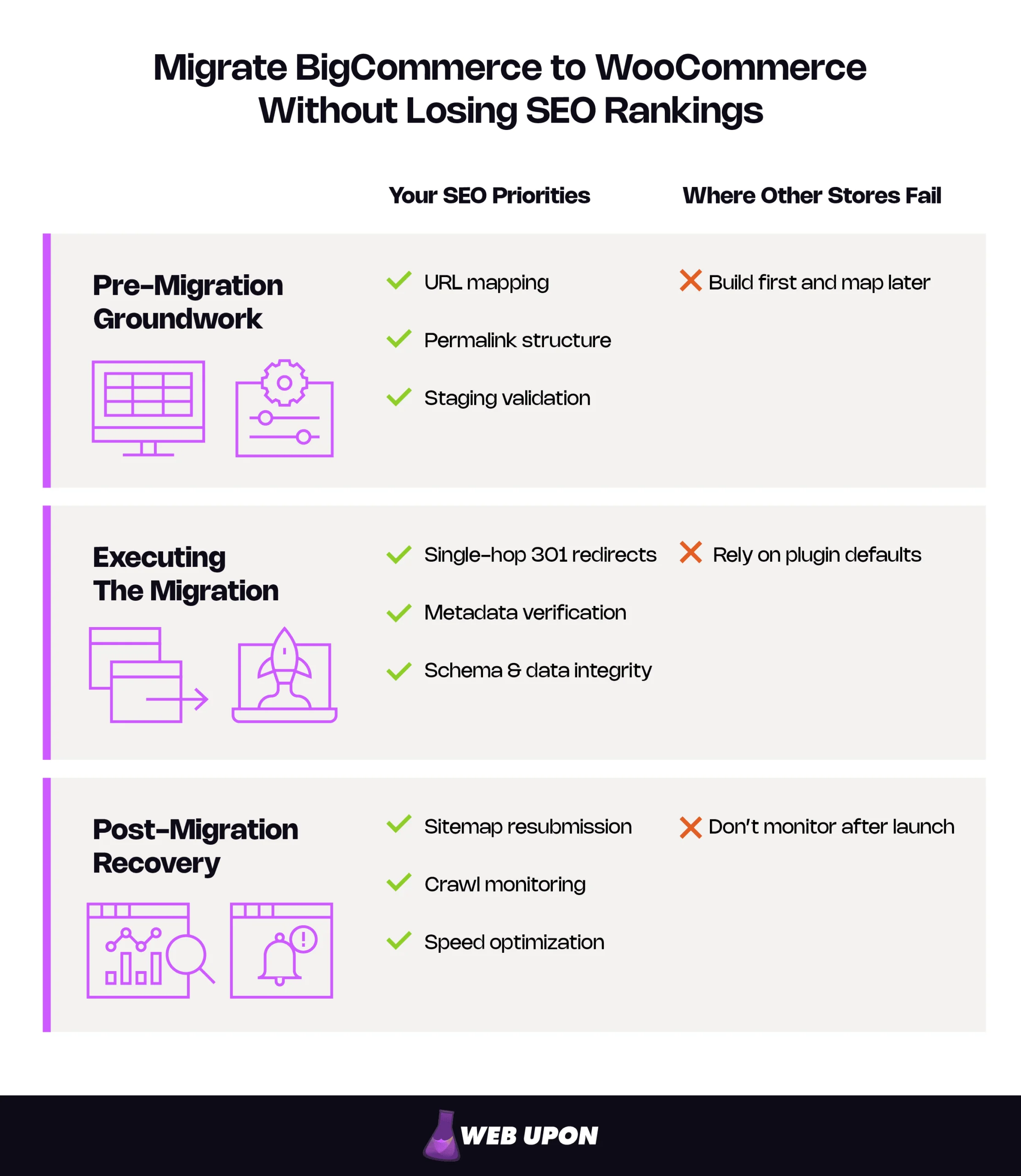
Key Takeaways
- The URL map is the load-bearing deliverable, and it comes before the build. Permalink decisions made after import invalidate every row of it at once.
- Single-hop 301s carry the link equity across. Google states that permanent redirects do not cost PageRank, and advises keeping them for at least a year.
- Validate metadata and schema rather than assuming parity. Both platforms handle product markup differently, and lost rich results cost clicks without moving rankings.
What Actually Determines Whether You Keep Your Rankings
Done properly, this project ends with organic traffic at or above where it started, link equity intact, and a configuration your business owns rather than rents. Link equity is the ranking value a page has earned from the links pointing at it. It is the asset most at risk in a platform move.
The 301 redirect is what protects it. A 301 permanently forwards both visitors and accumulated ranking signals from an old URL to its replacement, and Google’s site migration documentation states plainly that permanent redirects do not cost PageRank.
Carry one model into every conversation with your development team. Search engines have already indexed and credited your current URL structure. To preserve SEO during site migration, you are transferring those credits to new addresses, not rebuilding them.
The table below is a procurement checklist. Column one belongs in the scope of work. Column two is worth doing and never worth delaying launch for.
| Non-negotiable | Optimization |
| Complete URL map covering every indexed page | Slug simplification |
| Single-hop 301 redirects for every changed URL | Schema enhancement beyond parity |
| Metadata migration (titles, descriptions, canonicals) | Image compression |
| Staging validation before launch | CDN configuration |
| Correct indexability settings on all commercial pages | Faceted navigation refinement |
Pre-Migration SEO Groundwork: Auditing, Mapping, and Protecting What You’ve Already Earned
Credits only move if you know what exists and where each item is going. Building that inventory is the entire purpose of the pre-migration phase.
Conduct a Full SEO Audit of Your BigCommerce Store Before Touching Anything
You cannot protect assets you have not counted. A pre-migration SEO audit produces the record of what your store looks like to search engines the day before the move, and the organic traffic baseline you measure recovery against. Without it, a post-launch dip is unprovable — you cannot separate migration damage from seasonality, and you have no basis to hold anyone accountable for either.
- Crawl the entire BigCommerce site with a dedicated crawler such as Screaming Frog or Sitebulb to capture every indexed URL.
- Export every meta title, meta description, canonical tag, and heading structure across products, categories, and blog pages.
- Record 12 months of organic traffic, impressions, and top queries in Google Search Console and Google Analytics so seasonality is visible in the baseline.
- Build three lists of high-value pages: top 20 by organic sessions, top 20 by assisted revenue, and every page with earned referring domains.
Those lists overlap less than owners expect. A category page can hold the backlinks while a product page holds the revenue. Our guide to running an ecommerce website SEO audit covers the same ground outside a migration.
Map Every BigCommerce URL to Its WooCommerce Equivalent Before You Build Anything
This is the load-bearing document of the project. The two platforms organize URLs differently, which makes 301 redirect mapping the most important deliverable your team produces — ahead of the theme, the hosting, and the launch date. Every redirect written later is a row copied from this sheet.
BigCommerce URL patterns are not fixed. They are configured under Settings, then URL Structure, and stores run several different options — the /products/ and /categories/ prefixes come from the SEO Optimized (Long) setting, not a platform default. Map against your own crawl export, never an assumed pattern.
| Page type | Common BigCommerce pattern | WooCommerce default | Recommended action |
| Product | /products/product-name/ | /product/product-name/ | Note the singular/plural difference, decide deliberately, then redirect. |
| Category | /categories/category-name/ | /product-category/category-name/ | Decide the slug base before import. |
| Blog post | /blog/post-name/ | /blog/post-name/ | Preserve exactly wherever possible. |
Build the sheet with seven columns and no fewer. The first two define the redirect, the next three set priority, and the last two prove the work was done.
- Old URL
- New URL
- Page type (product, category, blog, informational)
- Organic sessions, last 12 months
- Referring domains
- Redirect status (written, deployed, verified)
- QA verified (Y/N)
Sort by columns four and five to know which rows to test first when time runs short. Sorting also settles whether every URL needs mapping: the rows with sessions and referring domains are revenue, and the rest are insurance.
Replicate Your WooCommerce Permalink Structure to Mirror BigCommerce URL Patterns
Your WooCommerce permalink structure is a decision, not a default, and it gets made before any product data is imported. The platform ships with four product permalink options and a configurable category base, all under Settings, then Permalinks.
- Configure product and category permalinks before importing catalog data.
- Evaluate whether a /product/ base or a flatter structure gives closer parity with your existing URLs.
- Align category base slugs so less of the site architecture changes at all.
- Keep the product and category bases distinct, since WordPress cannot tell the two URL types apart when they share one.
- Lock the permalink and slug structure, then record it in the project documentation before the first import.
Sequencing this wrong is expensive, and WooCommerce’s own documentation explains why: changing permalink structures updates the URLs of existing products, and indexed URLs return 404s unless redirects exist. Change permalinks after import and every row of the mapping sheet is invalidated at once. The redirect work restarts from scratch, on the critical path, usually the week before launch.
Set Up a Staging Environment to Test Every SEO Element Before Going Live
A staging environment is a private copy of the new site where everything is validated before the public sees it. Skip it and you are testing in production, which on an established store means testing with revenue.
- Build and validate the entire WooCommerce store on staging, never on the live domain.
- Confirm that redirects resolve, that metadata transferred, and that canonical tags — the tag naming the definitive version of a page — point at the correct URLs.
- Crawl the staging site to surface orphaned pages, broken internal links, and missing metadata.
- Verify SSL installation and HTTPS enforcement so no mixed-content warnings appear at go-live.
One line belongs in the project plan on its own. Staging must be blocked from search engines, usually by password protection or a site-wide noindex tag, and that block has to come off at launch. A noindex left in place tells Google to drop those pages entirely from search results as it recrawls them — among the most expensive errors in this process, precisely because the site looks perfect to everyone except a crawler.
Audit and mapping is where migrations are won, and it is the phase most often shortened to protect a launch date. If you want a second set of eyes on that plan before the build starts, contact Web Upon.
Executing the Migration: Redirects, Metadata, and Data Integrity That Search Engines Demand
The map exists. Every credit now has to arrive at its new address, which is a question of implementation precision rather than strategy.
Implement High-Precision 301 Redirects for Every Changed URL Without Exception
A 301 tells search engines a page moved permanently and forwards its accumulated signals. A 302 says the move is temporary, so the old URL stays the one shown — a small difference in code and a large one in outcome, since Google reads redirect type as a canonicalization signal. Use 301s for every permanent change, and leave them in place for at least a year, which is Google’s stated guidance for signals to fully transfer.
- Implement redirects at server level — .htaccess on Apache, the equivalent configuration elsewhere — or through a dedicated redirect plugin rather than default platform handling.
- Write individual rules from the mapping document for every product, category, and blog URL that changed.
- Resolve every redirect in a single hop, avoiding redirect chains (one URL forwarding to another that forwards again before reaching the destination).
- Redirect discontinued products to the closest equivalent or their parent category, never the homepage, since blanket redirects there may be treated as soft 404s.
- Audit for 404 errors immediately after staging deployment and treat every unresolved one as lost revenue.
The case against chains is usually stated wrong. Google’s documentation says permanent redirects do not cost PageRank, so the problem is not leakage. It is that Googlebot follows up to 10 hops before giving up, and Google advises redirecting straight to the final destination — no more than three where a chain is unavoidable — since each hop adds latency and can break silently. Chains also spend crawl budget, the finite number of URLs a search engine will fetch from your site in a given period, and avoiding them sits on Google’s list of crawl efficiency practices. That guidance is scoped to sites above roughly 10,000 pages changing daily, a threshold faceted navigation reaches faster than owners expect: filter and sort combinations multiply one product into many crawlable URLs.
Migrate and Synchronize All On-Page Metadata with Database-Level Precision
Metadata is not decoration. Titles and descriptions are the text that wins or loses the click after ranking has already been earned, and WooCommerce will generate its own if you let it.
- Migrate every meta title and meta description explicitly through an SEO plugin rather than accepting generated defaults.
- Match or improve on the BigCommerce equivalents so the change does not read as a wholesale content rewrite.
- Migrate canonical tags accurately so faceted navigation — the filter and sort options that spawn variant URLs — does not create duplicate pages.
- Validate product schema explicitly rather than assuming parity between the two platforms.
Schema hides its own damage. Product structured data is what renders price, availability, and review stars as rich results. Lose it and your ranking position can be unchanged while click-through falls, because your listing is now a plain blue link beside competitors showing price and stock. No rankings report will surface that.
Absence is rarely the failure mode here, since WooCommerce core outputs product structured data automatically. Incompleteness is. Variable products emit one aggregated block, dropping variation-level GTIN, MPN, and SKU and replacing individual prices with a range — occasionally enough for Google to fail validation. Validate against Google’s product structured data documentation before launch.
Preserve Blog Content and Internal Link Architecture During Content Migration
Blog content is often where the backlinks live, which makes it the least replaceable content on the site. Reviewing it through content audits first tells you which posts earn and which are dormant.
- Retain original slugs, internal links, and heading hierarchy on every migrated post.
- Update internal links to point directly at final WooCommerce URLs rather than at old URLs that resolve through a redirect.
- Preserve image alt text, file names, and compression settings to protect image search visibility and page speed.
- Rebuild any BigCommerce-specific widgets or embedded CTAs that may have been stripped out during migration.
Teams skip the second bullet because the site works without it. Redirected internal links do function — they just spend a crawl request reaching a destination you could have linked to directly, and one find-and-replace fixes them all.
Validate Data Integrity Across Products, Categories, and Taxonomy Structures
Missing data creates thin pages, and thin pages lose rankings without any redirect being at fault. Reconciliation is unglamorous and it catches what nothing else will.
- Confirm every product, variant, SKU, and category migrated with all fields intact.
- Cross-reference WooCommerce product and category counts against the BigCommerce export before launch.
- Mirror category hierarchies so the architecture search engines already credited stays recognizable.
- Verify indexability on every commercial page, with no noindex tags surviving from staging.
Run this pre-launch SEO quality assurance checklist for a WooCommerce migration as a formal gate before go-live. Nobody signs it off verbally.
- Permalink structure locked before import
- Every URL mapped, with no unaccounted rows
- All redirects resolving in a single hop
- Zero unresolved 404s in the staging crawl
- Meta titles and descriptions present on every page
- Canonical tags pointing to the correct URLs
- Product schema validating without errors
- Product and category counts reconciled against export
- No noindex tags on commercial pages
- Staging index block removed
This phase needs someone who can validate redirect behavior and schema output, not simply move data between systems. If you want that validation handled by a team experienced in BigCommerce-to-WooCommerce migration, contact Web Upon.
Post-Migration SEO Recovery: Monitoring, Fixing, and Consolidating Your Search Authority
Launch day is the midpoint of your BigCommerce to WooCommerce SEO project, not the end of it. The next 90 days are where problems surface, and where a fluctuation separates itself from a failure.
Submit Updated Sitemaps and Reconfigure Google Search Console Immediately After Launch
Google finds the new structure faster when you tell it directly. This work happens within hours of go-live, not at the end of the sprint.
- Generate a fresh XML sitemap from your SEO plugin and submit it in Google Search Console.
- Remove outdated BigCommerce sitemaps so crawlers stop being pointed at URLs that no longer exist.
- Use the Change of Address tool if the migration involved a domain change, noting that Google stops associating the two properties after 180 days.
- Keep paying for the old domain for at least a year afterward, as Google recommends, so nobody else acquires it.
- Check the Page Indexing report (formerly Index Coverage) daily for the first two weeks to catch stray noindex tags and redirect failures early.
Monitor Crawl Errors, Redirect Performance, and Ranking Fluctuations in Real Time
Movement in the first fortnight is normal and not a reason to intervene. What matters is the shape of the movement, not its existence.
- Use Search Console’s Page Indexing report and URL Inspection tool to find 404s and redirect errors staging did not catch.
- Track daily rankings for your top 20 to 50 priority pages.
- Audit your backlink profile to confirm external links resolve through your redirects rather than landing on errors.
- Watch Core Web Vitals and page speed in Search Console and PageSpeed Insights.
Here is the distinction worth learning. A shallow dip spread broadly across many pages in the first two weeks is ordinary recrawling. A sustained decline concentrated in one page type or one category branch is a structural fault — a redirect pattern that missed a URL variant, or a template-level metadata failure — and it needs investigating the day you see the pattern, not at the end of the month. One first-week alarm you can dismiss: Search Console flags old-sitemap URLs as redirecting, which Google says is normal.
| Timeframe | What to check | What “normal” looks like |
| First 48 hours | Sitemap submitted, page indexing, 404 log | Crawl volume spikes as Google re-discovers |
| Days 3–14 | Rankings for priority pages, redirect resolution | Visible fluctuation, no sustained decline |
| Days 15–30 | Traffic vs. baseline, Core Web Vitals | Trending back toward pre-migration levels |
| Days 31–90 | Full crawl, conversion rate, backlink resolution | At or above baseline |
Optimize WooCommerce Site Speed and Mobile Responsiveness to Protect Rankings
On BigCommerce, performance was largely fixed by the platform. On WooCommerce it becomes a variable you control, which is one of the genuine upsides of the move provided the hosting and theme decisions are made deliberately rather than inherited from a template demo.
- Choose managed WordPress hosting and a lightweight theme before performance becomes a retrofit project.
- Compress migrated product images through an optimization plugin without degrading quality.
- Enable caching, a CDN, and lazy loading across the store.
- Confirm the theme performs on mobile, since mobile-first indexing means the mobile experience is the one being assessed.
Write the current thresholds into the build spec: Largest Contentful Paint at or under 2.5 seconds, Interaction to Next Paint at or under 200 milliseconds, and Cumulative Layout Shift at or under 0.1, each at the 75th percentile of real visits. One detail saves an argument later. Field data in Search Console and PageSpeed Insights is reported on a rolling 28-day window, so launch-week numbers still describe the old site.
Where speed is a primary reason for the move, our approach to BigCommerce-to-WordPress speed optimization treats it as a build decision rather than a post-launch fix.
Conduct a 30-Day and 90-Day Post-Migration SEO Audit to Lock In Long-Term Stability
Two checkpoints turn monitoring into resolution. Put both in the calendar during the project, not after it.
- Run a full crawl at 30 days to catch residual redirect errors, orphaned pages, missing metadata, and schema failures.
- Compare organic traffic, rankings, and conversion rates against your documented baseline at 90 days.
- Reclaim or disavow links pointing at old URLs that were never properly redirected.
- Document every SEO configuration decision made during the project.
That last item outlives the migration. A written record of your permalink structure, redirect rules, canonical logic, and schema setup means the next theme change and the next agency relationship start from evidence. You went through this to own your stack. The documentation is the part you keep.
Migrating Without Losing What You’ve Built
Rankings survive migrations that are mapped, redirected, and validated before launch. They do not survive migrations that treat SEO as post-launch cleanup, which is why some stores migrate BigCommerce to WooCommerce without incident while others spend a year recovering.
Before the build, you inventory what you have and decide where every URL is going. During execution, you move the credits precisely and prove they arrived. After launch, you monitor deliberately for 90 days and document what you configured.
That leaves one question for whoever is executing this project: is there a documented URL map and redirect plan in place before the build begins? A team that can produce one is running a controlled migration. A team that cannot is running an experiment on your organic traffic.
The platform is what you were shopping for. The sequence is what decides how much of your traffic survives the trip. If you want to talk through the mapping and redirect plan for your store before anything is built, contact Web Upon.


