Every morning, someone on your team copies web orders into the ERP by hand. BigCommerce B2B Edition promises to end that, and your buyers want it too: 67% of B2B buyers prefer a rep-free experience, according to a 2026 Gartner survey. The fear is what the move does to the rankings that quietly fill your pipeline. A HubSpot to BigCommerce B2B migration doesn’t have to cost you that search equity.
You protect your rankings by treating the migration as an SEO project from day one. Below, we cover why this move is riskier than most, then exactly what to do before, during, and after launch.
Key Takeaways
- Why the risk is higher: HubSpot is built around pages and blogs, BigCommerce around categories and products, so nearly every URL changes. With B2B buying cycles averaging about 10 months, a ranking drop shows up as lost pipeline long after launch.
- Scope comes first: Decide whether HubSpot stays on as your CRM or goes entirely. That choice sets your redirect workload and who serves which 301s.
- Before launch: Crawl every hostname, record baselines while Search Console still holds its full 16 months of data, and build a complete old-to-new URL map. Plan URL by URL, since BigCommerce has no native wildcard redirects.
- During the build: Use one-hop 301s and keep them at least a year. Carry over metadata and structured data, rebuild the content hub (BigCommerce won’t recreate HubSpot’s pillar-cluster model for you), and keep filter URLs out of the crawl.
- After launch: Expect movement. Google says medium-sized sites can take a few weeks or more to settle, so monitor daily for 30 days and weekly through day 90.
- Long term: Reclaim links, grow the content hub on BigCommerce, and audit quarterly so the new platform becomes a base for growth.
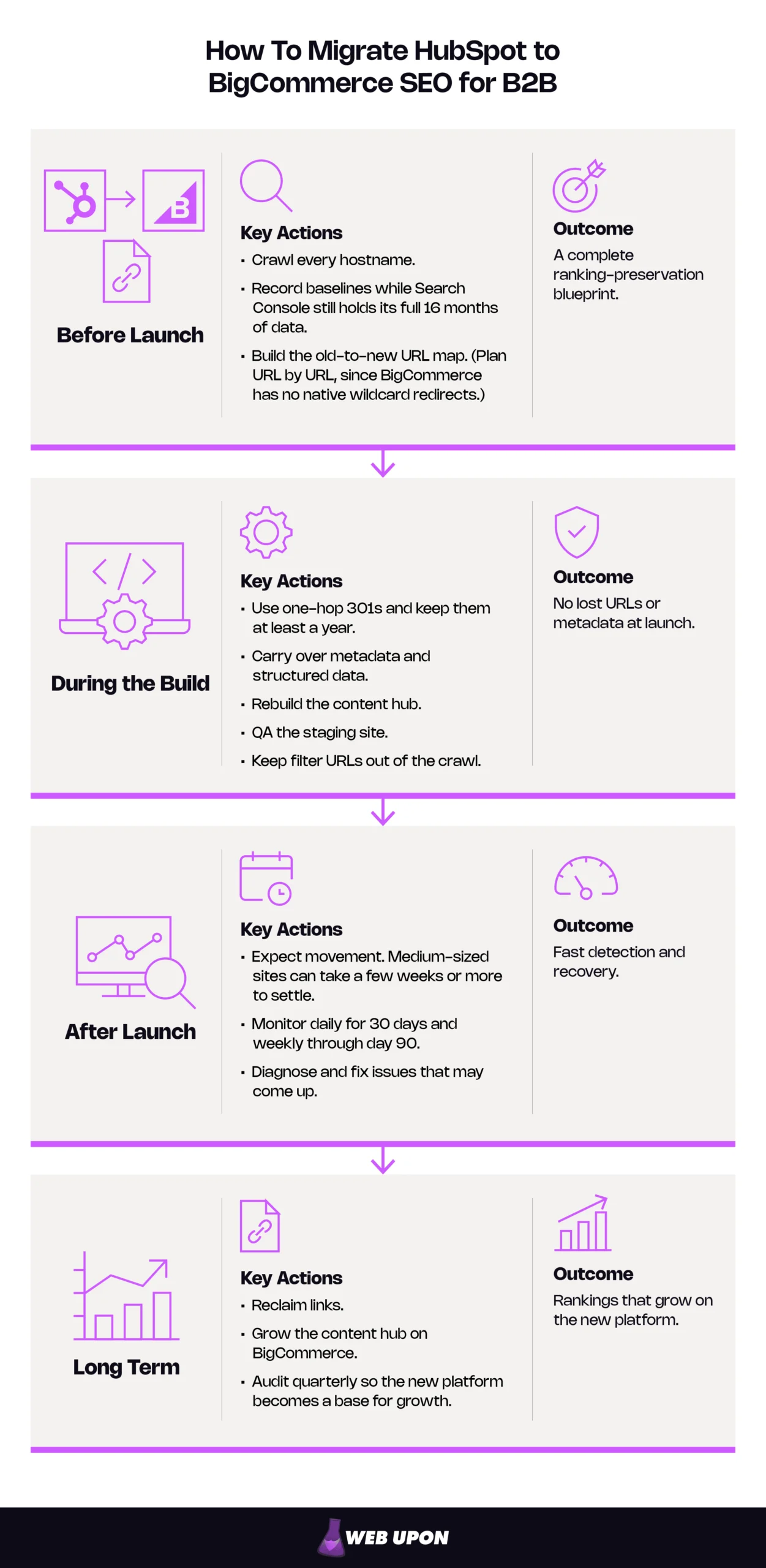
Your HubSpot-to-BigCommerce SEO Migration Plan
| Phase | Key Actions | Owner | Outcome |
| Before launch | Crawl, benchmark, build the URL map | SEO lead + marketing | A complete ranking-preservation blueprint |
| During the build | 301 redirects, on-page transfer, structured data, technical settings, staging QA | SEO lead + developers | No lost URLs or metadata at launch |
| After launch (days 1–90) | Daily, then weekly, monitoring, diagnosis and fixes | SEO lead | Fast detection and recovery |
| Long term | Content hub rebuild, link reclamation, quarterly audits | Marketing + SEO | Rankings that grow on the new platform |
Follow the phases in order and rankings tend to hold steady or return quickly. Lead flow stays protected while your team moves to a storefront built for B2B ordering. The new platform becomes a base for growth instead of a recovery project.
Before each how-to, here’s why this migration carries more SEO risk than most.
Why Your HubSpot-to-BigCommerce Migration Is an SEO Emergency in Disguise
The Hidden SEO Stakes of Switching B2B Platforms
Most teams scope a platform move as an IT project. It is also an SEO event, and one wrong setting can undo years of accumulated search equity.
The platforms are built on different foundations. The HubSpot CMS (content management system) is organized around pages, blogs, and landing pages. BigCommerce is organized around categories and products. That difference changes nearly every URL, where metadata lives, and how canonical tags (code telling search engines which version of a page is the original) are generated.
The cost lands in pipeline, not just sessions. B2B buying cycles averaged 10.1 months in 6sense’s recent study of nearly 4,000 buyers, so a ranking drop in March becomes a thin quarter in July, long after anyone connects the two.
The scope is bigger than a typical site move, too. A CMS-to-CMS migration is mostly a content job. A CMS-to-commerce migration adds catalog URLs, product data, filters, and account-gated pages.
How HubSpot and BigCommerce Differ on SEO-Critical Elements
| Element | HubSpot (CMS-first) | BigCommerce (commerce-first) | Migration Implication |
| URL structure and trailing slashes | Set page by page. Blogs and landing pages often sit on subdomains (blog., info.). Paths typically lack a trailing slash. | Patterns set store-wide, from SEO-optimized presets to custom. Default product and category paths end in a trailing slash. | Nearly every URL changes and needs a mapped destination. |
| Content architecture | Pillar pages, topic clusters, landing pages | Category-to-product hierarchy, plus web pages and a blog | Content hubs must be rebuilt on purpose. |
| Blog functionality | Full-featured: multiple blogs, authors, tags, subscriptions | A basic built-in blog, with look and feel controlled by the theme | Pillar pages usually become custom web pages. |
| Structured data defaults | Depends on theme, templates, and modules | BigCommerce’s Cornerstone reference theme outputs Product markup by default; other themes vary. | Audit and rebuild schema. Don’t assume parity. |
| Redirect management | Redirect tool with flexible pattern rules, on HubSpot-hosted domains only | 301 manager with CSV import and manual or dynamic redirects, no native wildcards | Pattern rules don’t carry over. Plan URL by URL. |
The B2B-Specific SEO Risks That Generic Migration Guides Often Overlook
Generic SEO site migration checklists assume a simple store with a few hundred products. A B2B ecommerce migration breaks that assumption in six ways.
- Catalog complexity: Parent SKUs, variants, tiered pricing pages, and account-specific content can multiply into thousands of near-identical URLs that compete with each other.
- URL mismatch: HubSpot’s blog and landing page URLs don’t line up with BigCommerce’s category and product structure, and every unplanned change leaks link equity. Our guide to the SEO impact of changing URLs explains why.
- Content hub vulnerability: Rankings built on pillar pages and topic clusters are most exposed, because BigCommerce has no native equivalent.
- Lost bottom-of-funnel traffic: Spec sheets, resource pages, and gated content rank for the exact terms engineers search. Lose them, and you lose some of your most qualified leads.
- Catalog visibility: BigCommerce lets B2B merchants hide prices or whole catalogs behind a login. Google can’t reach pages that require a login, so gate the pricing, not the product pages.
- Subdomain moves: Folding blog. or info. into the main BigCommerce domain is a subdomain-to-subfolder move with its own redirect plan.
Moving Your Website vs. Replacing HubSpot Entirely
Decide what is actually moving before you map a single URL. That decision sets the scope of everything else.
Many B2B teams move only the storefront and website, and keep HubSpot as their CRM and marketing automation platform. A connector then syncs contacts, companies, products, and orders between the two, and the morning re-keying stops. Connectors in the HubSpot and BigCommerce app marketplaces vary widely, so compare three things:
- Which records sync, and in which direction
- Whether historical data comes across or only new activity
- Monthly order caps on lower tiers
| Approach | What Moves | What Stays | SEO Workload |
| Keep HubSpot as CRM + sync | Storefront, catalog, usually the blog and core pages | CRM, email, workflows, forms, possibly some landing pages | Moderate: map moved URLs and decide which HubSpot pages stay live |
| Replace HubSpot entirely | Every page, file, form, and landing page | Nothing on HubSpot | High: every HubSpot URL and file needs a destination before the account closes |
Keeping HubSpot has a quiet SEO advantage. HubSpot’s redirect tool only works on domains connected to and hosted in HubSpot, so a retained subdomain can keep serving its own 301s through the transition, as long as you keep a HubSpot tier that includes URL redirects. Replace HubSpot entirely, and those redirects must be rebuilt elsewhere before the subscription ends.
With the risks mapped, the next step is to capture everything you currently rank for, before a single setting changes.
Phase 1 (Before Launch): The Pre-Migration SEO Audit and Ranking Blueprint
For teams without in-house capacity, a pre-migration SEO audit is the natural starting point. Whoever runs it, this phase produces the blueprint that every later step relies on to preserve search rankings.
Conducting a Forensic SEO Audit of Your HubSpot Site
You can only protect what you’ve recorded. This audit becomes the migration’s source of truth.
- Crawl every HubSpot URL, including all subdomains, with a crawler such as Screaming Frog or Sitebulb before any code changes.
- Export all meta titles, meta descriptions, H1s, and canonical URLs into a single baseline document.
- Pull Search Console data to find your highest-traffic and highest-impression URLs. Those URLs are non-negotiable.
- Document internal linking, especially pillar and cluster links, which carry crawl authority you’ll need to rebuild.
- Merge crawl, Search Console, and backlink data. A crawl alone misses orphaned pages and URLs that live only in other sites’ links.
Set up a Domain property, plus a URL-prefix property for each hostname you’re moving (www, blog., info.), before launch. Without them, you have no clean before-and-after data for the sections you move.
What to Export Before Launch
- Full site crawl (all subdomains)
- Metadata export
- Search Console performance data (the full 16 months Search Console keeps)
- Internal link map
- Backlink export
- Indexed file URLs (PDFs, images)
Establishing Your SEO Baseline Metrics
Without a baseline, every post-launch dip looks like a crisis. With one, you can tell normal wobble from real loss.
- Record current rankings for target B2B terms in a rank tracker such as Ahrefs, Semrush, or Moz.
- Document organic traffic, engagement, and conversions by page type in Google Analytics.
- Capture Core Web Vitals from Search Console, since a new theme and infrastructure will perform differently.
- Export your backlink profile, and flag the URLs with the strongest links. Their redirects must be flawless.
| Metric | Where to Find It | Why It Matters Post-Launch |
| Rankings for top commercial terms | Rank tracker | Separates normal fluctuation from real loss |
| Clicks and impressions by URL | Search Console, Performance report | Identifies the URLs you can’t afford to lose |
| Organic sessions and conversions by page type | Google Analytics | Shows whether pipeline recovered, not just traffic |
| Indexed page count | Search Console, Pages report | Flags dropped pages or index bloat |
| Core Web Vitals | Search Console, Core Web Vitals report | Separates platform performance from content issues |
| Referring domains by URL | Backlink tool + Search Console Links report | Shows which redirects need the most care |
Creating Your URL Map: A Critical Pre-Migration Deliverable
Picture a spreadsheet with two columns: every URL you have today, and where each one lives tomorrow. That spreadsheet is where migrations succeed or fail, which is why URL mapping comes before any build work.
- Pair every HubSpot URL with its BigCommerce destination before the build starts.
- Prioritize pages that rank for commercial terms: products, categories, blog posts, and landing pages.
- Settle trailing slashes early. HubSpot typically omits them, while BigCommerce’s default product and category paths include them. If both versions resolve, ranking signals split between two copies of one page.
- Flag smart content and personalized variants, which have no direct BigCommerce equivalent, and decide whether to consolidate or redirect each.
- Include subdomains and HubSpot-hosted files, such as PDF spec sheets.
- Redirect retired URLs to the closest relevant page. Save 404 or 410 responses for obsolete content with no traffic or links. Never dump old URLs on the homepage; Google warns that may be treated as a soft 404, an error page in disguise.
Sample URL Map
| Old HubSpot URL | New BigCommerce URL | Page Type | Priority | Action | Status |
| www.example.com/industrial-fasteners | www.example.com/industrial-fasteners/ | Landing page → category | High | Redirect | Mapped |
| blog.example.com/torque-spec-guide | www.example.com/blog/torque-spec-guide/ | Blog post | High | Redirect | Mapped |
| www.example.com/hubfs/spec-sheets/m8-bolt.pdf | www.example.com/content/spec-sheets/m8-bolt.pdf | PDF spec sheet | Medium | Redirect (re-hosted) | In progress |
| info.example.com/2019-trade-show | www.example.com/events/ | Expired campaign page | Low | Consolidate | Approved |
If you’d rather not build it alone, talk to Web Upon about owning the map and the redirect plan that grows from it.
With the blueprint complete, the build can begin, and the URL map becomes every developer’s checklist.
Phase 2 (During the Build): SEO-Safe Data, Structure, and Content Transfer
Building a Redirect Strategy That Protects Your Link Equity
Redirects carry your earned authority from old URLs to new ones. Get them wrong, and Google meets your new pages as strangers.
- Use 301 redirects for every URL that changes. A 301 signals a permanent move, so Google consolidates ranking signals on the new URL. See Google’s redirects documentation.
- Bulk-import through BigCommerce’s 301 manager for large catalogs. BigCommerce’s Help Center covers how 301 redirects work in the control panel.
- Point catalog redirects at objects, not paths. BigCommerce’s dynamic redirects target a specific product or category, so they keep working if that item’s URL changes later.
- Enforce a one-hop rule. Redirect chains add latency and failure points, and Google advises redirecting straight to the final URL. Watch the redirects BigCommerce creates automatically when product, category, or page names change; they can stack up unnoticed.
- List HubSpot file patterns URL by URL. BigCommerce has no native wildcard redirects, so paths confirmed in your crawl (such as /hubfs/ and /hs-fs/) need individual redirects or a rule at the DNS or edge layer. Include thank-you and form confirmation pages that have earned authority.
- Handle subdomains separately. BigCommerce can only redirect domains it serves. Redirect blog. or info. from HubSpot during the transition, or move those rules to your DNS or edge provider before HubSpot hosting ends.
- Keep redirects for at least a year, and indefinitely for URLs with backlinks. Google recommends a one-year minimum so every signal transfers.
Common HubSpot URL Patterns and How to Handle Them
Treat these as common patterns to confirm in your own crawl.
| Pattern | Typical Content | Recommended Action |
| /hubfs/… | Files from HubSpot’s file manager (PDFs, images) | Re-host on BigCommerce; redirect every URL with traffic or links. |
| /hs-fs/hubfs/… | Resized or optimized images | Re-host; redirect only those with links or image search traffic. |
| /hs/… | HubSpot system paths (preferences, tracking links) | Usually retire; replace the function and confirm none are indexed. |
| blog.domain.com/… | Blog posts, listing, and tag pages | One-to-one redirects to /blog/ equivalents. |
| info., go., or lp. subdomains | Landing and thank-you pages | Redirect to the matching category or page; consolidate expired campaigns. |
Rebuilding Your On-Page SEO Architecture in BigCommerce
On-page signals are the first thing Google re-reads after a move. Keep them stable and the redirects have something solid to point at.
- Transfer meta titles and descriptions by hand for priority pages, and verify each one. Migration tools often drop or truncate them.
- Rebuild the content hub with BigCommerce’s blog, custom web pages, and vetted SEO apps from the BigCommerce App Marketplace.
- Set URL structure before launch to match HubSpot conventions where possible. Every URL kept identical is one redirect you never need.
- Rebuild internal linking with the same intent as the original architecture. If content needs triage first, critical content audits sort what to move, merge, or retire.
Because BigCommerce’s built-in blog is basic, pillar pages usually work best as custom web pages, with cluster posts linking up to them. That structure carries your pillar-cluster content across intact, along with the topical authority it earned.
Hold off on rewriting copy during the move. If URLs, templates, and text all change in the same week, you won’t know which one caused a drop.
Migrating B2B Content and Product Data Without SEO Loss
B2B search demand lands on part numbers, spec tables, and application terms. That’s the data you can least afford to mangle.
- Migrate descriptions, specs, and category copy with full HTML fidelity. Stripped formatting flattens headings and buries keywords.
- Preserve structured data, the Schema.org markup that describes products, reviews, and your organization to search engines. The platforms handle it differently, and gaps cost rich-result visibility.
- Keep the original URL for gated content such as whitepapers, spec sheets, and RFQ pages, or give each a precise 301. These pages often hold valuable industry backlinks.
- Control faceted navigation, the filters buyers use to narrow by size, material, or brand. Each filter combination can spawn a new URL. Keep low-value combinations out of the crawl, usually with robots.txt rules, and use canonical tags to the main category as a secondary signal. Google’s guide to managing faceted navigation lays out the options.
- Re-host every asset still in HubSpot’s file manager before you change the subscription, and export your HubSpot redirects first. HubSpot can’t redirect file URLs, and downgrading to Free tier removes access to its redirect tool.
Configuring BigCommerce’s Technical SEO Settings for B2B
These BigCommerce SEO settings decide whether Google can find, trust, and correctly read the new site.
- Submit a new XML sitemap in Search Console right after launch to help Google discover and prioritize migrated URLs. A sitemap aids discovery but doesn’t guarantee every URL gets crawled and indexed.
- Extend robots.txt rather than replacing it. BigCommerce’s default already blocks checkout and account URLs, plus cart and search; add staging, filter, and duplicate paths. “Indexed, though blocked by robots.txt” warnings on the default paths are expected.
- Confirm HTTPS on every page and fix mixed-content warnings, usually caused by migrated assets with hardcoded http:// links. HTTPS is a buyer trust requirement and, by Google’s own description, a lightweight ranking signal.
- Set up hreflang if you serve multiple regions or languages. Hreflang tags tell search engines which regional or language version to show. BigCommerce now supports multiple languages from a single storefront, with separate regional storefronts via multi-storefront. Confirm your theme’s hreflang output, and point every annotation to the new URLs.
Running a Pre-Launch SEO QA on Staging
Staging is the last place a mistake is still free to fix.
Launch-Day SEO Checklist
- Crawl the staging site and compare it with the URL map to confirm every destination exists.
- Test a sample of redirects, including every high-priority and high-backlink URL, and confirm each is a single-hop 301 to the right page.
- Verify metadata, canonical tags, structured data, and internal links on each priority template: product, category, blog, and landing page.
- Confirm staging is blocked from indexing before launch, and that the block comes off on launch day.
Launch day isn’t the finish line. The next 90 days decide whether rankings hold, dip, or recover.
Phase 3 (After Launch): Post-Migration Monitoring and Recovery
Expect some movement while Google recrawls. Google says medium-sized sites can take a few weeks or more to settle, and large catalogs longer. Monitoring exists to catch real problems inside that window.
Following a 90-Day Post-Migration Monitoring Protocol
A broken redirect found in week one costs an afternoon. Found in month three, it costs a quarter of pipeline.
- Check Search Console daily for 30 days for crawl errors, 404 spikes, and manual actions.
- Track weekly rankings for your top 50 B2B terms against the baseline.
- Set Google Analytics alerts for week-over-week organic drops above 10%.
- Audit live redirect responses weekly for 90 days. Platform updates and automatic redirects can break or chain existing rules without warning.
90-Day Monitoring Timeline
| Window | What to Check | Frequency | Red Flag |
| Days 1–7 | 404s, redirect responses, robots.txt, sitemap processing, conversion tracking | Daily | Any priority URL returning 404, or forms not recording leads |
| Days 8–30 | Indexed page counts, ranking movement, organic traffic by page type | Daily (Search Console), weekly (rankings) | Indexed pages still falling, or traffic down 10%+ week over week |
| Days 31–90 | Recovery against baseline, redirect integrity, Core Web Vitals | Weekly | Priority terms below baseline after 30 days, or new redirect chains |
Diagnosing and Recovering from Ranking Drops
A drop is a symptom, not a diagnosis. The fix depends on what actually broke.
- Separate fluctuation from structural errors. Fluctuation is gradual and broad; structural errors hit specific pages or templates.
- Trace high-value drops through the URL map. Confirm the redirect is live, returns a 301, and lands on a page with equal or better optimization.
- Request indexing through Search Console’s URL Inspection Tool for critical pages still missing after 30 days. Requests are capped daily, so use a sitemap for larger batches.
- Diff your pre- and post-migration crawls to find URLs dropped, orphaned, or misconfigured in the build.
| Symptom | Likely Cause | Fix |
| 404 spike in Search Console | Missing or mistyped redirects; unmapped HubSpot files. | Add one-hop 301s from the URL map; re-host missing files. |
| Sitewide ranking drop | Staging robots.txt or noindex left in place; broken canonicals. | Remove staging blocks, fix canonicals, resubmit the sitemap. |
| Single page drop | Redirect lands on a weaker page; metadata or content lost. | Repoint the redirect; restore on-page elements. |
| Pages “Discovered – currently not indexed” | Weak internal links; crawl budget spent on filter URLs. | Strengthen internal links; canonicalize or block low-value filters. |
If drops outlast the expected window or hit revenue-driving pages, bring in a strategic SEO team to diagnose and fix them.
Once rankings settle, the question changes from protecting what you had to growing beyond what HubSpot alone could support.
Building Long-Term SEO Growth on BigCommerce
The migration protects your rankings. The platform is what lets you grow them.
- Use native commerce features, such as product reviews, product structured data, and faceted search, to build advantages a CMS-first site couldn’t offer.
- Build a content roadmap that recreates the pillar-cluster model on BigCommerce’s blog and custom pages, centered on your core product lines.
- Reclaim links. Ask sites linking to old HubSpot URLs to update them, starting with those that send the most referral traffic. Each update removes a redirect hop for buyers and crawlers.
- Audit quarterly for crawl health, Core Web Vitals, and ranking trends as the catalog grows. At scale, an enterprise SEO partner keeps that cadence honest.
A few common questions remain, followed by your next steps.
HubSpot to BigCommerce Migration FAQs
Will I lose rankings when I migrate from HubSpot to BigCommerce? Some temporary fluctuation is normal while Google recrawls. A complete URL map, one-hop 301s, and preserved on-page SEO minimize lasting losses and speed recovery.
How long does SEO recovery take after a platform migration? Google estimates a few weeks or more for medium-sized sites, and longer for large catalogs. Treat that as a range, not a promise, and use the 90-day protocol to catch problems early.
Can I keep HubSpot as my CRM after moving my store? Yes. Many B2B teams sync BigCommerce with HubSpot so contacts and orders flow automatically. See “Moving Your Website vs. Replacing HubSpot Entirely” above.
How long should I keep 301 redirects in place? At least one year, and indefinitely for URLs with backlinks. Redirects are cheap to keep and expensive to lose.
Does BigCommerce B2B Edition affect SEO? It can. Login-only catalogs hide pages from search engines, so keep public catalog pages crawlable and gate only the pricing.
Protect Your Rankings, Then Grow Them
The morning re-keying has to stop, and this move is how it stops. Planned well, it carries manageable SEO risk. A HubSpot to BigCommerce B2B migration done in order (benchmark, map, redirect, monitor) keeps the pipeline flowing while the new storefront goes live.
Your HubSpot-to-BigCommerce SEO Migration Checklist
- Before launch: crawl, benchmark, and map every URL
- During the build: 301s, on-page transfer, structured data, technical settings, staging QA
- After launch: daily, then weekly, monitoring through day 90
- Long term: content hub rebuild, link reclamation, quarterly audits
No migration comes with guarantees. Treat the URL map as the revenue document it is, though, and yours can come with lower risk, a faster recovery, and a platform your rankings can grow on. If you want an experienced partner to run the audit, own the URL map and redirects, and watch recovery while your team focuses on the build, contact Web Upon.


