Your HTML site ranks. It has for years, and now the roadmap says rebuild it in React. Here is how to do that without losing what you’ve earned: don’t ship a pure client-side app. Build on Next.js with server-side rendering (SSR) or static generation (SSG) so every page still delivers complete HTML on the first request; keep every URL identical and 301 anything that must change; port your titles, descriptions, canonicals, and JSON-LD structured data into server-rendered components; and benchmark before launch so you can prove nothing regressed after.
Get any of that wrong and you create a crawlable ghost: a page that looks perfect to a person and arrives at Googlebot empty. HTML to React SPA SEO comes down to preventing that one failure. This guide covers why the risk exists, the migration roadmap, the performance work, and the monitoring that proves it worked. The dread is real; the fix is finite.
One note on terms. “React SPA” is what people search for, but a Next.js site rendered on the server is not technically a single-page app, and that is the point. You are building a React application experience delivered as full HTML.
Key Takeaways
- A React rebuild won’t cost rankings if every page that must rank still ships complete HTML on the first request, so build on Next.js with server rendering or static generation, not a pure client-side app.
- Google renders JavaScript in a separate, non-guaranteed pass, and most AI crawlers don’t run JavaScript at all.
- Keep every URL identical, and permanently redirect (301 or 308) any URL that must change, with no chains.
- Server-render all metadata and JSON-LD, using the pre-migration audit spreadsheet as the source of truth.
- Benchmark Core Web Vitals before launch, then monitor for 90 days, expecting temporary fluctuation while Google recrawls.
Five Moves That Protect Rankings Through a React Migration
Migrations that hold their rankings tend to do these five things. The ones that lose them usually skipped at least one.
| Move | What it protects | Where this article covers it |
| 1. Render on the server with Next.js SSR/SSG | Content visible to Googlebot on the first request | Rendering choice, SSR configuration |
| 2. Preserve every URL 1:1 | Accumulated link equity and ranking signals | URL preservation and redirects |
| 3. Port metadata server-side | Titles, descriptions, canonicals, robots directives | Dynamic metadata |
| 4. Port structured data server-side | Rich result eligibility and entity signals | Structured data migration |
| 5. Benchmark before, monitor after | Your ability to prove and defend the result | Pre-migration audit, 90-day monitoring |
A pure client-side React SPA is the one configuration this article advises against for a site that ranks. React is not bad for search; an empty first response is.
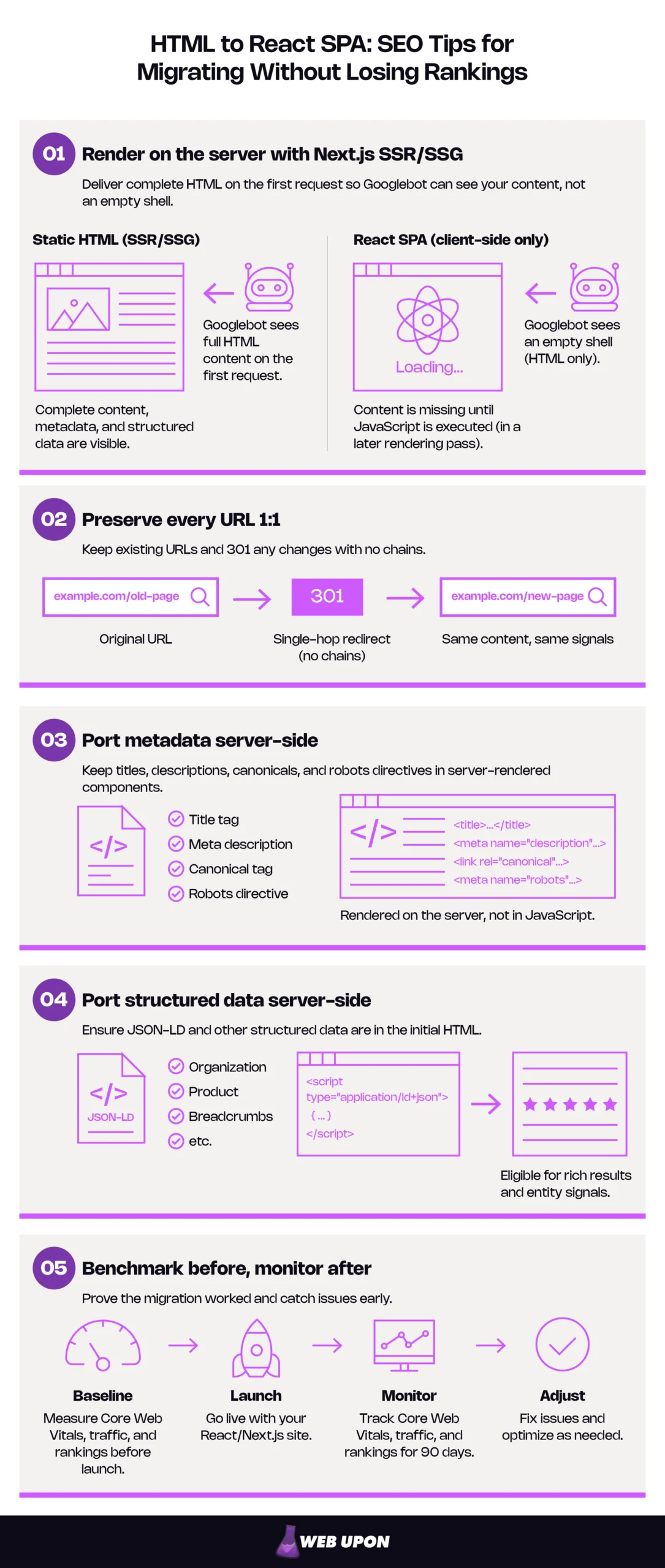
To see why these five moves matter, it helps to understand what changes when Googlebot meets a React page.
Why React SPAs Create SEO Risks That Static HTML Never Did
A plain HTML page arrives at Google as finished text. A client-rendered React page arrives as a blank stage with instructions for building the set later. Google will usually come back to build it, but “usually” and “later” are not words you want attached to revenue pages.
The Rendering Gap: How Google’s Deferred Rendering Queue Can Threaten Your Rankings
Googlebot processes JavaScript pages in three phases: crawling, rendering, and indexing. It fetches the raw HTML, queues the page for a separate pass in which a headless Chromium executes the JavaScript, and indexes the rendered result. Google’s JavaScript SEO documentation says a page may wait in that queue for a few seconds, but it can take longer.
That gap is the risk window. A client-rendered page can be indexed as empty or thin, and the timing of the render is neither guaranteed nor predictable. The most exposed pages are the ones that matter most: time-sensitive content, competitive terms, and newly launched URLs with no indexing history to fall back on.
Static HTML page journey:
- Googlebot requests the URL and receives complete HTML.
- Content, links, and metadata are all present in that first response.
- The page is queued for rendering anyway, but nothing depends on it.
Client-rendered React page journey:
- Googlebot requests the URL and receives a near-empty shell.
- Until rendering completes, the shell is all Google has: no body content, possibly no title.
- The page waits in the rendering queue for an unknown period.
- JavaScript executes, the DOM is rebuilt, and only then is the real content indexed.
Two details sharpen this. Google may skip rendering entirely when the initial HTML carries noindex, so a shell that ships noindex by default and removes it with JavaScript may never be rendered or indexed. And Googlebot is one of the few crawlers that renders JavaScript at all. A client-rendered page is not just late to Google; it is empty to many of the systems increasingly answering questions directly.
CSR vs. SSR vs. SSG: Why Your Rendering Choice Is Your Most Critical SEO Decision
Three ways to produce a React page, three very different first responses. Client-side rendering (CSR) builds the page in the browser after JavaScript loads. Server-side rendering (SSR) builds full HTML on the server for each request, then React takes over for interactivity in a step called hydration. Static site generation (SSG) builds the HTML once at deploy time and serves the finished file.
SEO Comparison: Client-Side Rendering vs Server-Side Rendering vs Static Site Generation
| Mode | Where HTML is built | What Googlebot gets on first request | SEO risk level | Best for |
| CSR | In the browser, after JavaScript runs | An empty shell | High | Logged-in dashboards, tools that shouldn’t rank |
| SSR | On the server, per request | Complete HTML with content | Low | Content that changes per request or per user |
| SSG | At build time, once | Complete HTML, served from cache or CDN | Lowest | Stable pages: services, articles, landing pages |
The wrong choice compounds: rendering JavaScript is more resource-intensive than processing static HTML, so on large sites updates can take longer to be picked up. The decision rule is short. If a page’s content changes less than daily, build it statically; if it changes per request or per user, render it per request; never use CSR for a page you want to rank.
These modes are per-page, not per-site. One Next.js application can serve static marketing pages, per-request search results, and a client-rendered account area side by side, which is why the rendering table later in this guide is organized by page type.
Crawl Budget Erosion: What React SPAs Can Do to Large-Scale Sites
Crawl budget is the number of URLs Googlebot is willing and able to fetch from your site in a given period: how hard it can hit your server (crawl capacity limit) combined with how much it wants to (crawl demand). JavaScript-heavy pages cost more per crawl because each triggers extra resource fetches and rendering compute. On a large site, that cost shows up as reduced coverage: deep category and listing pages, paginated archives, faceted URLs, and long-tail content get crawled less often, so changes to them take longer to be picked up.
Small site vs. large site — how much should you care? Google’s crawl budget guide targets sites with 1 million+ pages changing weekly, 10,000+ pages changing daily, or many URLs stuck in “Discovered – currently not indexed,” and calls those figures rough estimates, not exact thresholds. Sites under a thousand pages shouldn’t need that level of crawling detail. But if your site is large, crawl efficiency is a first-class migration requirement.
One detail applies at any size. Googlebot caches JavaScript and CSS aggressively and may ignore caching headers, which is fine with Next.js: files under /_next/static/ carry content hashes in their filenames that change whenever a file does, so stale copies are never reused. Blocking those assets in robots.txt, or serving them from a host that errors for bots, quietly breaks rendering across the whole site.
Understanding these risks is what makes the following roadmap non-negotiable — each step closes one of the gaps above.
The Technical Migration Roadmap That Protects Search Rankings
For the person signing off: this section is the site migration SEO checklist. It runs in the order your team will execute it, and each step produces something you can ask to see.
Pre-Migration Audit: Establishing Your SEO Baseline Before Writing a Single Line of React
Without this audit there is no way to know what was lost. The audit produces one spreadsheet (every URL with its title, description, canonical, robots directive, structured data, and internal links), which is reused later as the redirect matrix and the metadata source of truth. Crawl the existing site with a tool such as Screaming Frog to build it, then export the full 16 months of performance data Search Console retains. The interface caps exports at 1,000 rows and the Search Analytics API at 50,000 rows per day per search type, so anything beyond a small site should pull the data through the API for a fuller baseline rather than a sample.
Pre-migration SEO baseline checklist:
- Full crawl export: every indexable URL, status code, and canonical
- Title tag and meta description for every URL
- Robots directives per URL, plus the current robots.txt
- Every structured data block, by page template
- Internal link graph: inbound and outbound links per URL
- Search Console performance export: queries and pages, 16 months
- Search Console Page Indexing report snapshot: indexed vs. excluded counts
- Core Web Vitals field data (Chrome UX Report) per template
- Lab performance scores for the top 20 revenue URLs
- Current XML sitemap(s) and submission status
- Marketing sign-off that the “must not lose” URL list is complete
If the team lacks the time or tooling for this baseline, a professional pre-migration SEO audit can produce the same inventory in days.
Choosing Next.js as Your Migration Framework for SEO Continuity
Next.js earns its place primarily because server rendering and static generation are first-class features, not bolt-ons. Because the framework builds HTML on the server, Googlebot receives finished content on the first request and the rendering queue stops being a dependency. File-based routing maps onto an existing URL tree — /services/seo.html becomes app/services/seo/page.tsx and serves at /services/seo — so the structure you already rank with is mirrored, not redesigned. Other frameworks offer server rendering too; what matters is the rendering model, not the brand.
Head tags move from markup to code. In the App Router the primary path is the Metadata API: export a metadata object for static pages or a generateMetadata function for dynamic routes, and Next.js renders the tags into the server response. The Pages Router equivalent is next/head: still supported, but the legacy path.
Next.js Metadata API code example for dynamic title and meta description:
// app/services/[slug]/page.tsx
import type { Metadata } from ‘next’;
import { getService } from ‘@/lib/services’;
type Props = { params: Promise<{ slug: string }> };
export async function generateMetadata({ params }: Props): Promise<Metadata> {
const { slug } = await params;
const service = await getService(slug);
return {
title: service.seoTitle,
description: service.metaDescription,
alternates: { canonical: `/services/${slug}` },
openGraph: { title: service.seoTitle, images: [service.ogImage] },
};
}
URL Structure Preservation and Redirect Strategy
URLs stay identical wherever possible. Changing one forces Google to re-evaluate everything that page accumulated, and the SEO impact of changing URLs is rarely zero even with perfect redirects: permanent redirects don’t lose PageRank, but expect temporary ranking fluctuation while it recrawls. Match the old conventions exactly: set trailingSlash: true in next.config if the old site used trailing slashes, and pick one policy for .html extensions before writing a single redirect. Either 301 every /page.html to /page (cleaner long-term) or keep the extension via rewrites (safer when thousands of external links point at .html URLs); mixing the two creates chains.
For URLs that must change, use permanent server-side redirects, as Google recommends, and eliminate chains and loops before launch, since long chains hurt crawling. Where the redirects live matters too. The redirects() config in next.config works, but hosting platforms may cap how many it can hold, so for large matrices the edge or CDN layer is usually better: it resolves in milliseconds without a full application round-trip, and it keeps working during a rollback when the new app is not the one answering requests. Note that permanent: true returns a 308, not a 301; Google treats both as permanent, and statusCode: 301 forces the literal code if needed.
| Old URL | New URL | Type | Verified |
| /services/seo.html | /services/seo | 301/308 | Yes |
| /Blog/Post-Title.html | /blog/post-title | 301/308 | Yes |
| /products?page=2 | /products/page/2 | 301/308 | Pending |
| /about-us.html | /about | 301/308 | Yes |
| /contact.html | /contact | 301/308 | No — chain via /contact/ |
Mixed-case, query-string, and pagination URLs are the rows that are easiest to miss. Before launch, load the old-URL column into a crawler in list mode and confirm every row returns exactly one 301 or 308 to the expected destination, ending in a 200.
Dynamic Metadata Implementation to Replace Static HTML Head Tags
React components carry no <head> by default. Without a deliberate strategy, titles and descriptions simply disappear in the rebuild, and nobody notices until the Performance report does. Use the Metadata API as the primary implementation; React Helmet is the fallback for React builds not on Next.js, but in a client-rendered build it injects tags only after JavaScript runs, which is exactly what the rendering gap punishes. Google reads JavaScript-set titles after rendering but prefers canonicals in the original HTML, and many other bots never run JavaScript, so server-rendered metadata is the safe default.
The audit spreadsheet is the source of truth for what each page’s tags must say. Google recommends absolute canonicals, warning that relative ones can cause problems if a testing site gets crawled. Set metadataBase in the root layout from a fixed production URL; one built from a per-environment variable can resolve canonicals to a preview host and point every page at staging. Set robots: { index: false } on preview environments through an environment variable so staging is never indexed.
Head tags that must survive migration:
- <title>
- Meta description
- Canonical (absolute URL)
- Robots directives
- Open Graph tags
- Twitter Card tags
- Hreflang (if multilingual)
- Viewport
Verify with view-source, not DevTools. DevTools shows the DOM after hydration, a view that can lie to you. Two more layers close the gap: curl -A “Googlebot” against a production URL confirms the server returns the tags to a bot user agent, and Search Console’s URL Inspection tool shows the exact HTML Google received. On dynamic routes, Next.js streams metadata into the <body> for JavaScript-capable bots such as Googlebot, so set htmlLimitedBots: /.*/ or make those checks search the whole document.
Structured Data and Schema Markup Migration
JSON-LD (JSON for Linked Data, the script-tag format Google generally recommends for structured data) does not migrate itself. Every block in the old HTML must be re-implemented in React components and rendered on the server: a <script type=”application/ld+json”> in the page or layout, populated from the same data object that feeds generateMetadata. Deriving both from one source means the title tag and the schema headline can never drift apart. Google supports JavaScript-injected JSON-LD, but it carries the same timing risk as client-side metadata.
Getting this wrong costs rich result eligibility (Article, Product, Breadcrumb, Review) and weakens the entity signals Organization markup provides. Validate before and after launch with Google’s Rich Results Test and the Schema Markup Validator, and keep a per-template schema map so nobody guesses.
| Page type | Schema type | Source of data |
| Homepage | Organization, WebSite | Site config |
| Service page | Service, BreadcrumbList | CMS service record |
| Blog post | Article or BlogPosting, BreadcrumbList | CMS post record |
| Product / listing page | Product, ItemList | Product catalog |
| FAQ section | FAQPage (optional; no longer a Google rich result) | Same content as rendered on page |
XML Sitemap and Robots.txt Continuity
A copied static sitemap breaks the moment URL patterns or page counts change. Generate it from the route structure instead (app/sitemap.ts in the App Router) so it always reflects what is deployed, and include only canonical, indexable URLs that return 200. Large sites hit Google’s 50,000-URL, 50 MB (uncompressed) per-file limit quickly: split output into one file per template with generateSitemaps, and serve the sitemap index from your own route handler, since Next.js does not create it. Populate lastmod only from real modification timestamps, because Google uses the field only when it is consistently and verifiably accurate, and a sitemap where every URL “updated” at build time is neither.
The robots.txt needs equal care. Block build artifacts and internal API routes, but never block the JavaScript and CSS Googlebot needs to render. In particular, never disallow /_next/static/.
Launch-day sitemap and robots checklist:
- Confirm the generated sitemap contains only 200-status, canonical, indexable URLs.
- Confirm robots.txt references the sitemap URL and does not block /_next/static/.
- Submit the sitemap in Search Console within the first hour after DNS cutover.
- Spot-check ten high-value URLs in URL Inspection to confirm rendered HTML.
- Re-submit the sitemap after any large route change in the following weeks.
- Remove any preview-environment noindex from production configuration.
A technically correct migration can still lose rankings if the new site is slower than the old one — which is why performance is the next battleground.
Core Web Vitals and Performance Optimization During Migration
A static HTML page is about as fast as a page can be. React adds JavaScript that must download, parse, and run before the page is interactive, and Google measures the difference.
Why React SPAs Often Fail Core Web Vitals That Static HTML Passed Easily
Larger JavaScript bundles, hydration cost, and render-blocking resources push the main content later and can shift the layout while scripts settle. Three metrics capture the damage. Largest Contentful Paint (LCP) measures when the biggest visible element finishes rendering; Cumulative Layout Shift (CLS) measures how much the page jumps while loading; Interaction to Next Paint (INP), which replaced First Input Delay in March 2024, measures how quickly the page responds to a tap or click.
Google’s ranking systems reward good page experience, and while good Core Web Vitals don’t guarantee rankings, a regression against your benchmark is measurable, so React Core Web Vitals work belongs inside the migration scope, not in a follow-up ticket. One timing detail matters for monitoring: field data comes from the Chrome UX Report’s rolling 28-day window, so a regression introduced at launch will not fully appear in Search Console for about a month. Lab data is the early-warning system; field data is the scoreboard.
| Metric | What React commonly does to it | Good | Needs Improvement | Poor |
| LCP | Delays it behind bundle download and hydration | ≤ 2.5 s | 2.5–4.0 s | > 4.0 s |
| INP | Inflates it with heavy hydration and third-party scripts | ≤ 200 ms | 200–500 ms | > 500 ms |
| CLS | Introduces it via unsized images and late-loading fonts | ≤ 0.1 | 0.1–0.25 | > 0.25 |
Thresholds are Google’s, measured at the 75th percentile of page loads. Compare every number against the field data you captured in the audit, which closes the loop on your baseline.
Code Splitting, Lazy Loading, and Bundle Optimization for SEO-Safe React Performance
Code splitting shrinks the JavaScript the browser must process before the page is usable, which improves LCP and INP. It does nothing for Time to First Byte, a server and network metric — don’t let anyone put code splitting on the wrong line of the plan. Next.js splits by route automatically so no page pays for the whole app, and next/dynamic (or React.lazy) defers components below the fold or behind interaction.
Images and fonts drive CLS. Use next/image for explicit dimensions and automatic lazy loading, with one exception: give the hero image fetchPriority=”high” or loading=”eager” so it loads early, or LCP gets worse (Next.js 16 deprecated priority, and the docs reserve preload for specific cases). Use next/font or font-display: swap to avoid invisible text during font load. Third-party scripts are a common hidden INP problem; load them through next/script with afterInteractive for analytics and lazyOnload for chat widgets and anything non-critical.
Performance tasks to complete before launch:
- Route-level bundle sizes reviewed, no shared layout pulling in heavy dependencies
- Below-the-fold and interaction-gated components loaded via next/dynamic
- All images through next/image with explicit dimensions
- Hero / LCP image set to fetchPriority=”high” or loading=”eager” (priority is deprecated since Next.js 16)
- Fonts self-hosted via next/font or set to font-display: swap
- Every third-party script assigned a next/script loading strategy
- Lab scores for top 20 URLs meet or beat the pre-migration benchmark
- Bundle-size budget enforced in CI
Server-Side Rendering Configuration for Immediate Content Delivery
This is the mechanism behind move one: when Next.js renders on the server, the HTML Googlebot receives already contains the content, and the rendering queue becomes irrelevant. In the Pages Router the data-fetching functions are getStaticProps and getServerSideProps. In the App Router, Server Components fetch data directly, generateStaticParams pre-builds dynamic routes, and fetch caching with revalidate controls freshness. Incremental Static Regeneration (ISR) is the middle path: pages are built statically and regenerated in the background after a set interval or on demand, giving static speed with near-fresh content.
| Page type | Recommended rendering mode | Why |
| Homepage | Static with ISR | Rarely changes, must be the fastest page on the site |
| Service pages | Static | Stable, high-value, heavily linked |
| Blog posts | Static with ISR | Static content, occasional edits |
| Product / listing pages | ISR or per-request | Inventory and price change, freshness matters |
| User dashboards | CSR | Personal, not indexable, no SEO value |
One silent footgun deserves a callout. In the App Router’s default caching model, a page you intended as static becomes dynamically rendered the moment anything in its tree reads cookies(), headers(), or searchParams, or makes a fetch with cache: ‘no-store’. Nothing visibly breaks, but the page now costs a server round-trip per request, Time to First Byte rises, and under load Googlebot sees slower responses that throttle crawling. Check the next build output before launch: each route is marked ○ (Static), ● (SSG), ◐ (Partial Prerender, the default with Cache Components), or ƒ (Dynamic), and every page that should be static but isn’t is a bug to fix before DNS changes.
Even a fast, server-rendered migration needs proof that it worked — the next section covers how to watch, diagnose, and recover.
Post-Migration Monitoring and Recovery Protocol
For the person who owns the traffic number: this is the part you can run yourself. It needs Search Console, the audit export, and a calendar.
Search Console Monitoring Framework for the First 90 Days After Launch
Check daily in week one, every two to three days through week four, then weekly through day 90. Use URL Inspection to confirm rendered HTML matches expectations and pages are indexed. In the Page Indexing report, expect some churn: URLs moving between “Crawled – currently not indexed” and indexed usually reflect re-evaluation, while a steady decline in the indexed total does not. Compare the Performance report against the pre-migration export, segmented by page template, so a problem in one route type shows before it drags the site average.
Know each report’s lag before you panic. The Performance report isn’t real-time, and the Page Indexing report can trail a fix. The Crawl Stats report (Settings → Crawl stats) is the most immediate signal — Googlebot’s request volume, response codes, and average response time by day — and the closest thing to log-file analysis for teams who cannot get server logs.
90-day SEO monitoring calendar for a React site migration:
| Timeframe | What to check | Red flag |
| Day 1 | Sitemap submitted, URL Inspection on top 20 URLs, Crawl Stats response codes | Any 5xx, blocked resources, or empty rendered HTML |
| Days 2–7 (daily) | Page Indexing report totals, 404 and redirect errors, Crawl Stats response time | Indexed count falling, 404 spike, response time doubling |
| Weeks 2–4 (every 2–3 days) | Performance clicks and impressions vs. baseline, by template | Any template down more than the site average |
| Weeks 5–8 (weekly) | Core Web Vitals report (field data now populated), rich result reports | New “poor” URLs, rich result count dropping |
| Weeks 9–13 (weekly) | Full Performance comparison vs. 16-month baseline, sitemap coverage | Sustained decline with no recovery trend |
Diagnosing and Recovering from Post-Migration Ranking Drops
Three causes explain most drops, and each has a one-line test.
- Rendering failures: Open URL Inspection and read the HTML tab, because if the content isn’t there nothing else matters.
- Lost metadata: View-source a dropped URL and compare its title and canonical against the audit spreadsheet.
- Broken internal linking: Crawl the new site and compare inbound links per URL against the pre-migration crawl.
If you have server logs, go one level deeper and confirm Googlebot is receiving 200s with reasonable response times, broken down by template.
If rankings drop, check in this order:
- Crawl Stats: any 5xx errors or blocked resources in the last 48 hours?
- URL Inspection on five dropped URLs: does the rendered HTML contain the content?
- View-source on the same URLs: are title, canonical, and robots correct?
- Redirect matrix: run the old-URL list through a crawler again — any chains, loops, or 404s?
- Internal links: which dropped URLs lost inbound links compared to the old crawl?
- Sitemap: is every dropped URL present, canonical, and 200?
- Core Web Vitals lab scores: did a deploy in the last week regress LCP or INP?
Set expectations honestly: Google says to expect temporary fluctuation during a move; medium-sized sites can take a few weeks or more for new URLs to replace old ones in results, larger sites longer. To speed recovery, request indexing on high-value URLs through URL Inspection and re-submit the sitemap after fixes. On rollback: once permanent redirects are live, browsers can cache them indefinitely unless cache headers say otherwise, and Google begins consolidating signals to the new URLs, so restoring the old site means either reversing redirects (a second migration) or serving the old site at new URLs (a third). Rollback makes sense only in the first hours after a catastrophic failure — site-wide 5xx, mass noindex, blocked assets — and after that, fixing forward is almost always cheaper.
If you have run the list above and the drop still has no explanation, that is the point where you can opt for outside diagnosis from professional SEO services.
Ongoing SEO Maintenance in a React SPA Architecture
Ranking preservation in a React codebase is continuous, not a launch deliverable. Every new route template is a chance to ship a page with no title, no canonical, and no schema, so make your SEO gate mechanical rather than cultural: a CI step that fetches each new route’s HTML without executing JavaScript, asserts a <title>, a canonical, and valid JSON-LD, and fails the build otherwise. Run Lighthouse CI or an equivalent audit in the pipeline to catch performance regressions before production, pair it with a bundle-size budget, and on large sites watch crawl budget consumption as routes are added.
SEO gates for every deployment:
- Metadata present and correct on every route (automated fetch, no JavaScript)
- Canonical absolute and matching the intended URL
- Valid JSON-LD on every template that requires it
- Lighthouse CI performance and SEO scores at or above threshold
- Bundle-size budget not exceeded
- New route templates have a metadata and schema definition before merge
The goal, from launch onward, is a site that never becomes a crawlable ghost.
Frequently Asked Questions About React SEO Migration
Is React bad for SEO? No. Client-side rendering without a server-rendered fallback is the problem, not React. A React application built with Next.js and rendered on the server sends Googlebot complete HTML on the first request, exactly as a static site does. React becomes a risk only when the first response is an empty shell.
Does Google render JavaScript? Yes, in a separate rendering pass that is neither immediate nor guaranteed. Googlebot fetches the raw HTML, queues the page, and renders it when resources allow — usually within seconds, sometimes much longer — then indexes the rendered result. Many other crawlers, including most AI crawlers, do not execute JavaScript at all. Server rendering removes the dependency for all of them.
Should I use SSR or SSG for SEO? Use static generation for pages whose content changes less than daily, per-request rendering for content that changes per request or per user, and ISR for the middle ground. Never use CSR for a page that must rank. Well-built Next.js SEO setups typically mix modes by page type rather than picking one for the whole site.
Do I have to change my URLs when moving to Next.js? No. File-based routing can mirror your existing structure, including trailing slashes, and rewrites can preserve .html extensions if needed. Any URL that must change requires a permanent (301 or 308) redirect recorded in a matrix and verified with a crawler before launch. Unchanged URLs are the cheapest way to protect rankings.
How long do rankings take to stabilize after a React migration? Short-term volatility is normal as Google recrawls and re-evaluates the site. Google’s site-move guidance says medium-sized sites can take a few weeks or more for new URLs to replace old ones in results, and large sites longer. Use the 90-day monitoring framework to distinguish expected churn from genuine loss, and work the diagnostic list if a drop persists.
Migrate to React Without Becoming a Crawlable Ghost
Render on the server with Next.js. Keep every URL, and 301 the ones you cannot keep. Put metadata and structured data in the server response, then benchmark before launch and watch Search Console after. Those five moves separate a migration that holds its rankings from one that turns years of work into an empty page in Google’s index.
Done right, you end up with a modern React codebase, complete HTML on every first request, unchanged URLs, protected metadata and schema, and — because you kept the baseline — measurable proof for anyone who asks.
Your next three steps:
- Run the pre-migration audit and build the URL-to-metadata spreadsheet.
- Choose the rendering mode for every page type and verify it in the build output.
- Build the redirect matrix and the 90-day monitoring calendar before touching DNS.
A migration is a one-shot event, and the cheapest insurance against a hard-to-reverse one is a second set of expert eyes before launch — contact our team and we’ll review the plan with you.


