The campaign brief was approved on Monday. By Thursday, the landing page is still “in the dev queue,” the webinar date hasn’t moved, and paid spend goes live next week against a page that doesn’t exist yet.
If that sounds familiar, the WordPress vs. HubSpot CMS decision isn’t about features. It’s about which bottleneck you need to remove. HubSpot CMS fits teams without developer support that need to launch fast and tie content to pipeline: CRM, hosting, and security are built in, but cost climbs steeply with scale and design freedom is narrower. WordPress fits teams with developer or agency support that want design control, a lower entry cost, and no lock-in, provided maintenance, security, and CRM attribution become their job. If speed and attribution are your constraint, choose HubSpot CMS; if flexibility and cost control are, and you have technical help, choose WordPress.
This HubSpot Content Hub vs. WordPress comparison covers self-hosted WordPress (WordPress.org, not WordPress.com) and HubSpot CMS, which HubSpot renamed Content Hub in 2024. Both are judged from the marketing team’s seat, not IT’s.
Key Takeaways
- Speed to launch: HubSpot lets marketers ship pages, forms, and emails alone; WordPress needs a good template library and someone to maintain it.
- Attribution: HubSpot links pages to contacts natively from Professional, but revenue reports require Marketing Hub Enterprise; WordPress needs a CRM integration.
- Maintenance ownership: WordPress upkeep is yours or a partner’s; HubSpot’s is the vendor’s.
- True cost: WordPress is cheaper to start and harder to predict; HubSpot is the reverse, scaling with tier, seats, and marketing contacts.
- Flexibility and lock-in: WordPress offers near-total ownership; HubSpot content and CRM data export, but templates and workflows are rebuilt if you leave.
- A middle path: HubSpot’s free WordPress plugin connects a WordPress site to HubSpot’s CRM, so CRM-connected tracking doesn’t require a full migration.
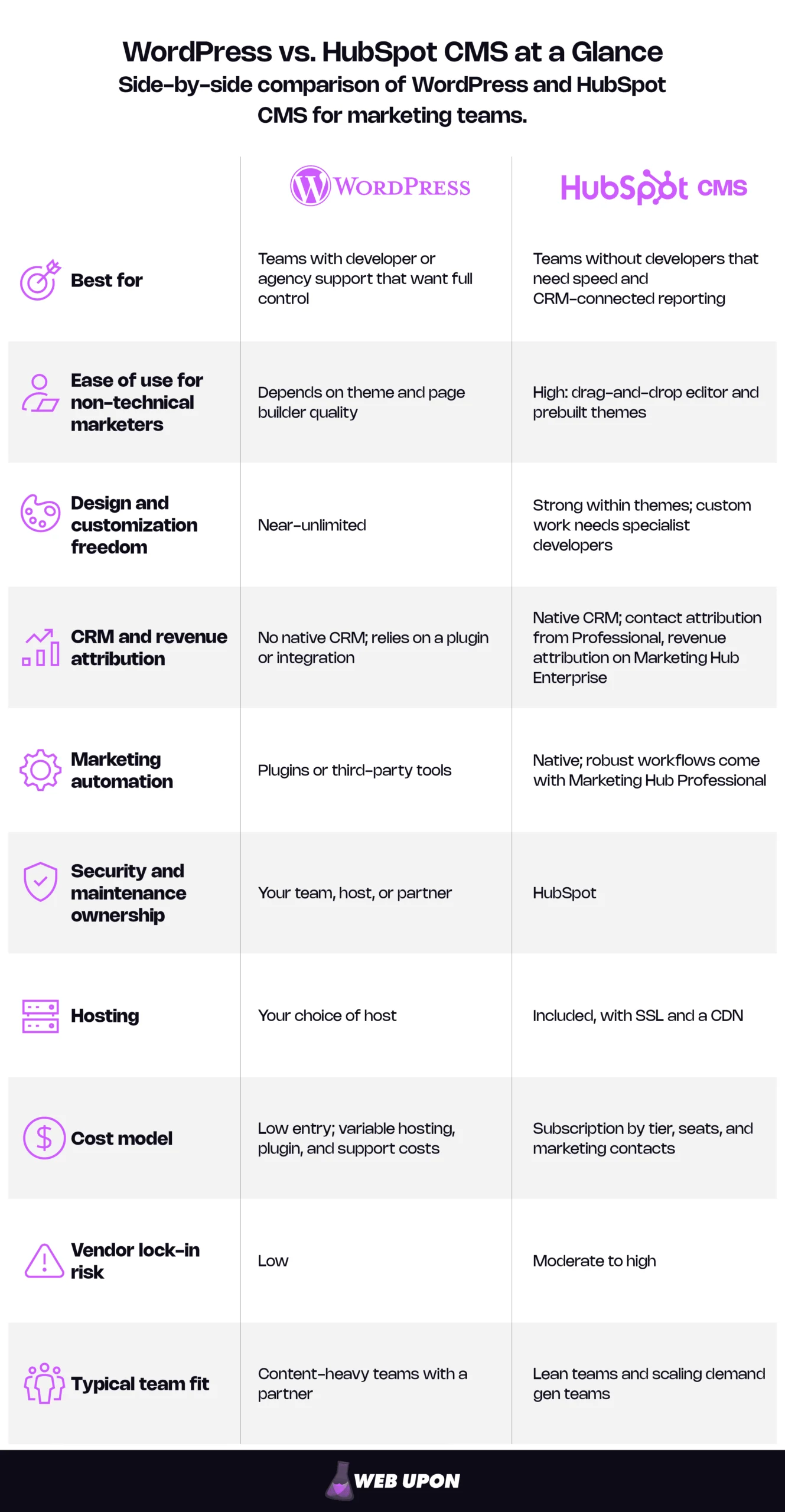
Why Marketing Teams Are Forcing This Decision Right Now
The Developer Bottleneck Breaking Marketing Velocity
A demand gen manager has a quarterly webinar with a pipeline target attached. The landing page needs one new form field and a tracking fix. Both are sitting behind sprint work that has nothing to do with marketing.
Put numbers on it. For example, a campaign expected to source $90,000 of pipeline over 12 weeks loses a quarter of its window to a three-week delay. If lead flow is roughly even, about $22,500 of pipeline never enters the funnel this quarter. A competitor didn’t win it; it simply never happened.
That delay is one of four costs that add up quickly:
- Lost launch windows: Weeks in a technical queue for a simple landing page cost measurable pipeline.
- Fragile go-lives: Plugin conflicts push back launch dates and erode the team’s confidence in its own site.
- Unprovable results: When the CMS and CRM don’t share data, revenue attribution becomes a spreadsheet argument.
- A shifted mandate: The platform choice has moved from an IT conversation to a marketing survival conversation.
The reason for that shift is simple. Marketing increasingly carries pipeline targets and owns website conversion, so the CMS is a revenue tool, not an IT asset. When the team accountable for pipeline can’t change the pages that generate it, the platform is the constraint, which is why the HubSpot CMS vs. WordPress question now gets settled in marketing budget meetings.
What This Comparison Actually Covers
The lens here is everyday marketer agility, not developer capability. A marketing director, a demand gen manager, and a campaign lead need a different framework than an IT team weighing hosting architecture. The tension this article resolves is open-source flexibility against a built-in marketing ecosystem, and there is no single best CMS for marketing teams, only the best fit for a team’s constraints.
One clarification sharpens everything that follows. “HubSpot CMS” changes meaning by tier: the Free and Starter editions cap a site at 30 website pages and 30 landing pages, and smart content, A/B testing, and advanced SEO recommendations start at Content Hub Professional. For most teams, the real comparison is WordPress against Content Hub Professional, often with Marketing Hub alongside it for automation and reporting.
Both platforms are judged on five criteria:
- SEO and content strategy
- Landing pages and automation
- Analytics and attribution
- Security, performance, and scalability
- Total cost
WordPress for Marketing Teams: Where It Wins and Where It Hurts
WordPress is the open-source default: it gives marketers nearly unlimited freedom, in exchange for owning everything that keeps the site running. Here are the WordPress pros and cons as they show up in a marketing team’s week.
The Pros: Why WordPress Still Powers Marketing at Scale
WordPress currently runs on 39.3% of all websites and 58.0% of sites that use a known CMS, according to W3Techs. Its share has declined over the past year, but it remains the most widely used CMS by a wide margin, and that scale shows up in its strengths.
- Ownership without lock-in: You own the code, content, and database, and can change hosts whenever you like. The flip side is that ownership includes responsibility; nobody maintains it for you.
- A vast plugin ecosystem: Thousands of tools cover SEO, forms, analytics, and content creation. Quality varies widely by vendor, and premium plugins add recurring license fees.
- A lower entry cost: The software is free, and you choose any host, from budget shared plans to managed WordPress hosting. A low entry cost is not a low total cost, as the cost section shows.
- Mature publishing tools: More than two decades of development since the first release in 2003 give content teams categories, scheduling, revisions, and editorial roles built for volume.
- Granular on-page SEO control: Plugins such as Yoast give marketers detailed control of titles, meta descriptions, schema, and sitemaps. The plugin supplies tools, not rankings, and it’s one more thing to update.
- A deep theme ecosystem: A good theme delivers brand-aligned design without a custom build. Bloated multipurpose themes, though, are a common cause of slow pages, and teams that need a distinctive look often invest in custom WordPress web design instead.
The Cons: The Real Tax WordPress Places on Marketing Teams
Two terms come up repeatedly here. Caching stores ready-made copies of pages so the server doesn’t rebuild each one for every visitor. A CDN, or content delivery network, serves files from servers close to each visitor so pages load faster everywhere. Plugins are also where most security risk enters: security vendor Patchstack found that 91% of new WordPress vulnerabilities logged in 2025 were in plugins and 9% in themes.
| The Con | What It Costs Marketers | How Teams Mitigate It |
| Plugin fragility | Each new plugin raises the risk of conflicts, failed updates, and broken pages at go-live. | A lean plugin stack, updates tested on a staging copy first, a maintenance retainer |
| Security ownership | Patching and monitoring fall to marketing or scarce developer time; hosts secure the server, not the application you install. | Managed hosting, a security service, and WordPress.org’s hardening guidance |
| No native CRM | CRM connectivity depends on plugins or integrations, so attribution data sits in silos. | An official CRM integration, such as HubSpot’s WordPress plugin |
| Technical performance work | Caching, CDN, and hosting setup aren’t marketer skills. | Managed hosting with caching and a CDN built in, plus periodic performance audits |
| A steep learning curve | Non-technical marketers end up managing updates, backups, and hosting. | An agency or developer partner, and a host with automatic backups |
| Bolted-on automation | Third-party tools add cost, complexity, and gaps in the data. | One automation platform, integrated deeply, instead of a stack of tools |
| Developer-dependent landing pages | Campaign pages wait in queues or rely on page builders that break. | A reusable block and template library, built once, that marketers assemble alone |
Many of these problems trace back to the build rather than the platform, and a bloated, plugin-heavy site can often be stabilized without switching platforms, through a WordPress recode that strips out conflicts while keeping your content and URLs.
HubSpot CMS for Marketing Teams: Where It Wins and Where It Hurts
HubSpot CMS, now sold as Content Hub, is an all-in-one platform built around its CRM. You pay for the convenience in subscription cost and flexibility, and the HubSpot CMS pros and cons below show exactly where.
The Pros: Why HubSpot CMS Was Built for Marketers, Not Developers
- Native CRM integration: Pages, forms, and calls to action write straight to contact records, so every form fill arrives in the CRM with its source attached. Revenue-level reporting on top of that needs Marketing Hub Enterprise, covered in the attribution section. Teams that get the most from this treat the CRM as the center of their process, not an add-on; that principle is the heart of most HubSpot CRM strategies.
- Managed hosting and security: Hosting, a CDN, an automatic XML sitemap, and a stated 99.95% measured uptime are part of Content Hub, and HubSpot provides standard SSL on all content it hosts. HubSpot’s developer documentation confirms it handles hosting, updates, scaling, and security, so the maintenance burden shifts off the marketing team entirely.
- One home for campaign assets: Landing pages, calls to action, forms, and emails live together, with no integration stitching between them.
- Native marketing automation: Campaigns launch with fewer dependencies. Content Hub covers pages and content; multi-step workflow automation comes with Marketing Hub Professional and above, and Content Hub is not among the subscriptions that include workflows.
- Connected testing and SEO: SEO tools, analytics, and A/B testing share one data layer. A/B testing, adaptive testing, smart content, and advanced SEO recommendations start at Content Hub Professional.
- A direct support path: Marketers escalate to vendor support instead of filing IT tickets. Marketing Hub Professional and Enterprise include email and phone support; channels vary by Hub and tier, so check what yours includes.
- Everyday ease of use: Marketers drag sections into place, start from prebuilt themes with brand settings, and use smart content to swap a headline or call to action based on what the CRM already knows about a visitor.
The Cons: The Real Constraints HubSpot CMS Places on Marketing Teams
Custom HubSpot themes and modules are built in HubL, HubSpot’s own templating language. That single fact explains several of the constraints below.
| The Con | What It Costs Marketers | How Teams Mitigate It |
| Aggressively scaling cost | The bill rises with seats, marketing contacts, products, and tier upgrades. | Model two to three years of cost before signing, and keep contact lists clean |
| Constrained developer customization | Custom features need HubL developers and stay inside HubSpot’s framework. | Budget for a HubSpot-experienced developer on major builds; use marketplace modules |
| Marketplace-only extensibility | Arbitrary third-party plugins can’t be installed, and system fundamentals can’t be extended through plugins. | Use HubSpot Marketplace apps and APIs, and check integrations before buying |
| Less flexible visual design | Marketers edit within a theme’s modules, which limits highly custom brand experiences. | Invest once in a flexible theme with a broad module library |
| Real vendor lock-in | Leaving means rebuilding templates and workflows. | Document workflow and reporting logic, and keep content and CRM exports current |
| Integration overlap | Teams with an existing CRM or automation stack may pay twice, in a category where marketers already use only 49% of their stack, per Gartner’s 2025 Marketing Technology Survey as reported by Marketing Week. | Audit the stack first and use HubSpot only where it replaces a tool |
Lock-in deserves precision, because it’s often overstated in both directions. Your content is portable: HubSpot exports pages, blog posts, and templates as HTML, and CRM records export as files. What doesn’t travel is the logic. Exported HTML loses the drag-and-drop modules behind it, and workflows export only as a spreadsheet listing or an image, not as logic another platform can run, so automation is rebuilt by hand.
With both profiles established, the next step is to compare them directly on the criteria marketing teams care about.
Head-to-Head Feature Comparison: The Metrics That Matter to Marketing Teams
This section covers the first four criteria: SEO, landing pages and automation, attribution, and security. Cost gets its own section after it.
SEO Capabilities and Content Strategy Execution
| SEO task | WordPress: Can a marketer do it alone? | HubSpot CMS: Can a marketer do it alone? |
| Titles and meta descriptions | Yes, with an SEO plugin | Yes, built in |
| XML sitemap | Yes, generated automatically (in core since WordPress 5.5) | Yes, generated automatically |
| Redirects | Yes, with a redirect plugin | Yes, built in |
| Canonical tags | Yes, built in for posts and pages; an SEO plugin adds finer control | Yes, built in |
| Schema markup | Partly; custom types need help | Partly; custom types need help |
| Page speed and Core Web Vitals | Depends on host, theme, and plugins; often needs a developer | Handled by HubSpot hosting; heavy images and modules still matter |
Core Web Vitals are Google’s measures of loading speed, responsiveness, and visual stability. HubSpot handles the hosting side of those scores; on WordPress they depend on choices someone must make and maintain, which is where focused WordPress optimization earns its keep.
For content strategy, HubSpot organizes pillar pages and supporting posts into topic clusters. Advanced recommendations arrive at Content Hub Professional, and specialist HubSpot SEO builds on them. WordPress SEO handles clusters through categories, internal links, and plugins: more control, more manual effort. Either way, rankings come from a sound content marketing strategy, not the CMS.
Edge for marketers: HubSpot for doing SEO without help; WordPress for depth and control when a specialist is involved.
Landing Pages, Campaign Agility, and Marketing Automation
Speed depends less on the editor than on how many people and tools a page passes through. Here is one landing page with a form and a follow-up email, start to finish.
Launching a campaign page on WordPress:
- Build the page from a theme or page builder template, or ask a developer if no reusable template exists.
- Create the form in a form plugin, or embed your CRM’s form.
- Connect the form to the CRM or email platform, often an ops or developer task.
- Build the follow-up email in a separate email or automation tool.
- Add tracking: analytics events, campaign parameters, ad pixels.
- Test across plugins, publish, and confirm that submissions actually reached the CRM.
Launching a campaign page on HubSpot CMS:
- Clone a landing page template in the drag-and-drop editor.
- Add a HubSpot form; submissions write to the CRM automatically.
- Build the follow-up email and trigger it from the form. Multi-step nurture workflows need Marketing Hub Professional.
- Publish; tracking is already on the page.
The difference isn’t the step count; it’s the handoffs. The WordPress path typically crosses two or three tools and at least one person outside marketing. The HubSpot path stays inside one tool and one team.
Edge for marketers: HubSpot, unless a WordPress team has already invested in a reusable template library and one well-integrated automation platform.
Analytics, Attribution, and CRM Integration
Closed-loop reporting means sales outcomes flow back into marketing data, so you can see which page, campaign, or channel produced revenue, not just leads. The loop has five links:
- A tracked website visit
- A form submission
- A contact record created with its original source
- A deal created and associated with that contact
- Closed revenue credited back to the touchpoints
HubSpot runs this loop natively, but at different depths by tier. Reports on which interactions created a contact start at Content Hub or Marketing Hub Professional, while the reports crediting deals and revenue (Deal Create and Deal Revenue Attribution) require Marketing Hub Enterprise. A team that buys Content Hub Professional to “prove revenue” gets links one through three and still needs Marketing Hub Enterprise, or manual reporting, for links four and five. It’s a common expectation gap in HubSpot purchases.
| Capability | WordPress | HubSpot CMS |
| Visitor and page analytics | Third-party analytics tool | Built in |
| Form-to-contact link | Through a CRM integration | Built in |
| Contact source attribution | Through integration setup | Built in from Professional |
| Revenue attribution | External CRM and reporting setup | Marketing Hub Enterprise |
| Upkeep of the data connection | Your team or partner | HubSpot |
WordPress teams can close the loop through a CRM integration, including HubSpot’s own WordPress plugin, at the cost of setup and upkeep. Without it, marketing reports leads, sales reports revenue, and nobody can reconcile the two. Attribution only works when the CMS, forms, and CRM are connected correctly, so careful HubSpot CRM integration usually matters more than any new report.
Edge for marketers: HubSpot, decisively on Marketing Hub Enterprise. On lower tiers the gap narrows, and a well-built WordPress integration can close much of it.
Security, Performance, and Scalability
No neutral, current benchmark settles the speed question, so the useful comparison is who has to do what.
| Responsibility | WordPress (who owns it) | HubSpot CMS (who owns it) |
| Core updates | Site owner, managed host, or partner | HubSpot |
| Plugin and module updates | Site owner or partner | HubSpot for the platform; theme and module authors for their own code |
| Security patches | Site owner, host, or partner | HubSpot |
| SSL | Host or site owner | HubSpot, included |
| CDN | Host or an added service | HubSpot, included |
| Backups | Host or a backup plugin | HubSpot for the platform; content exports are yours |
| Uptime | Host | HubSpot (99.95% uptime) |
On WordPress, growth is a technical project, and ongoing optimization keeps a growing site fast and stable. On HubSpot, growth is a billing event: more seats, more contacts, and extra sites, with multisite support (a core domain plus nine more root domains) starting at Content Hub Enterprise.
Edge for marketers: HubSpot for low-maintenance reliability; WordPress for teams with a capable host or partner and unusual scale or architecture needs.
How the four criteria net out:
| Criteria | WordPress | HubSpot CMS | Edge |
| SEO and content strategy | Deep control with plugins and expertise | Strong, marketer-friendly native tools | Tie, depending on team skill |
| Landing pages and automation | Depends on templates and integrations | Native, with fewer handoffs | HubSpot |
| Analytics and attribution | Achievable with integration work | Native; revenue attribution on Marketing Hub Enterprise | HubSpot |
| Security, performance, and scalability | Owned by you, your host, or a partner | Owned by HubSpot | HubSpot for low upkeep; WordPress for control |
Features only matter relative to what they cost in money and team time.
The True Cost Comparison Marketing Leaders Should Calculate
Platform Cost Beyond the Sticker Price
HubSpot publishes its prices, which makes the starting point easy to read. As of November 2026, HubSpot CMS pricing on the Content Hub pricing page runs as follows. Content Hub cost is driven mainly by tier and seats.
| Content Hub tier | Price | Core seats included | Extra seats |
| Free | $0 | Up to 2 users | n/a |
| Starter | $20 per seat per month (list; promotional pricing for new customers) | Per seat | n/a |
| Professional | $450 per month billed annually ($500 when paid monthly) | 3 | From $45 per month |
| Enterprise | $1,500 per month | 5 | From $75 per month |
Marketing Hub, listed on the Marketing Hub pricing page, runs on a different model, and the two shouldn’t be blended. Its cost is driven mainly by marketing contacts.
| Marketing Hub tier | Price | Core seats | Marketing contacts included | Required onboarding (one-time) |
| Professional | $800 per month billed annually ($890 when paid monthly) | 3 | 2,000 | $3,000 |
| Enterprise | $3,600 per month | 5 | 10,000 | $7,000 |
Two cost levers are easy to miss. Marketing contacts are billed in tiers, but contacts you don’t actively market to can be set as non-marketing and aren’t billed. Status changes take effect on a monthly update date, and HubSpot doesn’t lower a contact tier mid-term, only at renewal, so clean up before you cross a tier. A quarterly cleanup rule (for example, anyone unengaged for 12 months becomes non-marketing) can keep a team in its current contact tier far longer. And each tier now includes HubSpot Credits (500, 3,000, and 5,000 on Content Hub Starter, Professional, and Enterprise), consumed by AI agents and automated features, so heavy use can add usage-based spend.
| Cost line | WordPress | HubSpot CMS |
| Platform or license | Free software | Content Hub subscription by tier and seats |
| Hosting | Separate, from budget shared to managed hosting | Included |
| Themes and templates | Free to premium; custom build optional | Free and paid marketplace themes; custom build optional |
| Plugins and add-ons | Free to premium licenses, often renewed annually | Marketplace apps, some paid |
| Security | A plugin, a service, or a managed host | Included |
| Developer or agency support | Ongoing retainer is typical | Needed for custom themes and integrations |
| Automation and CRM | Separate CRM and automation subscriptions | Marketing Hub, priced by contacts |
| Migration and onboarding | Build or migration project | Required onboarding on Marketing Hub Professional and Enterprise, plus migration |
Each platform hides its total cost of ownership in a different place. WordPress hides it in developer dependency and the hours spent keeping the stack upright. HubSpot hides it in the scaling model: seats, contacts, extra products, and the tier jump sometimes needed for a single feature, such as revenue attribution.
What Each Platform Costs in Marketing Team Time
License fees are the visible cost. The bigger one is the operational tax: hours lost to maintenance, troubleshooting, and workarounds, which shows up as slower launches and lower output per marketer. Here’s how to put it in front of finance.
Net monthly impact = (hours saved per month × loaded hourly cost) + (pipeline value from faster launches) − (incremental platform cost)
Illustrative example (not a benchmark):
- Hours saved: The team reclaims 30 hours a month of page building, plugin fixes, and manual reporting. At a $75 loaded hourly cost, that’s $2,250.
- Faster launches: Two campaigns a quarter launch two weeks earlier, adding $15,000 of pipeline a quarter. At a 20% pipeline-to-revenue rate, count about $1,000 a month in expected revenue. Converting pipeline to expected revenue keeps finance from discounting the number.
- Incremental platform cost: The new platform costs $1,200 a month more than the current stack.
- Net monthly impact: $2,250 + $1,000 − $1,200 = $2,050 a month, before one-time migration and onboarding costs, which set the payback period.
The hours only materialize if the team actually changes how it works. An untrained team recreates old workarounds on a new platform, which is why HubSpot CRM training often decides whether the formula’s first line is real.
With cost and capability mapped, the remaining step is to turn them into a decision.
How to Choose: A Decision Framework for Marketing Teams
Five questions point most teams in the right direction:
- Do you have reliable developer or agency support today?
- Is proving revenue attribution a leadership priority this year?
- Is budget your tightest constraint?
- Does your brand need highly custom design or functionality?
- Do you already run a CRM and automation platform you’re happy with?
Mostly “yes” to questions 1, 3, 4, and 5 points toward WordPress. A “yes” to question 2 combined with a “no” to question 1 points toward HubSpot CMS.
Signals That WordPress Is the Right Choice for Your Marketing Team
- Your team has dedicated developer resources or a reliable agency partner built into its workflow.
- Design freedom and custom functionality are non-negotiable for your brand.
- HubSpot’s pricing model would be unsustainable at your current scale.
- Your existing stack already handles automation, CRM, and attribution well.
Signals That HubSpot CMS Is the Right Choice for Your Marketing Team
- Developer bottlenecks are actively slowing launches and costing pipeline.
- Leadership treats revenue attribution as a priority and will fund the tier that delivers it.
- Your team needs the CMS, CRM, and automation on one shared data layer.
- Cutting technical maintenance is a prerequisite for publishing more, faster.
When a Hybrid Setup or Migration Makes Sense
Not every team has to choose all at once. Running both platforms during a transition is common and sensible. A permanent hybrid is also a legitimate end state: the free HubSpot WordPress plugin connects a WordPress site to HubSpot’s CRM, adds tracking automatically, and provides forms, live chat, email, and analytics. It works with many existing WordPress form builders, so you don’t have to replace your forms.
There’s a second hybrid route, too. Content Hub Professional supports content embeds, which place HubSpot-built blocks, including personalized smart content, on an existing website (up to three per page). A WordPress team can test CRM-driven personalization without moving the site.
If a full WordPress to HubSpot migration is on the table, work through these checkpoints first, and make sure the move serves the marketing roadmap rather than a frustration with the current build.
- Content and URL inventory: List every live URL and decide whether to keep, merge, or retire it.
- Redirect plan: Map each old URL to its new home, following Google’s guidance on site moves with URL changes.
- Form and integration audit: Record every form, embedded tool, and data destination.
- Template rebuild scope: Count unique page layouts; each is a template or module to rebuild.
- CRM data cleanup: Deduplicate records, define lifecycle stages, and decide which contacts count as marketing contacts, which sets your Marketing Hub bill from day one.
- Team training plan: Decide who builds pages, who owns workflows, and who owns reporting.
- SEO baseline: Record rankings, organic traffic, and conversions for top pages so you can measure the move.
Start step 5 early rather than last. Lifecycle definitions decide what your reports can ever show, and no tier upgrade fixes undefined stages. Many complaints that “HubSpot attribution doesn’t work” trace back here, which is why structured HubSpot CRM onboarding belongs in the plan from the start. If you’re weighing a migration or a hybrid setup, have the plan reviewed before anything moves: contact Web Upon to pressure-test the redirect map and data model first.
That leaves a handful of questions readers commonly ask before deciding.
The Verdict: Matching Platform Strengths to Marketing Team Reality
What Growth-Focused Marketing Teams Should Walk Away Knowing
Neither platform is universally better; the best CMS for marketing teams is whichever one fits your team’s constraints. WordPress rewards teams with technical depth, and HubSpot CMS rewards teams that prize speed and marketing-sales alignment. The most expensive choice is the one that keeps your marketing team waiting in a developer queue.
| Team Archetype | Likely Best Fit | Why |
| Lean marketing team with no in-house developer | HubSpot CMS | Removes maintenance and developer dependency; budget for Professional to get the core marketer features. |
| Content-heavy brand team with an agency or developer partner | WordPress | The partner absorbs maintenance, and the team keeps design freedom and publishing depth at a lower license cost. |
| Scaling demand gen team that needs attribution and automation | HubSpot CMS with Marketing Hub | Native CRM loop and workflows; revenue attribution requires Marketing Hub Enterprise. |
| Enterprise team with an established CRM and martech stack | WordPress or a hybrid | Avoids paying twice for CRM and automation. If the established CRM is already HubSpot, HubSpot CMS becomes the stronger fit. |
The answer to WordPress vs. HubSpot CMS comes back to the bottleneck. Choose HubSpot CMS when speed and attribution are what’s holding you back, and WordPress when flexibility and cost control matter most and you have technical support behind you.
Three next steps can tell you which applies:
- Audit where campaigns stall. Trace your last three launches and note every handoff and delay.
- Calculate the true cost. Run the net monthly impact formula with your own hours, rates, and pipeline.
- Run the pre-migration checkpoints before committing to any move.
Whichever platform you choose, the goal is the same: a marketing team that can ship, measure, and improve without waiting. Pick the platform that removes your team’s bottleneck, and the CMS stops being a queue and becomes what it should be, an engine for pipeline. Web Upon builds, optimizes, and supports both platforms, so if you’d like a second opinion on yours, contact us.