Three commitments protect organic traffic through a WordPress to headless React migration:
- Preserve every URL you can, and 301-redirect every URL you can’t. Single hop, mapped against a complete inventory, tested in staging.
- Render every indexable page on the server or at build time. Client-side rendering is a bet that only one crawler matters, and that bet has aged badly.
- Rebuild the metadata layer. Titles, descriptions, canonicals, JSON-LD, sitemaps, robots.txt — as code. Yoast and RankMath do not come with you.
What follows is the operational detail: the sequence to run them in, the gates to set before launch, and how to read the first thirty days without panicking.
Key Takeaways
- Traffic loss is a scoping failure, not a framework failure. The migrations that lose traffic are the ones where SEO arrived after the architecture was locked.
- Build the URL inventory from four sources, not one. A crawl only finds what is linked, and orphans with real backlinks are what a redirect map drops.
- Server-render anything indexable. Google renders JavaScript. Almost nothing else does.
- One layer owns redirects. Single hops, tested in staging, configured in exactly one place.
- Metadata becomes code. Decide before launch who changes a title tag, and how long it takes.
- Expect volatility, and know its shape. Two to four weeks of turbulence is normal. High-value URLs leaving the index is not.
What This Migration Puts at Risk and What Protects It
| What’s at risk | What protects it |
| Indexed URLs and accumulated link equity | Complete URL inventory and a single-hop 301 redirect map, tested in staging |
| Content visibility to Googlebot and to AI crawlers | SSG or SSR on every indexable page, CSR reserved for authenticated views |
| Title tags, meta descriptions, canonicals | Page-level metadata implemented in code, not applied globally |
| Rich results and structured data | JSON-LD re-implemented as components rendering in the document head |
| Discovery and crawl efficiency | Dynamically generated XML sitemaps and a robots.txt that blocks API and preview routes |
| Core Web Vitals and ranking stability | Bundle discipline, image optimization, and CDN caching validated pre-launch |
The difference between a migration that holds its rankings and one that does not is almost never the framework. It is whether the right-hand column above was written into engineering tickets before the build started, or discovered in a launch-week QA pass. The work is the same either way. The cost is not.
Why Headless React Migrations Put SEO at Risk (And What’s Actually at Stake)
Open the plugins page on the WordPress install you are about to leave. Most teams find between twenty and sixty entries, and cannot say what half of them do.
The risk comes from three simultaneous losses in a single release: the plugin layer handling SEO infrastructure invisibly, the guarantee that every request returns finished HTML, and the URL contract that has been accumulating equity since launch. Any one is survivable. Together they are how years of rankings become a recovery project.
Losing the Built-In SEO Infrastructure WordPress Was Handling for You
WordPress handles permalinks, canonical tags, XML sitemaps and metadata templating natively or through plugins like Yoast and RankMath. Every one must be rebuilt deliberately. Losing the plugin ecosystem means losing guardrails many teams depend on without having noticed they exist.
| WordPress handled automatically | Headless equivalent | Now owned by |
| Permalink structure and slug generation | URL routing in the frontend framework | Engineering |
| Canonical tags | Page-level metadata implementation | Engineering |
| XML sitemap generation and updates | Dynamic sitemap route or build script | Engineering |
| Meta title/description templating | Programmatic templates from CMS fields | Engineering + SEO |
| Breadcrumb and article schema | JSON-LD components | Engineering + SEO |
| Redirect management UI | Redirect config or edge middleware | Engineering |
| robots.txt and noindex controls | Static file plus per-page directives | Engineering + SEO |
That table lists what moves. The more useful observation is where it moves to: out of an admin UI and into a git repository. Sitemap logic, robots directives, redirect rules and metadata templates become files deployed on the engineering release cycle. The capability does not disappear — the turnaround changes from minutes to sprints, and the person who used to make the change no longer has access.
So ask before architecture lock: after launch, who changes a title tag, and how long does it take? If the answer is “file a ticket,” you need CMS-field-driven metadata so editors keep control. Teams that skip this discover it during their first ranking emergency.
The failure it produces is mundane and expensive. A team ships. Three weeks later someone notices meta descriptions were applied globally rather than per page. Four thousand identical snippets.
Understanding What Google Actually Sees in a Headless React Environment
Google renders JavaScript, reliably, and has for years. In March 2026 it removed a section of guidance from its JavaScript SEO documentation on exactly those grounds — the advice was outdated, because Search has been rendering JavaScript for a long time. Any argument for server rendering resting on “Google can’t see your React” is wrong, and an engineering reader will check.
The argument that holds is different. Googlebot is no longer the constraint; almost every other crawler is.
Joint crawl-log research from Vercel and MERJ, published in December 2024, found that none of the major AI crawlers render JavaScript: GPTBot, OAI-SearchBot, ClaudeBot, Bytespider, PerplexityBot, Meta’s external agent, and Common Crawl. They read the initial response and move on. Two exceptions are worth naming precisely — Gemini inherits Googlebot’s rendering service, and AppleBot renders through its own browser-based crawler. One qualifier sharpens the rule rather than softening it: content in the initial HTML response, including JSON payloads, may still be picked up, because these models can interpret non-HTML content. What matters is presence in the first response, not HTML-ness.
| Criteria | CSR | SSR | SSG |
| HTML delivered on first request | Empty shell | Full content | Full content |
| Requires JS execution to index | Yes | No | No |
| Indexing delay risk | High | Low | Low |
| Visible to non-Google crawlers | No | Yes | Yes |
| Content freshness | Immediate | Immediate | Depends on rebuild/revalidation |
| Appropriate for indexable pages | No | Yes | Yes |
Google processes JavaScript in three phases: crawling, rendering, indexing. Pages returning a 200 are queued for rendering whether or not they contain JavaScript, though this may not hold for non-200 responses. How long the queue takes is not guaranteed. The consequence is that the first wave indexes your raw HTML, so anything absent from that response — content, canonicals, JSON-LD, meta tags — is invisible until the second wave arrives. A page can be indexed with a wrong title while the correct one waits.
When teams hit this mid-build, someone always proposes dynamic rendering — pre-rendered HTML for bots, the app for humans. Google reclassified it as a deprecated workaround in February 2024. It creates two versions of every page to keep in sync, for a crawler population that no longer looks the way it did when the pattern was invented.
Choosing Your Architecture Path: Headless WordPress or a New Headless CMS
Two materially different projects hide under the same phrase, and the distinction that predicts risk is whether the URL contract survives.
Path A — WordPress stays as the headless backend. Slugs and taxonomies remain in place; React consumes them via REST API or WPGraphQL. This is a frontend migration: slug preservation is largely free, redirect risk is confined to what the routing layer alters, and the map is small and mechanical. The new exposure is the API surface.
Path B — WordPress is replaced by a separate headless CMS. This is a content migration wearing a frontend migration’s clothes. Every field is re-mapped, every slug re-derived, and the redirect map is the size of the site. Export completeness, not rendering, becomes the dominant risk.
One rule is worth stating outright: these two projects should not share a launch date. Do both in one release and you lose the ability to diagnose anything — when traffic moves, nothing tells you which change caused it.
Building a Pre-Migration SEO Baseline You Can Defend
Nine days after launch someone will ask what you ranked for before. If nobody exported it, there is no answer — only an argument.
A defensible baseline is a complete inventory of what you currently rank for, at what URLs, with what markup, captured before anything changes. Without it you cannot prove what broke, or that anything broke at all. The baseline is not documentation. It is the evidence you will need in a meeting.
Auditing Your Existing WordPress SEO Footprint Before Writing a Single Line of React
A complete pre-migration SEO audit produces eight artifacts, framed as deliverables rather than activities: URL inventory, metadata inventory, schema inventory, backlink profile export, full page-level Search Console performance export, Core Web Vitals snapshot, sitemap archive, robots.txt archive. Pull the Search Console export first — it is the only one that expires, and post-hoc reconstruction is not possible.
Migrations that lose URLs almost always lose them the same way: the redirect map was built from a crawl, and a crawl only sees what is linked from somewhere else. A complete inventory is the union of four sources, and the gaps between them are the point.
- The site crawl — everything reachable by following internal links, using a tool such as Screaming Frog or Sitebulb. Misses orphans by definition.
- XML sitemaps, including archived versions — what the site claims exists, often a superset of what is linked.
- Server logs, twelve months minimum — every URL a crawler or a human actually requested. Where the orphaned 2019 landing page with forty referring domains surfaces, and it will not appear anywhere else.
- Search Console performance export, page-level — every URL that has earned an impression.
The URLs most likely to be dropped from a redirect map are the ones with no internal links and real backlinks. They are invisible to the method most teams use and disproportionately valuable.
This audit is frequently skipped, and rarely because anyone decided to skip it. It sits between marketing and engineering ownership.
Mapping Your WordPress Content Model to a Headless Content Architecture
Post types, taxonomies and custom fields must be explicitly mapped to the new content model before migration begins — validation work under Path A, full re-modelling with meaningfully higher risk under Path B. Slug preservation is non-negotiable: any change to URL patterns without a corresponding redirect strategy causes immediate indexation loss. Sound headless CMS SEO starts here, in the field mapping, rather than in the frontend.
Categories and tags generate their own indexed archive URLs, so decide early whether to preserve, redirect or consolidate. “Thin” is not actionable in a meeting; the working test is that an archive earns preservation if it has organic entrances or referring domains in the baseline data. Everything else consolidates into its parent and redirects there. Run it against the Search Console export rather than intuition — teams consistently over-estimate which archives matter, and consolidating hundreds of thin tag archives is often an SEO gain. The same discipline that governs content audits applies to taxonomy decisions.
Metadata fields vanish silently during export, because content absence is obvious and metadata absence is not. A missing post is a 404 someone notices. A missing meta description regenerates from body copy and looks fine in a browser. Check these explicitly, because they live in plugin tables rather than post content: custom title tags and meta descriptions, canonical overrides, per-page noindex flags, Open Graph overrides, and existing redirect rules. Media and alt text are routine casualties too.
Sites running for years carry redirect rules accumulated from previous migrations. Those rules are part of the URL inventory. Leave them behind and you break chains that have been quietly working since 2018, for URLs you never knew existed — which means nobody is monitoring them.
Making the WordPress to Headless React Architecture Decisions That Determine Migration Success
Somewhere in the backlog is a ticket that says “build blog template.” It does not specify a rendering mode, which means the rendering mode is being chosen by whoever picks the ticket up.
Four decisions carry almost all the risk in a WordPress to headless React build: how pages render, how URLs redirect, how metadata is injected, how crawlers are guided. Everything else is refinement.
Choosing the Right Rendering Strategy to Protect Crawlability and Indexation
Static site generation delivers pre-rendered HTML that crawlers read immediately, making it the safest default for SEO-critical pages. Server-side rendering suits dynamic or frequently updated content where revalidation cycles are too slow. Most large migrations land on a hybrid. Client-side rendering should be avoided for anything that needs to rank, and reserved for authenticated or deliberately non-indexed views.
| Page type | Recommended rendering | Why |
| Blog posts, guides, evergreen pages | SSG | Content changes rarely, instant crawlability |
| Product or pricing pages | SSG with revalidation | Needs freshness without sacrificing pre-rendered HTML |
| News and time-sensitive content | SSR | Immediate freshness at request time |
| Search results, filtered views | SSR or CSR + noindex | Rarely valuable to index, often crawl-budget waste |
| Account, dashboard, authenticated views | CSR | Not indexable by design |
Incremental regeneration makes SSG viable for content that changes: pages build statically, then rebuild in the background on an interval or on demand. Treat that interval as an SEO decision, not an infrastructure preference. Too long and Google indexes a stale price; too short and you have rebuilt SSR with extra steps. The right interval is your tolerance for the content being wrong, which the SEO owner knows and the engineer does not.
No team decides to ship client-side rendering. Teams decide to ship now and add server rendering later. Retrofitting it is substantially harder than building it in, because data fetching, state initialization and component boundaries all have to be reworked, and by then the app is in production and the SEO problem is live.
Implementing a Redirect Strategy That Preserves Link Equity
Every URL whose structure changes needs a 301 implemented before the new site goes live, collapsed to a single hop. Map the patterns unique to WordPress — /category/, /?p=123, /author/, /feed/, attachment pages, paginated /page/2/ archives — to headless equivalents or canonical alternatives. Then validate in staging: crawl the pre-migration inventory against it, confirm every response is a single 301 to a 200, and confirm nothing resolves to a soft 404. Build the map with five columns — old URL, new URL, status code, priority tier, verification status — so it hands to a developer without translation.
The single-hop rule is right; the usual justification for it is not. Google’s redirects documentation states neither that 301s retain PageRank nor that Google stops following after a set number of hops. Both claims circulate widely and trace to undated employee remarks. Two reasons stand on their own: every hop is latency, paid by users on slow connections and by crawlers against your crawl budget; and chains break silently, because each hop is a rule some future migration can delete.
One failure mode is specific to headless builds. Decide whether the framework or the edge owns redirects, and make sure only one does. Configure both — framework config, plus platform rules, plus a legacy .htaccess nobody deleted — and you get chains no single system can see.
One layer owns redirects. Write it into the ticket.
Rebuilding Metadata, Canonicals, and Structured Data in React
Title tags, meta descriptions, Open Graph tags and canonicals must be injected per page, not applied globally. In current Next.js that is the App Router Metadata API; older Pages Router and non-Next.js stacks use next-seo or react-helmet-async, which are alternatives to it rather than companions. Replicate Yoast templates programmatically — patterns like %%title%% %%sep%% %%sitename%% — from content model fields, with defined fallback behavior. Missing fallback logic is what produces blank or duplicate title tags at scale.
Canonicals must be self-referencing and reflect the production URL, never a staging domain. This failure is among the most damaging in headless builds, and the cause is almost always one root-level base URL setting. Frameworks resolve relative metadata paths against a single configured absolute base; in Next.js that is metadataBase. Set it to a hardcoded staging value and every canonical on the site is wrong in the same direction, at once.
It renders correctly in a browser. It looks fine in the CMS. It is only visible in the raw HTML response, which is why it survives QA.
Note which failure you are guarding against. An unset base does not fall back silently — a relative path with none configured produces a build error. The dangerous case builds cleanly: a base URL set, and set wrong. So the prevention is one ticket line — read it from an environment variable, and add a pre-launch check asserting every canonical in the production HTML is absolute and on the production domain.
Google now addresses conflicting canonical signals directly, since canonicalization happens both before and after rendering. It offers two acceptable patterns: match the canonical in the original HTML to the URL JavaScript will produce, or leave it out of the original HTML rather than let the two disagree. The stricter default belongs in your tickets — the canonical in the server response is the canonical — but keep the second option for stacks that cannot server-render one.
Re-implement article and breadcrumb schema as JSON-LD rendering in the document head during SSR or SSG. Google supports JavaScript-generated structured data but recommends the initial HTML response, so treat post-hydration schema as unreliable.
Managing XML Sitemaps, Robots.txt, and Crawl Budget in a Headless Setup
Generate sitemaps dynamically from the content API; static ones go stale immediately at volume. Every format caps a single sitemap at 50,000 URLs or 50MB uncompressed, past which you split the file and may submit an index as the entry point. Google gives a better reason to split by content type than an arbitrary one: performance can be tracked per sitemap in Search Console, which turns the split into a diagnostic.
Google ignores changefreq and priority outright, and uses lastmod only where the value proves consistently and verifiably accurate. The value should reflect the last significant update — a change to main content, structured data or links counts, a copyright-date change does not. A route that stamps every entry with the build timestamp is therefore wrong by that definition, and rebuild-on-deploy makes that stamp the default unless someone maps lastmod to the content’s own modified date.
Robots.txt should block API endpoints, preview URLs, staging subdomains and CMS admin routes. But crawling is not indexing, and this is among the most confused pairs of controls in technical SEO. Google is explicit that robots.txt is not a mechanism for keeping a page out of Search: a disallowed URL can still be indexed if linked elsewhere, surfacing with its anchor text and no content behind it. The mechanisms that work are noindex — which requires the page to be crawlable — password protection, or removal. Which is why preview deployments need authentication or an X-Robots-Tag header, not a disallow line.
Crawl budget goes to paginated archives, faceted navigation and duplicate URLs from the frontend — e-commerce teams should look hardest at faceted navigation and URL parameters, publishers at archive pagination depth. These decisions are largely irreversible once the build is underway, which is the argument for settling them here rather than in the launch checklist.
Treating Performance Optimization as an SEO Requirement, Not a Bonus
Google is not grading the laptop you are reading this on. It is grading a mid-range Android phone on a commuter train.
A React frontend is not automatically faster than WordPress. It is faster when bundle size, image delivery and caching are managed, and slower when they are not. Teams that assume the framework delivers the win skip the work that produces it.
Achieving Core Web Vitals Improvements That Translate Into Ranking Gains
Three metrics carry the ranking signal, and web.dev sets the thresholds at the 75th percentile of page loads: LCP within 2.5 seconds, INP at or under 200 milliseconds, CLS at or under 0.1. INP replaced First Input Delay in March 2024, so treat FID as historical.
LCP improves through CDN-delivered static assets, image optimization via the framework’s image component, and elimination of render-blocking JavaScript. CLS regresses when image dimensions are undeclared, or when fonts load asynchronously without size-adjust and the related ascent-override, descent-override and line-gap-override descriptors — the @font-face family for matching a fallback font’s metrics to the web font it replaces, with layout-shift prevention as a named use case. INP is driven by React bundle size, which makes code splitting, lazy loading and tree shaking SEO requirements rather than refinements.
Of the three, INP is the one a React migration is most likely to regress and the hardest to fix afterwards. LCP problems are usually resources — a large image, a slow origin — and compress away. CLS problems are usually missing dimensions, and close to mechanical. INP is a JavaScript architecture problem: too much work on the main thread, too many components hydrating that never needed to be interactive. The page looks ready before it is interactive, and that gap is what INP measures. You design your way out of it early or not at all — the argument for a performance budget in the build tickets rather than an audit in the launch checklist.
Set one expectation before launch, because it prevents a painful conversation later. PageSpeed Insights lab scores are not what Google ranks on. Chrome User Experience Report field data is, and CrUX data is a 28-day rolling average, updated daily on a best-effort basis with no service-level agreement. A team can ship a genuinely faster site and see no movement for a month, with no way to schedule around the update. Effective site speed optimization is measured in field data, not lab scores.
Optimizing Mobile Performance in a Headless React Frontend
Test on real mobile hardware and with field data, not desktop emulation. Note that Google retired the Mobile-Friendly Test tool, its API and the Search Console Mobile Usability report on 1 December 2023. Use real-device testing, PageSpeed Insights, Lighthouse and the Search Console Core Web Vitals report instead.
Hydration is significantly slower on mobile hardware, and hydrating non-interactive components is among the most common regressions in headless migrations. Image optimization should include responsive srcset attributes, modern formats such as WebP or AVIF — Google added AVIF to its supported formats in August 2024 — and lazy loading below the fold. What Google indexes is the mobile render.
A re-platform is also the one moment a team can legitimately delete accumulated tag debt. Audit third-party scripts for their contribution to Total Blocking Time, and treat it as a deliverable: an inventory of every script with a named owner and a stated purpose, and removal of anything failing both tests.
Validating, Monitoring, and Recovering SEO After Launch
Expect volatility for two to four weeks. Verify in the first 48 hours that redirects, metadata and structured data are behaving in production, and know in advance which signals mean wait and which mean act.
Running the Post-Launch SEO Audit Every Headless Migration Needs
Submit the new sitemap immediately and request indexing for the highest-priority URLs — but plan around Google’s framing rather than a number. There is a daily limit on indexing requests per property, a request does not guarantee indexing, and a sitemap is the documented route when many pages need indexing.
| Window | Actions |
| First 24 hours | Verify redirects, canonicals, robots.txt and noindex directives in production; submit sitemap; spot-check rendered HTML for top URLs. |
| First week | Full comparative crawl against baseline; validate structured data; monitor Search Console coverage and crawl stats. |
| Weeks 2–4 | Track indexed page counts, impressions and position; watch for crawl anomalies; begin field-data CWV comparison. |
| Days 30–90 | Confirm recovery against baseline; retire redundant redirects only after Google has recrawled; close out remaining regressions. |
Run the comparative crawl against the pre-migration baseline to identify missing pages, broken internal links and lost metadata. Treat redirect failures found post-launch as P1 incidents. Validate structured data against live production URLs rather than staging.
One instruction is worth stating literally: view source, not inspect element. The two views show different things. Only the raw HTML response represents what a crawler receives on first pass — and, as above, what most non-Google crawlers ever receive at all.
Detecting and Recovering From SEO Regressions After Going Headless
Monitor Search Console daily for the first 30 days. Traffic drops in the first two weeks are frequently caused by Google recrawling and re-evaluating pages rather than by permanent ranking loss, so distinguish indexation lag from genuine regression before acting. As a working threshold from practice, a drop beyond about 20% past the expected recrawl window warrants auditing rendering with the URL Inspection tool.
| Symptom | Likely normal | Likely a real problem |
| Impressions dip, positions hold | Yes — recrawl in progress | — |
| Indexed page count drops then recovers over 2–3 weeks | Yes | If it keeps falling past week 4 |
| Specific high-value URLs fall out of the index | — | Yes — check redirects and rendering immediately |
| Rich results disappear across a template | — | Yes — schema is likely not in the initial HTML |
| Crawl stats spike then normalize | Yes | If crawl errors spike alongside |
| Sitewide title tags identical in SERPs | — | Yes — metadata is being applied globally, not per page |
| AI search referrals drop and do not recover with rankings | — | Yes — content is reaching Google’s renderer but not HTML-only crawlers |
Four to eight weeks is normal on a large site. Once redirects are confirmed working, fix-forward is almost always the correct call. Which makes rollback less a decision than a capability — one that either exists before launch or does not. Three things make it real: WordPress still running in parallel, DNS TTL lowered days in advance, and the path rehearsed at least once. If those three are not true, the honest framing is that you do not have a rollback option, and the pre-launch gates matter more as a result.
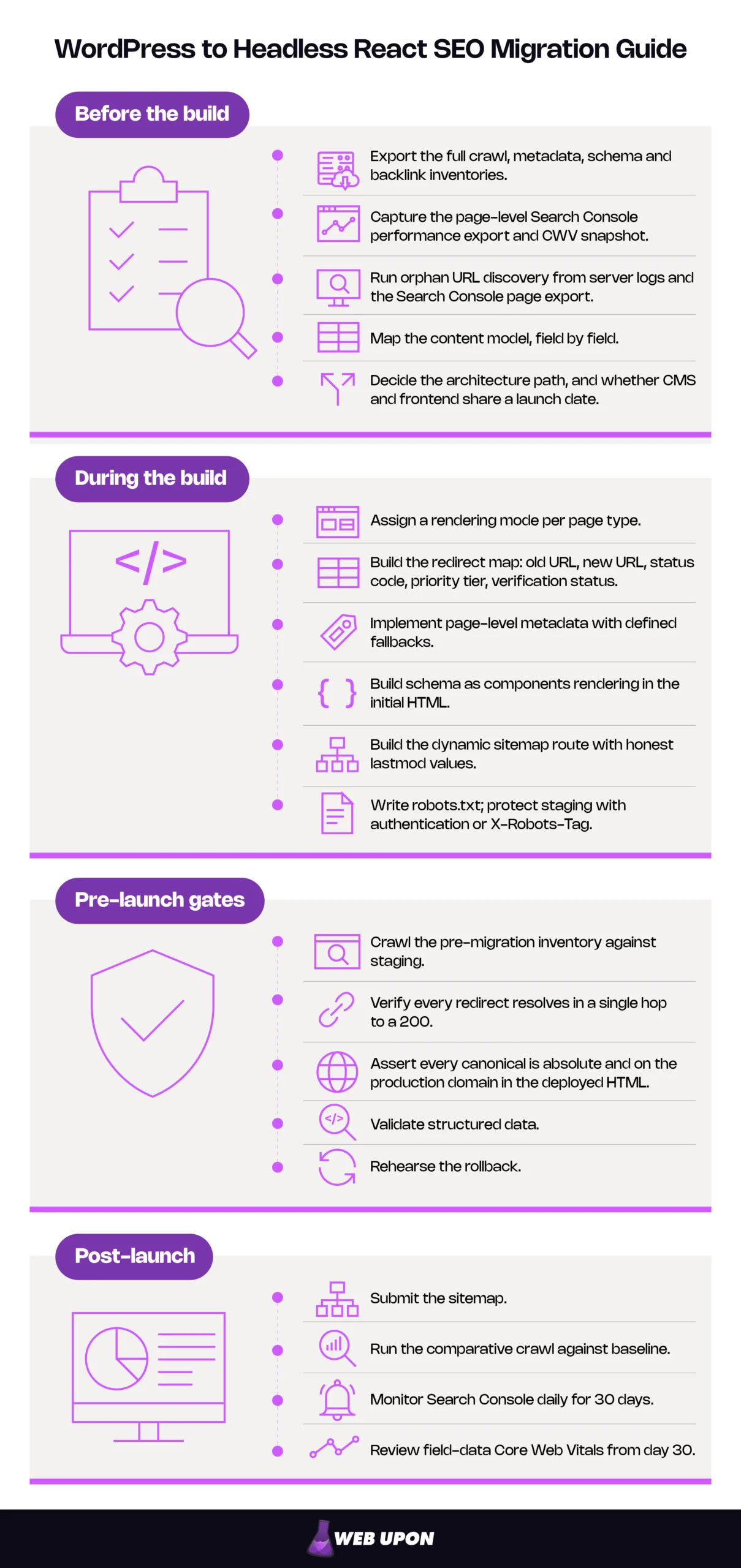
Your WordPress to Headless React SEO Checklist
Everything above, in the order it needs to happen.
Before the build:
- Export the full crawl, metadata, schema and backlink inventories.
- Capture the page-level Search Console performance export and CWV snapshot.
- Run orphan URL discovery from server logs and the Search Console page export.
- Map the content model, field by field.
- Decide the architecture path, and whether CMS and frontend share a launch date.
During the build:
- Assign a rendering mode per page type.
- Build the redirect map: old URL, new URL, status code, priority tier, verification status.
- Implement page-level metadata with defined fallbacks.
- Build schema as components rendering in the initial HTML.
- Build the dynamic sitemap route with honest lastmod values.
- Write robots.txt; protect staging with authentication or X-Robots-Tag.
Pre-launch gates:
- Crawl the pre-migration inventory against staging.
- Verify every redirect resolves in a single hop to a 200.
- Assert every canonical is absolute and on the production domain in the deployed HTML.
- Validate structured data.
- Rehearse the rollback.
Post-launch:
- Submit the sitemap.
- Run the comparative crawl against baseline.
- Monitor Search Console daily for 30 days.
- Review field-data Core Web Vitals from day 30.
Protecting Rankings Is a Build Requirement, Not a Launch-Day Task
A WordPress to headless React migration holds its rankings when URL preservation, server rendering and the metadata layer are treated as build requirements. It loses them when those things arrive as a launch-week QA pass. The migrations that lose traffic are not the ones that chose the wrong framework — they are the ones where headless architecture SEO requirements arrived after the architecture was locked.
Nothing here requires a bigger budget or a longer timeline. It requires the URL inventory, the rendering decision and the metadata layer to be written down as acceptance criteria while the tickets are still being written. After the architecture is locked they are still possible, but they cost a quarter, not an afternoon.
So: run the baseline audit, decide the architecture path, write the rendering and redirect requirements into the build tickets, and set the pre-launch gates.
You cannot control whether the re-platform happens. You can control whether SEO arrives as a requirement or as a bug report. If it is sitting in the seam between your marketing and engineering teams and nobody has picked it up, contact Web Upon — that seam is where we usually come in.


