It’s 11 p.m., your launch email goes out at 9 a.m., and the product page still looks like a draft. A week later your first payout lands, smaller than you expected, trimmed by fees nobody explained.
That is the real risk behind every Wix vs Squarespace decision. For most boutique retailers and solo service businesses that want a polished, professional site with minimal effort, Squarespace is the better choice in 2026. Wix is the better choice if you need maximum design control or features Squarespace doesn’t offer natively, as long as you accept a steeper design learning curve and keep app costs in check.
Underneath the feature lists, the trade-off is simple: freedom versus guardrails. Below, we compare design, ecommerce fees and true monthly cost, SEO, scalability, and support, then hand you a short framework for choosing the best website builder in 2026 for your business.
Key Takeaways
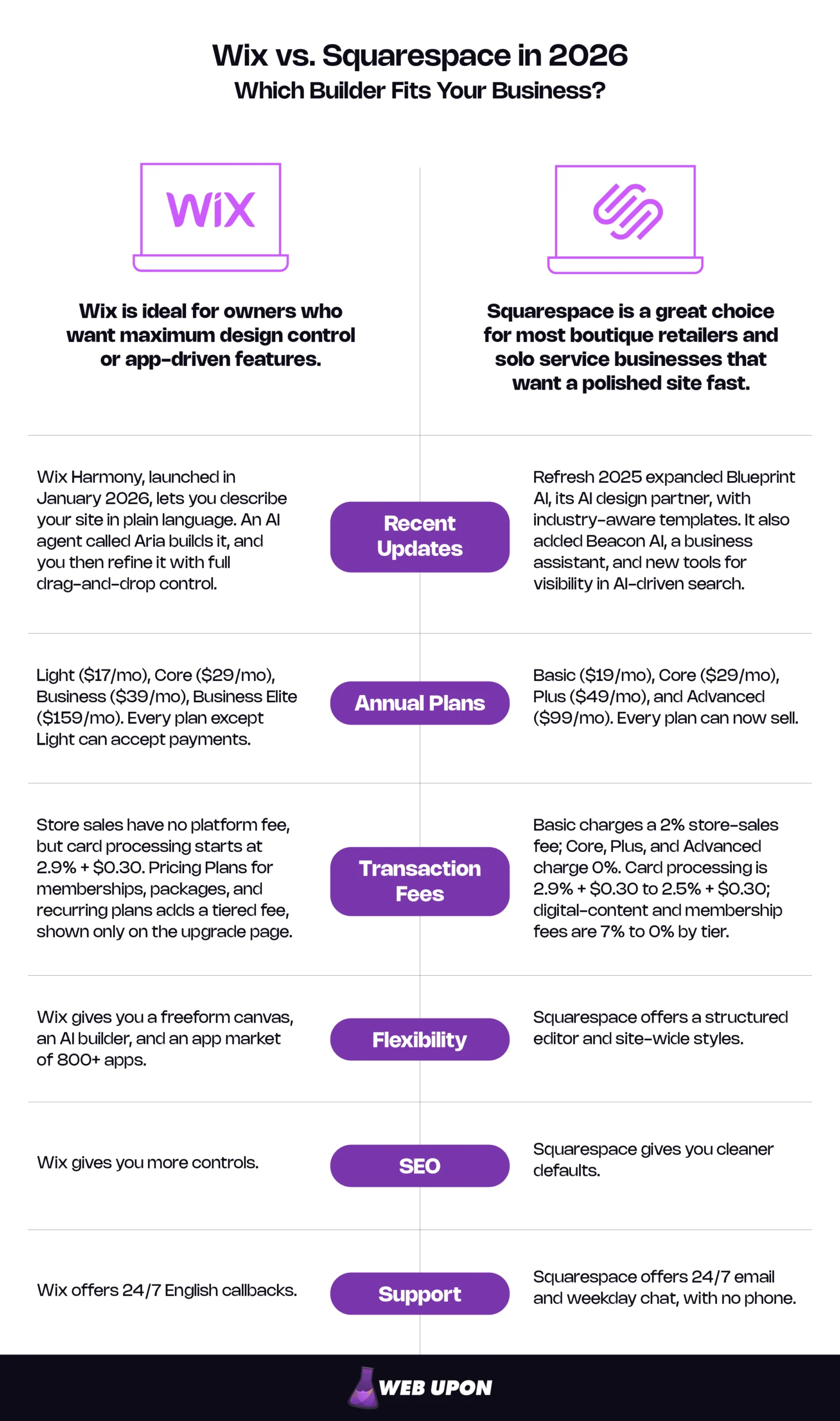
- The answer: Squarespace for most boutique retailers and solo service businesses that want a polished site fast. Wix for owners who want maximum design control or app-driven features and will manage the extra decisions.
- Polish and speed: Squarespace. Its structured editor and site-wide styles keep pages consistent even if you’ve never designed anything.
- Flexibility: Wix. You get a freeform canvas, an AI builder, and an app market of 800+ apps.
- Fees: Closer than their reputations suggest. On mid-tier plans, both charge 0% platform fees on store sales. Watch Squarespace’s 2% Basic fee, and membership fees on both platforms.
- True cost: Plan price is rarely the real number. Card processing, apps, and plan-level fees decide what you pay each month.
- SEO: Wix gives you more controls; Squarespace gives you cleaner defaults.
- Support: Wix offers 24/7 English callbacks; Squarespace offers 24/7 email and weekday chat, with no phone.
- Long-term growth: Wix stretches further through apps, but neither platform lets you take your design with you.
Wix vs. Squarespace: Quick Verdict and Key Differences
Quick Verdict
| Category | Winner | Why |
| Best for polish and speed | Squarespace | Structured editor, consistent results |
| Best for design flexibility | Wix | Freeform canvas, pixel-level control |
| Best low-cost entry | Squarespace | Basic plan sells from $19/mo (billed annually) |
| Best for scaling with apps | Wix | Much larger app market |
Side-by-Side Comparison
| Criteria | Wix | Squarespace |
| Ease of use | More choices, steeper curve | Guided, faster for beginners |
| Design approach | Freeform drag-and-drop canvas | Structured, section-based layouts |
| Templates | 2,000+ | Smaller, curated library |
| Ecommerce | Broad tools plus apps | Polished built-in essentials |
| Store transaction fees | 0% on selling plans | 2% on Basic, 0% above |
| SEO | More granular controls | Clean, reliable defaults |
| Apps and integrations | 800+ apps | Smaller curated extensions |
| Support | 24/7 English callback | 24/7 email, weekday chat |
| Cheapest plan that sells | $29/mo (Core) | $19/mo (Basic) |
Prices are US, billed annually, as of November 2026. Wix’s cheapest plan, Light ($17/mo), cannot accept online payments.
Choose Squarespace if you want a site that looks premium without design skills, you sell a focused product range or your time, and you’d rather launch this month than spend it perfecting layouts.
Choose Wix if you have a clear visual vision or a designer on hand, you need functionality that only an app provides, or your business model is likely to keep changing.
Bottom Line: Squarespace is the safer default for most small businesses. Wix wins when control and extensibility matter more than speed.
Before the details, it helps to understand why these two platforms, specifically, are the ones worth comparing.
Why Wix and Squarespace Are the Top Website Builders to Compare in 2026
The Stakes for Small Business Owners Choosing Between These Two Platforms
A website rebuild rarely costs less than the first build. You pay again for design, rewrite product pages, and watch search traffic wobble while old links redirect. For a non-technical owner, “best” comes down to four tests, and they are the scoring lens for the rest of this article:
- Fast to launch: Can you go live in days, not months?
- Professional by default: Does it look credible without a designer?
- Predictable to run: Do you know your real monthly cost?
- Able to grow: Can it add features without forcing a move?
How Each Platform Has Evolved to Compete for the Same Audience
Wix started as the free, do-anything builder; Squarespace started as the designer’s choice. Both have since grown into serious commerce platforms chasing the same customer: you.
Wix in 2026
- Wix Harmony, launched in January 2026, lets you describe your site in plain language. An AI agent called Aria builds it, and you then refine it with full drag-and-drop control.
- A simpler plan lineup (Light, Core, Business, Business Elite). Every plan except Light can accept payments.
Squarespace in 2026
- Refresh 2025 expanded Blueprint AI, its AI design partner, with industry-aware templates. It also added Beacon AI, a business assistant, and new tools for visibility in AI-driven search.
- A restructured plan lineup (Basic, Core, Plus, Advanced). Every plan can now sell.
Both now use AI to draft your first version, which narrows the ease-of-use gap at the start. The real difference shows up the moment you begin editing.
Bottom Line: Both platforms are mature and business-ready. The real question is how each one wants you to work.
That brings us to the single biggest difference between them: how much design control you get.
Design Freedom vs. Design Protection: The Core Difference Between Wix and Squarespace
Wix’s Drag-and-Drop Editor: Total Flexibility With a Hidden Cost
On Wix, you can drop a headline anywhere on the page, down to the pixel. Nothing snaps you back into line. With a trained eye, that freedom produces layouts that look nothing like a template.
For everyone else, the cost arrives slowly. We see it constantly in client rebuilds: generous margins and two fonts on the homepage, tighter spacing and four fonts by page nine. No single edit was wrong; nothing held the pages together, and visitors read that inconsistency as “small operation.” Freeform pages also need a separate mobile review: in the Wix Editor, desktop changes carry over to mobile, but mobile fixes don’t carry back, and elements placed by hand don’t always rearrange gracefully on a phone.
So, is Wix or Squarespace easier to use? For non-designers, Squarespace, by a clear margin. Wix’s AI builder gives you a strong starting point, but every edit afterward asks you to make design decisions. If you’d rather have those decisions made well, our web design expertise works for exactly that gap.
Matters most for: owners who want a distinctive layout and have the eye, or the help, to execute it.
Squarespace’s Section-Based Editor: Guardrails That Produce Polish
Squarespace works differently. You build pages from sections, place blocks on a grid inside them, and let site-wide styles control fonts, colors, and spacing. Change your heading font once, and every page updates.
Those guardrails are why Squarespace sites rarely look amateur. They also shorten launch timelines, because the editor removes many of the small choices. The trade-off is real: if you want an element somewhere the grid and site styles won’t easily allow, you’ll need custom code or a compromise.
Matters most for: The Solo Service Entrepreneur and The Boutique Retailer who need credibility on day one.
Templates and Mobile Responsiveness Compared Head-to-Head
Wix lists 2,000+ website templates. Squarespace offers far fewer, all professionally designed. A huge gallery mostly makes the first decision harder.
What matters more is what happens after you choose. On Wix, the template you start with is the one you keep: Wix’s help center confirms you can’t switch templates on a site you’ve already created, so a new look means rebuilding pages. Squarespace treats design as a style layer, so you can restyle the whole site without starting over.
On mobile, Squarespace sections adapt automatically, though its Fluid Engine editor lets you adjust the mobile layout separately and Squarespace itself advises reviewing it as you edit. Wix’s freeform pages usually need a dedicated mobile check before launch: an extra step, but also extra control.
| Factor | Wix | Squarespace |
| Editor style | Freeform canvas | Sections on a grid |
| Learning curve | Steeper | Gentler |
| Risk of amateur results | Higher without design skills | Low |
| Time to launch | Longer for non-designers | Shorter |
| Mobile handling | Usually needs review | Adapts automatically; quick review advised |
| Best for | Custom layouts, designers | Polish with minimal effort |
Bottom Line: Squarespace wins on polish and speed for non-designers. Wix wins for owners with design skills, or a designer, who need layouts Squarespace’s grid won’t allow.
Looks get customers to stay. Next is what it costs when they buy.
Ecommerce Features, Transaction Fees, and Pricing Compared
The real Wix vs Squarespace ecommerce question isn’t plan price; it’s what each sale costs your online store once every fee is counted. Four charges matter.
Fee glossary
- Subscription: your monthly plan price.
- Platform transaction fee: a percentage the website builder keeps from each sale.
- Payment processing fee: what the payment processor charges to move the money, usually a percentage plus a fixed amount per order.
- App fees: monthly charges for add-ons that fill feature gaps.
Wix Ecommerce: Flexible Selling Tools With Add-On Costs
Wix’s selling plans are Core at $29/mo, Business at $39/mo, and Business Elite at $159/mo. Monthly billing costs more. Light (17/mo) can’t accept payments, so it isn’t an option for a store.
Wix charges no platform transaction fee on store sales through Wix Payments; card processing starts at 2.9% + $0.30 per transaction (US). Product pages, inventory, abandoned cart recovery, and appointment bookings are built in, and the app market covers the rest.
The exception: Wix’s Pricing Plans tool, used for memberships, packages, and recurring plans, carries its own platform fee on top of processing. That fee is a percentage of each sale, tiered by your site plan, and Wix shows the exact rate only on its upgrade page, so check the rate on your plan before you price packages.
Matters most for: The Solo Service Entrepreneur selling packages or memberships.
Squarespace Ecommerce: Premium Presentation With a Higher Entry Price
Ignore older advice about “Business” and “Commerce” tiers; those plans are gone. The lineup now is Basic $19/mo, Core $29/mo, Plus $49/mo, and Advanced $99/mo billed annually, or $25, $39, $65, and $139 billed monthly.
Squarespace transaction fees are simpler than their reputation. Only Basic charges a platform fee on online store sales, at 2%; Core, Plus, and Advanced charge 0%. Card processing starts at 2.9% + $0.30 on Basic and Core, then drops to 2.7% + $0.30 on Plus and 2.5% + $0.30 on Advanced. Digital content and membership sales carry a separate platform fee: 7% on Basic, 5% on Core, 1% on Plus, and 0% on Advanced.
Presentation is where Squarespace earns its price: product pages look premium with almost no effort. Abandoned cart recovery and subscription products are included on every plan; Plus adds lower card rates and a reserved-cart countdown timer. Payment and integration options are narrower than on Wix.
One piece of upgrade math: Plus costs $20 more a month than Core and saves 0.2 percentage points on card processing. Those savings alone cover the upgrade only at about $10,000 a month in card sales. Below that, upgrade for the features, not the fees.
Matters most for: The Boutique Retailer weighing Core against Plus.
Pricing Plans Compared: Which Platform Delivers More Value per Dollar in 2026
Side by side, the gap in Wix vs Squarespace pricing is smaller than most owners expect.
| Plan | Price/mo (annual) | Store platform fee | Card processing from |
| Wix Core | $29 | 0% | 2.9% + $0.30 |
| Wix Business | $39 | 0% | 2.9% + $0.30 |
| Wix Business Elite | $159 | 0% | 2.9% + $0.30 |
| Squarespace Basic | $19 | 2% | 2.9% + $0.30 |
| Squarespace Core | $29 | 0% | 2.9% + $0.30 |
| Squarespace Plus | $49 | 0% | 2.7% + $0.30 |
| Squarespace Advanced | $99 | 0% | 2.5% + $0.30 |
US prices as of November 2026, billed annually.
Squarespace Basic’s 2% fee is the trap here. Basic is $10 cheaper than Core, but 2% of $500 is also $10. Once your store sells more than about $500 a month, Squarespace Core is cheaper than Basic.
Here is a worked example for a boutique doing $5,000 a month in sales: 100 orders at $50, card payments through each platform’s own processor, and estimated app spending of $30 a month on Wix and $10 on Squarespace for reviews, pop-ups, and upsells. Those app figures are assumptions; for scale, one product-reviews app on the Wix App Market runs from free to about $13 a month.
| Monthly cost | Wix Business | Squarespace Core | Squarespace Basic |
| Subscription | $39 | $29 | $19 |
| Platform fee | $0 | $0 | $100 |
| Card processing | $175 | $175 | $175 |
| Apps (estimate) | $30 | $10 | $10 |
| True monthly cost | ~$244 | ~$214 | ~$304 |
Illustrative estimate. Your apps and order mix will change the totals.
Card processing, the biggest line, is identical across all three. The plan and the apps make the difference, and the “cheap” plan is the most expensive way to run this store.
Bottom Line: Squarespace is cheaper to start selling, but only on Basic and only at low volume. Beyond that, mid-tier card rates match, so plan price and apps decide the gap. Squarespace is easier to predict; Wix is easier to extend.
If you’re unsure which plan fits your margins, contact Web Upon for a cost-focused platform recommendation.
Of course, fees only matter once customers can find you. That’s the next comparison.
SEO, Performance, and Marketing Tools That Drive Real Traffic
The Wix vs Squarespace SEO debate is mostly a leftover from years ago. Both now handle the fundamentals: custom meta titles, clean URLs, automatic XML sitemaps, and SSL certificates. The difference is how much control you get, and how much discipline it requires.
Wix SEO Tools: Much Improved but Still Catching Up
Wix’s reputation for weak SEO comes from its older, heavier sites. Today, a built-in SEO setup checklist walks beginners through the essentials, and experienced users get granular control over meta tags, URLs, 301 redirects, and structured data.
Where Wix can still fall short is site speed, usually because of what owners add: dense freeform layouts, large images, and stacked apps. Speed feeds into Google’s Core Web Vitals, and Wix’s Site Speed dashboard reports yours from real visitor data. Still, test your own pages with PageSpeed Insights. And for competitive searches, content, links, and structure decide rankings, which is where ROI-focused SEO strategies come in.
Squarespace SEO and Marketing: Clean Architecture With Fewer Custom Controls
Squarespace’s structured templates produce tidy pages that search engines crawl and index easily, which is the foundation Google’s SEO Starter Guide describes. Squarespace adds structured data for products, blog posts, events, and your business automatically, though you can’t edit or remove it. Refresh 2025 also added tools aimed at visibility in AI-driven search. Social integrations and promotional pop-ups (Core and above) are built in, and email campaigns run inside the platform, though both platforms charge for email beyond a small free allowance. The limit is fine-grained control: some adjustments Wix exposes in settings require code on Squarespace, or aren’t available at all.
Its blogging tools are a genuine strength. For a coach or consultant, a steady blog attracts clients who are already searching, and pairing it with solid content marketing strategies turns posts into inquiries.
Analytics, Domains, and Hosting Reliability Compared
Both include native analytics (Squarespace’s ecommerce analytics start on Core) and a free custom domain for the first year on annual plans; the domain then renews at standard rates. Hosting is fully managed on both, with SSL, security, and updates handled for you. On speed, the platforms are close: in HTTP Archive data for November 2025, as reported by Search Engine Journal, about 75% of Wix sites and 70% of Squarespace sites passed Google’s Core Web Vitals. In practice, what slows a site and costs sales is within your control: image sizes, app count, and page complexity.
| SEO and Marketing feature | Wix | Squarespace |
| Custom meta titles | Yes | Yes |
| URL control | Yes | Yes |
| 301 redirects | Yes | Yes |
| Structured data | Automatic plus custom | Automatic basics |
| XML sitemap | Automatic | Automatic |
| Blogging | Built in | Built in, strong |
| Email marketing | Built in; paid plans above a small free tier | Built in; paid plans above a small free tier |
| Speed tools | Site Speed dashboard (Core Web Vitals) | Automatic image resizing (WebP) |
Bottom Line: For most small businesses, both platforms are good enough for SEO. Wix suits owners who want to fine-tune. Squarespace suits owners who want solid defaults and a strong blog.
Matters most for: The Local or Hybrid Small Business Owner competing in local search.
Attracting customers is today’s problem. Next is whether the platform keeps up as the business grows.
Integrations, Scalability, and Support as Your Business Grows
App Market vs. Extensions: How Each Platform Expands Functionality
Wix’s app market, with over 800 apps, is one of its biggest advantages: a loyalty program, a niche shipping integration, or a trade-specific booking tool is probably an install away. Squarespace’s extension library is smaller and curated, meaning fewer options but less clutter.
Either way, every app adds a monthly fee, another login, and a dependency that can break, slow your site, or be discontinued. Use apps to fill real gaps, not to chase features you might use someday.
Scalability Ceilings: Which Platform Grows With Your Business
Wix scales sideways: a café that adds online ordering, then events, then a membership club can usually do it all in one place. Squarespace scales within its lane, and a design-led store can grow a long way before high order volumes, complex shipping rules, or very large catalogs start to strain it.
Plan for leaving, too: a website migration is where platform choice gets expensive. Squarespace’s built-in export covers basic pages, galleries, and a single blog; product pages and styling stay behind. Wix offers no full-site export, because Wix sites must run on Wix’s own servers, though you can download data such as product lists and contacts. Either way, moving to a dedicated ecommerce platform means a rebuild plus redirecting every old URL. Google’s guidance on site moves with URL changes explains why those redirects protect your rankings.
Matters most for: The Boutique Retailer planning multi-year growth.
Customer Support and Learning Resources Compared
Picture checkout breaking at 9 p.m. on a Saturday. On Wix, you can request a callback, available 24/7 in English on every plan, with priority for Business Elite. On Squarespace, there’s no phone: you email (answered around the clock) or wait for weekday chat.
| Channel | Wix | Squarespace |
| Phone | 24/7 callback (English) | Not offered |
| Live chat | Mon–Fri, 2 a.m.–6 p.m. ET in English; other languages vary | Mon–Fri, 4 a.m.–8 p.m. ET |
| Email or tickets | Ticket via help center | 24/7 email |
| Self-help | Large help center, forum | Help center, forum, webinars |
Both help centers are extensive; Squarespace’s tends to be easier to follow because there are fewer settings to explain.
Bottom Line: Wix offers more room to grow and faster human help after hours. Squarespace offers fewer moving parts to manage. Neither makes leaving easy.
With every category covered, here is how to decide for your type of business.
Which Platform Should You Choose for Your Business?
The Wix vs Squarespace for small business question has no single answer: it depends on how you sell and how much you want to design.
When Wix Is the Right Choice for Your Storefront
Choose Wix if you want maximum design freedom and expect to add features as you go. It leads for highly custom layouts, several business models under one roof (a shop plus bookings plus events), and AI-drafted sites you then reshape freely. Accept its limits first: the design discipline it demands, app costs that creep up, and membership fees that vary by plan.
When Squarespace Is the Right Choice for Your Storefront
Choose Squarespace if your brand depends on looking premium and you’d rather run your business than design pages. It leads for boutique brands with focused catalogs, service businesses that sell on credibility, and content-led brands. Accept its limits first: Basic’s 2% fee, lower card rates that start only on Plus, no phone support, and fewer extensions.
A Simple Decision Framework for Your Business
Start with one question: do you want to design your website, or do you want your website to be designed for you?
- If you want to design it, Wix gives you the canvas and the tools. Budget time for the decisions that come with them.
- If you want it designed for you, Squarespace builds good taste into the system, so most of your choices are already sound.
| Business type | Best fit | Why |
| Boutique retailer | Squarespace (Core or Plus) | Premium look, 0% store fee |
| Solo service entrepreneur | Squarespace | Fast, credible, strong blogging |
| Local or hybrid business | Wix | Apps, flexibility, after-hours help |
| Subscription seller | Depends on volume | Higher tiers cut membership fees |
| Content-led brand | Squarespace | Strong blogging, clean defaults |
Then work through this checklist:
- Will you, or someone on your team, make design decisions confidently?
- What will you sell monthly in year one: under $500, or more?
- Do you sell memberships or recurring plans? If so, price the platform fee on each.
- Which features will you need in two years that you don’t need today?
- If something breaks after hours, how quickly do you need a person?
Pick the one whose trade-offs you can live with.
Choose Once and Build It Right
The Wix vs Squarespace choice comes down to one trade-off. Squarespace gives most small businesses a polished site with less effort; Wix gives owners who want control more room to build and grow.
The platform is only half the outcome, though. A great builder won’t rescue a confusing product page or a site no one can find; the build, structure, and SEO decide whether it earns its keep.
Your next three steps:
- Answer the one question: design it yourself, or have it designed for you?
- Price your true monthly cost, including platform fees, processing, and apps.
- Start a free trial on your top choice and build one product or service page.
Get those three right, and the night before launch is about your email, not your product page, and your first payout holds no surprises.
If you’d like a second opinion on your platform choice, help with a migration, or a professional build and growth plan on either platform, contact Web Upon. We’ll review your plans and point you to the right launch path.