It’s 9:40 on a Friday night, and the checkout page is throwing an error. Whether you fix it yourself, call a developer, or never see it happen at all is the real difference in Shopify vs. WooCommerce.
Neither Shopify nor WooCommerce wins outright; it comes down to who owns the technical work. Shopify suits lean teams that want predictable costs, managed security and fast launches, and accept fixed URL structures and app dependency. WooCommerce suits content-led brands with developer or agency support that need full SEO control, custom checkout flows and no platform transaction fees at scale.
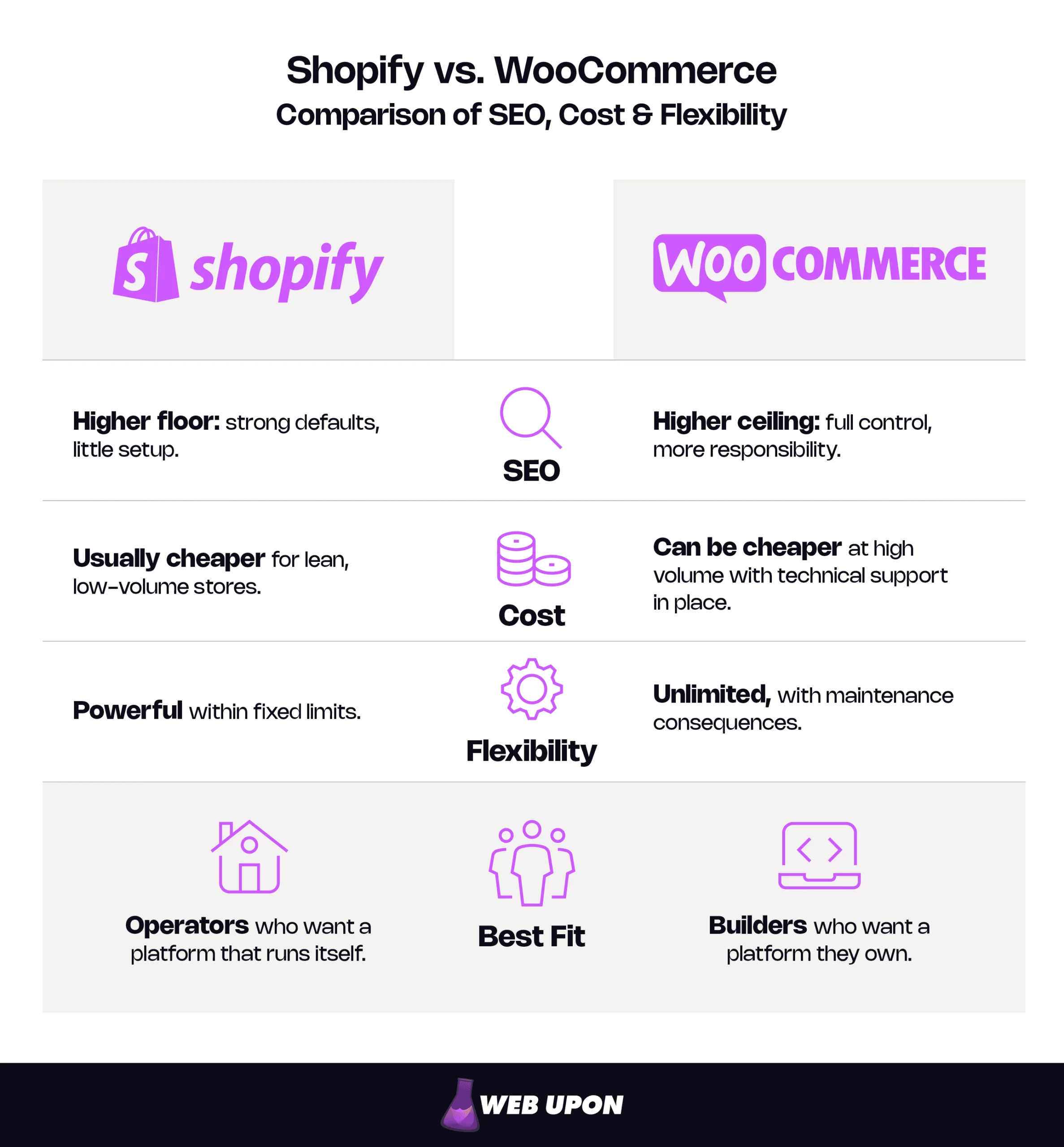
Key Takeaways
- SEO: Shopify has the higher floor, with free SSL, automatic sitemaps and built-in product structured data, but fixed /products/ and /collections/ paths. WooCommerce has the higher ceiling, with editable URL structures, and more responsibility.
- Cost: As of October 2026, Shopify plans start at $29 a month billed yearly, plus a 0.2% to 2% fee if you don’t use Shopify Payments. The WooCommerce plugin is free, but running a store on it is not: hosting, annual plugin licenses and maintenance time add up.
- Flexibility: Shopify is powerful within fixed limits, and its advanced checkout steps require Plus. WooCommerce lets you build almost anything, and every customization becomes something to maintain.
- Speed: In HTTP Archive’s 2025 field data, 76% of Shopify sites passed all three Core Web Vitals on mobile, against 35% of WooCommerce sites. That’s a platform average, and speed is one ranking signal among many.
- Security: Shopify is Level 1 PCI DSS certified; on WooCommerce, security is shared between you, your host and your payment gateway.
By the end of this guide, you’ll be able to decide:
- Which platform matches the technical capacity your team actually has
- What each platform really costs over three years, including your own time
- Where each platform’s SEO ceiling sits, and whether you’re likely to hit it
- Which features you’d get natively, through an app or plugin, or only with a developer
Where to start:
- Running lean, with no developer? Read Total Cost of Ownership, then When Shopify Is the Right Choice.
- Building a business case for a growing store? Go to the Lifecycle Cost Comparison, Flexibility and Customization and Security, Scalability, and Data Ownership.
- Growing mainly through content and search? Start with SEO Capabilities, then When WooCommerce Is the Right Choice.
The Real Stakes: Why Your Platform Choice Is a Long-Term Business Decision
Before comparing features, it helps to see what this choice actually commits you to.
Beyond the Surface: What Growth-Minded Owners Actually Need From a Commerce Platform
The debate is usually framed as hosted versus self-hosted. Underneath, it’s control versus convenience: every piece of control you take is work you take on, and every convenience is a decision someone else makes for you.
That trade rarely announces itself. It shows up as a plugin update that breaks checkout, an app subscription that quietly renews at a higher tier, or a forced re-platforming 18 months in. None of these are platform failures. They’re staffing questions that arrived without a job description.
That’s why “easy to start” and “easy to scale” are rarely the same thing, whichever side of the WooCommerce vs. Shopify line you land on. Three pillars decide which kind of easy you’re buying:
- SEO depth: how much ranking control you get, and who has to use it.
- Total cost of ownership: every fee, tool, person and hour across the store’s life.
- Architectural flexibility: what the platform lets you build, and what it costs to keep running.
Understanding the Two Platforms at Their Core
Shopify is software as a service (SaaS): you rent the software, and Shopify runs the servers, security and updates. WooCommerce is open source, meaning its code is public and modifiable, and it’s a plugin that turns a WordPress site into a store. A WooCommerce merchant is running three things: a WordPress site, a web host and a stack of plugins. Both are mainstream choices: in HTTP Archive’s 2025 crawl, WooCommerce ran about 44% of detected ecommerce sites on mobile and Shopify about 25%.
Think of it as renting a fully serviced apartment versus owning a house. The apartment comes with a building manager and rules about which walls you can knock down. The house lets you knock down anything, and the leaking roof is yours too.
Each model carries a quiet assumption. In hosted vs. self-hosted ecommerce, Shopify assumes you’d rather not touch code. WooCommerce assumes someone will.
How Each Platform Works
| Factor | Shopify | WooCommerce |
| Hosting | Included in every plan, with free SSL | You choose, pay for and manage a host |
| Software updates | Automatic, platform-wide | You apply WordPress, plugin and theme updates |
| Security and PCI compliance | Managed; Shopify is Level 1 PCI DSS certified. | Shared between you, your host and your payment gateway |
| Code access | Theme code only; the core platform is closed. | Full access to all code and the database |
| Who fixes it when it breaks | Shopify, or the developer of the app involved | You, your host or your developer |
| Main extension model | Apps, usually billed monthly | Plugins, free or with paid annual licenses |
That architecture shows up first where your customers see it: in search results. How well it performs there depends on who will tend it.
SEO Capabilities: Which Platform Actually Helps You Rank and Win Organic Traffic
The short version of Shopify vs. WooCommerce SEO is that both can rank well, and the difference is how much is done for you versus how much you can control.
Shopify SEO: Strong Defaults, Structural Limits
Shopify SEO starts from a high floor. Every store gets free SSL and managed hosting, automatically updated sitemaps, mobile-ready themes and images served through Shopify’s CDN (a network of servers that delivers content from somewhere close to each shopper). A non-developer can launch with the technical basics already in place.
The ceiling is the Shopify URL structure. Products always live under /products/, collections under /collections/ and standard pages under /pages/. Shopify treats /products and /collections as fixed paths and allows redirects only from broken URLs, so redirects can create shorter aliases but the real URLs don’t change. Only a headless build (a custom front end running on Shopify’s back end) escapes the fixed prefixes. There’s no building a keyword-led hierarchy like /mens/running-shoes/.
Collections also create a second path to every product, such as /collections/sale/products/trail-shoe, and Shopify’s developer documentation asks theme builders to weigh the SEO implications of that duplicate. Shopify themes normally point that path back to /products/trail-shoe with a canonical tag (code telling search engines which version of a page is the main one). The canonical is usually handled for you; the internal links may not be. Many themes still link product cards to the collection path, so crawlers keep visiting duplicates until a one-time theme edit fixes the links.
Your robots.txt file, which tells crawlers what to skip, is editable only through theme code, using a robots.txt.liquid template. Shopify calls this an unsupported customization and warns that mistakes can cost a store all its search traffic. The default file already blocks cart, checkout and filtered collection pages, so most stores never need to touch it.
Schema markup (code that labels details such as price and availability for search engines) is built into Shopify-supported themes for product pages, covering price, availability and reviews; extra types, such as FAQ or organization details, usually need an app or custom code. Shopify’s native blog works, but it offers fewer layouts, simpler categorization and a lighter editorial workflow than WordPress. For a modest catalog with modest content plans, none of this will decide your rankings.
WooCommerce SEO: Full Control, Full Responsibility
WooCommerce SEO starts from the opposite position. WooCommerce’s permalink settings offer four product URL patterns, including a shop base with the category (/shop/hoodies/hoodie-with-logo) and a fully custom base. Category and tag bases are editable too.
Control isn’t the same as configuration, though. Out of the box, categories sit under /product-category/, which is no more keyword-led than Shopify’s folders. Changing permalinks on a live store sends old URLs to 404 errors unless redirects are in place. Settle your URL architecture before launch, or budget for a redirect map.
WordPress SEO plugins add page-level control over titles, meta descriptions, schema and breadcrumbs. They’re tools, not a strategy. The control pays off only when someone uses it well.
The bigger advantage is content. Because WordPress ecommerce keeps store and blog in one system, a pillar guide can anchor a topic cluster whose supporting articles link down to category and product pages, passing relevance as they go. Built on a deliberate ecommerce content strategy, that structure compounds: each new article strengthens the pages that sell.
The tradeoff is speed. WooCommerce’s ceiling is higher, but reaching it depends on hosting, caching and plugin discipline.
Page Speed, Core Web Vitals, and Their SEO Consequences on Each Platform
Core Web Vitals are Google’s three measures of real-world page experience: loading, responsiveness and visual stability. Google’s “good” thresholds are a Largest Contentful Paint (LCP) within 2.5 seconds, an Interaction to Next Paint (INP) of 200 milliseconds or less, and a Cumulative Layout Shift (CLS) of 0.1 or less.
Two details matter more than the numbers. Google judges these metrics on real visitors at the 75th percentile, mobile and desktop separately, so a fast test on office Wi-Fi can hide a slow experience for a quarter of your mobile shoppers. And Google says there is no single page experience signal; good scores don’t guarantee top rankings. Treat speed as a tiebreaker and a conversion lever, not a shortcut.
Shopify gives a consistent baseline without developer work, though heavy themes and stacked app scripts can still drag it down. On WooCommerce, hosting quality, theme weight, caching and plugin count decide the result. The field data shows the gap: in HTTP Archive’s 2025 Web Almanac, 76% of Shopify sites passed all three Core Web Vitals on mobile, against 35% of WooCommerce sites, and the report notes that self-hosted stacks can still perform well with strong engineering discipline. Read it as a platform average, not a ceiling for your store.
Who Controls Each Speed Factor
| Factor | Shopify | WooCommerce |
| Hosting and servers | Managed by Shopify | Your responsibility, through your host choice |
| CDN | Included | Depends on your host, or added separately |
| Theme code | Theme developer and you | Theme developer and you |
| Third-party apps or plugins | Your responsibility | Your responsibility |
| Image optimization | Partly automated by Shopify’s CDN, upload size is yours | Your responsibility |
| Caching | Managed by Shopify | Your responsibility, at host or plugin level |
Bottom line: In the Shopify vs. WooCommerce SEO comparison, Shopify wins on floor-level consistency. WooCommerce wins on ceiling-level control.
If you suspect your platform is capping your rankings, Web Upon’s ecommerce SEO experience and expertise can pinpoint what’s fixable on the platform you already have.
Every one of those SEO advantages is paid for in apps, developers or hours, and someone on your team has to own that bill.
Total Cost of Ownership: Stripping Away the Hidden Fees and Technical Debt
Total cost of ownership is everything you pay to run a store over its life: platform fees, tools, people and time, not just the price on the plan page. It’s the fairest way to compare Shopify vs. WooCommerce cost.
Shopify Costs: Transparent Pricing, Invisible Ceilings
Shopify’s pricing is easy to read. Figures below are USD for US merchants as of October 2026 and vary by region, so check the Shopify pricing page for yours.
Shopify Plans (as of October 2026, USD)
| Plan | Monthly price (billed yearly / monthly) | Third-party transaction fee | Online card rate with Shopify Payments | Key inclusions |
| Basic | $29 / $39 | 2% | 2.9% + 30¢ | Full online store, no additional staff accounts, up to 3 B2B catalogs |
| Grow | $79 / $105 | 1% | 2.7% + 30¢ | 5 staff accounts |
| Advanced | $299 / $399 | 0.6% | 2.5% + 30¢ | 15 staff accounts, third-party calculated shipping rates |
| Plus | From $2,300 (1- or 3-year term) | 0.2% | 2.25% + 30¢ | Unlimited staff, fully customizable checkout, unlimited B2B catalogs |
Premium and international cards carry higher rates. Introductory trial offers are excluded.
Shopify transaction fees are the line to watch. They apply only when you use a third-party payment provider instead of Shopify Payments, and they’re charged on top of that provider’s own processing fee. Shopify Payments isn’t available in every country; the Philippines, Malaysia and Indonesia, for example, aren’t on the supported list. For merchants there, the fee is unavoidable.
The fee and the plan are really one decision. In an illustrative example, a store processing $50,000 a month through a third-party provider pays $1,000 a month in platform fees on Basic, $500 on Grow and $300 on Advanced. Moving from Basic to Grow costs $50 more a month on yearly billing and saves $500 in fees. Here, the cheaper plan turns out to be the more expensive choice.
Then come the apps. Reviews, bundles, loyalty and advanced SEO tools are often separate monthly charges, many priced by order volume. Premium themes and developers fluent in Liquid, Shopify’s templating language for theme pages, add more. Shopify’s pricing stays predictable. It just doesn’t stay small.
WooCommerce Costs: Low Entry Point, Compounding Operational Costs
The WooCommerce plugin is free to download, but running a store on it is not. Hosting, a domain and backups are mandatory recurring costs. WooCommerce requires a host with HTTPS support, so confirm SSL is included in your hosting plan rather than budgeting for it as an extra.
WooCommerce hosting costs depend on the tier you choose:
- Shared hosting is the cheapest and the least suited to stores.
- Managed WordPress or WooCommerce hosting costs more but takes on much of the maintenance.
- VPS or cloud hosting gives the most control and demands the most management.
What you don’t pay the host in money, you pay in time.
Premium plugins are the cost most budgets misread. Many are annual licenses, and when a WooCommerce.com subscription lapses, the extension keeps working but stops receiving updates, including security patches, which WooCommerce warns can leave it vulnerable. As of October 2026, the WooCommerce Subscriptions extension costs $279 a year and WooCommerce Memberships, developed by SkyVerge for the Woo Marketplace, $199 a year. On a budget sheet they look like purchases; in practice they behave like subscriptions.
Developer and maintenance time is the other compounding cost: updates, plugin conflicts and security patches. Against that sits a genuine advantage: WooCommerce adds no platform fee to transactions, whichever gateway you use. Its own WooPayments gateway, for instance, has no setup or monthly fees, only per-transaction processing fees. Processors still charge their own fees on both platforms, so the saving is the missing platform layer, not free payments.
| Cost item | Shopify | WooCommerce |
| Platform fee | Monthly plan ($29 to $2,300+, as of October 2026) | None, the plugin is free |
| Hosting | Included | Paid separately, quality varies with price |
| Themes | Free or premium | Free or premium |
| Apps or plugins | Monthly app subscriptions | Free plugins plus annual premium licenses |
| Payment and transaction fees | Processing fees, plus 0.2% to 2% if not using Shopify Payments | Processing fees only |
| Developer and maintenance | Lower baseline, rises with customization | Ongoing updates, conflicts and performance work |
| Security and backups | Included | Your responsibility, through host, plugins or services |
The Lifecycle Cost Comparison: Which Platform Is Actually Cheaper at Scale
At low volume, WooCommerce often costs more than Shopify once maintenance time and developer support are counted; leave those out and it only looks cheaper. At high volume the picture can flip, as Shopify’s fees, app tiers and plan upgrades overtake WooCommerce hosting costs and license renewals.
The deciding variable is usually time, so price it: monthly hours spent on updates and fixes, multiplied by the hourly value of whoever does them. In an illustrative case, six hours a month at $75 an hour is a $450 monthly cost that appears on no invoice. Run the sum for both platforms, add one-off costs such as migration and redirect mapping, and compare three-year totals.
Your business model shifts the math as well:
- Physical goods: shipping and inventory tools are the swing cost on both platforms.
- Digital products: delivery and licensing tools matter more than shipping, and both platforms need add-ons.
- Subscriptions: Shopify’s free, Shopify-built Subscriptions app covers simple plans, while complex models need paid apps on Shopify or paid extensions on WooCommerce.
Illustrative Store Profiles
| Store profile | Likely cheaper | Why |
| Early-stage: solo, low volume, no developer | Usually Shopify | Hosting, security and updates are bundled, and owner time is the scarcest resource. |
| Growing: small team, rising volume, some app spend | Depends | Plan, fees and apps on one side; hosting, licenses and maintenance on the other. Model both. |
| High-volume: established team or agency support | Often WooCommerce | No platform transaction fee, and costs can grow more slowly than revenue when technical support is already paid for. |
Bottom line: Shopify is usually cheaper and more predictable for lean, early-stage stores. WooCommerce can become cheaper at high volume when technical support is already in place.
Model three-year costs, including your own time, before you commit. What you’ll spend depends partly on what you need the store to do, and on who will build and maintain it.
Flexibility and Customization: The Architectural Freedom Debate
Flexibility is only valuable if your business model needs it and you have the people to use it.
Shopify Customization: Powerful Within Defined Boundaries
Shopify’s flexibility lives in its app ecosystem: thousands of integrations with marketing tools, CRMs and inventory systems. The core platform is closed, so when no app does what you need, you work around Shopify rather than change it.
Credit where it’s due: the theme editor’s sections and blocks let non-developers rearrange layouts and launch campaign pages without touching code. Deeper design work moves into Liquid and needs a specialist.
Checkout is where the boundaries show. On Basic and higher, the checkout and accounts editor handles branding, and apps can extend the thank-you and order status pages. Apps on the information, shipping and payment steps, along with the Checkout Branding API, are Shopify Plus checkout features. Checkout isn’t locked; its advanced steps simply require Plus.
Integration depth varies by plan too: custom apps get limited data access on Basic and full access from Grow upward, with API rate limits rising to as much as 2x on select APIs on Advanced and 10x on Plus. For a custom ERP or CRM connection, the plan shapes what a developer can build.
WooCommerce Customization: True Ownership, Operational Consequences
Because WooCommerce is an open-source ecommerce platform, any feature is buildable in principle with the right developer. Checkout flow, gateway integrations and the customer experience are yours to shape, without waiting for platform permission or a higher plan.
The WordPress foundation also suits business models that sit awkwardly on a standard store. Think memberships with gated content, B2B pricing tiers, or course and booking businesses running alongside a shop. Shopify can approximate several of these through apps, but at extra cost and with less control.
That freedom has a shadow. Thousands of plugins mean real choice, but also decision fatigue, plugin conflicts and a maintenance load that grows with every addition.
Security, Scalability, and Data Ownership
Any business that takes card payments must meet PCI DSS, the card industry’s security standard set by the PCI Security Standards Council. Shopify is certified Level 1 PCI DSS compliant, and stores on it are PCI compliant by default, with security and updates managed for you.
On WooCommerce, much of the security work is yours: plugin updates, vulnerability monitoring and hosting-level protection. One decision lightens the load. Gateways that redirect shoppers to the processor, or embed the processor’s own payment form, keep card numbers off your server and usually qualify the store for SAQ A, the shortest PCI self-assessment. Since PCI DSS v4.0.1 took effect in April 2025, embedded forms also require confirmation that your payment page is protected against malicious scripts. Gateways that pass card data through your server push you toward SAQ D, the full burden. Confirm the right questionnaire with your payment provider.
Shopify’s hosting is included and managed for you, with high-volume checkout reserved for Plus; WooCommerce needs its hosting upgraded before a spike, not during it. On data portability, Shopify exports products, customers and orders as CSV files, but your theme and app-dependent features won’t carry over to another platform. WooCommerce gives you the full database and every file.
Can I Do This? (as of October 2026)
| Capability | Shopify | WooCommerce |
| Custom URL structure | Not possible (fixed prefixes; headless build only) | Native, through permalink settings |
| Custom checkout fields | Plus only (Shopify Plus checkout apps) | Plugin or developer |
| Subscriptions | App (free Shopify-built app, paid apps for advanced models) | Plugin (paid extension) |
| Memberships and gated content | App | Plugin (paid extension) |
| B2B or wholesale pricing | Native (up to 3 B2B catalogs on all plans, unlimited on Plus) | Plugin |
| Multi-language | Native, on all plans | Plugin |
Bottom line: Shopify gives non-developers safe, fast control inside clear limits. WooCommerce gives unlimited control to teams that can maintain it.
Put the three pillars together, and the decision comes back to one question: who on your team will own the technical work?
The Verdict: Matching Platform Strengths to Your Specific Business Reality
Shopify or WooCommerce? The right platform is the one whose technical demands match the team you actually have.
When Shopify Is the Right Choice
- Lean teams and solo operators who can’t absorb technical maintenance as a hidden operating cost
- Businesses where predictable uptime, managed security and out-of-the-box performance matter more than customization depth
- Retailers with straightforward catalogs, where the Shopify URL structure makes little practical difference
- Founders who need to move fast and treat the platform as infrastructure, not a competitive advantage
- Brands selling internationally or to simple wholesale accounts, since multi-language and B2B catalogs are built in
When WooCommerce Is the Right Choice
- Content-driven businesses where WordPress blogging and SEO architecture create compounding organic growth
- Scaling operations with complex customization, unique checkout flows or business models Shopify’s ecosystem can’t accommodate
- High-volume, cost-sensitive businesses where removing platform transaction fees and app subscriptions justifies the technical overhead
- Organizations with in-house developers or agency partners who can turn flexibility into a genuine advantage
Five Questions to Help You Decide
- Who on your team will handle updates, security and fixes, and how many hours a month can they give? Few or none points to Shopify; a developer or agency makes WooCommerce viable.
- How central are content and organic search to your growth plan? A supporting role points to Shopify; the main growth engine points to WooCommerce.
- Does your business model need checkout, pricing or membership features beyond a standard store? Standard needs point to Shopify; deep custom flows without Plus pricing point to WooCommerce.
- What is your expected revenue in two to three years, and how would platform fees scale with it? Modest revenue, or Shopify Payments, keeps Shopify fees manageable; high third-party volume is worth modeling on WooCommerce.
- How important is owning your data and code if you ever need to move? Exporting core data is enough on Shopify; full code and database ownership points to WooCommerce.
| Profile | Likely fit | What would change it |
| Lean Operator | Shopify | Hiring a developer or agency, plus content-led growth ambitions |
| Scaling Digital Manager | Depends: model the costs | High third-party processing volume, or custom checkout needs without a Plus budget, tilt toward WooCommerce |
| Content-Led Brand | WooCommerce | No technical support available, in which case Shopify plus a strong content strategy |
If your answers point in both directions, an ecommerce SEO partner can pressure-test the decision against your growth plan before you commit.
Your Platform Is the Foundation, Not the Strategy
On SEO, Shopify gives you the higher floor and WooCommerce the higher ceiling. On cost, Shopify is usually more predictable early, while WooCommerce can be more efficient at scale. On flexibility, Shopify offers safe limits and WooCommerce offers freedom that needs maintaining.
So is Shopify better than WooCommerce? For some teams, clearly; for others, clearly not. Either way, the platform won’t rank or sell on its own. Rankings and revenue come from strategy, content and technical execution. Choose the platform whose demands match the team you have, and that Friday-night checkout error stops being a fear and becomes a problem someone already owns. Four steps will help you choose with confidence:
- Audit your team’s real technical capacity.
- Model three-year costs, including time.
- Map your SEO and content needs.
- Get expert SEO input before committing or migrating: a second opinion usually costs far less than a re-platform.
Whether you build on Shopify or WooCommerce, we can help your store rank, convert and scale on the platform you choose. When you’re ready to put your foundation to work, contact Web Upon.


