Your category pages carry the same /collections/ prefix as every other Shopify store. The filter menu spawns URLs faster than search engines can crawl them, and the buying guides your team wants to publish don’t fit any template. Meanwhile, someone has pitched a nine-month headless rebuild with a slide promising faster pages.
For most brands, standard Shopify gives better SEO value per dollar: its managed defaults handle the technical fundamentals, and its known gaps can usually be managed. Headless React becomes the better SEO investment only when custom URL architecture, complex international SEO, or content-commerce convergence directly drives revenue, and your team can own a server-rendered front end permanently. Headless doesn’t improve SEO by default. It removes Shopify’s ceilings and Shopify’s guardrails at the same time.
Key Takeaways
- Rendering control: Shopify serves full HTML by default. Headless matches it only with server-side rendering configured on every page type.
- The real Shopify limits: Fixed URL paths, faceted crawl control, and thin editorial templates. Only the paths are immovable. Headless removes fixed paths and template limits.
- SEO engineering capacity: Shopify owns sitemaps, canonicals, and hosting. Headless hands all of it to your engineers.
- The speed question: Headless adds Core Web Vitals headroom to optimize, but a lean Shopify theme can pass and a careless headless build can fail.
- Cost and time to value: Shopify’s SEO gains come from weeks of theme and content work. Headless gains arrive only after a full build and launch.
- The international test: Shopify Markets covers most expansion; headless fits distinct regional URL logic.
- The middle path: Shopify as the commerce back end with a server-rendered React front end. Hybrid on the Storefront API and Hydrogen is often the right first step, but SEO stays your team’s job.
Each path buys something different. Shopify keeps the fundamentals managed and the team fast. Fully custom headless trades permanent SEO engineering ownership for architectural control. Hybrid keeps Shopify’s commerce engine and checkout while freeing the front end, which is why it’s usually the right answer when headless commerce SEO is justified.
| SEO factor | Shopify (Liquid) | Headless React | Edge |
| Rendering | Server-rendered HTML by default | Depends on SSR/SSG setup | Shopify (safer default) |
| Core Web Vitals ceiling | Limited by theme and apps | Higher, if well built | Headless (headroom only) |
| URL control | Fixed /products/ and /collections/ paths | Fully custom | Headless |
| Faceted navigation | Limited crawl control | Fully engineerable | Headless |
| Content and CMS flexibility | Basic blog and pages | Any headless CMS | Headless |
| International SEO | Shopify Markets automates hreflang | Fully custom, fully manual | Shopify for most, headless for complex setups |
| SEO defaults out of the box | Sitemaps, canonicals, SSL included | None, all built by your team | Shopify |
| Regression risk | Low, platform-managed | High without pipeline checks | Shopify |
To see why the gap exists, start with how each architecture serves pages to search engines.
Why Platform Architecture Sets Your SEO Ceiling
How Monolithic and Decoupled Architectures Shape Search Visibility
On standard Shopify and Shopify Plus, one system does everything. Theme, product data, checkout, and hosting all live inside Shopify’s managed platform, so SEO control comes bundled with SEO limits: you get what the platform allows, and the platform keeps it working.
Headless React splits that system in two. The commerce back end (often still Shopify) holds products, inventory, and checkout, while a separate React application builds the pages shoppers and crawlers see. Search engines judge that new layer on whatever HTML it delivers.
That makes architecture an SEO strategy decision, not just a development one. The choice decides how deep crawlers reach, how fast new pages get indexed, and who notices when something breaks.
One misconception is worth clearing up. Liquid pages are rendered on Shopify’s servers, so crawlers get complete HTML on the first request. When a Shopify store has rendering problems, the cause is usually app-injected JavaScript or theme bloat, not the platform’s rendering model.
Rendering Strategies Explained: CSR, SSR, SSG, and ISR
Rendering is one of the most important SEO decisions in a headless build, so the four options deserve plain definitions.
- Client-side rendering (CSR): The server sends a near-empty page and a JavaScript bundle; the browser builds the content.
- Server-side rendering (SSR): The server builds the full HTML page for each request before sending it.
- Static site generation (SSG): Pages are built into HTML at deploy time and served instantly.
- Incremental static regeneration (ISR): Static pages are rebuilt in the background, so content stays fresh without a full redeploy.
Google does process JavaScript, but in stages. Google’s JavaScript SEO documentation explains that Googlebot crawls a page, queues it for rendering, and indexes the rendered result later; that queue can take longer than seconds. Content that exists only after JavaScript runs depends on that second step going well. Server-side rendering removes the dependency, which is why Google still recommends it as the safer default for product and category pages.
Good React SEO usually mixes strategies: SSG or ISR for stable category and content pages, SSR where price and stock change constantly, and CSR only for pieces that don’t need to rank, such as a cart drawer.
| Strategy | How the page is built | SEO risk | Best for |
| CSR | In the browser, after JavaScript loads | High: delayed or partial indexing | Account pages, cart, interactive widgets |
| SSR | On the server, per request | Low, if server response stays fast | Product pages with live price and stock |
| SSG | At build time | Low, but content can go stale | Evergreen content, guides, landing pages |
| ISR | At build time, refreshed in the background | Low, but needs correct revalidation | Large catalogs and collection pages |
Two Opposite Fears: The Over-Engineering Trap vs. the Performance Ceiling
Founders of fast-growing brands fear being stuck: fixed URLs, template-bound content, and app-heavy themes capping organic growth just when the brand needs it most.
The opposite fear is just as rational. A team can spend most of a year and a large budget on a rebuild, launch with indexing gaps, ship slower, and inherit a maintenance load that never ends.
Between those fears sits the real trade-off: managed stability with predictable SEO tooling, or total front-end control with custom SEO engineering. Neither is free.
With the models defined, here is what Shopify gets right and where it stops.
Shopify SEO: The Pros and Cons of a Managed Monolithic Storefront
Shopify SEO Pros: What the Platform Gets Right Out of the Box
- Automatic technical basics: self-updating XML sitemaps, canonical tags, and editable meta titles and descriptions, with no configuration.
- Server-rendered HTML: crawlers receive complete pages on the first request.
- Secure, mobile-ready foundations: built-in SSL, responsive themes, and product structured data included in all current Shopify-supported themes.
- Consistent hosting performance: Cloudflare-backed CDN speed without custom infrastructure work.
- An editable robots.txt: crawl rules can be customized through the robots.txt.liquid template, as described in Shopify’s Help Center.
- Accessible SEO tooling: apps for meta management, schema markup, and bulk redirects.
- Predictable URL patterns: shallow crawl depth for typical catalogs.
Shopify SEO Cons: Where the Platform Sets Ceilings
The most common Shopify SEO limitations are structural, and each has a visible symptom.
- Rigid URL structure: products sit under /products/ and categories under /collections/, and in practice neither segment can be removed. Collection-aware paths such as /collections/shoes/products/trail-runner duplicate the product page, as Shopify’s Liquid documentation cautions. Themes typically canonicalize them to the /products/ version, which manages the duplicate but still spends crawl budget.
- Limited rendering control: advanced Core Web Vitals work is possible in Liquid but slow, often requiring theme rewrites.
- Little control over app scripts: every app can add JavaScript to every page, and Shopify warns that duplicate frameworks across apps slow loads further.
- Hard-to-manage faceted navigation: six filter groups of five values each can produce tens of thousands of URL combinations, and Google warns such infinite URL spaces cause overcrawling. Shopify’s default robots.txt already blocks filtered and sorted collection URLs; beyond that, crawl control comes down to robots.txt rules and theme-level canonical and noindex logic.
- A fixed sitemap: Shopify generates it automatically, with no built-in editor; extra sitemaps can only be referenced through robots.txt.liquid.
- Checkout constraints: checkout is customized only through Checkout Extensibility, since Shopify Scripts stopped working on June 30, 2026, and checkout.liquid is no longer supported. That limits conversion-page design and analytics continuity, not rankings, because checkout pages shouldn’t be indexed (Shopify’s default robots.txt blocks them).
- App dependency: several overlapping SEO apps create duplicate tags, theme conflicts, and technical debt.
Most of these ceilings are manageable; only the fixed URL paths are truly immovable.
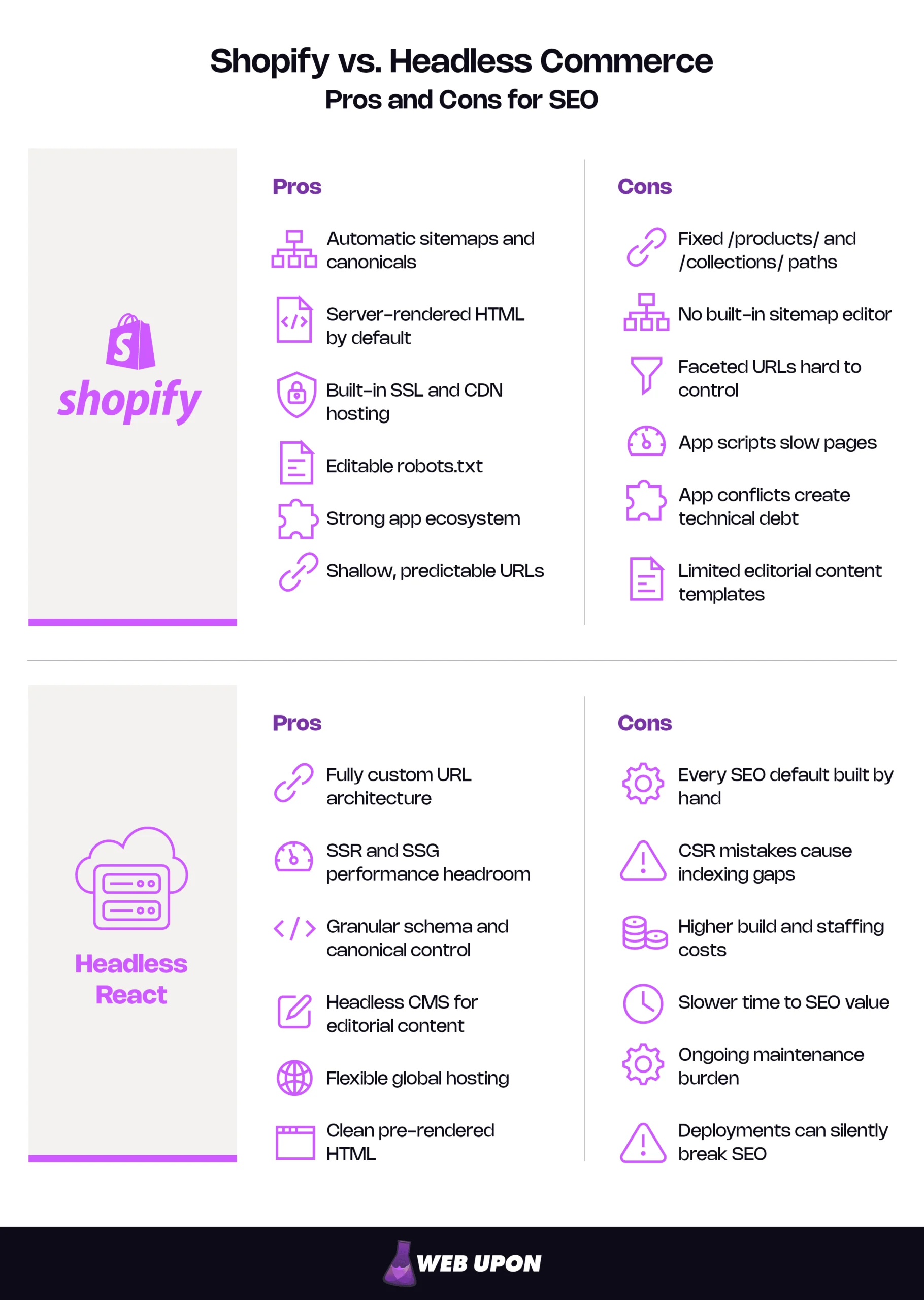
| Shopify SEO pros | Shopify SEO cons |
| Automatic sitemaps and canonicals | Fixed /products/ and /collections/ paths |
| Server-rendered HTML by default | No built-in sitemap editor |
| Built-in SSL and CDN hosting | Faceted URLs hard to control |
| Editable robots.txt | App scripts slow pages |
| Strong app ecosystem | App conflicts create technical debt |
| Shallow, predictable URLs | Limited editorial content templates |
Headless architecture exists to remove these ceilings. The question is what it costs to do so.
Headless Commerce (React) for SEO: The Pros and Cons of Full Architectural Control
The honest summary of headless commerce SEO: everything becomes possible, and nothing comes free.
Headless React SEO Pros: A Higher Ceiling for Performance and Customization
- Full URL control: your team designs URL structure, internal linking, and crawl depth.
- Better rendering options: frameworks such as Next.js support SSR and SSG, which can improve page speed and Core Web Vitals when properly implemented.
- Precise technical SEO logic: meta tags, structured data, and canonical rules tailored to complex catalogs.
- Integrated content: a headless CMS lets editors publish buying guides and shoppable editorial alongside products, free of Liquid template limits.
- Global delivery choices: hosting and CDN decisions tuned for international audiences.
- Clean HTML for crawlers: pre-rendered pages instead of reliance on client-side rendering.
Headless React SEO Cons: The Hidden Complexity Tax on SEO Execution
- Rendering mistakes: a React front end that relies on client-side rendering without SSR or SSG risks delayed, partial, or failed rendering, so Google may index incomplete content.
- No managed defaults: sitemaps, robots.txt, hreflang, canonicals, and redirects are all engineered and maintained by your team.
- Higher build and staffing costs: you need front-end engineers who can own both React and technical SEO after launch.
- Delayed benefits: SEO gains can’t start until the new front end launches.
- Compounding maintenance: the rendering layer, hosting, and API integrations all need ongoing care.
- Regression risk: any deployment can break SEO silently.
That last risk is the one teams underestimate. A routine release changes a shared layout component, and either a staging-only noindex tag slips into production or canonical logic starts pointing every variant at the homepage. Google may skip rendering a noindexed page entirely and treats canonicals as a strong signal. Nothing looks different, and traffic slides for weeks before anyone connects it to the deploy. Automated SEO checks in the deployment pipeline (testing rendered HTML on sample URLs for robots directives, canonicals, titles, and status codes) turn that silent failure into a failed build.
| Headless React SEO pros | Headless React SEO cons |
| Fully custom URL architecture | Every SEO default built by hand |
| SSR and SSG performance headroom | CSR mistakes cause indexing gaps |
| Granular schema and canonical control | Higher build and staffing costs |
| Headless CMS for editorial content | Slower time to SEO value |
| Flexible global hosting | Ongoing maintenance burden |
| Clean pre-rendered HTML | Deployments can silently break SEO |
Pros and cons lists set the terms. The real test is how each architecture performs on the factors that shape search performance.
Shopify vs. Headless Commerce, Factor by Factor
Page Speed and Core Web Vitals: Where Headless Has More Headroom
Google’s Core Web Vitals measure loading (Largest Contentful Paint, LCP), responsiveness (Interaction to Next Paint, INP), and visual stability (Cumulative Layout Shift, CLS). “Good” means LCP within 2.5 seconds, INP under 200 ms, and CLS under 0.1. INP replaced the older responsiveness metric on March 12, 2024, so analyses that predate the change are out of date.
Most Shopify Core Web Vitals problems trace back to the theme and app layer: oversized hero images, render-blocking scripts from review and personalization apps, and layout shifts from late-loading widgets. Fixing them takes theme-level work, and some app scripts can’t be removed without losing the feature.
A headless front end with SSR or SSG can deliver strong LCP, INP, and CLS scores when properly implemented, because the team controls every asset, script, and render path. The advantage is headroom, not a guarantee. A lean Shopify theme can pass, and a headless site shipping a heavy JavaScript bundle can fail. And Google says good scores don’t guarantee top rankings; relevance comes first.
Edge: Headless, if your team has the discipline to use the headroom; otherwise a cleaned-up Shopify theme is the faster win.
Crawlability, Indexing, and URL Architecture: Shopify’s Predictability vs. Headless Flexibility
For a few thousand products in a simple category tree, Shopify’s automatic sitemaps and consistent URL patterns deliver reliable crawling with almost no effort.
Headless removes forced path segments, so URLs can mirror how customers search: /running-shoes/trail/ instead of /collections/trail-running-shoes. The team also decides exactly which filter combinations become indexable landing pages and which stay out of the crawl. Shopify still asks for a server-side redirect from the standard /products/:handle path.
The catch is rendering. Headless indexing problems most often come from client-side rendering without a server-rendered fallback.
Edge: Shopify for standard catalogs; headless when URL architecture or faceted search is a measurable revenue driver.
Content Management and On-Page SEO Control: The CMS Integration Advantage of Headless
Shopify’s native content tools cover a basic blog and static pages. A serious editorial program (buying guides with live products, comparison hubs, category pages with rich copy) usually stretches metafields, sections, and apps past what they were built for.
Headless can connect a purpose-built CMS, giving editors structured content models, rich metadata, and programmatic page generation at scale. Meta tags and schema are then generated from the same data instead of patched together from apps. For brands where editorial and commerce are converging, this is often the strongest argument for headless. That integration works best when a deliberate ecommerce content strategy drives it, rather than the technology itself.
Edge: Headless, when content-led acquisition is a core growth channel; Shopify, when content is occasional and product-focused.
International SEO: Shopify Markets vs. Custom hreflang Engineering
Shopify Markets covers more than many teams realize. According to Shopify’s Help Center, once markets are configured, Shopify generates hreflang tags, canonical URLs, and market-specific sitemaps automatically across subfolders, subdomains, or country domains. Shopify recommends subfolders for most stores. Teams can turn off the automatic hreflang tags and supply their own.
Headless gives full control over hreflang, localized URL slugs, and per-market content, which matters when markets need different catalogs or region-specific content programs. The price is that every tag, sitemap entry, and return link must be built and kept in sync, and hreflang errors are easy to make and slow to surface. Google’s guidance on localized versions ignores hreflang without return links and flags wrong language or region codes.
For a founder planning new markets, the test is simple. The same catalog in more currencies and languages is Shopify Markets territory. Distinct regional storefronts with their own URL logic and content are where headless starts to earn its cost, and where hreflang, URL, and sitemap planning calls for an enterprise SEO approach.
Edge: Shopify for most expansion plans; headless for complex, content-heavy localization.
| SEO factor | Shopify | Headless React | Edge | What it takes to win |
| Page speed and Core Web Vitals | Theme and app layer sets the ceiling | High headroom with SSR/SSG | Headless (conditional) | Shopify: app cleanup and a lean theme. Headless: performance budgets and SSR on key templates. |
| Crawlability and URLs | Predictable, fixed paths | Fully custom | Depends on catalog | Shopify: filter and canonical hygiene. Headless: correct rendering plus a deliberate URL plan. |
| Content and on-page control | Basic blog and pages | Any headless CMS | Headless (content-led brands) | Shopify: structured metafields and sections. Headless: CMS models with SEO fields built in. |
| International SEO | Shopify Markets automates hreflang | Fully manual and flexible | Shopify (most brands) | Shopify: subfolder markets, published translations. Headless: automated hreflang and sitemap generation with tests. |
Headless wins several of these factors on paper. Whether it wins in your business depends on cost, time, and migration risk.
Cost, Time to Value, and Migration Risk: The Price of SEO Control
What a Headless SEO Build Costs
Headless commerce cost is less about the build than about everything that follows it. Shopify itself says headless costs more to build and run than a theme. The main categories:
- Front-end build: the React application and every page template.
- Hosting and rendering infrastructure: servers or edge functions that run SSR, plus CDN and caching.
- Headless CMS licensing: a recurring subscription that scales with users, locales, or volume.
- API integration: connecting commerce, CMS, search, reviews, and analytics.
- SEO engineering: sitemaps, canonicals, robots rules, hreflang, structured data, and redirects.
- QA and monitoring: rendered-HTML testing, Core Web Vitals monitoring, and pipeline checks.
- Ongoing maintenance headcount: the engineers who keep it all working after launch.
Standard Shopify’s profile is simpler: subscription, theme work, and a few SEO apps. Hybrid sits between them, since checkout, commerce logic, and much of the routing plumbing stay with Shopify. Shopify’s Oxygen hosting comes at no extra charge on paid plans.
Relative cost of Shopify, hybrid headless Shopify, and fully custom headless builds:
| Cost category | Shopify | Hybrid (headless Shopify) | Fully custom headless |
| Front-end build | Low | High | High |
| Hosting and rendering | Low (included) | Low on Oxygen, Medium on other hosts | Medium to High |
| CMS licensing | Low | Medium | Medium |
| API integration | Low | Medium | High |
| SEO engineering | Low | Medium | High |
| QA and monitoring | Low | Medium | High |
| Ongoing maintenance headcount | Low | Medium to High | High |
How Long Before the SEO Gains Show Up
SEO gains start after launch, and rankings rarely settle the day a new front end goes live. Google notes a site move takes a few weeks on medium sites and longer on large ones. The payback clock starts months after the spending does.
That gap hits cash flow and the roadmap. While engineers build the new front end, they aren’t shipping conversion improvements, new markets, or campaign pages on the old one.
Before approving a build, name the targets: Core Web Vitals pass rate by template, indexed pages in key categories, non-brand organic sessions, and organic revenue. If nobody can name the target, nobody can say whether the project worked.
Protecting Rankings During the Switch
A new front end is one of the riskiest moments for organic traffic, even when the back end stays put. Every template, internal link, and URL is regenerated by new code at once.
URLs are the biggest variable. Leaving Shopify’s fixed paths means every changed URL needs 301 redirects to its closest equivalent, kept for at least a year, as Google’s guidance on site moves with URL changes describes. For many brands, the safer headless migration keeps existing URLs in the first release and restructures later, once the new front end is stable in search; Google advises one change at a time. Hybrid builds get one safety net: current Hydrogen checks the store’s Shopify URL redirects before returning a 404, so redirects managed in Shopify admin keep working.
Headless SEO launch checklist:
- Crawl and benchmark the current site, including rankings, indexed pages, and Core Web Vitals.
- Choose a rendering strategy for each page type.
- Map every existing URL to its new destination and set up 301 redirects.
- Rebuild sitemaps, canonicals, robots rules, and hreflang before launch.
- Validate rendered HTML for key templates with Search Console’s URL Inspection tool.
- Add automated SEO checks to the deployment pipeline.
- For large catalogs, launch in stages; Google advises moving smaller sites all at once.
- Monitor indexing, rankings, and organic revenue until traffic settles on the new URLs.
This checklist is where a partner experienced in ecommerce SEO helps. One missed redirect map or broken canonical template can cost more in organic revenue than an expert review would have.
You now have every input. Here is how to weigh them for your business.
An SEO Decision Framework for E-Commerce Leaders
When Shopify’s SEO Capabilities Are Enough
- Standard catalogs: conventional category trees, manageable SKU counts, and content plans that fit Shopify’s constraints.
- Lean engineering teams: no dedicated front-end engineers to carry a headless SEO stack.
- Speed-first businesses: time to market and stability outweigh the marginal gain from full control.
When Headless React Becomes the Better SEO Investment
- Revenue-critical architecture: page speed at scale, complex hreflang, and custom URLs directly drive revenue.
- Content-commerce convergence: growth depends on a CMS integrated with commerce, and Shopify’s content limits create a measurable SEO ceiling.
- Dedicated front-end teams: engineers who can own rendering, SEO infrastructure, and maintenance without losing agility.
The Hybrid Middle Path: Shopify as Commerce Backend with React Frontend
The hybrid model uses Shopify’s Storefront API to power a custom React front end while checkout and commerce logic stay on Shopify. It captures most of the SEO upside of headless (custom URLs, rendering control, CMS integration) without giving up Shopify’s proven commerce infrastructure. Shopify’s headless overview sets out the options.
The SEO priorities for a headless Shopify build don’t change: server-render every commerce template, make sure API content is in the initial HTML rather than loaded afterward, and keep sitemaps and indexing in sync across the decoupled stack.
Shopify Hydrogen is the toolkit for this path, and it changed significantly in 2026. Shopify’s legacy documentation describes Hydrogen 2026-04 and earlier as a full-stack framework built on Remix or React Router. According to Shopify’s Hydrogen documentation, the current version is a framework-agnostic toolkit for the Shopify-specific parts that are easy to get wrong: cart, variant selection, collection filtering, Shopify Markets routing, and redirects. As of October 2026, Shopify offers two starting templates: React Router on Shopify’s Oxygen hosting, or Next.js on Vercel.
The documentation is explicit about what Hydrogen leaves to you: routing, rendering strategy, and SEO, including meta tags, Open Graph tags, and structured data. Hydrogen simplifies the commerce plumbing; it doesn’t settle who owns SEO. The template choice usually follows team skills. React Router on Oxygen keeps hosting inside Shopify’s ecosystem, while Next.js on Vercel suits teams already fluent in that stack.
Questions to Answer Before Committing to Headless
- Which specific Shopify SEO limit is costing us revenue today, and can we measure it?
- Can a theme rebuild, app cleanup, or Shopify Markets setup solve that limit for less?
- Do we have front-end engineers who can own SSR, sitemaps, canonicals, and hreflang permanently?
- How long can the business wait for SEO payback after launch?
- Who will protect organic rankings during the switch?
How the answers usually land, by business profile:
- Growing DTC brand on a standard theme: stay on Shopify and invest in theme performance and content.
- Content-led brand with a large editorial program: consider hybrid, led by the CMS and content model.
- Multi-market brand with complex localization: start with Shopify Markets; go hybrid only if markets need distinct URL logic and content.
- Large catalog with deep faceted navigation: hybrid is often justified, if faceted SEO value can be measured.
- Enterprise with a dedicated front-end team: hybrid or fully headless, depending on how much non-Shopify commerce the stack must serve.
Decision matrix for staying on Shopify, going hybrid, or going fully headless:
| Criterion | Stay on Shopify | Go hybrid | Go fully headless |
| Engineering capacity | No dedicated front-end team | Small dedicated front-end team | Large team owning the full stack |
| URL architecture needs | Standard paths are acceptable | Custom paths drive revenue | Custom paths across several back ends |
| Content ambitions | Occasional blog and guides | Editorial program tied to products | Content platform serving many channels |
| International complexity | Same catalog, more markets | Distinct URLs or content per market | Distinct catalogs and systems per region |
| Core Web Vitals gap | Fixable with theme and app work | Persistent after theme work | Persistent and revenue-critical |
| Budget and time horizon | Short payback required | 12+ months to payback acceptable | Long-term platform investment |
If your answers point toward hybrid or headless, get an SEO architecture review before development starts; strategic SEO input costs far less at the planning stage than after launch.
Whichever way your answers point, the next step is the same: pressure-test the plan before you build.
Choose the SEO Burden You Can Sustain
The Shopify vs. headless commerce decision isn’t really about which storefront is faster. Shopify gives most brands better SEO value per dollar because it owns the fundamentals for you. Headless pays off only when a specific architectural limit is costing revenue and your team can carry the SEO work that comes with removing it.
The right architecture is the one whose SEO ownership your team can sustain while still moving quickly. Before anyone writes code:
- Identify the Shopify SEO limits that cost you revenue today.
- Audit your team’s capacity to own a rendering layer.
- Plan SEO protection before any rebuild begins.
Do that, and the rebuild pitch becomes a decision you can measure, not a leap of faith.
If you’re weighing a headless proposal, we can review its SEO risk (rendering, URLs, redirects, and international setup) before the budget is approved. To set up that review, contact Web Upon.


