You can move from Shopify to a custom Node.js/React storefront with your rankings intact, and usually come out faster and more visible than you went in. The organic traffic loss behind every replatforming horror story is almost never caused by leaving the platform. It comes from four preventable failures in the handoff between the old architecture and the new one.
- An incomplete or untested 301 redirect map. The URLs move; the accumulated authority doesn’t follow.
- Client-side rendering that hides content from crawlers. The page looks perfect to a human and empty to a bot.
- Structured data and canonical tags never re-implemented. Rich results vanish and duplicate versions of the same page start competing.
- No pre-migration baseline. Problems stay invisible until the revenue drop makes them obvious, and by then you’ve lost weeks of diagnostic time.
Every one is an execution gap, not an architectural flaw. Shopify migration SEO fails in the transfer, not the destination.
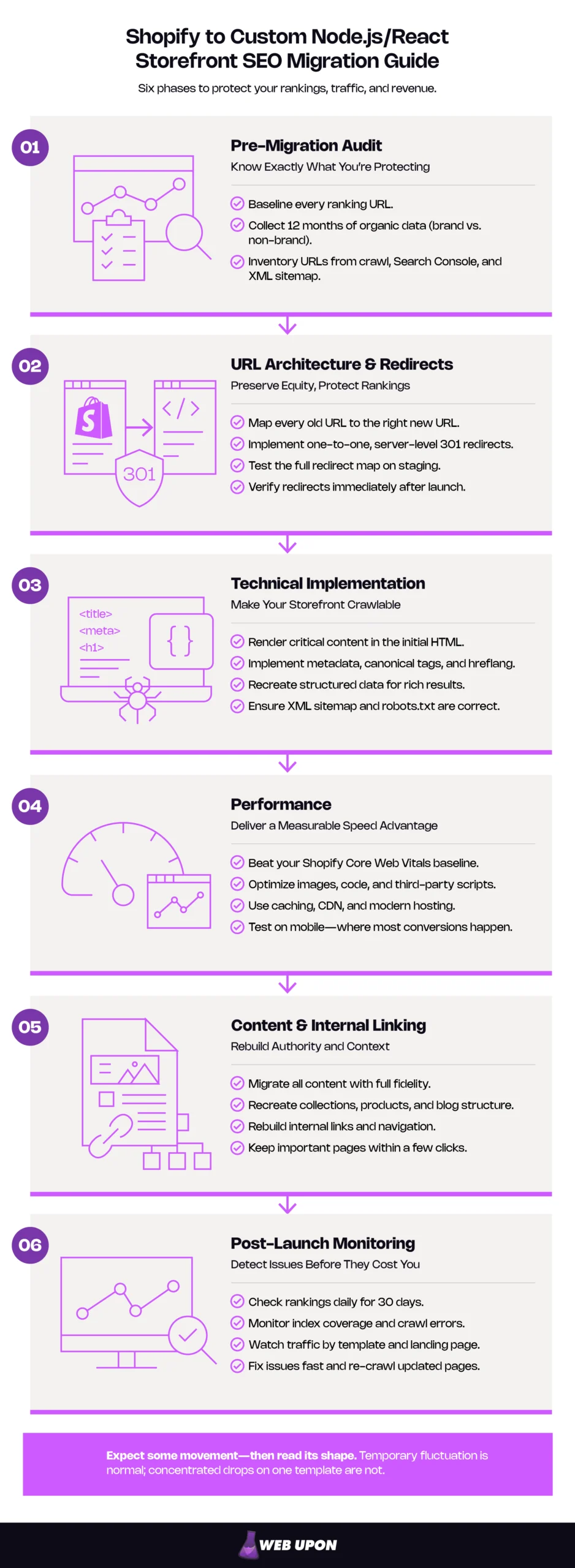
What follows resolves each failure in order. Failure four belongs to Phase 1, where you establish what you’re protecting. Failure one belongs to Phase 2, where URLs and redirects are designed. Failures two and three belong to Phase 3, where the storefront is made legible to search engines. Phases 4 through 6 cover performance, content integrity, and the monitoring that tells you whether any of it worked.
Key Takeaways
- Baseline before anyone builds. Twelve months of organic data, branded separated from non-branded, every ranking URL inventoried from a crawl, Search Console, and the XML sitemap.
- Redirects are the highest-risk deliverable. One-to-one, server-level 301s, tested against staging before launch and against production immediately after.
- Anything you want indexed must exist in the initial HTML response. Rendering is a separate queued stage, and content that appears only after JavaScript executes waits on it.
- What Shopify handled silently becomes your specification: canonical logic, sitemap generation, hreflang, and structured data.
- Expect movement, then read its shape. Temporary fluctuation is normal and a medium-sized site can take a few weeks for most pages to move in the index. Losses concentrated on one template are a bug; scattered movement usually isn’t.
The Migration at a Glance: Six Phases and What Each Protects
Replatforming from Shopify is a sequence, not a checklist you can shuffle. This ecommerce site migration checklist gives you the six phases and the one thing in each you cannot compromise on.
| Phase | The single non-negotiable | What it protects |
| 1. Pre-migration audit | Baseline every ranking URL before anyone touches the build | Your ability to detect a problem at all |
| 2. URL architecture & redirects | One-to-one, server-level 301s, tested before launch | Accumulated link equity and indexed URLs |
| 3. Technical implementation | Metadata, content, and schema in the initial HTML response | Crawlability, indexation, and rich results |
| 4. Performance | Measurable Core Web Vitals improvement over the Shopify baseline | The competitive upside of the project |
| 5. Content & internal linking | Full-fidelity transfer with the link graph rebuilt | Topical authority and equity distribution |
| 6. Post-launch monitoring | Daily ranking checks for 30 days against the baseline | Fast diagnosis before losses compound |
The work starts before a line of production code is written, with knowing exactly what you have. Teams that start building before the audit is finished are the teams that discover, three weeks after launch, that they have no way of knowing what they lost.
1. Pre-Migration SEO Audit: Know Exactly What You’re Protecting Before You Move
You can’t prove a migration worked without a number to compare against. This phase produces that number — and it’s the one that gets compressed when timelines tighten, which is why it sits behind most problems nobody can diagnose later. Shopify migration SEO begins before any architectural decision is locked. Start with a structured pre-migration SEO audit.
Conducting a Full URL Inventory of Your Shopify Store
Your inventory needs three independent sources, because none is complete alone.
- A full site crawl using a tool such as Screaming Frog or Sitebulb, covering products, collections, blog posts, and every navigation path.
- Google Search Console’s indexed pages report, which shows what Google actually holds, including pages your crawler will never reach.
- The existing XML sitemap, which captures what the platform believes it published.
A crawler only finds what is linked. A discontinued collection nobody links to anymore, a landing page from a campaign three years ago — both can still rank and still be missed entirely by a crawl. The gaps between the lists are where the risk lives.
You’re finished when every URL from any source carries a decision: preserve, redirect, or retire. A crawl alone is not an inventory. Record Shopify’s default patterns as you go — /products/, /collections/, /blogs/, /pages/ — since each must be reconciled explicitly.
Mapping Keyword Rankings and Organic Traffic Baselines
The baseline is the instrument panel for the entire project. Build it in this order:
- Export at least twelve months of organic data. A shorter window can’t capture seasonality, and a November launch measured against an August average looks like a catastrophe when it’s simply Q4 arriving.
- Segment branded from non-branded queries. Branded search survives a migration almost untouched; non-branded discovery is the fragile part. Averaged together, healthy branded numbers will hide real non-branded loss for weeks.
- Tie ranking positions to specific URLs. When a position moves after launch, you need to know which page owned it.
- Flag the pages driving most organic sessions and conversions as your priority monitoring set.
- Store every export outside the platform being decommissioned. Data that lives only in the system you’re switching off is not a baseline.
Auditing Backlink Profiles and Domain Authority Signals
Pull a complete backlink report and find which URLs hold the heaviest concentration of inbound links and referring domain authority. Link equity — the ranking value that flows through a link from one page to another — is the one asset here you can’t rebuild on your own schedule.
Internal links are yours to fix whenever you like. External links are not. A trade publication linked to a product page in 2021; if that URL 404s after launch, nobody is updating that link for you. That makes the backlink inventory the highest-priority input to the redirect map, not a workstream running alongside it.
Every externally linked URL is a permanent obligation. Carry your disavow file forward too — it doesn’t migrate itself.
Inventorying Existing Metadata, Structured Data, and Canonical Tags
Extract every meta title, description, canonical tag, and hreflang tag currently live, and audit which structured data types are deployed. Split the results in two, because this inventory does two jobs at once.
| What to preserve | What to upgrade |
| Titles and descriptions on strongly ranking pages | Templated titles constrained by theme character limits |
| Canonical logic that correctly resolves variants | Duplicate paths the platform generated automatically |
| Product and breadcrumb schema currently earning rich results | Schema fields the theme never populated |
| Hreflang configurations across market variants | Metadata gaps on lower-tier collection and blog pages |
Most of these signals were shaped by what a theme allowed rather than by what your catalog needed. The custom build removes that ceiling, which is much of the practical appeal of headless commerce SEO. That makes this document a preservation record and an improvement backlog at once.
One warning catches teams repeatedly: structured data injected by a Shopify app disappears completely at cutover. Apps don’t migrate. Review stars and enhanced product schema delivered by an app have to be rebuilt natively, and nobody notices they’re gone until the rich results stop appearing.
Skip this phase and later problems become undetectable rather than merely difficult. If you’d rather have the baseline built by a team that’s done it before, contact Web Upon.
You now know what exists. The next question is where it’s going to live.
2. URL Architecture and Redirect Strategy: The Foundation of SEO Continuity
More migrations are damaged at this step than at any other. If you read one section of this guide with a developer in the room, make it this one.
Designing a URL Schema That Preserves or Improves Shopify’s Structure
The first decision in any URL structure migration is whether to mirror your existing patterns or build a cleaner hierarchy. Preserve URLs that hold rankings or external links, and restructure only where the existing pattern is actively harmful. Actively harmful means parameter bloat, duplicate paths to the same product, or deprecated routes still returning 200s. It doesn’t mean “slightly inelegant.” Every changed URL is a deliberate risk traded for a structural gain, and that trade only works where the gain is real.
| Shopify pattern | Recommended action | Reasoning |
| /products/[handle] | Preserve, or shorten to /[handle] | High equity concentration, change only with full redirect coverage |
| /collections/[handle] | Preserve | Category equity is slow to rebuild |
| /collections/[a]/products/[b] | Consolidate to the canonical product URL | Classic duplicate-path source |
| /blogs/[blog]/[article] | Flatten to /blog/[article] | Cleaner hierarchy, low risk with redirects |
| /pages/[handle] | Preserve | Often carries unexpected backlinks |
Building and Validating the Redirect Map
The 301 redirect map is the highest-risk deliverable in the project: every inventoried URL mapped one-to-one to its destination, implemented as server-level 301s in the Node.js application. Not 302s, meta refreshes, or client-side JavaScript redirects. The reason isn’t equity — permanent redirects don’t cause a loss in PageRank. It’s the signal: a temporary redirect is designed to leave Google uninfluenced by the move, which can keep the old URL in results, and Google may never see a JavaScript redirect at all if rendering fails.
- Build the destination URL structure and freeze it. A map written against a moving target is worthless.
- Map every inventoried URL. For retired products, send traffic to the closest equivalent product or the parent collection.
- Stage the rules in pre-production.
- Test by running your complete pre-migration URL list against staging, capturing the response code and final destination for every single one.
- Verify against the audit inventory, row for row.
- Launch, then immediately re-run the same test against production.
Resist blanket-redirecting retired products to the homepage. Google’s site move documentation warns that pointing many old URLs at one irrelevant destination might be treated as a soft 404, in which case no equity passes and the original page falls out of the index anyway. Consolidation is the carve-out: content that lived across several pages may legitimately be merged into one, which is what a thin-collection cleanup is.
Done means zero 404s, zero 302s, zero chains longer than one hop, on a list matching your inventory exactly. Googlebot follows up to ten hops, and Google’s advice where chaining is unavoidable is ideally three and below five. Hold the tighter line anyway. Every extra hop is another chance for a rule to be misordered or quietly dropped in a later deploy.
A redirect map isn’t finished until it has been tested against the staging build.
One clarification worth having early: Search Console’s Change of Address tool covers domain changes only. Even a www to non-www move on the same domain is handled with canonical tagging and redirects instead. A replatform on the same domain doesn’t use it. Your redirects are the only signal you get to send.
Handling Shopify-Specific URL Patterns in Node.js Routing
Shopify enforces URL conventions a custom Node.js storefront simply doesn’t have. Those forced prefixes are platform behavior, not web standards, so legacy paths must be handled explicitly in routing rather than assumed to resolve. The same applies to parameterized URLs from variant selectors and filters, many of which have quietly picked up index coverage.
- Configure routing middleware to match legacy path patterns and resolve them to new destinations.
- Write wildcard rules for parameterized and variant URLs never mapped individually.
- Confirm the final configuration has no loops, no temporary redirects, and no chains beyond one hop.
Specific rules first, wildcards last. A broad pattern evaluated ahead of your one-to-one mappings will swallow them whole, routing carefully mapped URLs to a generic destination without raising a single error.
Establishing Canonical Rules the Platform Used to Handle for You
Canonicalization — the signal telling search engines which version of a page is the authoritative one when several URLs serve similar content — is where the handoff thesis is clearest. Shopify did most of this automatically. Your custom build will not, unless someone specifies it.
Implement self-referencing canonical tags on every page, rendered server-side and present in the raw HTML rather than injected by JavaScript after load. Then audit the three page types behind nearly all duplicate indexing:
- Product variants — canonical points to the primary product URL, not the variant.
- Paginated collection pages — each page gets its own canonical URL. Don’t point page 2 at page 1; Google’s ecommerce pagination guidance says explicitly not to use the first page of a sequence as the canonical.
- Filtered results — faceted navigation means filter combinations that generate unique URLs. Decide first whether you want them crawled at all. For the combinations you don’t, Google prefers a robots.txt disallow or fragment-based filtering, calling canonical and nofollow signals generally less effective in the long term. Reserve canonicalization for filtered URLs you deliberately keep crawlable — and return a 404, not a styled empty page, when a combination matches nothing.
Invisible platform behavior has become an explicit engineering requirement. Put it in the specification.
The URLs now resolve correctly. The next question is whether search engines can see anything on them.
3. Technical SEO Implementation: Making the New Storefront Legible to Search Engines
A React storefront can render a flawless page for a human being and an entirely empty one for a crawler. Closing that gap is the substance of React storefront SEO, and the work of this phase.
Three stages are involved, and conflating them causes most of the confusion here. Crawling is a request for a URL. Rendering is the execution of JavaScript to produce the finished page. Indexing is the decision to store that page and let it rank. A page can be crawled and never rendered, or rendered and never indexed. Googlebot queues every page returning a 200 for rendering, and a page may sit on that queue for a few seconds but can take longer. That delay is the risk. Google’s JavaScript SEO documentation sets out the sequence in full.
Choosing Between Server-Side Rendering and Static Generation
The rule of thumb is short enough for a whiteboard: anything you want indexed must exist in the initial HTML response. Server-side rendering (SSR, where the server builds HTML per request) and static site generation (SSG, where pages are pre-built at deploy) both deliver that. Client-side rendering (CSR, where the browser assembles the page from JavaScript) does not do so reliably; that’s the contrast between server-rendered pages whose response contains all content and app-shell sites whose initial HTML doesn’t.
This isn’t an all-or-nothing decision, and treating it as one produces either a slow storefront or an invisible one. Server-side rendering SEO is a per-route policy rather than a global switch. One build can serve static collections, server-rendered products, and client-rendered account areas — the pattern most Next.js ecommerce SEO work converges on.
| Page type | Recommended rendering | Why |
| Product pages | SSR, or SSG with incremental revalidation | Price and stock change, must stay indexable |
| Collection pages | SSG where content is stable | Crawl efficiency, fastest delivery |
| Blog and editorial | SSG | Static content, maximum performance |
| Search and filtered results | CSR, excluded from indexing | No index value, protects crawl budget |
| Account, cart, checkout | CSR, blocked in robots.txt | Never indexable |
Implementing Metadata at Catalog Scale
Nobody writes metadata by hand for five thousand SKUs, which means the template system is your metadata strategy. Populate it from the backend or CMS data layer before HTML is served — never client-side, where a crawler can end up with an empty <title>.
- The pattern — field order and separators for each page type.
- Character limits — enforced at generation, not corrected later.
- A uniqueness rule — a check that stops two products producing identical titles.
- Fallback behavior — defined output when a data field is missing.
That last one isn’t optional. Incomplete product records are a certainty at scale, and without fallbacks they ship with empty or truncated titles that surface in an audit six months later.
Rebuilding Structured Data From Scratch
Structured data delivered by a theme or app is gone at cutover. All of it has to be re-implemented as JSON-LD — a script-tag format for machine-readable page data — injected server-side and populated from your data layer.
- Product, as a merchant listing — name, description, image, SKU, brand, price, currency, availability. Google splits Product markup into two classes with different requirements; a storefront where the item can be bought is a merchant listing, not a product snippet, and the merchant listing documentation carries the full field set.
- BreadcrumbList — the full navigational trail for each page.
- Organization — name, logo, URL, contact and social profiles, sitewide. Nesting merchant return policy and loyalty program markup is also recommended here.
The commercial stake is easy to underrate. Rich results are visible real estate: star ratings, price, and stock status sitting inside the listing itself, pulling clicks that a plain blue link doesn’t. Lose rich results and click-through falls while your rankings hold perfectly steady — a revenue effect no rankings report will show you.
Two notes belong in the spec. Schema values must match what’s rendered; a price in your markup that disagrees with the page is a manual action risk, and such an action costs rich result eligibility while leaving web ranking untouched — the same pattern described above. And the rich-result landscape has narrowed. Google wound down HowTo rich results through 2023, limiting them to desktop in August of that year alongside a sharp cut to FAQ visibility, and FAQ rich results stopped appearing in Search entirely on 7 May 2026. Both remain valid Schema.org types and are harmless if present, but neither produces a visual search feature now. Product, BreadcrumbList, and Organization are where the visible return sits.
Generating and Submitting the New XML Sitemap
Shopify generates your sitemap automatically: every store produces a sitemap.xml covering products, pages, collections, and blog posts, updated whenever an item is added. A custom build will not, unless someone writes it into the specification.
- Include: products, collections, blog posts, and key static pages, generated dynamically so new items appear without manual intervention.
- Exclude: filtered URLs, internal search results, account pages, cart, and checkout.
- Split into a sitemap index past 50,000 URLs — or past 50MB uncompressed, a limit that binds independently and is hit first on sitemaps with long URLs or image extensions.
- Retain and submit the old URL sitemap temporarily. Handing search engines the old list surfaces your redirects faster than waiting for a natural re-crawl. Submit both and watch the old sitemap’s indexed count fall to zero as the new one rises. Retire it once coverage stabilizes.
Carrying Hreflang Signals Into the New Build
Skip this section if you sell into a single market. Everything above and below applies to you; this doesn’t.
Hreflang tags tell search engines which language and regional version of a page to serve to which audience. If you were using Shopify Markets, this wasn’t partly handled for you — it was handled outright. Configure markets with domains and languages and the hreflang tags, canonical URLs, sitemaps, and crawler access are all produced automatically, updating when market settings change. Following the pattern of this phase, that obligation now transfers to your build.
- Migrate every existing language and region configuration.
- Render the tags server-side in the HTML head, not through sitemap entries alone.
- Audit return-tag reciprocity: every variant must reference every other variant, including itself. A one-way declaration is ignored — the requirement exists so another site can’t unilaterally name itself an alternate version of your page. The failure is pairwise, though: Google still processes the pairs that do point to each other, so a broken return tag drops that relationship, not the whole cluster.
The storefront is now crawlable, indexable, and correctly signposted. The next phase is where the custom build starts paying you back.
4. Performance Optimization: Core Web Vitals as a Ranking Imperative
Everything to this point has been defensive. This is the first phase about winning. On the old platform you optimized inside a theme; here you own the stack. Our approach to site speed optimization goes deeper than the fundamentals below.
Achieving Sub-Second Response Times With Node.js Backend Optimization
Work outward from the database to the edge, since each layer only helps if the ones beneath it are sound.
- Database and API layer — optimize queries and Storefront API calls to eliminate render-blocking data fetching.
- Application cache — Redis or in-memory caching for product data, collection data, and frequent API responses.
- Compression and transport — HTTP/2 and Brotli or Gzip at the server level, cutting time-to-first-byte, the delay before the browser receives the first byte of a response.
- CDN edge cache — the outermost layer, serving cached responses close to the visitor.
Cache invalidation is the decision your developer will make without asking, and you should make it with them. Aggressive caching produces excellent performance numbers and, sooner or later, shows a sold-out product as in stock at last month’s price. That’s a commercial problem wearing a technical costume. Set invalidation rules for pricing and inventory before the caching strategy is signed off.
Applying React Frontend Techniques That Directly Impact Rankings
Each technique maps to a specific metric, which is the only useful way to prioritize them.
- Code splitting and lazy loading of non-critical components → improves LCP and INP by cutting the JavaScript parsed before the page becomes usable.
- Modern image formats, responsive srcset, explicit width and height → improves LCP and eliminates the CLS caused by images resizing after load.
- Font preloading and reserved space for late-loading elements → eliminates CLS from banners and web fonts.
- Alt text populated from product data → serves accessibility and image search at once, on the same template-with-fallback discipline as metadata.
Never lazy-load above-the-fold hero or primary product imagery. Don’t lazy-load images likely to be in the viewport at load, LCP images especially. It delays the exact element LCP measures — a change that reads as an optimization in the pull request and registers as a regression in the field.
Benchmarking and Monitoring Core Web Vitals Post-Migration
Capture your Core Web Vitals baseline before cutover using Chrome User Experience Report field data, sampling the ecommerce templates that matter most: product, collection, and cart. Set explicit improvement targets rather than vague performance goals.
| Metric | Good threshold | Most common cause of failure on a React storefront |
| Largest Contentful Paint (LCP) | 2.5 seconds or less | Unoptimized hero imagery, slow server response |
| Interaction to Next Paint (INP) | 200 milliseconds or less | Heavy JavaScript execution blocking the main thread |
| Cumulative Layout Shift (CLS) | 0.1 or less | Images without dimensions, late-loading fonts or banners |
All three must pass at once — Google’s assessment passes only if the 75th percentiles of all three are good, so two out of three is a fail. That percentile means a fast median with a slow tail still fails. Mobile is almost always the harder bar. And the assessment runs on field data across a rolling 28-day window.
That last point is why a week-two reading proves nothing. Lab tools give an instant diagnostic score, useful for finding problems and useless for judging outcomes. The field data feeding the page experience signal lags by roughly a month, so your real performance profile won’t surface in Search Console until long after the launch dust settles. Use INP; First Input Delay was retired in 2024 when INP replaced it as a Core Web Vital, and any guidance still citing it is out of date.
The architecture is fast and visible. What it needs now is the content and linking structure that earned the rankings in the first place.
5. Content Migration and Internal Linking: Protecting the Authority You Built
Technical migrations get scrutinized. Content migrations get assumed to be a simple export, which is exactly why content is where the silent losses happen. Nobody notices a missing heading tag.
Migrating Product Pages, Collection Pages, and Blog Posts Without Content Loss
Transfer product descriptions, collection copy, and blog content with full fidelity, preserving heading hierarchy, keyword placement, and in-body internal links. Keep original publish dates, author metadata, and category structures — they carry topical authority signals that reset if the migration stamps everything with today’s date.
“Full fidelity” is an intention until you make it a test. Run a parity check per URL:
- Word count, old versus new.
- Heading count by level — H2s, H3s — old versus new.
- Internal link count, old versus new.
- Image count and alt text presence.
- Publish date and author attribution.
Any URL failing a check gets manual review before launch. Watch the headings especially. Rich text stored in Shopify’s editor frequently loses its heading tags on export, turning H2s into styled paragraphs — a page that reads identically to a customer and arrives structurally flat to a crawler.
Resist auto-generating product copy to fill gaps. Use the transition to enrich descriptions that were squeezed by template limits. Structured content audits identify which pages deserve the investment.
Rebuilding Internal Linking Architecture in the Custom Storefront
Audit the existing internal link graph and replicate the high-value relationships between products, collections, and editorial content. Then improve on them. Shopify’s related-product and navigation logic is largely fixed; a custom build lets internal linking run on data you actually care about — search demand, conversion rate, inventory depth.
Make sure navigation, breadcrumbs, and footer links render in server-side HTML and are genuinely crawlable. One trap voids all of this regardless of rendering strategy: if it isn’t an anchor tag with an href, it isn’t a link. Google can generally only crawl an anchor element with an href, and can’t reliably extract URLs from elements acting as links through script events. Navigation built on click handlers works flawlessly for every customer and transmits nothing to a crawler. The distinction a React team needs sits in the same page: links inserted by JavaScript stay crawlable provided what renders is proper anchor markup.
Managing Crawl Budget Efficiency in the New Architecture
Crawl budget — the finite attention a search engine allocates to your site — is a genuine constraint at very large catalog sizes, or at medium size when content changes daily. Google scopes its guidance to sites of a million or more pages changing weekly, or ten thousand or more changing daily, and tells sites whose pages are crawled the day they publish that they don’t need it at all. A fifteen-thousand-SKU catalog with a stable product set does not automatically have a crawl budget problem. Locate your catalog on that scale before deciding how much this deserves.
The distinction that confuses teams is between blocking and de-indexing, and getting it backwards produces the opposite of what you intended.
| Block in robots.txt | Allow crawl, apply noindex |
| Cart, checkout, and account pages | Thin collection pages you want out of the index |
| Internal search result URLs | Paginated pages beyond a useful depth |
| Infinite filter and parameter combinations | Legacy pages being phased out |
| Anything with no index value and no incoming links | Anything currently indexed that must be removed cleanly |
A URL blocked in robots.txt cannot have its noindex directive read. A blocked crawler never sees the rule, and the page can still appear in search results. If a page is already indexed and you want it out, allow the crawl so the instruction can be seen. Block it first and it may sit in the index indefinitely.
Every preparation is complete. The remaining question is what happens after the switch is flipped.
6. Post-Migration Monitoring: Telling a Fluctuation From a Failure
Some movement in the first weeks is expected behavior. Google’s site-move documentation says to expect temporary fluctuation, and that a medium-sized site can take a few weeks for most pages to move in the index. Knowing the difference between that and a fault prevents one of the most damaging post-launch errors: a panicked overcorrection to a problem that was already resolving itself.
Launching With a Go-Live SEO Checklist
This is the last mile of the ecommerce site migration checklist. Every item is verified against the live production URL, not staging. Environments diverge at deploy, and a check performed on staging proves nothing about what shipped.
- Confirm the production robots.txt does not carry staging restrictions.
- Spot-check redirects across every URL pattern type in the inventory.
- Confirm canonical tags render in the raw HTML source, not just in the browser.
- Submit the new XML sitemap in Google Search Console.
- Validate structured data with the Rich Results Test.
- Run a full production crawl and resolve every error it surfaces.
- Confirm analytics and Search Console tracking are live on the new build.
Shipping a staging environment’s Disallow: / to production is a single line instructing search engines to stop crawling the entire site, and it leads this list because the cost of missing it dwarfs everything else on it. It takes eleven seconds to check.
Tracking Keyword Rankings and Organic Traffic After Migration
Monitor rankings daily for the first 30 days, focused on the priority URLs from your audit. Set automated alerts on traffic drops for key landing pages so a problem surfaces in hours, not at the end of a monthly reporting cycle. Then calibrate what you’re looking at.
| Expected fluctuation | Investigate immediately |
| Modest movement across a scattered subset of URLs | Sudden loss concentrated on one template or URL pattern |
| Movement trending back toward baseline over two to four weeks | Losses deepening week over week |
| Temporary indexation dips as pages are re-crawled | Pages disappearing from the index entirely |
| Branded traffic steady, non-branded softening slightly | Branded and non-branded dropping together |
The right-hand column shares a signature. Structural faults produce patterned losses, because a broken rule breaks everything it touches. Scattered movement is usually re-crawling; a whole page type falling at once is a bug.
Diagnosing and Recovering From Post-Migration Ranking Drops
When something does drop, triage in this order rather than investigating everything at once. Most losses resolve at step one or two.
- Is the page indexed at all? Check coverage in Search Console and inspect the URL. If it isn’t in the index, nothing downstream matters.
- Does the old URL resolve correctly? Confirm a single-hop 301 to the right destination. Redirect faults are the most common cause.
- Is the content in the initial HTML? View the raw source, not the rendered DOM. Content that appears only after JavaScript executes is your answer.
- Did anything get lost in transfer? Compare against your parity check — missing headings, truncated copy, absent internal links.
- Is the equity still flowing? Confirm high-authority external links land on live pages rather than 404s.
Resubmit affected URLs through the URL Inspection tool to speed re-crawling once a fix ships. At 90 days, compare against your pre-migration baseline across rankings, organic traffic, Core Web Vitals, and backlink health. That’s the review that tells you whether continuity held.
If a drop resists internal diagnosis, an external technical review will usually find it faster than continued trial and error.
Each of the four failure modes named at the start now has an owner: the redirect map in Phase 2, rendering and structured data in Phase 3, and the baseline that makes all of it measurable in Phase 1.
Migrating With Confidence
The platform was never the risk. The handoff was — and a handoff is a manageable engineering problem when it’s sequenced properly and verified at every stage.
- Phase 1: Baseline everything before anyone touches the build.
- Phase 2: One-to-one server-level 301s, tested against staging.
- Phase 3: Content, metadata, and schema in the initial HTML response.
- Phase 4: Measurable performance improvement over the old baseline.
- Phase 5: Full-fidelity content with the link graph rebuilt.
- Phase 6: Daily monitoring for 30 days, full review at 90.
The migrations that hold their rankings share one characteristic, and it isn’t budget or team size. The SEO work started before the build did. Treating search continuity as post-launch cleanup is the most expensive mistake because by the time the damage is visible the diagnostic window has closed and the traffic has gone.
Get the sequence right and every constraint that shaped your old decisions — template limits, fixed navigation, metadata you couldn’t control — is gone, and a more ambitious content marketing strategy becomes possible on architecture that won’t fight you. Replatforming stops being something you survive and becomes the thing that raises your ceiling.
If you’d rather not run this alone, that’s what we do. We handle the audit, own the redirect map end to end, and validate the build before and after go-live so nothing ships on assumption. Contact us today ⟶


