The rankings you lose in a migration are lost in the planning, not the launch. Nobody destroys a site on cutover day. The damage is done three weeks earlier, when the old site never got crawled and documented.
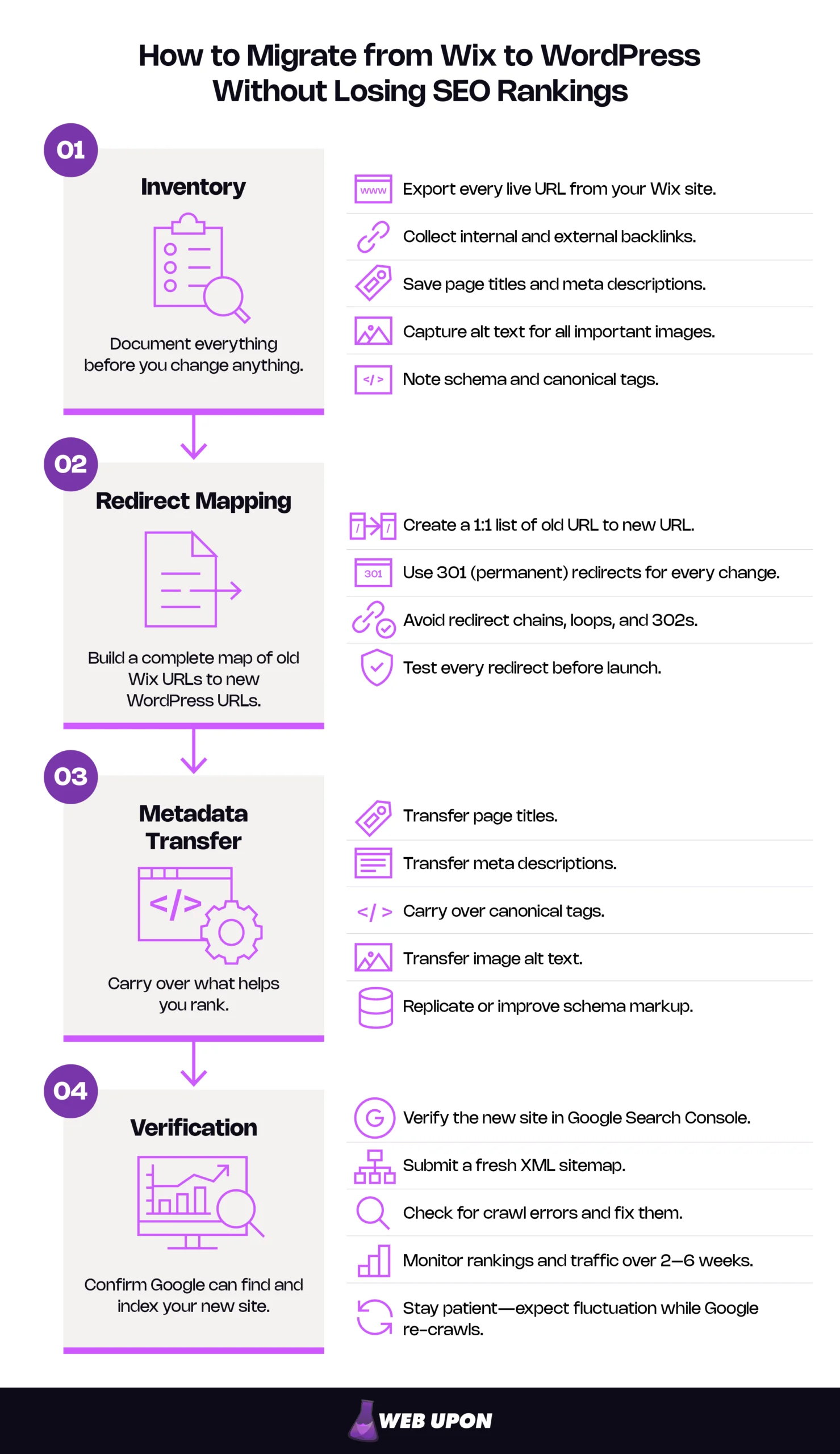
You keep your rankings by doing four things in order:
- Inventory every live URL, title, description, and backlink before you change anything.
- Build a 1:1 map of 301 redirects pairing each old Wix URL to its new WordPress equivalent.
- Carry over titles, descriptions, canonicals, alt text, and schema.
- Verify the new site in Google Search Console and submit a fresh sitemap on launch day.
Do that and you migrate Wix to WordPress SEO intact. Expect fluctuation while Google re-crawls; Google says most pages of a small to medium-sized site move within a few weeks. Two to six weeks is typical. A well-executed migration returns to baseline and often beats it, because WordPress gives you speed and technical controls Wix does not.
Why Migrating from Wix to WordPress Is an SEO Risk Worth Managing
Wix served you well enough to build something worth protecting. You are not escaping a bad product. You are outgrowing a ceiling. A Wix to WordPress migration is a platform upgrade with an SEO cost you can control.
The Hidden SEO Dangers of Platform Migration
“Rankings drop” is not information. Here is the mechanism. Google holds an index full of your Wix URLs, each carrying authority earned from internal and inbound links. When those URLs stop resolving, Googlebot finds 404s where authoritative pages used to be and drops them from the index. Redirection is not what costs you — permanent redirects cause no loss in PageRank — its absence is.
Three failure modes cause most of the damage:
- Unmapped URLs. Any page you failed to record 404s the moment DNS switches. Rankings and backlinks go together.
- Wrong redirect type. Googlebot follows a 302, but the indexing pipeline will not treat the destination as canonical, so the old URL can stay indexed.
- Metadata loss. Tuned titles get replaced by CMS defaults, and pages stop matching the queries they ranked for.
Google treats a platform move with URL changes as a site move requiring a mapped redirect strategy, not a routine update.
Staying put is not the safe option either. It is a deferred cost. Every quarter you wait, you add content to a platform where URL structure, performance, and architecture are all capped — and the migration gets larger, more link-heavy, and more expensive.
What You Stand to Gain SEO-Wise by Moving to WordPress
The gain is control. Wix makes reasonable defaults on your behalf. WordPress hands you the settings.
| Capability | Wix | WordPress |
| URL structure | Default prefixes on blog, store, dynamic pages, customizable by page type | Configurable per site and page |
| Metadata | Per-page titles and descriptions | Per-page plus site-wide templating |
| Schema | Automatic, for supported page types | Any type, editable |
| Speed and caching | Managed by the platform | Caching, images, delivery in your hands |
| Redirects | Manual entry in settings | Bulk import, pattern rules, chain detection |
| Architecture | Limited to supported page types | Custom post types and taxonomies |
That control is what a long-term WordPress SEO strategy is built on.
Migrate Wix to WordPress SEO Intact: The Pre-Migration Audit
A pre-migration SEO audit hands you a finished inventory and map before anything moves. It’s the real work that prevents any possible migration damage.
Conducting a Full SEO Inventory of Your Wix Site Before You Touch Anything
You need every URL Google knows about. No single source has them all, so pull four and merge:
- XML sitemap — authoritative for pages the platform knows about, but misses orphans.
- Search Console page indexing data — what Google actually indexed, including URLs you forgot existed.
- Analytics landing pages, 12–24 months — catches seasonal and long-tail pages a short window hides.
- Full site crawl — catches everything linked, and nothing unlinked.
Record the title, description, H1, and canonical for each URL. Then flag your protected set: pages driving sessions, and pages holding referring domains. They are rarely the same pages. The ones holding links are often old and low-traffic, which is exactly why they fall off a map built from analytics alone.
Capture your baseline before you change anything — rankings for priority terms, organic sessions by landing page, indexed page count. Without it you cannot tell a normal re-crawl dip from real damage, and that ambiguity is what produces panic and rushed, damaging fixes.
Building Your URL Mapping and Redirect Strategy from Day One
Wix and WordPress build URLs differently, and the difference is structural rather than cosmetic. Wix applies default prefixes to certain page types: blog posts under /post/, products under /product-page/. They are customizable in SEO Settings rather than locked, so map what is live. WordPress has no equivalent defaults, so each path is a mapping decision. Older sites may also carry legacy hashbang URLs — a pattern Google stopped recommending in October 2015 — which still surface in Search Console and old inbound links.
Build the map in a spreadsheet with these columns:
| Column | What it is for |
| Old URL | The exact live Wix URL, including any prefix |
| New URL | Its WordPress destination (one per row, no blanks) |
| Page type | Page, post, product, category (drives permalink handling) |
| Organic sessions (90 days) | Traffic value at risk |
| Referring domains | Link value at risk |
| Priority | High, medium, low (drives verification order) |
| Redirect status | Not built, built, tested |
| Verified | Confirmed in production after cutover |
Decide the awkward cases deliberately, because every real migration has them:
- Many-to-one. Thin pages merging into one: redirect all of them to the merged page for consolidated content. Never to the homepage — many URLs pointed at one irrelevant destination can read as a soft 404.
- One-to-many. A broad page splitting: redirect the old URL to whichever new page best matches the original search intent, then link the others from it.
- Retired pages. No traffic and no links means a 404 is a legitimate choice. Make it deliberately and record it.
For tooling, you need four capabilities: a desktop crawler, a backlink analysis tool, a redirect plugin that accepts bulk import, and a bulk metadata editor.
Setting Up a Staging Site to Test SEO Configurations Safely
Launch straight to production and your first look at the new site is also Google’s. Mirror your intended setup on staging — same theme, same plugins — because a redirect rule validated against a different configuration has not been validated. Confirm three things before anyone discusses a launch date:
- Every mapped redirect resolves to a live page, in one hop.
- Permalinks generate exactly the URLs in your map’s New URL column.
- Titles, descriptions, and canonicals match your inventory, page by page.
Block staging from indexing or you will compete with yourself. Google documents two methods: IP-restricted access, or a noindex robots rule in the HTML or HTTP headers. That block has a mirror-image failure at launch.
You now have a validated plan. Execution comes next, in an order that matters more than most people expect.
Technical SEO Execution During the Migration Process
Four tasks, in the correct sequence: permalinks, then redirects, then metadata, then DNS. Permalinks decide your destination URLs, so redirects built beforehand point at addresses that may not exist. DNS moved early exposes an unfinished site to Googlebot.
Configuring WordPress Permalinks and URL Structures to Match or Improve on Wix
Your WordPress permalink structure is set once, at Settings → Permalinks, and governs every post, page, and archive. WordPress’s own documentation calls permalinks permanent URLs that should never be changed.
Match your existing URLs unless you have a specific, articulable reason not to. Every URL you keep identical needs no redirect and loses nothing. Restructuring mid-migration changes two variables at once, which doubles the risk surface and makes diagnosis harder. It is justified when:
- URLs contain dates, IDs, or parameters that no longer describe the content.
- The current structure blocks an architecture you have already decided to build.
- Platform prefixes force a path you cannot replicate and would not choose.
Cosmetic preference is not on that list. If you do restructure, do it in the map — every changed URL needs a redirect row like any other.
Implementing 301 Redirects in WordPress to Preserve Link Equity
In WordPress, redirects run through a redirect plugin or at server level. The mechanism matters less than the response code you return.
| Response | What it tells Google | Effect on link equity | When to use it |
| 301 permanent | The page moved for good | Consolidated to the new URL | Every mapped URL |
| 302 temporary | The move is temporary | Old URL may stay indexed | Genuinely temporary moves |
| Redirect chain | Destination reached indirectly | Adds latency and crawl cost | Never intentionally |
| No redirect (404) | The page is gone | Lost entirely | Deliberate retirements only |
Redirect to the final destination, and where that is impossible keep the chain to ideally no more than three and fewer than five. Chains appear by accident. An old redirect from a previous URL change survives, your new one points at its source, and Google walks A to B to C without anyone intending it.
Implementation, in order:
- Export your map to the CSV format your redirect plugin accepts: old URL, new URL, 301.
- Bulk import on staging. Resolve every import error — silent skips are common.
- Bulk-test the list with a crawler in list mode. Every old URL returns a single 301, every destination returns a 200, no row shows more than one hop.
- Fix, re-import, re-test until clean.
- After cutover, run the identical test against production. Staging results do not transfer.
Same domain and new domain are different procedures. Keeping your domain means redirects live on your new host and there is no Change of Address step. Moving domains means redirects must run from the old domain, so you keep it registered and pointed somewhere that can serve them, plus a Change of Address request for the old property.
Keep redirects in place for as long as possible, generally at least a year, because that is the window in which every signal — including links on other people’s sites — gets recrawled and reassigned. Budget for the old domain accordingly.
Synchronizing Metadata Across Every Migrated Page
Your inventory is the source of truth. Transfer titles and descriptions with a bulk editor rather than by hand, then reconcile against it.
Configure your WordPress SEO plugin’s title templates before you import anything. These plugins apply a site-wide default pattern, usually page name plus site name, and that pattern will silently overwrite tuned Wix titles the moment content lands. The page looks perfect but the title tag has quietly gone generic.
- Canonicals. Each new URL self-canonicalizes. Imported content sometimes arrives with canonicals still pointing at old Wix URLs, signalling that Google should keep indexing a site you just switched off.
- Schema. Audit before assuming. Wix generates some structured data automatically, so many owners do not know what they already have. Check a sample of each page type with the Rich Results Test. In practice you will usually find LocalBusiness, Organization, Article, Product, FAQPage, and BreadcrumbList. Carry FAQPage across for comprehension, not appearance — Google deprecated the FAQ rich result on 7 May 2026.
Managing Hosting, DNS Settings, and Minimizing Downtime for SEO
Schedule cutover in your lowest-traffic window, read off your own analytics. Server response time feeds straight into loading performance, the Core Web Vital hosting most directly influences.
The cutover sequence:
- Lower your DNS TTL to a conservative low value (a few hours) at least a week before the move. ISPs cache DNS records by TTL, so lowering it early speeds propagation. The lead time is what people compress, and a long split-traffic window usually traces back to it.
- Run final staging verification — redirects, permalinks, metadata.
- Switch DNS to the new host.
- Disable the search engine visibility block immediately. The most consequential two-second task in the migration.
- Re-run the full redirect test against production.
- Verify in Search Console and submit the new sitemap.
- Restore TTL once propagation is confirmed.
The structure is in place. The content that fills it still has to arrive intact, and Wix makes that harder than most people expect.
Content Migration Best Practices That Protect SEO Value
Exporting Wix Content and Importing It Into WordPress Without Data Loss
Set expectations honestly, because this is where mid-migration panic starts. Wix is a closed platform and its export capabilities reflect that. Blog posts do not export — Wix states plainly that exporting blog posts to other platforms is currently not possible. CMS collections and store data do export to CSV; static pages, layouts, and design elements have no export path at all. Run the export before planning around it: it carries image URLs, not image files.
- Plan for partial manual rebuild. Budget hours for pages built with proprietary elements. Finding this out halfway through produces rushed decisions.
- Migrate images as a distinct step. Download from the URLs in your export, upload to the media library, re-link. Check that no page still pulls images from your old Wix domain — those break the day you switch it off. Confirm each sits in an img element’s src attribute, which is where Google extracts images from.
- Re-apply alt text explicitly. Alt text is the most important attribute for supplying image metadata. It’s also among the most commonly lost assets in a migration, because its absence is invisible. Nothing looks broken. Image search traffic just stops, and surfaces months later in a report nobody connects to the move.
Audit a sample of each page type for formatting breakage, broken links, missing images, and empty metadata before calling this done.
Preserving and Strengthening Your Internal Linking Structure
Internal links tell Google which pages matter and how they relate. Here is the trap. Links pointing at old Wix URLs resolve through your redirects and appear to work perfectly. Each is an unnecessary hop that adds latency, and Google advises updating your links to the new URLs directly. Because nothing looks broken, they get missed indefinitely. Crawl the new site and repoint every internal link at its final destination.
Then look for orphaned pages — pages nothing links to. A page in your sitemap is discoverable regardless; the cost is structural. Nothing tells Google where it sits or what it relates to. They are easy to create during a migration, when navigation gets rebuilt and pages quietly fall out of the menu. A post-migration content audit is also the moment to improve what you inherited, since your old link structure reflected Wix’s constraints rather than your intentions.
The site is live and complete. Now you prove it worked.
Post-Migration SEO Verification and Recovery Protocol
This is where you find out whether the plan to migrate Wix to WordPress SEO intact held.
Submitting Your New WordPress Site to Google Search Console
Launch-day tasks, in order:
- Verify the new site as a Search Console property. Everything else depends on it.
- Generate and submit your XML sitemap from your WordPress SEO plugin.
- Run URL Inspection on five to ten priority pages to confirm Google can fetch and render them.
- Keep the old property open. Its coverage reports are your earliest warning of redirect failures.
If you changed domains, submit a Change of Address request from the old property. If you kept your domain and only changed platform, the tool does not apply to you — Google lists a same-URL hosting move under “when not to use this tool,” and states the tool works only on domain-level properties. Hunting for it on a same-domain migration is a common and needless source of confusion.
Monitoring Rankings, Traffic, and Backlink Health After Migration
Your baseline is the measuring stick you compare against. Everything you did to preserve SEO rankings during migration either shows up in your organic traffic and index coverage now, or it does not.
| When | What to check | Normal | Red flag |
| Day 1 | Production redirects, indexing setting, sitemap, crawl errors | A few 404s from edge cases | A priority URL returning 404 or 500, site still blocked |
| Week 1 | Index coverage, crawl stats, sessions vs baseline | Visible movement in rankings and sessions, old URLs still ranking | Flat-lined traffic, indexed count under half of baseline |
| Week 4 | Priority rankings, coverage trend, Core Web Vitals | Partial recovery, some terms unstable | Indexed count still far below baseline, priority pages absent |
| Week 8 | Rankings vs baseline, backlinks, orphans | At or near baseline, some terms up and some down | Materially below baseline with no diagnosed cause |
On the recovery timeline. Two to six weeks to substantial stability is typical for a small-to-mid-sized site, but it is an observed range, not a promise; Google commits only to “a few weeks” for most pages, longer for larger sites. Four variables move it: site size, prior crawl frequency, redirect map completeness, and whether you changed domains.
Pairing a move with a content and URL redesign typically costs traffic while Google relearns the pages. Fluctuation here is expected behavior. A dip that recovers is a re-crawl, and a dip that has not moved in a month has a cause you can find.
Audit backlinks specifically. Pull your referring domains, test each link’s target, and confirm it resolves through a single 301 to a live page. Where a link is valuable and the source reachable, ask them to update it.
If week four looks materially worse than the table above, get expert eyes on it rather than changing things to see what happens. Changing several variables during an unstable period destroys your ability to find the cause.
Turning Page Speed and Core Web Vitals Into Your New WordPress Advantage
Now the upside. After five sections of risk management, this is where the migration stops being defensive and starts compounding.
Google’s Core Web Vitals thresholds are specific: Largest Contentful Paint at or under 2.5 seconds, Interaction to Next Paint at or under 200 milliseconds, Cumulative Layout Shift at or under 0.1, each at the 75th percentile of real visits. On WordPress you can move all three, through caching, image compression and sizing, content delivery, and explicit dimensions on media to stop layout shift. Theme choice sets your ceiling. A heavy multipurpose theme, loading scripts for features you will never enable, turns every later optimization into a workaround.
One expectation worth setting now. Core Web Vitals field data comes from real Chrome users, reported as a trailing 28-day window that updates daily. A new site accumulates it progressively, so a change takes roughly a month to be fully represented. Work from PageSpeed Insights lab data meanwhile, and do not read a thin field report as failure. A structured site speed audit gives you a prioritized list rather than a scoreboard.
The migration protected what you had. Site speed optimization turns the move into an advantage your old platform could not have given you.
From what to do, to what to avoid. Most migration damage traces to four errors, all preventable.
Common Wix-to-WordPress Migration Errors That Do the Most Damage
- Launching without a complete redirect map. Mass 404s, dropped pages, stranded link equity. You will see it as an unusually high number of “Not found” errors in Search Console within days. Fix: map and redirect them now, prioritized by referring domains, then traffic.
- Leaving the search engine visibility block enabled after launch. One checkbox emits a site-wide noindex directive. WordPress is precise: it asks search engines not to index the site, and each decides whether to honor it. Google does, which is why this stays catastrophic — and a two-click fix. You will find it at Settings → Reading, where “Discourage search engines from indexing this site” must be unchecked. Confirm independently that URL Inspection reports your pages as indexable. Fix: uncheck, save, request indexing. Check on launch day, then again a week later — staging tools and host-level protection can silently re-enable it.
- Neglecting metadata migration. Generic titles and missing descriptions mean pages no longer match the queries they ranked for. You will see it by crawling the live site, exporting all title tags, and comparing against your inventory. Templated titles in bulk is the signature. Fix: restore from the inventory. This is why you built it.
- Switching DNS before staging testing is complete. Googlebot crawls an unfinished site and indexes what it finds. You will see it as placeholder content or test pages in a site: search of your domain. Fix: finish the work, then request removal while corrected versions are recrawled.
Building a Migration Checklist That Leaves No SEO Detail Behind
A working website migration SEO checklist is a shared document with owners and dates. Assign each item to a named person and record every decision. When something looks wrong in week three, that log is what turns guesswork into diagnosis.
Pre-migration:
- Take a complete site backup and verify you can restore it — the one step that makes most other mistakes recoverable.
- Merge URL inventory from sitemap, Search Console, analytics, and crawl.
- Record titles, descriptions, H1s, canonicals, and alt text for every URL.
- Capture baseline rankings, sessions, and indexed page count.
- Identify pages holding the most traffic and the most referring domains.
- Complete the URL map, including merges, splits, and retirements.
- Build staging, blocked from indexing.
- Test every redirect on staging: one hop, live destination, zero chains.
During migration:
- Set permalink structure before importing content.
- Configure SEO plugin title templates before content lands.
- Import content and transfer metadata from the inventory.
- Migrate images and re-apply alt text.
- Lower DNS TTL to a few hours, at least a week ahead.
- Switch DNS in your lowest-traffic window.
- Disable the search engine visibility block immediately.
- Re-test every redirect against production.
Post-migration:
- Verify the new site in Search Console.
- Submit the XML sitemap.
- Submit Change of Address (domain changes only).
- Repoint internal links at final destinations.
- Check for orphaned pages.
- Monitor on the day 1 / week 1 / week 4 / week 8 schedule.
- Keep 301 redirects live for at least a year.
Everything about how to migrate Wix to WordPress SEO intact comes down to one thing: the rankings survive if the planning did. Inventory every URL. Map each one to a destination. Redirect with 301s and verify them in production, not on staging. Verify in Search Console and monitor against the baseline you captured before you started.
Be honest about the division of labor. The URL map and the redirect implementation are where inexperience costs the most, because those errors are hardest to detect and most expensive to reverse. We can help you begin from a complete picture with a pre-migration SEO audit or have the migration owned end to end. Contact Web Upon if you need expert SEO and site migration services.


