A migration from Webflow to WordPress does not have to cost you a single ranking — but only if the SEO work starts before the move. Ranking losses during a platform migration are caused by four preventable failures: URLs that move without anyone recording where they went, redirects that are missing or routed through multiple hops, metadata never exported before the old site came down, and no monitoring in the first thirty days after launch. Prevent those four and the migration is a controlled technical exercise. Skip one and the losses are severe, and slow to reverse.
What follows is the method, in three phases: what you capture before you move, how you execute the move, and what you defend after launch.
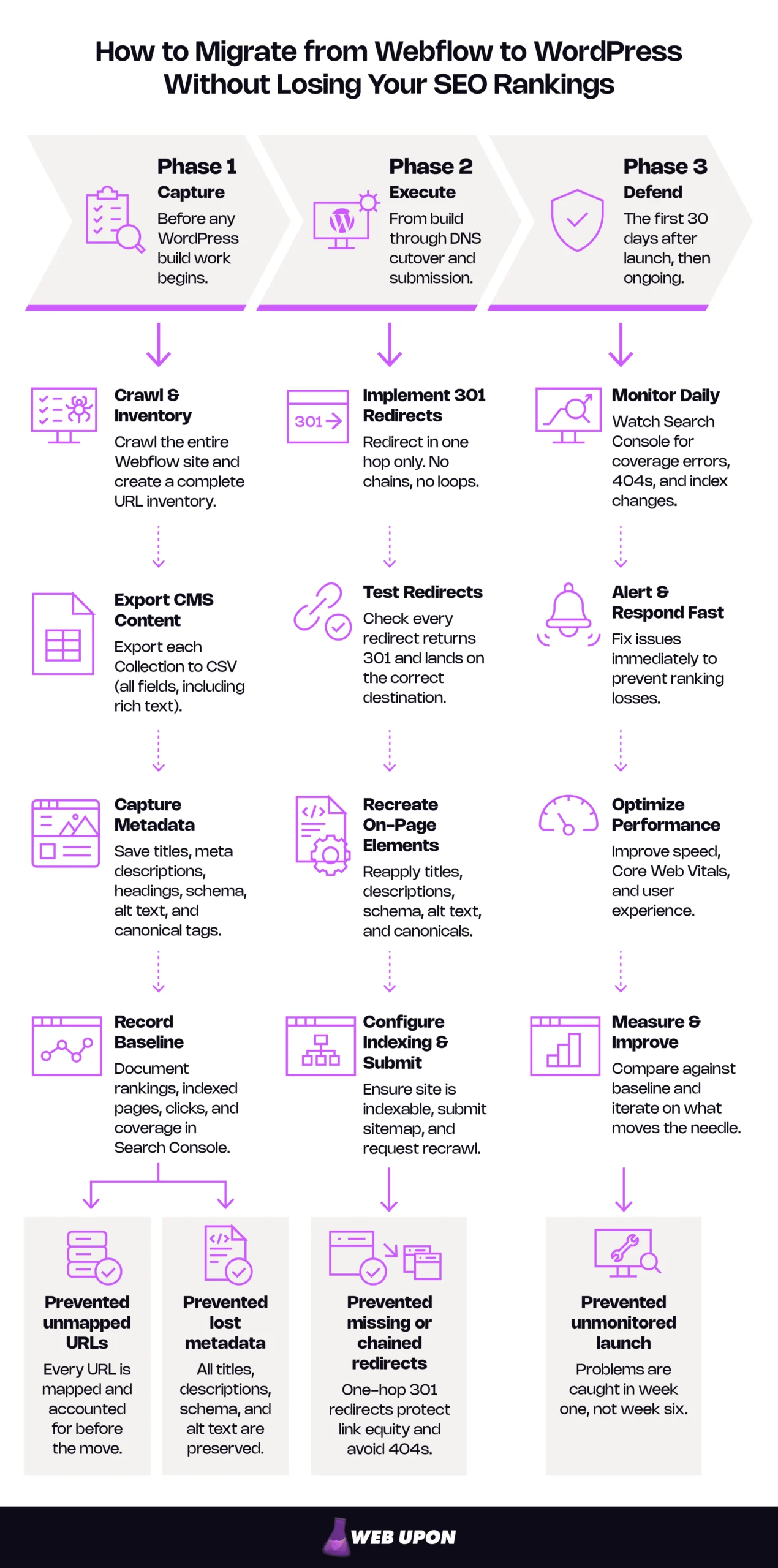
Key Takeaways
- Phase 1 cannot be redone. Webflow’s code export excludes CMS Collection content, so a crawl export plus per-Collection CSVs is the only complete capture. After the old site comes down, what you did not export is gone.
- Redirect in one hop using 301. Google treats a permanent redirect as the signal that the destination should be canonical. Keep the rules at least a year.
- Redirects must live on the server answering for your domain. Rules configured inside Webflow stop applying the moment your domain no longer points there.
- The costliest failure is a checkbox. WordPress’s discourage-indexing setting changes nothing visible, so a site left with it on after launch looks perfect while it leaves the index.
- Two to six weeks of volatility is normal. Positions will move temporarily as Google re-crawls and re-indexes your new structure. Some pages will drop before they climb back and settle over time. Read Search Console for thirty days against your Phase 1 baseline: position movement is noise; pages leaving the index, climbing coverage errors, and 404s on mapped URLs are signals.
What a Successful Webflow to WordPress Migration Actually Involves
You end with a site that ranks as well as or better than it did, on a platform you own outright, and a written record of every URL that moved and where it went.
| Phase | When it happens | What it protects |
| Phase 1: Capture | Before any WordPress build work begins | URL inventory, metadata, schema, alt text, ranking baseline |
| Phase 2: Execute | From build through DNS cutover and submission | Link equity in transit, on-page elements, index eligibility |
| Phase 3: Defend | The first thirty days after launch, then ongoing | Recovery speed, technical performance, long-term visibility |
That is a website migration SEO checklist in compressed form: preserve first, execute second, verify third.
Handled properly, everything that carries ranking value survives the move — URLs and the redirects backing them, meta titles and descriptions, schema, alt text, internal linking architecture. Some things genuinely improve: plugin-level schema control, far more flexible internal linking, caching and CDN options you did not have.
And some things become your job. Hosting performance and plugin weight were absorbed invisibly by Webflow’s managed hosting. The duplicate content WordPress generates automatically through its archive system had no equivalent there at all. That is not an argument against moving. It is the part of moving that most people discover in week three.
The Four Failures That Cause Ranking Loss During Migration
CMS migrations fail in the same four ways, and each is prevented in a specific phase.
| Failure | What it looks like | Prevented in |
| Unmapped URLs | Pages move with no record of where they went | Phase 1 |
| Missing or chained redirects | 404s on ranking pages, equity diluted across hops | Phase 2 |
| Unexported metadata | Titles, descriptions, schema, and alt text unrecoverable | Phase 1 |
| No post-launch monitoring | Week-one problems found in week six | Phase 3 |
Unmapped URLs are the root failure, because the other three get harder without the map. If nobody wrote down that /services/brand-strategy became /services/branding, nobody can build the redirect — and six weeks later, nobody can tell whether the page was lost or renamed.
Missing or chained redirects need more precision than they usually get. A redirect chain is an old URL pointing to a second URL that points to a third. Googlebot will follow a chain, but Google’s guidance is to redirect straight to the final destination: chains add latency for users, and long ones are not consistently supported across user agents and browsers. Where one is unavoidable, its stated tolerance is three hops at most. The fix: map every old URL straight to its final destination in one hop. But that fix is only available if the mapping work in Phase 1 was done properly. Google’s site move documentation treats redirect handling as the central task of any move that changes URLs for exactly this reason.
One shortcut is worth naming because it is common and costly: pointing a batch of retired URLs at the homepage. Google warns against pointing many old URLs at one unrelated destination and says it may be treated as a soft 404, so the destination inherits nothing. Send each URL to its closest real equivalent, or let it 404 and accept that loss deliberately.
Unexported metadata is the only failure here that is permanent. Once the Webflow site is decommissioned, what you did not capture is not merely hard to recover. It is gone.
Absent post-launch monitoring is the failure of omission. Problems that surface in week one are cheap to fix in week one. Found in week six, they have had six weeks to compound in the index.
Those are the universal causes. How much they threaten you depends on what your site actually looks like.
How Migration Risk Changes With Your Site’s Complexity
A thirty-page brochure site and a four-hundred-page content library carry different risk, and treating them the same way is how teams either over-prepare or badly under-prepare.
| Site profile | What raises the risk | Where to concentrate effort |
| Static site, few pages, no Collections | Risk concentrates in a handful of pages. | Complete metadata capture; single-hop redirects for every URL. |
| Mid-size site, one or two Collections | Collection paths and slug conventions that differ from WordPress defaults. | URL mapping discipline; a deliberate permalink decision before any build. |
| Large library, multiple Collections, distributed backlinks | URL volume; authority spread across many pages; template variation. | Mapping automation; backlink-weighted redirect priority; staged validation. |
Webflow CMS Collections are the complexity multiplier. Collection items live beneath a collection path generated by the Collection’s settings rather than written page by page — posts under /blog/, case studies under /case-studies/. Reproducing that in WordPress usually means a custom post type, a deliberate permalink configuration, or both. One structural decision moves every item in the Collection at once.
The second variable is where your authority sits. Links concentrated on ten pages mean ten URLs that must not break. Links spread across two hundred mean a much longer list, and no obvious place to start without data.
If you cannot confidently place yourself in that table, a pre-migration SEO audit is the right first step. It produces the inventory everything else depends on, before you have committed to a date.
Phase 1: Building Your SEO Safety Net Before You Move a Single File
Preserving SEO during a site migration is mostly work done before the migration starts. Everything you capture here is recoverable later. Everything you miss may not be.
Audit Your Webflow Site Before Migration Begins
Two files come out of this phase: a crawl export and a ranking snapshot. Everything later gets validated against them.
- Crawl your entire Webflow site using a site crawler such as Screaming Frog or Ahrefs to capture every indexed URL, meta title, meta description, H1, and image alt text.
- Export and document your current keyword rankings as a baseline benchmark to measure post-migration performance against.
- Identify your highest-traffic and highest-authority pages so they receive priority protection during the migration process.
- Record all existing canonical tags, schema markup, and structured data implementations that must be replicated in WordPress.
The crawl is your primary metadata capture mechanism, not a supplementary check. Webflow’s code export gives you static HTML, CSS, JavaScript, and assets; it does not include CMS Collection content, which exports separately as a CSV per Collection. Neither route hands you one clean file containing every page-level SEO field. A crawl export plus per-Collection CSV exports is the practical method — and worth running twice, once early and once immediately before decommissioning, so late edits are not lost. One practical note: code export sits on Webflow’s Workspace plans, not on a Site plan alone.
The ranking baseline is the most undervalued item on that list. Without a pre-migration snapshot of rankings and organic sessions, you cannot tell normal re-indexing volatility from real loss. In week two, when a page drops four positions, someone will want to act. The baseline is what tells them whether to.
| What to capture | Where it lives in Webflow | Where it goes in WordPress |
| URL inventory | Site crawl export, sitemap | URL mapping sheet, permalink configuration |
| Meta titles and descriptions | Page settings, Collection template SEO fields | SEO plugin per page or via bulk import |
| H1s and on-page headings | Page content, Collection templates | Post and page content |
| Image alt text | Asset settings and image elements | Media library and post content |
| Canonical tags | Page settings, custom code | SEO plugin canonical fields |
| Schema and structured data | Custom code embeds | SEO plugin or dedicated schema plugin |
| Open Graph and Twitter Card data | Page and Collection SEO settings | SEO plugin social fields |
| Custom header and footer code | Project-level and page-level custom code | Theme header, functions file, or tag manager |
| Ranking and traffic baseline | Rank tracker and analytics exports | Reference document kept outside the CMS |
Build that as a working sheet before anything else. It becomes the checklist you validate against in Phase 2.
Map Every URL Before Touching the CMS
One spreadsheet, seven columns. It is the least interesting artifact in the migration and the one everything else hangs on, which is exactly why it gets deferred.
- Build a comprehensive URL mapping spreadsheet that pairs every Webflow URL with its intended WordPress equivalent.
- Identify URL structure changes early, particularly slug differences caused by Webflow’s default path conventions versus WordPress permalink settings.
- Flag pages where the URL structure will change significantly, as these represent the highest risk for link equity loss and ranking drops.
- Document all backlink-receiving URLs using a backlink tool such as Ahrefs or SEMrush so no high-authority destination is left without a redirect.
The columns:
- Old URL
- New URL
- Page type
- Organic sessions
- Referring domains
- Redirect required
- Redirect tested
Columns four and five turn an inventory into a priority list. Six and seven make it auditable on launch day.
Webflow builds Collection URLs from the Collection slug plus the item slug. WordPress builds them from your permalink settings, and the two rarely align by default. WordPress’s permalink configuration will match most Webflow structures closely, and matching is almost always right. Every deliberate URL change is a redirect you create, test, and maintain permanently. A migration is the wrong moment to redesign a URL structure; if yours needs it, do that as a separate project once rankings have stabilized.
Two small details do outsized damage. Whether WordPress appends a trailing slash follows from the permalink structure you choose, and if that convention differs from Webflow’s, every URL on the site has technically changed. And a URL differing only by capitalization is a different URL. Decide both conventions before you map.
Export Every Piece of Critical Metadata Before Anything Moves
After the Webflow site is decommissioned, anything not exported is gone. Not difficult to recover. Gone.
- Manually export or screenshot every page’s meta title and meta description from Webflow before initiating content transfer.
- Preserve Open Graph tags, Twitter Card metadata, and any custom header code that supports search visibility.
- Ensure image alt texts are documented alongside their corresponding images to prevent accessibility and SEO regressions during content migration.
- Note any existing schema markup implementations, including Article, FAQ, Product, or LocalBusiness schemas, for exact replication in WordPress.
Custom header code is the item most often lost and least often noticed, because nothing looks different when it disappears. Verification tags, hand-injected structured data, analytics and conversion tracking, consent tooling — these live in Webflow’s custom code fields, and none of them appear in a content export. Webflow keeps two injection points, site-wide and per-page, so review both as a task separate from the crawl, recording each snippet with a note on what it does.
Commonly missed, in rough order of frequency:
- Custom header and footer code, both project-level and page-level
- Per-Collection metadata defined in Collection template SEO fields rather than on individual items
- Favicon and touch icons
- Redirects already configured inside Webflow, which must be carried forward rather than rebuilt
That last one matters more than it looks. Old URLs your Webflow site already redirects still take traffic and still hold links. The existing rules export by CSV, so carrying them forward is a copy, not a rebuild. Losing them recreates a problem you solved once already.
Your documentation is complete. Every execution step from here depends on it.
Phase 2: Executing the Migration Without Losing Your Rankings
Build order organizes this phase. Infrastructure, then content, then redirects, then launch, then submission. Run those out of order and duplicate content gets indexed while launch-day errors go unnoticed — which makes sequencing, not tooling, the core of Webflow to WordPress SEO.
Configure WordPress SEO Infrastructure Before Importing Content
Configure the container before you fill it. Every step below is harder to correct once content exists.
- Install and fully configure an SEO plugin such as Rank Math or Yoast SEO before any content goes live on WordPress.
- Set WordPress permalink structure to match Webflow slugs as closely as possible, to minimize URL structure changes and redirect dependency.
- Disable search engine indexing in WordPress settings during the migration build phase, to prevent Google from crawling an incomplete or duplicate site.
- Configure your XML sitemap in WordPress and verify that it reflects the correct final URL structure before submission.
Your build lives somewhere during this phase — a staging environment or a temporary subdomain — which is why step three exists. A publicly reachable copy of your content at different URLs is a duplicate content problem waiting to be indexed, and Google has no way to know it is looking at a work in progress.
Two clarifications prevent real damage. First, the discourage-indexing checkbox is a request, not a lock. It does not block access. Honoring it is left to search engines, and it works by writing a noindex directive into the page head. Protect sensitive staging with server-level password authentication as well. Second, and more urgently — turn the setting off on launch day. The most damaging migration failures are this checkbox, left on after go-live, quietly deindexing a site that looks perfect to everyone reviewing it because nothing visible changes. Leftover noindex rules is a common reason a new site never gets indexed. Put it on the launch checklist by name, then check it again in Phase 3.
Template rebuild belongs here too, and design integrity is not cosmetic: layout that shifts or breaks on mobile degrades the experience of the visitors your rankings exist to serve. Where your design carries brand weight you cannot afford to lose in translation, Webflow to WordPress web design is the workstream that protects it.
Build a Redirect Strategy That Protects Every Drop of Link Equity
Every redirect is one line of configuration. Two hundred of them, done correctly, are the difference between a migration nobody notices and one that shows up in the pipeline report. Few tasks in a website migration carry more leverage than getting the 301 redirects right.
- Implement 301 redirects for every changed URL using a redirect plugin, or through server-level rules for maximum reliability.
- Prioritize redirects for pages with active backlinks, high organic traffic, and strong keyword rankings, to protect authority transfer.
- Avoid redirect chains by mapping old Webflow URLs directly to final WordPress destinations in a single hop.
- Test every redirect before launch using a crawler or redirect checking tool, to eliminate 404 errors before they impact crawling.
This clarification prevents one of the costliest mistakes in a migration: your redirects must live on the server that answers requests for your domain after the DNS cutover — meaning the WordPress environment. Redirects configured inside Webflow stop applying the moment your domain no longer points there. People assume the old platform keeps forwarding traffic. It does not.
Use 301, not 302. Google’s redirect documentation draws the line plainly: a permanent redirect shows the destination in search results and signals that it should be canonical, while a temporary one shows the source page and signals nothing. There is no upside to 302 here.
| Priority tier | Criteria | Why it ranks here |
| Tier 1 | URLs with referring domains | External links cannot be re-earned; a broken one is a permanent loss. |
| Tier 2 | URLs with meaningful organic sessions | Traffic loss is immediate and commercially visible. |
| Tier 3 | URLs ranking for tracked keywords | Position recovery is slower than traffic recovery. |
| Tier 4 | Everything else | Every unmapped URL is a future 404. |
Testing needs a method:
- Take the old URL list from your Phase 1 crawl — the full inventory, not a sample.
- Run it in list mode through a crawler pointed at staging, or against the live site in a controlled window immediately after cutover.
- Check every row against four pass conditions: a single hop, a 301 status, the correct destination, and no 404s anywhere in the list.
- Re-run the same list seven days after launch. Redirect rules get edited by hand during launch week, and hand edits introduce chains.
Mark column seven only when a URL passes all four. A redirect that exists is not a redirect that works.
Then leave the rules in place. Google’s floor is a year, long enough for links elsewhere to be recrawled and reassigned; indefinitely is better.
Rebuild and Validate Every On-Page SEO Element in WordPress
Everything in this section restores something captured in Phase 1. If Phase 1 was thorough, this is transcription. If it was not, this is where you find out.
- Re-enter every meta title and meta description manually or via bulk import into your WordPress SEO plugin, matching the Webflow originals exactly.
- Reapply all canonical tags to prevent duplicate content issues that commonly arise when WordPress generates multiple URL variations for the same page.
- Reconstruct all schema markup using your WordPress SEO plugin or a dedicated schema plugin, validating each implementation with Google’s Rich Results Test.
- Audit and restore all image alt texts post-migration, as content transfer tools frequently strip or corrupt alt text attributes during the import process.
Alt text loss is worth singling out because it is invisible in a visual review — the page looks identical and every image is there. Verify by crawl, not by eye, comparing the total count of images carrying alt text against your Phase 1 baseline. A count that fell by two hundred tells you what a five-page spot check never will.
Run this before launch, not after:
- Meta titles match the baseline export
- Meta descriptions match the baseline export
- Canonical tags present and self-referencing where expected
- Schema validates without errors
- Alt text count matches the Phase 1 baseline
- Custom header code reinstalled and firing
- Indexing setting ready to be switched on
Submit, Monitor, and Defend Your Search Visibility After Launch
Launch is where measurement starts.
- Submit your new WordPress XML sitemap to Google Search Console immediately after launch to accelerate re-crawling and re-indexing.
- Use the URL Inspection tool in Search Console to manually request indexing for your highest-priority pages first.
- Monitor Google Search Console daily for crawl errors, 404s, and coverage issues during the first thirty days post-migration.
- Track keyword rankings and organic traffic fluctuations weekly against your pre-migration baseline, to detect and respond to ranking drops before they compound.
One expectation to set: if your domain is not changing, there is no way to notify Google that you switched platforms. Search Console’s Change of Address tool covers moves between domains or subdomains, not moves within one site. A same-domain migration is discovered entirely through crawling, which makes sitemap submission and manual indexing requests your only levers. Google frames the sitemap as speeding discovery rather than guaranteeing indexing. Prioritize the manual requests: submissions are capped, resubmitting does not speed anything up, and large sites are pointed back to the sitemap.
| Timeframe | What to check | What is normal | What requires action |
| Days 1–3 | Indexing setting off, sitemap submitted, redirect spot-checks, 404 report | Crawl activity spikes, coverage counts fluctuate | Any 404 on a mapped URL, sitemap rejected or unread |
| Days 4–14 | Coverage report, ranking movement, redirect re-test | Positions move both ways, some pages temporarily drop | Pages leaving the index entirely, chains appearing |
| Days 15–30 | Organic sessions vs. baseline, crawl errors, Core Web Vitals | Traffic within a variance band and trending back | Sustained decline with no recovery trend, climbing crawl errors |
| Day 30+ | Full comparison against the Phase 1 baseline | Rankings at or near pre-migration levels | Any priority page still below baseline without explanation |
Rankings moving in week two is expected. It is not a signal. Pages vanishing from the index, coverage errors climbing week over week, or 404s on URLs your sheet says were mapped — those are signals, and each points at a redirect or indexing failure rather than normal re-crawling.
Worth saying plainly: this is the stage where in-house migrations most often strain, and it has less to do with skill than with capacity. The redirect map needs someone whose entire job that week is the redirect map.
Launch is the midpoint of this project, not the finish line.
Phase 3: Protecting Your Search Performance After Launch
The first two phases preserved what you had. This one is the difference between a migration that survived and one that improved on what came before.
Diagnose the Technical Regressions Unique to WordPress
Webflow’s managed hosting handled a whole category of work invisibly. WordPress hands it back, and the regression usually shows up within days. A post-migration SEO audit is how you find it before Google does.
- Run a full post-migration crawl to identify broken internal links, missing metadata, and orphaned pages that did not transfer cleanly from Webflow.
- Check site speed performance using Google PageSpeed Insights and Core Web Vitals, as WordPress themes and plugins frequently introduce performance regressions that Webflow’s optimized hosting masked.
- Validate that your WordPress site is fully mobile-responsive and that no design integrity issues are creating crawlability or usability signals that harm rankings.
- Confirm that no unintended duplicate content has been created by WordPress’s category, tag, or archive URL generation, and apply noindex or canonical tags where necessary.
What regresses, specifically: theme assets loading on every page, plugin scripts loading site-wide whether or not a page uses them, uncompressed images, and no CDN unless you configure one. None of these are WordPress defects. They are configuration decisions Webflow made for you, and nobody has made them yet on your new site.
One regression is not a configuration choice. Google crawls a newly moved site more heavily than usual, because crawls of old URLs redirect onto the new ones on top of ordinary crawling. Confirm your host can absorb that before launch.
The Core Web Vitals worth measuring are Largest Contentful Paint at 2.5 seconds or less, Interaction to Next Paint at 200 milliseconds or less, and Cumulative Layout Shift at 0.1 or less, each at the 75th percentile of real user data. If your reference material still lists First Input Delay, it is out of date — INP replaced it in 2024.
One timing nuance saves a lot of unnecessary alarm: field data is gathered from real users over a rolling window, so reported scores lag your actual site by roughly a month after launch. Diagnose with lab data in the first weeks; treat field data as confirmation arriving later. Where the regression is structural rather than a plugin you can switch off, Webflow to WordPress speed optimization closes the gap.
Duplicate content is the one problem here that did not exist on your old site. WordPress generates archive URLs automatically for categories, tags, authors, and dates. Thirty tags can become dozens of thin, near-duplicate pages nobody created on purpose and nobody has read — and an author archive URL is generated for every user account, published or not. Attachment pages are worth checking rather than assuming: off by default on new installations since WordPress 6.4, but a plugin can reintroduce them. The remedy is a decision, not a blanket setting: noindex the archives that serve no search purpose, keep and optimize the ones that do. Category archives on a content library often earn traffic. Date archives almost never do.
While you are here, check the indexing setting again. It belongs on both lists.
| What to check | Tool | What good looks like |
| Broken internal links and orphans | Site crawler | Zero internal 404s, no orphaned priority pages |
| Metadata completeness | Site crawler | Titles and descriptions match the Phase 1 baseline |
| Core Web Vitals | PageSpeed Insights | LCP under 2.5s, INP under 200ms, CLS under 0.1 |
| Mobile rendering | PageSpeed Insights, manual review | No layout breakage, parity with desktop content |
| Duplicate archive URLs | Site crawler, Search Console coverage | Only intentional archives indexed |
| Indexing permission | WordPress settings, live source check | Indexing enabled, no stray noindex directives |
A post-migration content audit is the structured version of that crawl, and the right call if the first pass turns up more than a handful of issues.
Rebuild and Strengthen Your SEO Foundation Inside WordPress
You have protected what you had. Now there are things available to you that were not before.
- Leverage WordPress’s flexible plugin ecosystem to implement advanced schema markup, internal linking strategies, and content optimization that were restricted inside Webflow.
- Reconstruct your internal linking architecture deliberately, ensuring your highest-authority pages pass link equity to strategically important target pages.
- Use WordPress’s open-source flexibility to implement performance optimization through caching plugins, image compression, and CDN integration, to meet or exceed your previous Webflow site speed benchmarks.
- Establish a recurring SEO monitoring cadence using Search Console, rank tracking tools, and crawl audits, to catch and resolve issues before they erode the search visibility you worked to protect during migration.
Internal linking holds one of the largest gains available, and a migration is a rare chance to do it on purpose. Most link structures are not designed. They accumulate. Pages get linked because somebody remembered they existed, and the pages that earn the most authority often pass none of it to the pages that earn revenue. The principle is plain: pages with the most earned authority should link to the pages that matter most commercially. Your Phase 1 audit already produced both lists. You are holding two halves of the same map.
One note on schema. Article or BlogPosting markup is still worth implementing properly. FAQ markup no longer produces expandable results in Google; the feature was withdrawn in May 2026 and testing-tool support retired. FAQPage remains valid schema, though, and existing markup does not need removing. Implement structured data because it describes your page accurately, not because it will change how your listing looks.
Then make the monitoring recurring rather than reactive:
- Weekly: rankings and organic sessions against baseline, Search Console coverage errors
- Monthly: Core Web Vitals in field data, redirect map spot-check, new 404s
- Quarterly: full crawl audit, internal linking review, schema validation
- Annually: full technical audit and content performance review
Results come from the cadence, not the launch. A deliberate WordPress SEO strategy is what turns a successfully defended migration into compounding growth.
Migrating Without the Guesswork
Your rankings survive this migration when four failures are prevented: URLs that move unmapped, redirects missing or chained, metadata lost when the old site comes down, and a launch nobody monitors. Every migration that has gone badly went badly for one of those reasons, and everything above prevents them.
The honest assessment of difficulty is this. Nothing here is beyond a capable in-house team, and none of it requires knowledge you cannot acquire. What makes a Webflow to WordPress migration hard is the coordination. The sequence has to hold. The capture has to be complete before anything is switched off. Someone has to test every redirect before launch rather than find the gaps afterward, in the week when five other things are also on fire. Teams rarely fail at migration for lack of knowledge. They fail because the work was spread across people who each had another job that week.
If you have the capacity to own the sequence — particularly the redirect map, in the days either side of cutover — run it yourself and use this as the framework. If organic search drives pipeline you cannot afford to interrupt, or the timeline is tight, scope the migration with a partner experienced in managing migrations. Either way, you need to make that call in the planning phase.


