You shipped the site in a weekend. It looked right, it worked, and eighteen months later it is still the company website. Then you checked the traffic.
The reason you have not moved it yet is that you have heard migrating a site destroys rankings. That is a fair thing to have heard. It happens, it is expensive, and it happens for reasons that are almost entirely preventable.
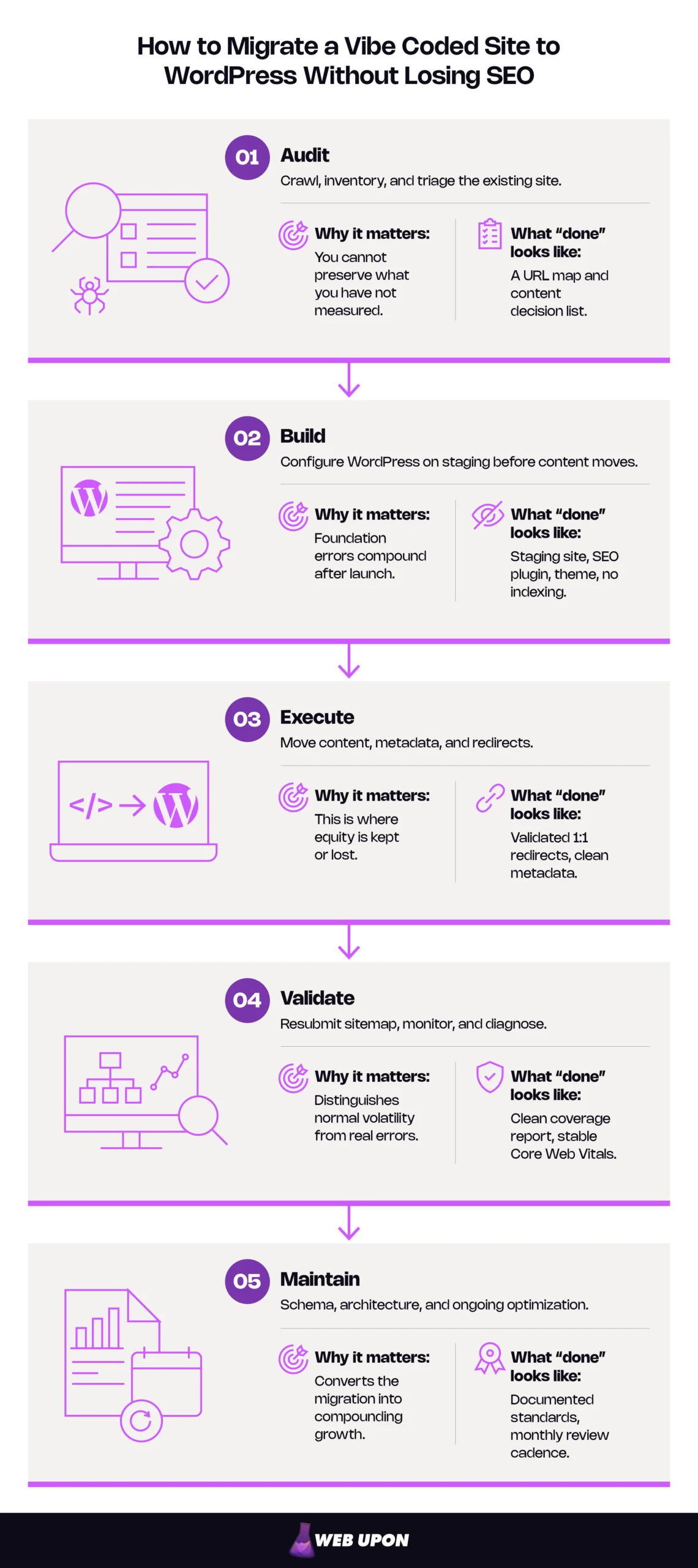
Here is the short version. You migrate a vibe coded site to WordPress without losing SEO by treating the move as a URL-preservation project rather than a redesign: audit, build, execute, validate, maintain — in that order. Crawl the existing site so you know every address, title, and indexed page you have. Audit that inventory to decide what moves, what gets rewritten, and what gets folded into something better. Build the new site on a staging environment with the theme and SEO plugin configured before a single page of content lands. Transfer the metadata by hand instead of trusting the export to carry it. Deploy a tested map of permanent redirects at cutover, one old address to one new address. Then resubmit your sitemap and read Search Console every day for two weeks.
Done in that order, you keep what you have earned. Done out of order, some of it does not come back.
Key Takeaways
- The validated 1:1 redirect map is the highest-value artifact. Permanent redirects do not cost PageRank, so loss after a migration is a mapping failure, not a tax on moving. Go one hop: Googlebot follows up to ten, but Google advises going straight to the destination.
- Not every page needs a redirect. Pages carrying links or traffic get one; content you are not carrying over should return 404 or 410, and dumping the rest on the homepage may be read as a soft 404.
- Keep the redirects at least a year — Google’s stated timeframe for transferring signals.
- Expect two to four weeks of movement, and read its shape. Gradual movement across many pages is normally search engines re-reading the site; sudden loss on specific pages is a defect to chase the same day.
- Start without a developer. The crawl and URL map require no code and carry much of the value.
Phase 1: Auditing What Your Vibe Coded Site Is Actually Worth
You cannot preserve what you have not counted. On most AI-generated sites the inventory holds a few pages doing real work surrounded by a great deal that never did any, and a pre-migration SEO audit is what tells the two apart.
Start with one question, because the answer changes how much of this phase applies to you. Does the current site have indexed pages, organic traffic, or backlinks pointing at it? If the honest answer is no — a recent prototype nobody has linked to — move quickly and treat this as a clean build with the content brought across. If the answer is yes, this is the highest-stakes work in the project, and every hour spent here is bought back twice in Phase 3.
Crawling Your AI-Generated Site Before You Touch Anything
A crawl is a program walking your site the way a search engine would, recording what it finds. Its export becomes the source of truth for everything that follows.
- Run a site crawler across the existing site and export a full inventory. Desktop crawlers such as Screaming Frog or Sitebulb are the common choice, and any tool that exports URLs, status codes, and metadata will do.
- Check what is actually indexed using Google Search Console’s URL Inspection tool before assuming anything ranks.
- Document every slug, title tag, and meta description — including the poorly structured AI-generated ones — as your baseline.
- Flag duplicate content, missing H1s, and the placeholder text AI site builders leave behind.
A crawler tells you what your site contains. Search Console tells you what Google decided to keep. On an AI-generated site that gap is usually wide, because template pages and near-duplicate service pages get crawled and then declined. A large published-but-not-indexed count is Google telling you the content was thin before you started. Migrating thin pages onto WordPress does not make them rank; the platform change fixes structure, not substance.
Your crawl export becomes tab one of the migration spreadsheet. It tells you what exists, not what deserves to survive.
Conducting a Content Audit to Separate Signal from Noise
Every page in the export needs a decision against it. A content audit sorts them into three buckets.
| Bucket | Qualifying criteria | Redirect treatment |
| Migrate with optimization | Has traffic, backlinks, or a clear commercial job | 1:1 redirect to the new equivalent URL |
| Migrate with rewrite | Topic matters, the AI-generated copy is thin or generic | 1:1 redirect to the rewritten page |
| Consolidate or discard | Filler, duplicative, or generated by a template | Redirect to the closest relevant surviving page if it holds links or traffic, otherwise return 404 or 410 |
Identify which pages carry organic traffic or backlink equity before deciding, using your analytics platform alongside Search Console’s links report or a commercial backlink index. Audit internal linking too, since vibe coded sites frequently ship broken navigation hierarchies that leave pages poorly connected.
That disconnection is often blamed on crawl budget, which is not what is happening. The real cost is that pages are discovered late, receive little internal equity, and compete with each other for the same intent.
Note existing canonical tags, or their absence, since AI exports often produce duplicate URL variants with nothing resolving them. Discarding a page still requires a decision — a redirect, or a deliberate 404 — which is one of the most common oversights here.
Mapping URL Structure and Building Your Redirect Strategy
This is the pivot point of the project. Export a complete URL map and design the new WordPress permalink structure before a single page is built, because changing it after launch compounds the damage rather than correcting it. WordPress documents these as permanent URLs that should never change, hence the name.
| Column | What it records |
| Old URL | The existing address, exactly as it appears |
| Status code | What the old URL currently returns |
| Indexed (Y/N) | From Search Console, not from the crawler |
| Backlinks | Referring domains pointing at this URL |
| Traffic | Organic sessions over the last twelve months |
| Decision | Optimize, rewrite, or consolidate |
| New URL | The WordPress destination |
| Redirect type | 301 in almost every case |
| Tested (Y/N) | Confirmed resolving after cutover |
Two URL patterns recur in AI exports and need different answers. Client-side routing that puts the page path after a # produces addresses the server never sees, so a server-level redirect cannot fire on them. Don’t use fragments to load different content at all because Googlebot cannot reliably parse those URLs. Handle those paths at the application or edge layer, or accept them as lost and rebuild with fresh internal links. Query-parameter variants are the opposite problem — many URLs, identical content — and they are handled with pattern rules and canonical resolution rather than a row each.
Map every URL a human or a link points at, and treat machine-generated variants as a class. If the crawl shows the bulk of the site behind a hash fragment, this is closer to a rebuild with content transfer than to a redirect project, and the budget should be sized accordingly.
This spreadsheet is what Phases 3 and 4 get validated against, and it is the step most teams underestimate. If you would rather have it run for you, contact Web Upon.
Done correctly, Phase 1 ends with two artifacts: a crawl export and a URL map with a decision against every row. With the inventory settled, the next job is making sure the destination can receive it, because a clean migration into a poorly configured WordPress install still underperforms.
Phase 2: Building WordPress Into an SEO-Ready Foundation
Every decision in this phase is cheap now and expensive after launch. You configure the destination before content arrives, which prevents the errors you would otherwise unpick page by page.
Choosing Hosting, Configuring DNS, and Minimizing Downtime Risk
You do not need to know which host is best. You need four questions to ask any of them:
- Server response time. How quickly does the server begin replying?
- Server-level caching. Built in, or will you install a plugin to compensate?
- Staging environment included. Can you build and test a full copy privately?
- CDN integration. Handled, or another purchase?
Plan the DNS cutover for your lowest-traffic window and lower your TTL — the length of time other servers cache your DNS records — forty-eight hours in advance, so the change propagates quickly. Confirm SSL is active and HTTPS enforced before going live, or mixed-content warnings greet your first visitors.
Build it somewhere private first. Staging is the most protective habit in this phase. Every mistake you make there costs nothing.
With the environment settled, the next decisions are about what you install into it, and the order matters more than most teams expect.
Installing and Configuring the Right SEO Plugin Architecture
- Install a dedicated SEO plugin first, immediately after WordPress core setup. Several mature options cover the same ground — Yoast SEO, Rank Math, and SEOPress among them — and the choice matters far less than configuring one before content arrives.
- Configure title tag structures, meta description templates, and Open Graph settings at plugin level. Templates set before import apply automatically to incoming content; retrofitting means editing every page by hand.
- Enable XML sitemap generation and verify the sitemap reflects your intended architecture rather than everything WordPress can find.
- Protect staging at the server level — a password, an IP restriction, or your host’s staging protection.
WordPress has a reading setting that discourages search engines from indexing a site. Since 5.3 it writes a noindex, nofollow robots meta tag into the head, and honoring it is up to the search engines. Treat it as a second layer, not the only one. The checkbox is a request; the password is a lock.
That same checkbox left on at launch keeps your finished site out of Google entirely. The site looks perfect to human visits, so the error is usually found weeks later by someone wondering why traffic never returned. Make “turn indexing back on” an explicit line item in your launch checklist.
The plugin governs your signals. The theme governs whether search engines can read the site’s structure at all.
Selecting a Theme Built for Speed and Schema Compliance
The div-heavy structure of an AI export is exactly what a page-builder-heavy theme reintroduces, which means you can complete the entire migration and land back in the same hole. Search engines lean on headings and a clean structural hierarchy to work out what a page is about. A page assembled from nested generic containers gives them very little to read.
| Green flags | Red flags |
| Lightweight, minimal default assets | Bundled page builder you cannot remove |
| Clean HTML5 with proper heading hierarchy | Everything rendered as nested divs |
| Native schema support or clean plugin integration | Schema only via a paid add-on |
| Published Core Web Vitals baseline | No performance data at all |
Test the theme’s Core Web Vitals baseline in PageSpeed Insights before adding content or plugins, so you know what the foundation costs before anything sits on top of it.
Done correctly, Phase 2 ends with a staging site that is fast, structurally clean, correctly configured, and invisible to search engines. What follows is where equity is either preserved or permanently lost.
Phase 3: Executing the Migration Without Losing SEO Equity
This is where the URL map gets used. When you migrate a vibe coded site to WordPress, the highest-consequence errors all happen in this phase, and one category of damage is the hardest to undo: a broken redirect on a page somebody linked to is rarely recovered once the referring site has moved on.
Transferring Content with Metadata Integrity Intact
Migration is the one moment when rewriting every generic title and description at once is efficient rather than disruptive. Take it.
Move titles and meta descriptions manually or by CSV import. Never rely on AI-exported HTML to carry clean metadata into WordPress — it arrives blank, duplicated, or irrelevant. Apply one formula consistently: primary term first, qualifier second, brand last.
| Metadata | Before | After |
| Title | Home | Welcome to Our Website | Commercial Roof Repair in Leeds | Northgate Roofing |
| Meta description | Welcome to our website. We offer services. | Emergency and planned commercial roof repair across West Yorkshire. Free survey within 48 hours. |
Preserve and reassign image alt text during media migration, because vibe coded sites frequently export images with filename-based or empty alt attributes. Describe the image’s content and function in plain language, include a relevant term only where it is genuinely descriptive, and never keyword-stuff, which Google warns may cause a site to be seen as spam. The same guidance asks for short, descriptive filenames over generic ones — fix both in one pass, since AI exports ship them together.
Content in place, the next task is making sure every old address still leads somewhere.
Implementing 301 Redirects and Protecting Link Equity
A 301 tells browsers and search engines that a page has permanently moved and that the new address should inherit its identity. It is the mechanism that carries years of accumulated authority from the old address across to its replacement.
Launching without a tested redirect map is the one mistake on this list you cannot fix in week two. A missing meta description is a Tuesday afternoon. A broken redirect on a page somebody linked to is a link you are unlikely to get back.
Start by discarding a myth you have probably encountered while researching this decision. Permanent redirects do not skim a percentage off your rankings. The widely repeated claim that a 301 passes only eighty-five or ninety percent of a page’s value is outdated; Google’s site-move documentation states, under “Don’t worry about link credit,” that permanent redirects do not cause a loss in PageRank.
Chains are still a real problem, for different reasons. A chain is an old URL redirecting to a second URL that redirects to a third. Every extra hop adds a round trip for the visitor, consumes crawl attempts, and muddies which URL is meant to be canonical, particularly when a chain mixes permanent and temporary redirect types. Googlebot follows up to ten hops, but Google advises redirecting to the final destination directly, and failing that keeping chains to no more than three. One hop, old URL to final URL. Flatten anything longer.
Then there is the mistake that recurs most often. Redirecting a mass of old URLs to the homepage looks tidy. It destroys the signal, because Google warns that many old URLs sent to one irrelevant destination may be treated as a soft 404 — the page is reachable, but the value is discarded. No error to alert you, and no equity transferred. Consolidating several pages onto one new page is explicitly permitted. Dumping unrelated pages on the homepage is not.
Work the map in this order:
- Move the whole site at once. For small and medium sites, move all URLs simultaneously rather than section by section, so its systems detect the move faster.
- Implement redirects deliberately, through a dedicated redirect manager — a standalone plugin, or the one built into your SEO plugin — or through server-level rules. Never rely on WordPress default 404 handling.
- Prioritize pages with confirmed backlinks, since those carry authority a broken redirect destroys permanently.
- Give discarded pages that carry links or traffic a destination, the closest genuinely relevant surviving page; let the rest return a clean 404 or 410.
- Test on staging before DNS cutover, using a crawl tool to catch errors before they reach live rankings.
- Run the validation loop. Crawl the old URL list against the new site and confirm every row returns a single 301 to a live 200 page. Every row, not a sample.
Redirects are not temporary scaffolding. Google’s guidance is to keep them as long as possible and generally at least a year, so it can transfer all signals to the new URLs, and to consider keeping them indefinitely for users. The redirect map is a permanent asset of the site. It belongs in your documentation, and it does not get cleaned up at the end of the quarter because someone is tidying plugins.
Redirects handle the addresses you knew about. WordPress will generate a few you did not.
Configuring Canonical Tags and Duplicate Content Controls
A canonical tag tells search engines which version of near-identical pages is the real one. WordPress needs several, because it creates pages on your behalf.
- Set canonicals on all migrated pages through your SEO plugin, resolving the URL variants the import creates. Google ranks redirects as the strongest canonicalization signal and rel=”canonical” next, so the two work together rather than competing.
- Audit the category, tag, and author archives WordPress generates automatically — the category and tag bases can be renamed but never removed from URLs. These compete with the pages you want ranked, and applying noindex or canonical controls is a five-minute job that prevents a confusing month.
- Disable parameter-based duplicate URL patterns and enforce your clean permalink structure immediately after migration.
- If your site serves multiple languages or regions, implement hreflang deliberately, since AI exports rarely handle international signals properly. Every version must list itself as well as the others, and Google names missing return links — page Y failing to link back to page X — as the most common mistake.
Done correctly, Phase 3 ends with content live, metadata deliberate, every old URL that earned a redirect resolving in a single 301, and no self-inflicted duplicates. The site is live. The next two weeks determine whether you read the data correctly — and whether you panic at the wrong moment.
Phase 4: Validating Performance and Recovering Rankings After Launch
The post-launch window is an active monitoring period with a defined shape, not a waiting game. The checks below are ordered to separate normal volatility from something genuinely broken.
Resubmitting to Google and Monitoring Indexing Health
First 24 hours. Submit the new XML sitemap to Search Console as soon as DNS propagation confirms the site is reachable. Spot-check that your highest-value pages return a 200 and that redirects from their old addresses fire in one hop.
First 48 hours. Request indexing manually for the handful of pages that pay the bills: the homepage, top service pages, whatever ranks. The URL Inspection tool carries an unpublished daily quota per property, and hitting it greys the button out. Submission requests a crawl rather than guaranteeing one, and Google’s advice for indexing many pages is to submit a sitemap instead. The sitemap and your internal linking handle the rest.
First two weeks. Read the Coverage report daily for crawl errors, soft 404s, and excluded pages.
Configure analytics before cutover, not after. Teams routinely find the gap when they try to compare post-launch traffic against a baseline that no longer exists, and a clean GA4 setup means day one is measurable.
One question will come up within an hour of opening Search Console. The Change of Address tool applies to moves between domains or subdomains, forwarding signals for 180 days, so a CMS migration keeping the same domain does not use it. Its absence is not a step you have missed.
Indexing confirms search engines can find the site. Speed determines how it is judged once they do.
Auditing Core Web Vitals and Site Speed After Migration
Run a Core Web Vitals audit in PageSpeed Insights and Search Console’s Web Vitals report within 48 hours of going live. A site speed audit at this point catches regressions while they are cheap to fix. The three targets below are Google’s “good” thresholds.
| Metric | What it measures in plain terms | Common cause after migration |
| Largest Contentful Paint | How quickly the main content appears — target around 2.5 seconds | Uncompressed hero images carried over from the export |
| Cumulative Layout Shift | Whether the layout jumps while loading — target 0.1 or less | Images or embeds without dimensions set |
| Interaction to Next Paint | How quickly the page responds to a click — target under 200ms | Plugin scripts stacking up during the build |
Optimize image delivery with next-generation formats, a CDN, and lazy loading for images below the fold — never the hero. Google is explicit that loading=lazy belongs only on images outside the initial viewport: the browser cannot defer an image until it knows where it sits, so lazy-loading a hero worsens the metric the table above flags. Add caching and configure compression and CSS/JS minification.
Core Web Vitals are used by Google’s core ranking systems, but there is no single page experience signal, and Google adds that page experience aspects beyond Core Web Vitals do not directly help a site rank higher. Speed does not win a query; relevance does. But when two pages answer the same question roughly equally well, the one that loads and responds cleanly is the better bet, and a site failing these metrics caps what its content can achieve.
One distinction prevents two weeks of misplaced panic. A speed test measures a simulated visit from a controlled environment; the numbers Google uses come from real visits aggregated on a 28-day rolling average. A freshly migrated site has almost no real-visit data yet, so the Search Console report may look empty or still reflect the old site for weeks. Diagnose with the lab test now; confirm with the field report later.
Speed and indexing can both look healthy while rankings still move. That movement is the part misread most often.
Protecting Against Ranking Drops During the Transition Window
Yes, your rankings will probably move after the migration, and for most sites the movement settles within two to four weeks. What matters is telling the difference between search engines re-reading your site and something actually broken, because the two look identical on day three and completely different on day ten.
The distinction is in the shape of the drop, not the size of it.
| Wait | Act |
| Gradual movement spread across many pages | Sudden loss concentrated on specific pages |
| Impressions holding while positions wobble | Impressions falling off a cliff for known-good URLs |
| Coverage report clean, sitemap processing normally | New crawl errors, soft 404s, or excluded pages |
| Recovery visible by week two or three | Nothing moving at all after three weeks |
Cross-reference organic sessions against Search Console impressions daily to tell whether a drop is crawl-related or ranking-related. If the pattern lands in the right-hand column, open the URL map that day.
Meanwhile, rebuild internal linking within WordPress to distribute equity across migrated pages — AI-generated sites rarely have intentional link architecture, so this is free ground to make up. Accelerate re-crawling by keeping the sitemap current, using crawl requests within the quota, and earning fresh links to key pages. These are typical patterns rather than guaranteed ones.
Done correctly, Phase 4 ends with a clean Coverage report, stable Core Web Vitals, and the ability to read week-two data without panic. Recovery is the floor, not the goal. The reason to migrate at all is what becomes possible once the structure holds.
Phase 5: Maintaining a Scalable SEO Architecture in WordPress
The migration bought you a structure, and structure only pays off when it is maintained deliberately. That is where a durable WordPress SEO strategy separates a completed project from a compounding one.
Establishing Schema Markup and Structured Data Standards
Structured data is a description of your page written for machines — what kind of thing it is, who published it, where it sits in the site. It is how a search result becomes more than a blue link.
- Implement Article, BreadcrumbList, and Organization markup through your SEO plugin’s schema tools — all three remain supported types in Google’s structured data gallery.
- Validate with Google’s Rich Results Test, which reports the rich result types found on a page along with any errors.
- Create a schema standard for recurring content types — blog posts, service pages, landing pages — so future content is structured consistently from creation.
- Monitor the Enhancements section of Search Console for errors as you publish.
Structured data helps search engines understand individual pages. Architecture helps them understand how those pages relate.
Building a Scalable Site Architecture and Navigation System
The broken navigation you found in Phase 1 gets cleared here, permanently.
- Redesign navigation as a logical, crawlable hierarchy keeping priority pages a short click path from the homepage: Home → Category → Page. Treat any specific click-depth number you see quoted as a heuristic, not a Google rule.
- Use WordPress menus and breadcrumbs to reinforce that hierarchy for readers and crawlers alike.
- Establish a consistent internal linking approach with contextual anchor text that directs equity to priority pages.
- Keep the database clean, remove orphaned pages, and submit updated sitemaps after significant content changes — the point at which crawl efficiency genuinely starts to matter as the site grows.
Architecture holds the site together. The last piece is the routine that keeps it improving.
Monitoring Rankings, Reclaiming Backlinks, and Optimizing Continuously
| Frequency | Tasks |
| Weekly, month one | Coverage report, Core Web Vitals, top-page rankings, redirect spot-checks |
| Monthly, ongoing | Backlink audit against old URLs, outreach to update referring links, keyword recovery review |
| Quarterly | Content refresh — titles, meta descriptions, thin pages flagged in the original audit |
| Annually | Full technical audit, confirm redirects still resolve |
Audit backlinks pointing at old vibe coded URLs and contact referring domains to update them, which converts a redirect into a direct link. Use Search Console alongside your rank tracking to find pages needing further on-page work.
Done correctly, Phase 5 turns a completed migration into a platform where each new page compounds rather than disappears.
Turning a Prototype Into a Platform
The migration is an equity transfer, and sequence is what protects the equity.
Audit before you build: crawl the site, decide what survives, map every URL. Build the destination before content lands: hosting, plugin, theme, staging locked down. Execute against the map: metadata by hand, one-hop redirects, canonicals set.
Validate on a schedule: sitemap submitted, Coverage read daily, the shape of the drop watched rather than the size. Then maintain it, because the structure only pays if you use it.
Start with the crawl and the URL map. Every other decision depends on those two files, and neither requires a developer to begin. If you would rather not carry the risk of a project where the irreversible mistakes are concentrated in a single afternoon, contact Web Upon and we will run it.
You built fast because building fast was the right call. Nothing about the decision to migrate a vibe coded site to WordPress changes that. The site you shipped in a weekend earned something while nobody was watching; the sequence above carries it across intact. The difference is that from here, the next thing you ship gets counted.


