Somewhere in your backlog sits a ticket for the next platform upgrade. Behind it waits a queue of security patches, an extension conflict nobody owns, and a product feature that has slipped three sprints running. That queue is what this decision is really about, and the wrong foundation makes it longer every year.
Here is the short answer to the Magento vs. Shopify Plus question. Shopify Plus is the better enterprise ecommerce platform for most companies that win on brand, speed, and market execution, and that don’t want to fund a permanent platform-engineering team. Adobe Commerce, the licensed edition of Magento, is the better choice when complex B2B workflows, deep ERP or legacy integration, or proprietary commerce logic is your competitive advantage, and you can staff the team behind it for 36 months or more. The deciding factor is internal engineering capacity.
This guide covers pros and cons, a 36-month cost model, customization and B2B limits, security, and the SEO risk most comparisons skip, then ends with a decision matrix for your own organization.
The Verdict in 60 Seconds
Choose the platform whose maintenance burden your team can carry for three years; that burden, more than any feature, decides whether you move faster or slower after launch.
Five factors decide most enterprise outcomes:
- Engineering capacity: Magento needs a standing team to run it; Shopify Plus needs a team to build on it.
- 36-month TCO: Magento’s license may be zero, but headcount dominates; Shopify Plus stays predictable until GMV triggers variable fees.
- Customization depth: Magento’s ceiling is your budget; Shopify Plus works inside a defined perimeter.
- B2B and multi-store complexity: Adobe Commerce leads on configurable B2B; Shopify Plus leads on fast multi-store and international launches.
- Security accountability: on self-managed Magento you own patching and most PCI scope, and even on Adobe’s managed cloud, applying patches stays with you; on Shopify Plus, Shopify owns the platform layer.
The arrival of Adobe Commerce as a Cloud Service in June 2025, a SaaS edition where Adobe runs infrastructure and updates, means the Shopify Plus vs. Adobe Commerce decision is no longer a clean “open source vs. SaaS” split. The payoffs are simple: Shopify Plus gives engineering time back to the roadmap; Magento gives you control over every layer of the stack.
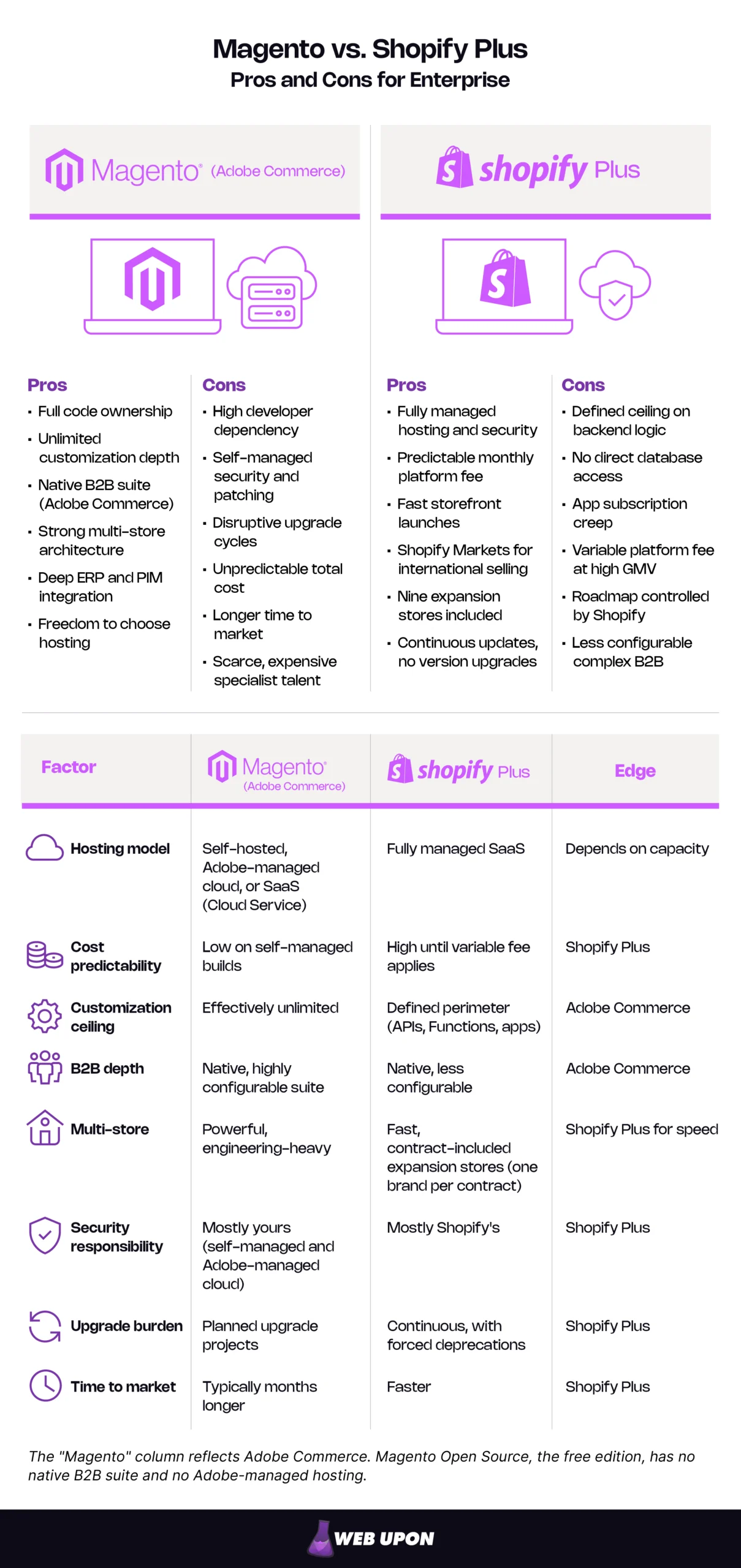
Every item on these lists traces back to one architectural choice: who runs the platform.
The Core Architectural Divide: Open-Source Sovereignty vs. Managed SaaS Reliability
What Magento’s Open-Source DNA Means for Enterprise Control
With Magento, the codebase sits in your repository. Every layer, from database schema to checkout, can be changed, and no vendor decides which customizations are allowed. That sovereignty is real, and so is its price: someone on your payroll maintains, patches, and evolves all of it.
Buyers often blur the two editions, so the Magento Open Source vs. Adobe Commerce distinction is worth stating plainly:
- Magento Open Source is free and self-managed, with no native B2B suite. You choose and pay for hosting, security, and every extension.
- Adobe Commerce is licensed. It adds the B2B suite, advanced merchandising, and Adobe support, and runs on-premise, on Adobe’s managed cloud infrastructure, or as the newer Cloud Service.
That hosting freedom matters most where data residency or a specific compliance regime dictates the infrastructure.
What Shopify Plus’s Managed SaaS Model Delivers at Scale
Shopify Plus inverts the model. Shopify runs the servers, ships updates, and absorbs the Black Friday spike; nobody books an upgrade weekend, because there is no version to upgrade.
The trade-off is a perimeter. You extend Shopify through its APIs, apps, theme code, and Shopify Functions (small pieces of custom logic that Shopify executes inside its own backend). You cannot touch the database or rewrite core behavior. For teams without deep development benches, that perimeter often feels less like a limit than a guardrail.
Where the Line Is Blurring: Adobe Commerce as a Cloud Service
Adobe Commerce as a Cloud Service launched in June 2025 as Adobe’s cloud-native SaaS edition. Adobe handles infrastructure, scaling, upgrades, and patching, and applies feature and security updates to production automatically after a 30-day evaluation window in your sandbox, according to Adobe’s Cloud Service overview.
What it removes is the maintenance burden. What it doesn’t remove is evaluation work. It is a different product from self-managed Magento, with its own extensibility model: customizations live outside the core, built with Adobe’s App Builder and API Mesh rather than as in-process PHP modules. It also drops the classic Luma storefront. An existing Magento build will not lift and shift; plan to re-implement custom modules.
That makes it a credible third option in any Adobe Commerce vs. Shopify Plus evaluation. If you need Adobe’s B2B depth without the infrastructure work, put it on the shortlist. Adobe also says it has no end-of-life plans for its existing managed-cloud (PaaS) edition, so moving to the Cloud Service is a choice, not a deadline. Cloud Service pricing is quote-based, so a real comparison needs a direct quote from Adobe.
Why You Are Choosing a Foundation, Not Just a Platform
An enterprise platform decision is a commitment of at least 36 months, and its technical debt compounds. Magento rewards engineering-heavy organizations; Shopify Plus rewards lean, growth-focused teams. The wrong fit shows up as drag: a new region that takes two quarters instead of two months. Audit your developer capacity honestly before you compare a single feature.
| Responsibility | Magento Open Source | Adobe Commerce as a Cloud Service | Shopify Plus |
| Hosting | You | Adobe | Shopify |
| Security patches | You | Adobe | Shopify |
| Upgrades | You | Adobe (continuous) | Shopify (continuous) |
| Performance tuning | You | Shared | Shared (platform: Shopify; theme and apps: you) |
| PCI compliance | You (largest scope) | Shared | Shared (platform: Shopify) |
| Custom code | You | You | You |
| Third-party apps and extensions | You | You | You |
Adobe Commerce on Adobe’s managed cloud (the PaaS edition) sits between the first two columns: Adobe runs and secures the infrastructure, but applying Adobe Commerce patches and upgrades stays with you.
Architecture sets the rules. Cost decides whether you can afford to live by them.
Total Cost of Ownership: A 36-Month Financial Breakdown
Picture the slide your CFO actually wants: three years of spend, every line accounted for. An honest Magento vs. Shopify Plus cost comparison fills that slide with license, hosting, and people.
Magento’s True Cost Beyond the “Free” Open-Source License
Magento Open Source has no license fee. Adobe Commerce does, and Adobe Commerce pricing is quoted privately; Adobe’s license terms tie fees to gross merchandise value (GMV) and average order value thresholds. Neither number says much about total cost.
On self-managed setups, hosting is entirely yours and grows with traffic. Developer costs dominate: maintenance, security updates, module development, performance tuning, and the upgrade project that returns every few years. Specialized Magento developers are scarce and priced accordingly, which is why many enterprises carry an agency retainer on top of internal staff.
Shopify Plus Pricing Transparency and Its Hidden Ceiling
Shopify Plus pricing starts at a published platform fee of $2,300 per month on a three-year term or $2,500 per month on a one-year term (as of October 2026, per Shopify’s Plus pricing page). That fee covers the main store plus nine expansion stores; each additional store costs $300 per month or a revenue share, and one Plus contract covers one brand.
Higher-volume merchants move to a variable platform fee based on revenue and business model. Shopify does not publish the threshold, rate, or cap, so negotiate them and get them in writing. If you use a third-party payment gateway instead of Shopify Payments, Shopify adds 0.2% per transaction on top of your processor’s fees. At $10 million in annual GMV, that is $20,000 a year.
Apps are the quieter cost: features Adobe Commerce ships natively often become recurring subscriptions on Shopify Plus. Even so, one predictable platform fee is far easier for a CFO to forecast.
Where Each Platform Becomes Financially Dangerous at Enterprise Scale
Magento budgets break when engineering bandwidth is underestimated during platform selection. The overrun arrives as emergency patching, a delayed upgrade that becomes a rebuild, or agency hours billed to fix both.
Shopify Plus budgets climb at high GMV through the variable fee, the gateway surcharge, and an app stack that grows one subscription at a time. Both platforms carry heavy implementation costs, and any model that leaves out three years of headcount is incomplete.
| Cost category (36 months) | Magento Open Source | Adobe Commerce | Shopify Plus |
| Platform license | None | High (quote-based, GMV-linked) | 2,300–2,500/month base (as of Oct 2026) |
| Variable or revenue fees | None | Built into license | Medium–High at high GMV (negotiated) |
| Hosting | Medium–High | Medium (included on Adobe cloud options) | Included |
| Payment surcharges | None | None | 0.2% if not using Shopify Payments |
| Apps and extensions | Medium (mostly one-time) | Medium | Medium–High (recurring) |
| Implementation | High | High | Medium–High |
| Ongoing development | High | High | Medium |
| Security and compliance | High | Medium–High | Low |
| Internal headcount | High | High | Low–Medium |
Relative weights are illustrative. Model your own figures with real quotes.
One line many TCO models miss is protecting organic search through the migration; budget for enterprise SEO support before the build starts, not after traffic drops.
Much of the cost gap comes from one variable: how much you need to customize.
Customization, Flexibility, and Developer Involvement
Magento’s Customization Ceiling Is Effectively Unlimited, at a Price
Full PHP codebase access lets you build custom checkout flows, complex B2B pricing, and proprietary business rules directly into the platform, backed by a large extension ecosystem. The frontend is open too: a custom theme, PWA Studio, or headless commerce (a setup where the storefront is built separately from the commerce back end).
Take a manufacturer whose distributors each hold contract prices in the ERP, tiered by volume and renegotiated every quarter. On Magento, developers can read that contract table and apply it natively inside the pricing engine. Every such customization, though, costs developer time to build and is code that must survive the next upgrade.
Shopify Plus Customization: Powerful Within a Defined Perimeter
Liquid themes and the Storefront API allow deep frontend work without backend access, and Shopify’s Hydrogen framework supports headless builds. Checkout customization now runs entirely through Checkout Extensibility and Shopify Functions. Shopify Scripts stopped executing on June 30, 2026, per the Shopify developer changelog, and checkout.liquid had already been retired for Plus checkouts: from in-checkout pages in August 2024 and from Thank you and Order status pages in August 2025.
Backend logic is where the perimeter shows. The same distributor scenario on Shopify Plus usually means middleware that syncs ERP contract prices into B2B catalogs, plus Functions for discount rules. It works, but you are integrating around the platform rather than building into it, and every sync is another moving part to monitor.
API Architecture and Integration Ecosystem Compared
Magento’s REST and GraphQL APIs, combined with direct code access, support deep integration with ERP, PIM, and custom internal systems. Shopify Plus APIs are well documented and developer-friendly, but most are rate-limited and work within permission boundaries, so high-volume syncs need careful design.
Magento also accepts almost any payment gateway with no platform surcharge. For integration with legacy systems, Magento’s open architecture usually wins; for standard integrations at speed, Shopify Plus’s documented APIs usually do.
| Customization need | Magento approach | Shopify Plus approach | Effort level |
| Custom checkout | Modify checkout code directly | Checkout Extensibility and Functions | Magento: High / Shopify Plus: Medium |
| B2B pricing | Native rules or custom module | B2B catalogs, Functions, middleware | Magento: Medium / Shopify Plus: Medium–High |
| Headless frontend | PWA Studio or any framework | Hydrogen or any framework via Storefront API | Similar |
| ERP sync | Direct integration or module | Middleware or app, within API limits | Magento: Medium / Shopify Plus: Medium–High |
| Multi-warehouse logic | Native inventory sources, customizable | Native locations, complex rules via apps | Magento: Medium / Shopify Plus: High |
Customization tells you what you can build. Scalability tells you whether it holds up across regions, brands, and channels.
Scalability, Performance, and Multi-Store Enterprise Capabilities
Magento’s Multi-Store Architecture: Power and Complexity in Equal Measure
Magento handles multi-store ecommerce natively, running multiple websites, stores, and store views (localized versions with their own language and display currency) from one backend. Prices are set globally or per website, not per store view. That structure suits enterprises running distinct regional storefronts alongside B2B and B2C channels.
The catch is operational. Performance at scale depends on your CDN, caching, search, and database tuning, so each new region is architecturally simple but adds load to a DevOps team that is often already stretched.
Shopify Plus Multi-Store and International Expansion Capabilities
Shopify Markets handles international selling from a single store, with localized pricing, currencies, languages, and domains. For separate storefronts, Shopify Plus includes nine expansion stores alongside the main store under one contract (as of October 2026), managed through Shopify’s organization settings. That contract covers a single brand, though; a portfolio of separate brands needs a separate Plus contract for each.
Infrastructure scales without your engineers. In practice, managed infrastructure takes much of the anxiety out of international launch planning.
B2B Capabilities: Where the Enterprise Gap Is Most Pronounced
Adobe Commerce’s B2B suite is the most complete native offering of the three: company accounts with buyer roles, shared catalogs, negotiable quotes, purchase orders, and approval rules. Magento Open Source does not include it.
Shopify Plus has native B2B features, including company profiles, catalog-based pricing, payment terms, and volume pricing, and they have matured quickly. Shopify B2B is now available on every plan, with Plus adding unlimited catalogs that can be assigned directly to company locations. The features remain less configurable for multi-step procurement and quote negotiation. In any Adobe Commerce vs. Shopify Plus B2B comparison, the real question is not whether B2B is possible but how much of your workflow fits the native model.
| B2B feature | Adobe Commerce | Magento Open Source | Shopify Plus |
| Company accounts | Native | Via extension | Native |
| Custom catalogs | Native | Via extension | Native |
| Quotes | Native (negotiable) | Via extension | Via app or draft orders |
| Purchase orders | Native | Via extension | Native (PO number) / via app for workflows |
| Approval workflows | Native | Via extension | Via app or custom build |
| Net payment terms | Native | Via extension | Native |
| Customer-specific pricing | Native | Via extension | Native (via catalogs) |
Shopify’s B2B features change often. Confirm current capabilities in the Shopify Help Center before deciding.
Your business model narrows the choice quickly:
- If you are DTC-only, Shopify Plus covers multi-market selling with far less operational load.
- If you are B2B-only with complex procurement, Adobe Commerce’s native suite is the stronger fit.
- If you are hybrid B2B/B2C, Adobe Commerce handles both from one backend more naturally; test Shopify Plus against your real quote and approval flows first.
- If you are multi-brand, Shopify Plus launches each brand fast but needs a separate contract per brand, while Magento runs every brand from one shared backend.
Scale also multiplies risk. The next question is who answers for it when something breaks.
Security, Maintenance, and Long-Term Operational Risk
Magento’s Security Responsibility: Total Control, Total Accountability
A security bulletin lands on a Tuesday. On Magento Open Source, self-managed Adobe Commerce, and even Adobe Commerce on Adobe’s managed cloud, your team reads it, tests the patch against every customization, and deploys it, because applying patches is the merchant’s job. Delay creates exposure, particularly for PCI DSS compliance, the payment card industry’s security standard.
The exposure runs below Magento itself: Adobe’s lifecycle documentation warns that running PHP past its end of life puts PCI compliance at risk, and PHP 8.2 reaches end of life on December 31, 2026. Layer monitoring, penetration testing, and incident response on top of that endless patch-and-test cycle, and the fatigue is easy to understand.
Shopify Plus Security Model: Shared Responsibility With a Managed Ceiling
Shopify is certified PCI DSS Level 1 compliant, and that certification extends by default to every store on the platform. Vulnerabilities in the core platform are Shopify’s to fix, not yours.
Shopify’s certification covers its platform, not the apps and custom code you add, and every app with data access widens the surface you need to review. For a CTO buried in patch cycles, moving the platform layer to Shopify is genuine operational relief.
Evaluating Technical Debt Risk Over a 36-Month Horizon
Magento’s major upgrades have a costly history. The move from Magento 1 to Magento 2, forced when Magento 1 reached end of life on June 30, 2020, amounted to a near-complete rebuild for most merchants. Today each 2.4.x release line gets a three-year standard support window under the Adobe Commerce lifecycle policy. The current line, 2.4.9, was released on May 12, 2026, with standard support through May 31, 2029. Adobe now ships one full release a year, each May, which makes upgrades easier to schedule but no less mandatory. From June 1, 2027, Adobe will suspend traffic to Commerce on Cloud environments running unsupported versions, taking those storefronts offline.
Shopify Plus has no version upgrades, but the roadmap belongs to Shopify, and forced deprecations still create work. The Scripts sunset forced Plus merchants still running Scripts to rebuild that logic before June 30, 2026. On Magento, debt builds through deferred upgrades, module conflicts, and legacy code. On Shopify, it hides in app sprawl and integrations built against APIs that later change. Stress-test your team against a realistic three-year plan before you commit.
| Responsibility | Magento Open Source | Adobe Commerce (self-managed) | Adobe Commerce as a Cloud Service | Shopify Plus |
| Platform patches | You | You | Adobe | Shopify |
| PCI compliance | You | You (with Adobe support) | Shared | Shared (platform: Shopify) |
| SSL | You | You | Adobe | Shopify |
| App and extension security | You | You | You | You |
| Custom code security | You | You | You | You |
| Upgrades | You | You | Adobe | Shopify |
Adobe Commerce on Adobe’s managed cloud (PaaS) follows the self-managed column for platform patches and upgrades. Adobe secures the infrastructure and provisions SSL there, but applying patches remains the merchant’s responsibility.
One risk rarely makes it into platform comparisons, yet it can erase years of growth in a single launch weekend: losing organic search traffic.
SEO and Replatforming Risk: What Each Platform Means for Organic Revenue
URL Structure and Technical SEO Control
Open your analytics and sort landing pages by revenue. Most of those URLs will change in a replatform, and each one carries rankings, backlinks, and history that must move with it.
Magento gives you full control over URL structure, canonical tags, layered-navigation indexing, and server configuration, which suits large catalogs if someone configures it well. Shopify Plus enforces fixed prefixes such as /products/ and /collections/ and generates the sitemap automatically; robots.txt is editable through a theme template, but the prefixes are not. Faceted navigation on a large catalog creates parameterized filter URLs that need deliberate crawl management on either platform; on Shopify Plus, that work runs through canonical tags and robots.txt rules rather than server configuration. Our Magento SEO strategy and Shopify SEO strategy services cover each platform’s constraints in depth.
Migration Redirects and Ranking Preservation
Ecommerce replatforming is one of the riskiest moments in a site’s organic life, because search engines must re-crawl, re-evaluate, and reconnect years of links to new addresses at once. A Magento to Shopify Plus migration almost always changes URLs, because Shopify’s fixed prefixes rarely match Magento’s paths. That means a complete 301 redirect map (a permanent redirect from each old URL to its new equivalent), plus metadata transfer, internal link updates, and close post-launch monitoring. Google’s guidance on site moves with URL changes sets the baseline: use server-side permanent redirects, avoid redirect chains, and keep redirects in place for at least a year. Timelines depend on catalog size, integrations, and custom features, so run SEO as a workstream through the whole project, not a launch-week task.
International SEO: Shopify Markets vs. Magento Store Views
Shopify Markets serves each market through subfolders, subdomains, or separate domains and generates hreflang (the tag that tells search engines which language or regional version to show) automatically for every market with a distinct URL. That is a real advantage for fast expansion, though translations still need review.
Magento store views can map to any URL structure you choose, but hreflang is something your team configures and maintains rather than something the platform hands you. On either platform, validate the output against Google’s guidance on localized versions.
Site Speed and Core Web Vitals
Shopify Plus delivers solid baseline performance through its global CDN and managed infrastructure. The main risk is app bloat: apps that add scripts to the storefront can drag down the Core Web Vitals Google uses to assess page experience, a set of metrics covering loading performance, interactivity, and visual stability.
Magento performance depends entirely on your choices. Well-tuned hosting, full-page caching, and a lightweight or headless frontend can be excellent; a default theme on undersized hosting can be poor. Shopify Plus wins on SEO safety by default; Magento wins on SEO control for teams that can use it.
Eight-Step SEO Checklist for Replatforming Enterprise Ecommerce
- Crawl and benchmark the current site: every indexable URL, with its traffic, rankings, and backlinks.
- Map every old URL to its closest new equivalent before development locks the new structure.
- Carry over titles, meta descriptions, headings, and structured data, or improve them deliberately.
- Configure hreflang and market URLs for every region before launch.
- Test redirects, canonicals, and robots rules on staging with a full crawl.
- Benchmark Core Web Vitals on staging against the current site.
- Launch, submit updated sitemaps, and monitor crawl errors and indexing daily.
- Compare traffic and rankings weekly for at least three months, fixing gaps as they appear.
If you are planning a migration, have an ecommerce SEO partner review your redirect map and URL plan before launch; it costs far less than recovering lost rankings afterward.
You now have every input. Here is how to weigh them for your organization.
The Enterprise Decision Matrix: Which Platform Wins for Your Context
When Magento Is Usually the Stronger Fit
- Large, specialized engineering teams with a mandate for technical sovereignty.
- Complex B2B operations, multi-brand architectures, or regulated industries with custom compliance workflows.
- Proprietary customer experiences that are a core competitive differentiator.
- Existing Adobe ecosystem investments that benefit from unified commerce, content, and analytics.
When Shopify Plus Is Usually the Stronger Fit
- High-growth DTC and omnichannel brands that prioritize speed to market over deep customization.
- International expansion plans where infrastructure work would consume scarce engineering time.
- Lean development teams whose roadmap would suffer under platform maintenance.
- Board-level requirements for predictable platform costs and managed reliability.
Five Questions to Answer Before Signing a Platform Contract
- What is our realistic internal developer capacity over the next 36 months, including attrition risk?
- Do our B2B complexity, multi-store architecture, or compliance requirements exceed what Shopify Plus supports natively?
- Are we prepared to own security, performance, and upgrade cycles, or would that overhead threaten our product roadmap?
- Is our competitive advantage built on proprietary commerce experiences, or on speed, brand, and market execution?
- How much organic revenue is at risk during migration, and who owns protecting it?
Your organization’s profile points to a likely verdict:
- Lean DTC brand: Shopify Plus.
- Hybrid B2B/B2C manufacturer: Adobe Commerce, or Adobe Commerce as a Cloud Service if infrastructure is the pain point.
- Multi-brand retailer: Shopify Plus for launch speed, budgeting one Plus contract per brand; Adobe Commerce when the brands share complex back-office logic.
- Regulated-industry enterprise: Adobe Commerce where hosting control is mandatory.
- Existing Adobe ecosystem customer: Adobe Commerce, with the Cloud Service evaluated first.
| Criterion | Leans Magento | Leans Shopify Plus |
| Engineering capacity | Large, stable, specialized team | Lean team focused on product |
| B2B complexity | Multi-step quotes, approvals, contract pricing | Straightforward wholesale |
| Customization need | Core logic is proprietary | Differentiation is brand and content |
| International speed | Fewer markets, deeper customization | Many markets, launched fast |
| Cost predictability | Tolerates variable engineering spend | Requires fixed, forecastable costs |
| Security appetite | Wants full control and accountability | Wants platform risk transferred |
| SEO control | Needs full URL and crawl control | Accepts fixed URL structure |
Whichever way your answers point, the next step is the same: pressure-test the decision before you sign.
Choose the Burden You Can Carry
Strip away the feature lists and the Magento vs. Shopify Plus decision comes down to ownership. Shopify Plus lets brand- and speed-led enterprises hand the platform layer to Shopify and spend engineering time on growth. Adobe Commerce rewards organizations whose advantage lives in complex B2B, deep integration, or proprietary logic, and who can staff that advantage for years.
Neither choice empties the backlog. The right platform is the one whose burden your team can carry while still shipping fast. Three steps will tell you which one that is:
- Audit your 36-month engineering capacity, including attrition.
- Build a full TCO model that includes headcount, not just licensing.
- Plan SEO protection before any migration work begins.
Answer those honestly, and the platform choice usually makes itself.
If you would like a second opinion on migration SEO risk before contracts are signed, contact Web Upon.


