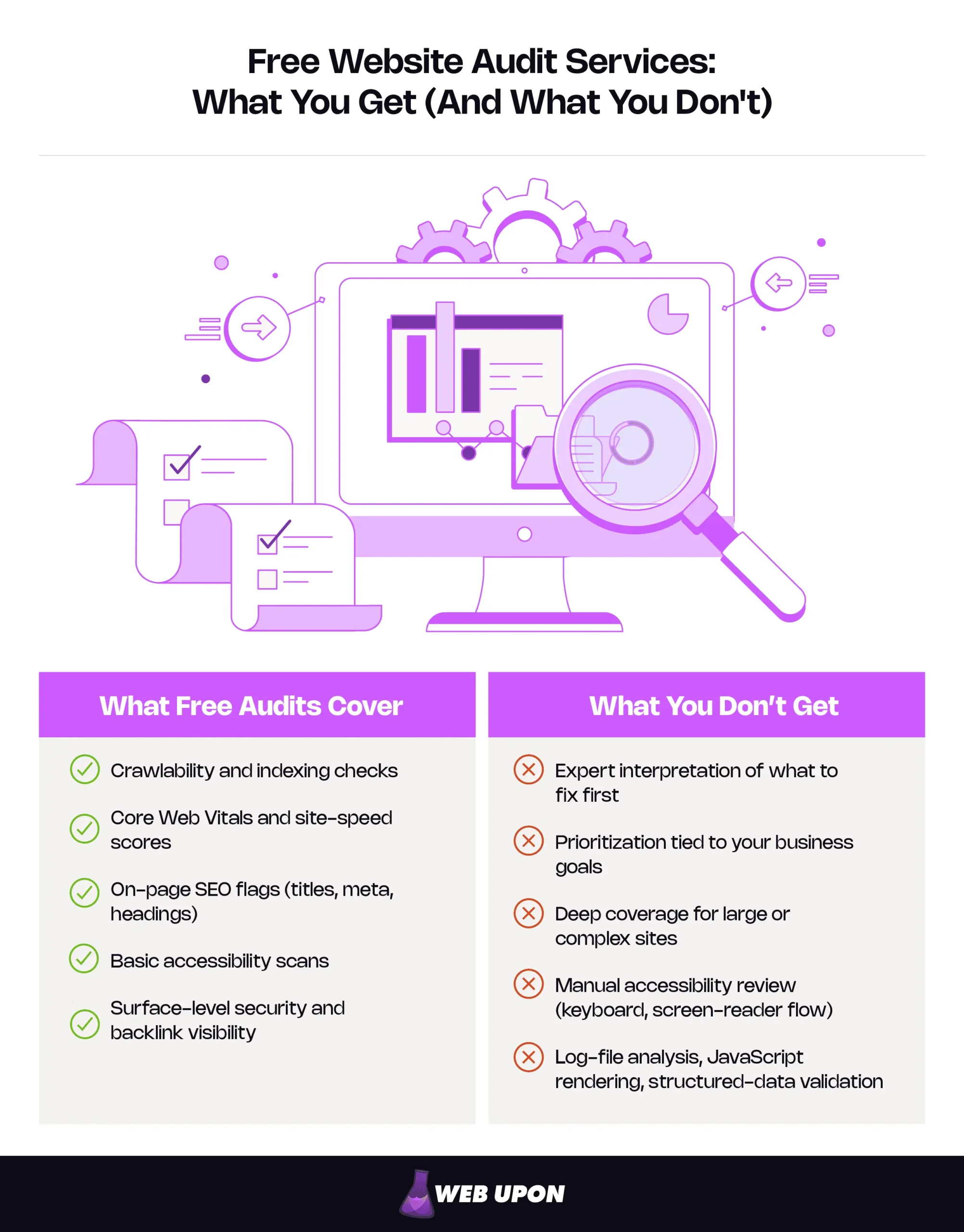
Free website audit services genuinely deliver real diagnostics: they check whether search engines can reach and index your pages, measure your Core Web Vitals and load speed, flag on-page SEO problems like missing or duplicate title tags, run a basic accessibility scan, and reveal surface-level security and backlink data. What they don’t deliver is judgment: what to fix first, how it ranks against your actual business goals, deep coverage for large or complex sites, and advanced checks like log-file analysis, JavaScript rendering, and structured-data validation. Use a free audit as a starting point, layer a few tools so they cover each other’s blind spots, and bring in expert eyes to interpret those findings and prioritize them against your goals.
Surfacing isn’t solving. Put simply, free website audit services reliably tell you what is happening on your site, but rarely tell you what to do about it. The rest of this guide walks both halves — what the free tier does well, and exactly where it stops — so you leave with a repeatable workflow and a clear sense of when expert help earns its cost.
Key Takeaways
- Start with crawlability. If search engines can’t reach a page, nothing else matters. A page that isn’t crawled can’t be indexed, and one that isn’t indexed can’t rank.
- Commit the Core Web Vitals thresholds to memory: LCP ≤ 2.5 seconds, INP ≤ 200 milliseconds, CLS ≤ 0.1, and remember that field data from real users (not lab scores) is what moves rankings.
- Automated accessibility scans catch only a fraction of real barriers; the rest need a person moving through the site by keyboard and screen reader.
- Layer free tools so their blind spots don’t line up, run the stack quarterly, then sort every finding by impact and effort.
- Bring in expert help when findings outrun your confidence to prioritize them, or when your site grows complex enough that free tiers start leaving gaps.
What Free Website Audit Services Actually Deliver (And Why It Matters More Than You Think)
For most small and growing sites, the free tier covers the core technical SEO diagnostics that catch the highest-impact problems — the ones quietly costing you visibility right now. The catch is reading the output well.
| Category | Free tier surfaces | Paid / expert tier adds |
| Crawlability | Common blockers, broken links, basic crawl errors | Full-site crawls, crawl-budget analysis, log-file insight |
| Performance | Core Web Vitals scores, lab plus some real-user data | Continuous monitoring, per-template diagnostics |
| On-page SEO | Missing or duplicate tags, basic content flags | Intent and competitive content assessment |
| Accessibility | Auto-detectable issues (alt text, contrast) | Manual review (keyboard nav, screen-reader flow) |
| Security and backlinks | HTTPS and mixed-content flags, sampled backlinks | Exhaustive link indexes, deeper vulnerability context |
Start with crawlability, because if search engines can’t reach your pages, nothing else on this list counts.
Automated Crawlability and Indexing Checks: Your First Line of Defense
Imagine a page that exists, loads perfectly, and converts beautifully — and that no search engine has ever seen. That’s the problem this category catches.
Two quick definitions: Crawlability is whether a search engine’s bot can find and read your pages by following links. Indexing is whether, having read a page, the engine files it away so it can appear in results. They run in sequence. A page that can’t be crawled won’t be indexed, and a page that isn’t indexed can’t rank, however good it is.
Free website audit services scan your site and report where that sequence breaks. The skill is telling a real fire from a smoke alarm with a low battery. A critical error looks like an important page accidentally blocked in your robots.txt — the small text file that tells bots where they may go. One stray line there can hide an entire section of your site. A cosmetic error looks like a short redirect chain or a low-priority page you meant to keep out of the index. Both glow red in the report. Only one is worth your weekend.
| Critical — fix now | Cosmetic — monitor |
| Important pages blocked by robots.txt or noindex | A two-hop redirect chain |
| Broken internal links to key pages | A trailing-slash inconsistency |
| Orphaned pages nothing links to | A page you meant to keep out of the index |
Even a basic crawl scan routinely turns up one of these — the kind of fix that can light up pages that were dark for months. For a deeper toolkit, see our roundup of free website audit tools.
Once your pages can be found, the next question is how fast they feel.
Core Web Vitals and Site Speed Analysis: The Performance Snapshot You Can Trust
Core Web Vitals are Google’s three real-user performance metrics. Free website audit services measure all three, and the “good” thresholds are worth committing to memory.
| Metric | What it measures | “Good” threshold | Common cause of failure |
| LCP (Largest Contentful Paint) | How fast the main content appears | 2.5 seconds or less | Oversized hero images, slow server response |
| INP (Interaction to Next Paint) | How quickly the page responds to a tap or click | 200 milliseconds or less | Heavy JavaScript blocking the main thread |
| CLS (Cumulative Layout Shift) | How much the layout jumps while loading | 0.1 or less | Late-loading fonts, images without set dimensions |
One currency note that trips up a lot of guides: the third metric used to be First Input Delay. Google replaced it with INP on March 12, 2024, and INP is stricter. If a tool is still grading you on FID, it’s behind.
Two things to read carefully here. First, immersive, visually-rich sites are built to struggle with LCP (that full-width hero is the largest element, and it’s heavy) and CLS (web fonts and late-loading galleries shove the page around as they arrive). Beauty and speed aren’t enemies, but on a design-led site they pull against each other, and that tension is usually where the points go.
Second, mind the gap between lab data and field data. A tool like Lighthouse runs one simulated test on one virtual device. Google’s ranking signal uses field data — your real visitors, measured at the 75th percentile. You can score 95 in the lab and still fail in the field, because real people are on slower phones and worse networks than the test machine. When the two disagree, the field is the one that moves rankings.
Speed handled, the next layer is what your pages actually say.
On-Page SEO Evaluation: Title Tags, Meta Descriptions, and Content Quality Signals
Free audits are reliable mechanics and unreliable critics. They’ll consistently flag missing, duplicate, or poorly sized title tags and meta descriptions, thin headings, and basic content issues. What they can’t tell you is whether the page actually answers what a searcher wanted.
| A tool reliably flags | A human has to judge |
| Missing or duplicate title tags | Whether the title matches real search intent |
| Missing meta descriptions | Whether the page fully answers the query |
| Thin or absent headings | Whether the page deserves to outrank competitors |
Automation catches the mechanical; people judge the meaningful. Read the SEO score in a free audit report as a hygiene check, not a prediction. Clean plumbing is necessary; it doesn’t promise the house sells.
If you’d rather work through these checks in order, our website audit checklist lays them out step by step.
ADA Compliance and Accessibility Issue Detection: The Overlooked Audit Layer
One framing matters before the rest: accessibility is about reducing risk and reaching more people, not earning a legal certificate. A free scan can’t make your site “ADA compliant,” and no honest tool claims it can. What it can do is catch real barriers and hand you a starting list.
Automated scanners are sharp on the machine-detectable problems and blind to the human ones.
| Auto-detectable | Needs manual review |
| Missing alt text on images | Whether the alt text actually means anything |
| Low color contrast | Keyboard-only navigation — can you tab through everything? |
| Missing form labels | Screen-reader reading order and flow |
Automated accessibility scans catch only a fraction of all barriers; the rest are experiential, and finding them means a person actually moving through the site without a mouse, or listening to it with a screen reader. On immersive, design-heavy work, that gap widens, because the very flourishes that make a site feel premium — custom scroll effects, animated menus, canvas elements — are the ones automated tools can’t judge. The W3C’s Web Accessibility Initiative is the standard to cite. A free scan won’t carry you to the finish; it reliably gets you off the blocks, and fixing alt text and contrast means a real person somewhere can finally use your site.
Security Audit Basics and Backlink Visibility: What Gets Surfaced for Free
Free security checks cover the essentials without theatrics: whether your site runs on HTTPS, whether you have mixed content (a secure page loading insecure resources, which browsers flag and which chips away at trust), and basic certificate validity. Confirm them, but keep the volume down. This is a smoke detector, not a vault inspection.
Backlinks are where expectations need trimming. A backlink is just a link from another site to yours, and search engines read them as a signal of relevance and trust. Free tools give you a directional view — a sample of who points your way, handy for spotting your strongest referrers or an obvious hole. But that sample is drawn from a far smaller link index than paid crawlers carry, so treat the figures as a sketch, not a census. Even a partial map of your top referring domains helps explain why a well-built page still isn’t ranking.
And that’s the turn. Free tools are genuinely good at surfacing crawl errors, slow metrics, missing tags, weak contrast, and a sample of links. But surfacing a problem and solving it are different jobs.
What Free Website Audit Services Leave Out (And How to Close the Gap Without Overspending)
Lay three free audit reports side by side: rows of green checks, a scatter of red flags, a few amber warnings. Every mark is accurate. And together they still can’t tell you the one thing you opened them to learn — what to fix first, and why. This is where the real value lives, and where free runs out of road.
The Expert Interpretation Problem: When Automation Stops and Strategy Begins
A free tool hands you a list. It can’t rank that list against your business. It doesn’t know your contact page drives most of your revenue, or which single category of search you’re trying to win, or that the “critical” error it flagged sits on a page no customer ever opens. Strip out that context and the list quietly invites you to spend a week on cosmetic wins while the page that matters keeps leaking.
| What the tool says | What an expert asks next |
| “47 issues found” | Which of these sit on pages that actually drive revenue? |
| “Improve your meta descriptions” | Do these pages even target the right intent? |
| “Performance score: 72” | 72 next to whom, for the keywords that matter to you? |
A tool generates findings; it can’t weigh them against your goals, your audience, or your competitors. So the realistic expectation for a founder watching the budget is clean and simple: free audits give you an accurate inventory of problems, and expert review turns that inventory into a sequence. When the findings outpace your confidence to prioritize them, that’s the moment an expert SEO audit service pays for itself — not to replace free website audit services, but to name the few things on the list that actually move the needle.
Past interpretation, the free tier has hard technical ceilings worth saying out loud.
Hidden Limitations in Free Audit Tools: Scan Depth, Data Freshness, and Feature Gaps
Free tools come with limits that stay invisible until they bite. The real question isn’t whether the limits exist, it’s whether they matter for your site.
| Limitation | Who it affects most | Acceptable trade-off or real risk? |
| Page and crawl caps | Large or complex sites | Real risk at scale; fine for a small brochure site |
| Data freshness / crawl frequency | Sites that change often | Real risk if you ship weekly; fine if mostly static |
| No JavaScript rendering | App-like, JS-heavy sites | Real risk for single-page apps; fine for classic HTML |
| No log-file analysis | High-traffic, SEO-mature sites | A trade-off most can ignore until they scale |
JavaScript rendering matters because many free crawlers read only the first wave of HTML and miss anything your site assembles with JavaScript afterward, so on an app-style site, the tool may never “see” half your content. Log-file analysis means reading your server’s own record of what search bots actually crawled, rather than a tool’s best guess; it’s how large sites find wasted crawl budget. Structured-data validation checks the hidden labels that earn rich results in search, and it’s usually locked behind paid tiers.
The self-assessment is short. Small, mostly static, classic HTML? The free-tier limits are fine. Large catalog, frequent updates, or a JavaScript framework underneath? Those same limits become blind spots.
Building Your No-Cost Audit Stack: Combining Free Website Audit Services for Broader Diagnostic Coverage
No single free tool does everything. Layered well, a handful of them cover most of what a small site needs, each one patching another’s blind spot.
| Check type | Free tool category to use | What it tells you |
| Crawl and indexing | Your search engine’s own console (e.g., Google Search Console) | Which pages are indexed, found, or blocked |
| Speed and Core Web Vitals | A page-speed analyzer (e.g., PageSpeed Insights / Lighthouse) | Lab plus real-user performance scores |
| On-page SEO | A free site crawler/auditor | Missing tags, broken links, duplicate content |
| Accessibility | A browser-based accessibility checker | Auto-detectable barriers (contrast, alt text) |
| Security | An HTTPS / SSL checker | Certificate status and mixed-content warnings |
Then run them on a clock. Once it’s familiar, this quarterly pass takes well under an hour:
- Confirm indexing. Open your search console and check which key pages are indexed versus excluded.
- Measure performance. Run a Core Web Vitals check on each type of page — home, product or service, article — not just the homepage.
- Crawl for on-page issues. Use a free auditor to catch broken links, missing tags, and duplicate content.
- Scan accessibility. Run a checker on your highest-traffic templates; fix alt text and contrast first.
- Verify security. Confirm HTTPS sitewide and clear any mixed-content warnings.
- Log it all in one place. Record every finding and tag it — fix now, plan, or monitor.
Setting Realistic Expectations: Turning Free Audit Findings Into a Growth Roadmap
Here’s the shift that ends the anxiety: a free audit is a diagnosis, not a verdict. It shows you where to look, not how scared to be. Hold it as a starting point rather than a judgment on your site’s worth, and you stay strategic instead of swamped.
To prioritize without an SEO team behind you, sort every finding on two axes — impact (how much it moves visibility or revenue) and effort (how hard it is to fix). That gives you three piles:
- Fix now — high impact, low effort. A page blocked from indexing, a broken link to your contact form, missing alt text on key images. This week.
- Plan — high impact, high effort. A heavy hero image dragging every template, a sitewide content-intent mismatch. Schedule it; resource it.
- Monitor — low impact. Minor redirect chains, cosmetic flags. Note them and move on.
The cost of ignoring a true high-impact error — months of buried pages — almost always dwarfs the cost of fixing it. Run the audit, sort the findings, work the top pile, come back next quarter. That loop, not one flawless report, is what compounds into growth.
Frequently Asked Questions
Are free website audit services accurate enough to rely on? For the diagnostics they cover — crawlability, Core Web Vitals, on-page flags, basic accessibility and security — yes, they’re generally accurate. The limitation isn’t accuracy; it’s interpretation and depth. They reliably tell you what is wrong, not which fix matters most for your goals.
Can a free website audit replace a paid or expert SEO audit? For a small, mostly static site, a well-layered free stack covers most needs. For larger, complex, or JavaScript-heavy sites — or any time you need findings ranked against business goals and competitors — expert review adds what automation structurally can’t.
How often should I run a free website audit? Quarterly is a sensible baseline, with an extra check after any major redesign, migration, or content overhaul. Sites that publish or change often benefit from monthly performance and indexing checks.
Do free audits check ADA accessibility and site security? They check the auto-detectable layer — missing alt text, low contrast, HTTPS status, mixed content. They don’t confirm legal compliance or replace manual review of the keyboard and screen-reader experience, both of which need a person.
What should I do first with my free audit results? Sort findings by impact and effort, then act on the high-impact, low-effort items first — restoring a wrongly blocked page, fixing a broken link to a key page. Tag the rest as plan or monitor so the list stays manageable.
Your Next Move After the Free Audit
Free website audit services hand you an accurate, no-cost diagnosis: what’s crawlable, how fast you are, what’s flagged on-page, and where the obvious accessibility and security gaps sit. What they don’t hand you is the judgment to know which finding deserves your next hour, and that’s the part that turns a report into growth. Run the audit, layer your tools, sort by impact and effort, and come back each quarter; that habit beats chasing a perfect score every time. Contact Web Upon and we’ll help you turn a free audit into a prioritized roadmap.