Two fears sit underneath almost every platform decision. One is that your software will charge you more every time you succeed. The other is that it will quietly turn you into a part-time systems administrator, patching plugins at midnight instead of planning next quarter.
BigCommerce vs. WooCommerce is really a choice between those two risks. Choose BigCommerce if you want predictable costs, managed security, and a store that rides out traffic spikes without a developer on call. In return, you accept less design freedom, along with plan tiers and fees that rise with your sales and vary by payment provider. Choose WooCommerce if content and search bring in your customers, you have technical help, and you want full control. The plugin is free, but hosting, security, PCI scope, and updates are yours.
Neither platform is cheaper by default. The cheaper one is the one that fits your team.
This guide gives you pricing verified as of October 2026, honest pros and cons, and a five-question framework for making the call. BigCommerce overhauled its plans on June 1, 2026, so many comparisons online now quote prices that no longer exist.
Key Takeaways
- The answer: Neither platform wins on price alone. BigCommerce suits owners who want managed infrastructure and predictable bills; WooCommerce suits content-led brands with reliable technical help who want full control.
- BigCommerce costs rise in visible steps. Plans start at $29 a month billed annually (Core), and stores move up automatically as trailing 12-month sales cross each plan’s threshold.
- Your payment provider now affects BigCommerce’s price. Orders through embedded providers such as Stripe or PayPal Braintree carry no BigCommerce fee; other gateways and offline orders cost 0.6% to 2.0%, depending on plan.
- WooCommerce is free, but running it isn’t. The software carries no license fee, yet most premium extensions renew every year, and developer hours are usually the largest cost.
- Security responsibility differs sharply. BigCommerce holds Level 1 PCI DSS attestations, though merchants remain ultimately responsible for compliance. On WooCommerce, every plugin and script on your site counts toward PCI scope, and SAQ A now requires confirming your site resists script attacks.
- Scaling and SEO split the same way. BigCommerce absorbs traffic spikes for you; WooCommerce scales through engineering. WooCommerce has the higher ceiling for content-led SEO, but strategy matters more than the platform.
The Quick Verdict: BigCommerce vs. WooCommerce
- Choose BigCommerce if you want someone else to run the infrastructure. Security, hosting, and traffic spikes are handled for you, at the cost of design freedom and fees tied to your sales and payment provider.
- Choose WooCommerce if organic content drives your growth and you can count on technical help. You get total control, and you take on everything that comes with it.
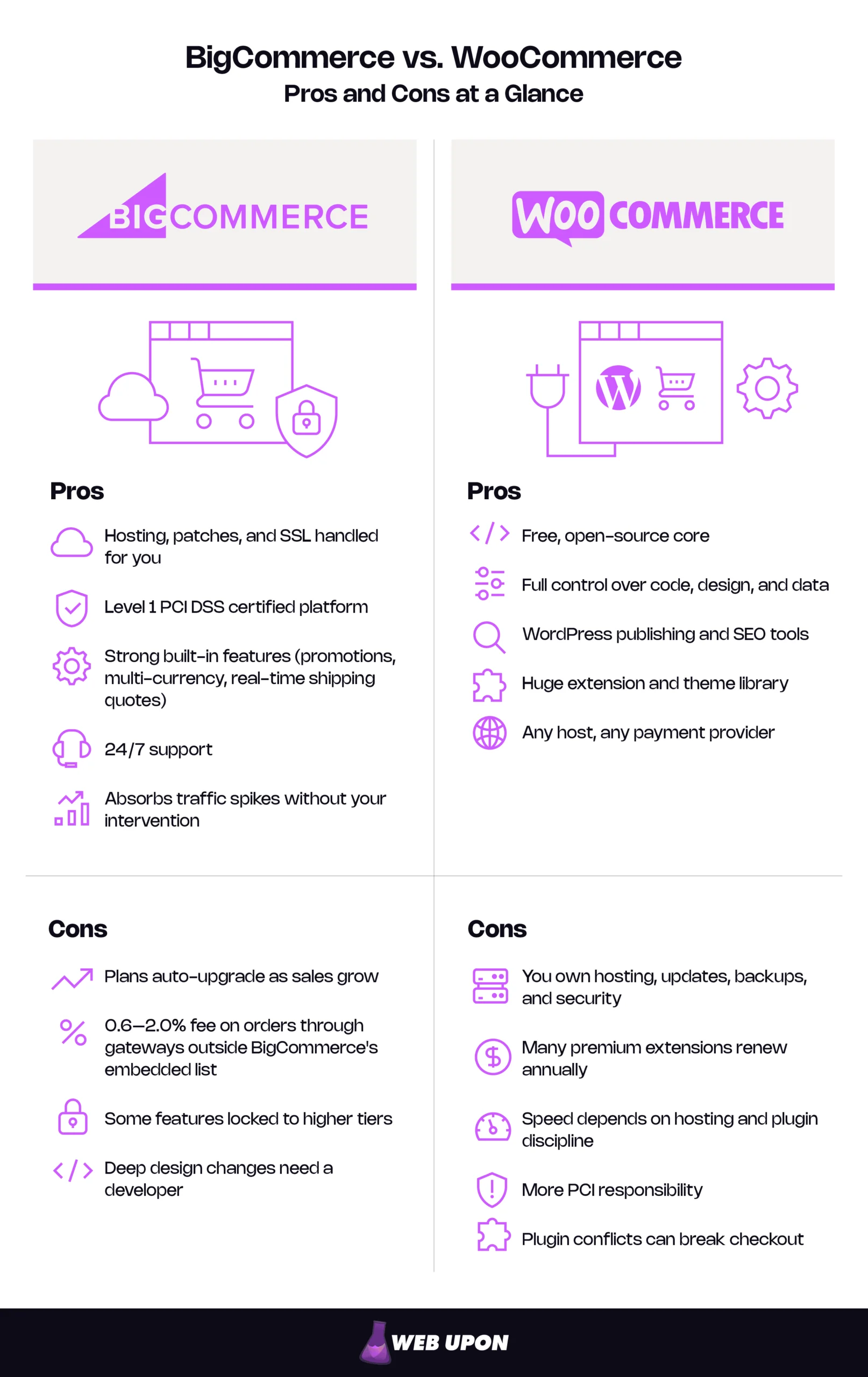
Head-to-Head Snapshot (pricing as of October 2026)
| Factor | BigCommerce | WooCommerce | Stronger for… |
| Platform type | Managed SaaS | Self-hosted, open-source WordPress plugin | Depends on your team |
| Starting cost | $39/mo, or $29/mo billed annually (Core) | Plugin free, hosting and extensions extra | Lean technical teams: WooCommerce |
| Platform transaction fees | $0 through embedded payment providers, 0.6–2.0% through other gateways and offline orders | None | Gateway flexibility: WooCommerce |
| Hosting | Included | You choose and pay | Hands-off owners: BigCommerce |
| Security and PCI | Platform is Level 1 certified; you keep some responsibilities. | Your responsibility, reduced with hosted payment fields | Non-technical owners: BigCommerce |
| Design flexibility | Strong themes; deep changes need a developer. | Limited mainly by budget and developer skill | Custom brands: WooCommerce |
| SEO and content | Solid technical basics, basic blog | Full WordPress publishing plus leading SEO plugins | Content-led brands: WooCommerce |
| Scalability | Managed infrastructure absorbs spikes | Scales well with good hosting and engineering | Predictable scaling: BigCommerce |
| Best for | Owners who want to sell, not maintain | Owners who want control and have help | — |
Those verdicts hold for a reason. Almost every row in that table traces back to one architectural decision, made long before you pick a theme.
What You’re Really Choosing Between: SaaS Infrastructure vs. Open-Source Freedom
The Architectural Difference Behind Every Trade-Off
Think of BigCommerce as renting space in a fully serviced building. The landlord handles the wiring, the locks, and the elevator, and you decorate within the lease. WooCommerce is more like buying land and building your own store. Every wall can go where you want it, and every leaking pipe is yours.
In plain terms, BigCommerce is a SaaS (software as a service) ecommerce platform: it runs on BigCommerce’s servers, and you pay a subscription to use it. WooCommerce is a self-hosted, open-source plugin. It adds a store to WordPress, which runs on hosting you choose and manage. Here is what that means on an ordinary Tuesday:
| BigCommerce handles… | With WooCommerce, you handle… |
| Servers, scaling, and uptime | Choosing, paying for, and upgrading hosting |
| Platform updates and security patches | Updating WordPress, WooCommerce, your theme, and every plugin, then checking they still work together |
| SSL and sitewide HTTPS on every plan | SSL setup, usually included by your host |
| Platform-level PCI DSS compliance | Your own PCI scope, including the scripts that run on your site |
| Platform backups and disaster recovery | Your backups, and proof they actually restore |
| Peak-day capacity and platform security | Caching, a CDN, and capacity planning before every sale |
BigCommerce includes free sitewide HTTPS and a dedicated SSL certificate on all four plans, and says it manages hosting, performance, and updates for merchants.
“Free” is where WooCommerce starts, not where its costs end. “Hosted” is where BigCommerce starts, not where its trade-offs end.
Who Each Platform Was Actually Built For
BigCommerce was built for merchants who want professionally run infrastructure without hiring a development team. WooCommerce was built for owners who want maximum control and are comfortable owning the technical work, or paying someone who is.
Most owners fit one of three profiles. The scaling retailer has a working store, a small team, and promotions that sometimes slow the site down. The ambitious founder is launching a first serious store on a lean budget. The content-led brand wins customers through guides, blogs, and organic search.
A mismatch is expensive either way. Picture a non-technical founder on WooCommerce who updates three plugins the night before a sale. Checkout breaks, and the weekend disappears into troubleshooting. Now picture a content brand on BigCommerce that wants long, richly linked guides. It finds the built-in blog basic and starts paying for workarounds.
BigCommerce likely fits if you:
- Have no developer on staff and don’t want one
- Run promotions that drive sudden traffic spikes
- Want security and compliance handled at the platform level
- Value a predictable monthly bill over fine-grained control
- Use a mainstream payment provider such as Stripe or PayPal
WooCommerce likely fits if you:
- Have reliable technical help, in-house or on retainer
- Rely on content and organic search for customers
- Need custom functionality or an unusual checkout
- Use a regional, specialist, or offline payment method
- Want to own your code, data, and hosting
Knowing which profile you fit is half the decision. The other half is the question every founder asks next: what will this actually cost over a year?
Pricing, Total Cost of Ownership, and the Hidden Fee Problem
BigCommerce Pricing: What You Pay and What You Get
BigCommerce sells four plans: Core, Growth, Scale, and Performance. These are the plans formerly called Standard, Plus, Pro, and Enterprise. BigCommerce renamed them on June 1, 2026, lowered the sales thresholds, and changed how fees work. You can confirm current figures on the official BigCommerce pricing page.
BigCommerce Plans
| Plan (former name) | Price: billed monthly / annually | Sales threshold (trailing 12 months) | Fee on orders through non-embedded gateways | Key features unlocked |
| Core (Standard) | $39 / $29 per month | Up to $30K, auto-upgrades to Growth | 2.0% | Unlimited products, blog, coupons and gift cards, multi-currency, real-time shipping quotes, 24/7 chat and email support |
| Growth (Plus) | $105 / $79 per month | Up to $100K, auto-upgrades to Scale | 1.0% | Customer groups, abandoned cart saver, persistent cart, stored cards, phone support |
| Scale (Pro) | $399 / $299 per month | $33,333 per month, plus 0.9% on sales above that, moves to Performance at $2M | 0.6% | Product filtering, including custom fields, Google customer reviews |
| Performance (Enterprise) | Custom, from $1,499 per month billed annually | Custom | None under contract | Customer-specific price lists, advanced promotions, dedicated success manager |
The thresholds are the part to read twice. BigCommerce measures your sales over a rolling 12 months, using what it calls Inclusive GMV: your gross order value, including tax and shipping, minus 10%. So the $30,000 Core cap equals about $33,333 in gross orders, and the $100,000 Growth cap about $111,111. Cross a threshold and you are moved up automatically. Each store on an account is evaluated separately.
That is the mechanism behind the “penalized for success” fear, and it is real. It is also transparent, and the 2026 changes brought two genuine improvements. You can now downgrade yourself when your sales allow it, with the change taking effect at the start of your next service period. And the Scale plan replaced the old fixed charge per block of sales with a smooth 0.9% overage, which is easier to forecast.
The bigger change concerns BigCommerce transaction fees. Orders processed by one of BigCommerce’s embedded payment providers carry no BigCommerce fee. That list includes Stripe, PayPal Braintree, Adyen, and BigCommerce Payments. Orders processed through any other gateway, or paid offline, carry a fee of 0.6% to 2.0% depending on your plan. BigCommerce bills that fee to you monthly as a separate invoice line, and it can’t be passed on to shoppers. Your card processor’s own fees apply either way.
WooCommerce Pricing: The True Cost Beyond the Free Plugin
Is WooCommerce free? Yes. The WooCommerce plugin and WordPress itself are free, open-source software released under the GPL license, with no license fee. You pay for everything around them: hosting, a domain, a theme, extensions, and the hours someone spends keeping it all running.
The line that surprises new owners is extensions. On the official WooCommerce Marketplace, most premium extensions are annual subscriptions, not one-time purchases. WooCommerce Subscriptions costs $279 a year, Memberships $199, Product Add-Ons $79, and each carrier shipping extension (UPS, USPS, or FedEx) $109. Renewal pays for updates and support. Let a license lapse and the updates stop with it, including security patches.
Payments are where WooCommerce’s flexibility helps. WooCommerce charges no platform fee on any gateway, so you can use Stripe, PayPal, or a regional processor and pay only the processor’s rates. The trade-off is that you configure, test, and secure that setup yourself.
Typical WooCommerce Annual Cost Stack (illustrative)
| Cost item | Low-end estimate | Typical estimate | Notes |
| Hosting | $120–300 | $300–1,200 | Shared at the low end; managed WordPress hosting is typical for real stores. |
| Domain | $10–20 | $15–20 | Same cost on either platform. |
| SSL | $0 | $0 | Free certificates are standard and usually included by your host. |
| Theme | $0 | $60–120 | Premium themes often renew annually for updates. |
| Core extensions | $0–200 | $300–1,000 | Subscriptions, shipping, add-ons; most renew yearly. |
| Security and backups | $0–100 | $100–400 | Some managed hosts include these. |
| Developer hours | $0 (you do it) | $1,200–6,000 | 2–5 hours a month at $50–100 an hour. |
| Total | ~$130–620 | ~$2,000–8,700 | Excludes card processing, which is similar on both platforms. |
Those developer hours are the biggest part of the WooCommerce total cost of ownership, and the easiest to forget. They go to plugin updates tested on a staging copy first, conflict fixes when an update breaks something, security monitoring, backup restore tests, and speed tuning before peak season.
Side-by-Side Total Cost of Ownership Analysis
Prices on a pricing page are only inputs. To compare honestly, you need a full year, three realistic stores, and your own time counted as a cost.
On BigCommerce, costs climb with revenue in three ways. Your plan auto-upgrades at each threshold. The Scale plan adds a 0.9% overage. And if you use a gateway outside the embedded list, a percentage fee applies. Here is the overage in practice. A store doing $100,000 a month in gross orders has about $90,000 in Inclusive GMV, which is $56,667 over the Scale cap. At 0.9%, that adds roughly $510 a month to the $299 base, or about $9,700 a year in platform cost before any apps.
On WooCommerce, costs climb through people more than plans. For a sense of scale, the U.S. Bureau of Labor Statistics reports a May 2025 median wage of $92,650 for web developers, about $45 an hour before benefits, with the lowest-paid tenth earning under $48,100 and the highest-paid tenth over $162,290. Freelance and agency rates run higher because they cover overhead. The ranges below assume $50 to $150 an hour.
How we built the scenarios:
- Small store: $60,000 a year, about 100 orders a month, solo owner.
- Mid-size store: $500,000 a year, about 800 orders a month, a team of three to five, and a freelance developer.
- Scaling store: $3 million a year, about 4,000 orders a month, ten or more staff, and a developer on retainer.
- BigCommerce prices use annual billing, and all orders go through an embedded payment provider.
- Card processing is excluded because it is similar on both platforms.
- Owner time is valued at $50 an hour.
BigCommerce vs. WooCommerce Pricing, 12-Month Total Cost of Ownership (illustrative estimates)
| Store | BigCommerce | WooCommerce | Main cost drivers | Likely winner |
| Small ($60K) | ~$1,250–3,550. Growth plan $948 (sales exceed the Core cap), apps $300–1,200, theme $0–400, occasional developer help $0–1,000. Plus ~1hr/month of owner time (~$600). | ~$1,000–3,800. Hosting $300–600, theme $0–100, extensions $100–500, security $0–200, developer $600–2,400. Plus 2–4 hrs/month of owner time (~$1,200–2,400). | BigCommerce: plan tier. WooCommerce: developer hours and owner time. | WooCommerce if you’re technical; BigCommerce if you’re not. Cash is close; your time decides it. |
| Mid-size ($500K) | ~$6,200–11,600. Scale plan 3,588 plus ~450 overage, apps $1,200–3,600, developer $1,000–4,000. ~2 hrs/month of staff time. | ~$5,500–17,700. Managed hosting $1,200–3,600, extensions $500–1,500, security $200–600, developer 4–8 hrs/month ($3,600–12,000). 4–8 hrs/month of staff time. | BigCommerce: plan, overage, and apps. WooCommerce: developer retainer and hosting. | BigCommerce for most teams; WooCommerce only with in-house skill. |
| Scaling ($3M) | ~$27,000–48,000 + Performance contract from ~$18,000 (negotiated), apps $3,000–10,000, developer or partner $6,000–20,000. | ~$30,000–96,000. High-performance hosting $3,600–18,000, extensions $1,500–3,000, security and monitoring $1,000–3,000, developer 20–40 hrs/month ($24,000–72,000). | Engineering on both; on WooCommerce, team quality sets the ceiling. | Depends on the team. BigCommerce is more predictable; WooCommerce can be cheaper with a strong in-house team. |
The pattern is consistent. WooCommerce’s cash costs are lower when a capable person is already on the payroll, and higher when that capability has to be bought by the hour. BigCommerce costs more on paper at every stage and less in surprises. Either way, a lower bill only pays off once customers start finding the store, which is why SEO gets its own section.
Price, though, is only half the comparison. The other half is what each platform does before you install a single app.
Features, Functionality, and Built-In Ecommerce Power
BigCommerce Core Features: What’s Included Out of the Box
Open a new BigCommerce store and much of the toolkit is already there:
- Inventory management, variants and SKUs, and bulk pricing rules
- Multi-currency checkout in more than 100 currencies
- Real-time shipping quotes from major carriers
- A promotions engine with more than 70 discount types, plus gift cards
- Selling on Amazon, eBay, and Walmart from every plan
Abandoned cart recovery and customer segmentation start on Growth.
For larger brands, BigCommerce is API-first. That means every store function is reachable through APIs, the connectors that let other software read and update store data. This makes headless commerce practical. In a headless setup, the storefront that shoppers see is built separately from the system that runs products, carts, and orders, and the two talk through those APIs. BigCommerce even maintains its own headless storefront framework, called Catalyst, built on Next.js and its GraphQL Storefront API.
There is a catch worth planning for: features, not revenue, often force the upgrade. Product filtering, which many catalogs of more than a few hundred items need, starts on Scale. Customer-specific price lists, the backbone of B2B pricing, are Performance-only. Map your must-have features to the BigCommerce Plans table before you compare prices.
WooCommerce Core Features: The Plugin-Powered Ecosystem
Out of the box, WooCommerce covers the essentials. You get products and variations, inventory, coupons, tax settings, flat-rate shipping, and a modern block-based cart and checkout. Flat rate, free shipping, and local pickup are the core shipping methods; other rates come from plugins. Beyond that, you extend. Subscriptions, memberships, carrier-calculated shipping, wholesale pricing, multi-currency, and advanced filtering typically come from extensions.
That modular approach cuts both ways. It lets you assemble almost any feature set, including combinations few SaaS platforms can replicate. It also means every added feature is one more update, one more renewal, and one more possible conflict.
Payment Gateways, Transaction Fees, and Checkout Control
BigCommerce integrates natively with the major payment providers. Since June 2026, which provider you choose has also become a platform-cost decision. BigCommerce bills its fee based on which provider actually processes each order, not which payment options appear at checkout. Offline and manual payments, including B2B purchase orders, count too.
For most retailers already using Stripe or PayPal, the fee is zero. Now take a wholesaler on the Growth plan that receives $50,000 a year in purchase orders: it pays about $450 a year (1% of $45,000 in Inclusive GMV). Before choosing BigCommerce, check your preferred gateway against its embedded provider list and estimate your share of offline orders.
WooCommerce works with Stripe, PayPal, and hundreds of regional options, with no platform fee on any of them. It also gives you deeper control of checkout itself: you can change fields, steps, and logic in ways BigCommerce’s optimized, ready-made checkout doesn’t allow.
The margin math is worth seeing. At $500,000 in annual sales, every half-point of payment cost equals $2,500 a year. Checkout friction can often cost more than that: peer-reviewed research has found perceived transaction inconvenience to be the strongest predictor of cart abandonment, ahead of perceived risk and waiting time. A clunky form that loses even a small share of buyers who were ready to pay can outweigh any fee difference. Choose the platform whose checkout you can make fast and trustworthy for your customers.
Feature Comparison Matrix
| Feature | BigCommerce (native / plan) | WooCommerce (native / extension) |
| Inventory | Native on all plans, 4–8 stock locations depending on plan | Native (basic), multiple locations need an extension |
| Variants and SKUs | Native, all plans | Native |
| Multi-currency | Native, all plans | Typically via extension |
| Shipping | Real-time carrier quotes, all plans | Flat rate native, carrier quotes via extensions (~$109/yr each) |
| Abandoned cart | Native from Growth | Extension or email-platform integration |
| Gift cards | Native, all plans | Typically via extension |
| Customer segmentation | Native from Growth | Extension required |
| B2B and bulk pricing | Bulk rules native, price lists on Performance, advanced B2B via add-on | Extensions required |
| Headless and API | REST and GraphQL APIs, Catalyst storefront framework | REST API native, headless needs custom development |
| Payment gateways | Embedded providers fee-free, others 0.6–2.0% | Any gateway, no platform fee |
Features decide what your store can do. Design decides how it feels to the person about to buy, and that is where the two platforms’ philosophies are easiest to see.
Design Flexibility, Themes, and Storefront Customization
BigCommerce Themes and Design Control
BigCommerce themes run on Stencil, its theme framework. The result is polished and mobile-ready, with free and premium themes to start from. Premium themes typically add layout options, built-in merchandising sections, and design support rather than a different level of quality. Page Builder lets non-technical owners drag sections into place, change banners, and launch landing pages without touching code.
The ceiling appears when you want to change structure rather than style. Rebuilding the product page template, or adding a module that pulls custom data into the layout, means editing Stencil templates. That is developer work. Most stores never need it. Brands with a distinctive digital identity often do.
Design on BigCommerce: best for professional, conversion-tested storefronts with little upkeep.
WooCommerce Design Freedom and Its Real-World Trade-Offs
WooCommerce opens the entire WordPress theme ecosystem: thousands of themes, the native block editor, and page builders such as Elementor. Every pixel is customizable. The design ceiling is limited mainly by budget and developer skill.
That freedom has a maintenance bill. Each theme, builder, and add-on is code that must stay compatible with the next WordPress and WooCommerce update. Stack enough of them and the site slows down, which costs both conversions and search visibility. The most beautiful WooCommerce stores are usually the most disciplined ones, not the most decorated.
Design on WooCommerce: best for brands that treat the storefront as a creative asset and budget to maintain it.
And the more you customize, the more there is to protect.
Security, Hosting, Performance, and Scalability
BigCommerce Security and Infrastructure: The Managed Advantage
PCI DSS is the card industry’s security standard for any business that accepts card payments. On BigCommerce, that compliance is largely handled for you. The platform holds Level 1 PCI DSS attestations, the highest level, as both a merchant and a service provider, according to its Trust Center. Your remaining job is lighter but real. You remain ultimately responsible for compliance, including any design changes and outside integrations you add, and your payment processor or bank may ask you to validate it, often with a short self-assessment questionnaire. Protect staff logins and vet the apps you install. The PCI Security Standards Council sets the standard and publishes those questionnaires.
SSL comes free on every plan, and BigCommerce manages hosting, updates, and platform security for you. Managed doesn’t mean risk-free. A third-party app with weak credentials can expose store data even when the platform itself is secure. Review your installed apps once a quarter and remove any you don’t use.
WooCommerce Security and Hosting: Full Control, Full Responsibility
Choosing WooCommerce hosting is the first security decision you make, and the one that shapes the rest.
WooCommerce Hosting Options (illustrative monthly costs)
| Type | Typical monthly cost | Best for | Maintenance burden |
| Shared hosting | $5–30 | Testing and very small catalogs | High: limited resources, you manage most things |
| Managed WordPress or WooCommerce hosting | $25–150 | Most small and mid-size stores | Low to medium: host handles core updates, backups, caching |
| VPS | $40–200+ | Technical teams that want control | High: you manage the server |
| Dedicated or high-availability cloud | $300–1,500+ | High-volume stores | Medium to high: needs DevOps skill or a managed provider |
A VPS (virtual private server) is a slice of a physical server with guaranteed resources that you configure yourself. Whatever you choose, you also own performance: caching, database care, and a CDN, which is a content delivery network that serves images and files from servers close to each shopper.
PCI is where many guides go quiet. The most common safeguard is a hosted payment form, such as Stripe’s or PayPal’s embedded card fields, so card numbers never touch your server. That usually qualifies you for the shortest self-assessment, called SAQ A.
In January 2025, though, the PCI Security Standards Council updated SAQ A, effective March 31, 2025. Merchants must now confirm their site is not susceptible to attacks from malicious scripts. You can meet that criterion with your own script protections or with written confirmation from your PCI-compliant payment processor, according to the PCI Security Standards Council. On WooCommerce, every plugin and third-party script on your site is part of that answer. Running fewer plugins, kept current and from reputable developers, is now a compliance practice, not just tidy housekeeping.
Your monthly WooCommerce security checklist:
- Update WordPress core, WooCommerce, your theme, and plugins, testing on a staging copy first.
- Remove plugins and themes you no longer use.
- Confirm extension licenses are active so security updates keep arriving.
- Review admin accounts and require strong passwords with two-factor authentication.
- Check that backups ran, and test-restore one every quarter.
- Scan for malware and review which third-party scripts load on your pages.
- Confirm your payment gateway uses hosted card fields.
Scalability Under Pressure: Which Platform Holds Up at Volume
On BigCommerce, a traffic spike is the platform’s problem. You run the promotion, and the infrastructure stretches to meet it with no action on your side. Your scaling costs show up on the invoice instead, as plan changes, overage, and eventually a negotiated contract.
On WooCommerce, scaling is an engineering project you schedule. The good news is that modern WooCommerce scales better than its reputation. For years, orders were stored as generic WordPress posts, the root of many slowdown stories. WooCommerce’s newer order storage (High-Performance Order Storage, or HPOS) gives orders their own database tables. WooCommerce reports up to five times faster order creation and up to 1.5 times faster checkout, and HPOS has been the default for stores created on or after October 10, 2023. Older stores, and stores running plugins that don’t support it, may still be on the legacy setup. Check before your next peak season.
Scaling Milestones (illustrative, assumes a $75 average order and annual billing)
| Monthly orders | What changes on BigCommerce | What changes on WooCommerce | Typical added cost or effort |
| 100 (~$90K/yr) | Growth plan, no infrastructure work | Managed WordPress hosting and basic caching | BigCommerce ~$79/mo; WooCommerce ~$25–50/mo hosting plus upkeep. |
| 1,000 (~$900K/yr) | Scale plan plus ~$300/mo overage, no infrastructure work | Higher hosting tier, object caching, CDN, HPOS confirmed, staging site | BigCommerce ~$600/mo; WooCommerce $100–300/mo hosting plus several developer hours. |
| 5,000 (~$4.5M/yr) | Moves to a Performance contract | Dedicated or high-availability hosting, database tuning, load testing before sales | BigCommerce negotiated, from ~$1,499/mo; WooCommerce $300–1,500/mo hosting plus a developer retainer. |
| 10,000 (~$9M/yr) | Same plan, renegotiated, the platform absorbs the load | Separate database server, search offloading, possibly headless | BigCommerce contract terms; on WooCommerce, engineering becomes a standing budget line. |
Page speed also matters for search. Google’s Core Web Vitals score three things:
- Loading: Largest Contentful Paint.
- Responsiveness: Interaction to Next Paint, which replaced First Input Delay on March 12, 2024.
- Visual stability: Cumulative Layout Shift.
Heavy stacks of WordPress plugins, apps, and third-party scripts hurt responsiveness most, on either platform.
A fast, secure store still has to be found. That makes search the last, and often deciding, piece of the comparison.
SEO Tools, Marketing Integrations, and Growth Capabilities
BigCommerce SEO and Built-In Marketing Tools
BigCommerce covers the technical SEO basics well:
- Custom URLs for products, categories, and pages
- Editable metadata on every page
- Schema markup built into its themes
- A promotions engine, coupons, and integrations with major email platforms
Multichannel selling is a genuine strength. Amazon, eBay, and Walmart connect on every plan, and a free feed tool, Feedonomics Surface, syncs your catalog to Google, Meta, TikTok, Microsoft, and Pinterest ads. The tool’s basic plan covers up to 100,000 SKUs.
The gap is content. BigCommerce’s built-in blog handles occasional posts, but it is thin for a serious editorial program with rich layouts, deep internal linking, and dozens of authors.
WooCommerce SEO Power Through the WordPress Ecosystem
WordPress was a publishing platform before it was a store, and it shows. Yoast SEO and Rank Math, with more than 10 million and 4 million active installations respectively in the WordPress plugin directory, are among the most widely used and capable SEO plugins available. Blogging, landing pages, and editorial workflows are native rather than bolted on. Email, CRM, and automation plugins offer a depth of integration few SaaS platforms can match.
That is the real story behind the BigCommerce vs. WooCommerce SEO debate: content compounds. Picture a specialty coffee store that publishes one in-depth brewing guide a week. Each guide answers a specific question, such as how to dial in espresso grind size, and links to the products that help. Specific questions like that often face less competition than broad category terms. As the guides link to each other, search engines start treating the site as an authority on brewing, and the category and product pages rise with them. A year later, the store could have around 50 pages bringing in steady traffic it doesn’t pay for per click. A clear ecommerce content strategy is what turns that from a nice idea into a library.
SEO and Marketing Comparison
| Capability | BigCommerce | WooCommerce |
| URL control | Custom URLs for products, categories, and pages | Full control through WordPress permalinks |
| Metadata | Native fields per page | Native, extended by SEO plugins |
| Schema | Built into themes, extendable | Via SEO plugins or custom code |
| Blogging | Built-in, basic | Full WordPress publishing |
| Landing pages | Page Builder | Block editor and page builders |
| Multichannel selling | Marketplaces native, plus a free ad-feed tool | Extensions per channel |
| Email and CRM integrations | App marketplace | Very deep plugin ecosystem |
The platform sets the ceiling, but strategy decides how close you get to it. Plenty of WooCommerce stores never publish a useful page, and plenty of BigCommerce stores outrank them. Working with an ecommerce SEO partner can build that strategy on either platform, so the choice you make here doesn’t cap the traffic you earn later.
With every trade-off on the table, here is how to decide.
The Verdict: Which Platform Wins for Your Specific Business Situation
When BigCommerce Is the Smarter Strategic Choice
BigCommerce wins when operational calm is worth more to you than control:
- No technical team, real security needs. You want enterprise-grade security and compliance without hiring for it.
- High volume, mainstream payments. You want predictable infrastructure costs and minimal maintenance, and your payment provider is on BigCommerce’s embedded list, so fees stay at zero.
- Simplicity over customization. Uptime and a smooth operation matter more to you than deep customization.
- WooCommerce has become unpredictable. Your hosting and developer bills have outgrown your budget.
For growing teams without developers, it is often the best ecommerce platform for scaling, because growth changes your invoice, not your workload.
When WooCommerce Is the Smarter Strategic Choice
WooCommerce wins when control creates value you can measure:
- Content-driven brands. Blogging and search are how customers find you.
- Technically capable teams. You have developers in-house or on retainer.
- Specialist needs. You need functionality no app ecosystem offers, or a regional, specialist, or offline payment method that BigCommerce would now charge a fee on.
- Lean early-stage stores. Your founders can handle hosting and maintenance themselves.
Recommendations by Business Profile
The solo entrepreneur launching a first store. If you’re not technical, start on BigCommerce and stay focused on selling. Budget realistically: the Core plan caps at $30,000 in sales, so a store that takes off will move to Growth within a year. Plan for $79–105 a month, not $29–39. If you’re comfortable with WordPress, and content is your growth plan, WooCommerce on managed hosting can cost less and grow further.
The mid-market retailer past $500,000 a year. At this stage, the question is usually whether to migrate, and how to manage an ecommerce migration without losing rankings. Build a complete 301 redirect map from every old URL to its new one, because the two platforms use different URL structures, and keep those redirects in place for at least a year. Keep page titles, descriptions, and content the same through the move. Migrate customers, orders, and reviews, and plan a password-reset email, because customer passwords often can’t be carried over between platforms. Launch in a quiet sales week and watch crawl errors daily for a month. This is where SEO expertise pays for itself: years of rankings can survive a replatform or disappear in one.
The enterprise brand evaluating headless. BigCommerce offers native REST and GraphQL APIs and its own Catalyst storefront framework, so headless is a supported path. WooCommerce can go headless too, but only with custom engineering that you’ll own indefinitely.
Five Questions to Answer Before You Commit
- Do you have reliable technical help? If not, lean BigCommerce. If yes, both are open to you.
- Are content and SEO your main acquisition channels? If yes, lean WooCommerce.
- How predictable must your monthly costs be? If very predictable, lean BigCommerce, provided your gateway is on its embedded list.
- Do you need functionality no app offers today, or a payment method outside BigCommerce’s embedded list? If yes, lean WooCommerce.
- Where will your revenue be in 24 months? If growing fast with a lean team, lean BigCommerce, but model the tier and overage costs first.
Choose the Platform That Fits Your Team, Then Build Visibility That Compounds
BigCommerce sells predictability: someone else runs the infrastructure, and your costs rise in published steps. WooCommerce sells control: you own everything, including the work that comes with it. Neither platform punishes growth, provided it fits the team running it and you have checked which fees and thresholds apply to you.
So start with the five questions above. Then take the pricing tables, plug in your own sales, order volume, and payment provider, and map the next 12 months. The answer is usually clearer than the debate suggests, and the fear of choosing wrong gives way to a decision you can defend.
Whether you choose BigCommerce or WooCommerce, the platform only opens the door; growth depends on how customers find it. If you’d like a search and content foundation that compounds on either platform, contact Web Upon and we’ll help you plan it.


