A search engine listing is how your site page shows up on a search engine results page (SERP) — the clickable title, the web address beneath it, the short description, plus any features Google adds, such as rich snippets, featured snippets, knowledge panels, and local packs. Your title tags, meta descriptions, URLs, and structured data are the raw materials Google builds the listing from. It’s the public preview that determines whether a searcher clicks you or scrolls to a competitor.
Key Takeaways
- Google assembles every listing through a four-step pipeline: crawl (find it), index (store and understand it), rank (score it for a query), and serve (build the live page). If a page isn’t crawled and indexed, nothing else counts.
- The meta description is not a ranking factor — it shapes click-through rate, not position. Google also rewrites a majority of titles and descriptions, so clear, intent-matching ones are your best way to keep control.
- SERP features and AI Overviews are reshaping the page. A growing share of searches now end without a click, so visibility increasingly means being the source Google cites, not just the link it lists.
- FAQ rich-result dropdowns are gone, but accurate structured data — review stars, product price and availability, breadcrumbs — still earns enhanced listings.
- Work in order: fix indexing first, optimize your core listing second, layer in structured data third.
How Google Finds, Reads, and Decides What to List: The Crawling and Indexing Pipeline
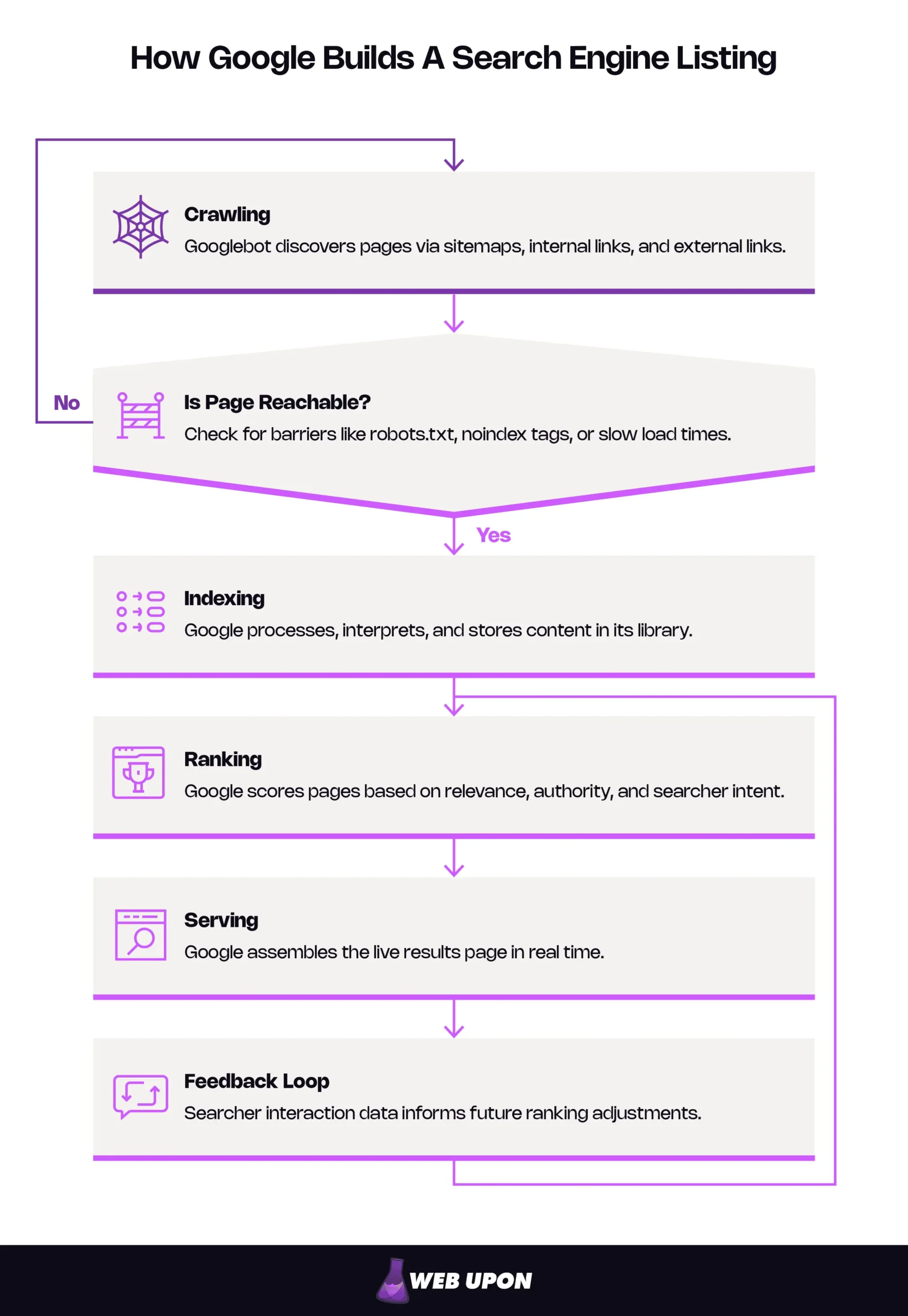
A listing is the visible result of an invisible process. Long before a searcher lays eyes on your page, it runs a gauntlet Google applies to the entire web: crawl → index → rank → serve. Knowing about these four steps is one of the best cures for search anxiety, because they show you exactly where things break and exactly where you can reach in and fix them.
Crawling: How Google’s Bots Discover Your Web Pages
Crawling is discovery. Google runs automated programs — together called Googlebot — that travel link to link across the web, finding new pages and re-checking familiar ones. Googlebot reaches you three ways: through your sitemap (a file listing your URLs for search engines), through the internal links tying your own pages together, and through external links pointing at you from other sites.
A few barriers can stop that discovery cold, and they’re worth knowing by name:
- A robots.txt file — a small instruction file on your site — that accidentally blocks Google from a section it should be reading.
- A noindex tag — a line of code telling Google flat-out not to list a page. A gift when you mean it, a disaster when you don’t.
- Slow load times or errors that make pages hard for Googlebot to reach.
You may have heard the term crawl budget — the amount of crawling Google spends on a site — and braced for one more thing to worry about. Don’t. For the overwhelming majority of small and mid-sized business sites, crawl budget simply isn’t a problem; Google can crawl a few hundred or a few thousand pages without blinking. It becomes a real consideration only for very large sites.
The principle underneath all of it is if Google can’t reach a page, it can’t list it. Crawlability is the price of admission. For the full walkthrough, see our guide on how to make your website searchable.
Indexing: How Google Stores and Understands Your Content
Finding a page isn’t the same as filing it. Indexing is where Google processes what it crawled — reading your text, your images, your code, working out what the page is about, and storing it in the index, the enormous library Google searches every time someone hits enter.
As it indexes, Google reads your content, interprets any structured data (we’ll get to that), and weighs signals like headings and internal links to pin down your topic and quality. And here’s the gap that quietly costs sites their visibility: crawled and indexed are not the same status. A page can be discovered and still never make the index — present on your site, absent from search, and you’d never know unless you looked.
So look. Google Search Console is Google’s free dashboard for site owners, and it tells you plainly which pages are indexed, which aren’t, and often why. When a page you care about won’t show up, this is the first door to knock on. For the fundamentals, our beginners guide to indexing walks it step by step.
Ranking and Serving: How Google Decides Which Listings Appear and Where
Once a page is indexed, it’s allowed to compete. Ranking is Google scoring how well your page answers a specific query — weighing relevance, authority, and the searcher’s intent against every other indexed page in the race. Serving is the final move: Google building the live results page in real time, in the instant after someone presses enter.
Two facts tend to surprise people. First, there’s no single, fixed results page. Two people searching the identical words can see different listings, because Google factors in location, language, and device — and, to a lesser extent, prior activity — so the rankings you check from your desk may not match what a customer sees across town. Second, it’s a loop: how searchers treat your listing feeds back into Google’s read on whether you deserve the spot you’re holding.
The Anatomy of a Search Engine Listing: What Google Actually Shows Users
Picture a single result on a Google page: a line of blue text, a grey web address, a couple of lines of description. That’s the whole of what most searchers ever see of you before they decide. Every standard organic listing — “organic” meaning the unpaid results Google ranks on merit, not ads — is built from the same handful of parts. Learn them, and you know exactly what you’re shaping.
Defining a Search Engine Listing and Why It’s Your Digital Storefront
A search engine listing is the visual representation of your web page on the SERP — the first handshake between your site and a stranger who might become a customer. In the half-second before anyone reaches your homepage, they meet you here: a headline, an address, a preview. That snapshot is working hard. It decides whether someone clicks, how much they trust you before they arrive, and how you measure up against the results pressed in right above and below you.
Every standard organic listing stands on three pillars:
- The title link — the blue, clickable headline.
- The URL display — the web address, shown as a readable path.
- The meta description — the short summary underneath.
That’s a basic listing. An enhanced listing is the same foundation with extras stacked on — star ratings, images, sitelinks — which Google adds when it has the right information and a reason to use it. Your listing is a storefront you partly design and Google partly arranges. Nail the fundamentals, and you hand Google every reason to display you well.
The Title Link: Google’s Headline for Your Page
The title link is the loudest thing in your listing — the bold, clickable headline at the top. Most of the time, Google builds it from your title tag, the snippet of code that names your page’s topic. But here’s what catches owners off guard: Google doesn’t always use what you wrote. When Google decides your title tag isn’t pulling its weight — too long, stuffed with keywords, copied across every page, or just not matching the content — it rewrites the title link itself. It’ll reach for your on-page headings, your prominent text, even the words other sites use when they link to you. This isn’t a penalty. It’s Google trying to show the searcher the clearest possible headline for the question they typed.
Picture a bakery whose page carries the title tag “Home | Best Cakes Cupcakes Pastries Wedding Cakes Birthday Cakes | Sweet Co.” — a keyword pile-up. Google may quietly swap in something cleaner, like “Sweet Co. Bakery — Custom Cakes in [City],” lifted from the page’s main heading. The fix isn’t to outsmart Google. It’s to write a title so clear and on-topic that Google never reaches for the red pen.
So: name the page honestly, lead with the words that matter most, answer what the searcher wants, and write something a human would actually click. Length counts mainly because Google trims long titles with an ellipsis, so put the important words first.
The URL Display and Meta Description: Supporting Characters That Drive Clicks
Under the title link sits the URL display — your page’s address. On desktop, Google now usually shows it as a readable breadcrumb path (yoursite.com › services › roof-repair) instead of a raw string; on mobile, it trimmed that down to your domain alone back in early 2025. Small element, outsized effect. A clean, logical URL tells a searcher they know exactly where a click lands them. A garbled string of numbers and symbols whispers the opposite.
Then comes the meta description — the line of text that summarizes the page. This is your pitch in the SERP, your shot at telling a searcher why you’re the answer. And here’s a point worth getting exactly right, because the myth is everywhere: the meta description is not a ranking factor — Google has said so plainly since 2009. A sharper one won’t lift you up the page. What it moves is your click-through rate — the share of people who see your listing and click it — which is a different lever, and a powerful one.
There’s a wrinkle that drives marketers up the wall: Google often ignores the description you wrote and writes its own on the spot, grabbing whatever text on your page best fits the exact search. You can’t force its hand. You can shorten the odds of an override by writing descriptions that mirror your real content and the intent behind the searches you want. Give Google a snippet that already fits, and it has less reason to replace it.
Beyond the Basic Listing: SERP Features That Transform How Google Displays Your Site
A modern results page is nothing like ten blue links. Google now answers many searches with enhanced formats — answer boxes, visual snippets, business panels, maps — and, more and more, with AI Overviews, the AI-written summaries that sit at the very top and stitch together information from several sources at once. These features rewrite the stakes. They decide not just whether you show up, but how much of the page you own and how often a searcher gets their answer without clicking anyone at all.
That last point deserves honesty, not alarm. A growing share of searches now end with no click — a clear majority, roughly two-thirds, by one 2026 clickstream study — as Google answers the searcher right there on the results page, through snippets, panels, and especially AI Overviews, which by early 2026 appear on a sizable share of results pages. That doesn’t make visibility worthless. It changes what search visibility means. Being the source Google lifts into an answer box, or cites inside an overview, is the new front row. Everything below is how you earn that seat.
| SERP Feature | What It Displays | Query Type It Serves | How to Earn It |
| Featured snippet | A direct answer pulled from one page, above the organic results | Informational (“how to,” “what is”) | Answer the question cleanly, in a format Google can extract. |
| Rich snippet | A standard listing with extras (review stars, prices, images) | Product, recipe, review, event pages | Add valid structured data Google still supports for that content. |
| Knowledge panel | An information box about a known entity (brand, person, place) | Branded and entity searches | Build entity recognition and authoritative references. |
| Local pack | A map with three nearby businesses, ratings, and contact details | Local intent (“near me,” city queries) | Optimize your Google Business Profile; keep your NAP consistent. |
Featured Snippets and Answer Boxes: Earning Position Zero
A featured snippet is the answer Google boxes up from a single page and parks above the regular results — hence the nickname, position zero. It might be a paragraph, a list, or a small table, and Google picks the shape to fit the question: a numbered list for “steps to…,” a table for “X vs Y,” a paragraph for a definition. To be the page it pulls from, structure your content so the answer is easy to find and easy to lift — a clear question, the direct answer right under it, no guesswork required.
There’s a real trade-off here, and it bites harder now than it used to. Position zero can cost you clicks. If the snippet fully settles a simple question — “what time does the Eiffel Tower open?” — the searcher has no reason to click through to anyone. But for a meatier question, where the snippet only opens the door, position zero can flood your page with traffic. The AI Overview era sharpens the same edge: when Google answers at the top, the prize shifts from the raw click toward being the trusted source that shapes the answer. So aim position zero at questions that leave the reader wanting more, where your answer earns the click instead of ending the search.
Rich Snippets and Schema Markup: Making Your Listing Stand Out Visually
Some of the most eye-catching listings are powered by code the searcher never sees. Structured data is a standardized way of labeling what’s on your page — telling Google “this is a price,” “this is a star rating,” “this is an event date” — in a form machines read without ambiguity. Schema markup is the shared vocabulary you write it in (named for Schema.org, the standard Google and other engines agree on). Put plainly: structured data is you handing Google a labeled fact sheet instead of making it infer everything from your sentences.
Feed Google the right structured data, and it may promote your standard listing to a rich snippet — a result trimmed with extra detail. The still-supported staples include review stars on a product or recipe, price and availability on a product page, and breadcrumb paths showing where a page lives on your site. Each one widens your footprint and tells the searcher something useful before they click, which tends to lift click-through by setting honest expectations.
One current note: FAQ rich results — those expandable question-and-answer dropdowns that used to hang under listings — are gone. Google narrowed them to government and health sites in 2023 and retired them entirely in May 2026. Marking up a genuine FAQ can still help readers and help machines make sense of your page, but it will no longer earn that dropdown for a typical business site, so spend your structured-data effort where a visible payoff still exists. One caution: bad markup backfires. Claim a rating you don’t have, and you invite a problem. Google can issue a manual action that strips a page’s rich-result eligibility.
Knowledge Panels, Local Packs, and Carousel Snippets: Entity-Level Display
Some features promote you from “a page” to “a name Google recognizes.” A knowledge panel is the information box — usually off to the right — that Google assembles about a known brand, person, or place, drawing on its Knowledge Graph, a vast map of entities and how they connect. You can’t build one directly. You earn it by becoming an entity Google sees referenced, consistently, across the web.
For any business with a storefront or a service area, the local pack is often the most valuable real estate on the page: the map with three business listings, each with ratings, hours, and contact details, that Google serves for location-driven searches. Winning a spot there comes down to a couple of fundamentals. Claim and optimize your Google Business Profile (Google’s free tool for managing how your business shows up), and keep your NAP — your Name, Address, and Phone number — identical everywhere it appears online. Mismatched NAP data is one of the most common reasons a local business underperforms on the map, and it’s one of the easiest things to fix. (We go deeper in our local SEO and Google Maps strategies and local listing optimization.)
You’ll also run into carousel snippets — the horizontally scrollable rows Google uses to group related items, common on “best of” and top-list searches. Like the other features, they reward content Google can confidently understand and sort.
Controlling and Optimizing Your Search Appearance: Practical SEO Actions
The levers are genuinely in your hands — your title tags and meta descriptions (your headline and your pitch), your structured data (the labeled facts that unlock rich snippets), your canonical tags (code that tells Google which version of a duplicate page is the official one, so it lists the right URL), and your robots directives (the rules for what Google may crawl and index). Line these on-page signals up with how Google prefers to display results, and you accomplish two things at once: your pages get easier to list well, and Google gets fewer reasons to overwrite your title or description with its own.
To keep score, go back to Google Search Console. It reports how often you appeared, how many clicks you earned, your average position, and which SERP features you’re capturing — guesswork turned into a search-visibility dashboard you can actually act on. (When you’re ready to boost your search engine visibility and improve your website visibility in search results, this is the data that points the way.)
Work the pipeline in sequence:
- Fix indexing first. If pages aren’t crawled and indexed, nothing else counts — confirm your important pages are actually in Google’s index.
- Optimize your core listing second. Sharpen the title tags, meta descriptions, and URLs until your basic listing is clear, accurate, and worth clicking.
- Layer in structured data third. With the foundation solid, add the markup that earns rich snippets and stronger displays.
If you want a professional review of what’s working, what’s broken, and where your listing is losing clicks, contact Web Upon for a focused SEO audit.


