Last Tuesday, a bakery owner in Portland opened Google Search Console for the first time and discovered that 40% of her product pages weren’t showing up in search results. A misconfigured robots.txt file — six characters in the wrong place — had been hiding them from Google for three months. Her traffic had dropped 35% and she’d blamed it on a slow season.
That’s the thing about website problems. They don’t announce themselves. Rankings slip after a quiet algorithm update. Pages load three seconds too slow on mobile. Google can’t index half your site. And from the front end, everything looks fine.
A free website audit tool can surface exactly what’s broken — and with the right free SEO audit tool alongside it, you’ll also see which keywords you’re losing ground on. The challenge: no single tool catches everything, and choosing the wrong one means wasting time on the wrong problems.
The five tools worth your time: Google Search Console for indexing visibility and search performance straight from Google’s own data, Screaming Frog SEO Spider for deep technical crawls that catch structural problems other tools miss, Ubersuggest for keyword-integrated site health checks, SEOptimer for fast single-page snapshots when you need a quick website health check, and GTmetrix for diagnosing page speed issues down to the millisecond. Used together strategically, two or three of these website analysis tools cover nearly every blind spot.
Key Takeaways
- No single free tool covers everything. The real strategy is combining two or three tools — Google Search Console for indexing data, GTmetrix for speed diagnostics, and Screaming Frog for technical depth — to approximate what enterprise platforms deliver.
- Prioritize by impact, not volume. Audit tools will surface hundreds of issues. The difference between a critical problem and a cosmetic one can mean hundreds of dollars per month in lost traffic. Work the priority list top-down: critical items first.
- Know when to call in help. Free tools diagnose problems; they don’t prioritize them by revenue impact or connect interrelated issues. For sites over 500 pages or those recovering from traffic drops, a professional website audit delivers clear ROI.
The 60-Second Answer: Which Free Audit Tool Should You Use?
If you’ve been watching a slow decline in organic traffic and want to know what’s wrong, start here.
Google Search Console is the non-negotiable baseline — the only tool that shows you how Google actually sees your site. Which pages are indexed, which are being ignored, where your clicks are coming from. GTmetrix pairs with it naturally: Search Console tells you what’s happening in search results; GTmetrix tells you why pages feel slow, with visual breakdowns of every resource loading on the page. Together, they’ll surface your most urgent indexing and speed issues in under ten minutes.
For deeper technical work, Screaming Frog crawls your entire site architecture and exports a page-by-page inventory of broken links, missing metadata, redirect chains, and duplicate content — the structural issues that silently erode rankings over months. Ubersuggest adds a content and keyword layer: where your pages rank, what gaps exist, which competitors are eating your traffic. And for a fast, plain-English snapshot of any single page, SEOptimer delivers a graded report in seconds — useful for gut-checking a homepage or landing page before digging deeper.
| Tool | Best For | Key Limitation |
| Google Search Console | Indexing visibility & search performance | No deep technical crawl analysis |
| Screaming Frog (Free version) | Comprehensive technical SEO crawls | 500 URL crawl cap; desktop install required |
| Ubersuggest (Free tier) | Keyword + content + site health overview | ~3 daily searches on free tier; shallow data depth |
| SEOptimer | Quick single-page health snapshots | One page at a time; no site-wide crawling |
| GTmetrix (Free account) |
Page speed & Core Web Vitals diagnostics | Performance only — no SEO or content analysis |
Here’s what to look for in any audit tool, followed by a detailed walkthrough of each — including what they miss.
What Makes a Good Free Website Audit Tool?
Every free site audit tool emphasizes something different. Some go deep on technical plumbing; others focus on speed or content. Knowing which categories matter for your website health check saves you from running three audits when one would have answered your question.
Five feature categories separate a useful audit from a data dump.
Technical SEO Diagnostics
Picture a house with a beautiful exterior but a cracked foundation. That’s what technical SEO problems look like — invisible to anyone walking through the front door, but quietly undermining everything above.
A serious SEO site audit checks whether search engines can actually find, crawl, and understand your pages. That means detecting crawl errors (pages that return error codes when Google tries to visit them), validating metadata (the title tags and descriptions that appear in search results), checking canonical tags (instructions telling Google which version of a page is the “real” one when duplicates exist), reviewing your XML sitemap, and confirming your robots.txt file isn’t accidentally blocking important content.
Your homepage could look perfect while a misconfigured robots.txt silently tells Google to ignore your entire blog. These are the issues that cause rankings to quietly decay without any obvious explanation — and why a regular technical SEO audit belongs at the foundation of site maintenance.
For sites with complex structures or hundreds of pages, a professional SEO audit catches the interconnected issues that individual free tools surface in isolation but can’t prioritize in context.
Performance and Speed Analysis
Google uses Core Web Vitals as a ranking signal. Three metrics matter: LCP (Largest Contentful Paint — how long until the main content is visible; target: under 2.5 seconds), INP (Interaction to Next Paint — how fast the page responds when someone clicks or taps; target: under 200 milliseconds), and CLS (Cumulative Layout Shift — how much the layout unexpectedly jumps around while loading; target: below 0.1).
A solid Core Web Vitals test — which any good page speed test should include — measures these metrics, identifies render-blocking resources (scripts and stylesheets that prevent the page from displaying until they finish loading), evaluates server response time, and tests mobile responsiveness. As of 2025, HTTP Archive reported that roughly 56% of desktop websites and 48% of mobile websites pass all three Core Web Vitals thresholds. That’s close to half the web leaving ranking potential on the table.
An important distinction: tools like GTmetrix run lab-based tests in controlled conditions, while Google Search Console reports field data from real Chrome users. Both are valuable, but they measure different things. Your lab scores might look perfect while real users on older phones and slower networks have a very different experience.
If speed is your primary concern, a dedicated page speed optimization audit translates diagnostic data into a prioritized fix plan — especially for server-side and infrastructure issues that free tools flag but can’t resolve.
Content Quality and Optimization
A technically flawless site still underperforms when its content doesn’t match what people are actually searching for. A capable on-page SEO checker evaluates keyword usage and distribution, identifies content gaps where competitors rank and you don’t, flags duplicate content that confuses search engines, and catches thin pages — pages with so little substance that Google may treat them as low-value.
Content auditing is where free tools start diverging sharply. Some provide keyword-level analysis; others barely scratch the surface. The question that matters isn’t “does my page mention the right keywords?” It’s “does this page answer the searcher’s question better than what’s already ranking?”
For a structured approach to content gaps and opportunities, content audit services map your existing content against search demand and competitive positioning — at a scale that free tools can’t efficiently match.
Backlink and Security Checks
Backlinks — links from other websites pointing to yours — remain an important ranking signal. A free backlink checker gives you a snapshot of who’s linking to your site, whether those links look healthy, and where competitors might be earning links you’re not. On the security side, a basic website security check covers SSL certificate verification (confirming your site uses HTTPS) and malware scanning.
Worth knowing: the SEO industry has historically overhyped “toxic backlinks” as a ranking threat. In practice, Google has gotten very good at simply ignoring low-quality links rather than penalizing sites for them. The disavow tool exists for genuine spam attacks, but for most small business sites, the real concern is earning too few good backlinks — not that bad ones are actively hurting you. Free tools have limited backlink data regardless, so treat their numbers as directional rather than comprehensive.
Reporting and Usability
The most thorough audit in the world is useless if you can’t interpret the results or act on them. Evaluate tools by the clarity of their recommendations (do they explain what’s wrong and what to do about it, or just dump data?), whether reports are exportable or shareable, and whether the tool tracks progress over time.
This is where combining tools pays off. One tool surfaces the issue; another provides the context to understand why it matters. The goal isn’t finding the single perfect tool — it’s building a lightweight workflow that catches the problems costing you the most traffic.
5 Free Website Audit Tools Compared
Google Search Console
What it does: Google’s own free tool for monitoring how your site appears in search results and diagnosing indexing problems. If you use only one tool from this list, this is it.
Search Console gives you something no other free tool can: direct data from Google’s index. No estimation, no approximation — you’re seeing exactly which pages Google has indexed, which ones it tried to crawl and couldn’t, and how your pages perform in actual search results: clicks, impressions, average position, click-through rate.
The URL Inspection tool lets you check any individual page — is it indexed? Are there crawling issues? When did Google last visit it? The Performance report shows which search queries drive traffic to your site, and more valuably, which queries generate impressions but few clicks. That gap between “showing up” and “getting clicked” is where title tag and meta description improvements pay immediate dividends. You’ll also find mobile usability reports, a Core Web Vitals overview based on real-user field data, and sitemap monitoring.
The limitation is scope. Search Console reveals how Google sees your site, but it won’t crawl your architecture the way a dedicated crawler does. It won’t catch redirect chains, orphan pages (pages that exist but aren’t linked from anywhere), or structural issues requiring a page-by-page inventory. Backlink data is minimal. And there’s a reporting lag — data can lag from a few hours to a couple of days behind real-time, depending on the report type — so changes you make today may not appear until later this week.
Best for: Every website owner. This should be the baseline in any audit workflow regardless of what else you use.
Screaming Frog SEO Spider
What it does: A desktop-based website crawler that systematically scans your site’s architecture and surfaces technical SEO issues with a level of detail no browser-based free tool can match.
Screaming Frog works differently from everything else on this list. Instead of testing a URL against a set of checks, it crawls your site the way a search engine would — following every link, cataloging every page, building a complete map of your structure. The result is a spreadsheet-style inventory of every URL with columns for status codes, title tags, meta descriptions, H1 tags, word counts, canonical tags, and more.
This is where hidden problems surface. The 47 pages returning 404 errors that nobody noticed because they’re linked from old blog posts. Three different versions of your homepage — with www, without www, with a trailing slash — splitting your link equity. Meta descriptions that got accidentally deleted during a redesign six months ago. Screaming Frog shows you every page returning an error and lets you export that list so you can fix redirects in bulk.
The free version caps at 500 URLs — and that count includes images, PDFs, and other resources, not just web pages. A 200-page website might consume 400+ of those URLs once images and documents are counted. For most small business sites, 500 is sufficient; beyond that, you’ll need the paid license. The tool also requires a desktop download and some comfort with a data-heavy interface — this isn’t a click-and-get-a-grade experience.
Best for: Marketing generalists or technically comfortable business owners who want a thorough crawl error checker for a small-to-medium site. Pairs exceptionally well with Google Search Console — crawl data plus index data.
Ubersuggest
What it does: A browser-based website analysis tool that combines site health scoring with keyword research, content analysis, and competitive intelligence in a single interface.
While every other tool on this list focuses on technical issues or speed, Ubersuggest connects your site’s technical health to its content and keyword performance. Run a site audit and you’ll get a health score alongside flagged issues — but you can also see which keywords your pages rank for, where content gaps exist, and what competitors are doing differently. All from the same dashboard.
The keyword research component is genuinely useful for business owners without a dedicated SEO tool. Type in a keyword: search volume, competition level, related terms. The top pages report shows which competitor URLs drive the most traffic — a fast way to spot content you should be creating.
The honest limitation: the free tier is tight. Approximately three searches or reports per day, one project, keyword tracking for about 25 terms, and site audits capped at 150 pages per crawl. That’s enough for a quick check or initial exploration, but not for ongoing work. The tool is clearly designed to funnel toward paid plans, and some features feel unnecessarily gated. Data is also shallower than dedicated tools — treat keyword volumes and backlink counts as directional estimates, not precise figures.
Best for: Marketing generalists who want a quick all-in-one view of site health, keyword performance, and content opportunities — and can work within tight daily limits on the free tier.
SEOptimer
What it does: A lightweight, browser-based tool that generates a fast on-page SEO, performance, and security report from a single URL. Enter an address, get a graded report in seconds.
SEOptimer is the tool you reach for when you want a gut check, not a deep audit. As a free page checker, it’s hard to beat for speed: paste in a URL and within seconds you’ll get letter grades covering on-page SEO (title tags, meta descriptions, heading structure, keyword usage), performance, mobile responsiveness, security (SSL, HTTPS), and social media presence. Recommendations come in plain language, making this the most accessible tool on the list for non-technical business owners.
Where SEOptimer shines is speed and clarity. About to launch a landing page and want to confirm the basics are covered? Need to answer “how’s my homepage doing?” in 30 seconds? SEOptimer delivers. The visual grading system makes strengths and weaknesses immediately obvious.
The tradeoff is depth. SEOptimer analyzes one page at a time — it’s not a crawler and won’t examine your site as a whole. It won’t catch broken internal link structures, orphan pages, or crawl-blocking configurations. Think of it as a stethoscope, not an MRI: it tells you how one patient is doing right now, but can’t diagnose systemic problems.
Best for: Business owners who want a quick, easy-to-understand snapshot of a specific page’s health without installing software or interpreting complex dashboards.
GTmetrix
What it does: A dedicated page speed and performance analysis tool that measures load times, Core Web Vitals (via Lighthouse lab metrics), and delivers specific optimization recommendations.
If your question is “why is my site slow?”, GTmetrix gives you the most direct answer available. Enter a URL and you’ll get a waterfall chart — a visual timeline showing every resource (images, scripts, stylesheets, fonts) loading on your page, in what order, and how long each takes. This chart makes the invisible visible: you can literally see the oversized hero image or the three unoptimized JavaScript files adding two seconds to your load time.
GTmetrix scores against Lighthouse metrics: LCP, TBT (Total Blocking Time — the lab equivalent of INP, measuring how long the main thread is blocked during page load), and CLS. Worth understanding: TBT and INP aren’t identical. TBT is a lab simulation; INP reflects real-user responsiveness in the field. Both matter, but if GTmetrix says your TBT is fine and Search Console shows poor INP from real visitors, trust the field data. Your site performs differently under real-world conditions than in a controlled test.
The recommendations are specific and actionable: “serve images in next-gen formats,” “eliminate render-blocking resources,” “reduce server response time.” Each one tells you how much time you’d save by implementing it — making it straightforward to prioritize fixes by impact. Historical tracking lets you confirm whether changes actually improved load times.
The free account limits daily tests and testing locations. GTmetrix focuses exclusively on performance — no SEO, content, or backlink analysis. As a website performance check it’s unrivaled among free tools, but it’s a specialist, not a generalist, and works best alongside a broader audit tool.
Best for: Anyone whose primary concern is page speed, or as a complement to a broader SEO audit tool like Google Search Console or Screaming Frog.
Side-by-Side Feature Comparison
| Feature Category | Google Search Console | Screaming Frog (Free) | Ubersuggest | SEOptimer | GTmetrix |
| Technical SEO Diagnostics | ● Partial (indexing focus) | ● Full | ● Basic | ● Basic (single page) | ○ None |
| Performance & Speed | ● CWV field data | ○ None (without API) | ● Basic scoring | ● Basic scoring | ● Full |
| Content & Keywords | ● Search query data | ○ None | ● Good | ● Basic on-page | ○ None |
| Backlinks & Security | ◐ Limited links, no security | ○ None | ◐ Basic overview | ◐ SSL/security checks | ○ None |
| Reporting & Usability | ● Dashboard + exports | ● Detailed CSV exports | ● Dashboard + PDF | ● Graded visual report | ● Waterfall + history |
- = Strong coverage | ◐ = Partial/limited | ○ = Not covered
How to Choose the Right Tool for Your Needs
You know what each tool does. Now the question is where to start — running all five on day one is a recipe for overwhelm, not progress.
Start With Your Biggest Problem
Match the tool to the pain point, not the other way around:
- “My rankings dropped and I don’t know why” → Start with Google Search Console. Check the Performance report for traffic changes, then the Pages report for indexing issues.
- “My site feels slow and I’m getting complaints” → Start with GTmetrix. The waterfall chart will show you exactly what’s dragging.
- “I suspect there are technical issues nobody’s found” → Start with Screaming Frog. A full crawl surfaces the hidden structural problems.
- “I need to understand my keyword and content gaps” → Start with Ubersuggest. Even with free tier limits, one audit pass gives you a useful content picture.
- “I just need a quick check on my homepage” → Start with SEOptimer. Thirty seconds and you’ll know the basics.
Site size matters too. A 20-page brochure site has different needs than a 2,000-page e-commerce store. If you’re under 500 pages, Screaming Frog’s free version crawls the whole thing. Larger than that, you’ll need to be strategic about which sections you crawl — or weigh whether the paid version is worth the investment.
Match the Tool to Your Skill Level
Not everyone needs — or wants — a spreadsheet with 47 columns of technical data.
Non-technical users should start with SEOptimer or Google Search Console. Both present information accessibly with clear action items. Search Console has a learning curve, but Google’s documentation walks through every report.
Comfortable reading dashboards and interpreting data but not diving into code? Ubersuggest hits the sweet spot — enough depth to be useful, enough simplicity to avoid intimidation.
Technically comfortable users who like working in spreadsheets and building their own analysis will get the most from Screaming Frog’s detailed exports.
The best tool is the one you’ll actually use. A simpler tool run monthly beats a powerful tool used once and abandoned.
Combine Tools for a Complete Picture
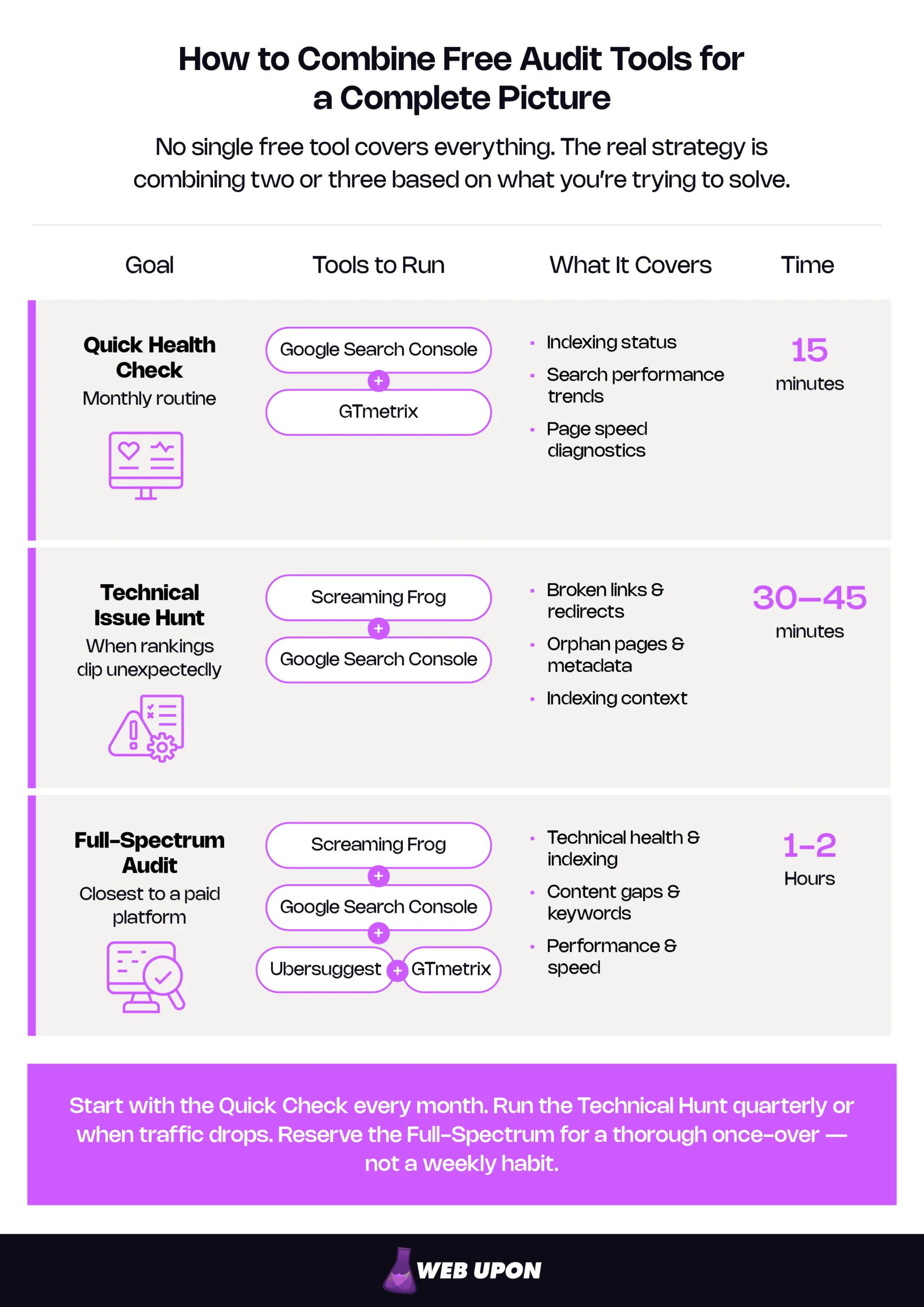
No single free website audit tool covers every dimension of site health. The real value is combining two or three tools strategically — and that’s what separates an informed website owner from someone guessing. Here’s how to use them together.
- Baseline audit (15 minutes): Google Search Console + GTmetrix. Indexing status, search performance trends, and detailed speed diagnosis. Enough to catch the most common issues affecting traffic.
- Deeper technical dive (30-45 minutes): Screaming Frog + Google Search Console. Screaming Frog provides page-by-page crawl data; Search Console provides indexing and performance context. Together, they answer “what’s broken?” and “is it actually hurting my visibility?”
- Full-spectrum free audit (1-2 hours): Google Search Console + Screaming Frog + Ubersuggest. Technical health, indexing, search performance, content gaps, keyword opportunities. Add GTmetrix if speed is a particular concern. This combination approaches what a paid all-in-one tool delivers — though it requires more manual effort to connect the dots.
Fix Issues Before They Cost You
Running an audit takes ten minutes. The hard part comes next: staring at a report listing 200+ “issues” and knowing which ones actually matter.
How to Read Your Audit Results (Without Panicking)
Screaming Frog might flag 300 items. Ubersuggest might score you a 72 out of 100. The instinct is either panic or dismissal. Neither helps.
The difference between a critical problem and a cosmetic one can mean $500/month in lost traffic versus adjusting something nobody will notice. Prioritize by severity:
| Priority | What It Means | Example Issues | Fix Timeline |
| Critical | Actively blocking traffic or visibility | Pages blocked from indexing, security warnings, 5xx server errors, manual penalties in Search Console | Immediately |
| High | Directly impacting rankings or user experience | Slow page loads (LCP > 4s), missing title tags on key pages, broken internal links on high-traffic pages | This week |
| Medium | Degrading quality over time | Duplicate content, missing image alt text, suboptimal heading structure, thin content | This month |
| Low | Minor maintenance items | Short redirect chains, missing meta descriptions on low-traffic pages, minor CLS issues | Ongoing |
The mistake most people make: trying to fix everything at once. Work the priority list top-down. Critical items first — they’re actively costing you traffic and revenue. Then high. Medium and low are for when the foundation is solid.
Quick Wins You Can Implement Today
You don’t need a developer on speed dial. These are changes most business owners can make with a basic CMS:
- Fix broken links. Screaming Frog or Google Search Console will surface them. Most CMS platforms let you set up redirects (sending the old URL to the correct new one) through a plugin or settings panel. Start with broken links on your most-visited pages.
- Add missing metadata. If your highest-traffic pages lack unique title tags or meta descriptions, you’re leaving clicks on the table. Write a compelling, keyword-relevant title (under 60 characters) and description (under 160 characters) for each. Focus on pages showing high impressions but low click-through rates in Search Console’s Performance report — that’s where better metadata has the most immediate impact.
- Compress your images. Oversized images are the single most common speed problem on small business sites. A 4MB hero image will drag load times no matter how fast your server is. Run images through a compression tool before uploading, and serve modern formats like WebP where your CMS supports it.
- Test on real devices. Pull up your key pages on an actual phone — not a browser’s mobile emulator — and tap through the navigation. Layout issues, tiny tap targets, and sluggish interactions reveal themselves immediately in ways desktop testing misses.
Build a Recurring Audit Habit
A single audit is a snapshot. Consistent auditing is how you prevent problems instead of just discovering them after the damage compounds.
- Monthly (15 minutes): Run a Google Search Console check — the Pages report for new indexing issues, the Performance report for traffic trends — and a GTmetrix test on your top five pages. This catches most emerging problems before they snowball.
- Quarterly (1-2 hours): Full Screaming Frog crawl, compared against your previous results. Are new broken links appearing? Have redirect chains grown? Is metadata intact after recent content updates? Good time to pull an Ubersuggest audit for keyword and content shifts too.
- Track three numbers in Google Search Console over time: total indexed pages (should be stable or growing), organic traffic trends (watch for sustained declines), and Core Web Vitals scores (all three metrics in the “good” range).
Free tools give you visibility — they surface problems and point you in the right direction. But interpreting the full picture, understanding how issues interact, and executing a fix strategy without breaking something else is where professional support earns its keep. If you’ve run your audit and want expert eyes on the results, or need help implementing fixes at scale, Web Upon’s audit team can take it from here.
When Free Tools Aren’t Enough (And What to Do Next)
Free audit tools are genuinely powerful — for many small business sites, they’re sufficient for ongoing maintenance. But they have structural ceilings, and pretending otherwise doesn’t serve anyone.
- Crawl limits and data caps. Screaming Frog’s 500-URL cap means larger sites can’t get a complete picture. Ubersuggest’s three daily searches won’t support iterative optimization. Search Console’s data is invaluable but incomplete — it shows what Google sees, not everything a comprehensive crawl would catch.
- No prioritized action plan. Free tools surface issues. They don’t tell you which one is costing the most revenue, which fix will have the biggest impact, or how problems interact. A broken internal link on a page nobody visits is a fundamentally different problem from a broken link on your highest-converting service page. That prioritization requires human interpretation and business context.
- No historical thread. Most free tools show you a snapshot of right now. They can’t correlate technical changes with traffic shifts or identify the slow deterioration that builds over months.
- Interconnected complexity. E-commerce stores with thousands of product pages, multilingual sites, businesses that have been through migrations or redesigns — these create layered issues that need systematic diagnosis. When a robots.txt change two months ago caused a crawl issue that led to deindexing that triggered a traffic drop that created a content visibility problem, connecting those dots takes more than five free tools running in parallel.
If your site has more than 500 pages, depends on organic traffic for revenue, is recovering from a penalty or sudden traffic drop, or keeps surfacing the same problems despite regular free audits — that’s when a professional website audit delivers clear ROI. Not as a replacement for the tools you’ve been using, but as the intelligence layer that turns raw data into a prioritized plan.
You’ve done the work to diagnose the basics. Get in touch with our audit team to go deeper:
- SEO Audits — Go beyond free tools with a comprehensive, expert-led audit covering technical SEO, content, and competitive positioning.
- Speed Optimization Audits — Diagnose and fix the performance issues that free tools flag but can’t resolve on their own.
- Content Audits — Identify content gaps, thin pages, and keyword opportunities with a structured audit framework.
Stop Guessing, Start Auditing
The gap between websites that grow and websites that stagnate usually isn’t design, branding, or content quality. It’s knowing what’s happening under the hood — and acting on it before small problems become expensive ones.
A free website audit tool — or a strategic combination of two or three — gives you that visibility without an agency retainer or enterprise software budget. Google Search Console and GTmetrix alone catch the most common issues costing small businesses traffic and revenue. Add Screaming Frog for technical depth and Ubersuggest for content intelligence, and you’ve built an audit workflow that rivals tools costing hundreds per month.
Running the audit is only the beginning. The value comes from prioritizing by impact, implementing consistently, and building a monthly habit that catches problems before they compound. The tools are free. The knowledge is here. The only thing left is starting.
Run a Google Search Console check and a GTmetrix test on your homepage this week. Fifteen minutes. You’ll know exactly where to focus. And if the results reveal more than you can tackle alone, Web Upon’s team is here to help.